Best Clay.com Alternatives: Why Google Sheets, Excel & Airtable + Tomba.io Beat Clay
Clay charges $149 to $800 per month for a data enrichment platform that acts as a middleman between you and the tools that actually find emails. No original data. No public accuracy benchmarks. No transparency. Just a…
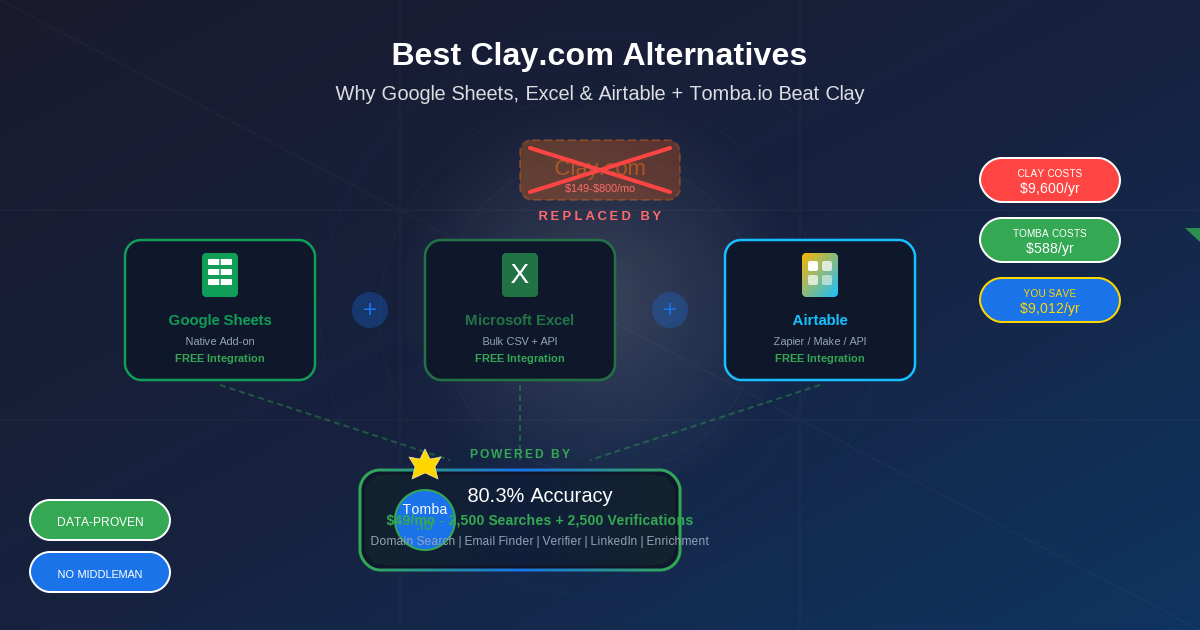
4 Best Clay Alternatives in 2026 (Cheaper & More Accurate)
Looking for Clay alternatives? You are not alone. Clay charges $185 to $495 per month for a data enrichment platform that sits between you and the tools that actually find emails. It has no email database of its own and publishes no accuracy benchmarks.
The best Clay alternatives are tools you already use: Google Sheets, Microsoft Excel, Airtable, or the AI agent your team already chats with. Pair any of them with Tomba.io, the #1 most accurate email finder at 80.3%, and you cover Clay's email finding and enrichment at a fraction of the cost.
Tomba.io plugs into all four. No marketplace markup. No two-currency credit math. Just direct access to accurate email data inside the tool you already work in.
In this guide, we show how Google Sheets + Tomba.io, Excel + Tomba.io, Airtable + Tomba.io and your AI agent + Tomba.io each work as a Clay alternative, and which 5 Tomba.io tools do the heavy lifting.
Table of Contents#
Clay Alternatives at a Glance#
| Clay alternative | Best for | Setup time | Cost |
|---|---|---|---|
| Google Sheets + Tomba.io | Sales teams living in spreadsheets | 2 minutes | $49/mo |
| Excel + Tomba.io | Microsoft 365 and enterprise teams | 5 minutes | $49/mo |
| Airtable + Tomba.io | Automated, relational prospect bases | 10 minutes | $49/mo + Airtable free tier |
| AI agent + Tomba.io (via treg) | Teams working in Claude, ChatGPT or Cursor | 5 minutes | $49/mo |
| Clay | Multi-provider waterfall workflows | Hours | $185-$495/mo |
Why Teams Look for Clay Alternatives: 5 Problems#
Let's be direct. Clay is the wrong fit for most teams that just need emails. Here is why people search for a Clay alternative:
1. Clay Pricing Is High for a Middle Layer ($185-$495/Month)#
Clay does not own an email database. It connects you to third-party data providers through its marketplace and charges a platform fee on top.
Clay changed its pricing in March 2026. The old Starter ($149), Explorer ($349) and Pro ($800) plans are now legacy plans for existing customers only. New customers choose between Launch and Growth (Clay pricing).
| Plan | Monthly Cost | Annual Cost |
|---|---|---|
| Clay Launch | $185/mo | $2,220/yr |
| Clay Growth | $495/mo | $5,940/yr |
| Clay Enterprise | Custom | Custom |
| Tomba.io | $49/mo | $588/yr |
Save $1,632 to $5,352 per year by choosing a cheaper Clay alternative. (Clay's annual billing lowers its prices to $167 and $446 per month. Tomba.io still costs less than a third of that.)
2. No Public Proof of Data Quality#
Clay pulls data from many third-party sources but publishes no accuracy benchmarks. You cannot check what share of the emails it returns are valid.
Tomba.io proves its accuracy: 80.3% across 5,000 queries, with all data in public Google Sheets.
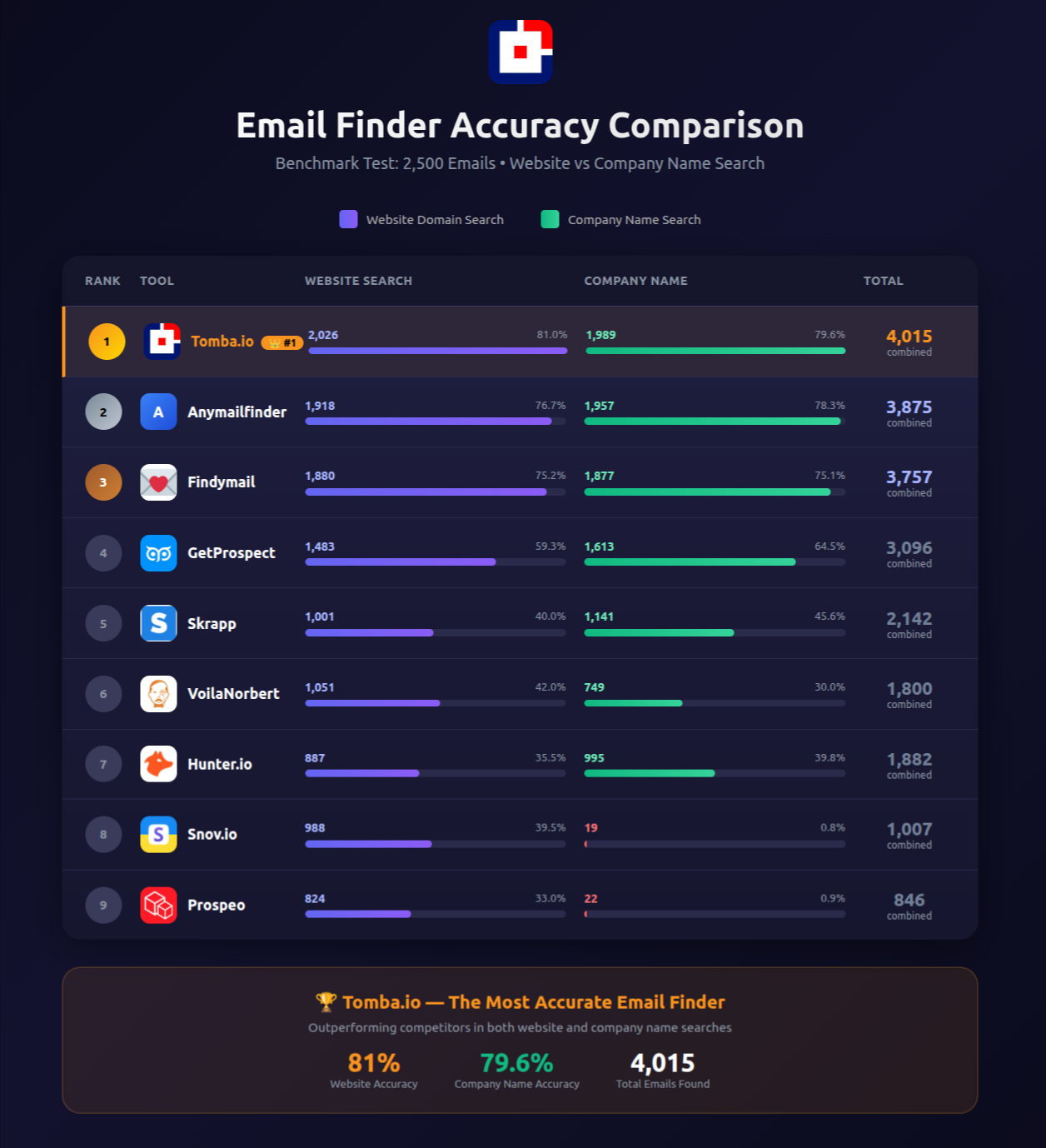
Website Search (81.0%): View Proof Data
Company Name Search (79.6%): View Proof Data
3. Overcomplicated for Simple Tasks#
Need emails for a list of companies? Clay asks you to build a multi-step "waterfall enrichment" workflow with columns, providers and logic.
Tomba.io + Google Sheets does it in one click. Simple jobs should stay simple.
4. Two Credit Systems to Manage#
Since March 2026, Clay bills in two currencies: Data Credits for marketplace data and Actions for workflow steps. Different enrichments cost different amounts, so forecasting spend takes real effort.
Tomba.io: 2,500 searches + 2,500 verifications for $49/month. Simple. Predictable. No credit math.
5. Your Results Depend on Third-Party Providers#
Clay's data comes from the providers in its marketplace. Quality varies by provider, and you pay for each lookup whichever source answers.
Tomba.io finds emails from its own database, so the accuracy you see in the benchmark is the accuracy you get.
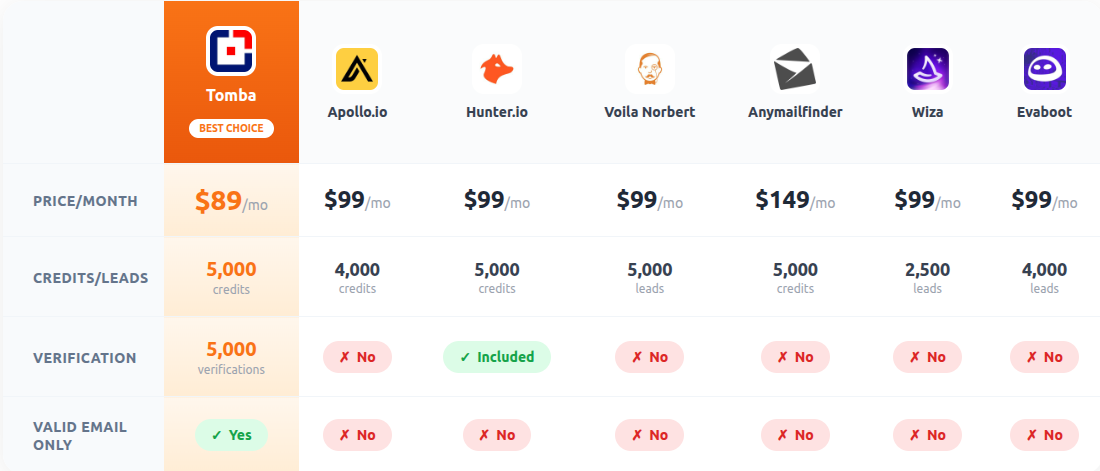

The 4 Best Clay Alternatives (You Already Have Them)#
Alternative #1: Google Sheets + Tomba.io#
Tomba.io has a native Google Sheets add-on that turns your spreadsheet into an email enrichment tool. It is the fastest Clay alternative to set up.
How it works:
Install the Tomba Google Sheets Add-on
Paste your list of domains or company names
Click "Find Emails" and Tomba enriches every row
Emails arrive verified with 80.3% accuracy
Run bulk verification on the results, included in your plan
Google Sheets + Tomba.io vs Clay:
| Capability | Google Sheets + Tomba | Clay |
|---|---|---|
| Domain Search | Direct in Sheets | Via Data Credits |
| Email Finding | Native add-on | Third-party waterfall |
| Email Verification | Included (2,500/mo) | Extra credits |
| Bulk Enrichment | One click | Multi-step workflow |
| Collaboration | Built into Sheets | Inside Clay workspace |
| Cost | $49/mo | $185-$495/mo |
| Accuracy Proof | 80.3% public data | None published |
Real example: Paste 500 company domains into Column A. The Tomba add-on fills Column B with verified emails, Column C with confidence scores and Column D with job titles. No waterfall. No credits.
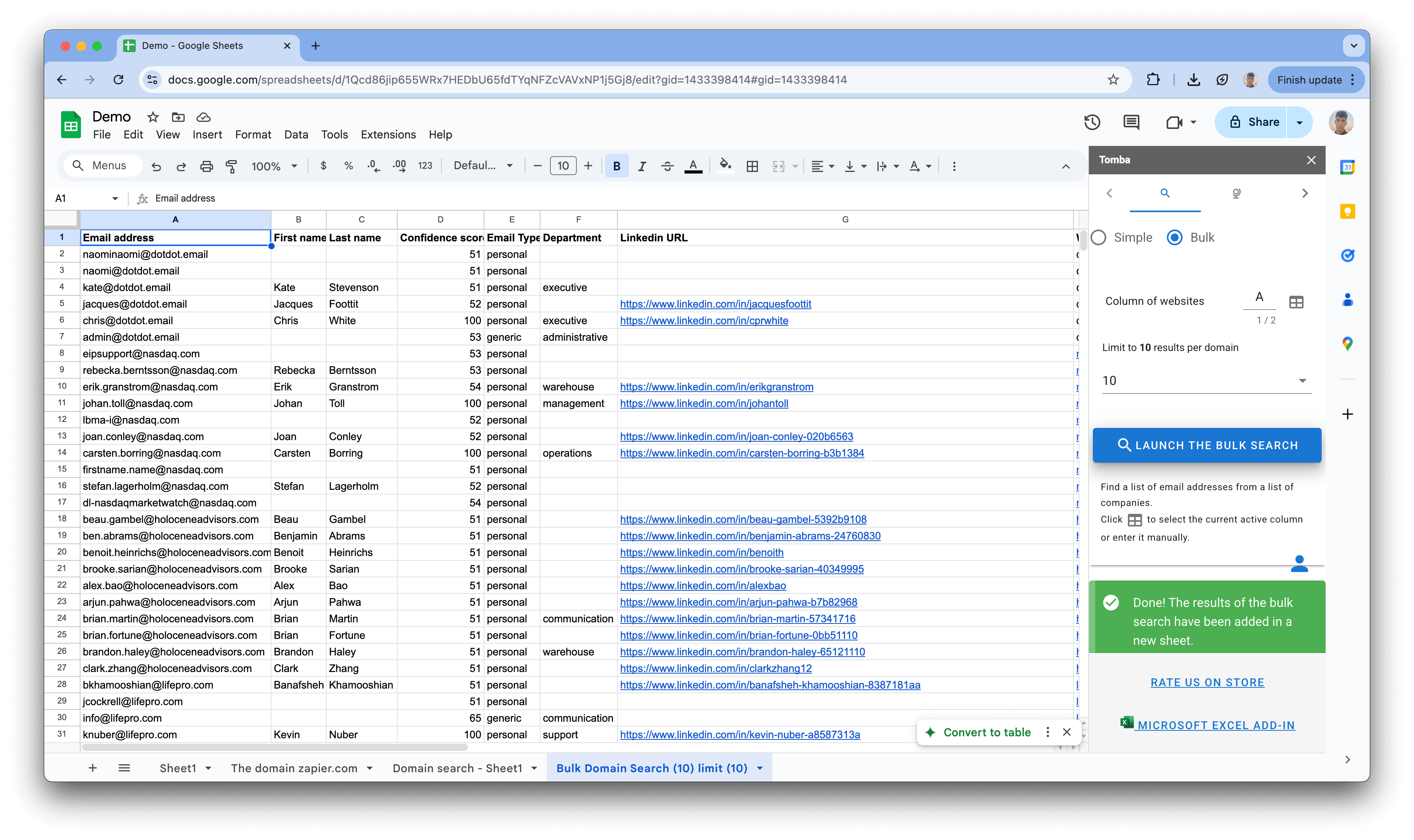
The best tool is the one your team already uses. Most prospecting lists already live in a spreadsheet, so adding Tomba.io there removes the need for a separate enrichment platform.
Alternative #2: Microsoft Excel + Tomba.io#
For teams on Microsoft 365, Tomba.io works with Excel through its add-in, API and bulk tools. You get enterprise-grade enrichment without the Clay invoice.
How it works:
Export your prospect list from your CRM to Excel
Use Tomba Bulk Email Finder to process the list
Download enriched results back into Excel
Verify with Tomba Bulk Email Verifier, included in your plan
Import clean, verified data back to your CRM
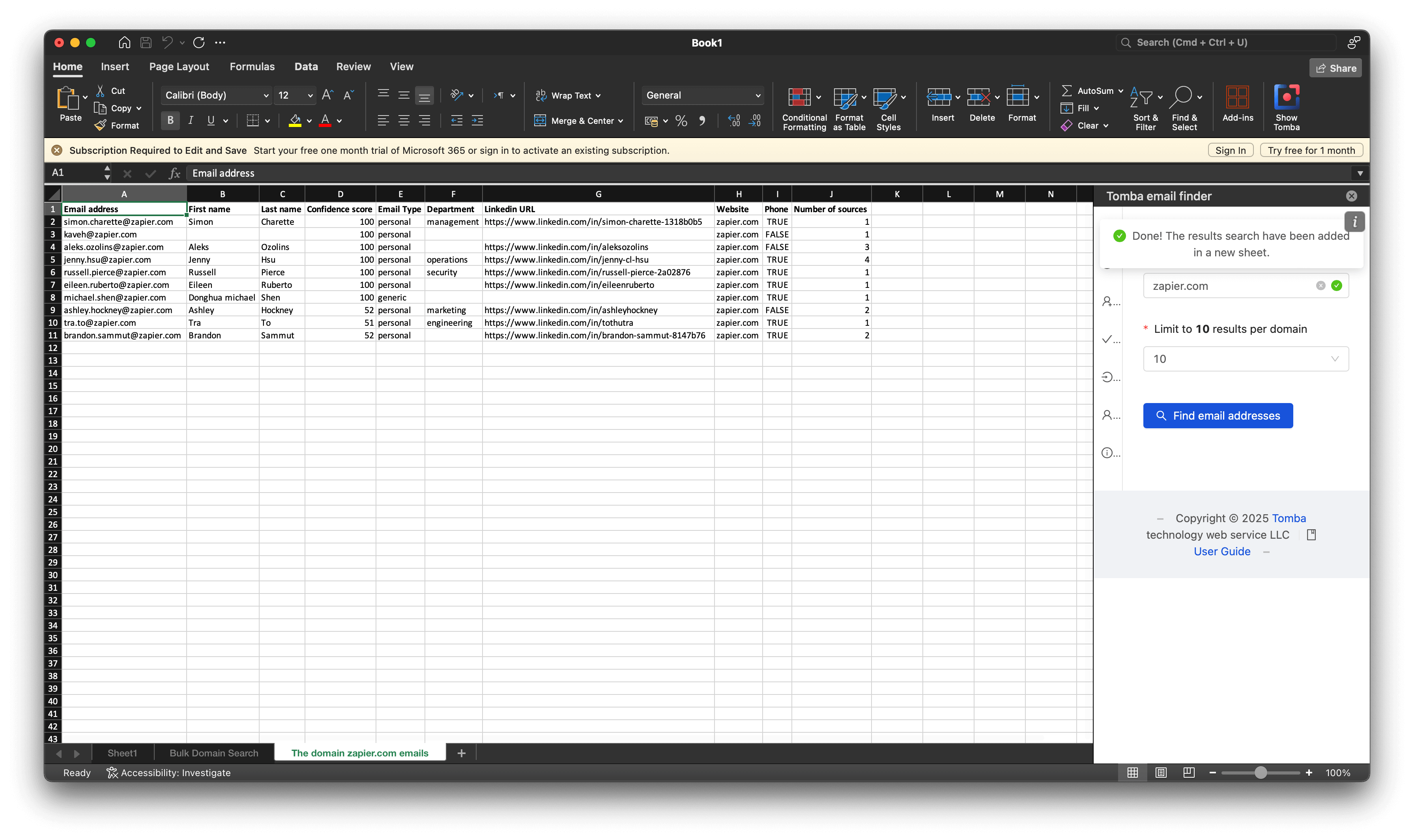
Excel + Tomba.io vs Clay:
| Capability | Excel + Tomba | Clay |
|---|---|---|
| Bulk Processing | Upload CSV, get results | Credit-based waterfall |
| Email Verification | Included bulk verify | Extra credits |
| Offline Access | Full Excel capabilities | Cloud only |
| Data Location | Your files, your control | Clay's platform |
| Enterprise Ready | Microsoft 365 ecosystem | Separate platform |
| Cost | $49/mo | $185-$495/mo |
For enterprise teams: Excel + Tomba.io keeps your data in the Microsoft ecosystem your IT team already manages. That means fewer vendor approvals and no extra platform to review.
Alternative #3: Airtable + Tomba.io#
Tomba.io connects with Airtable through Zapier, Make or the Tomba API. This Clay alternative suits teams that want automated enrichment in a relational database.
How it works:
Create your prospect base in Airtable
Connect Tomba.io via Zapier, Make or the Tomba API
Set up an automation: a new record triggers a Tomba email search
Emails populate automatically with verification status
Filter, sort and segment in Airtable views
Airtable + Tomba.io vs Clay:
| Capability | Airtable + Tomba | Clay |
|---|---|---|
| Automated Enrichment | Zapier/Make triggers | Built in (uses credits) |
| Custom Views | Kanban, Calendar, Gallery | Table |
| Team Collaboration | Built into Airtable | Inside Clay workspace |
| Relational Data | Linked records | Tables |
| Verification | Included (2,500/mo) | Extra credits |
| Cost | $49/mo + Airtable free tier | $185-$495/mo |
The automation advantage: Airtable + Tomba.io + Zapier creates a self-running enrichment engine. Add a company name to your base, and Tomba finds and verifies the email. No manual steps.
Alternative #4: Your AI Agent + Tomba.io (Through treg)#
If your team works in Claude, ChatGPT or Cursor rather than a spreadsheet, connect Tomba through treg. The agent finds, verifies and enriches contacts from a chat.
Bring your own Tomba key and treg does not meter those calls; they count against your Tomba plan as usual.
How it works:
Create a treg account
Add treg's MCP server to your agent. In Claude Code:
claude mcp add --transport http treg https://treg.to/mcpRegister your Tomba API key in treg
Ask in plain language: "Find and verify the email for the Head of Sales at stripe.com"
The agent returns the verified email and enriched profile in the chat
AI agent + Tomba.io vs Clay:
| Capability | AI Agent + Tomba (treg) | Clay |
|---|---|---|
| Interface | Chat in Claude, ChatGPT or Cursor | Table and workflow builder |
| Email Finding | Ask in plain language | Third-party waterfall |
| Email Verification | Included (2,500/mo) | Extra credits |
| Setup | One token, one MCP server | Multi-step workflow |
| Metering | Your Tomba plan (own key) | Data Credits + Actions |
| Cost | $49/mo | $185-$495/mo |
Why it works as a Clay alternative: there is no table to build and no workflow to maintain. You describe the contacts you need, and the agent calls Tomba's Domain Search, Email Finder, Email Verifier and Enrichment for you.
5 Tomba.io Tools That Replace Clay#
Clay aggregates other tools. Tomba.io is the tool. These 5 features power every Clay alternative above:
Tool #1: Domain Search#
Tomba Domain Search finds the email addresses associated with a company domain. Enter "microsoft.com" and get a list of verified emails with names, job titles and departments.
Accuracy: 81.0% for website/domain searches (View proof)
Results: Up to 100+ emails per domain
Filters: Department, seniority, name
Output: Export to CSV, Google Sheets, or use via API
Clay equivalent: "Company enrichment" waterfall that costs credits per lookup
Why it beats Clay: Direct results from Tomba's own database. One search, verified results, no credit math.
Tool #2: Email Finder#
Tomba Email Finder finds a specific person's email when you have their name and company. It is the most common task in sales prospecting.
Accuracy: 80.3% combined across both search methods
Input: Name + company domain or company name
Output: Verified email with confidence score
Speed: Real-time results
Clay equivalent: "Person enrichment" that uses Data Credits
Why it beats Clay: Tomba finds the email directly from its 500M+ database. Clay asks a third-party provider to find it, then bills you credits for the lookup.
Tool #3: Email Verifier#
Tomba Email Verifier checks whether an address is valid, catch-all, unknown, invalid or disposable. 2,500 verifications per month are included with the $49 plan.
Accuracy: 99%+ verification accuracy
Bounce rate: Helps keep you below 5%
Catch-all detection: Advanced checks for accept-all domains
Bulk verify: Process entire lists at once
Clay equivalent: Verification through a marketplace provider, paid in credits
Why it beats Clay: Verification is part of the plan, not an extra line of credits.
Tool #4: LinkedIn Email Finder#
Tomba LinkedIn Finder finds verified email addresses from LinkedIn profiles. Use the Chrome Extension to find emails while you browse LinkedIn.
Works on: LinkedIn profiles, company pages
Auto-verify: Every email found is pre-verified
Chrome Extension: One click from any LinkedIn profile
Bulk: Process multiple LinkedIn profiles
Clay equivalent: LinkedIn enrichment waterfall
Why it beats Clay: Same LinkedIn email finding, straight from the browser. Click a profile, get an email.
Tool #5: Email Enrichment#
Tomba Enrichment takes an email address and returns the full profile: name, job title, company, social profiles and more.
Data returned: Name, title, company, location, social links
Bulk enrichment: Process entire lists
API access: On all plans from $49/mo (API docs)
Integrations: Google Sheets, Zapier, Make, n8n, treg
Clay equivalent: "Enrichment waterfall", Clay's main selling point
Why it beats Clay: Tomba enriches from its own data. Clay enriches by querying other providers through its marketplace.
Clay Alternatives Cost Comparison#
Here is the annual math for a typical sales team:
| What You Need | Tomba.io + Sheets/Excel/Airtable/AI Agent | Clay |
|---|---|---|
| Email Finding | $49/mo (2,500 searches) | $185-$495/mo (credit-based) |
| Email Verification | Included (2,500/mo) | Extra credits |
| Spreadsheet Workflow | Native add-ons | Import/export |
| LinkedIn Finding | Included | Extra credits |
| Enrichment | Included | Extra credits |
| API Access | Included | Plan dependent |
| Annual Total | $588/year | $2,220-$5,940/year |
| You Save | -- | $1,632 - $5,352/year |
The core email features Clay bills credits for are included in Tomba.io's $49/month plan. Domain search, email finder, email verifier, LinkedIn finder and enrichment, all with 80.3% proven accuracy. See Tomba.io pricing for every plan.
Who Actually Needs Clay?#
Clay makes sense if:
You need to combine 5+ different data sources in a single workflow
You have the budget ($495+/mo) and cost is not a concern
You specifically need Clay's "waterfall" logic across multiple providers
You have a niche use case nothing else covers
A Clay alternative makes more sense if:
You need email finding (Tomba is more direct and cheaper)
You need email verification (Tomba includes it)
You need domain or company search (Tomba does it directly)
You need LinkedIn prospecting (Tomba's Chrome extension does it)
You work in Google Sheets, Excel or Airtable
You work in Claude, ChatGPT or Cursor (Tomba connects through treg)
You care about accuracy proof (Tomba publishes its data)
You care about budget (Tomba is $49/mo; Clay starts at $185/mo)
That covers most people considering Clay.
How to Switch to a Clay Alternative Today (10-Minute Setup)#
For Google Sheets Users:#
Go to the Tomba Google Sheets Add-on
Install in one click
Start finding emails in your spreadsheet
Clay replaced. Time: 2 minutes.
For Excel Users:#
Sign up at tomba.io
Use Bulk Email Finder to upload your CSV
Download enriched results back to Excel
Clay replaced. Time: 5 minutes.
For Airtable Users:#
Sign up at tomba.io
Connect via the Tomba API or Zapier
Set up automated enrichment triggers
Clay replaced with automation. Time: 10 minutes.
For AI Agent Users (Claude, ChatGPT, Cursor):#
Sign up at tomba.io and copy your API key
Create a treg account and add its MCP server (
https://treg.to/mcp) to your agentRegister your Tomba key in treg
Clay replaced with a chat. Time: 5 minutes.
Clay Alternatives: Frequently Asked Questions#
What is the best Clay alternative?#
For email finding and enrichment, Tomba.io paired with a tool you already use. Google Sheets suits most sales teams, Excel suits Microsoft 365 teams, Airtable suits automated workflows, and treg suits teams that work inside an AI agent. All four run on the same $49/month Tomba.io plan.
Is Tomba.io really a Clay alternative?#
Yes, for email finding. Clay is an enrichment layer over third-party providers. Tomba.io is the email finding engine itself, with 80.3% proven accuracy and 5 core tools (Domain Search, Email Finder, Email Verifier, LinkedIn Finder, Enrichment) at $49/month. Clay charges $185-$495/month.
Can Google Sheets + Tomba.io really replace Clay?#
For email finding and enrichment, yes. The Tomba Google Sheets add-on finds, verifies and enriches contacts in your spreadsheet. Just paste domains and get verified emails. What you give up is Clay's multi-provider waterfall logic, which many teams do not need.
Can I use Tomba.io from Claude, ChatGPT or Cursor?#
Yes, through treg. Add treg's MCP server to your agent, register your Tomba API key, and ask the agent to find, verify or enrich contacts. With your own key, treg does not meter those calls. They count against your Tomba plan as usual. See the treg integration.
How much does Clay cost in 2026?#
Clay's Launch plan is $185/month and Growth is $495/month on monthly billing ($167 and $446 on annual billing). Enterprise pricing is custom. The older Starter, Explorer and Pro plans are legacy plans for existing customers.
What about Clay's data accuracy?#
Clay publishes no accuracy data. Tomba.io shows 80.3% accuracy across 5,000 queries in public Google Sheets that anyone can check.
Does Tomba.io work with Airtable?#
Yes. Tomba.io connects to Airtable through Zapier, Make and the API. New Airtable records can trigger Tomba email searches automatically. Visit Tomba Integrations for setup guides.
How much can I save by switching to a Clay alternative?#
Between $1,632 and $5,352 per year. Clay Launch costs $2,220/year and Clay Growth costs $5,940/year on monthly billing. Tomba.io costs $588/year and includes 2,500 searches, 2,500 verifications, domain search, email finder, LinkedIn finder, enrichment and API access.
The Bottom Line on Clay Alternatives#
You do not need a $185-$495/month platform to find emails. You need an accurate email finder that works with the tools you already use.
Tomba.io gives you:
80.3% accuracy, #1 in our 9-tool benchmark, publicly proven
$49/month for 2,500 searches + 2,500 verifications
5 tools: Domain Search, Email Finder, Email Verifier, LinkedIn Finder, Enrichment
Integrations: Google Sheets, Excel, Airtable, Zapier, Make, n8n, treg
Full API access on all plans
Transparency: every accuracy claim backed by public Google Sheets
Clay gives you:
No published accuracy data
$185-$495/month for a platform layer
Two credit systems to track
Third-party data billed per lookup
The choice is clear. Pick the Clay alternative that fits how you work, and plug the #1 most accurate email finder straight into it.
Replace Clay in 2 Minutes#
Try Tomba.io Free - Works With Google Sheets, Excel, Airtable & AI Agents
$49/mo instead of $185-$495/mo. 80.3% proven accuracy.
Google Sheets: Install Add-on | AI agents: treg Integration | API: Developer Docs | Pricing: View Plans
// start free
See who Tomba finds at any company
Type a company's domain to see its people, their roles and verified work emails, each with the pages it was found on. Free account, no card.
Free plan · No credit card required · GDPR & CCPA
