Best Email Finder Tools in 2026: Top 9 Tested & Ranked
We tested 9 of the best email finder tools on accuracy, pricing, and bulk speed. See which platform actually delivers verified B2B emails in 2026 — and which to skip.
Picking an email finder used to be simple: you grabbed whatever was cheapest and hoped half the addresses bounced. In 2026 that approach quietly kills your domain reputation and your pipeline. The best email finder tools now compete on verified accuracy, catch-all handling, and how cleanly they push data into your CRM — not just raw database size.
This guide ranks nine of the most popular tools on the metrics that actually matter, with a comparison table, pricing breakdowns, and honest notes on where each one wins.
TL;DR — Which Email Finder Tool Should You Use?#
- Best overall accuracy + value: Tomba — real-time SMTP verification, catch-all handling, and a usable free tier (25 searches/mo), with paid plans from $49/mo.
- Best if you live in a sales-engagement suite: Apollo.io — huge database, but accuracy and credit limits frustrate at scale.
- Best lightweight domain search: Hunter — clean UX, smaller database, pricier per credit.
- Best for recruiters/personal emails: RocketReach and ContactOut — strong on personal data, weaker on bulk B2B workflows.
- Skip if accuracy matters most: tools that sell "millions of contacts" but don't verify at send time.
What Makes an Email Finder Tool "Good" in 2026?#
The conclusion first: a good email finder is judged on deliverable emails, not found emails. A tool that returns 1,000 addresses where 300 bounce is worse than one that returns 700 clean ones.
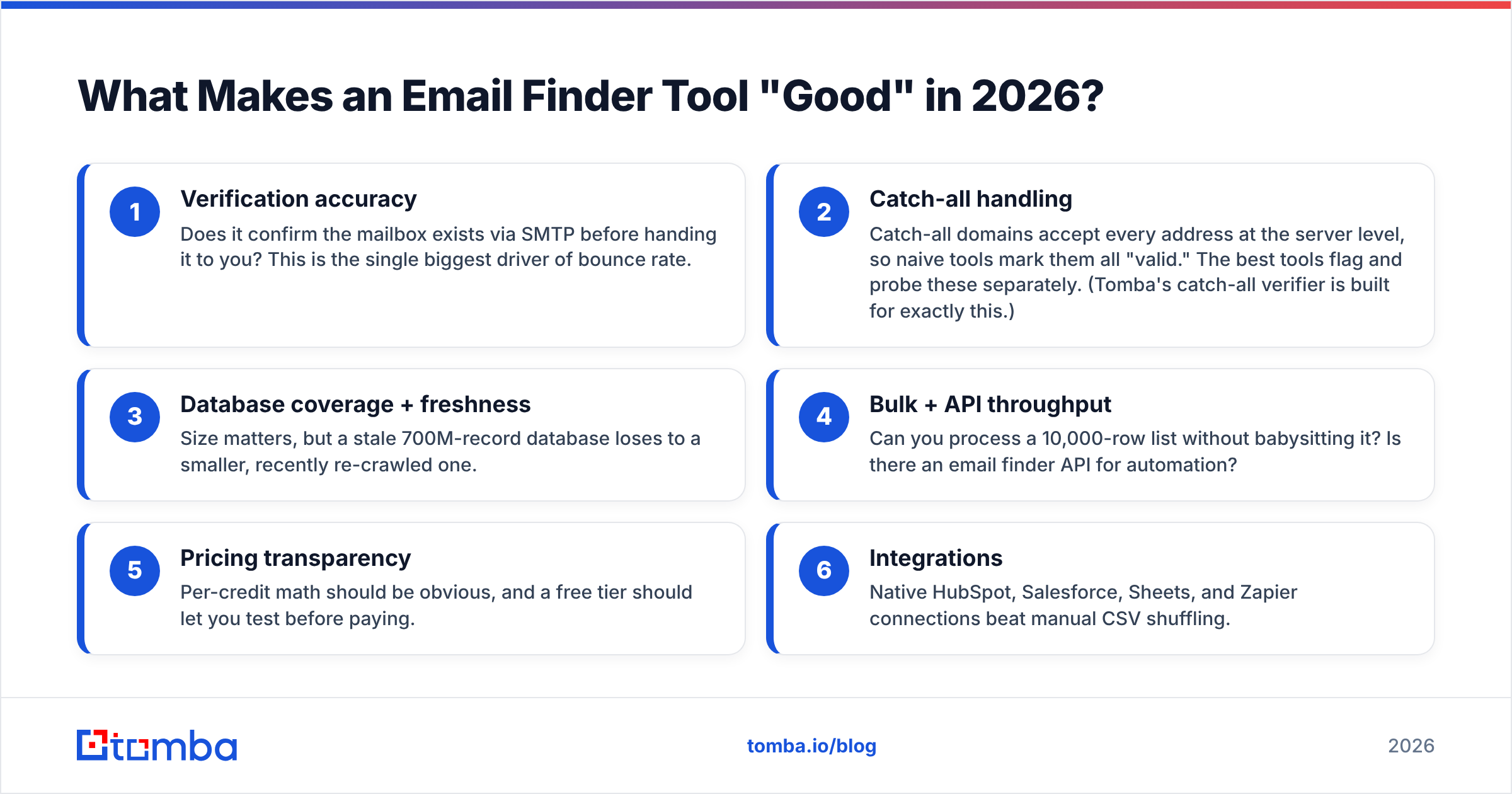
Here are the criteria we weighted, in order:
- Verification accuracy — Does it confirm the mailbox exists via SMTP before handing it to you? This is the single biggest driver of bounce rate.
- Catch-all handling — Catch-all domains accept every address at the server level, so naive tools mark them all "valid." The best tools flag and probe these separately. (Tomba's catch-all verifier is built for exactly this.)
- Database coverage + freshness — Size matters, but a stale 700M-record database loses to a smaller, recently re-crawled one.
- Bulk + API throughput — Can you process a 10,000-row list without babysitting it? Is there an email finder API for automation?
- Pricing transparency — Per-credit math should be obvious, and a free tier should let you test before paying.
- Integrations — Native HubSpot, Salesforce, Sheets, and Zapier connections beat manual CSV shuffling.

Accuracy is where most "big database" vendors quietly fall apart. A tool can claim a 95% guarantee and still bounce 15% of a real list, because the guarantee only covers addresses it labels "verified" — not the catch-alls and guesses it slips in alongside them. Always test on your own ICP before committing.
What Are the Best Email Finder Tools? (Comparison Table)#
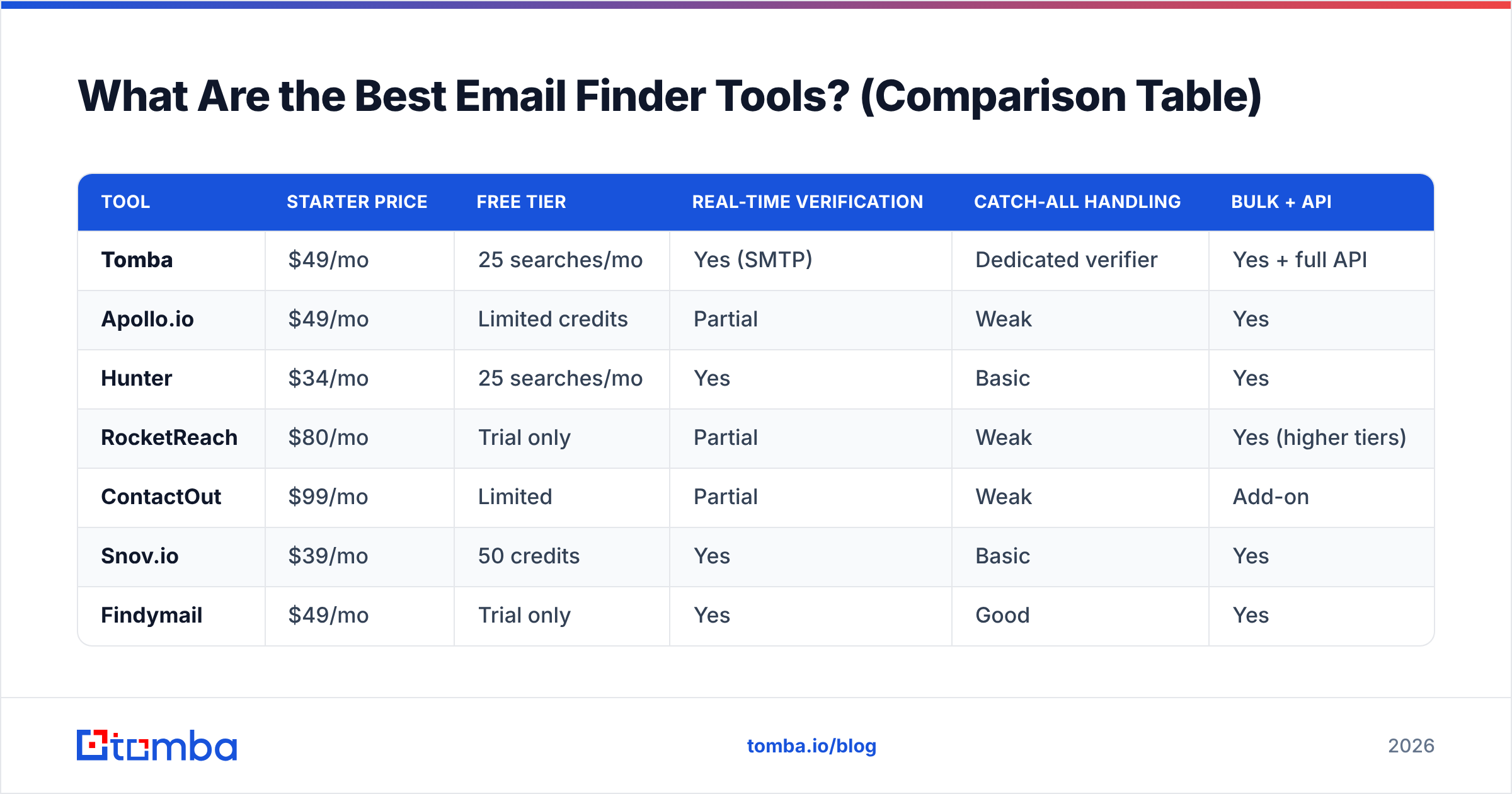
Here's the head-to-head on the attributes that decide real-world results. Prices reflect entry-level paid plans as of June 2026.
| Tool | Starter price | Free tier | Real-time verification | Catch-all handling | Bulk + API |
|---|---|---|---|---|---|
| Tomba | $49/mo | 25 searches/mo | Yes (SMTP) | Dedicated verifier | Yes + full API |
| Apollo.io | $49/mo | Limited credits | Partial | Weak | Yes |
| Hunter | $34/mo | 25 searches/mo | Yes | Basic | Yes |
| RocketReach | $80/mo | Trial only | Partial | Weak | Yes (higher tiers) |
| ContactOut | $99/mo | Limited | Partial | Weak | Add-on |
| Snov.io | $39/mo | 50 credits | Yes | Basic | Yes |
| Findymail | $49/mo | Trial only | Yes | Good | Yes |
| Lusha | $49/mo | Limited | Partial | Weak | Yes |
| Seamless.AI | Custom | Limited | Partial | Weak | Yes |
A few notes the table can't capture: Apollo and Lusha bundle the finder inside a broader sales platform, so you pay for features you may not need. Hunter is cheaper at the door but its per-credit cost climbs fast on larger lists. RocketReach and ContactOut shine for personal/recruiter emails but lag on bulk B2B hygiene. For a deeper breakdown of pricing math across tiers, see the full Tomba pricing page.

How Do the Top Email Finder Tools Compare One by One?#
Tomba — best overall accuracy and value#
Tomba leads on the metric that matters: verified deliverability. Every result runs through SMTP verification, and catch-all domains get routed to a separate probing flow instead of being rubber-stamped. You can search by person, by company, or pull every public address on a domain with domain search.
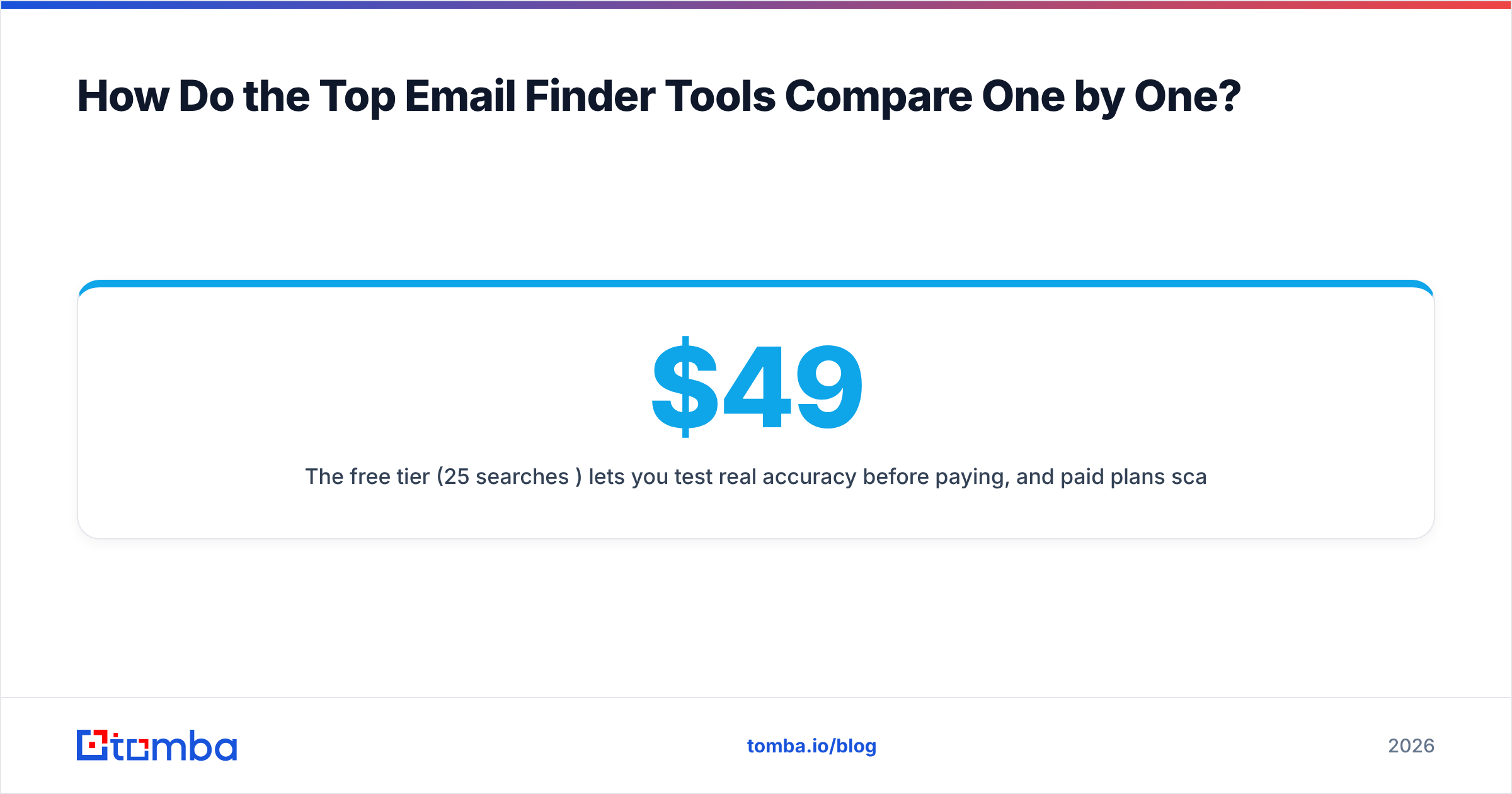
The free tier (25 searches/mo) lets you test real accuracy before paying, and paid plans scale cleanly: Starter $49/mo, Growth $99/mo, Pro $249/mo, then Enterprise. Bulk processing, a documented API, a CLI, and native HubSpot/Salesforce/Sheets integrations make it a fit for both one-off prospecting and automated pipelines.
Best for: teams that send cold email at volume and can't afford bounce-driven reputation damage.
Apollo.io — database-first, accuracy-second#
Apollo's strength is breadth: a massive contact database wrapped in a sequencing tool. The trade-off is that accuracy and credit caps frustrate users at scale, and exported data often needs a separate verification pass. If you want the database without the bloat, compare it against an Apollo alternative before locking in an annual contract.
Hunter — clean and simple, smaller pool#
Hunter remains the friendliest UX in the category and is great for quick domain lookups. Its database is smaller than Tomba's or Apollo's, and per-credit pricing gets expensive once you move past light use. A solid choice for low-volume, high-trust prospecting.
RocketReach & ContactOut — personal data specialists#
Both excel at surfacing personal emails and phone numbers, which makes them popular with recruiters. For structured B2B outbound and list hygiene, though, they're weaker — verification is partial and bulk workflows feel bolted on. If you're evaluating them, the RocketReach alternative comparison is worth a read.
Snov.io, Findymail, Lusha, Seamless.AI — the rest of the field#
Snov.io bundles finding with a drip-campaign tool at a low entry price. Findymail has earned a reputation for clean verification. Lusha and Seamless.AI lean on browser extensions and large databases but share the same accuracy-at-scale caveat as Apollo. All are viable; none clearly beat a verification-first tool on bounce rate.
How Do You Test an Email Finder's Accuracy Yourself?#
Don't trust marketing percentages — run your own 30-minute test. Here's the method:
- Build a known-good control set. Take 50 contacts whose emails you already have confirmed (past customers, colleagues at target companies).
- Run them through the tool's finder. Record matches and misses.
- Verify the output independently. Push the results through a separate email verifier and count how many come back valid vs. risky vs. invalid.
- Calculate true accuracy. Divide independently verified valid by total returned. This is your real number — usually well below the advertised one.
- Send a small live batch. Nothing beats a 100-email test send. Watch the bounce rate in your ESP.
If a tool returns lots of "valid" results that your independent check flags as catch-all or risky, that's the gap that bites you in production.

What's the Real Cost Difference Between These Tools?#
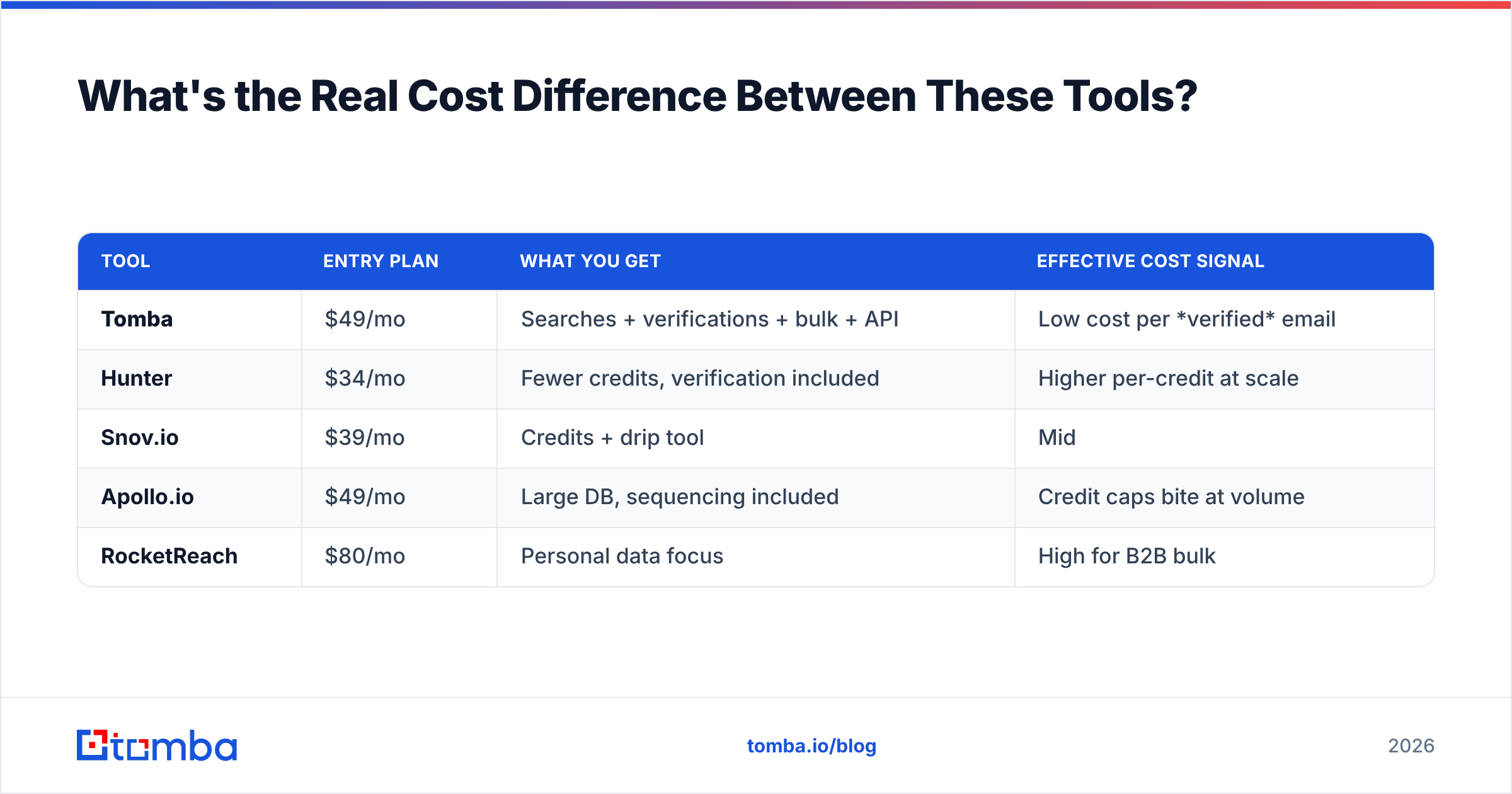
Sticker price is misleading because each vendor defines a "credit" differently — some charge for searches, some for verifications, some for both. Here's a like-for-like view at the entry tier:
| Tool | Entry plan | What you get | Effective cost signal |
|---|---|---|---|
| Tomba | $49/mo | Searches + verifications + bulk + API | Low cost per verified email |
| Hunter | $34/mo | Fewer credits, verification included | Higher per-credit at scale |
| Snov.io | $39/mo | Credits + drip tool | Mid |
| Apollo.io | $49/mo | Large DB, sequencing included | Credit caps bite at volume |
| RocketReach | $80/mo | Personal data focus | High for B2B bulk |
The cheapest monthly fee rarely wins. A $34 plan that bounces 20% of your list costs more in lost deliverability and re-work than a $49 plan that lands clean. Optimize for cost per verified email, not cost per month. For automating the whole flow, the bulk email finder plus API combination usually delivers the lowest effective cost at scale.
Do You Still Need a Separate Email Verifier?#
Short answer: yes, as a safety net — even with a verification-first finder. Best practice in 2026 is a two-step hygiene flow:
- Step 1 — Find with verification on. Use a tool that confirms mailboxes at discovery time.
- Step 2 — Re-verify before every campaign. Emails decay roughly 22–30% per year as people change jobs. A list verified three months ago is already stale.
Pairing a strong finder with periodic re-verification keeps your bounce rate under the 2–3% threshold that mailbox providers use as a spam signal. If you want to understand the underlying mechanics, the glossary entry on email deliverability is a good primer, and Google's own Postmaster Tools documentation explains how reputation is scored on the receiving end.
How Do These Tools Handle Integrations and Workflow?#
A finder is only as useful as how fast data reaches the rep working the deal. Evaluate three integration layers:
- CRM sync — Native HubSpot and Salesforce connections (vs. CSV import) save hours weekly. Independent reviews on G2 consistently rank native sync as a top buying factor.
- Spreadsheet + no-code — Google Sheets add-ons and Zapier/Make connections let ops teams build enrichment flows without engineering.
- API + automation — For product-led or high-volume teams, a documented email finder API is non-negotiable. Check rate limits and per-call pricing before committing.
Apollo and HubSpot's own sales tools integrate tightly within their ecosystems, which is great if you're already locked in — and limiting if you're not. Tooling-agnostic finders like Tomba avoid that lock-in while still offering native connectors.
Which Email Finder Tool Is Right for You?#
Match the tool to your primary job-to-be-done:
- High-volume cold email, accuracy-critical: Tomba — verification-first, transparent pricing, full API.
- All-in-one sales engagement, database-led: Apollo — accept the accuracy trade-off or pair it with external verification.
- Occasional, low-volume lookups: Hunter — simple and clean.
- Recruiting / personal contact data: RocketReach or ContactOut.
- Budget drip campaigns: Snov.io.
The pattern across every serious 2026 evaluation is the same: teams stop optimizing for the biggest database and start optimizing for the cleanest, most verified output. Bounce rate is the new battleground, and it's where verification-first tools pull ahead.
Start With a Verified-First Finder#
If deliverability is your priority — and in 2026 it has to be — start with the Tomba Email Finder. You can find professional emails by name, company, or domain, get real-time SMTP verification and catch-all handling on every result, and test it all on the free tier (25 searches/mo) before spending a cent. When you're ready to scale, plans start at $49/mo with bulk processing and a full API. Run the 50-contact accuracy test above against your current tool, then run it against Tomba — let the bounce rate decide.
// get started
Find, verify and enrich your first contacts today
Start on the free plan with 25 searches a month, then scale when your team is ready.
Free plan · No credit card required · GDPR & CCPA
// about the author