8x8 vs Ooma 2026: Which Business Phone System Wins?
8x8 vs Ooma in 2026: a side-by-side breakdown of pricing, call quality, integrations, and which platform fits sales teams that actually live on the phone.
8x8 vs Ooma 2026: Which Business Phone System Wins?
TL;DR
- 8x8 is the enterprise-leaning UCaaS platform — unlimited calling to 14-48 countries, contact-center add-ons, and deep CRM integrations starting at $24/user/mo on the X2 plan.
- Ooma Office is the SMB-first VoIP — flat $19.95-$29.95/user/mo, a physical base station option, and a setup process most small teams finish before lunch.
- 8x8 wins for outbound sales teams, multi-country offices, and anyone routing calls into Salesforce or HubSpot.
- Ooma wins for sub-20-seat businesses, brick-and-mortar shops, and teams that want hardware-first reliability without a phone-system project.
- Neither tool finds the numbers you dial — pair whichever you pick with a B2B phone finder so reps aren't cold-dialing junk lists.
What is 8x8 and who is it built for?#
8x8 (Nasdaq: EGHT) is a unified communications platform that started as a video conferencing company in the 1990s and pivoted into cloud telephony. Today its flagship product is the 8x8 Work suite — voice, video, team chat, and SMS in one app — sold alongside 8x8 Contact Center for support and sales floors that need queues, IVRs, and supervisor dashboards.
The product is built for companies that have outgrown a basic VoIP setup. Three signals you've crossed that line:
- You have reps in more than one country and need a single bill plus consistent dialing rules.
- You want call activity to write back to your CRM automatically — not via a manual log.
- Your support or SDR team needs queues, whisper coaching, and recordings as a baseline, not an add-on.
8x8's pricing reflects that audience. The X2 plan ($24/user/mo when billed annually) is the realistic entry point because it's the first tier with unlimited international calling to 14 countries and Microsoft Teams integration. X4 ($44) adds supervisor analytics and 48-country calling.
You can read 8x8's own positioning on 8x8.com and cross-check independent reviews on G2.
What is Ooma and who is it built for?#
Ooma is the opposite end of the spectrum. The company sells two products that share a brand but solve different problems:
- Ooma Office — cloud VoIP for small businesses, sold per user with optional desk phones or a physical base station.
- Ooma Enterprise — a separately built UCaaS product aimed at mid-market, less widely deployed.
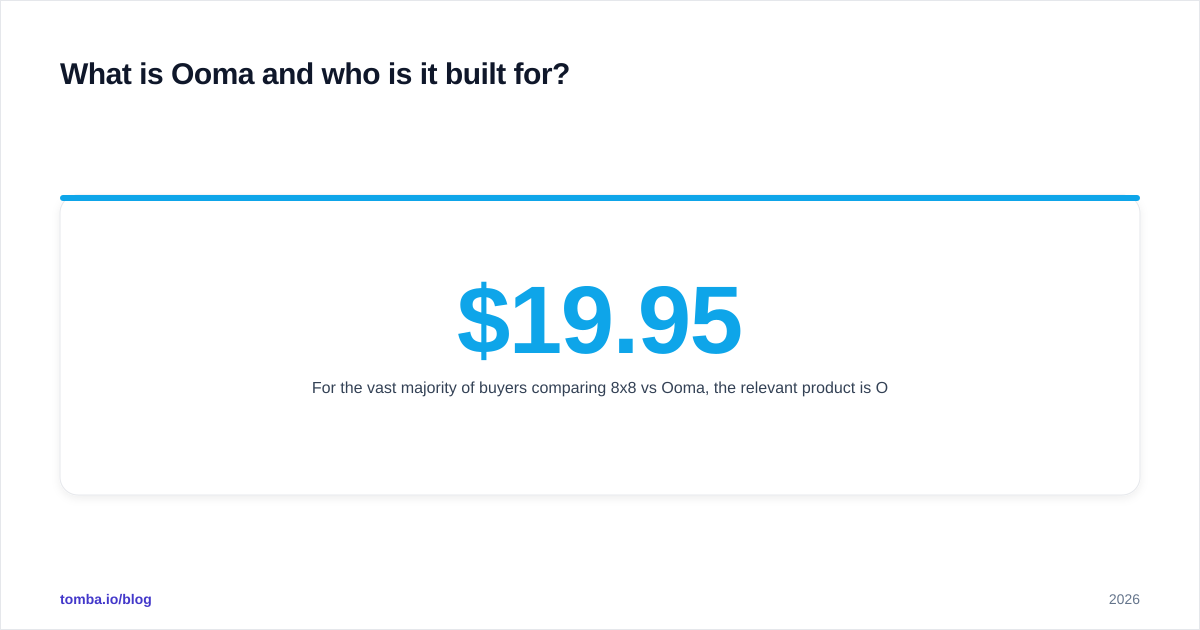
For the vast majority of buyers comparing 8x8 vs Ooma, the relevant product is Ooma Office. Pricing is refreshingly flat: Essentials at $19.95/user/mo, Pro at $24.95, and Pro Plus at $29.95. There's no quote-to-buy, no annual lock, and no per-feature haggling.
Ooma's calling card is the base station — a small router-like device you plug between your modem and your network. It runs QoS for voice traffic so your calls don't suffer when someone in the office starts a
Zoom call or a 4K Netflix stream. For brick-and-mortar businesses (dentists, contractors, retail) that's a meaningful selling point.
The Ooma homepage at ooma.com and the Capterra reviews for Ooma Office are useful sanity checks on real-world usage.
How do 8x8 and Ooma compare on pricing?#
Headline pricing tells one story. Total cost of ownership tells another. The table below normalizes both.
| Feature | 8x8 X2 | 8x8 X4 | Ooma Office Pro | Ooma Office Pro Plus |
|---|---|---|---|---|
| Per-user/mo (annual) | $24 | $44 | $24.95 | $29.95 |
| Unlimited US/Canada calling | Yes | Yes | Yes | Yes |
| International unlimited | 14 countries | 48 countries | No (per-minute rates) | No (per-minute rates) |
| Video meetings | Up to 500 | Up to 500 | 25 participants | 100 participants |
| Call recording | On demand | Auto + on demand | On demand | Auto + on demand |
| SMS / MMS | Yes | Yes | Yes | Yes |
| CRM integration | Salesforce, HubSpot,Zoho, Dynamics | + analytics writeback | Salesforce only (Pro Plus) | Salesforce |
| Contact center features | Add-on | Add-on | No | Basic queues |
| Setup complexity | Medium (1-2 weeks) | Medium-high | Low (same day) | Low |
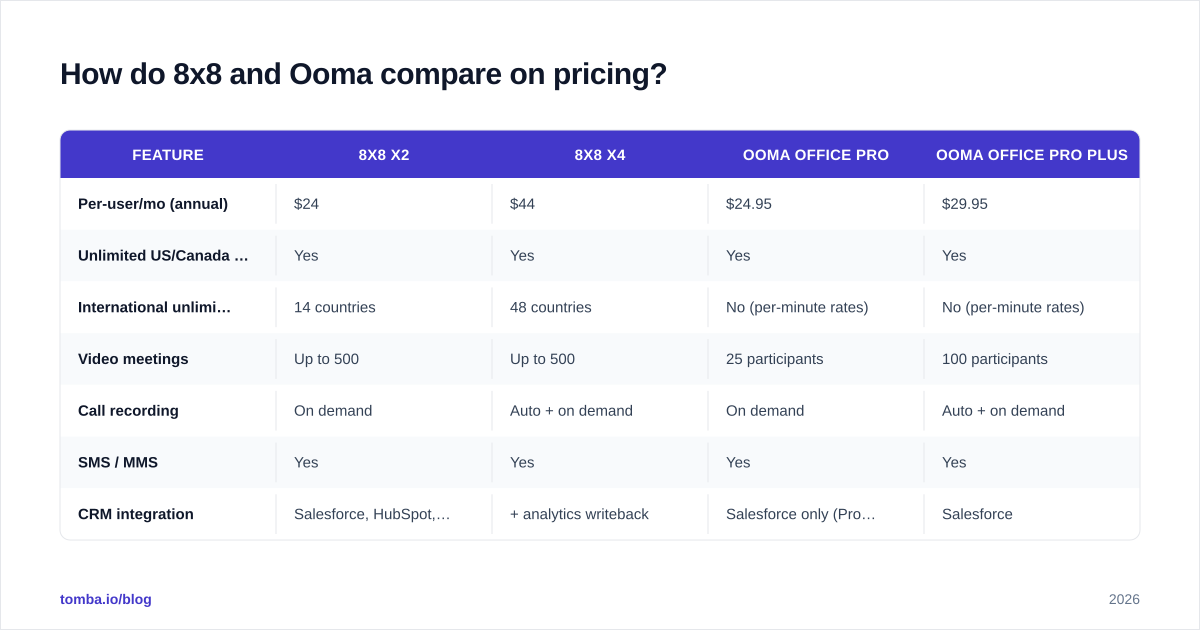
The headline numbers look close at the entry tier, but two things shift the math:
International calling. If even 10% of your team's outbound minutes are international, Ooma's per-minute rates ($0.014-$0.49/min depending on country) blow past 8x8's unlimited bundle within a couple of months.
Salesforce writeback. Ooma puts native Salesforce integration behind Pro Plus ($29.95). 8x8 includes it in X2 ($24). For a 20-rep sales team using Salesforce, that's a $1,680/yr swing in 8x8's favor before any other features.

Is 8x8 or Ooma better for call quality?#
Both providers publish 99.999% uptime SLAs and both pass them most months. Where they diverge is how they protect call quality on your end.
8x8 routes traffic through its own global backbone with PoPs across North America, Europe, and APAC. Calls between two 8x8 users never touch the public internet. For distributed teams, this matters — a rep in Berlin calling a colleague in Austin gets backbone-to-backbone routing instead of best-effort hops.
Ooma's quality story is local-first. The base station applies QoS at the LAN level, which is exactly what a single-office business needs. But Ooma doesn't have the same global backbone footprint, so multi-region calls fall back to public internet routing.
The practical takeaway:
- One office, mostly domestic calls? Ooma's QoS box solves the most common quality problem (a chatty office network) cheaply.
- Multi-region team, lots of internal calls? 8x8's backbone is worth the extra dollars.
Gartner's 2025 UCaaS Magic Quadrant places 8x8 in the Leaders quadrant on this basis — see the analyst summary at gartner.com for the methodology.
What about integrations and the CRM stack?#
This is where most sales teams quietly decide. Phone systems that don't write back to the CRM force reps to log calls manually, which means they don't log them at all.
8x8 native integrations include:
- Salesforce (call pop, click-to-dial, activity logging, recording links)
- HubSpot (similar feature set)
- Microsoft Teams (full PSTN-from-Teams replacement)
- Dynamics 365, Zoho, Zendesk, ServiceNow, Freshdesk
- Slack (notifications, click-to-dial)
- Power BI (call analytics export)
Ooma Office native integrations include:
- Salesforce (Pro Plus only)
- Microsoft Dynamics 365 (Pro Plus only)
- Google Workspace contacts sync
- Zoho CRM (limited)
If your team runs on HubSpot, the comparison is over — 8x8 is the only one with a native integration. If you're on Salesforce, both work, but 8x8 logs calls and recordings automatically while Ooma's connector relies more on click-to-dial as the primary touchpoint.
Once your dialer is wired into the CRM, the next bottleneck is the data going into the CRM. A dialer is only as good as the contacts it dials. Most sales teams plug a B2B phone finder into the front of the pipeline so reps aren't burning minutes on disconnected numbers. Tomba's data enrichment flow pushes verified phone, email, and LinkedIn data into HubSpot or Salesforce — then 8x8 or Ooma takes over for the actual call.
Which one is better for outbound sales teams?#
If you're running 5+ SDRs dialing 80+ calls a day, 8x8 wins decisively. Here's why:
- Power dialer. 8x8 X4 includes a sequential dialer that auto-advances to the next contact. Ooma has click-to-dial but no native power-dialing mode.
- Local presence dialing. 8x8 can rotate the outbound caller ID to match the prospect's area code (subject to FCC rules). Ooma doesn't offer this.
- Call recording at scale. 8x8 X4's auto-record + searchable transcript is standard. Ooma's recording is per-call.
- Whisper coaching. A manager can join an SDR's live call silently and coach in real time on 8x8 X4. Not available on Ooma Office.
- CRM dispositions. 8x8 lets reps tag each call with a disposition that writes back to Salesforce/HubSpot. Ooma requires manual logging.
Ooma can run an outbound team — it's not broken — but the workflow friction adds up. Reps spend 30-60 seconds per call on logging that 8x8 reps spend zero seconds on. Multiplied across a team and a quarter, that's hundreds of hours.
For broader outbound stack research, the Outreach alternative and Salesloft alternative breakdowns cover the dialer-plus-sequencer category that often sits next to 8x8 in a sales tech stack.
When does Ooma actually beat 8x8?#
Ooma wins more often than UCaaS analysts give it credit for. The clearest scenarios:
- Single-location SMBs under 25 seats. A dental office, a law firm, a HVAC contractor. The base station's QoS solves more real problems than 8x8's backbone, and the bill is lower.
- Businesses that want a physical receptionist phone. Ooma's hardware-plus-cloud model still ships proper desk phones with line keys, intercom paging, and overhead paging integration. 8x8 supports desk phones but defaults to softphone.
- Teams that don't want a phone project. Ooma can be set up in an afternoon. 8x8 deployments typically involve a porting window, training, and a SIP-or-softphone decision for every user.
- No-CRM businesses. If you don't run Salesforce or HubSpot, 8x8's biggest advantage evaporates.
- Cost-sensitive shops with steady call volume. Ooma's Essentials at $19.95 is genuinely cheap, and there's no usage cliff.
A real-world rule: under 15 seats, mostly domestic, no CRM dependency — Ooma. Above 25 seats, multi-region, CRM-driven — 8x8.
What features should you actually care about in 2026?#
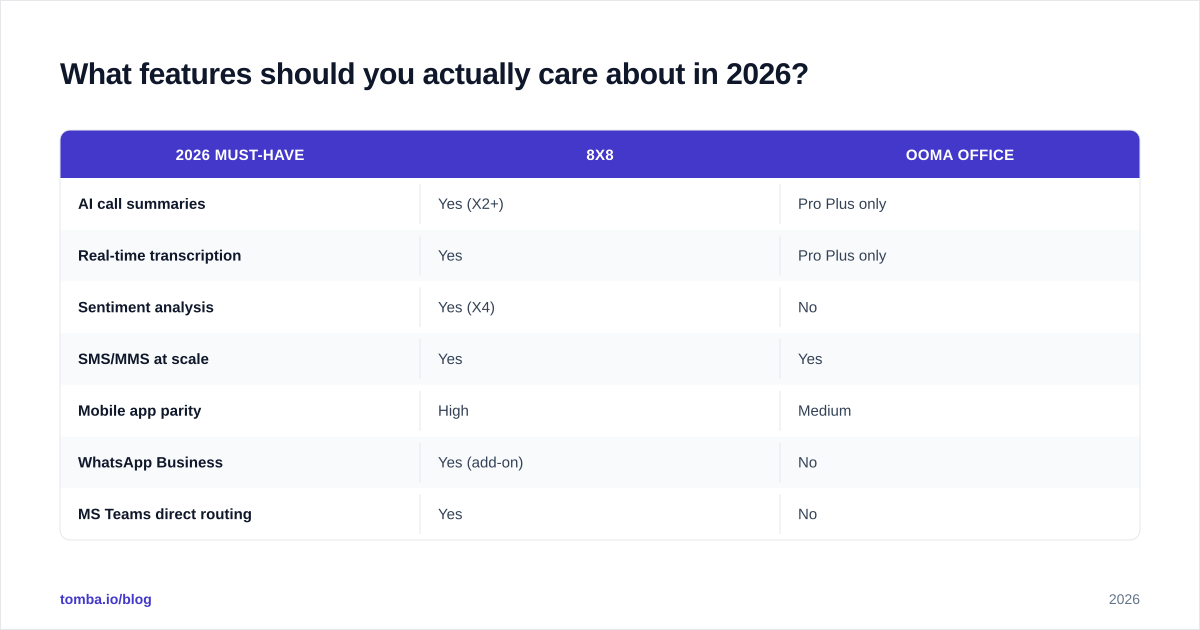
Buyers in 2026 are evaluating phone systems on a different checklist than in 2020. The bar has moved.
| 2026 Must-Have | 8x8 | Ooma Office |
|---|---|---|
| AI call summaries | Yes (X2+) | Pro Plus only |
| Real-time transcription | Yes | Pro Plus only |
| Sentiment analysis | Yes (X4) | No |
| SMS/MMS at scale | Yes | Yes |
| Mobile app parity | High | Medium |
| WhatsApp Business | Yes (add-on) | No |
| MS Teams direct routing | Yes | No |
| Open API for custom integrations | Yes | Limited |
| Toll-free vanity numbers | Yes | Yes |
| E911 compliance | Yes | Yes |
The AI gap is the one that matters most. 8x8 ships post-call summaries, action-item extraction, and sentiment scoring across the X-series. Ooma is catching up but mostly gates AI to Pro Plus. For a sales manager reviewing 200 calls a week, AI summaries change the job. For a five-person office, it's a nice-to-have.
How does data quality affect either system?#
A phone system doesn't generate leads — it dials them. The most common ROI complaint about both 8x8 and Ooma is "we're paying for unlimited calling but our reps are still hitting voicemail." That's almost never a phone-system problem. It's a contact-data problem.
Three fixes that work regardless of which dialer you pick:
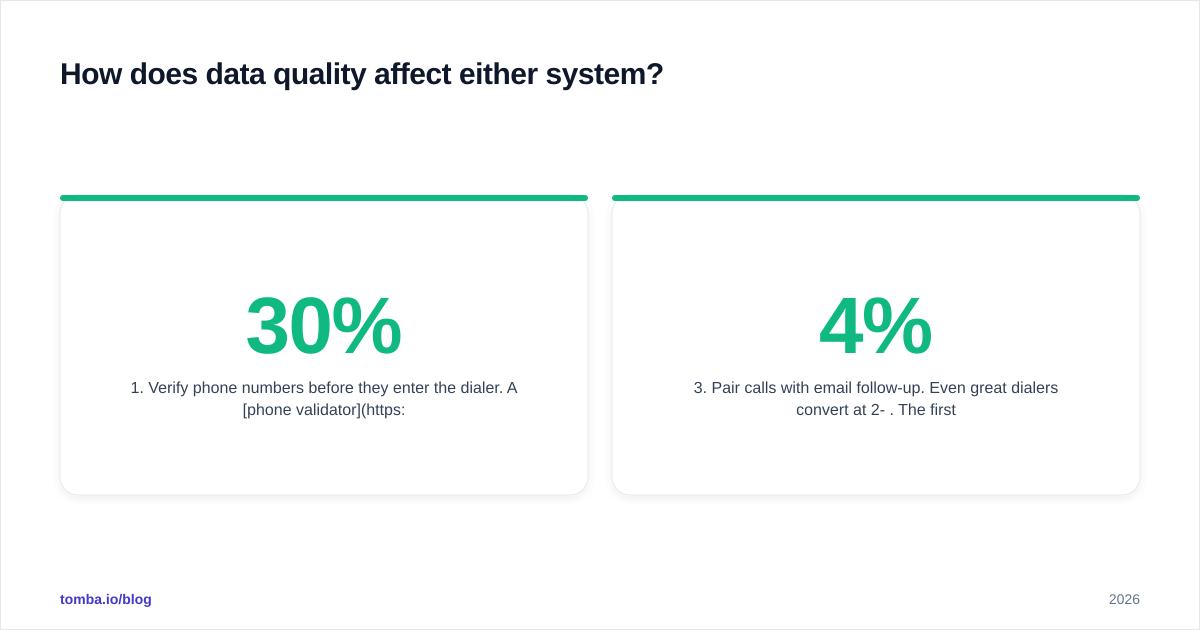
- Verify phone numbers before they enter the dialer. A phone validator check screens out disconnected, fax, and invalid numbers — often 15-30% of a purchased list.
- Enrich with mobile direct dials. Office numbers route through gatekeepers. Mobile direct dials don't. Tomba's phone finder returns mobile numbers when available, scored by confidence.
- Pair calls with email follow-up. Even great dialers convert at 2-4%. The first follow-up email lifts that to 8-12%. The Tomba Email Finder fills in the email when you only have a phone number, and vice versa.
The phone system is the last mile. The data feeding it is everything before that. See where Tomba gets its data for the sourcing methodology behind the numbers and emails reps end up dialing and writing to.
What are the main pros and cons?#
8x8 pros
- Enterprise-grade global backbone
- Native HubSpot + Salesforce + Teams integration
- Power dialer, whisper coaching, local presence built-in
- AI summaries and sentiment included on X2+
8x8 cons
- More complex setup (1-2 weeks typical)
- Quotes obscured for higher tiers (X6/X8 are quote-only)
- Steeper learning curve for small teams
- Some users report ticket-based support is slow on lower plans
Ooma pros
- Flat, transparent pricing
- Same-day setup, including hardware
- Physical base station handles LAN QoS
- Strong for single-location SMBs
Ooma cons
- No native HubSpot integration
- AI features mostly gated to Pro Plus
- No power dialer or whisper coaching
- International calling priced per minute, not bundled
Final verdict — 8x8 vs Ooma#
8x8 is the answer for sales-led organizations, multi-region teams, and anyone whose CRM is the source of truth. Ooma is the answer for single-location SMBs who want a phone system, not a phone platform. The price difference at the entry tier is so small ($24 vs $24.95) that the decision should be made on integration depth and team workflow — not the sticker.
Whichever dialer you land on, the bottleneck isn't the phone — it's the list. A 25% bump in connect rate from cleaner data dwarfs the feature differences between any two UCaaS vendors.
Ready to make the calls count? Stop dialing junk numbers. Get verified mobile direct dials, work emails, and LinkedIn profiles for your target accounts with the Tomba Email Finder and phone finder — the same B2B contact data that feeds 8x8 and Ooma deployments at 40,000+ teams. Start with 25 free searches a month, no card required.
Ready to find emails that actually work?
Join 150,000+ professionals who stopped guessing and started sending. Free credits on signup — no credit card required.
Get the Tomba newsletter
Practical outbound tactics and product updates — once every two weeks.
About the author