7 Best Accelo Alternatives for Agencies and PSAs in 2026
Accelo bundles CRM, projects, and billing — but the price tag and learning curve push many agencies to shop elsewhere. Here are the 7 best Accelo alternatives in 2026, scored on price, usability, and PSA depth.

TL;DR#
- Accelo is a full client-work platform (CRM + projects + retainers + billing), but seats start around $30/user/month and quickly stack to $89+/user once you turn on the modules you actually need.
- The best Accelo alternatives in 2026 fall into three buckets: full PSAs (Scoro, Kantata, Productive), project-first tools with light CRM (Teamwork, ClickUp), and CRM-first stacks bolted to a project tool (HubSpot + Asana).
- For agencies under 25 people, Productive and Teamwork are the strongest swaps. For 25–250 person service firms, Scoro and Kantata match Accelo's depth without its quirks.
- Don't migrate without pulling clean contact data first — a single bad export can stall onboarding for weeks. Use a verified email source like Tomba to rebuild contact lists before the cutover.
- Pricing is rarely the whole story. The hidden cost of Accelo is configuration time; the hidden cost of cheap alternatives is the integrations you'll bolt on later.
Why are agencies looking for Accelo alternatives in 2026?#
Accelo positions itself as a "client work management platform" — CRM, project tracking, retainers, time, and invoicing under one login. On paper, that's the holy grail for any agency tired of duct-taping HubSpot to Asana to QuickBooks. In practice, three issues keep showing up in G2 and Capterra reviews:
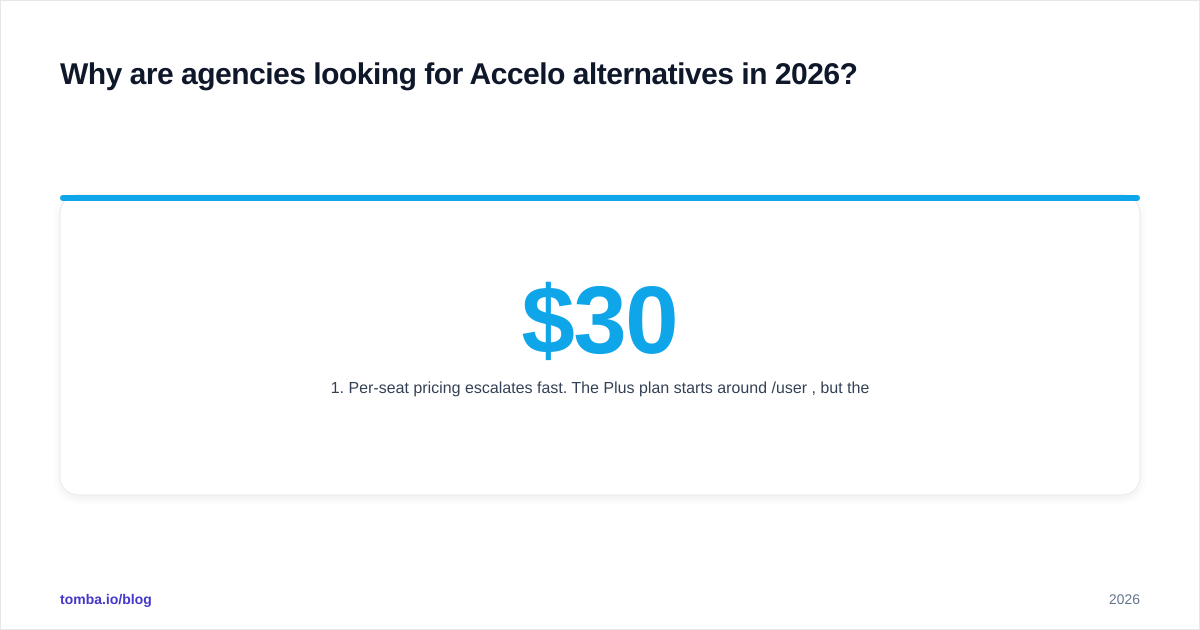
- Per-seat pricing escalates fast. The Plus plan starts around $30/user/month, but the Premium tier (with retainers, quotes, and full billing) runs $89/user. A 20-person agency lands at roughly $21,000/year before integrations.
- The learning curve is steep. Accelo's data model — companies, contacts, sales, quotes, projects, retainers, tickets, invoices — is powerful but unforgiving. Most teams need 4–8 weeks before the system stops fighting them.
- The UI feels dated. Even Accelo's biggest fans on G2 flag the interface as the platform's weakest link versus newer competitors like Productive and Scoro.
If any of those hit a nerve, this guide is for you. We benchmarked seven Accelo alternatives against the criteria that actually matter when you're running a service business: time-to-value, true cost per seat, PSA depth, and how well each tool plays with the rest of your stack.

What should you look for in an Accelo replacement?#
Before you scroll to the comparison table, write down which of these five capabilities are non-negotiable for your team. Accelo bundles all of them — most alternatives don't.
- CRM with pipeline tracking. Deals, stages, forecasted close dates. If you can't see expected revenue, you can't staff against it.
- Project and task management. Gantt, Kanban, or list views with dependencies and milestones.
- Time tracking tied to projects. Either built-in timers or a tight Harvest/Toggl integration.
- Retainers and recurring work. This is where most "project tools" fall apart — they treat retainers as just another project.
- Invoicing and billing. Either native invoicing or a clean push to QuickBooks/Xero.
The deeper your PSA needs, the fewer tools qualify. The shallower your needs, the more you'll regret paying Accelo prices for features you never use.
What are the 7 best Accelo alternatives in 2026?#
Here's the short list, grouped by use case. Pricing is the published starting tier as of Q2 2026; expect annual discounts of 10–20%.
| Tool | Starts at | Best for | Native CRM | Native invoicing | Retainers |
|---|---|---|---|---|---|
| Productive | $9/user/mo | Modern agencies, 5–100 people | Yes | Yes | Yes |
| Scoro | $26/user/mo | Mid-market PSA, 25–250 people | Yes | Yes | Yes |
| Kantata | Custom (≈$39+/user) | Enterprise services, 100+ people | Light | Yes | Yes |
| Teamwork.com | $10.99/user/mo | Project-first agencies | Light (add-on) | Yes | Yes |
| ClickUp | $7/user/mo | Hybrid teams, internal + client work | No (deals via list) | No (Zapier) | Manual |
| Monday Work Management | $9/user/mo | Visual planners, light services | No (separate Monday CRM) | No | Manual |
| HubSpot + Asana | $20/user/mo (combined) | Sales-led agencies | Yes (HubSpot) | Yes (HubSpot) | Manual |
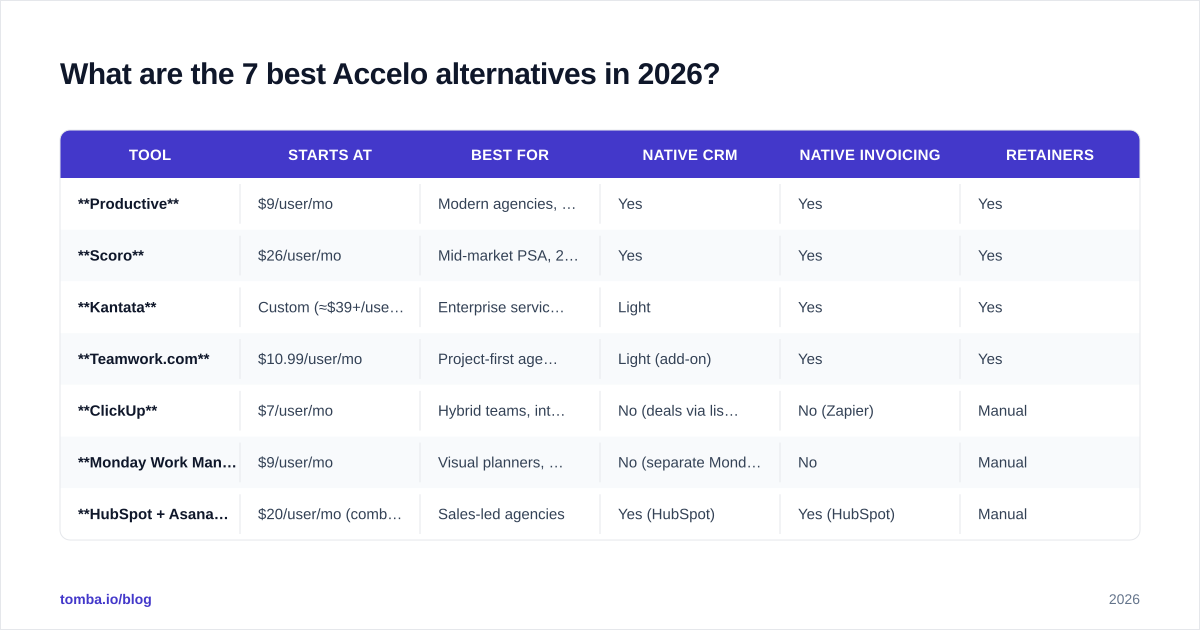
The headline numbers are misleading on their own. The real spread shows up once you map each tool to a 20-person agency running 12 active retainers and 30 projects — the section below does that math.
How do Accelo alternatives compare on price and PSA depth?#
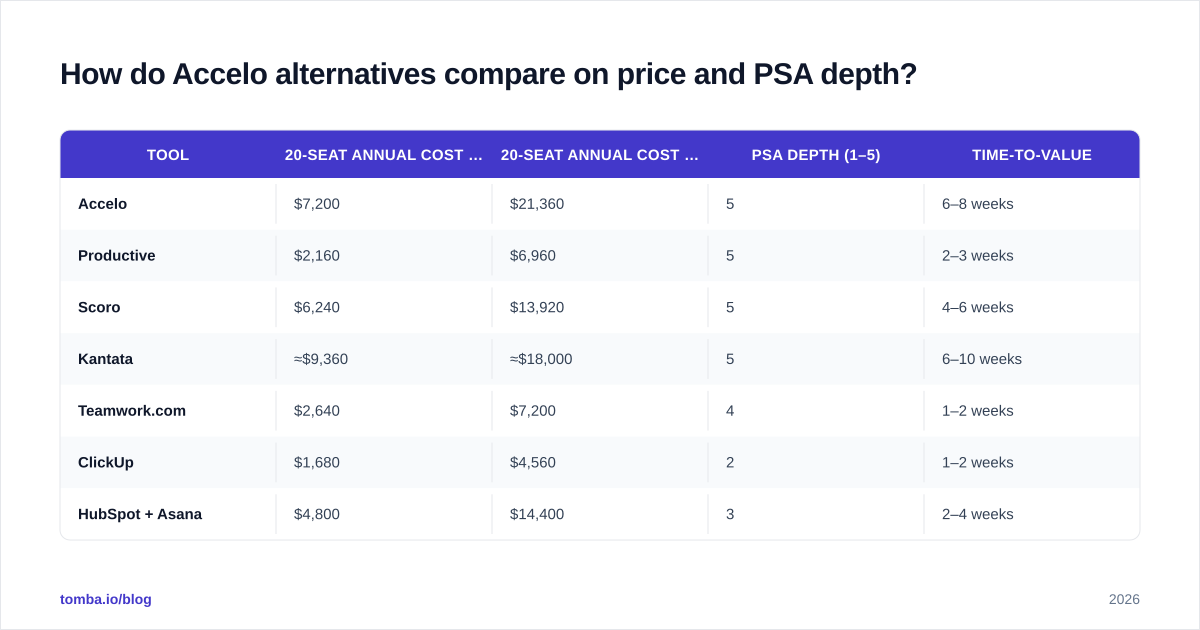
| Tool | 20-seat annual cost (entry tier) | 20-seat annual cost (full PSA tier) | PSA depth (1–5) | Time-to-value |
|---|---|---|---|---|
| Accelo | $7,200 | $21,360 | 5 | 6–8 weeks |
| Productive | $2,160 | $6,960 | 5 | 2–3 weeks |
| Scoro | $6,240 | $13,920 | 5 | 4–6 weeks |
| Kantata | ≈$9,360 | ≈$18,000 | 5 | 6–10 weeks |
| Teamwork.com | $2,640 | $7,200 | 4 | 1–2 weeks |
| ClickUp | $1,680 | $4,560 | 2 | 1–2 weeks |
| HubSpot + Asana | $4,800 | $14,400 | 3 | 2–4 weeks |
A few takeaways jump out:
- Accelo isn't the most expensive tool on the list — Kantata is — but it has the second-worst time-to-value of the bunch.
- Productive delivers comparable PSA depth at one-third the cost.
- The HubSpot + Asana combo wins on familiarity but loses on cohesion: you're stitching two systems together with [
Zapier](https://tomba.io/integrations/zapier) or HubSpot's native sync, and reconciliation never quite ends.
Which Accelo alternative is best for small agencies (5–25 people)?#
Productive is the strongest fit. It was built specifically for agencies, the UI is closer to Linear than to legacy PSA tools, and resource planning is genuinely usable out of the box. The CRM is light but sufficient for most service businesses that don't run high-volume outbound. Pricing is transparent and scales predictably.
Teamwork.com is the runner-up — especially if your team already lives in tasks and timesheets. Its CRM module is sold separately, which is either a feature or a bug depending on whether you already have a CRM you like. Teamwork's Capterra reviews consistently praise its onboarding speed.
If you only need project + time tracking and you'll bolt on a CRM later, ClickUp is the cheapest option that won't embarrass you in a client demo. Just don't pretend it's a PSA — retainers, invoicing, and forecasting all require glue code.
Which Accelo alternative is best for mid-market service firms (25–250 people)?#
Scoro is the closest like-for-like swap for Accelo. It covers the same five PSA pillars (CRM, projects, time, retainers, billing) with a cleaner UI and tighter reporting. The catch: Scoro's pricing is opaque past the entry tier, and the deepest features (revenue forecasting, custom dashboards) live on the higher tiers.
Kantata (formerly Mavenlink + Kimble) is the right pick if you're already feeling the limits of a self-serve tool. It's resource-planning-first, with deep utilization analytics and a Salesforce-native option for firms standardized on Salesforce. Expect a 6–10 week implementation and a real CSM relationship.
For sales-led agencies — where the deal pipeline matters as much as delivery — the HubSpot + project-tool combo is still a serious contender. HubSpot's CRM is best-in-class, and the published HubSpot pricing lets you start cheap and scale.
How do you migrate from Accelo without losing data?#
Migration is where most agencies underestimate the work. Accelo's export gives you CSVs of companies, contacts, sales, projects, and invoices — but the relationships between those entities don't always survive the round trip.
Three rules that save weeks:
- Rebuild your contact list from a verified source. Accelo's contact records often contain stale or generic emails (info@, hello@). Before importing into the new tool, run the list through a bulk email finder and a email verifier to drop bounces and fill in missing direct addresses. Migrating bad data is migrating bad outcomes.
- Export deals and projects separately, then re-link. The relational integrity won't survive a single-file dump. Plan for a join step in your new tool — usually via the project's "linked deal" field.
- Freeze invoicing during cutover. Don't migrate open invoices. Close the books in Accelo for the prior month, start fresh in the new tool, and let the two systems coexist for one billing cycle.
What hidden costs should you watch for?#
The published seat price is rarely the all-in cost. Across the seven alternatives we looked at, the most common hidden line items are:
- Per-module add-ons. Teamwork sells its CRM and Desk modules separately. Productive charges extra for advanced reporting and the budgeting module. Scoro's quote feature is gated behind a tier.
- Integration tax.
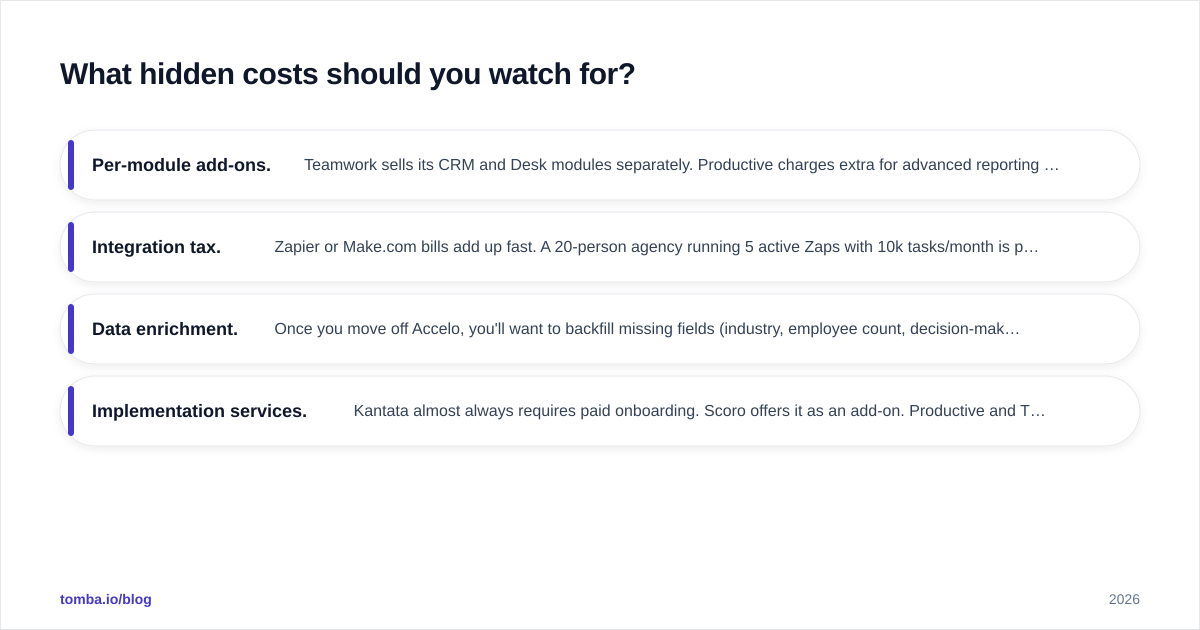
Zapier or Make.com bills add up fast. A 20-person agency running 5 active Zaps with 10k tasks/month is paying around $1,200/year for Zapier on top of seat fees.
- Data enrichment. Once you move off Accelo, you'll want to backfill missing fields (industry, employee count, decision-maker emails). Plan for an enrichment line item — it's cheaper than re-researching every account by hand.
- Implementation services. Kantata almost always requires paid onboarding. Scoro offers it as an add-on. Productive and Teamwork are usually self-serve.
A useful rule: the all-in cost is roughly 1.4× the sticker price in year one and 1.15× in year two, after you've stopped adding integrations.

Is Accelo ever still the right choice?#
Yes — in two specific cases.
First, if you're already three years deep and your team is fluent in Accelo's data model, the switching cost outweighs the savings. Accelo's retainer engine and invoicing logic are genuinely strong; rebuilding equivalent functionality elsewhere is not free.
Second, if you need ticketing + projects + retainers + billing in a single tool and don't want to integrate three systems, Accelo's breadth is hard to match. The closest one-stop alternatives are Scoro and Productive.
But for everyone else — especially agencies under 50 people who started Accelo for the bundle and stayed for the inertia — switching usually saves 30–60% per seat and shortens the time it takes a new hire to be productive.
How do you build a clean contact list for your new PSA?#
The best PSA on earth still loses to the quality of the data inside it. When you move to a new tool, treat it as a chance to rebuild your contact graph from scratch instead of importing every stale row.
A practical sequence:
- Pull your active client domains out of Accelo (CSV export → unique domains).
- Run them through a domain search to find current decision-makers at each account, including the patterns Accelo never captured.
- Verify everything before import. Bounced emails in a fresh PSA tank your sender reputation and waste outreach budget — start the new tool with a clean list.
- Enrich missing fields (title, LinkedIn, phone) so your team isn't pasting URLs into Google on day one of the new platform.
This is the step that separates migrations that finish in a month from migrations that drag on for a quarter.
Final recommendation#
For most agencies in 2026, the honest ranking looks like this:
- Productive — best balance of price, depth, and UX for 5–100 person agencies.
- Scoro — closest feature parity to Accelo for mid-market firms.
- Teamwork.com — best if project management is the center of gravity and CRM is secondary.
- Kantata — best for 100+ person services firms with deep resource planning needs.
- HubSpot + Asana — best if sales-led, with strong outbound and lighter delivery complexity.
- ClickUp — best if budget is the hard constraint and you'll glue the rest together.
- Accelo — still defensible if you're already deeply embedded.
Whichever tool you land on, the migration only succeeds if the data going in is clean. Start the move by rebuilding your contact list from a trusted source — verified emails, accurate titles, current decision-makers. The Tomba Email Finder is the fastest way to do that without paying a research firm: pull every active client domain through it, verify the results, then import the clean output into your new PSA. The first month in a new tool should be spent winning work, not chasing bounces.
// get started
Find, verify and enrich your first contacts today
Start on the free plan with 25 searches a month, then scale when your team is ready.
Free plan · No credit card required · GDPR & CCPA
// about the author