Accelo vs Salesforce 2026: Which CRM Wins for Services?
Accelo vs Salesforce in 2026: which CRM actually fits a professional services team? A neutral breakdown of pricing, features, integrations, and the right call for your stage.
TL;DR#
- Accelo is a client-work platform with a CRM bolted on — built for agencies, consultancies, and managed-service firms that bill for time and projects.
- Salesforce is the enterprise CRM standard — endlessly configurable, expensive, and overkill if you do not have a full RevOps function to run it.
- Accelo wins on services automation: quote-to-cash, retainers, timesheets, utilization. Salesforce wins on pipeline depth, AI, ecosystem, and reporting.
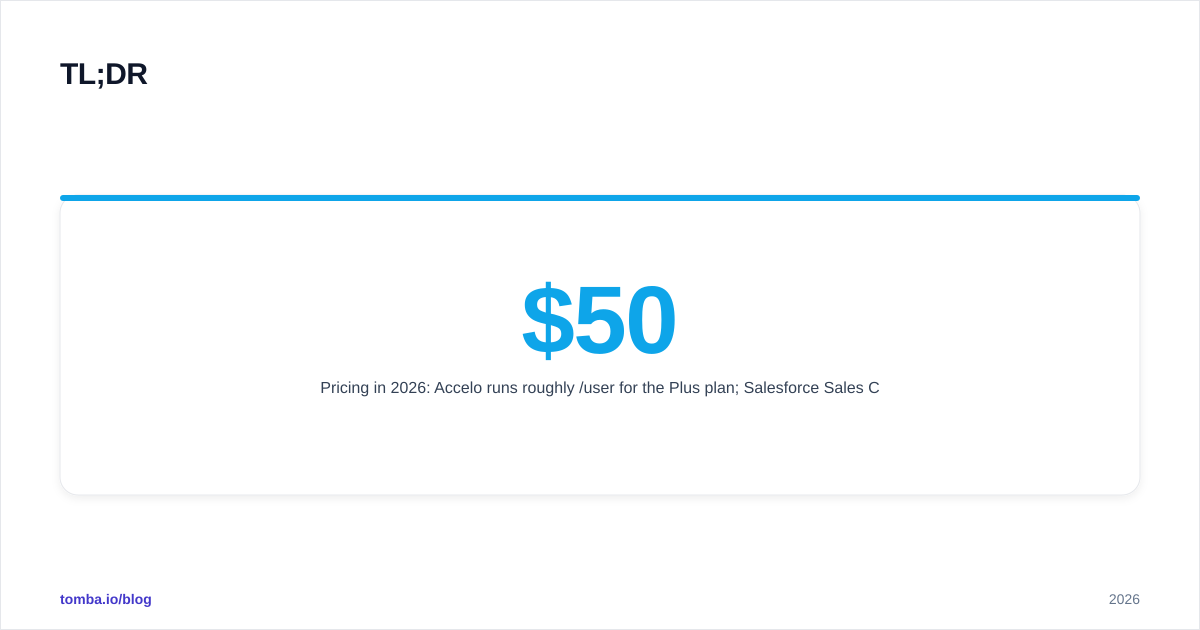
- Pricing in 2026: Accelo runs roughly $50/user/month for the Plus plan; Salesforce Sales Cloud Professional sits at $80/user, Enterprise at $165/user, Unlimited at $330/user.
- Pick Accelo if you sell billable hours. Pick Salesforce if you sell repeatable SaaS or complex B2B deals. Pair either with a focused email finder to keep the pipeline full.
What does Accelo actually do?#
Accelo calls itself a Service Operations Automation (ServOps) platform, which is a long way of saying it tries to run the whole client lifecycle inside one product — sales, quoting, projects, retainers, time tracking, billing, and the CRM that ties it all together. Think of it as a Professional Services Automation (PSA) tool that grew a CRM, rather than a CRM that grew a services module.
If your team sells billable engagements — a design retainer, a 12-week implementation, a managed IT contract — Accelo's data model already understands that. Contacts attach to companies, companies attach to recurring contracts and one-off projects, and every billable hour rolls up to revenue and margin per client.
The trade-off is depth. Accelo's sales pipeline works, but it is not the reason you buy the product. You buy Accelo because the moment a deal closes, the proposal becomes a project plan, the project plan becomes timesheets, and the timesheets become invoices — without exporting a CSV to QuickBooks.

What does Salesforce actually do?#
Salesforce is the default answer in enterprise B2B. Sales Cloud handles accounts, contacts, opportunities, forecasting, quoting (with CPQ), territory management, and reporting at a level of granularity that no PSA tool matches. Service Cloud, Marketing Cloud, Experience Cloud, Data Cloud, and Agentforce sit alongside it, each licensed separately.
The pull is the platform. AppExchange has thousands of integrations, and if a workflow does not exist out of the box you can build it with Flow, Apex, or Lightning Web Components. Salesforce is what you choose when the CRM is the system of record for the entire revenue org and you have admins to keep it that way.
The pain is also the platform. Implementation cycles measured in months, licenses that compound across clouds, sandboxes, integration users, and data storage add-ons, and a UI that punishes teams without a dedicated administrator.
Accelo vs Salesforce: how do they compare on price?#
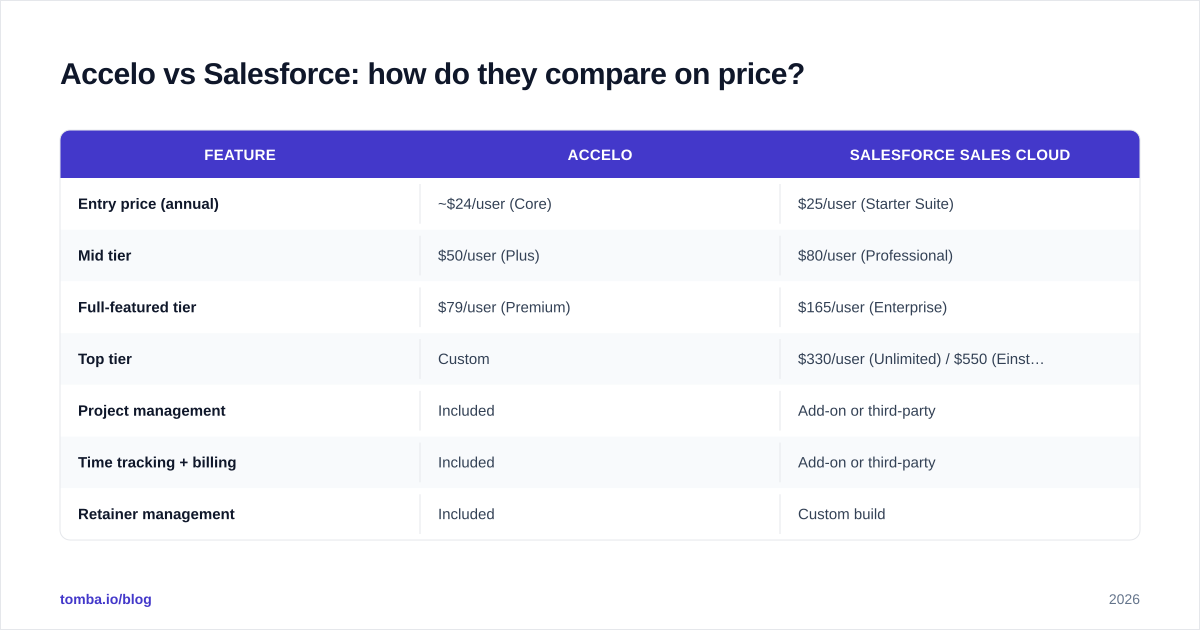
Pricing is where the gap is widest. Salesforce charges per user, per cloud, and per add-on. Accelo charges per user but folds projects, retainers, and billing into the core product. Numbers below reflect publicly listed 2026 pricing — actual deals vary, especially on Salesforce Enterprise contracts.
| Feature | Accelo | Salesforce Sales Cloud |
|---|---|---|
| Entry price (annual) | ~$24/user (Core) | $25/user (Starter Suite) |
| Mid tier | $50/user (Plus) | $80/user (Professional) |
| Full-featured tier | $79/user (Premium) | $165/user (Enterprise) |
| Top tier | Custom | $330/user (Unlimited) / $550 (Einstein 1) |
| Project management | Included | Add-on or third-party |
| Time tracking + billing | Included | Add-on or third-party |
| Retainer management | Included | Custom build |
| CPQ (quoting) | Native, basic | Add-on ($75+/user) |
| AI assistant | Limited | Agentforce / Einstein (priced separately) |
| Implementation | Self-serve to light-touch | Weeks to months, partner-led |
| Reporting depth | Operational | Industry-leading |
For a 10-person services firm, Accelo Plus lands around $6,000 per year. Salesforce Enterprise for the same team — before CPQ, add-ons, or an admin's salary — runs roughly $19,800 per year. The cost gap usually closes only when Salesforce replaces three or four separate tools.
Which one is better for professional services firms?#
Accelo, almost every time. The product was designed around the way agencies and consultancies actually make money: a deal closes, a project spins up, people log time against tasks, the system flags scope creep, and an invoice goes out at the end of the month with line-item detail tied to actual work.
Salesforce can do all of that — with FinancialForce (now Certinia), Mavenlink, Kantata, or a custom Apex build wired into the data model. But you are now paying for Salesforce, paying for the PSA layer on top, and paying for the integration to keep them in sync. Teams under 50 people rarely make that math work.
Where Salesforce wins for services firms is when the business has grown past pure billable hours — maybe you now sell software licenses alongside implementation, or you run a partner channel that needs PRM, or finance demands the same forecasting rigor a SaaS company would use. At that point, the CRM has to be the system of record and the PSA becomes a satellite.
Which one is better for B2B SaaS and tech sales?#
Salesforce. The whole forecasting category — weighted pipeline, commit, best case, opportunity splits, multi-currency, territory plans — exists because Salesforce built it. Pair it with a dialer, a sequencer, and a data enrichment layer and you have what most VC-backed sales orgs run today.
Accelo's pipeline is serviceable. It tracks stages, weighted values, and close dates. It does not have the depth that a VP of Sales running a $50M ARR business expects — no opportunity teams, no advanced forecasting hierarchies, no native CPQ for complex SKU configurations.
If your CRM exists to feed a forecast that the board sees every Monday, you are buying Salesforce. The hidden cost is everything that sits around it.
How do the integration ecosystems compare?#
Salesforce dominates here. AppExchange has more than 7,000 listings — from enrichment to call recording to revenue intelligence to specialized vertical apps for healthcare, financial services, and manufacturing. Native integrations exist for nearly every major sales tool, and the open API is mature enough that custom builds are routine.
Accelo's marketplace is intentionally smaller. The core integrations cover the workflow it is designed for: Google Workspace and Microsoft 365 for email and calendar, Xero and QuickBooks for accounting, HubSpot for marketing, Jira for engineering tasks, and Zapier for everything else. That is enough for most services firms and intentionally excludes the noise.
For prospecting data — the lifeblood of any pipeline regardless of CRM — both connect cleanly to outside tools through Zapier or direct API. A typical stack pairs the CRM with a dedicated email finder, the HubSpot integration or Salesforce integration, and a sequencer like Instantly or Outreach.
What about AI and automation in 2026?#
Salesforce has spent the last 18 months pushing Agentforce — autonomous AI agents that handle lead routing, opportunity research, case deflection, and prospecting outreach with minimal human input. The price tag is real (consumption-based, $2 per conversation in some configurations), but the capability gap versus most CRMs is widening fast.
Accelo's AI roadmap is narrower and more pragmatic: smart project insights, automated time-entry suggestions based on calendar and email activity, and natural-language ticket triage. None of it tries to replace the salesperson — it tries to remove the timesheet from the salesperson's day.
For a services team, Accelo's targeted AI is often more useful day to day. For a sales team that wants an agent qualifying inbound leads at 2am, Salesforce wins.
Where does each one fall down?#
Honest takes from real implementations:
Accelo's weak spots:
- Sales pipeline is functional but shallow — no advanced forecasting, no opportunity splits
- UI is dense and the learning curve is real for non-services users
- Reporting is operational, not boardroom-ready without exporting to BI
- Smaller ecosystem means you accept the workflow Accelo prescribes
- Mobile app is workable, not great
Salesforce's weak spots:
- Total cost of ownership balloons once you add CPQ, Pardot/Marketing Cloud Account Engagement, Data Cloud, sandboxes, and storage
- Without a dedicated admin, the system rots fast — orphaned fields, broken flows, junk data
- Time-tracking, project delivery, and retainer billing require a third-party PSA or heavy customization
- Implementation rarely fits the original quote
- Reporting is powerful but slow to set up; new users wait days for a custom report
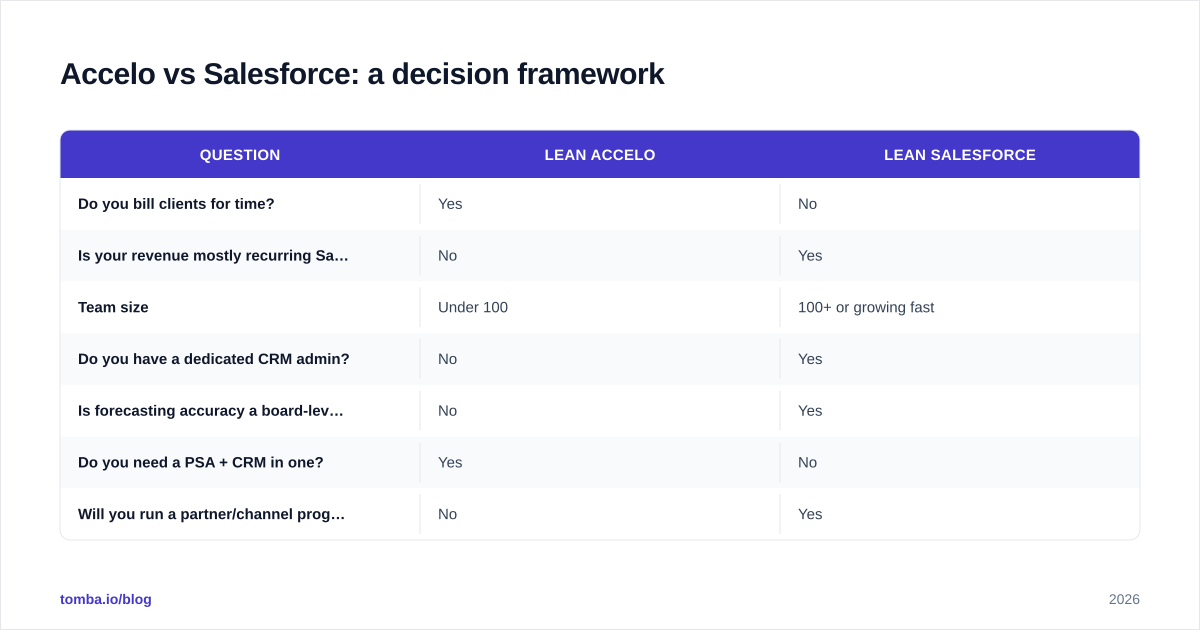
Accelo vs Salesforce: a decision framework#
A simple way to think about it, sorted by the questions that actually predict the choice:
| Question | Lean Accelo | Lean Salesforce |
|---|---|---|
| Do you bill clients for time? | Yes | No |
| Is your revenue mostly recurring SaaS? | No | Yes |
| Team size | Under 100 | 100+ or growing fast |
| Do you have a dedicated CRM admin? | No | Yes |
| Is forecasting accuracy a board-level KPI? | No | Yes |
| Do you need a PSA + CRM in one? | Yes | No |
| Will you run a partner/channel program? | No | Yes |
| Do you sell complex configurable products? | No | Yes |
| Is implementation budget under $25k? | Yes | No |
| Are you replacing 3+ separate tools? | Tied | Tied |
If you answered "Lean Accelo" to six or more questions, the cost-to-value math is on Accelo's side. If you answered "Lean Salesforce" to six or more, you are probably already buying it.
What does a typical stack look like with each one?#
Accelo stack for a 20-person agency: Accelo (CRM + PSA + invoicing) + Google Workspace + Xero + Slack + a focused email finder for outbound + Instantly for sequencing. Total monthly cost: roughly $1,500 for software, no admin headcount.
Salesforce stack for a 50-person SaaS company: Salesforce Enterprise + Sales Engagement + CPQ + Marketing Cloud Account Engagement + Gong +
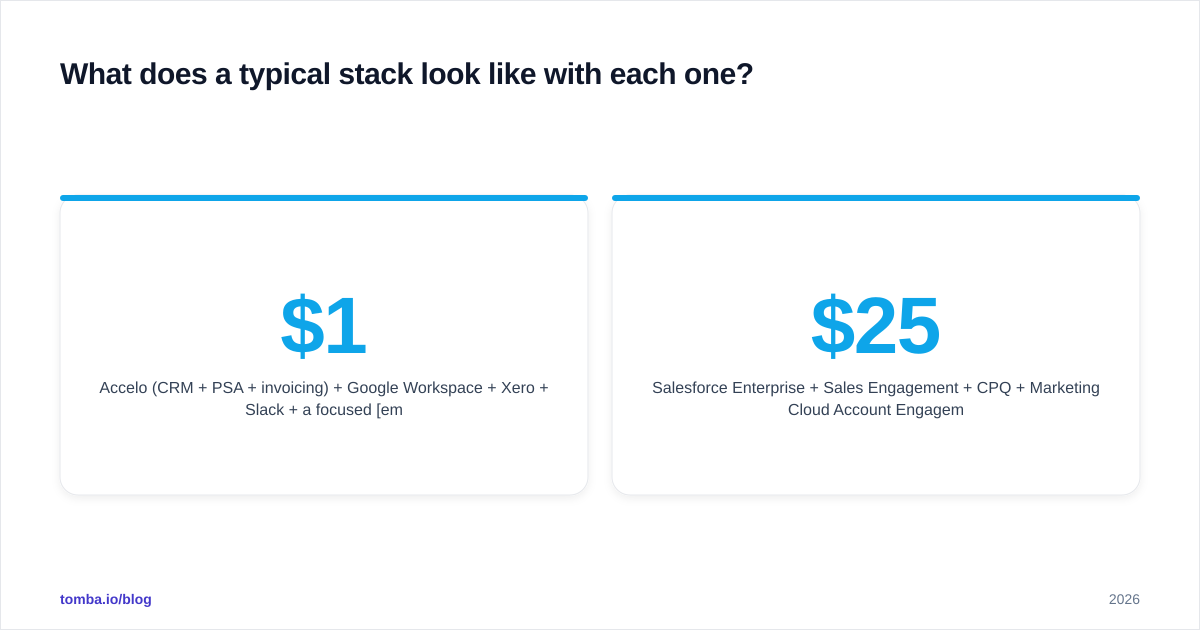
ZoomInfo or B2B database + Outreach + 6sense + dedicated admin headcount. Total monthly cost: easily $25,000–$40,000.
The stack is the point. Accelo collapses the stack; Salesforce extends it.
How do migrations between them usually go?#
Migrating from Accelo to Salesforce is the more common direction — services firms that grow into product companies or add a software arm. The CRM data ports cleanly (accounts, contacts, deals), but the PSA layer does not. Plan for a parallel project-management migration or a Certinia rollout.
The other direction — Salesforce to Accelo — is rarer but cleaner. Most teams making that move are simplifying after a failed Salesforce implementation. Export the standard objects, ignore the custom ones, and rebuild the workflow inside Accelo's native model.
In both cases, dedupe and verify your contact database before moving. A solid email verifier pass will save months of bounced-email cleanup on the other side, and a bulk email finder run can refill any contacts that arrived with missing emails. Migrating dirty data is worse than starting fresh.
What do reviewers actually say?#
Aggregate sentiment from G2 and Capterra in 2026:
- Accelo averages 4.4/5 across roughly 500 reviews. Praise centers on the unified workflow ("one place for everything"), retainer management, and time tracking. Complaints focus on UI density, the learning curve, and mobile.
- Salesforce Sales Cloud averages 4.4/5 across more than 22,000 reviews. Praise centers on customization, ecosystem, and reporting. Complaints focus on cost, complexity, slow implementations, and the need for ongoing admin work.
The scores are nearly identical. The user populations are not. Read the verticals before you weight the reviews — an enterprise reviewer's "easy" is a 20-person agency's nightmare, and vice versa.
So which one should you actually pick?#
Pick Accelo if billable hours are the unit of revenue, your team is under 100 people, and you do not have a CRM admin. The math works, the workflow fits, and you will not be paying for capabilities you never touch.
Pick Salesforce if revenue is recurring or complex, you have or can hire a CRM admin, and the CRM is the system of record across sales, marketing, success, and finance. The cost is real but the leverage scales.
If you are stuck between them, the honest tiebreaker is your finance team. Ask them what they would prefer to invoice from. The answer is usually the right CRM choice.
Keep the pipeline full no matter which CRM you pick#
Whichever CRM you land on, the limiting factor is rarely the software — it is the pipeline feeding it. Empty pipelines kill the best CRM implementations.
Tomba's Email Finder delivers verified B2B emails by domain, company, or name, plugs straight into both Accelo and Salesforce through Zapier or direct API, and starts at a free tier with 25 searches a month. The Starter plan is $49/month for 1,000 searches, which is enough to keep a small sales team busy. Spin it up alongside your CRM rollout, and you will spend the implementation period filling the pipeline instead of waiting for it.
// get started
Find, verify and enrich your first contacts today
Start on the free plan with 25 searches a month, then scale when your team is ready.
Free plan · No credit card required · GDPR & CCPA
// about the author