Account Based Marketing Google Ads: 2026 ABM Playbook
Most ABM teams pour money into LinkedIn and ignore Google Ads. That's a mistake. Here's how to run account based marketing on Google Ads in 2026 — targeting, bidding, creative, and measurement.
Account based marketing google ads sounds like a contradiction. ABM is supposed to be precise — 200 named accounts, one buying committee at a time. Google Ads is supposed to be a firehose — millions of queries, anonymous traffic, bid-and-pray. Most B2B teams treat them as separate worlds: LinkedIn for ABM, Google Ads for demand capture, and a Slack channel where the two teams quietly resent each other.
That's leaving pipeline on the table. In 2026, Google Ads has enough account-level targeting controls — Customer Match, company-name search, IP-based audiences via third parties, and signal-rich Performance Max — to be a real ABM channel. Done right, it's cheaper per meeting than LinkedIn and reaches accounts at the exact moment they're researching a solution.
This post is the playbook. Targeting, bidding, creative, measurement, and the specific mistakes that waste the budget.
TL;DR#
- ABM on Google Ads works when you stop running it like demand-gen. Tight account lists, branded competitor terms, and Customer Match are the levers.
- Customer Match is the foundation — upload your target account list as personal emails (gathered from a B2B database or data enrichment), layer it on every campaign, and bid up by 300-500%.
- Run three campaign types in parallel: branded competitor search, intent keywords with audience overlay, and Performance Max with audience signals.
- Measure account engagement, not clicks. Pipeline influenced beats CPC every time.
- Budget split: 60% to top-50 accounts, 30% to next 150, 10% to surround-sound display. Anything else dilutes the ABM thesis.
What is account based marketing on Google Ads?#
ABM on Google Ads means using paid search and display to reach a named list of target accounts — not anyone with a relevant query. You're not trying to capture every "CRM software" search. You're trying to make sure that when a director at one of your 200 target accounts searches "CRM software" or your competitor's brand name, your ad shows up and the bid is high enough to win the auction.
The mechanics are different from LinkedIn ABM. LinkedIn lets you target by company name directly. Google Ads doesn't — it has no native "show this ad only to people at Acme Corp" toggle. Instead, you stack signals: Customer Match lists, in-market audiences, company-name keywords for branded plays, and RLSA (remarketing lists for search ads) layered over broad terms. Each signal narrows the auction toward your target accounts.
The result is a hybrid: the reach of paid search with the precision of ABM. You spend more per click than a generic demand-gen campaign, but you waste less, and the accounts you reach are the ones your sales team actually wants meetings with.
Why does Google Ads belong in your ABM stack?#
Three reasons most ABM teams underweight Google Ads.
Intent is real. When a VP of Sales at your target account searches "Salesforce alternatives," that's the highest-intent signal you'll ever get. LinkedIn shows ads to people scrolling for entertainment. Google shows ads to people actively solving a problem. The conversion delta is significant.
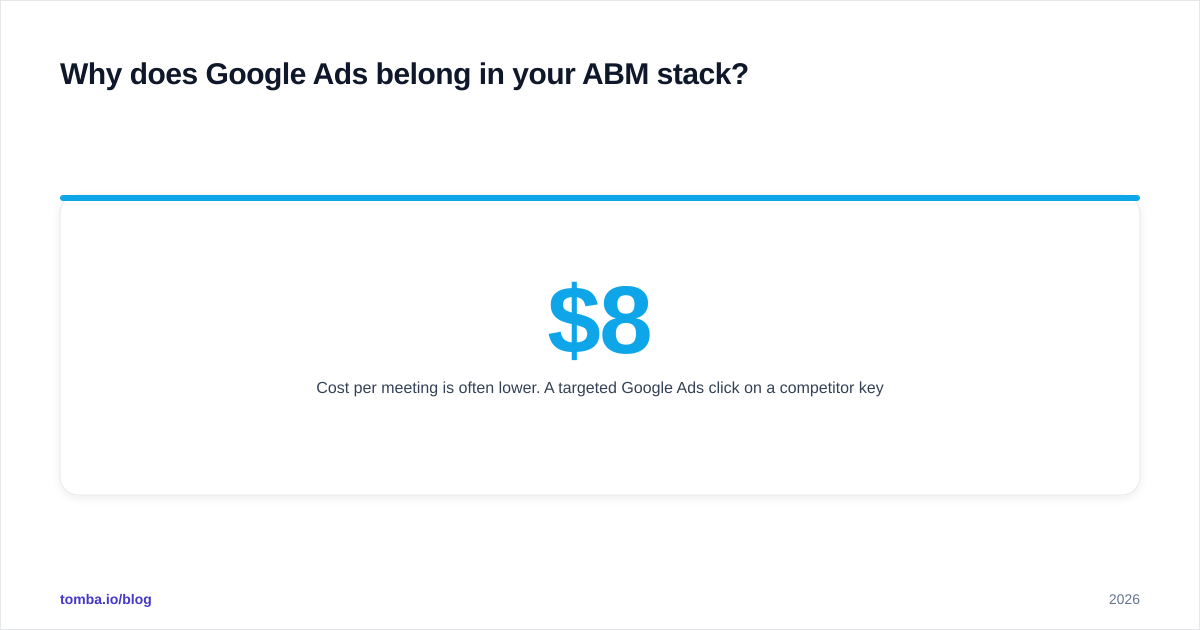
Cost per meeting is often lower. A targeted Google Ads click on a competitor keyword runs $8-25 in most B2B categories. A LinkedIn ABM click runs $12-40 with worse intent. Add in the fact that branded competitor searches convert 3-5x better than cold LinkedIn impressions, and the unit economics tilt toward search for high-intent moments.
Buying committee coverage. Most ABM platforms reach 1-3 personas per account. Google Ads reaches everyone in the account who searches — procurement, security, the CFO doing due diligence. That's the long tail of the buying committee that LinkedIn-only ABM misses.
According to Gartner research, the average B2B purchase involves 6-10 stakeholders. If your ABM only touches the economic buyer, the deal stalls at legal review. Google Ads is the channel that catches the rest of the committee mid-research.
How do you build the target account list for Google Ads ABM?#
The list comes first. Google Ads can't do ABM if you don't know who the accounts are.
Start with your ICP definition: industry, employee count, tech stack, revenue band, geography. Pull a list of 200-500 accounts that match. If your CRM doesn't have this clean, use a B2B database to build it from scratch — filter by firmographics, export company domains and employee email addresses, deduplicate against current customers.
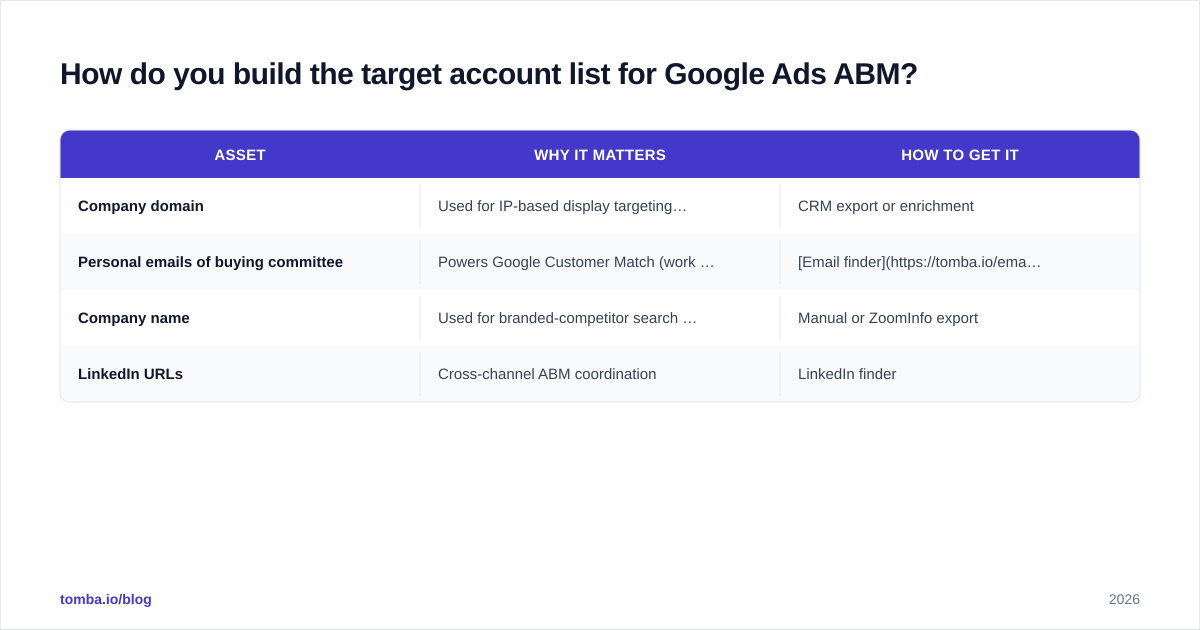
For each account, you need three things:
| Asset | Why it matters | How to get it |
|---|---|---|
| Company domain | Used for IP-based display targeting via DSPs | CRM export or enrichment |
| Personal emails of buying committee | Powers Google Customer Match (work emails fail) | Email finder + verifier |
| Company name | Used for branded-competitor search keywords | Manual orZoomInfo export |
| LinkedIn URLs | Cross-channel ABM coordination | LinkedIn finder |
The personal email piece is where most teams stuck. Google Customer Match matches on personal Gmail/Yahoo addresses, not work emails — Google can't match a work email back to a logged-in user, because most people don't sign into Google with their work address. You need the prospect's personal Gmail or similar. Tools like Tomba's reverse email lookup and enrichment APIs help fill this gap, but expect a 30-50% match rate at best. That's still enough to make Customer Match worthwhile.
What are the campaign structures that actually work?#
Three campaigns. Run them in parallel. Don't blur them.
Campaign 1 — Branded competitor search#
Bid on your competitors' brand names: "salesforce", "hubspot", "outreach.io". Apply your Customer Match list as a targeting layer (not observation) so only logged-in users from your target accounts see the ad. This is your highest-intent, highest-conversion campaign.
Expected metrics: CTR 4-8%, CVR to demo 8-15%, CPL $80-200.
Campaign 2 — Intent keywords with audience overlay#
Bid on generic category terms: "best CRM", "sales engagement platform", "ABM tools". Layer Customer Match + in-market audiences + RLSA. Without the audience layer this is generic demand-gen — with it, you're paying for clicks only from target accounts or known visitors.
Expected metrics: CTR 2-4%, CVR 3-6%, CPL $150-400.
Campaign 3 — Performance Max with audience signals#
Feed Pmax your Customer Match list as an audience signal (not exclusion). Pmax uses it as a strong seed to find lookalike behavior across YouTube, Discover, Gmail, and Search. This is your surround-sound layer. It will spend less efficiently than the first two but it covers display + video + Gmail without you running each manually.
Expected metrics: vary wildly — measure on assisted conversions, not last-click.
How should you bid and budget across these campaigns?#
Bidding strategy decides whether ABM economics work or not.
For Campaign 1 (branded competitor), use Target CPA. You know what a qualified meeting is worth — set CPA at 30-50% of LTV/payback target. Don't use Maximize Conversions on competitor terms; it'll overspend on low-quality clicks.
For Campaign 2 (intent + audience), use Manual CPC with portfolio bid adjustments. Bid +300% on the Customer Match audience. Bid 0 (or exclude) on everyone else. This forces the auction toward your accounts.
For Campaign 3 (Pmax), use Target ROAS if you have offline conversion data flowing back. Otherwise Maximize Conversion Value with a CPA ceiling.
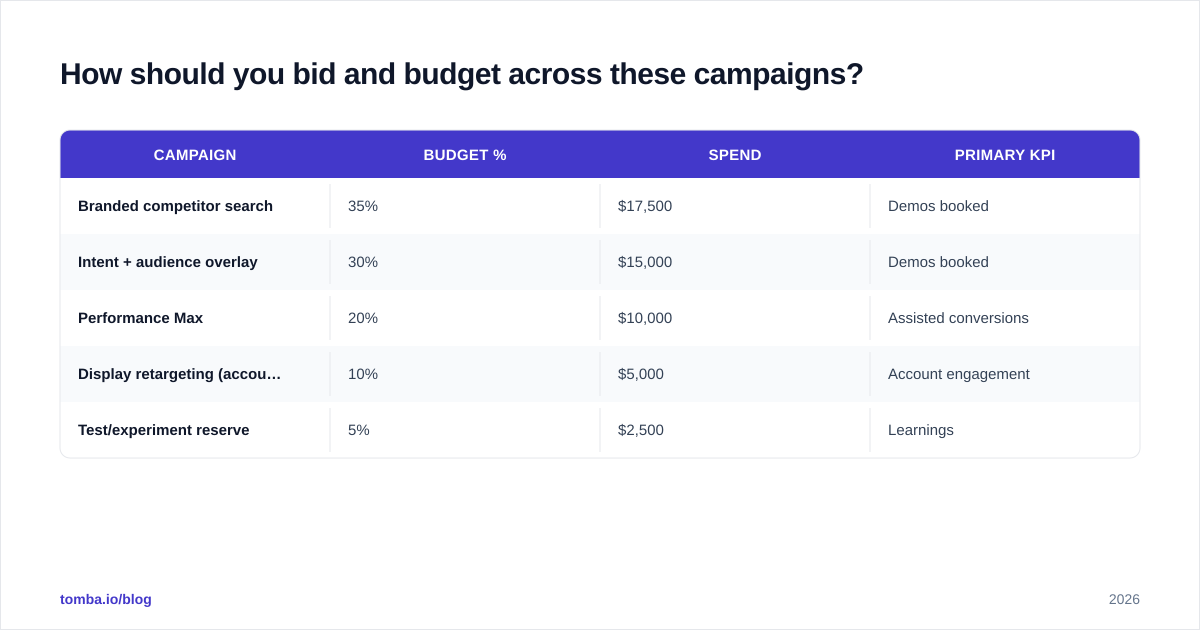
Budget split for a $50k/quarter ABM Google Ads program:
| Campaign | Budget % | Spend | Primary KPI |
|---|---|---|---|
| Branded competitor search | 35% | $17,500 | Demos booked |
| Intent + audience overlay | 30% | $15,000 | Demos booked |
| Performance Max | 20% | $10,000 | Assisted conversions |
| Display retargeting (account list) | 10% | $5,000 | Account engagement |
| Test/experiment reserve | 5% | $2,500 | Learnings |
The 5% experiment reserve is non-negotiable. Things change — Google's audience match rate drops, a competitor launches a brand campaign, a new keyword opens up. You need budget that isn't accountable to a quota to test these.
How do you measure ABM Google Ads without lying to yourself?#
Last-click attribution kills ABM measurement. Pmax got the click, but the deal closed because LinkedIn warmed the account, an SDR called, and a webinar invitation got opened. If you optimize on last-click, you'll kill the campaigns that actually drive pipeline.
Three metrics that matter for ABM Google Ads:
- Target account reach — what % of your named list saw an ad in the last 30 days? This is the awareness metric. Pull it from Customer Match audience size reports + display impression logs.
- Account engagement score — how many unique users per account clicked, visited high-value pages (pricing, demo, security), or returned within 14 days? Build this in your CRM or RevOps stack.
- Pipeline influenced — closed-won deals where any contact at the account had a Google Ads touch in the 90 days before the opportunity created. Multi-touch attribution, not last-click.
Tooling matters here. Google Ads' built-in "Conversions" report won't give you account-level rollup. You need either a Google Ads + CRM integration (HubSpot, Salesforce, Pipedrive), a reverse IP tool to identify anonymous account visits, or both. Tomba's website visitor reveal identifies anonymous traffic by company so you can attribute clicks back to target accounts even when the user doesn't convert on first visit.
What creative and landing pages does ABM Google Ads need?#
Generic landing pages waste ABM budget. If a CRO at a target account clicks your ad, they should land on a page that knows it's them.
Three creative principles:
Account-specific ad copy where possible. For top-20 accounts, write IF-function ads that swap industry or job title based on the audience that triggered the impression. RSA headlines like "{Industry} Teams: See Why 4 of 5 Top Brands Switched" outperform generic copy by 30-60%.
Personalized landing experiences. Use a tool like Mutiny, RB2B, or a homegrown reverse-IP lookup to swap the hero image, customer logos, and case study on landing pages based on the visiting company's industry or named account.
Sales-team-aware CTAs. A target account CRO shouldn't see "Start Free Trial" — they should see "Talk to a [Industry] Specialist." Route those leads directly to a named AE, not the SDR queue.
Don't over-engineer this on day one. Get the targeting and bidding right first. Personalized landing pages are a Phase 2 investment after you've proven the channel works for at least one quarter.
What are the biggest mistakes teams make?#
The traps that burn budget without producing pipeline.
Treating Customer Match as a bid modifier instead of a targeting layer. "Observation" mode lets anyone see the ad — you're just measuring what target accounts do. "Targeting" mode restricts the ad to those accounts. Most teams set it wrong and wonder why CPCs are still low.
Bidding on competitor brand without trademark policy review. Google's trademark policy allows bidding on competitor names but not always using them in ad text. Read the rules or get a cease-and-desist.
Ignoring negative keywords. A "CRM" search from someone at a target account might be a student doing research. Pile up negative keywords: "free", "tutorial", "salary", "jobs", "definition". Review the search terms report weekly for the first month.
Running Pmax without conversion guardrails. Pmax will spend on YouTube placements that have nothing to do with B2B if you don't constrain it with audience signals and conversion goals. It also cannibalizes branded search if you don't add brand-keyword exclusions (now possible via account-level negative keyword lists).
Measuring on form fills. ABM converts on meetings booked and pipeline created, not whitepaper downloads. If your conversion event is "downloaded ebook," you'll optimize toward students and competitors.
Skipping the sales handoff. A CRO from a target account just clicked your ad. The AE owning that account should know within an hour. Most teams have no alert system. Build one. Slack integrations and CRM workflows can fire alerts when a target-account contact converts.
How does ABM Google Ads compare to LinkedIn ABM?#
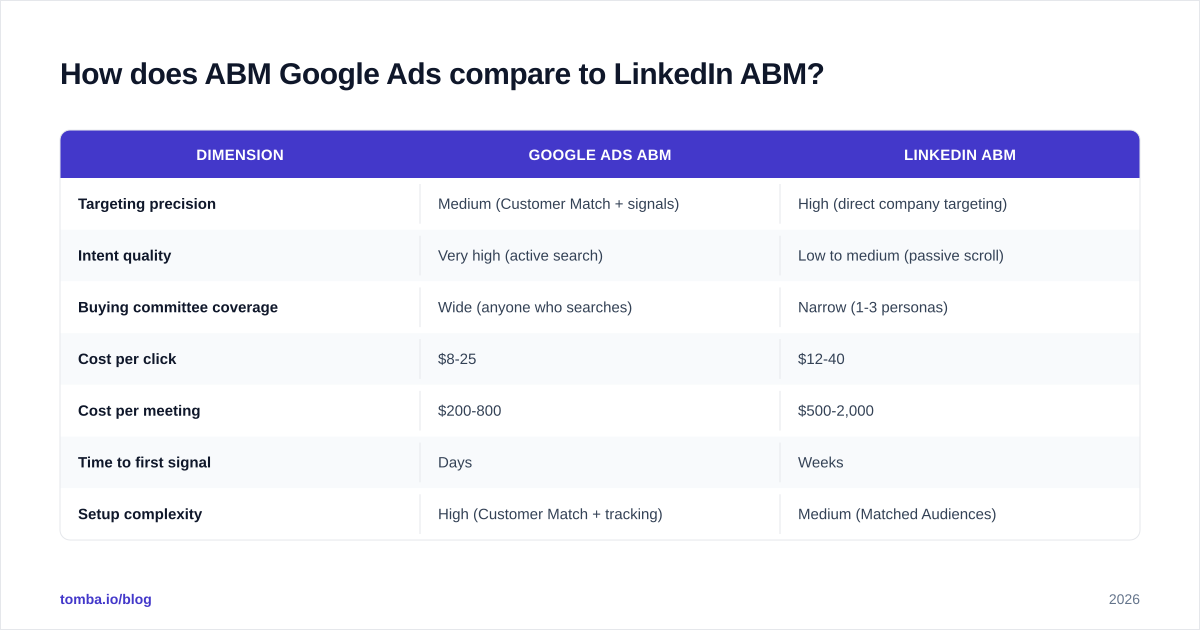
A fair comparison, since most teams are choosing between them or running both.
| Dimension | Google Ads ABM | LinkedIn ABM |
|---|---|---|
| Targeting precision | Medium (Customer Match + signals) | High (direct company targeting) |
| Intent quality | Very high (active search) | Low to medium (passive scroll) |
| Buying committee coverage | Wide (anyone who searches) | Narrow (1-3 personas) |
| Cost per click | $8-25 | $12-40 |
| Cost per meeting | $200-800 | $500-2,000 |
| Time to first signal | Days | Weeks |
| Setup complexity | High (Customer Match + tracking) | Medium (Matched Audiences) |
| Best for | Bottom-funnel + competitor capture | Top-funnel awareness + nurture |
The answer is almost always both, but Google Ads first if you have a list of accounts already showing intent. LinkedIn is better for accounts that don't yet know they have a problem. Google Ads is better for accounts that do.
For a more nuanced breakdown of ABM tooling categories, Forrester's B2B marketing research is the standard reference, and G2's ABM platform category shows the vendors people are actually buying.
What does a 90-day ABM Google Ads rollout look like?#
Realistic timeline if you're starting from zero.
Days 1-15 — list and tracking. Build the target account list (or import from CRM). Source personal emails for Customer Match using bulk email finder or enrichment. Upload to Google Ads as Customer Match audience. Wait 7-14 days for the audience to populate (Google says 48h, reality is longer). Set up offline conversion imports from your CRM.
Days 15-30 — Campaign 1 live. Launch branded competitor search with Customer Match as targeting layer. Tight budget, conservative bids, daily check-ins on search terms. Don't launch Campaigns 2 or 3 yet — prove the targeting works first.
Days 30-60 — scale and add campaigns. Add Campaign 2 (intent + audience overlay) once Campaign 1 has at least 30 conversions to learn from. Run Campaign 3 (Pmax) only after offline conversion data is reliably flowing.
Days 60-90 — optimize and report. Build the account engagement dashboard. Hold a weekly review with sales to QA which target accounts engaged. Sunset campaigns or keywords that aren't producing account-level signals.
By day 90 you'll know if Google Ads belongs in your ABM mix. Most teams find it produces 20-35% of total ABM pipeline at 60-70% of the per-meeting cost of LinkedIn.
Putting it together#
Account based marketing on Google Ads isn't a contradiction once you stop running search like demand-gen. The recipe: tight account list, Customer Match as targeting, branded competitor plus intent-with-audience plus Pmax in parallel, bid up hard on known accounts, measure on pipeline not clicks.
The bottleneck for most teams isn't the Google Ads side — it's the list. You can't run ABM on Google Ads if you don't have clean personal emails, verified domains, and current job titles for your target accounts. That's where most programs stall.
Tomba's Email Finder is built for this exact job: feed it a list of companies and roles, get back verified emails (personal where available, work as fallback), domain patterns for outbound, and contact enrichment to keep your Customer Match lists fresh. Start with the free tier (25 searches/month), then scale to Starter at $49/mo when your ABM list crosses 200 accounts. That's the foundation the rest of the playbook sits on.
// get started
Find, verify and enrich your first contacts today
Start on the free plan with 25 searches a month, then scale when your team is ready.
Free plan · No credit card required · GDPR & CCPA
// about the author