How to Build a Target Account List in 2026 (Step by Step)
A target account list is the foundation of every outbound program. Here's how to build one in 2026 that your reps actually want to work — with tiers, data, and a repeatable refresh loop.
A target account list is the single highest-leverage artifact in outbound sales — and the one most teams get wrong. Get it right and your reps spend their hours on companies that can actually buy. Get it wrong and you fund a year of activity against accounts that were never a fit.
This guide walks through building an account list in 2026 the way disciplined revenue teams do it: tied to a real ICP, scored and tiered, sourced from clean data, and refreshed on a schedule instead of rotting in a spreadsheet.
TL;DR#
- An account list is a curated set of companies that match your Ideal Customer Profile (ICP) and are worth coordinated sales and marketing effort.
- Build it in five steps: define the ICP, set firmographic and signal filters, source and enrich data, score and tier, then assign and refresh.
- Tier accounts (1/2/3) so reps know where to spend deep research versus light-touch automation.
- Data decay is the silent killer — 25–30% of B2B contact data goes stale yearly, so a refresh loop matters more than the initial build.
- Tools like a domain search and data enrichment turn a raw company list into a workable, contactable account list.
What is a target account list?#
A target account list is a deliberately chosen set of companies — not contacts — that your go-to-market team agrees are worth pursuing. Think of it as a guest list for an exclusive dinner: you don't invite everyone in the city, you invite the people who'll actually enjoy the meal and can pick up the check.
The shift from lead-based to account-based selling is what makes the list matter. In a lead model you chase whoever fills out a form. In an account model — the backbone of account-based marketing — you decide up front which companies deserve coordinated outbound, ads, and SDR effort, then go win them on purpose.
A good account list answers three questions for every rep who opens it:
- Who are we going after (company, size, industry, location)?
- Why this account (the signal or fit reason it earned a spot)?
- How hard do we work it (tier, owner, play)?
Why does a target account list beat a bought lead list?#
Because a bought list optimizes for volume, and an account list optimizes for fit. Those are different goals that produce very different pipelines.
A purchased CSV of 50,000 "decision makers" feels productive. But you didn't choose those companies — a vendor did, usually by scraping loosely matched filters. Your reps burn hours personalizing emails to accounts that will never buy, deliverability suffers from high bounce rates, and your CRM fills with noise that poisons every downstream report.

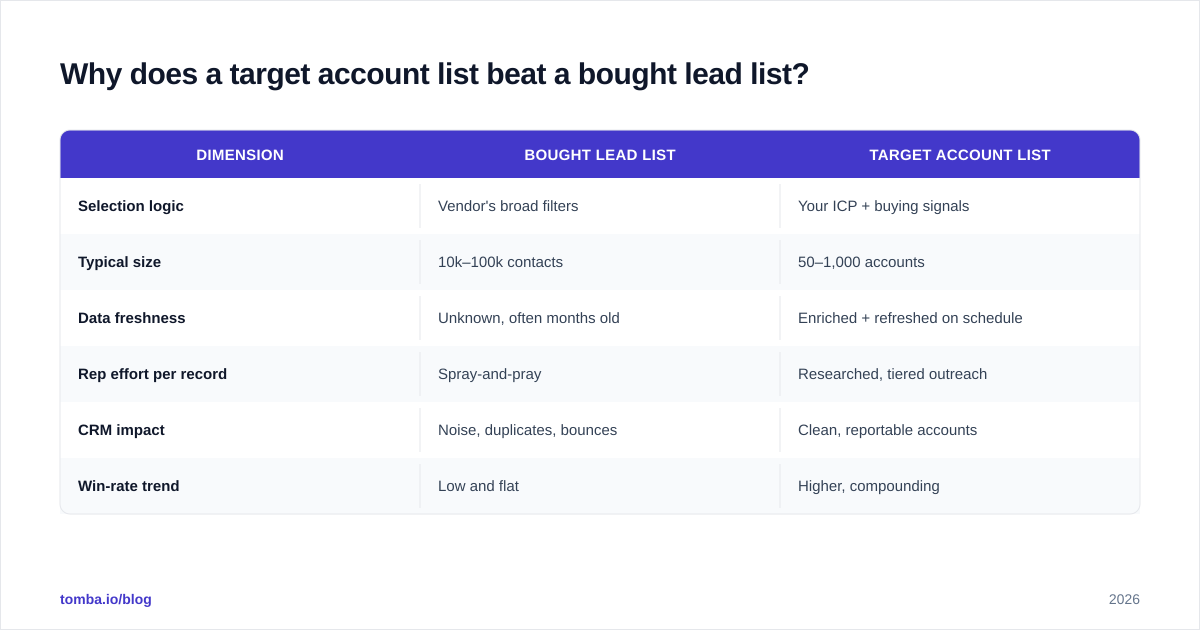
An account list flips the economics. Fewer, better companies mean reps can do real research, marketing can run targeted ads, and leadership can actually forecast against a known universe. Here's the contrast:
| Dimension | Bought lead list | Target account list |
|---|---|---|
| Selection logic | Vendor's broad filters | Your ICP + buying signals |
| Typical size | 10k–100k contacts | 50–1,000 accounts |
| Data freshness | Unknown, often months old | Enriched + refreshed on schedule |
| Rep effort per record | Spray-and-pray | Researched, tiered outreach |
| CRM impact | Noise, duplicates, bounces | Clean, reportable accounts |
| Win-rate trend | Low and flat | Higher, compounding |
The account list wins on every line that ties to revenue. The lead list only wins on raw count — a vanity metric.
How do you define the ICP behind the list?#
Start with your best customers, not your dream customers. Pull the 20–30 accounts that closed fastest, retained longest, and expanded most. The patterns in that cohort are your real ICP — far more reliable than a whiteboard guess.
Look for shared attributes across several dimensions:
- Firmographics: industry, employee count, revenue band, geography.
- Technographics: the tools they already run (a CRM, a specific cloud, a competing product you replace).
- Buying signals: hiring for relevant roles, recent funding, leadership changes, product launches.
- Pain triggers: the event that makes your solution urgent rather than nice-to-have.
Write the ICP as exclusion rules, not just inclusion rules. "Companies with 50–500 employees in North American SaaS, excluding sub-$2M revenue and agencies" is a usable filter. "Mid-market tech companies" is a wish. If you want a shared vocabulary across the team, keep a working definition of terms like marketing qualified lead so sales and marketing score accounts the same way.
How do you source and enrich account data?#
Once the ICP is defined, you need to populate the list — and this is where most lists either come alive or quietly die.
Step 1 — Build the company universe. Use a B2B database, industry directories, conference attendee lists, and your CRM's closed-lost pile (re-engaging old losses is cheaper than net-new). Filter to the firmographics in your ICP.
Step 2 — Find the right contacts at each account. A company name is not a target; the buying committee is. For each account, identify the economic buyer, the champion, and the blockers. A domain search returns the email patterns and named contacts behind a company domain, so you go from "Acme Corp" to the four people who actually decide.
Step 3 — Enrich and verify. Append titles, seniority, location, and verified contact details, then confirm the emails are deliverable before they touch a sequence. Running addresses through an email verifier keeps bounce rates low and protects your sender reputation — a bounced cold email costs you far more than the minute it took to check.
For larger universes, do this in batches rather than one record at a time. A bulk email finder processes hundreds of accounts at once and writes verified contacts straight back to your list, which turns a multi-day chore into an afternoon.
How should you score and tier the account list?#
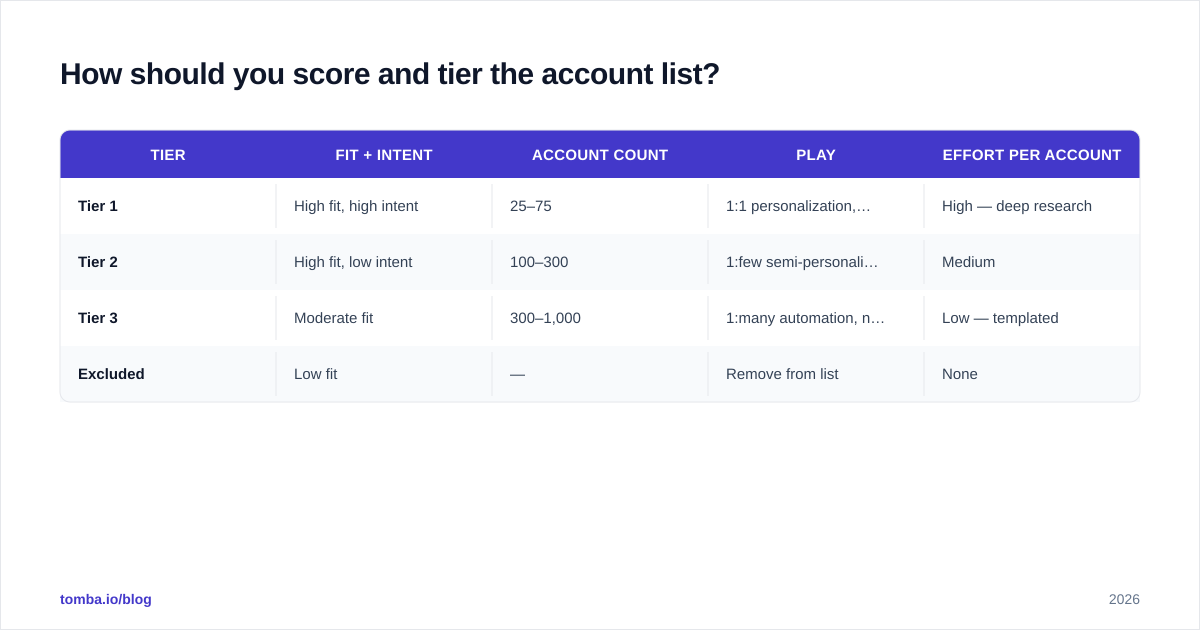
Score on two axes — fit and intent — then collapse the result into three tiers your reps can act on without a meeting.
Fit measures how well an account matches your ICP (firmographics, tech stack, segment). Intent measures whether they're showing buying behavior right now (site visits, hiring, funding, content engagement). An account high on both is a Tier 1; high fit but quiet intent is Tier 2; weak on both shouldn't be on the list at all.
| Tier | Fit + intent | Account count | Play | Effort per account |
|---|---|---|---|---|
| Tier 1 | High fit, high intent | 25–75 | 1:1 personalization, multi-channel, exec involvement | High — deep research |
| Tier 2 | High fit, low intent | 100–300 | 1:few semi-personalized sequences | Medium |
| Tier 3 | Moderate fit | 300–1,000 | 1:many automation, nurture | Low — templated |
| Excluded | Low fit | — | Remove from list | None |
This tiering is what stops reps from treating a 5,000-account list as one undifferentiated wall. It tells them exactly where to spend a research hour and where to let automation carry the load. For a deeper breakdown of qualification mechanics, frameworks like HubSpot's lead scoring guide map cleanly onto account scoring.
How do you keep the account list from going stale?#
Treat the list as a living system, not a one-time export — because data decays whether you maintain it or not.
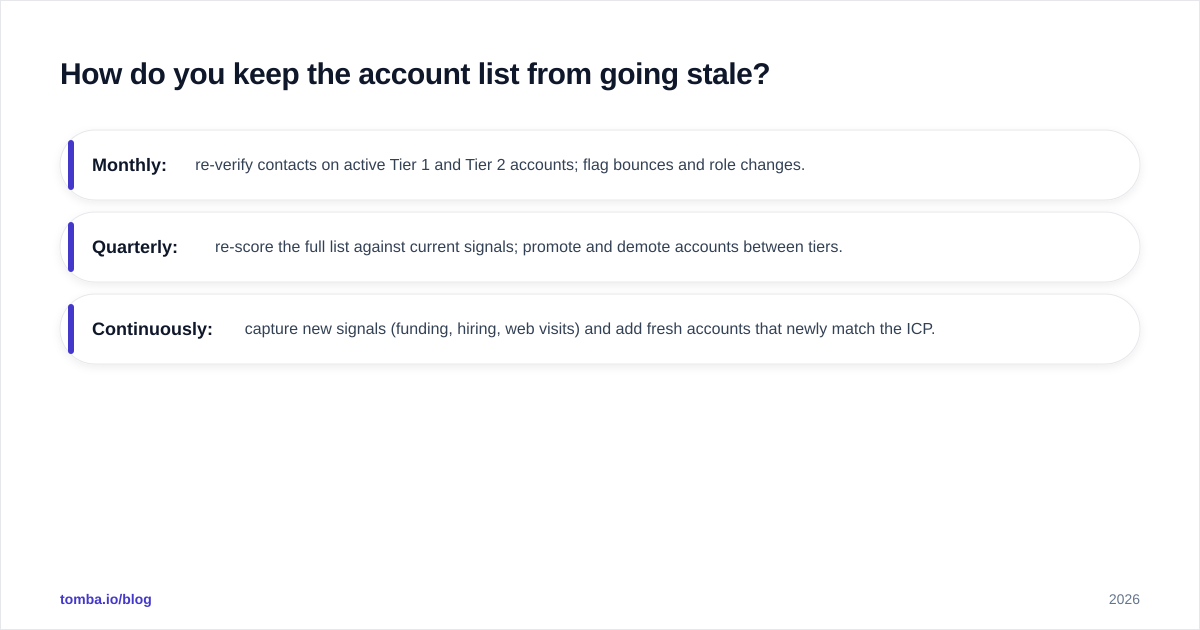
People change jobs, companies merge, domains get retired, and titles shift. Industry estimates put B2B data decay at roughly 25–30% per year, which means a list you built in January is meaningfully wrong by summer. The fix is a refresh loop:
- Monthly: re-verify contacts on active Tier 1 and Tier 2 accounts; flag bounces and role changes.
- Quarterly: re-score the full list against current signals; promote and demote accounts between tiers.
- Continuously: capture new signals (funding, hiring, web visits) and add fresh accounts that newly match the ICP.

Automate the verification and enrichment legs so this isn't manual grunt work. Wiring an enrichment step into your CRM via native integrations means new accounts get contact data appended the moment they land, and stale records get re-checked on a cadence without anyone remembering to do it.
What are the most common account list mistakes?#
Even teams that build a list correctly tend to undermine it in predictable ways:
- Too big. A 10,000-account "target" list is just a lead list wearing a costume. If reps can't name their Tier 1 accounts from memory, the list is too large.
- No owner. Every account needs a clear rep or pod assigned. Unowned accounts get worked by everyone and no one.
- Set and forget. The biggest one — building the list once and never refreshing it. Decay does the rest.
- Fit without intent. Loading the list with perfect-fit accounts that show zero buying behavior produces polite rejections at scale.
- Skipping verification. Pushing unverified emails into sequences spikes bounces and quietly throttles your email deliverability for every other send.
- No feedback loop. Reps see reality before the data does. If they can't easily flag "wrong contact" or "company acquired," your list drifts from the truth.
Avoiding these isn't complicated — it's discipline. The teams that win at account-based selling aren't the ones with the fanciest tools; they're the ones who keep a tight, owned, fresh list and actually work it.
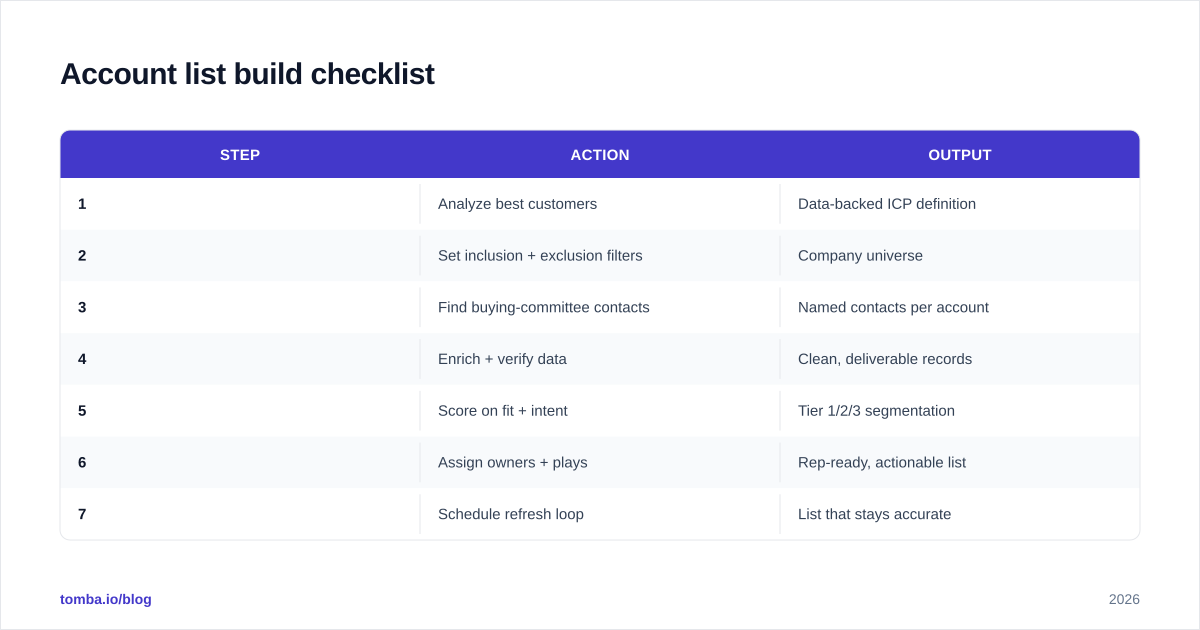
Account list build checklist#
Use this as the operating sequence whenever you stand up or rebuild a list:
| Step | Action | Output |
|---|---|---|
| 1 | Analyze best customers | Data-backed ICP definition |
| 2 | Set inclusion + exclusion filters | Company universe |
| 3 | Find buying-committee contacts | Named contacts per account |
| 4 | Enrich + verify data | Clean, deliverable records |
| 5 | Score on fit + intent | Tier 1/2/3 segmentation |
| 6 | Assign owners + plays | Rep-ready, actionable list |
| 7 | Schedule refresh loop | List that stays accurate |
Print it, pin it, run it. A list built this way pays back every hour you put into it because your reps stop guessing and start working accounts that can actually close.
Build your account list with verified data#
Your account list is only as good as the contact data behind it. A perfectly tiered list of companies is worthless if your reps can't reach the right people — or if half the emails bounce.
That's where Tomba's Email Finder fits. Point it at the domains on your target list and it returns verified, deliverable contacts for the buying committee — by domain, name, or company — so every account on your list becomes immediately workable. Pair it with bulk processing and CRM enrichment, and you go from a static spreadsheet to a living, contactable account list in a single pass.
Start on the free tier (25 searches a month), then scale to Starter at $49/mo or Growth at $99/mo as your list grows — see full Tomba pricing for the breakdown. Build the list once, keep it fresh, and let your reps spend their time selling instead of hunting for emails.
// get started
Find, verify and enrich your first contacts today
Start on the free plan with 25 searches a month, then scale when your team is ready.
Free plan · No credit card required · GDPR & CCPA
// about the author