Account Manager Email Templates: 12 Proven Examples for 2026
Twelve copy-paste account manager email templates for onboarding, QBRs, renewals, upsells, and churn saves — plus a framework for personalizing each one so it actually gets a reply.
Account management lives and dies by email. Not the flashy pitch — the steady, well-timed message that keeps a client feeling looked after between calls. Get those emails right and renewals feel automatic. Get them wrong and you find out a logo churned from a Slack message you weren't on.
This guide gives you 12 account manager email templates you can paste in today, a framework for personalizing them so they don't read like mail merge, and a clear map of which template to send at which moment in the lifecycle.
TL;DR#
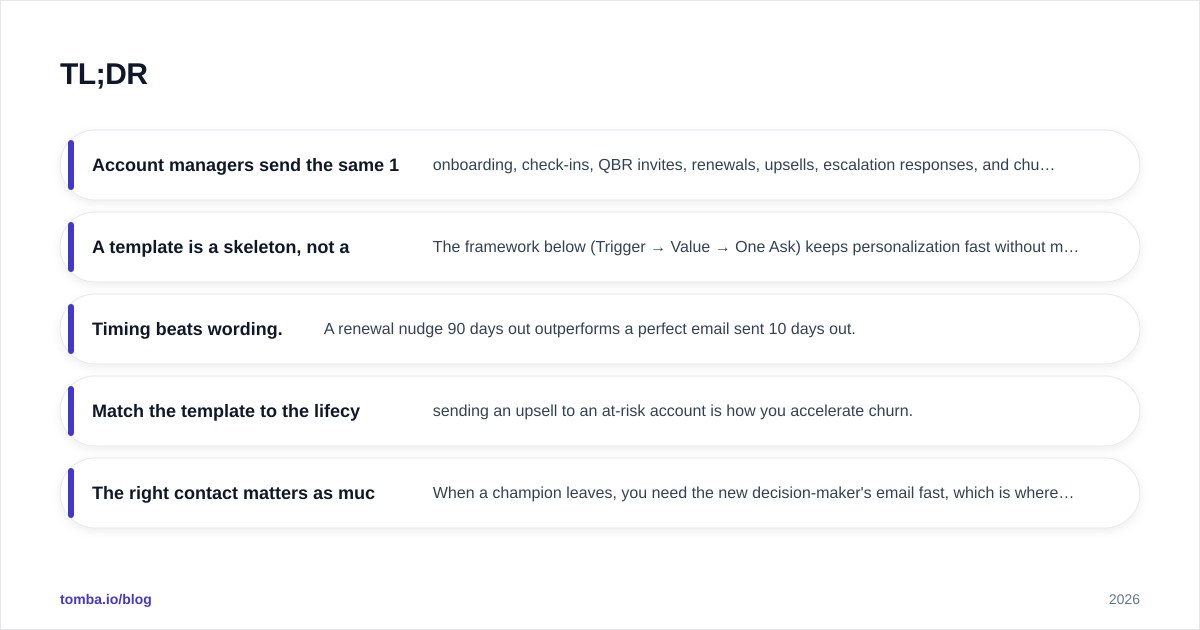
- Account managers send the same 12 emails over and over — onboarding, check-ins, QBR invites, renewals, upsells, escalation responses, and churn saves. Templating them saves hours and raises consistency.
- A template is a skeleton, not a script. The framework below (Trigger → Value → One Ask) keeps personalization fast without making every email from scratch.
- Timing beats wording. A renewal nudge 90 days out outperforms a perfect email sent 10 days out.
- Match the template to the lifecycle stage — sending an upsell to an at-risk account is how you accelerate churn.
- The right contact matters as much as the right words. When a champion leaves, you need the new decision-maker's email fast, which is where a tool like the Tomba Email Finder earns its keep.
Why do account managers need email templates?#
Because the cost of a blank cursor is paid in revenue. The average account manager owns 20 to 50 accounts. If each account needs a monthly touch, a quarterly business review, a renewal sequence, and the occasional fire drill, you are writing well over a hundred meaningful emails a month. Writing each from scratch is not "personal" — it is slow, inconsistent, and the first thing to get dropped when your week gets loud.
Templates fix three problems at once. They make sure every client gets the same baseline of care regardless of how busy you are. They cut drafting time from 15 minutes to 2. And they give your manager something to coach against — you cannot improve a process that lives only in your head.
The objection is always the same: "templates feel robotic." They only feel robotic when you send them raw. The framework in the next section is what separates a template that lands from one that gets archived unread.
What makes an account manager email actually get a reply?#
Three things, in this order: a relevant trigger, a specific piece of value, and exactly one ask.
Trigger — the reason you are emailing right now. "It's been a while" is not a trigger. "Your usage jumped 40% last month" is. "Your renewal is 90 days out" is. A real trigger tells the client this email is about them, not about your quota.
Value — what's in it for them before you ask for anything. A benchmark, a feature they're not using, a risk you spotted, a win you can celebrate. One concrete thing beats three vague ones.
One ask — a single, low-friction next step. "Book 20 minutes here" or "reply yes and I'll set it up." Two asks halve your response rate; three kill it.
Keep account emails under 120 words when you can. Your clients are skimming on a phone between meetings. If your template needs a scroll, it needs a cut. For a deeper read on what moves the needle, our breakdown of email response rate benchmarks is a useful gut-check against your own numbers.
Which template do I send at each lifecycle stage?#
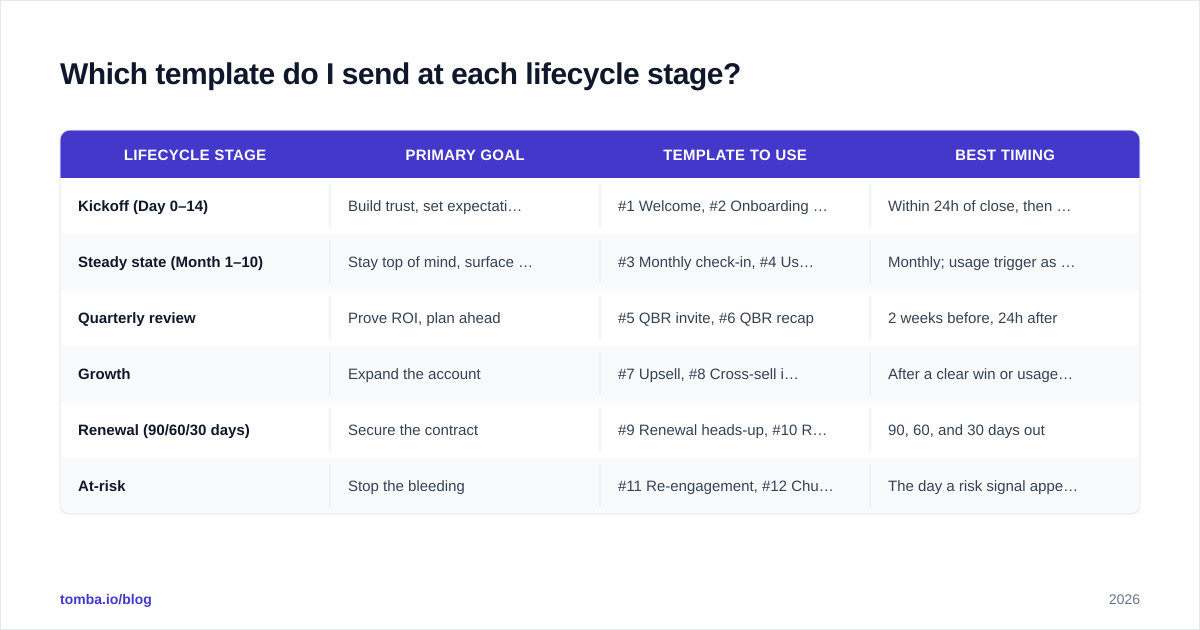
The single most common mistake in account management is sending the right email at the wrong moment. An upsell to a frustrated client is offensive; a churn-save email to a thriving one is confusing. Use this map.
| Lifecycle stage | Primary goal | Template to use | Best timing |
|---|---|---|---|
| Kickoff (Day 0–14) | Build trust, set expectations | #1 Welcome, #2 Onboarding check-in | Within 24h of close, then day 7 |
| Steady state (Month 1–10) | Stay top of mind, surface value | #3 Monthly check-in, #4 Usage insight | Monthly; usage trigger as it fires |
| Quarterly review | Prove ROI, plan ahead | #5 QBR invite, #6 QBR recap | 2 weeks before, 24h after |
| Growth | Expand the account | #7 Upsell, #8 Cross-sell intro | After a clear win or usage spike |
| Renewal (90/60/30 days) | Secure the contract | #9 Renewal heads-up, #10 Renewal close | 90, 60, and 30 days out |
| At-risk | Stop the bleeding | #11 Re-engagement, #12 Churn save | The day a risk signal appears |
The pattern: never skip a stage, and never let a risk signal sit. A drop in logins, a missed QBR, a new competitor mentioned on a call — each is a trigger to move to the at-risk templates immediately.
The 12 account manager email templates#
Copy these, then swap the bracketed fields. The bold label tells you the trigger so you know exactly when to fire each one.
1. The welcome email (deal just closed)#
Subject: Welcome to [Product], [First name] — here's what happens next
Hi [First name],
Thrilled to be working with you and the [Company] team. I'm your point of contact for anything and everything going forward.
Here's what the next two weeks look like: [step 1], [step 2], [step 3]. I've blocked time on [date] for our kickoff — does that still work?
Reply with any questions in the meantime. No question is too small.
[Your name]
2. The onboarding check-in (day 7)#
Subject: Quick pulse check on your first week
Hi [First name], you're a week in. Most teams hit [common early win] by now — are you seeing the same? If anything feels stuck, tell me and I'll jump on it today. One reply is all I need.
3. The monthly check-in (steady state)#
Subject: [Month] check-in — one thing that might help
Hi [First name], quick monthly note. I noticed [specific account detail], and there's a [feature/play] that fits it well. Want me to send a 3-minute walkthrough? Just say the word.
4. The usage-insight email (trigger: data change)#
Subject: Your [metric] is up [X]% — nice work
Hi [First name], your team's [metric] climbed [X]% last month — that puts you in the top [tier] of accounts your size. The fastest way to build on it is [specific next step]. Worth 15 minutes next week?
5. The QBR invitation (2 weeks out)#
Subject: Booking our Q[X] review — ROI + roadmap
Hi [First name], time for our quarterly review. I'll bring your numbers against your goals, a benchmark vs. peers, and what's coming on the roadmap. [Two time options] — which works?
6. The QBR recap (24 hours after)#
Subject: Recap + the 3 things we agreed
Hi [First name], great session. Recap: (1) [outcome], (2) [outcome], (3) [outcome]. I own [action] by [date]; you've got [action]. I'll check in on [date]. Anything I missed?
7. The upsell email (trigger: a clear win)#
Subject: You've outgrown [current plan] — in a good way
Hi [First name], between [win 1] and [win 2], your team is hitting the ceiling of [current plan]. [Higher tier] would unlock [specific benefit tied to their goal]. Want the numbers? I'll put together a side-by-side.
8. The cross-sell intro (trigger: adjacent need)#
Subject: Saw [pain point] come up — there's a fix
Hi [First name], on our last call you mentioned [pain point]. That's exactly what [other product/module] solves. No pressure — but if it's worth a look, I'll set up a 20-minute demo with no slides.
9. The renewal heads-up (90 days out)#
Subject: Your renewal is on [date] — let's make it easy
Hi [First name], your contract renews [date]. Nothing for you to do yet — I just want to review what worked this year and make sure next year's plan fits where [Company] is heading. Free for 30 minutes in the next two weeks?
10. The renewal close (30 days out)#
Subject: Renewal paperwork — 2 minutes to sign
Hi [First name], renewal docs for [date] are ready and reflect everything we discussed: [key term]. Here's the link — [DocuSign/link]. Anything you'd like to adjust before signing? Happy to hop on a call.
11. The re-engagement email (trigger: gone quiet)#
Subject: Still the right time for [their goal]?
Hi [First name], I haven't heard from the team in a bit and want to make sure [Product] is still earning its place. Is [original goal] still a priority? If yes, I have one idea to get momentum back. If not, tell me what changed.
12. The churn-save email (trigger: cancellation signal)#
Subject: Before you decide — can I fix this?
Hi [First name], I heard [Company] is reconsidering. That's on me to address, not to argue with. Can we spend 15 minutes so I understand what's not working? Whatever you decide, I'd rather you make the call with the full picture.
For subject-line variations on any of these, the subject line generator is worth a spin — small wording changes move open rates more than people expect. And if you want a starting library beyond account management, our cold email templates collection covers the top-of-funnel side.
How do I personalize templates without rewriting them every time?#
Personalize three fields, not the whole email. The Trigger → Value → One Ask framework means each template already has the right shape; your job is to make three slots specific.
- The trigger line — replace the generic reason with the real one. This is the single most important edit. "Checking in" becomes "Your renewal is 60 days out and I noticed your support tickets dropped to zero."
- The value detail — name the exact feature, number, or benchmark. Pull it from your CRM or product analytics before you write, not while you write.
- The ask specificity — swap "let's connect" for "Tuesday at 2pm or Thursday at 10am?"
That's three edits, roughly 90 seconds. Everything else stays. The trap is rewriting the greeting and the sign-off, which clients don't read, while leaving the trigger generic, which is the part they do.
A quick tool note: when your champion leaves and you're suddenly emailing a stranger, personalization starts with finding the right person at all. A domain search across the account surfaces the new stakeholders and their verified addresses, so your re-engagement email reaches a human instead of a dead inbox.
What tools make these templates faster to run at scale?#
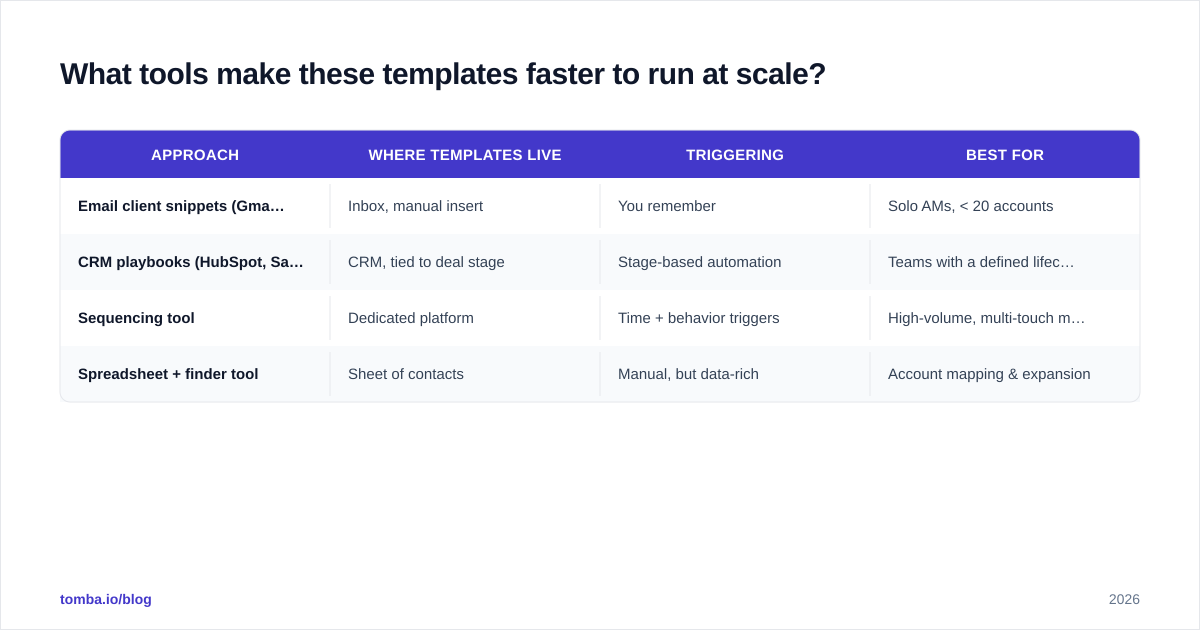
Templates solve the writing problem. Three other problems remain: storing the templates where you'll actually use them, triggering the right one at the right time, and reaching the right contact. Here's how the common approaches compare.
| Approach | Where templates live | Triggering | Best for |
|---|---|---|---|
| Email client snippets (Gmail/Outlook) | Inbox, manual insert | You remember | Solo AMs, < 20 accounts |
| CRM playbooks (HubSpot, Salesforce) | CRM, tied to deal stage | Stage-based automation | Teams with a defined lifecycle |
| Sequencing tool | Dedicated platform | Time + behavior triggers | High-volume, multi-touch motions |
| Spreadsheet + finder tool | Sheet of contacts | Manual, but data-rich | Account mapping & expansion |
Most account managers end up blending two: CRM playbooks for the lifecycle emails (renewals, QBRs) and inbox snippets for the ad-hoc ones. Platforms like HubSpot and Salesforce both let you attach templates to deal stages so the right email surfaces automatically when an account hits renewal or shows a risk signal. If you're comparing options on features and reviews, G2's account management category is a neutral starting point.
The data layer is the piece people forget. Your templates are only as good as the contacts they're sent to. When an account reorganizes — and over a 12-month contract, many will — you need fresh, verified addresses for the new buying committee. Running those names through an email verifier before you send protects your sender reputation and keeps your renewal emails out of the spam folder at the worst possible moment.
How do I measure whether these templates are working?#
Track three numbers per template, not vanity opens. Reply rate (did they engage?), meeting-booked rate (did the ask convert?), and stage-outcome (did the renewal close, the upsell land, the at-risk account recover?). Tag each template in your CRM so you can compare. Within a quarter you'll know which of the 12 pull their weight and which need a rewrite.
The highest-leverage metric for account management specifically is net revenue retention — are your accounts worth more at renewal than at signup? The QBR, usage-insight, and upsell templates are the ones that move it. If those three are getting low reply rates, fix the trigger line first. Nine times out of ten that's the problem, not the offer.
Common mistakes to avoid#
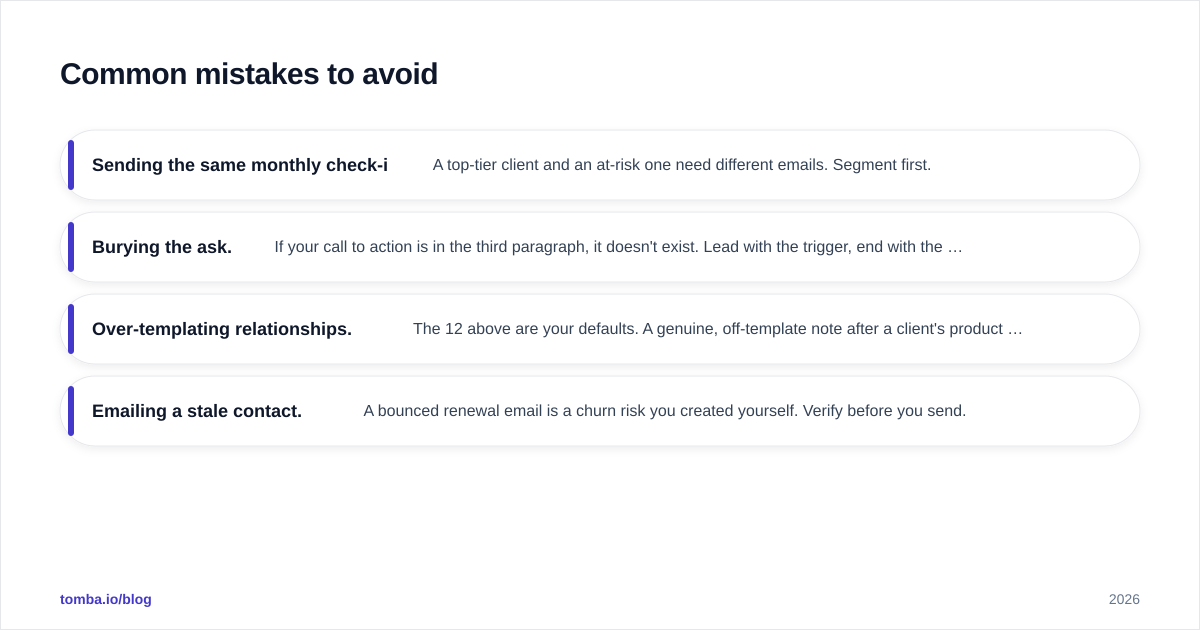
- Sending the same monthly check-in to every account. A top-tier client and an at-risk one need different emails. Segment first.
- Burying the ask. If your call to action is in the third paragraph, it doesn't exist. Lead with the trigger, end with the ask.
- Over-templating relationships. The 12 above are your defaults. A genuine, off-template note after a client's product launch or a personal milestone is worth more than any of them — use templates to free up time for those moments, not to replace them.
- Emailing a stale contact. A bounced renewal email is a churn risk you created yourself. Verify before you send.
Put these templates to work#
Templates remove the friction between you and a consistent, revenue-protecting cadence — but they only work when they reach the right person. When an account reshuffles, a champion moves on, or you're expanding into a new department, you need the new stakeholder's verified email before any of the 12 templates above matter. The Tomba Email Finder turns a name and a company domain into a verified, ready-to-send address in seconds, so your onboarding, renewal, and upsell emails always land in a real inbox. Start free with 25 searches a month, and check the full Tomba pricing when your account list grows — Starter is $49/mo, Growth $99/mo. Pair the right contact with the right template, and renewals stop being something you chase and start being something you close.
// get started
Find, verify and enrich your first contacts today
Start on the free plan with 25 searches a month, then scale when your team is ready.
Free plan · No credit card required · GDPR & CCPA
// about the author