Account Planning Examples: 7 Templates That Win in 2026
Seven real account planning examples and templates you can copy today — from SMB land-and-expand to enterprise multi-threading, with frameworks that map stakeholders and grow revenue.
Account planning is the difference between hoping a key customer renews and engineering the expansion before the competitor even gets a meeting. Yet most "plans" are a slide deck someone updates the night before QBR. This guide gives you seven concrete account planning examples — with the structure, the data, and the moves that make each one work.
TL;DR#
- Account planning examples fall into 7 repeatable patterns: land-and-expand, enterprise multi-thread, renewal defense, whitespace mapping, strategic/named-account, partner-led, and turnaround/at-risk.
- A usable plan is one page of decisions, not ten pages of company trivia. Stakeholders, whitespace, risks, and the next three plays — that's it.
- Multi-threading is the single biggest predictor of expansion. Single-threaded accounts churn when your one champion leaves.
- Good plans are data-backed: org charts, verified contacts, and buying signals beat guesswork. Build the contact map with a real email finder instead of LinkedIn scrolling.
- Use the templates and tables below as copy-paste starting points; pick the pattern that matches the account's stage, not the one your CRM defaults to.
What is account planning (and what it is not)?#
Account planning is the process of deciding, in advance, how you will retain and grow revenue inside a specific customer account. Think of it like a chess opening: you are not reacting move by move, you are setting up a position three moves ahead so the expansion or renewal feels inevitable.
It is not a company-research dump. Nobody wins a renewal because you memorized the customer's founding year. A plan earns its keep when it answers four questions:
- Who are the people that control budget, influence, and risk?
- Where is the unsold revenue (whitespace) inside this account?
- What could blow this up — competitor, champion departure, budget freeze?
- What are the next three specific plays, with owners and dates?
Everything else is context. The examples below all hang on those four answers.
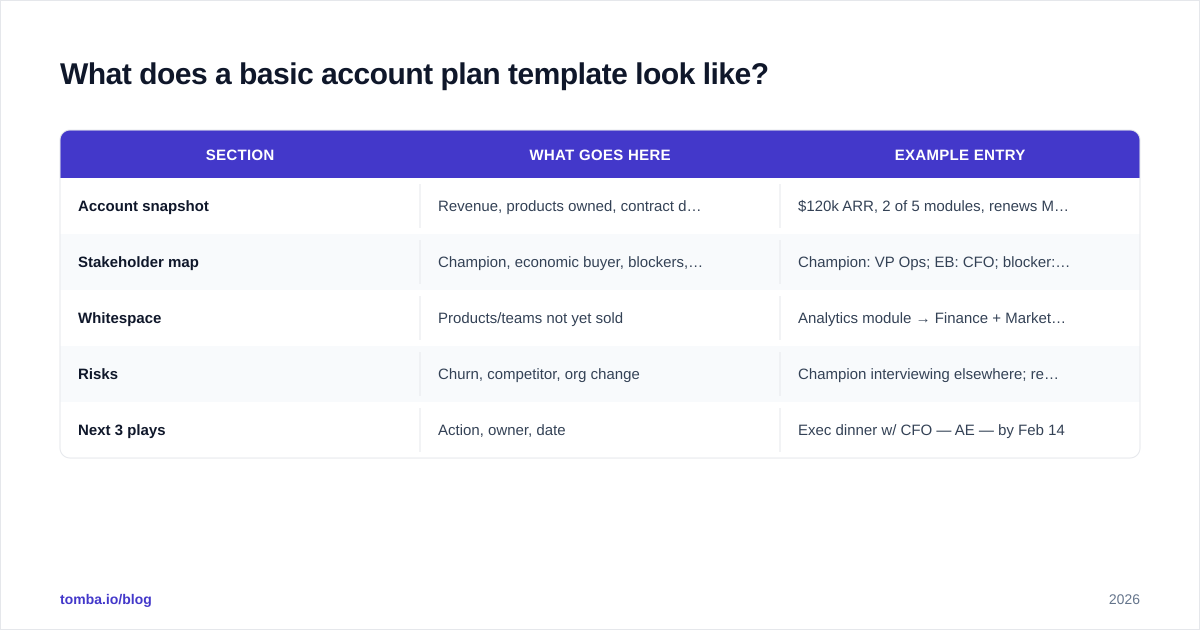
What does a basic account plan template look like?#
Before the seven examples, here is the skeleton every one of them shares. Keep it to a single page so it actually gets used.
| Section | What goes here | Example entry |
|---|---|---|
| Account snapshot | Revenue, products owned, contract dates | $120k ARR, 2 of 5 modules, renews Mar 2026 |
| Stakeholder map | Champion, economic buyer, blockers, users | Champion: VP Ops; EB: CFO; blocker: IT lead |
| Whitespace | Products/teams not yet sold | Analytics module → Finance + Marketing teams |
| Risks | Churn, competitor, org change | Champion interviewing elsewhere; renewal at risk |
| Next 3 plays | Action, owner, date | Exec dinner w/ CFO — AE — by Feb 14 |
If your CRM can't hold this cleanly, a HubSpot integration or a shared doc works fine. The format matters far less than the discipline of filling all five rows honestly.
Example 1: SMB land-and-expand plan#
Scenario: You closed a 25-seat deal with a 400-person company. The plan's whole job is turning one department into five.
The land-and-expand example is the most common and the most underused. Reps celebrate the close and forget the other 375 employees. A good plan treats the initial sale as a beachhead.
- Snapshot: 25 seats in Customer Support, $18k ARR.
- Whitespace: Sales, Success, and Ops teams (≈180 seats) use a competitor or nothing.
- Stakeholders to add: VP Sales (next buyer), RevOps lead (influencer), CFO (eventual EB for a company-wide deal).
- Plays: (1) 60-day value review with usage data, (2) warm intro from champion to VP Sales, (3) propose a department pilot.
The mechanics here depend on knowing who to reach in the next department. Pulling verified contacts for the Sales and Ops leaders with a domain search turns "I should expand" into a named call list by Friday.
Example 2: Enterprise multi-threaded plan#
Scenario: A $250k enterprise deal where six people touch the decision and your champion is one resignation away from torching the relationship.
Single-threading is the leading cause of enterprise churn. Gartner's research on B2B buying groups consistently finds six to ten stakeholders in a typical complex purchase. If you know one of them, you are exposed.
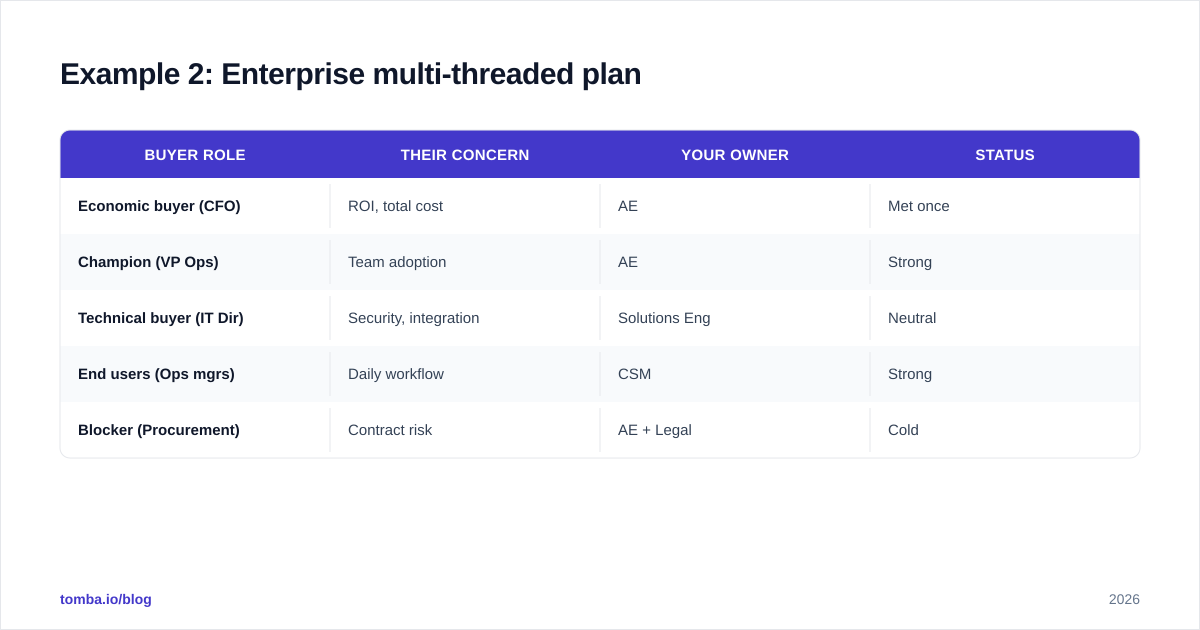
The multi-thread example maps every role and assigns a relationship owner on your side:
| Buyer role | Their concern | Your owner | Status |
|---|---|---|---|
| Economic buyer (CFO) | ROI, total cost | AE | Met once |
| Champion (VP Ops) | Team adoption | AE | Strong |
| Technical buyer (IT Dir) | Security, integration | Solutions Eng | Neutral |
| End users (Ops mgrs) | Daily workflow | CSM | Strong |
| Blocker (Procurement) | Contract risk | AE + Legal | Cold |
The action that flows out: every "cold" or "neutral" cell becomes a play. Procurement is cold, so you schedule a security-review call before renewal season, not during it.
Example 3: Renewal-defense plan#
Scenario: A flat account renews in 90 days and a competitor just started showing up in your champion's LinkedIn comments.
Renewal plans are about removing reasons to leave. Map the risk, then neutralize each one with evidence.
- Risk: Low product adoption (40% of seats inactive). Play: CSM-led re-onboarding before the renewal conversation.
- Risk: Champion changed roles. Play: Identify and build the new champion now — find their contact, get a warm intro, deliver a quick win.
- Risk: Competitor undercutting on price. Play: Build an ROI one-pager using the customer's own usage data.
A renewal plan lives or dies on early signal. Pair it with your CRM's health score and a clear definition of response rate on your check-in emails so you can see disengagement before the renewal call.
Example 4: Whitespace-mapping plan#
Scenario: A multi-product vendor selling into a 12-subsidiary holding company. You've sold one product to two subsidiaries.
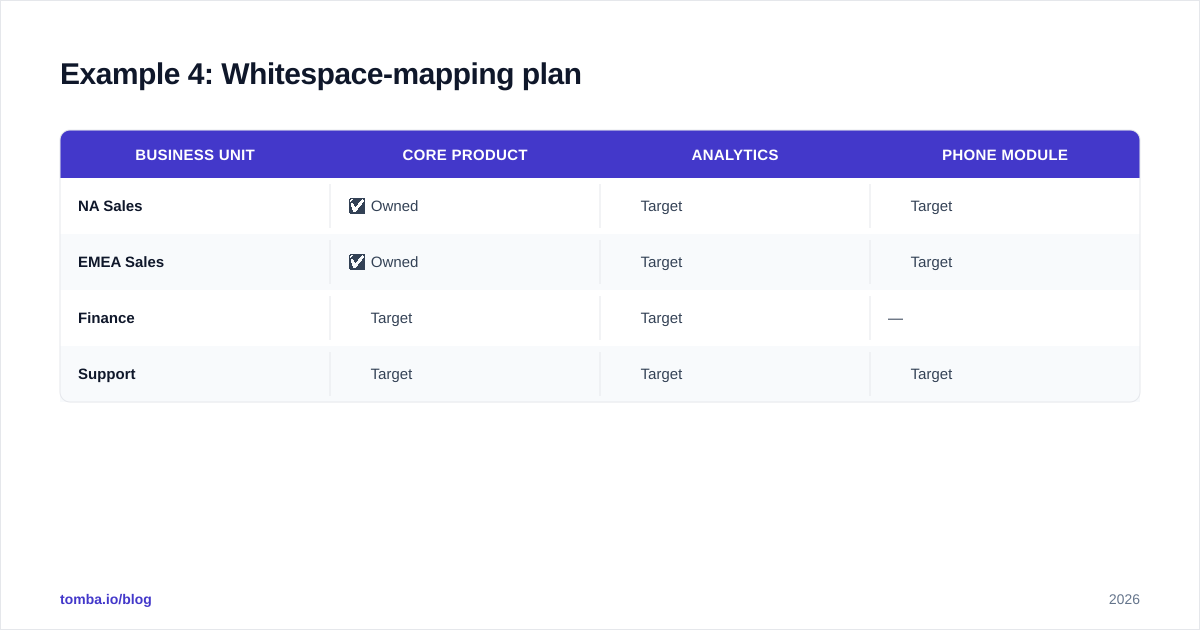
Whitespace mapping is a grid: products on one axis, business units on the other. Every empty cell is a target.
| Business unit | Core product | Analytics | Phone module |
|---|---|---|---|
| NA Sales | ✅ Owned | ⬜ Target | ⬜ Target |
| EMEA Sales | ✅ Owned | ⬜ Target | ⬜ Target |
| Finance | ⬜ Target | ⬜ Target | — |
| Support | ⬜ Target | ⬜ Target | ⬜ Target |
The plan prioritizes cells by deal size and warmth, then sources the right contact for each unit. For multi-entity accounts, batch-building those contact lists with a bulk email finder beats researching one subsidiary at a time. This is also where data enrichment earns its place — appending titles and departments tells you which empty cell is actually reachable.
Example 5: Strategic named-account plan#
Scenario: A top-10 logo your CRO personally tracks. The plan spans a full year and ties to a joint business outcome.
Strategic accounts get the heaviest plan because the stakes justify it. Beyond the standard skeleton, add:
- Joint success metric: the customer's own KPI you are tied to (e.g., "reduce their lead response time by 30%").
- Executive sponsor map: your VP ↔ their VP, your CRO ↔ their COO.
- 12-month milestone timeline: QBRs, exec syncs, and expansion gates.
The tone shifts from "selling" to "co-planning." HubSpot's own account-based marketing playbook is a useful reference for aligning marketing and sales motions on these named accounts. The plan is reviewed monthly, not quarterly.
Example 6: Partner- or channel-led plan#
Scenario: You sell through a reseller or alongside a systems integrator that owns the customer relationship.
Here the stakeholder map has two halves: the end customer and the partner. Your plays often route through the partner rather than directly to the buyer.
- Map the partner's incentive (margin, services revenue) against yours.
- Identify the partner rep who actually controls the account.
- Build a co-sell play: shared QBR, joint value story, split whitespace.
Contact data still matters — you need the partner's account team and visibility into the end customer. A LinkedIn finder helps you map both sides without waiting for the partner to make every introduction.
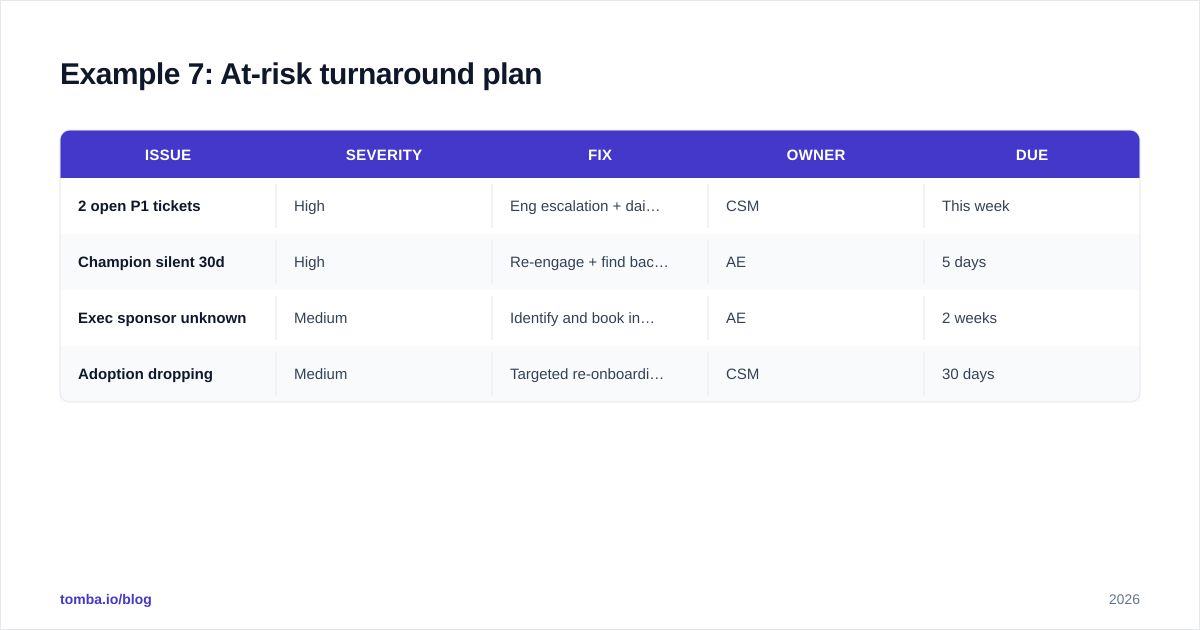
Example 7: At-risk turnaround plan#
Scenario: Red health score, support escalations open, champion gone quiet. Renewal in 120 days and trending toward churn.
The turnaround plan inverts the others: it's defense-first. The structure is a triage list.
| Issue | Severity | Fix | Owner | Due |
|---|---|---|---|---|
| 2 open P1 tickets | High | Eng escalation + daily update | CSM | This week |
| Champion silent 30d | High | Re-engage + find backup contact | AE | 5 days |
| Exec sponsor unknown | Medium | Identify and book intro call | AE | 2 weeks |
| Adoption dropping | Medium | Targeted re-onboarding | CSM | 30 days |
The first move in almost every turnaround is re-establishing human contact. When your only champion stops replying, you need a verified path to the next person — fast. That's where a clean email verifier pays off: there is no time to waste on a renewal email that bounces.
Which account planning example should you use?#
Match the pattern to the account's stage and risk, not to habit.
| If the account is... | Use this example | Primary goal |
|---|---|---|
| Newly closed, small footprint | Land-and-expand (Ex. 1) | Grow seats/departments |
| Large, complex buying group | Multi-threaded (Ex. 2) | Reduce single-threading |
| Stable but renewing soon | Renewal-defense (Ex. 3) | Remove churn reasons |
| Multi-product / multi-unit | Whitespace map (Ex. 4) | Cross-sell |
| Top-10 strategic logo | Named-account (Ex. 5) | Joint outcomes |
| Sold via partner | Channel-led (Ex. 6) | Co-sell leverage |
| Red health, churn risk | Turnaround (Ex. 7) | Save the renewal |
You can also peek at how peers rate the tooling behind these motions on G2's account planning category before standardizing a template across the team.
How do you keep an account plan from going stale?#
A plan that isn't updated is just a fossil. Three habits keep it alive:
- Tie reviews to a cadence, not a crisis. Strategic accounts: monthly. Everything else: each QBR. Put it on the calendar.
- Make the contact data self-updating. People change jobs constantly; a stakeholder map decays within months. Periodically re-verify your champions and economic buyers — a reverse email lookup catches the champion who quietly moved companies.
- Score the plan, not the activity. A plan is healthy when every risk has a play and every whitespace cell has an owner. Empty cells are the to-do list.
The deeper point: account planning is a data discipline as much as a sales one. The teams that win key accounts in 2026 are the ones whose plans are built on verified org maps and current contacts, refreshed on a cadence — not on a champion's memory and a stale CRM field.
Build your account plans on real contact data#
Every example above shares one dependency: knowing exactly who to reach inside the account, and being sure the email won't bounce. That's the gap between a pretty plan and a closed expansion.
Tomba's Email Finder turns a company domain and a name into a verified professional email in seconds, so your stakeholder maps, multi-threading plays, and whitespace lists are built on data you can actually act on. Start on the free tier (25 searches/month) to map your top account today, and scale up through Tomba's pricing — Starter at $49/mo, Growth at $99/mo — as your account list grows. Map the people, plan the plays, and stop leaving expansion revenue on the table.
Ready to find emails that actually work?
Join 150,000+ professionals who stopped guessing and started sending. Free credits on signup — no credit card required.
Get the Tomba newsletter
Practical outbound tactics and product updates — once every two weeks.
About the author