Best Account Planning Tools in 2026: A Buyer's Guide
Account planning tools turn your biggest accounts into repeatable revenue. Here's how the leading platforms compare on price, features, and fit in 2026.
TL;DR
- Account planning tools help revenue teams map stakeholders, find white space, and build repeatable expansion plans inside (or on top of) the CRM — instead of in static slides nobody updates.
- The market splits into three camps: native CRM modules (Salesforce, HubSpot), dedicated platforms (DemandFarm, Prolifiq, Revegy, ARPEDIO), and lightweight planning add-ons.
- Pick based on deal complexity: SMB teams rarely need more than a CRM template; enterprise teams selling six-figure deals to 15+ stakeholders need org charts, relationship maps, and white-space analytics.
- Price ranges from "free with your CRM seat" to $40–$100+ per user/month for dedicated platforms.
- Whatever tool you choose, it's only as good as the contact data feeding it. Clean, enriched stakeholder records are the difference between a real map and a fictional one.
What are account planning tools?#
Account planning tools are software that helps you grow revenue inside your existing accounts by turning scattered notes into a structured, living plan. Think of an account plan like a city map for a single customer: it shows who lives where (stakeholders), which roads are built (relationships you have), which neighborhoods are empty (white space you haven't sold into), and where you're headed next (your expansion strategy).
Without a tool, that map lives in a slide deck that gets updated once a quarter, the night before a QBR. With a tool, it lives next to your pipeline, updates as deals move, and tells the whole team — AE, CSM, SE, exec sponsor — the same story.
The category exists because of a simple economic fact: it costs far less to expand an existing account than to win a new logo. Most B2B revenue leaders will tell you that net revenue retention is the metric that decides whether a company compounds or stalls. Account planning is how you operationalize that.
Why do sales teams need dedicated account planning software?#
You don't always. A two-person team selling $5k deals can run account planning in a spreadsheet and a CRM note. The need for dedicated software scales with three things: deal size, number of stakeholders, and the gap between "land" and "expand."
Here's the failure mode dedicated tools solve. Your AE knows the account cold. They have the relationships, the history, the next three opportunities mapped in their head. Then they leave, or get reassigned, and 40% of that knowledge walks out the door. A good account planning tool externalizes what's in the rep's head into a shared asset the company owns.
The second failure mode is the "single-threaded" deal. You're relying on one champion. They get a new job, the deal dies. Relationship-mapping features force you to ask: who else matters, and do we have coverage?

The third is invisible white space. Your team is so busy renewing what exists that nobody notices the customer bought three of your five product lines and the other two are wide open. White-space analytics surface that gap automatically.
What features matter most in account planning tools?#
Not every tool does every job, and you shouldn't pay for capabilities your motion doesn't need. Here's how to weight the feature list.
Org charts and relationship maps. The single most important capability for complex deals. You want to visualize the buying committee, color-code relationship strength, and flag single-threaded risk at a glance.
White space analysis. A grid of products (rows) against business units or geographies (columns), showing where you've sold and where you haven't. This is where expansion pipeline comes from.
Native CRM integration. If the tool doesn't live inside Salesforce or HubSpot, adoption dies. Reps will not maintain a second system. The best platforms render the plan on the account record itself.
Stakeholder and contact data. A relationship map with stale or missing contacts is fiction. This is where data enrichment and accurate contact discovery earn their keep — you can't map a buying committee you can't reach.
Action plans and mutual close plans. Tasks, owners, due dates, and a shared timeline the customer can see.
Analytics and roll-ups. Managers need to see plan health across the book, not click into 50 accounts one at a time. This ties directly to forecasting and win rate improvement.

Which account planning tools are best in 2026?#
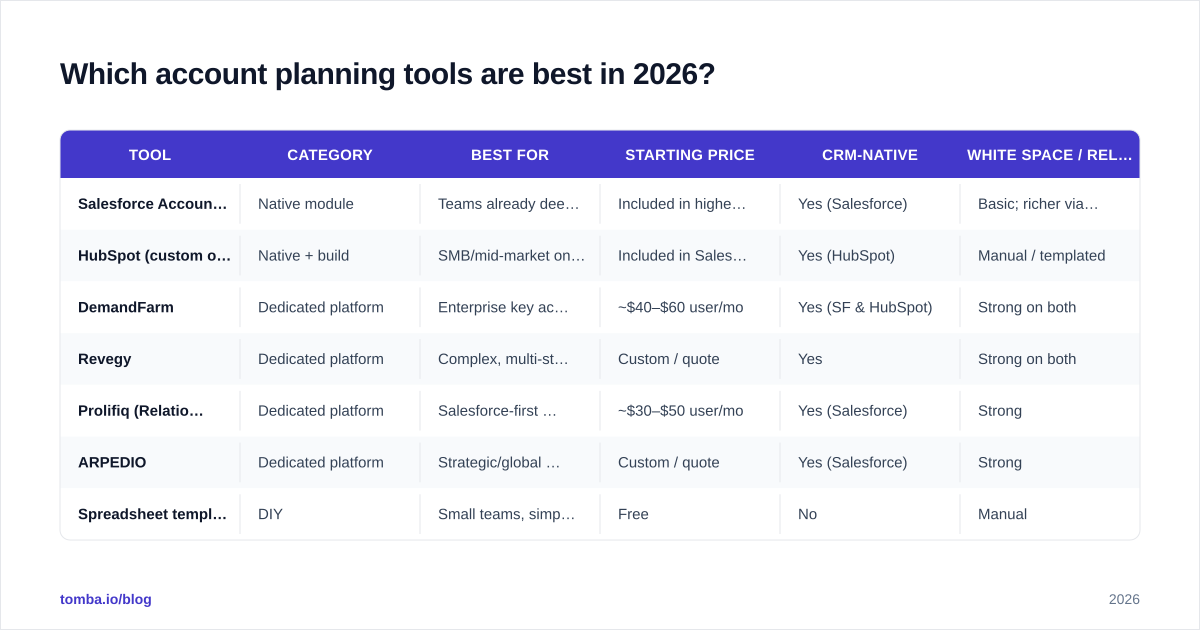
The honest answer is "it depends on your deal complexity and which CRM you already run." Below is a comparison of the main options across the three categories — native modules, dedicated platforms, and lightweight add-ons.
| Tool | Category | Best for | Starting price | CRM-native | White space / relationship maps |
|---|---|---|---|---|---|
| Salesforce Account Plans | Native module | Teams already deep in Salesforce | Included in higher Sales Cloud tiers | Yes (Salesforce) | Basic; richer via add-ons |
| HubSpot (custom objects) | Native + build | SMB/mid-market on HubSpot | Included in Sales Hub Pro+ | Yes (HubSpot) | Manual / templated |
| DemandFarm | Dedicated platform | Enterprise key accounts | ~$40–$60 user/mo | Yes (SF & HubSpot) | Strong on both |
| Revegy | Dedicated platform | Complex, multi-stakeholder deals | Custom / quote | Yes | Strong on both |
| Prolifiq (RelationshipMap) | Dedicated platform | Salesforce-first orgs | ~$30–$50 user/mo | Yes (Salesforce) | Strong |
| ARPEDIO | Dedicated platform | Strategic/global accounts | Custom / quote | Yes (Salesforce) | Strong |
| Spreadsheet template | DIY | Small teams, simple deals | Free | No | Manual |
A few notes on reading this table. Prices for dedicated platforms shift with seat count and contract length, so treat the figures as directional and get a quote. The "CRM-native" column matters more than almost anything else — a slightly weaker tool that lives inside your CRM will out-perform a feature-rich tool reps refuse to open.
For teams evaluating where these sit relative to broader sales tooling, Gartner and G2 both maintain category pages worth scanning; see Gartner's account planning research and the G2 account-based selling category for current user reviews and grid placement.
Is a native CRM module enough, or do you need a dedicated platform?#
Start with the module. Both Salesforce and HubSpot ship account-planning building blocks — custom objects, relationship fields, and plan templates — that cover the majority of mid-market needs at no extra software cost.
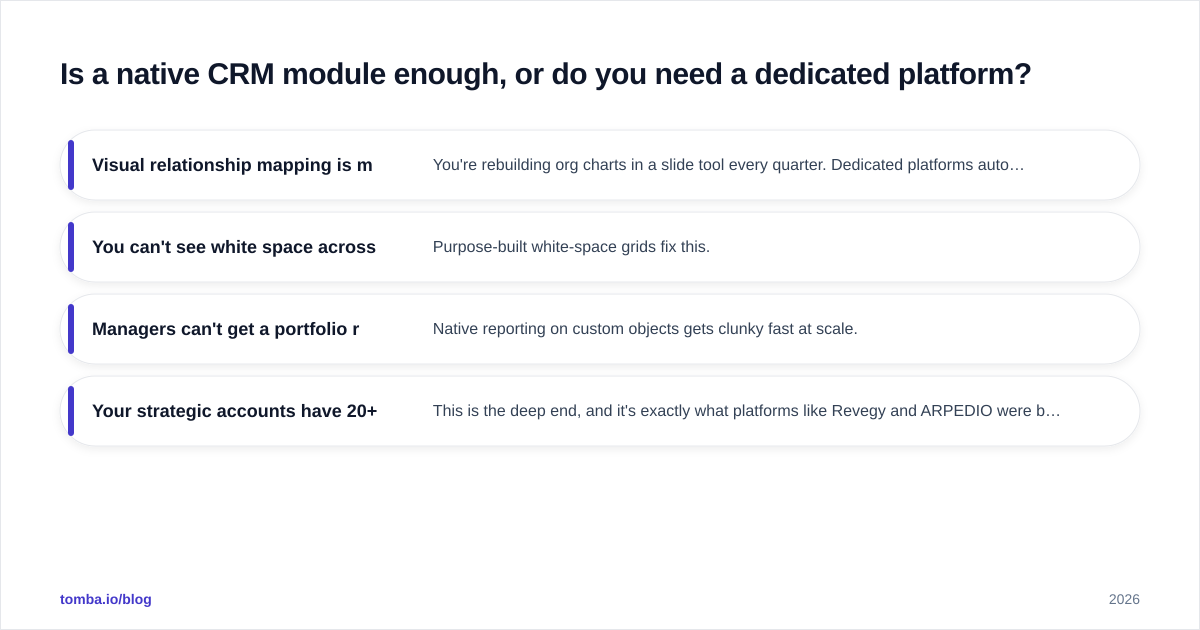
You've outgrown the native module when you hit one of these walls:
- Visual relationship mapping is manual and painful. You're rebuilding org charts in a slide tool every quarter. Dedicated platforms auto-generate and maintain them.
- You can't see white space across product lines without exporting to a spreadsheet. Purpose-built white-space grids fix this.
- Managers can't get a portfolio roll-up of plan health. Native reporting on custom objects gets clunky fast at scale.
- Your strategic accounts have 20+ stakeholders across regions. This is the deep end, and it's exactly what platforms like Revegy and ARPEDIO were built for.
Here's the rule of thumb: if your average strategic account has fewer than eight stakeholders and you sell one or two product lines, the native module plus discipline will beat a $50/seat platform you under-use. Cross those thresholds and the dedicated tool pays for itself in one saved single-threaded deal.
How do you implement an account planning tool without killing adoption?#
Tools don't fail on features. They fail on adoption. Here's the sequence that works.
1. Start with your top 10–20 accounts, not all of them. Account planning is expensive in rep time. Reserve it for the accounts where expansion upside justifies the effort. Spraying plans across every logo guarantees shallow, abandoned plans.
2. Make the plan a living artifact, not a quarterly event. The biggest predictor of ROI is whether the plan gets touched between QBRs. Tools that surface the plan on the account record — so reps see it during normal work — win. Tools that require a separate login lose.
3. Fix the data layer first. A relationship map is only as accurate as the contacts behind it. Before rollout, audit your stakeholder records: missing decision-makers, stale titles, bounced emails. This is unglamorous and it's where most implementations quietly break. Pair your planning tool with reliable contact discovery so that when a rep maps a buying committee, the email addresses and titles are real and reachable.
4. Tie plan health to the manager's cadence. If 1:1s and pipeline reviews reference the plan, reps maintain it. If they don't, reps won't. The tool is downstream of the management ritual.
5. Measure the right outcome. Don't measure "plans created." Measure net revenue retention, expansion pipeline created from white space, and reduction in single-threaded deals. Those are the numbers that justify the spend.
How much should you budget for account planning software?#
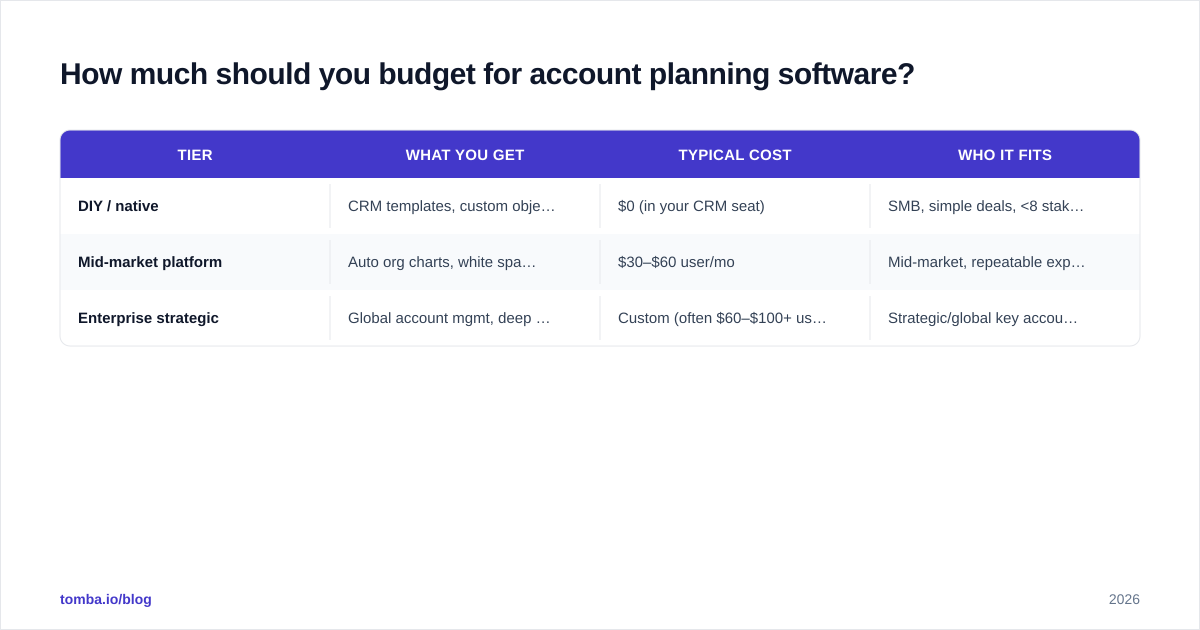
Budget falls into three tiers, and the right tier maps to your motion rather than your company size.
| Tier | What you get | Typical cost | Who it fits |
|---|---|---|---|
| DIY / native | CRM templates, custom objects, manual maps | $0 (in your CRM seat) | SMB, simple deals, <8 stakeholders |
| Mid-market platform | Auto org charts, white space, plan analytics | $30–$60 user/mo | Mid-market, repeatable expansion |
| Enterprise strategic | Global account mgmt, deep analytics, services | Custom (often $60–$100+ user/mo) | Strategic/global key accounts |
Two budgeting mistakes to avoid. First, buying the enterprise tier for a mid-market motion — you'll pay for analytics and services you never use. Second, refusing to spend anything and burying account planning in a spreadsheet that no one maintains; the hidden cost there is churned expansion revenue, which dwarfs the license fee.
If you want a sense of where vendors price publicly, compare against your existing stack — for instance Tomba's pricing for contact data sits independently of your planning tool, so you can keep the planning platform lean and feed it accurate data separately rather than paying a premium platform to also be your data source.
What's the connection between account planning and contact data?#
Direct and underrated: an account plan is a data structure, and bad data corrupts it silently. A relationship map showing a "champion" who left the company six months ago doesn't just fail to help — it actively misleads the deal. A white-space grid built on incomplete org data hides the very expansion you're trying to find.
This is the part most teams skip. They invest in a beautiful planning platform and feed it whatever happens to be in the CRM, which is often months stale. The map looks impressive and is quietly wrong.
The fix is a data hygiene loop running underneath the plan: enrich stakeholder records when an account is added to the plan, re-verify contacts before each QBR, and discover the org's missing decision-makers so your map reflects the real buying committee. Accurate contact discovery and contact enrichment aren't a planning feature — they're the foundation the whole plan stands on.
The bottom line: pick for your motion, then fix the data#
The best account planning tool is the one your reps will actually keep open. For most mid-market teams, that means starting with the native module in Salesforce or HubSpot and adding a dedicated platform only when relationship mapping, white-space analysis, or portfolio roll-ups outgrow it. Enterprise strategic-account teams should go straight to a purpose-built platform.
But no tool overcomes bad stakeholder data. Before you spend a dollar on planning software, make sure the contacts feeding your maps are real, current, and complete.
That's where Tomba fits into the stack. Use the Tomba Email Finder to discover and verify the decision-makers behind every account you plan — so your relationship maps reflect the actual buying committee, not last year's org chart. Start free with 25 searches a month, and scale up as your strategic account list grows. Accurate plans start with accurate data; give your account planning tool something real to work with.
// get started
Find, verify and enrich your first contacts today
Start on the free plan with 25 searches a month, then scale when your team is ready.
Free plan · No credit card required · GDPR & CCPA
// about the author