Accutrend vs ContactOut: Which B2B Data Tool Wins in 2026?
Accutrend sells static B2B lists; ContactOut mines live LinkedIn emails. We break down accuracy, pricing, and fit so you pick the right contact-data tool in 2026.
TL;DR
- Accutrend is a traditional B2B data and mailing-list provider — you buy bulk records (often per-list or per-record), best for direct mail and broad firmographic targeting.
- ContactOut is a Chrome-extension email finder that mines personal and work emails from LinkedIn profiles — best for recruiters and reps doing one-by-one prospecting.
- They are not really the same product: one sells lists, the other finds individuals. Choosing between them means choosing your motion, not just a vendor.
- Accutrend struggles with data freshness; ContactOut struggles with bulk scale and transparent pricing.
- If you want verified emails and bulk + API workflows without per-record list pricing, a dedicated email finder like Tomba is the more flexible third option.
What is the real difference between Accutrend and ContactOut?#
The short answer: Accutrend hands you a list; ContactOut hands you a person.
Think of it like buying produce. Accutrend is the wholesale warehouse — you order a pallet of records sorted by industry, geography, and company size, then sort through what you got. ContactOut is the farmers' market — you walk up to one specific stall (a LinkedIn profile) and grab exactly that one tomato. Both feed you, but the workflow, freshness, and price structure are completely different.
Accutrend Data Corporation has operated in the traditional list-brokerage and database-marketing space for decades, supplying business and consumer files for direct mail, telemarketing, and email campaigns. The model is volume: you license records, often priced per thousand or per list.
ContactOut is a newer, LinkedIn-native tool. Its browser extension overlays profiles and reveals work and personal email addresses plus phone numbers, with a search portal and API layered on top. It's widely used by recruiters and SDRs who live inside LinkedIn Recruiter and Sales Navigator.
)
How does each tool actually work?#
Understanding the mechanics tells you more than any feature list.
Accutrend works on a compiled-database model. Records are aggregated from public filings, directories, surveys, and partner sources, then segmented. You define a target audience (e.g., "CFOs at US manufacturers, 50–200 employees"), and you receive a file. The strength is breadth and firmographic filtering for offline channels. The weakness is that compiled databases decay fast — people change jobs roughly every two to three years, so a list bought today may be 20–30% stale within 12 months.
ContactOut works on a real-time enrichment model. You're looking at a live LinkedIn profile, and the tool resolves that identity to email and phone. Because it's anchored to the profile you're viewing, the match is usually current. The trade-off is that the workflow is inherently one profile at a time unless you use its bulk search or API, and coverage skews toward profiles that are active on LinkedIn.
The diagram above maps the two sourcing philosophies: list-first (define a segment, buy in bulk, then verify) versus profile-first (identify a person, then resolve their contact data). Your outbound motion should pick the philosophy first and the vendor second.
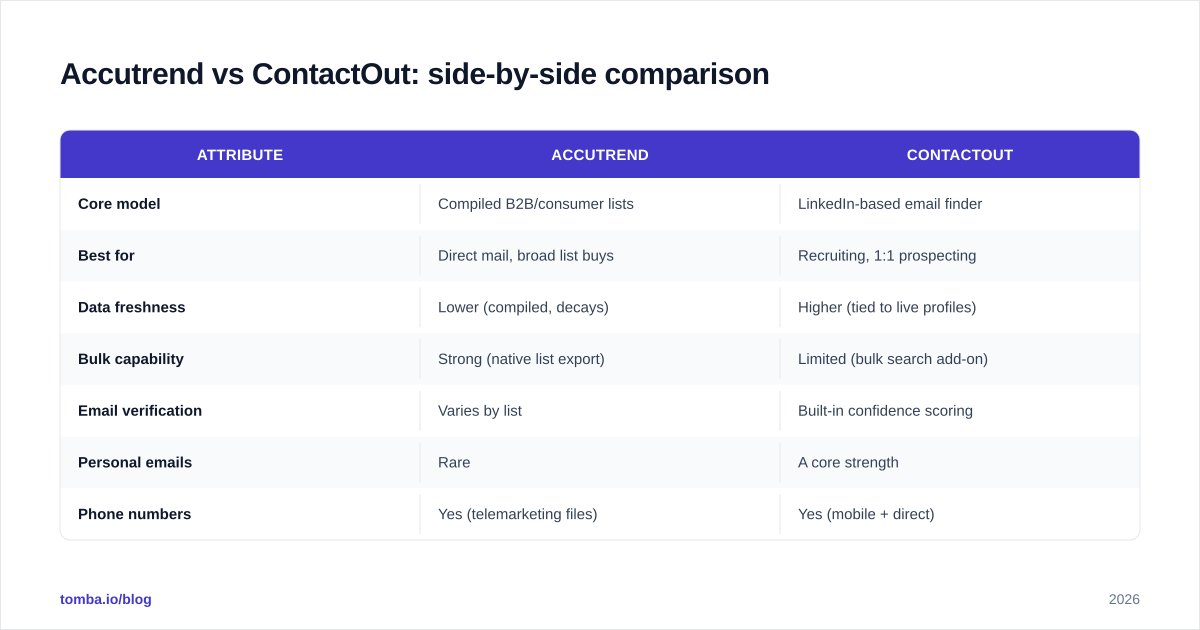
Accutrend vs ContactOut: side-by-side comparison#
| Attribute | Accutrend | ContactOut |
|---|---|---|
| Core model | Compiled B2B/consumer lists | LinkedIn-based email finder |
| Best for | Direct mail, broad list buys | Recruiting, 1:1 prospecting |
| Data freshness | Lower (compiled, decays) | Higher (tied to live profiles) |
| Bulk capability | Strong (native list export) | Limited (bulk search add-on) |
| Email verification | Varies by list | Built-in confidence scoring |
| Personal emails | Rare | A core strength |
| Phone numbers | Yes (telemarketing files) | Yes (mobile + direct) |
| Pricing model | Per-record / per-list | Per-seat + credit tiers |
| API access | Limited | Yes |
| Free tier | No | Limited free credits |
| Typical buyer | Direct marketers, list brokers | Recruiters, SDRs |
The table makes the split obvious. If your campaign is a postal mailer to 40,000 businesses, ContactOut is the wrong tool. If your campaign is 200 hyper-targeted LinkedIn-sourced execs, Accutrend is overkill and probably stale.
Which one has more accurate data?#
ContactOut generally wins on accuracy for active professionals; Accutrend wins on raw coverage of offline-reachable businesses.
Accuracy is the whole game in contact data — a bounced email hurts your sender reputation, and a wrong mailing address wastes print spend. The two tools fail in different directions:
- Accutrend's risk is staleness. Compiled files are only as fresh as their last refresh cycle. Job changes, mergers, and domain switches all erode list quality between updates.
- ContactOut's risk is coverage gaps. If a prospect barely uses LinkedIn or keeps a thin profile, there may be little to resolve. Personal emails are a strength, but B2B teams should confirm work addresses before sending at scale.

Regardless of which vendor you choose, verification is non-negotiable. Run any purchased list or extracted address through an email verifier before your first send. A clean list with 95%+ deliverability beats a bigger list that lands a third of its volume in spam folders. For deeper context on how providers source and refresh records, see independent reviews on G2.
How does pricing compare?#
This is where buyers get surprised, because the two pricing models barely rhyme.
Accutrend uses the classic list-brokerage structure: you pay per record or per list, sometimes with minimum order sizes and usage restrictions (one-time use vs. unlimited licensing). Costs scale with volume and selectivity — tighter targeting and more data fields raise the per-record price. There's typically no free tier and no self-serve credit dashboard.
ContactOut uses a per-seat subscription plus credit tiers, common among modern email finders. You get a set number of reveals per month, with higher plans unlocking bulk search, team seats, and API calls. There's a limited free allowance to test the extension.
)
For comparison, transparent self-serve email-finder pricing looks like Tomba's published pricing: a Free tier (25 searches/month), Starter at $49/mo, Growth at $99/mo, Pro at $249/mo, and custom Enterprise. The advantage of a published per-month credit model over per-record list buys is predictability — you know your cost before you commit, and credits roll into bulk and API use without renegotiating a list license.
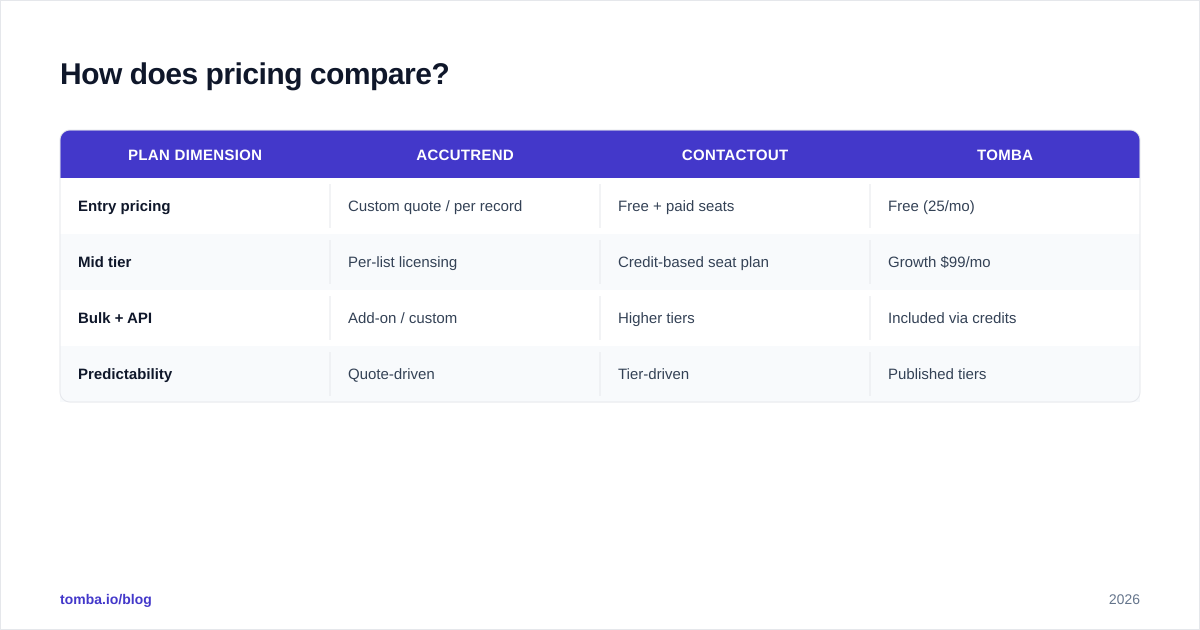
| Plan dimension | Accutrend | ContactOut | Tomba |
|---|---|---|---|
| Entry pricing | Custom quote / per record | Free + paid seats | Free (25/mo) |
| Mid tier | Per-list licensing | Credit-based seat plan | Growth $99/mo |
| Bulk + API | Add-on / custom | Higher tiers | Included via credits |
| Predictability | Quote-driven | Tier-driven | Published tiers |
When should you choose Accutrend?#
Pick Accutrend when your motion is volume and offline channels:
- You run direct mail or telemarketing and need postal + phone records at scale.
- You target broad firmographic segments (industry, revenue band, employee count) more than named individuals.
- You're a list broker or agency that resells or appends data.
- Your campaigns tolerate some staleness because the medium is forgiving (a mailer to a company address still arrives even if the named contact moved on).
Accutrend is a poor fit if you're doing modern, personalized cold email where deliverability and per-contact accuracy decide success.
When should you choose ContactOut?#
Pick ContactOut when your motion is profile-driven and personal:
- You're a recruiter sourcing candidates and need personal emails to reach passive talent.
- You're an SDR working a curated list of LinkedIn prospects one by one.
- You value freshness over raw volume and want data tied to a live profile.
- You already live inside LinkedIn Recruiter or Sales Navigator and want an in-browser reveal.
ContactOut is a poor fit if you need tens of thousands of records for offline channels, or if your prospects aren't active on LinkedIn.
What about a third option that does both?#
Here's the honest gap: Accutrend gives you bulk without freshness, and ContactOut gives you freshness without easy bulk + transparent pricing. Many teams want both — verified, current emails and scalable bulk/API workflows at a predictable cost.
That's the lane a dedicated email finder fills. With Tomba you can:
- Run domain search to pull every reachable email at a target company, the way Accutrend gives breadth — but verified and current.
- Resolve individuals from LinkedIn the way ContactOut does, via the LinkedIn finder.
- Verify everything in one place with the built-in email verifier before you send.
- Scale through bulk lead generation and the Tomba API without renegotiating a per-record list license.
If you're specifically weighing ContactOut, it's worth seeing the head-to-head on the ContactOut alternative page. Transparency on sourcing matters too — review where any vendor gets its records, the way Tomba documents its data sources, and cross-check claims on a neutral directory like Capterra.
Frequently asked questions#
Is ContactOut better than Accutrend? For modern, profile-driven outbound and recruiting, yes — ContactOut's data is fresher and verification is built in. For high-volume direct mail and broad firmographic list buys, Accutrend's model fits better. They solve different problems.
Does Accutrend offer email verification? It varies by list and product. Compiled lists should always be re-verified before sending, regardless of any vendor's stated hygiene, because records decay between refresh cycles.
Can I get personal emails from Accutrend? That's not its strength. Personal/direct emails are a core ContactOut feature, sourced from LinkedIn-linked profiles. Always confirm consent and compliance with your jurisdiction's rules before using personal addresses.
Which is cheaper? It depends on volume. Per-record list pricing (Accutrend) can be cheap at huge scale but unpredictable; per-seat credit pricing (ContactOut) is predictable for individual reps. A published-tier finder like Tomba sits between the two with a free tier and flat monthly plans.
Are these tools compliant? Compliance depends on how you use the data, not just the vendor. Honor GDPR, CAN-SPAM, and CCPA obligations, verify before sending, and document your lawful basis for outreach.
The bottom line#
Accutrend and ContactOut aren't really competitors — they're two answers to two different questions. Need bulk records for offline channels? Accutrend's list model fits. Need fresh, individual emails from LinkedIn? ContactOut earns its place. The mistake is forcing one tool to do the other's job.
If your real requirement is verified emails at scale with predictable pricing and an API — the overlap most outbound teams actually live in — start with the Tomba Email Finder. Use the free tier (25 searches/month) to test accuracy on your own target accounts, run a batch through the verifier, and compare deliverability against any list you already own. Pick the tool that lands in the inbox, not just the one with the biggest record count.
Ready to find emails that actually work?
Join 150,000+ professionals who stopped guessing and started sending. Free credits on signup — no credit card required.
Get the Tomba newsletter
Practical outbound tactics and product updates — once every two weeks.
About the author