Adaptio vs EmailListVerify 2026: Full Feature Comparison
Adaptio finds B2B contacts; EmailListVerify cleans the addresses you already have. Here's how the two compare on data, accuracy, and price in 2026 — and where a combined tool wins.
Adaptio and EmailListVerify get lumped together in "email tool" searches, but they solve opposite halves of the same problem. Picking the wrong one wastes budget and leaves a gap in your pipeline.
TL;DR#
- Adaptio (Adapt.io) is a B2B contact and email finder — a prospecting database you search to build new lead lists with emails, phone numbers, and firmographics.
- EmailListVerify is an email verifier — you feed it a list you already have, and it removes invalids, spam traps, and risky addresses before you send.
- They are complements, not true competitors: one fills your list, the other cleans it. Using only one leaves either thin data or dirty data.
- On price, EmailListVerify is the cheaper pay-as-you-go option for pure cleaning; Adaptio sits in the seat-based "sales intelligence" tier.
- If you want both jobs in one place — find verified emails and validate existing lists — a combined platform like Tomba removes the hand-off between two vendors.
What is Adaptio (Adapt.io)?#
Adaptio, branded as Adapt.io, is a B2B lead intelligence platform. You search its contact database by job title, company, industry, location, or technology, and it returns business emails, direct-dial phone numbers, and company firmographics. It also ships a Chrome extension ("Lead Builder") that pulls contact data while you browse LinkedIn or company sites.
Think of Adaptio as a phone book for B2B buyers. You don't bring your own data — you go shopping in theirs. That makes it a top-of-funnel tool: its job is to get net-new contacts into your CRM or sequencer.
What Adaptio does not do well is guarantee that every email it hands you is currently deliverable. Like every database vendor, its records decay — people change jobs, companies rebrand domains — so a slice of any export will bounce unless you re-check it before sending.
What is EmailListVerify?#
EmailListVerify is a dedicated email verification service. You upload a CSV (or call its API), and it runs each address through syntax checks, MX/domain validation, SMTP handshake tests, spam-trap and disposable-domain detection, and role-account flagging. It returns a clean list plus a status for every row: valid, invalid, unknown, or risky.
EmailListVerify is a bottom-of-funnel safeguard. It assumes you already have addresses — scraped, exported, or collected from forms — and its only job is to stop you from emailing dead inboxes. Cleaning your list protects your sender reputation and keeps your bounce rate under the ~2% threshold mailbox providers tolerate.
It does not find anyone. Give EmailListVerify an empty file and it has nothing to do.
Adaptio vs EmailListVerify: how do they actually differ?#
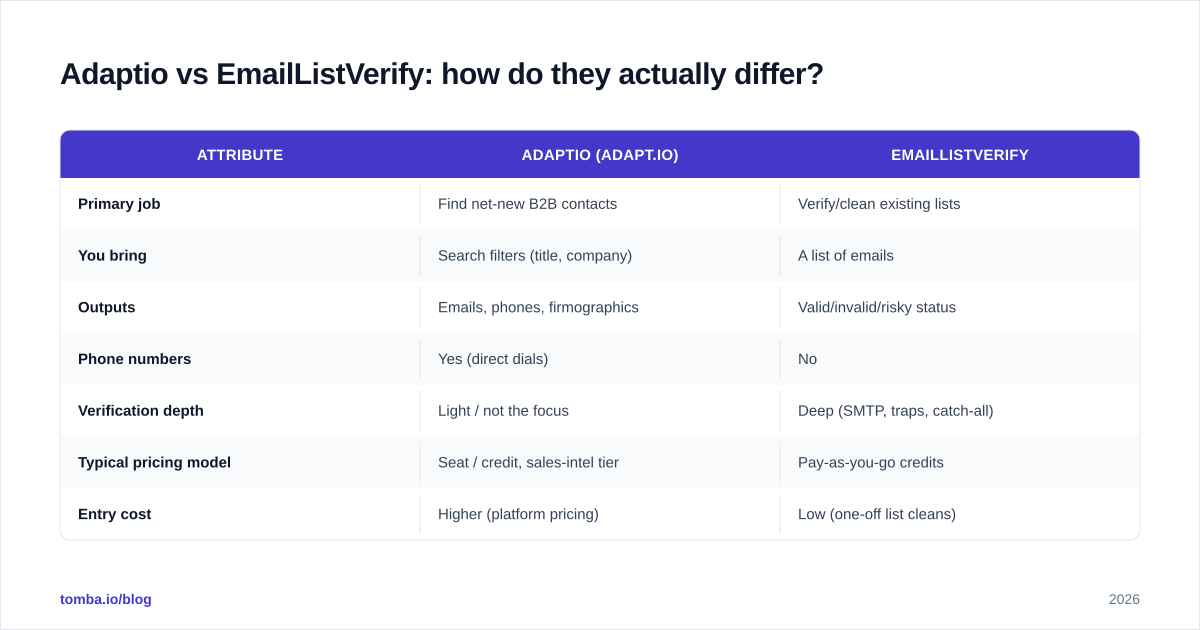
The cleanest way to see it: Adaptio is offense, EmailListVerify is defense. Here's the side-by-side.
| Attribute | Adaptio (Adapt.io) | EmailListVerify |
|---|---|---|
| Primary job | Find net-new B2B contacts | Verify/clean existing lists |
| You bring | Search filters (title, company) | A list of emails |
| Outputs | Emails, phones, firmographics | Valid/invalid/risky status |
| Phone numbers | Yes (direct dials) | No |
| Verification depth | Light / not the focus | Deep (SMTP, traps, catch-all) |
| Typical pricing model | Seat / credit, sales-intel tier | Pay-as-you-go credits |
| Entry cost | Higher (platform pricing) | Low (one-off list cleans) |
| Best for | Building prospecting lists | Protecting deliverability |
| Free option | Limited trial credits | Free verification tier |
The takeaway from the table: there is almost no feature overlap. If you ask "Adaptio vs EmailListVerify, which is better?" the honest answer is better at what? A list finder and a list cleaner aren't ranked on the same scale.
)
Which one do you actually need?#
Conclusion first: most teams need both functions, just not necessarily both tools.
Map it to where you are:
- You have no list yet. You need a finder. EmailListVerify can't help — there's nothing to clean. Start with Adaptio or another email finder.
- You have a big, old, or scraped list. You need a verifier first. Run it through EmailListVerify (or an email verifier) before a single send.
- You're running outbound continuously. You need both, on a loop: find new contacts, verify them, send, repeat. This is where paying two vendors starts to hurt.
That third case is the common one, and it's why the "vs" framing breaks down. You're not choosing between offense and defense for a whole season — you need both on the field every play.
How accurate is the data from each?#
Accuracy means two different things here, which is exactly why people get burned comparing them.
For Adaptio, accuracy is about coverage and freshness: when you search for a title at a company, does a record exist, and is the email current? Database vendors publish high "accuracy" numbers, but those reflect verification at the time of capture — not the day you export. Any contact database degrades roughly 2–3% per month as people switch roles.
For EmailListVerify, accuracy is about catch rate: of the bad addresses in your file, how many does it correctly flag? Dedicated verifiers are strong here because verification is their entire product — SMTP probing, catch-all detection, and spam-trap lists are core, not a side feature.
This is the real trap. A finder's emails are only as good as the day they were verified. A verifier only knows about the addresses you hand it. Neither closes the loop alone — which is why independent benchmarks score find-and-verify tools separately from pure cleaners.

The chart above is why teams increasingly want verification baked into the finder: an address that's checked at export time bounces far less than one pulled from a stale record and never re-tested.
What does each one cost in 2026?#
Pricing structures are as different as the products.
EmailListVerify uses pay-as-you-go credits — you buy a bucket of verifications (e.g. tens of thousands of credits) and spend them whenever, with no monthly seat. That's ideal for occasional, large list cleans. There's also a small free tier to test it.
Adaptio uses a sales-intelligence pricing model: tiers gated by seats and the number of contacts/credits you can reveal per month. It's pricier per "unit" because you're paying for the database access and the phone numbers, not just a yes/no on an email.
| Plan dimension | Adaptio | EmailListVerify | Tomba |
|---|---|---|---|
| Model | Seat + credit | Pay-as-you-go | Subscription + free tier |
| Free tier | Trial credits | Free verifications | 25 searches/mo |
| Entry paid | Platform tier (higher) | Low one-off packs | $49/mo (Starter) |
| Finds emails | Yes | No | Yes |
| Verifies emails | Limited | Yes (core) | Yes |
| Phone numbers | Yes | No | Yes (phone finder) |
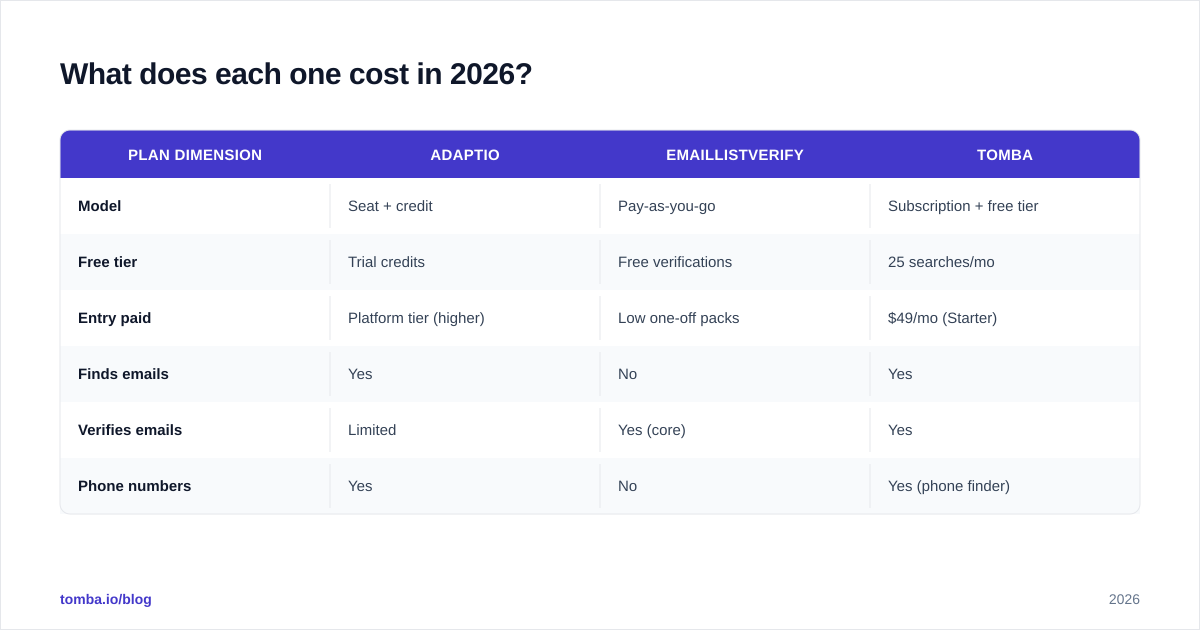
If you only ever clean lists, EmailListVerify's pay-as-you-go is hard to beat on raw cost. If you need to find contacts, you're into platform pricing either way — and at that point a combined tool's pricing is worth comparing against running Adaptio plus a separate verifier.
)
Can one tool do both jobs?#
Yes — and that's the practical alternative to the whole "Adaptio vs EmailListVerify" debate.
A combined platform does the find step and the verify step in one workflow, so you never export a list from one vendor and re-import it into another. Tomba is built this way: the finder returns emails with a confidence score, and the same account gives you bulk verification for lists you already own.
Concretely, that looks like:
- Find — search by domain or name with the email finder, or pull a whole company's addresses with domain search.
- Verify — run new or existing lists through the email verifier, including catch-all handling.
- Scale — process thousands at once with the bulk email finder instead of juggling two dashboards and two invoices.
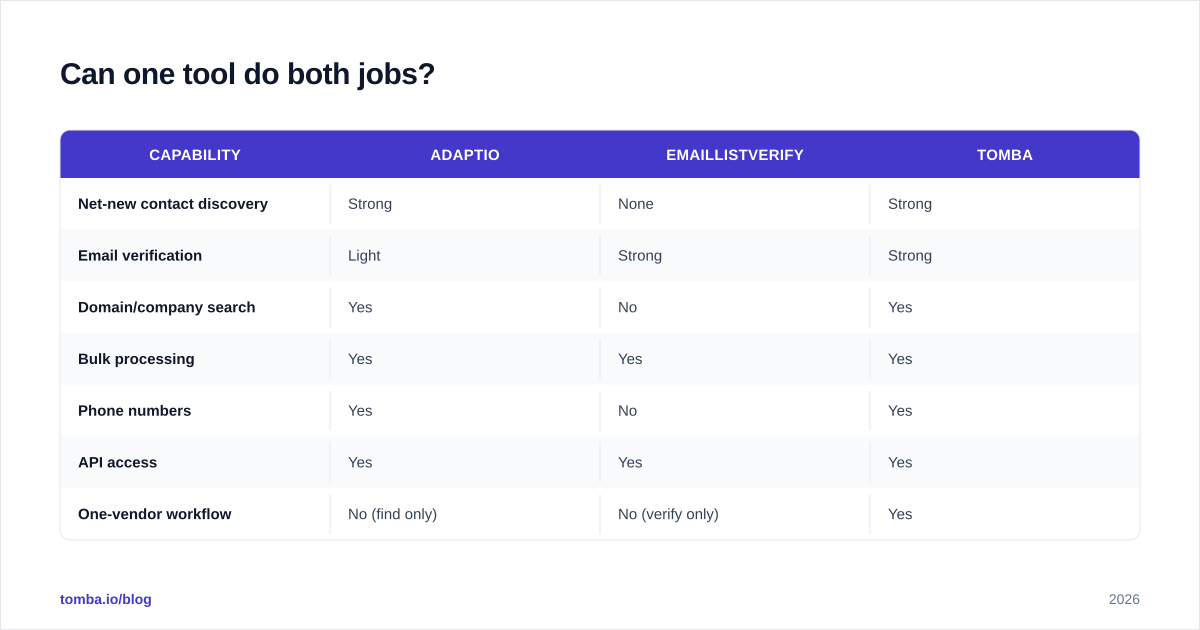
Here's how the categories line up when you put a combined tool next to the two specialists.
| Capability | Adaptio | EmailListVerify | Tomba |
|---|---|---|---|
| Net-new contact discovery | Strong | None | Strong |
| Email verification | Light | Strong | Strong |
| Domain/company search | Yes | No | Yes |
| Bulk processing | Yes | Yes | Yes |
| Phone numbers | Yes | No | Yes |
| API access | Yes | Yes | Yes |
| One-vendor workflow | No (find only) | No (verify only) | Yes |

The point isn't that Tomba beats a dedicated verifier at its single trick — EmailListVerify is genuinely strong at pure cleaning, and you can always pair it with anything. The point is that for teams running outbound continuously, a combined finder-plus-verifier removes a recurring hand-off, a second login, and a second bill. If your only need is cleaning a list you already trust, a pay-as-you-go verifier is the lean choice. If you're also generating that list, paying for two tools is the expensive default.
Adaptio vs EmailListVerify: which should you choose?#
Decide by the job in front of you, not by the brand:
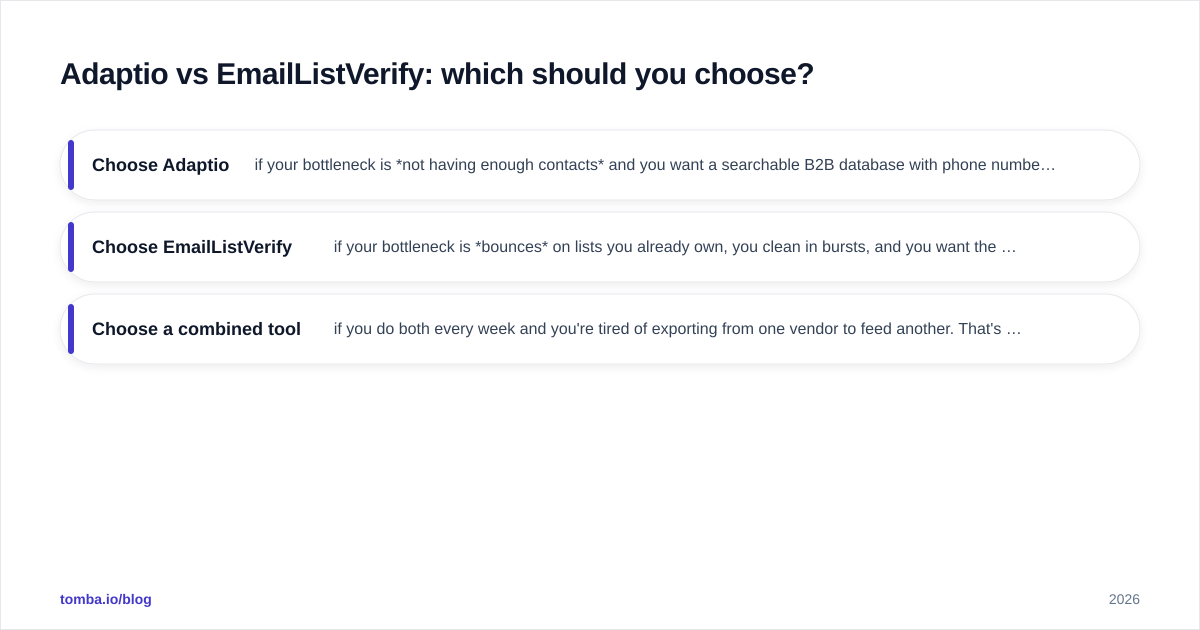
- Choose Adaptio if your bottleneck is not having enough contacts and you want a searchable B2B database with phone numbers — and you're fine adding a verification step before you send.
- Choose EmailListVerify if your bottleneck is bounces on lists you already own, you clean in bursts, and you want the cheapest accurate pay-as-you-go verification. It's also a sensible pick if you're shopping for an EmailListVerify alternative starting point to benchmark against.
- Choose a combined tool if you do both every week and you're tired of exporting from one vendor to feed another. That's the case for most active outbound and demand-gen teams.
Whatever you pick, don't run a list you found through zero verification, and don't pay for a verifier with no finder if your real problem is an empty pipeline. Match the tool to the missing half. For broader context on vendor trade-offs, third-party review sites like G2 are useful for seeing how each category is scored before you commit.
The bottom line#
Adaptio finds contacts; EmailListVerify cleans them. They're two halves of one outbound motion, and the "versus" only makes sense if you genuinely need just one half. If you're building lists and protecting deliverability — which is most B2B teams — the simplest setup is one platform that does both.
That's where Tomba fits: start with the Tomba Email Finder to pull verified business emails by name, company, or domain, then verify any list in the same account before you send. One workflow, one bill, no export-import shuffle between a finder and a verifier. Try it free with 25 searches a month and see whether you still need two separate tools.
// get started
Find, verify and enrich your first contacts today
Start on the free plan with 25 searches a month, then scale when your team is ready.
Free plan · No credit card required · GDPR & CCPA
// about the author