Adaptio vs Gigasheet 2026: Which B2B Data Tool Wins?
Adaptio builds and enriches prospect lists with AI; Gigasheet crunches massive datasets in the browser. Here's which B2B data tool fits your workflow in 2026 — and where the accurate contact data actually comes from.
TL;DR
- Adaptio and Gigasheet solve different halves of the same problem. Adaptio is an AI-driven GTM tool for building and enriching targeted prospect lists; Gigasheet is a browser-based "big data spreadsheet" for cleaning, analyzing, and joining huge datasets you already have.
- Pick Adaptio if your bottleneck is sourcing and qualifying net-new accounts and contacts. Pick Gigasheet if your bottleneck is wrangling million-row CSVs that crash Excel.
- Neither is primarily an email-finder. Both depend on an accurate contact-data layer underneath — that's where a dedicated provider matters.
- Pricing models differ sharply: Adaptio is seat/credit-based GTM tooling; Gigasheet sells on rows processed and storage.
- The smartest 2026 stack often uses both plus a verification layer, not one tool pretending to be all three.
What is Adaptio?#
Adaptio is an AI-assisted go-to-market platform built around one job: turning a vague ideal-customer profile into a concrete, enriched list of accounts and people you can actually sell to. Instead of you manually filtering a directory, you describe who you want — industry, headcount, signals, tech stack — and the system assembles and enriches the list.
Think of it like hiring a research assistant who never sleeps. You hand over a one-paragraph brief ("Series B fintechs in the US using Stripe, 50-200 employees, with a VP of Engineering") and you get back a structured table with companies, contacts, and supporting attributes. Technically, it leans on large language models plus third-party data sources to interpret intent and stitch records together.
Adaptio's center of gravity is outbound list construction and enrichment — the front of the funnel. It's strongest when the question is "who should I be talking to, and what do I know about them?"
What is Gigasheet?#
Gigasheet is a spreadsheet that doesn't fall over. Where Excel chokes somewhere north of a million rows and Google Sheets gets sluggish well before that, Gigasheet runs in the browser and handles billions of cells without a local install. It's a no-code analytics surface for people who think in rows and columns but work with data that's far too big for a desktop app.
The core jobs Gigasheet is built for:
- Opening and filtering massive CSV/JSON exports (CRM dumps, log files, scraped datasets).
- Deduplicating, cleaning, and standardizing dirty data.
- Joining multiple large files on a shared key.
- Lightweight enrichment and grouping/pivoting before you push results downstream.
So Gigasheet sits at the processing and analysis stage. It assumes you already have data — it just makes that data usable. It is not designed to discover new accounts or generate fresh contacts from a text brief.
Adaptio vs Gigasheet: what's the real difference?#
The honest framing: these tools are often compared because both touch "B2B data," but they live at opposite ends of the pipeline.
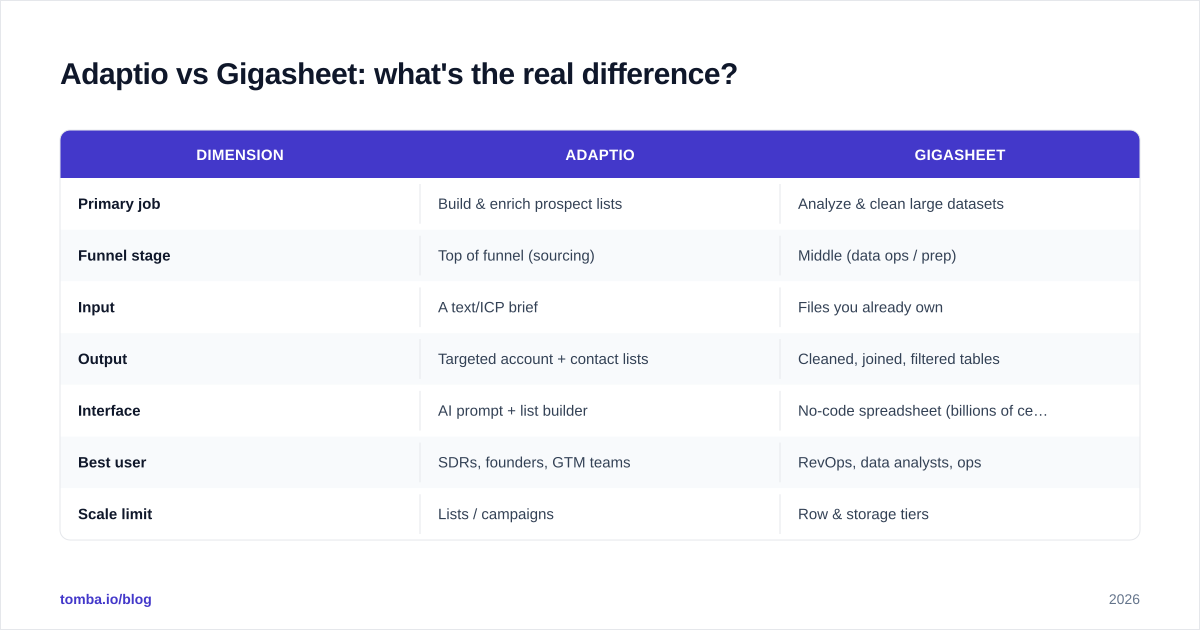
| Dimension | Adaptio | Gigasheet |
|---|---|---|
| Primary job | Build & enrich prospect lists | Analyze & clean large datasets |
| Funnel stage | Top of funnel (sourcing) | Middle (data ops / prep) |
| Input | A text/ICP brief | Files you already own |
| Output | Targeted account + contact lists | Cleaned, joined, filtered tables |
| Interface | AI prompt + list builder | No-code spreadsheet (billions of cells) |
| Best user | SDRs, founders, GTM teams | RevOps, data analysts, ops |
| Scale limit | Lists / campaigns | Row & storage tiers |
| Pricing basis | Seats / credits | Rows processed + storage |
| Learning curve | Low (describe and go) | Low-medium (spreadsheet skills) |
| Net-new discovery | Yes | No |
The takeaway: asking "Adaptio or Gigasheet?" is a bit like asking "hammer or measuring tape?" If you only have raw exports to untangle, Gigasheet wins by default. If you have nothing yet and need a list, Adaptio is the obvious starting point. Most teams that are scaling outbound eventually want both — Adaptio to source, Gigasheet to manage the resulting volume.

Which one fits your use case?#
You're an SDR or founder doing outbound#
Adaptio is the better fit. Your problem isn't analyzing data — it's generating qualified targets fast. A list-building tool that interprets your ICP and returns enriched contacts removes the most painful manual step. Just remember that AI-assembled lists still need a verification pass before you send, or your bounce rate punishes your domain.
You're in RevOps cleaning a CRM migration#
Gigasheet, easily. Dedupe 4 million Salesforce rows, normalize country fields, and join against a product-usage export — none of that is Adaptio's job. Gigasheet's spreadsheet model is purpose-built for it, and you avoid spinning up a database or writing Python.
You run a small team that does both#
Use them in sequence: Adaptio sources, Gigasheet cleans and segments the combined output, and a dedicated data layer fills the contact gaps. This is where a single AI tool or a single spreadsheet falls short on its own.
How do they compare on data accuracy?#
This is the uncomfortable part of any "Adaptio vs Gigasheet" debate: neither tool's headline feature is the accuracy of the underlying contact data. Adaptio assembles records from sources and AI inference; Gigasheet processes whatever you feed it. Garbage in, garbage out applies to both.
In practice, list-building tools that lean on AI inference can hallucinate or stale-date email addresses, and a big-data spreadsheet has no way of knowing whether a given email still resolves. That's why a verification and finding layer is non-negotiable in 2026. Independent reviews on G2 and Capterra consistently flag data freshness as the make-or-break factor for tools in this space — not the UI.
This is the gap a dedicated provider fills. Running your Adaptio output or your Gigasheet table through an email verifier before any campaign protects deliverability, and using a true email finder to recover missing contacts beats trusting an inferred guess. For records that arrive incomplete, data enrichment backfills firmographics and verified contact points so your list is actually actionable.
What about pricing?#
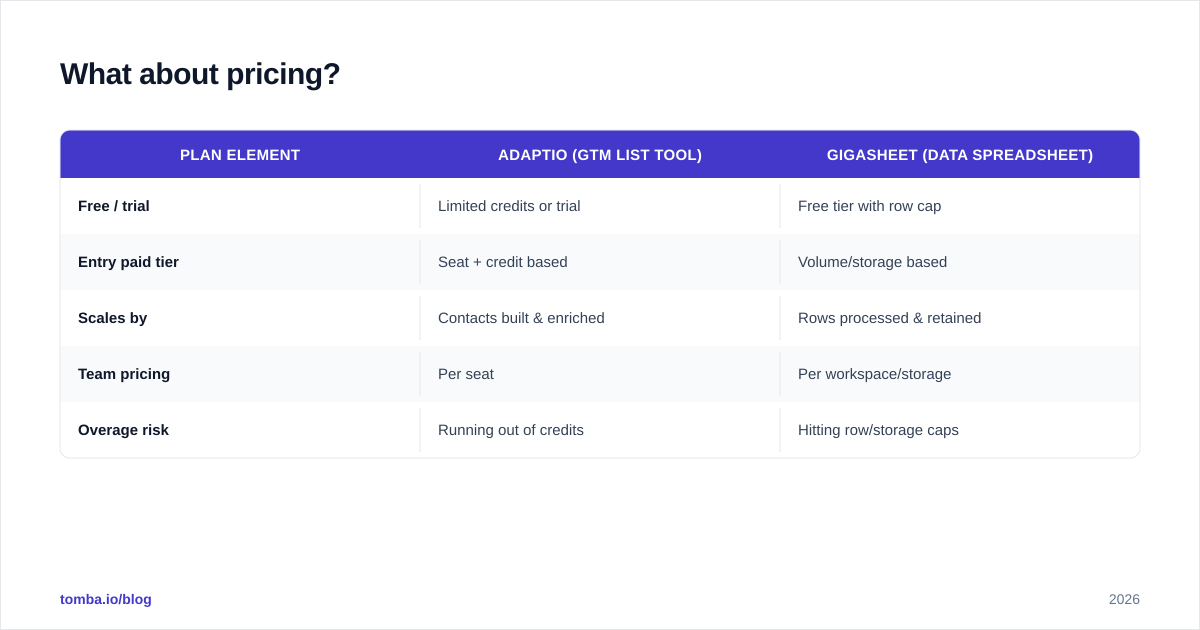
Pricing structures reflect the different jobs. Adaptio-style GTM tools typically charge per seat plus usage credits tied to how many accounts/contacts you build and enrich. Gigasheet charges on data volume — rows processed and storage retained — with a usable free tier for smaller files and paid tiers as your datasets grow.
A rough orientation (always confirm current numbers on each vendor's own page, since tiers shift):
| Plan element | Adaptio (GTM list tool) | Gigasheet (data spreadsheet) |
|---|---|---|
| Free / trial | Limited credits or trial | Free tier with row cap |
| Entry paid tier | Seat + credit based | Volume/storage based |
| Scales by | Contacts built & enriched | Rows processed & retained |
| Team pricing | Per seat | Per workspace/storage |
| Overage risk | Running out of credits | Hitting row/storage caps |
For the contact-data layer that sits underneath either tool, the math is simpler and predictable. Tomba runs a Free tier (25 searches/mo), Starter at $49/mo, Growth at $99/mo, Pro at $249/mo, and custom Enterprise — see full Tomba pricing for credit allocations. The point isn't that one number beats another; it's that you should budget separately for sourcing, processing, and accuracy, because no single tool here covers all three well.

Pros and cons at a glance#
Adaptio
- Pros: fast net-new sourcing, AI interprets fuzzy ICPs, strong for early-funnel outbound, low learning curve.
- Cons: AI-assembled data needs verification, not built for heavy data ops, costs scale with contact volume.
Gigasheet
- Pros: handles datasets that crush Excel, no-code cleaning and joining, great for RevOps, generous free tier.
- Cons: doesn't discover new prospects, no built-in contact verification, value depends entirely on the quality of files you import.
Can you use a single tool instead of both?#
Short answer: only if your workflow genuinely lives at one end of the pipeline. A pure data-analyst role might never need Adaptio. A solo founder firing off 50 emails a week might never hit Gigasheet's scale. But any team running structured outbound at volume touches both jobs — find the people, then make sense of the data — and forcing one tool to do the other's work is where productivity quietly leaks.
The component most teams under-invest in is the accuracy layer between them. You can source with Adaptio and clean with Gigasheet and still send into a wall of bounces if nobody verified the emails. For higher-volume runs, processing your combined list through a bulk email finder closes that gap in one pass, and pulling from a maintained B2B database gives you a fresher starting point than inference alone.
So, which should you choose in 2026?#
Conclusion first: choose by the job you're stuck on, not the category label.
- Stuck sourcing? Start with Adaptio.
- Drowning in exports? Start with Gigasheet.
- Bouncing emails or working with stale records? Fix the data layer first — that's upstream of both decisions.
The teams that win in 2026 stop treating this as an either/or. They source net-new with an AI list builder, prep and segment at scale in a big-data spreadsheet, and run everything through a verification-and-finding layer so the pipeline doesn't poison itself with bad addresses.
That last layer is where Tomba fits. Before your Adaptio lists or Gigasheet tables ever reach a sequencer, run them through the Tomba Email Finder to recover and confirm real, deliverable contacts by name, company, or domain — so the accounts you worked hard to source actually convert into replies instead of bounces. Start on the free tier, test it against a list you already trust, and only scale up when the accuracy proves itself.
Ready to find emails that actually work?
Join 150,000+ professionals who stopped guessing and started sending. Free credits on signup — no credit card required.
Get the Tomba newsletter
Practical outbound tactics and product updates — once every two weeks.
About the author