Adaptio vs Reachstream 2026: B2B Data Platform Compared
Adaptio vs Reachstream, compared on data coverage, accuracy, pricing model, and fit. A neutral 2026 breakdown to help you pick the right B2B data engine — or a leaner alternative.
Choosing between Adaptio and Reachstream usually comes down to one question: do you need a broad contact database you can export from, or an intelligence layer that scores and routes accounts for you? They look similar on a feature grid, but they solve different halves of the same problem.
This is a neutral breakdown — coverage, accuracy, pricing model, and the specific situations where each one earns its seat in your stack. Where the honest answer is "neither, get something leaner," I say so.
TL;DR#
- Reachstream is built as a B2B contact and company database — you search, filter, and export emails and phone numbers in bulk. It competes on volume and price-per-record.
- Adaptio leans toward the intelligence and signals end — account scoring, intent, and routing — so it fits revenue teams that already have data and want to prioritize it.
- The two overlap less than the "vs" framing suggests. Pick Reachstream for raw acquisition; pick Adaptio for prioritization on top of existing data.
- Both charge in ways that scale with seats or records, and both inherit the industry's core weakness: data decays fast, so verification matters more than headline contact counts.
- If your real need is accurate, verifiable emails at a predictable price, a focused email finder plus a verification step often beats a heavyweight platform.
What is Adaptio?#
Adaptio positions itself toward the "adaptive selling" and revenue-intelligence side of the market. The pitch is less "here is a giant list of contacts" and more "here is which accounts deserve your attention right now." That means features oriented around account scoring, buying signals, segmentation, and routing leads to the right rep.
In practice, a tool like this assumes you already have a pipeline or a data source feeding it. Its value shows up when your SDRs are drowning in accounts and you need a defensible way to rank them. If you're starting from zero contacts, an intelligence layer has little to chew on.
Because the category is fast-moving and vendors reword their feature lists often, treat any specific claim you read — including this one — as something to confirm on the vendor's own site and on a review platform like G2 before you sign. I'm flagging that up front rather than pretending the marketing copy is gospel.
What is Reachstream?#
Reachstream is a B2B contact database play. You define a target — industry, title, geography, company size — and it returns matching contacts with emails and, often, direct or mobile numbers, which you can export or push into your CRM. The competitive story is access to a large pool of records at a comparatively low cost, with bulk export as a first-class feature.
That model is straightforward and easy to evaluate: how many of the records you actually need are present, and how many of those emails bounce. You can verify both with a small trial before committing. You can check current positioning and user sentiment on Reachstream's site and cross-reference reviews on Capterra.
The trade-off with any large static database is freshness. A contact pulled six months ago may have changed roles, companies, or email format. This is not unique to Reachstream — it's the structural weakness of the whole "download a list" approach, and it's why a verification step is non-negotiable.
Adaptio vs Reachstream: how do they compare?#
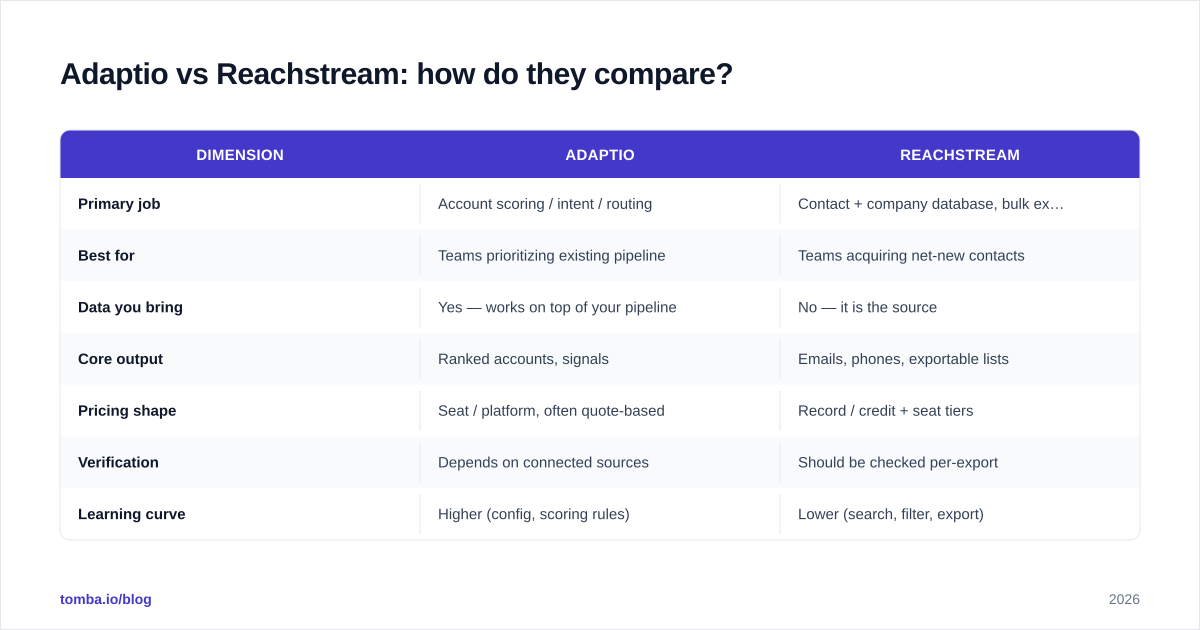
Here's the honest side-by-side. Where a value depends on a plan tier or a sales quote, I've said so rather than inventing a number.
| Dimension | Adaptio | Reachstream |
|---|---|---|
| Primary job | Account scoring / intent / routing | Contact + company database, bulk export |
| Best for | Teams prioritizing existing pipeline | Teams acquiring net-new contacts |
| Data you bring | Yes — works on top of your pipeline | No — it is the source |
| Core output | Ranked accounts, signals | Emails, phones, exportable lists |
| Pricing shape | Seat / platform, often quote-based | Record / credit + seat tiers |
| Verification | Depends on connected sources | Should be checked per-export |
| Learning curve | Higher (config, scoring rules) | Lower (search, filter, export) |
| Risk | Garbage-in if source data is weak | List decay between refreshes |
The key takeaway: these are complements as often as they are competitors. A mature team might use a database for acquisition and an intelligence layer for prioritization. A small team rarely needs both — and frequently needs neither at full price.
)
Which one is more accurate?#
Accuracy is the wrong single question — break it into two: coverage (does the record exist in the system?) and validity (is the email actually deliverable today?). A platform can win on one and lose on the other.
Databases like Reachstream tend to optimize for coverage: lots of records, broad filters. The risk is validity, because a record entered last quarter may already be stale. Intelligence-led tools like Adaptio inherit the validity of whatever feeds them — if your connected sources are clean, scoring is useful; if they're dirty, you're confidently prioritizing bad data.
The defensible move, regardless of vendor, is to run every list through verification before you send. Even a 90%-accurate source means one in ten sends hits a dead inbox, and that quietly erodes your sender reputation. A standalone email verifier catches invalids, accept-all domains, and risky addresses before they cost you deliverability. If you want to understand how providers source and refresh records in the first place, vendor data sources documentation is worth reading closely — vague answers there are a red flag.
How does pricing compare?#
Both vendors price in ways that scale with usage, but along different axes. Reachstream-style database tools usually meter on records or credits plus a seat fee, so your cost tracks how much you export. Adaptio-style platforms more often quote at the seat or platform level, which can mean a higher floor but flatter cost as volume grows.
That difference matters for budgeting. If your need is spiky — a few big list pulls per quarter — a credit model can be cheaper. If you have many reps hammering the tool daily, a flat platform fee can win. Always confirm current numbers directly; published tiers change, and "contact sales" pricing is common at the intelligence end.
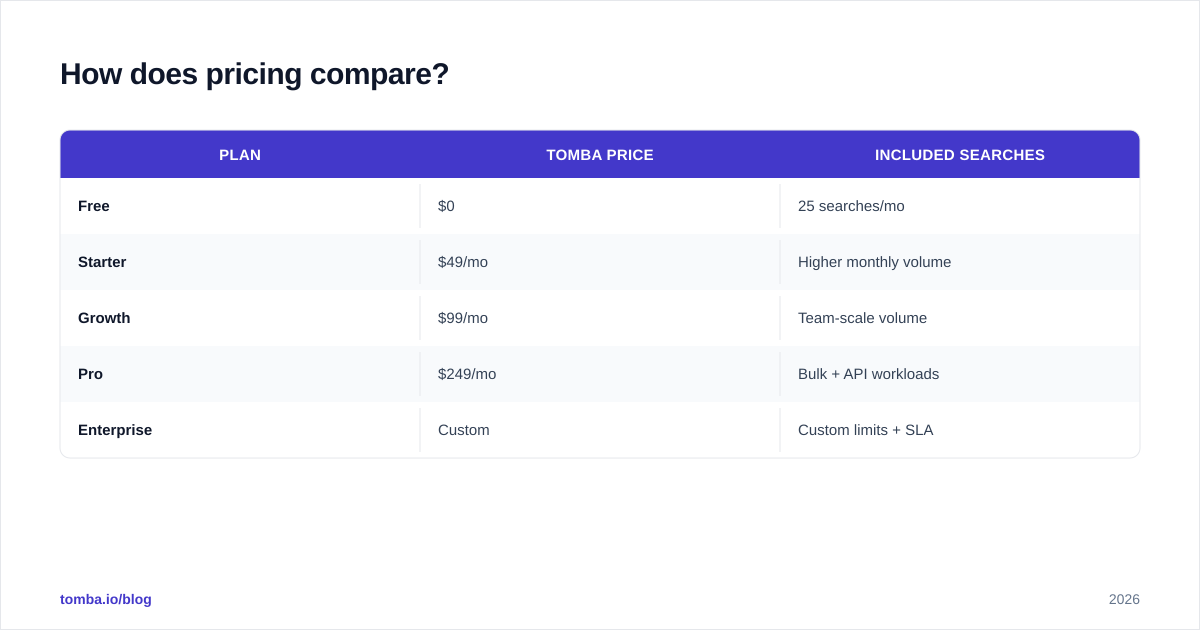
For comparison, a transparent, published model looks like this — Tomba lists its tiers openly rather than gating everything behind a demo:
| Plan | Tomba price | Included searches |
|---|---|---|
| Free | $0 | 25 searches/mo |
| Starter | $49/mo | Higher monthly volume |
| Growth | $99/mo | Team-scale volume |
| Pro | $249/mo | Bulk + API workloads |
| Enterprise | Custom | Custom limits + SLA |
You can see the full breakdown on the Tomba pricing page. The point isn't that one is universally cheaper — it's that you should be able to see the number before you talk to a rep.
When should you pick a leaner alternative?#
Plenty of teams reach for a full platform when they need one job done well: find accurate emails for a defined list of targets, and verify them. If that's you, a heavyweight account-intelligence suite is overkill, and a sprawling database is more list-cleanup than you bargained for.
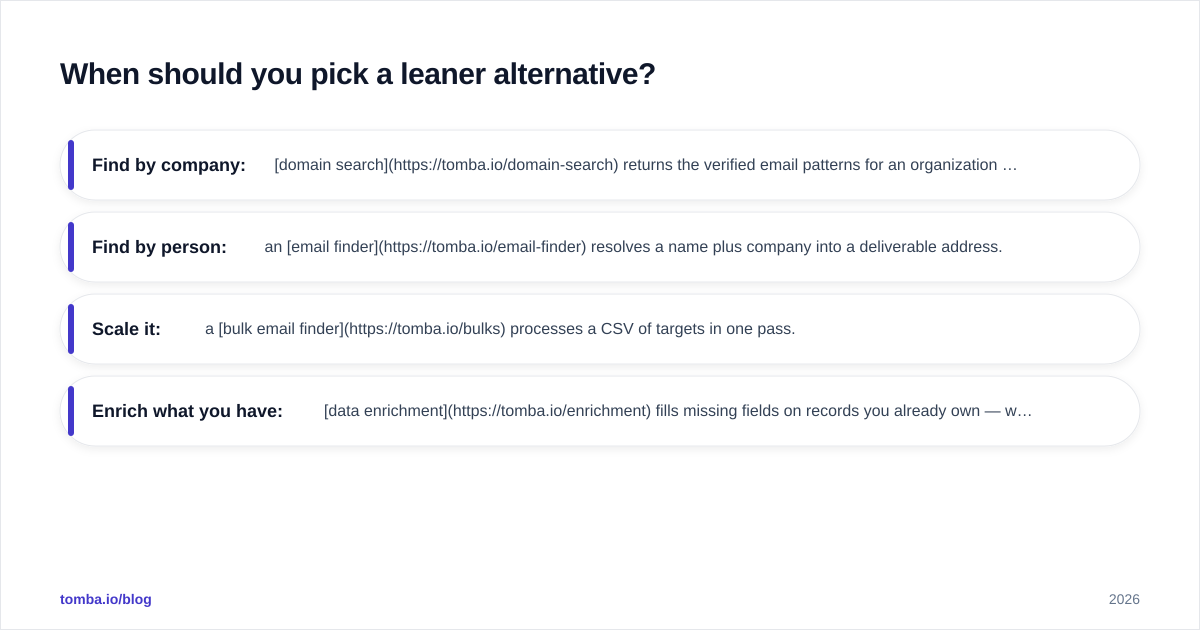
A focused stack handles the common case at a fraction of the cost and complexity:
- Find by company: domain search returns the verified email patterns for an organization in seconds.
- Find by person: an email finder resolves a name plus company into a deliverable address.
- Scale it: a bulk email finder processes a CSV of targets in one pass.
- Enrich what you have: data enrichment fills missing fields on records you already own — which is, notably, the same prerequisite Adaptio-style scoring needs.
This is also the pragmatic answer when you're evaluating Adaptio vs Reachstream and realize you're really asking "how do I get clean contact data into my CRM without overspending?"
)
What about data freshness and compliance?#
Two things quietly decide whether a B2B data tool helps or hurts you: how often the data refreshes, and how the vendor handles consent and regional privacy law.
On freshness, ask for the refresh cadence in writing. "Continuously updated" is marketing; "re-verified every 30 days" is a process. Reachstream-style databases live or die on this, and Adaptio-style scoring is only as current as the signals feeding it.
On compliance, B2B contact data intersects with GDPR, CCPA, and similar regimes. A credible vendor can explain its lawful basis, its opt-out handling, and what happens when someone requests deletion. This isn't legal advice — confirm your own obligations — but a vendor that gets cagey here is telling you something. Reputable platforms publish this; if you can't find it, treat the gap as a finding, not an oversight.
It's also why verification at the point of send matters even with a "fresh" database: re-checking right before outreach is the only way to know an address is live today, not merely live when it was scraped.
So which should you choose?#
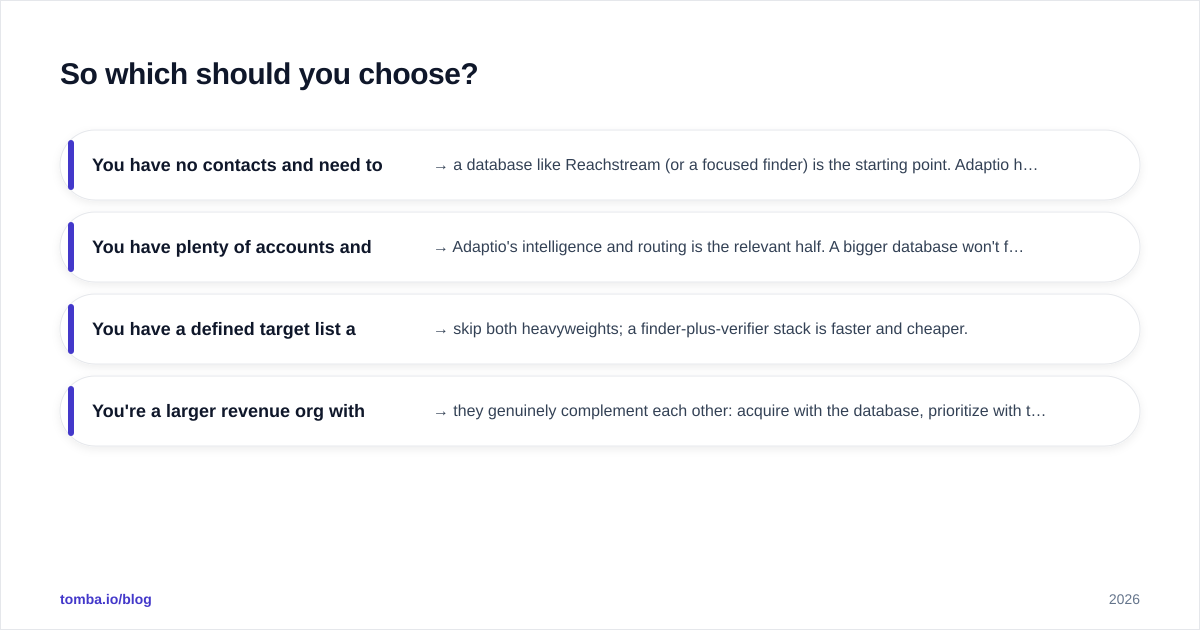
Decide by what you're missing, not by which feature list is longer.
- You have no contacts and need to build lists → a database like Reachstream (or a focused finder) is the starting point. Adaptio has nothing to score yet.
- You have plenty of accounts and can't tell which matter → Adaptio's intelligence and routing is the relevant half. A bigger database won't fix prioritization.
- You have a defined target list and just need accurate, verified emails → skip both heavyweights; a finder-plus-verifier stack is faster and cheaper.
- You're a larger revenue org with budget for both → they genuinely complement each other: acquire with the database, prioritize with the intelligence layer.
Most teams I see overbuy. They purchase a platform for a job a $49 tool does, then spend onboarding weeks configuring scoring rules on data they haven't cleaned. Clean, verified data first; intelligence on top of it second.
The bottom line#
Adaptio and Reachstream aren't really the same product wearing different logos — one ranks accounts, the other supplies contacts. Map your gap to the right half and the "vs" mostly dissolves. And whichever you lean toward, budget for verification: the most expensive data is the data you trusted without checking.
If your actual need is verified professional emails for a known set of targets — without a sales call or a platform commitment — start with the Tomba Email Finder. Find addresses by name, company, or domain, run them through built-in verification, and export straight to your CRM. The free tier gives you 25 searches a month to test accuracy on your own list before you spend a dollar, and the published Tomba plans scale with you instead of hiding behind a quote. Prove the data works, then decide whether you need a heavier platform at all.
Ready to find emails that actually work?
Join 150,000+ professionals who stopped guessing and started sending. Free credits on signup — no credit card required.
Get the Tomba newsletter
Practical outbound tactics and product updates — once every two weeks.
About the author