AddressTwo Pricing, Reviews, Pros and Cons (2026 Guide)
A no-spin breakdown of AddressTwo pricing, real user reviews, and the honest pros and cons of this small-business CRM in 2026 — plus who should skip it.
If you run a small B2B team and you have been told AddressTwo is the "affordable CRM that actually helps you sell," you are probably trying to separate the marketing from the reality. This guide does exactly that: what AddressTwo costs, what real users say, and where it genuinely helps versus where it quietly holds you back.
TL;DR#
- AddressTwo is a low-cost, small-business CRM built around contact management, simple marketing automation, and a "sales coaching" philosophy from founder Nick Carter — not an enterprise platform.
- Pricing is per-user and modest (roughly $15–$50/user/month depending on tier), which is its single biggest selling point. Always confirm current numbers on the official site before you buy.
- Pros: cheap, simple, fast to learn, US-based support, decent email marketing for the price.
- Cons: dated UI, shallow integrations, limited reporting, and weak native prospecting — you still need a separate tool to actually find contacts.
- Best fit: solo operators and micro-teams who want a glorified, automated address book. Larger or data-hungry teams will outgrow it fast.
What is AddressTwo?#
AddressTwo is a small-business CRM that has been around since the late 2000s, positioned as a simpler, cheaper alternative to heavyweight platforms like Salesforce. The pitch is straightforward: most small businesses do not need a complex sales machine, they need an organized contact list, automated follow-up, and a nudge to actually do the selling.
Think of it like the difference between a full commercial kitchen and a well-organized home kitchen. Salesforce is the commercial kitchen — endless capability, but you need staff to run it. AddressTwo is the home kitchen: everything you need for a family dinner, nothing you do not, and you can cook in it on day one.
Technically, AddressTwo bundles contact management, email marketing, simple drip campaigns, lead capture forms, and basic activity tracking. It leans heavily on the personal philosophy of its founder, including the "Building a Sales Engine" methodology, so it is as much a sales-coaching product as a software one.
How much does AddressTwo cost?#
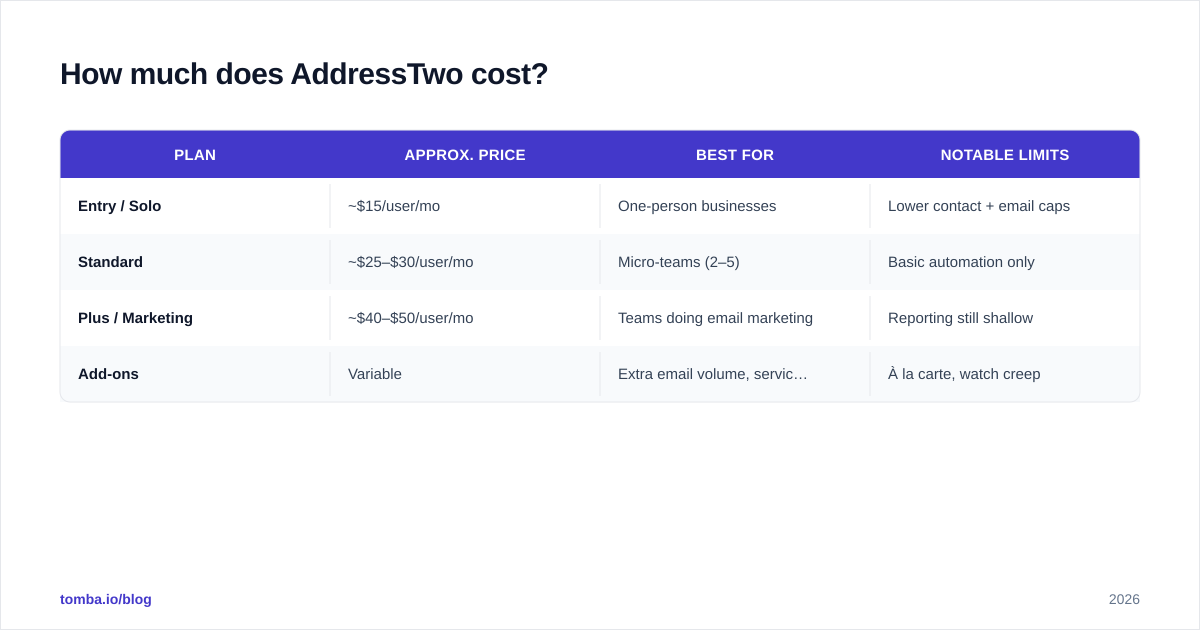
AddressTwo's appeal starts and ends with price. It is consistently one of the cheaper CRMs on the market, charged per user per month, with tiers that scale on contact volume and email-marketing features rather than on a maze of feature gates.
Because vendors adjust pricing over time, treat the table below as a planning guide and confirm live numbers on the AddressTwo website before you commit. The structure, not the exact cents, is what matters here.
| Plan | Approx. price | Best for | Notable limits |
|---|---|---|---|
| Entry / Solo | ~$15/user/mo | One-person businesses | Lower contact + email caps |
| Standard | ~$25–$30/user/mo | Micro-teams (2–5) | Basic automation only |
| Plus / Marketing | ~$40–$50/user/mo | Teams doing email marketing | Reporting still shallow |
| Add-ons | Variable | Extra email volume, services | À la carte, watch creep |
The headline takeaway: even the top published tier usually costs less than a single seat of many mid-market CRMs. For a bootstrapped operation, that math is hard to argue with.
What you will not find is enterprise pricing with SSO, advanced permissions, or volume discounts negotiated by a procurement team. AddressTwo is transparent and small by design. If you want to benchmark it against the broader market, our breakdown of Tomba pricing shows how data and CRM tooling are typically tiered so you can compare apples to apples.
Is AddressTwo worth it? What the reviews say#
Across review sites like G2 and Capterra, AddressTwo earns a recurring pattern of feedback that is remarkably consistent. Here is the honest synthesis.
What reviewers praise:
- Price-to-value. The most common compliment. Users repeatedly say it does "80% of what we need for 20% of the cost."
- Support. US-based, responsive, and willing to actually help configure the system — rare at this price.
- Ease of use. Non-technical owners get productive in a day. No certification, no consultant.
- Email marketing built in. Many small CRMs make you bolt on a separate email tool; AddressTwo includes usable campaigns.
What reviewers criticize:
- Dated interface. The most frequent complaint. It works, but it looks and feels older than newer competitors.
- Shallow integrations. Limited native connectors; you lean on workarounds or Zapier-style middleware.
- Reporting. Fine for "who did I talk to," weak for pipeline forecasting and cohort analysis.
- No serious prospecting. It organizes contacts you already have; it does not find new ones.
That last point is the one teams underestimate. A CRM is a system of record, not a system of acquisition. AddressTwo will faithfully store every lead you feed it — but feeding it is your job.
What are the biggest pros and cons of AddressTwo?#
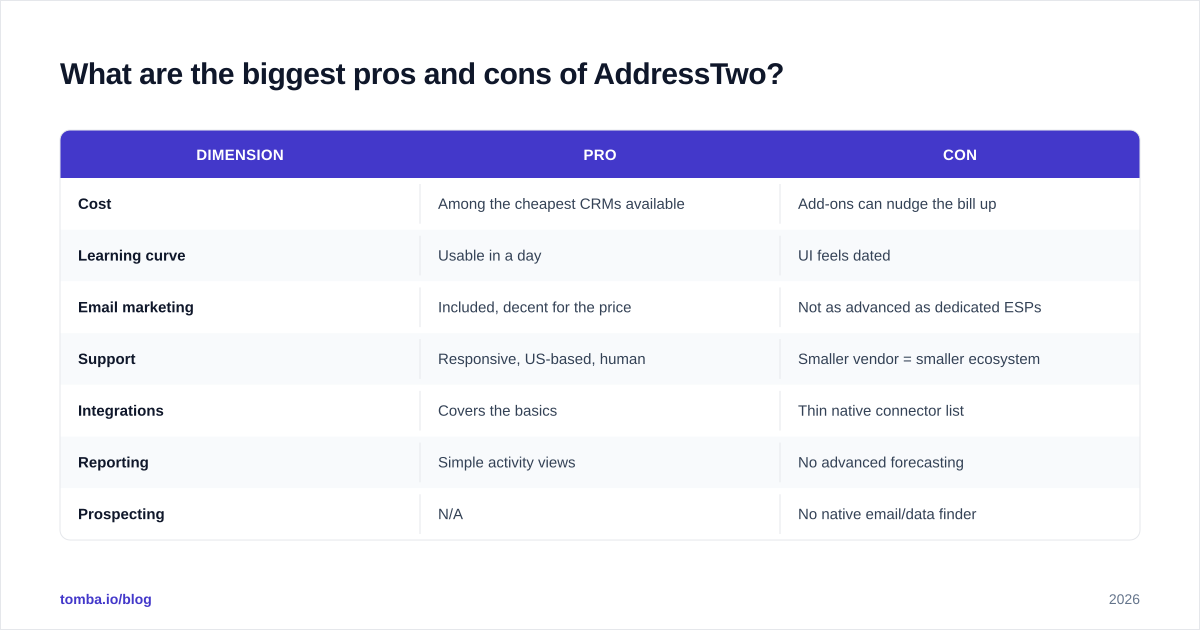
Let me put the trade-offs side by side so you can decide in thirty seconds whether to keep reading or move on.
| Dimension | Pro | Con |
|---|---|---|
| Cost | Among the cheapest CRMs available | Add-ons can nudge the bill up |
| Learning curve | Usable in a day | UI feels dated |
| Email marketing | Included, decent for the price | Not as advanced as dedicated ESPs |
| Support | Responsive, US-based, human | Smaller vendor = smaller ecosystem |
| Integrations | Covers the basics | Thin native connector list |
| Reporting | Simple activity views | No advanced forecasting |
| Prospecting | N/A | No native email/data finder |
The pattern is clear: AddressTwo trades depth for simplicity and price. That is a legitimate strategy, not a flaw — but only if simplicity is what your business actually needs.
Who should use AddressTwo (and who should not)?#
Use it if you are:
- A solo consultant, agency owner, or local service business with a few hundred to a few thousand contacts.
- Someone who has been running sales out of a spreadsheet or Gmail and needs a real, automated system without a steep bill.
- A team that values talking to a human in support over having a 500-app marketplace.
Skip it if you are:
- A scaling B2B team that needs robust pipeline reporting, territory management, or deep integrations.
- Data-driven and outbound-heavy — you will want richer enrichment and prospecting than AddressTwo offers.
- Committed to a modern, design-forward workflow where UI friction kills adoption.
If you fall in the second group, the gap is rarely the CRM itself — it is the data feeding it. That is where a dedicated layer changes the economics.
What is AddressTwo missing — and how do you fix it?#
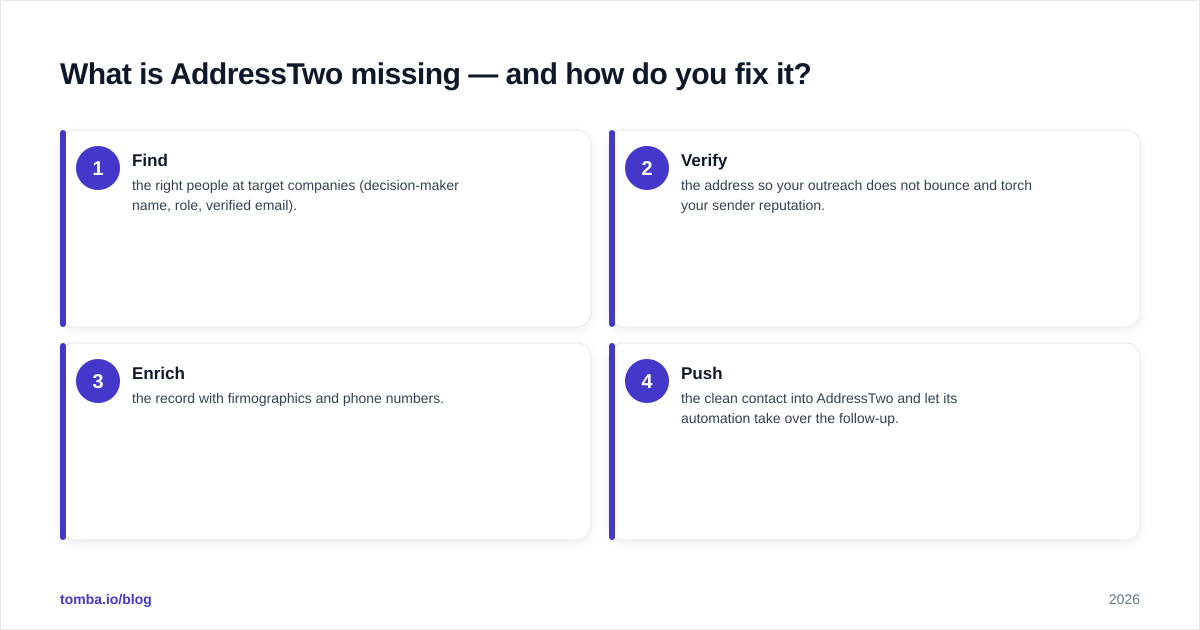
Here is the conclusion first: AddressTwo's biggest functional gap is lead acquisition, and you fix it by pairing it with a dedicated email-finding and enrichment layer rather than replacing the CRM entirely.
A CRM only multiplies value when it is full of accurate, reachable contacts. AddressTwo gives you the box; it does not fill it. In practice, small teams stitch together a workflow like this:
- Find the right people at target companies (decision-maker name, role, verified email).
- Verify the address so your outreach does not bounce and torch your sender reputation.
- Enrich the record with firmographics and phone numbers.
- Push the clean contact into AddressTwo and let its automation take over the follow-up.
Steps 1–3 are exactly what AddressTwo does not do — and exactly what a tool like Tomba does well. You can use the email finder to source verified work emails by name and domain, run a quick email verification pass to protect email deliverability, and pull whole company contact lists with domain search. Then your CRM does what it is actually good at: remembering to follow up.
This division of labor is why "AddressTwo vs Tool X" is often the wrong question. The right question is "AddressTwo plus what?"
How does AddressTwo compare to other small-business CRMs?#
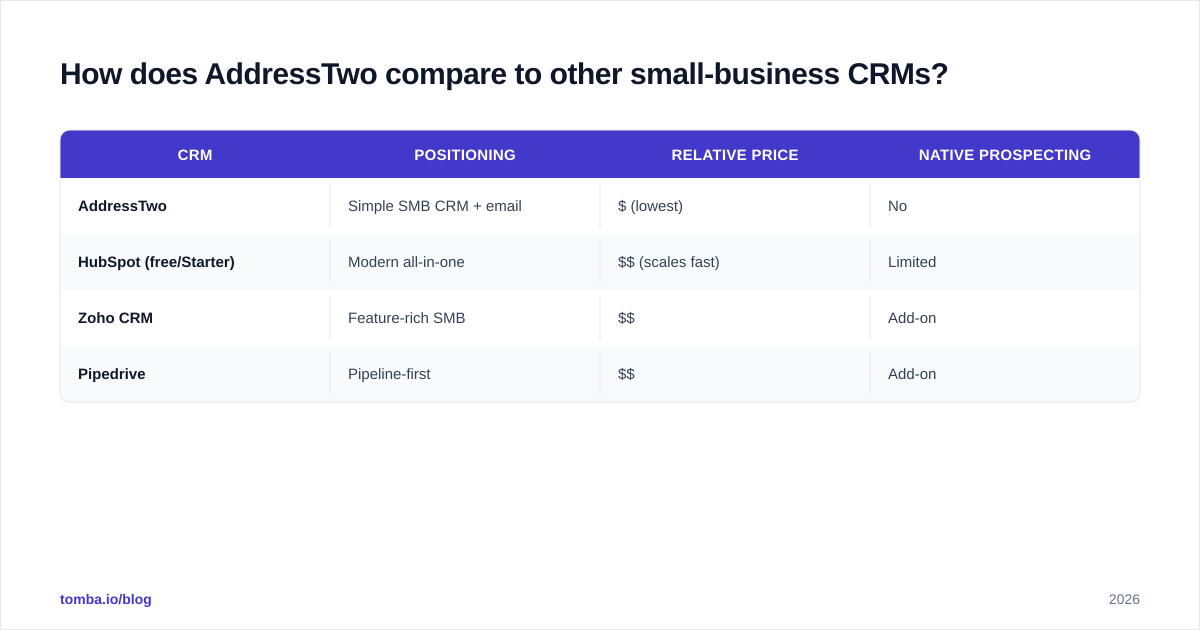
If price weren't AddressTwo's anchor, the comparison would look different. But for the budget-conscious small-business buyer, here is how it stacks up against common alternatives in spirit (verify each vendor's current pricing directly).
| CRM | Positioning | Relative price | Native prospecting |
|---|---|---|---|
| AddressTwo | Simple SMB CRM + email | $ (lowest) | No |
| HubSpot (free/Starter) | Modern all-in-one | $$ (scales fast) | Limited |
| Zoho CRM | Feature-rich SMB | $$ | Add-on |
| Pipedrive | Pipeline-first | $$ | Add-on |
HubSpot's free tier is the most common cross-shop; if you want to understand how the modern end of the market frames CRM, HubSpot's CRM overview is a useful reference point for what "feature-rich" looks like in 2026. AddressTwo deliberately does not try to match it — it competes on price and simplicity, and on staying out of your way.
The honest verdict: AddressTwo wins on cost and approachability, loses on polish, integrations, and analytics. None of its competitors solve prospecting natively either, which loops back to the same conclusion — your acquisition layer should be a deliberate, separate choice.
Frequently asked questions#
Is AddressTwo a good CRM in 2026? For solo operators and micro-teams on a tight budget, yes. For scaling teams that need reporting depth and a rich integration ecosystem, it will feel limiting.
Does AddressTwo include email marketing? Yes. Built-in campaigns and simple drip automation are part of its appeal — you do not need a separate ESP for basic outreach.
Can AddressTwo find new leads or emails for me? No. It manages contacts you already have. Pair it with a dedicated finder and email verifier to feed it accurate, reachable contacts.
How much does AddressTwo cost? Roughly $15–$50 per user per month depending on tier, with optional add-ons. Confirm current pricing on the official site, as vendors update plans periodically.
The bottom line#
AddressTwo is exactly what it claims to be: an affordable, no-nonsense CRM for small businesses that want organization and automated follow-up without a six-figure implementation. Its pros (price, simplicity, support) are real, and so are its cons (dated UI, thin integrations, no prospecting).
The smartest move for most small B2B teams is not to agonize over which budget CRM is marginally better — it is to fix the input problem. A CRM full of stale or missing contacts will underperform no matter how good it is.
Start by filling your pipeline with verified, decision-maker contacts using the Tomba Email Finder. Find the right people by name or domain, verify every address before it hits your sequence, and push clean records straight into whatever CRM you choose — AddressTwo included. Your CRM keeps the relationships; Tomba makes sure there are relationships worth keeping. Try it free and feed your sales engine the fuel it has been missing.
// get started
Find, verify and enrich your first contacts today
Start on the free plan with 25 searches a month, then scale when your team is ready.
Free plan · No credit card required · GDPR & CCPA
// about the author