Adversus Pricing, Reviews, Pros and Cons (2026 Guide)
A straight-talking breakdown of Adversus pricing, real user reviews, and the pros and cons of the outbound dialer before you commit a budget in 2026.
TL;DR
- Adversus is a cloud outbound dialer and lead-management platform built for high-volume calling teams — think telemarketing, appointment setting, and B2B SDR floors.
- Pricing is seat-based and quote-driven: there is no public free tier, and most teams land in the per-user-per-month range plus telephony usage. Budget for onboarding on top.
- The strongest reviews praise the predictive/power dialer, workflow automation, and reporting. The loudest complaints are the learning curve, support response times, and add-on costs.
- It fits dedicated calling teams of 5+ seats. Solo reps and light-touch outbound teams usually overpay for capacity they never use.
- If your bottleneck is finding accurate numbers and emails to dial in the first place, a dialer won't fix that — pair it with a data layer like a phone finder.
What is Adversus?#
Adversus is an outbound-focused calling platform. The simplest analogy: if a normal phone is a single garden hose, Adversus is the irrigation system — it decides which leads to call, dials them automatically, routes live answers to available agents, and logs every outcome so managers can see the whole field at once.
It bundles four things most calling teams otherwise stitch together: a dialer (manual, power, and predictive modes), a lead and campaign manager, workflow automation (rules that move leads between campaigns based on call results), and reporting dashboards. It's popular in European telemarketing, lead-gen agencies, and appointment-setting shops where reps make hundreds of dials a day.
You can confirm the current feature set on the official Adversus site. This guide focuses on the part vendors bury: what it costs, what real users say, and where it falls short.
How much does Adversus cost in 2026?#
Bottom line first: Adversus does not publish a flat, self-serve price list. Pricing is seat-based, quoted per team, and layered on top of telephony (call) costs. That means two teams of the same size can pay very different amounts depending on call volume, country routing, and add-ons.
Here's how the cost structure actually breaks down:
- Per-seat license — the recurring subscription for each agent or admin seat. This is the line item that scales with headcount.
- Telephony / minutes — outbound calls are billed by usage and destination. High-volume predictive dialing racks this up fast.
- Onboarding & setup — many teams report a one-time onboarding or implementation fee, especially for predictive-dialer configuration.
- Add-ons — SMS, advanced integrations, and extra number provisioning are commonly priced separately.
Because the public figures shift and are often gated behind a sales call, treat any single number you see online with skepticism and get a written quote scoped to your call volume. Verify current numbers directly on Adversus pricing and cross-check community-sourced ranges on G2 and Capterra before you sign.
Adversus vs common alternatives#
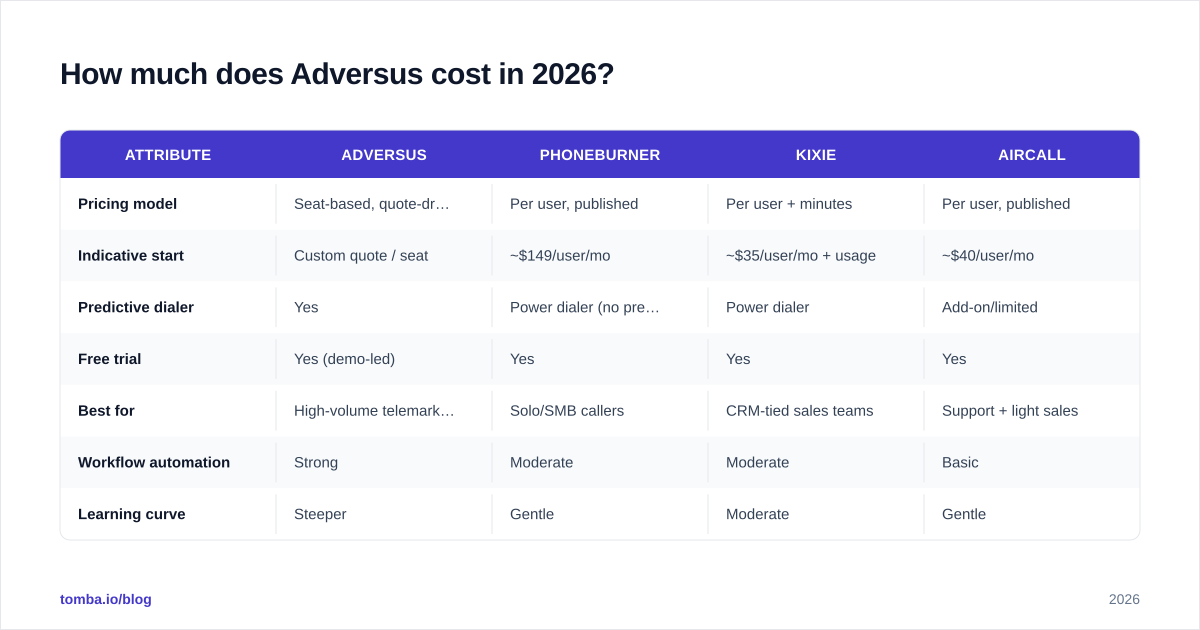
The table below compares Adversus against three frequently shortlisted outbound dialers. Prices are indicative starting points reported by users and vendor pages; always confirm live quotes.
| Attribute | Adversus | PhoneBurner | Kixie | Aircall |
|---|---|---|---|---|
| Pricing model | Seat-based, quote-driven | Per user, published | Per user + minutes | Per user, published |
| Indicative start | Custom quote / seat | ~$149/user/mo | ~$35/user/mo + usage | ~$40/user/mo |
| Predictive dialer | Yes | Power dialer (no predictive) | Power dialer | Add-on/limited |
| Free trial | Yes (demo-led) | Yes | Yes | Yes |
| Best for | High-volume telemarketing | Solo/SMB callers | CRM-tied sales teams | Support + light sales |
| Workflow automation | Strong | Moderate | Moderate | Basic |
| Learning curve | Steeper | Gentle | Moderate | Gentle |
The pattern: Adversus wins on raw outbound horsepower and automation depth, but it asks more of you up front in both money and setup time than a plug-and-play tool like Kixie or Aircall.
What do Adversus reviews actually say?#
Aggregating public reviews on G2 and Capterra, the sentiment clusters into clear themes rather than one-line star ratings.
What reviewers consistently praise:
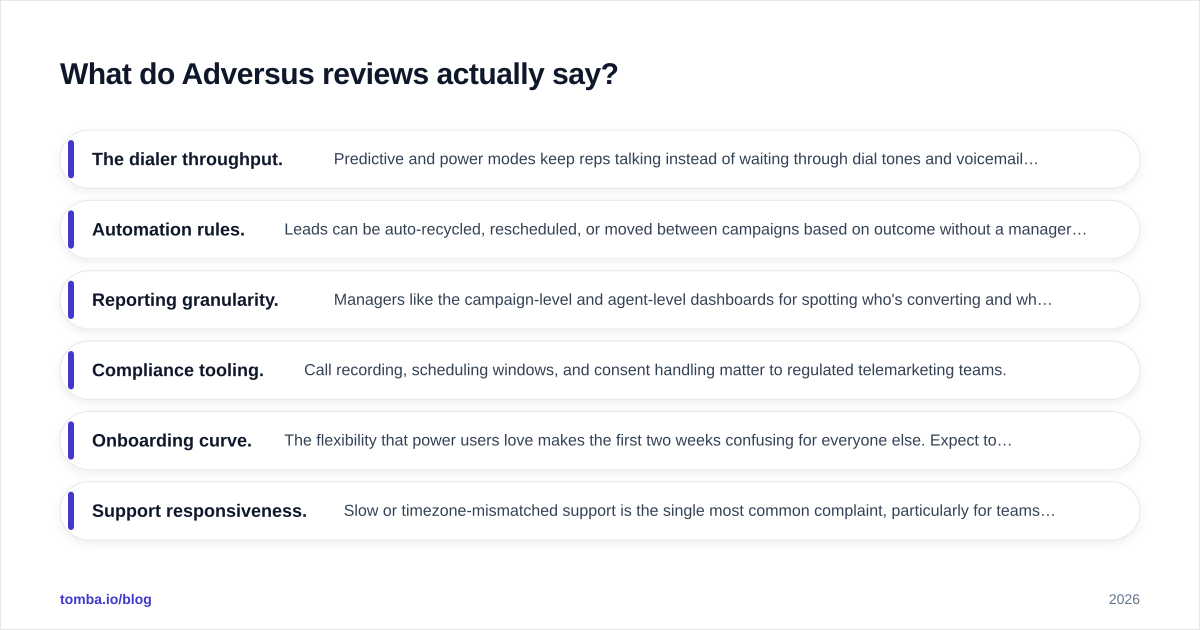
- The dialer throughput. Predictive and power modes keep reps talking instead of waiting through dial tones and voicemails. For appointment setters paid on connects, this is the headline value.
- Automation rules. Leads can be auto-recycled, rescheduled, or moved between campaigns based on outcome without a manager touching them. One reviewer's "set it and walk away" comment shows up in different words across many reviews.
- Reporting granularity. Managers like the campaign-level and agent-level dashboards for spotting who's converting and which lists are dead.
- Compliance tooling. Call recording, scheduling windows, and consent handling matter to regulated telemarketing teams.
What reviewers repeatedly criticize:
- Onboarding curve. The flexibility that power users love makes the first two weeks confusing for everyone else. Expect to invest in training.
- Support responsiveness. Slow or timezone-mismatched support is the single most common complaint, particularly for teams outside European business hours.
- Cost creep. Telephony usage and add-ons push the real monthly bill above the quoted seat price more often than buyers expect.
- UI density. Powerful, but busy. New agents need hand-holding to avoid mis-routing leads.
The honest read: Adversus reviews are good, not glowing, and the negatives are operational (support, ramp time) rather than fundamental (the core product works).
What are the pros and cons of Adversus?#
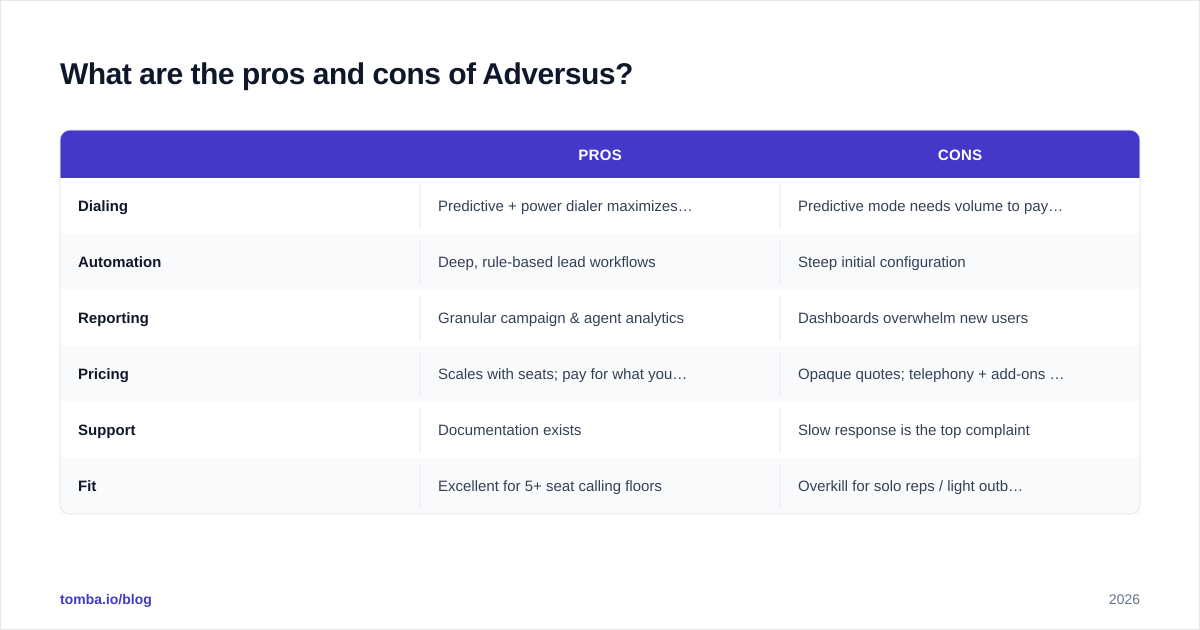
Here's the condensed scorecard.
| Pros | Cons | |
|---|---|---|
| Dialing | Predictive + power dialer maximizes talk time | Predictive mode needs volume to pay off |
| Automation | Deep, rule-based lead workflows | Steep initial configuration |
| Reporting | Granular campaign & agent analytics | Dashboards overwhelm new users |
| Pricing | Scales with seats; pay for what you staff | Opaque quotes; telephony + add-ons stack up |
| Support | Documentation exists | Slow response is the top complaint |
| Fit | Excellent for 5+ seat calling floors | Overkill for solo reps / light outbound |
Pros, in plain terms#
If you run a dedicated outbound floor, Adversus removes the three biggest time sinks: manual dialing, manual lead routing, and manual reporting. The predictive dialer alone can lift agent talk-time from roughly 15 minutes per hour to 40+ when lists are healthy — and that ratio is the whole game in telemarketing economics.
Cons, in plain terms#
If you're a small team or a generalist sales rep, you'll pay for capacity and complexity you can't use. The setup tax is real, and the support gap means you may be solving configuration problems yourself. A lighter tool — or even a CRM-native dialer — often delivers better ROI under five seats.

Who should actually buy Adversus?#
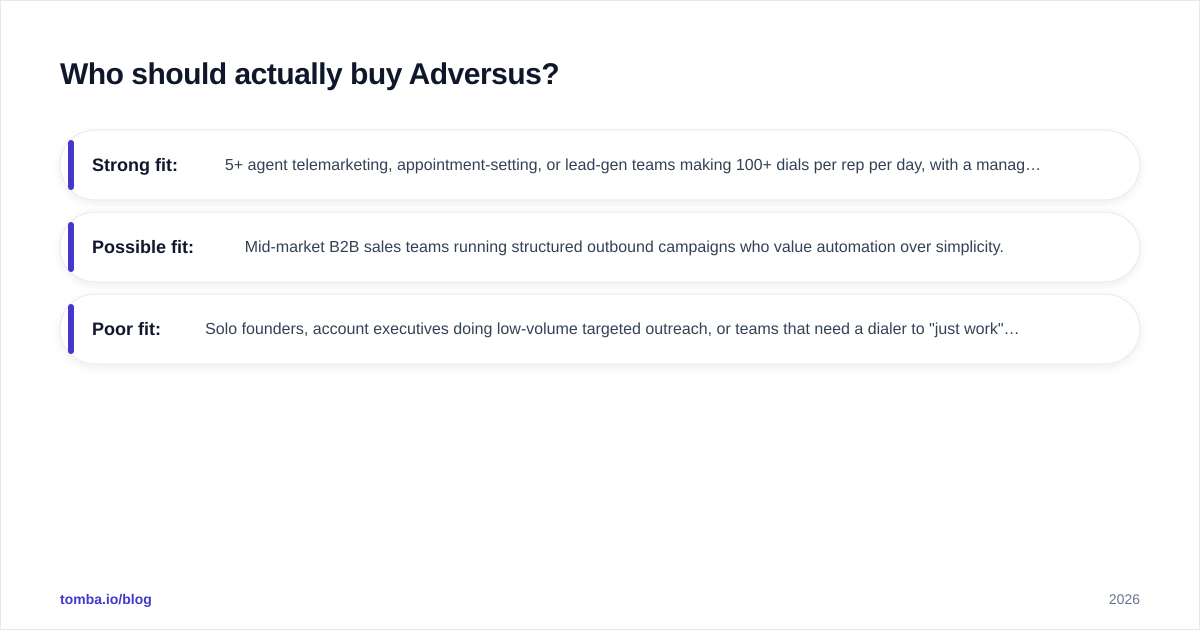
Use this quick qualifier:
- Strong fit: 5+ agent telemarketing, appointment-setting, or lead-gen teams making 100+ dials per rep per day, with a manager who can own configuration.
- Possible fit: Mid-market B2B sales teams running structured outbound campaigns who value automation over simplicity.
- Poor fit: Solo founders, account executives doing low-volume targeted outreach, or teams that need a dialer to "just work" on day one.
The deciding question isn't "is Adversus good?" — it's "do I dial enough volume to amortize the setup and seat cost?" If you hesitate, you're probably not there yet.
Does a dialer fix your real outbound problem?#
Often, no — and this is where most calling-tool purchases disappoint. A dialer makes bad numbers fail faster. It does nothing to improve the quality of the list you feed it. If 25% of your phone numbers are wrong and a third of your email follow-ups bounce, you've automated your way into more dead air.
Two upstream fixes matter more than dialer brand:
- Accurate contact data. Garbage lists waste predictive-dialer capacity (and you're paying per minute for those dropped calls). Validate numbers before they enter a campaign with a phone validator, and source direct dials with a dedicated phone finder instead of scraping stale CRM exports.
- Multichannel follow-up. Calls connect best when paired with email touches. Pull verified addresses with an email finder so a missed call becomes a tracked email sequence rather than a lost lead.
Think of it like a sports car: Adversus is the engine, but contact data is the fuel. A faster engine burning bad fuel just stalls louder. Teams that win at outbound treat data accuracy and dialer throughput as one system, not two purchases. (For a sense of how that data layer is priced, see Tomba pricing — it sits alongside, not instead of, your dialer.)
How does Adversus compare to building outbound on a CRM dialer?#
A fair alternative to a standalone platform is a CRM-native dialer (HubSpot, Salesforce, Pipedrive with a calling add-on). The trade-off:
- CRM dialer — simpler, cheaper at low volume, data already lives where reps work, but weak on predictive dialing and high-volume automation.
- Adversus — purpose-built for volume and automation, but a separate system to integrate, learn, and reconcile with your CRM.
For reference on the CRM side, HubSpot publishes its calling features openly on hubspot.com. If your team makes fewer than ~50 dials per rep per day, the CRM route usually wins on total cost and simplicity. Above that, Adversus's dedicated dialing engine starts to justify itself.
Final verdict: is Adversus worth it in 2026?#
Adversus is worth it for high-volume outbound teams that will actually use its dialer and automation — and a poor purchase for everyone else. The product is capable; the friction is operational (opaque pricing, ramp time, support). Go in with a written quote that includes telephony and onboarding, budget for two weeks of configuration, and confirm support coverage for your timezone before you commit.
But remember the order of operations: the dialer is the last 20% of an outbound system, not the first. Before you optimize how fast you dial, fix what you're dialing. Accurate, verified contact data is the cheapest performance upgrade most outbound teams ignore.
Start there. Use Tomba Email Finder to build clean, verified contact lists — direct emails and the data you need to enrich every lead — so whichever dialer you choose is firing at real people, not dead numbers. Spin up the free tier (25 searches/month), test it against your current list quality, and let your call connect rate make the argument. A faster dialer is optional; good data isn't.
// get started
Find, verify and enrich your first contacts today
Start on the free plan with 25 searches a month, then scale when your team is ready.
Free plan · No credit card required · GDPR & CCPA
// about the author