AdvizorPro vs SalesQL: Which B2B Data Tool Wins in 2026?
AdvizorPro vs SalesQL compared on data coverage, accuracy, pricing, and use cases — plus where each tool fits in a 2026 prospecting stack.
TL;DR
- AdvizorPro is a niche B2B database for the financial services vertical — advisors, RIAs, broker-dealers, and insurance pros — with deep firmographic and licensing data you won't find elsewhere.
- SalesQL is a LinkedIn-first email and phone extractor: a Chrome extension that pulls contact data off profiles and search results as you browse.
- They solve different problems. AdvizorPro is a who-to-target database for one industry; SalesQL is a how-to-reach-them scraper for any LinkedIn profile.
- On price, SalesQL starts cheaper and bills by credits; AdvizorPro is a premium, seat-based subscription priced for wealth-management teams.
- If your market is broader than financial services, a general-purpose email finder with verification often beats both on cost-per-valid-contact.
What is AdvizorPro?#
AdvizorPro is a vertical data-intelligence platform built almost entirely around the financial services industry. Think of it as a specialist directory rather than a general phone book: where most B2B databases try to cover every company on earth, AdvizorPro goes deep on financial advisors, registered investment advisors (RIAs), broker-dealers, insurance agents, and the firms they work for.
Its core value is data you can't easily assemble yourself. AdvizorPro enriches records with regulatory and licensing details (SEC/FINRA registrations, assets under management, custodian relationships, lines of insurance authority) alongside standard contact fields like email and direct dial. For a sales team selling fintech, asset-management software, insurance products, or recruiting talent into wealth firms, that regulatory layer is the whole point.
You access it through a web app with filters, list-building, and CRM exports, plus an API for teams that want to pipe records into their own systems. The trade-off is scope: outside financial services, AdvizorPro simply isn't built for you.
What is SalesQL?#
SalesQL is a LinkedIn contact extractor. It lives as a Chrome extension that overlays LinkedIn profiles and search results, surfacing personal and business emails plus phone numbers with a click. You prospect the way you already do — browsing LinkedIn, Sales Navigator, or Recruiter — and SalesQL appends contact details to the people you find.
Its model is horizontal, not vertical. SalesQL doesn't care whether the person is a financial advisor, a SaaS VP, or a logistics manager; if there's a LinkedIn profile, it tries to resolve a reachable email. That makes it flexible for generalist SDRs and recruiters working across industries.
The flip side is that SalesQL is only as good as the LinkedIn profile in front of you. It's a reach layer, not a market database — you still have to find the right people first.

How do AdvizorPro and SalesQL compare?#
Here's the fastest way to frame the decision: AdvizorPro tells you who exists in the financial-services market; SalesQL helps you contact whoever you've already identified on LinkedIn. One is a database, the other is an enrichment scraper.
The diagram above maps the two tools onto the two jobs every outbound motion needs: list-building (sourcing the right accounts and people) and contactability (resolving a deliverable email or phone number). AdvizorPro is strong on the first axis inside one vertical; SalesQL is built for the second axis across all verticals.
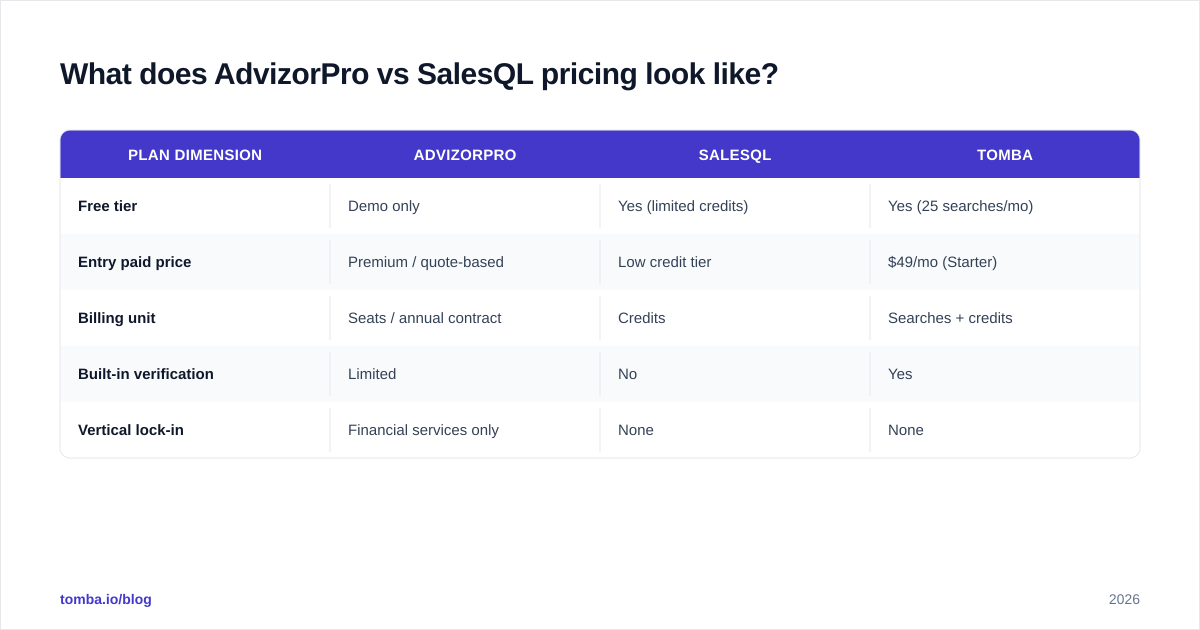
| Attribute | AdvizorPro | SalesQL |
|---|---|---|
| Primary use case | Financial-services market database | LinkedIn email & phone extraction |
| Coverage | Deep, single vertical (advisors, RIAs, insurance) | Broad, any LinkedIn profile |
| Unique data | AUM, FINRA/SEC licensing, custodians | Personal + work emails from profiles |
| Workflow | Web app filters + list export + API | Chrome extension over LinkedIn |
| Pricing model | Seat-based subscription (premium) | Credit-based tiers (lower entry) |
| Free option | Demo / limited trial | Free plan with limited credits |
| Best for | Fintech, asset mgmt, insurance, recruiting into wealth | Generalist SDRs, recruiters, mixed-industry outbound |
| Weakness | Useless outside finance | No market database; depends on LinkedIn |

Data coverage and accuracy#
AdvizorPro's accuracy advantage is concentrated. Within financial services, its records are curated against regulatory filings, so the firmographic detail is unusually reliable and hard to replicate. But coverage is bounded by the vertical — search for a manufacturing COO and you'll come up empty.
SalesQL's accuracy depends on the profile and on the freshness of whatever email it resolves. Personal emails (Gmail, Outlook) are common pulls, which can be a plus for recruiters but a deliverability risk for cold B2B outreach. Because it derives data per-profile, hit rates swing with how complete the LinkedIn profile is.
Neither tool fully solves the validation problem. A resolved email is a guess until it's checked against the mail server, which is why teams pair sourcing tools with a dedicated email verifier before launching a campaign. Skipping that step is the fastest way to torch your sender reputation.
What does AdvizorPro vs SalesQL pricing look like?#
Pricing is where the two diverge most clearly, and where buyers most often mis-scope their budget.
SalesQL uses a credit model with a free tier and paid plans that scale by the number of email/phone credits you consume per month. Entry plans are inexpensive, which makes it approachable for solo reps and small teams testing LinkedIn outbound. Costs climb as your volume does, but the floor is low.
AdvizorPro is positioned as a premium platform sold mostly on annual, seat-based contracts. You're paying for proprietary, regulated-industry data and list-building tooling, not per-credit lookups — so the entry point is materially higher and quoted per team rather than published as a flat self-serve price. Check current AdvizorPro and SalesQL plans on their own sites before budgeting, since both adjust tiers regularly.
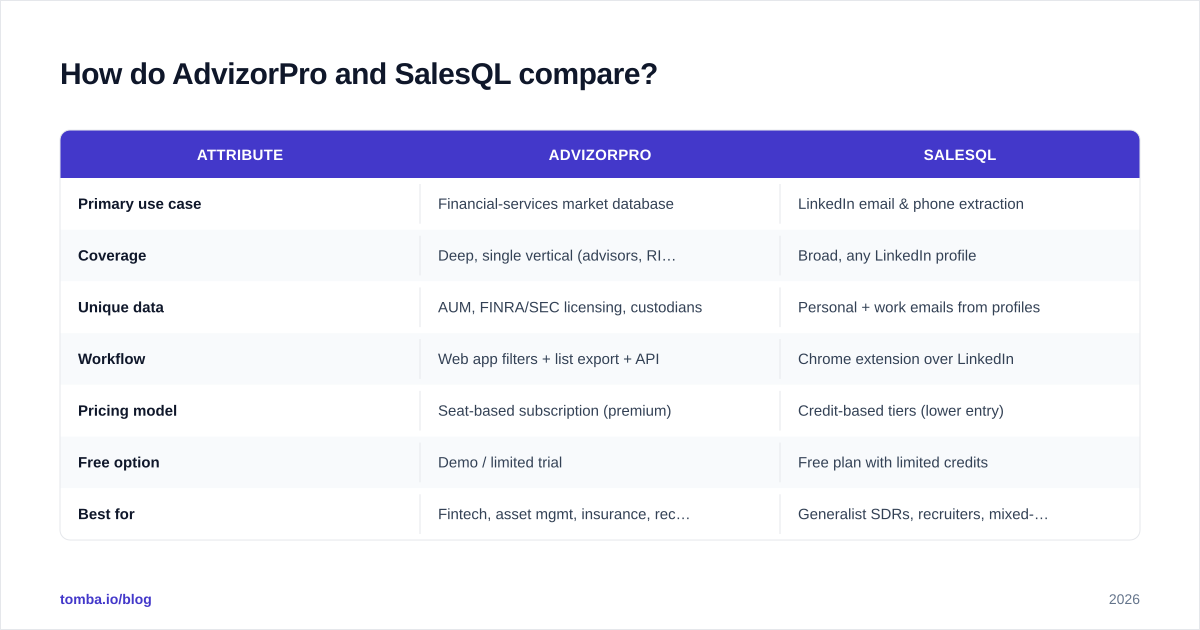
| Plan dimension | AdvizorPro | SalesQL | Tomba |
|---|---|---|---|
| Free tier | Demo only | Yes (limited credits) | Yes (25 searches/mo) |
| Entry paid price | Premium / quote-based | Low credit tier | $49/mo (Starter) |
| Billing unit | Seats / annual contract | Credits | Searches + credits |
| Built-in verification | Limited | No | Yes |
| Vertical lock-in | Financial services only | None | None |
For teams whose ICP isn't financial services, that table usually settles it: paying premium for advisor-specific data is wasted spend, and credit-only scrapers leave you doing list-building manually. A general platform with transparent Tomba pricing and built-in verification tends to win on cost-per-deliverable-contact.
Is AdvizorPro better than SalesQL?#
Neither is "better" in the abstract — they're optimized for different jobs, and the right answer depends entirely on your market and motion.
Choose AdvizorPro if:
- Your buyers are financial advisors, RIAs, broker-dealers, or insurance professionals.
- You need regulatory data — AUM, licensing, custodian relationships — to qualify or segment.
- You're building targeted lists in a vertical where generic databases are thin or wrong.
- Budget is available for premium, specialist data.
Choose SalesQL if:
- You prospect primarily on LinkedIn and Sales Navigator across many industries.
- You want a low-cost, click-to-extract reach layer rather than a market database.
- Recruiting or mixed-industry outbound means personal emails are acceptable.
- You already have a way to identify who to target and just need contact details.
The honest catch: most teams need both jobs done — sourcing and contactability — and end up stitching two or three tools together. AdvizorPro doesn't help you reach non-finance buyers; SalesQL doesn't tell you which accounts to chase. That gap is exactly where a consolidated platform earns its place.
How do AdvizorPro and SalesQL fit a 2026 prospecting stack?#
Picture your outbound engine as a relay race with three legs: source the accounts, resolve the contacts, then verify before you send. AdvizorPro is a strong first-leg runner — but only on the financial-services track. SalesQL is a capable second-leg runner anywhere LinkedIn reaches. The third leg, verification, neither owns well.
In practice, a generalist team running mixed-industry campaigns will get more leverage from one tool that covers domain-level sourcing, profile-level resolution, and verification in a single workflow. That's the design idea behind tools like Tomba: pair domain search to map a company's people, a LinkedIn finder to resolve profile emails the way SalesQL does, and verification to catch the bad addresses before they bounce. You can read more about where the underlying contact data sources come from if data provenance matters to your compliance team.
When AdvizorPro is the right call — a pure fintech or insurance GTM motion — you can still bolt a general finder and verifier alongside it to clean records and fill the occasional non-advisor contact (a procurement lead, an IT buyer) that AdvizorPro won't carry.
What do reviewers say about AdvizorPro and SalesQL?#
Independent review signal is worth a look before you commit. On G2, SalesQL is typically praised for ease of use and the low-friction Chrome workflow, with the common critique being variable email hit rates and reliance on LinkedIn being open in the browser. AdvizorPro reviews skew toward niche praise — buyers in wealth and insurance value the regulatory depth, while the recurring caveat is cost and the obvious fact that it only serves one industry.
Cross-reference those impressions with each vendor's own documentation — AdvizorPro and SalesQL both publish coverage and feature details — and, critically, run your own sample. Pull 50 records from each against a known segment of your ICP, then verify the emails. The bounce rate on that test tells you more than any star rating.
The bottom line#
AdvizorPro and SalesQL aren't really competitors; they're different stages of the same pipeline. AdvizorPro is the specialist market database for financial services, and SalesQL is the generalist LinkedIn reach layer. If you live in wealth-management GTM and need licensing data, AdvizorPro is hard to beat. If you prospect across industries on LinkedIn for cheap, SalesQL does the job. But if you're doing both — and most teams are — running two narrow tools plus a separate verifier gets expensive and leaky fast.
If you'd rather source, resolve, and verify contacts across any industry in one place, try the Tomba Email Finder. Find professional email addresses by domain, name, or company, verify them before you send, and start free with 25 searches a month — then scale on a plan that costs a fraction of premium vertical data. It's the simplest way to stop stitching tools together and get deliverable contacts into your sequence today.
// get started
Find, verify and enrich your first contacts today
Start on the free plan with 25 searches a month, then scale when your team is ready.
Free plan · No credit card required · GDPR & CCPA
// about the author