Agile CRM Pricing, Reviews, Pros and Cons (2026 Guide)
Is Agile CRM still worth it in 2026? A neutral breakdown of plan tiers, real user ratings, the standout features, and the dealbreakers before you commit.
TL;DR
- Agile CRM bundles sales, marketing, and service in one app, with a free tier for up to 10 users and paid plans that run from roughly $8.99 to $47.99 per user/month (annual billing).
- Reviews are split: users praise the all-in-one value and low price, but flag a dated interface, slow support, and contact caps that bite as you scale.
- The strongest fit is a small B2B team that wants marketing automation and a CRM without paying HubSpot prices.
- The weakest fit is a fast-growing outbound team — deliverability tooling and data enrichment are thin, so you'll bolt on other tools fast.
- Whatever CRM you land on, the data you pour into it decides your results. Clean, verified contacts beat a fancier UI every time.
What is Agile CRM?#
Agile CRM is an all-in-one customer relationship management platform aimed at small and mid-sized businesses. Think of it as a Swiss Army knife: contact management, sales pipeline tracking, marketing automation, helpdesk, and telephony all live under one login instead of three or four separate subscriptions.
It launched in 2013 and built its reputation on a simple pitch — give small teams the kind of automation that used to require enterprise budgets, and price it so a five-person startup can actually afford it. If you're new to the category, our CRM glossary entry covers the fundamentals before you compare vendors.
The product splits into three pillars: Sales (contacts, deals, pipelines, appointment scheduling), Marketing (email campaigns, landing pages, web pop-ups, automation workflows), and Service (a ticketing helpdesk with canned responses and SLAs). Most competitors charge for those as separate "hubs." Agile folds them into one plan.
How much does Agile CRM cost in 2026?#
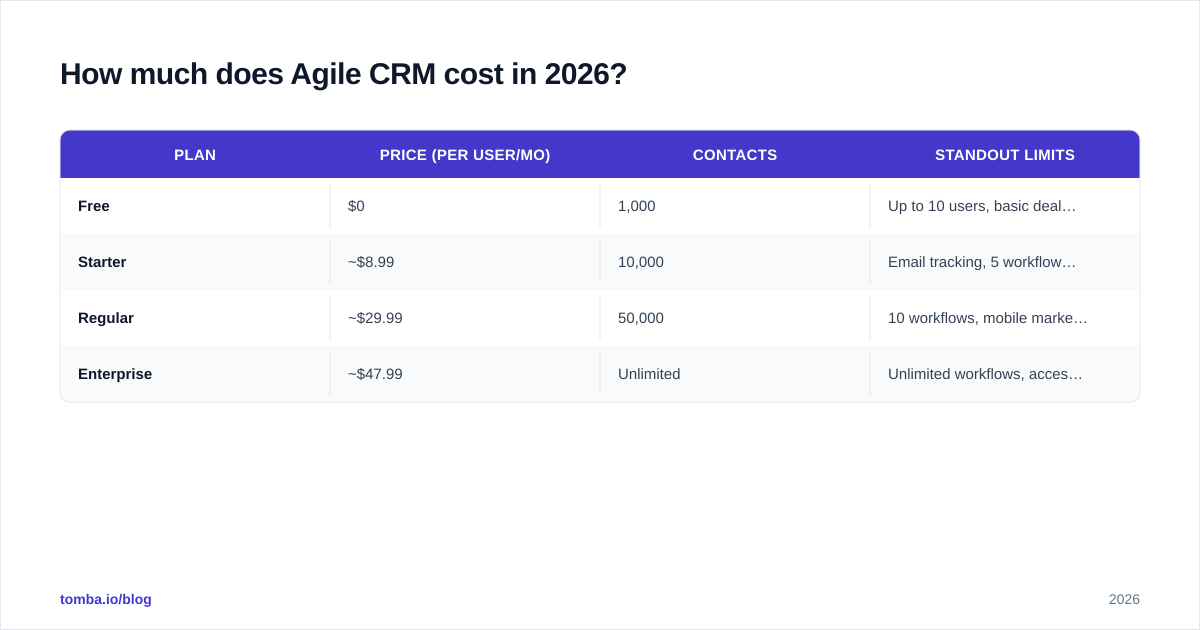
Agile CRM keeps a genuinely free plan and three paid tiers. Pricing is per user, per month, and the headline numbers below reflect annual (or two-year) billing — month-to-month costs more. Always confirm the live numbers on the official Agile CRM site before you buy, because vendors adjust tiers quietly.
| Plan | Price (per user/mo) | Contacts | Standout limits |
|---|---|---|---|
| Free | $0 | 1,000 | Up to 10 users, basic deals, 1 automation workflow |
| Starter | ~$8.99 | 10,000 | Email tracking, 5 workflows, social monitoring |
| Regular | ~$29.99 | 50,000 | 10 workflows, mobile marketing, helpdesk add-ons |
| Enterprise | ~$47.99 | Unlimited | Unlimited workflows, access controls, dedicated onboarding |
A few things to read between the lines:
- The free plan is real, not a 14-day trial. For a tiny team doing light contact management, it can carry you for months.
- Contact caps are the real pricing lever. You can sit on the Starter tier comfortably until your list crosses 10,000 contacts, then you're nudged up a tier whether or not you need the other features.
- The jump from Regular to Enterprise is where access controls, unlimited automation, and onboarding live — features mid-market teams usually need around the time they hit 15+ seats.
Compared with the broader market, Agile sits at the value end. HubSpot's paid Sales Hub starts higher and climbs fast; Salesforce Essentials and Pipedrive both land in a similar range to Agile's Regular plan but with narrower marketing tooling. If you want a sense of how transparent pricing should look, our own Tomba pricing page is laid out the same way — fixed tiers, no "contact us" wall until enterprise.
What do Agile CRM reviews actually say?#
Aggregate ratings hover in the 4.0–4.1 range on the major directories — solidly "good," not "great." On G2 and Capterra, the pattern is consistent enough to summarize honestly.
What reviewers like:
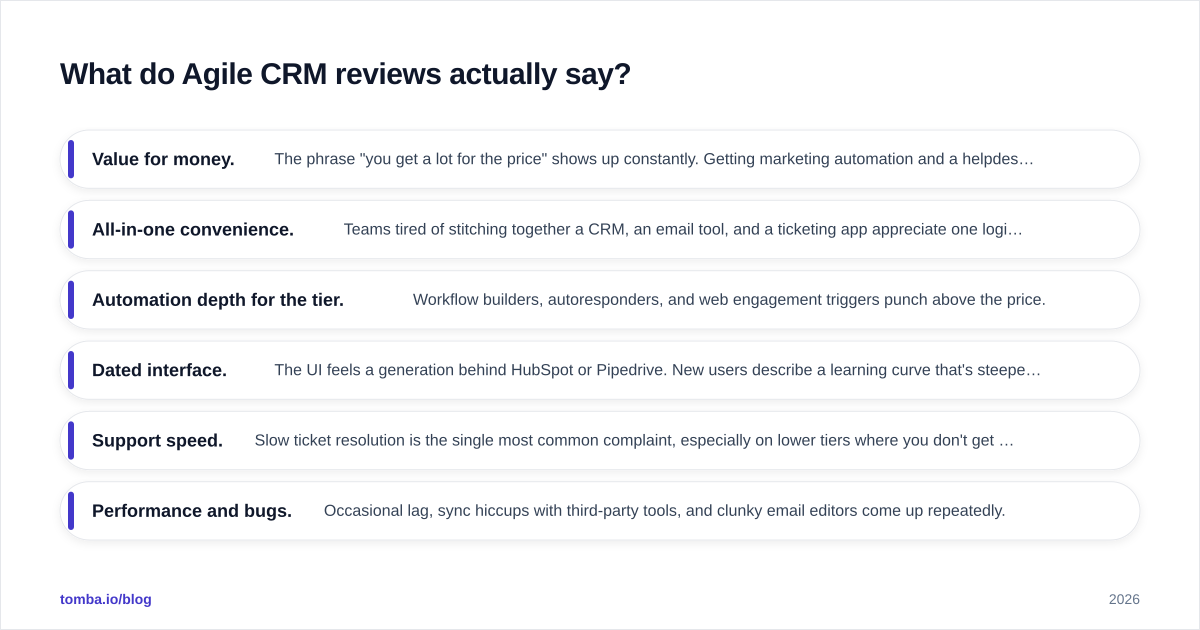
- Value for money. The phrase "you get a lot for the price" shows up constantly. Getting marketing automation and a helpdesk inside a CRM at this price point is the core draw.
- All-in-one convenience. Teams tired of stitching together a CRM, an email tool, and a ticketing app appreciate one login and one bill.
- Automation depth for the tier. Workflow builders, autoresponders, and web engagement triggers punch above the price.
What reviewers criticize:
- Dated interface. The UI feels a generation behind HubSpot or Pipedrive. New users describe a learning curve that's steeper than it should be.
- Support speed. Slow ticket resolution is the single most common complaint, especially on lower tiers where you don't get priority help.
- Performance and bugs. Occasional lag, sync hiccups with third-party tools, and clunky email editors come up repeatedly.
- Data quality is your problem. Like most CRMs, Agile stores what you feed it. It won't clean or verify contacts for you, so bad data quietly rots your pipeline.
That last point matters more than it sounds. A CRM is a filing cabinet, not a data vendor — if half your contact emails bounce, no amount of automation saves the campaign. That's exactly why teams pair their CRM with a dedicated email verifier and contact data enrichment layer rather than trusting whatever got typed in.
What are the pros and cons of Agile CRM?#
Here's the honest balance sheet, the kind you'd want a colleague to give you over coffee rather than a sales rep.
| Pros | Cons |
|---|---|
| Genuine free tier (up to 10 users) | Interface feels dated vs. modern rivals |
| Sales + marketing + service in one app | Support is slow on lower tiers |
| Affordable paid plans for small teams | Contact caps force upgrades early |
| Solid automation for the price | Native data enrichment/verification is thin |
| Built-in telephony and helpdesk | Occasional bugs and third-party sync issues |
| Landing pages and web pop-ups included | Steeper learning curve for non-technical users |
The pattern is clear: Agile CRM is a breadth play, not a depth play. You trade polish and best-in-class support for a wide feature set at a low price. For a bootstrapped team, that trade often makes sense. For a team that lives in one workflow all day — say, high-volume outbound — the rough edges show.
Who is Agile CRM best for — and who should skip it?#
Agile CRM is a strong fit if you:
- Run a small B2B or services business (roughly 2–20 people).
- Want marketing automation and a CRM without HubSpot-level spend.
- Value consolidation — one tool you can mostly learn yourself.
- Have a contact list under ~50,000 and modest support expectations.
Look elsewhere if you:
- Run a high-velocity outbound team that needs deliverability tooling, cadence software, and rich enrichment baked in.
- Need a polished, fast UI your reps will adopt without complaint.
- Expect premium, fast support as a baseline.
- Are scaling quickly and don't want contact caps dictating your upgrade timeline.
If you fall in the second group, the better move is often a leaner sales-focused CRM plus specialized tools for the parts that matter most. A Pipedrive or HubSpot core, paired with a dedicated prospecting and email finder stack, gives outbound teams more horsepower than a single all-in-one suite.
How does Agile CRM compare to the main alternatives?#
No CRM wins on every axis. Here's how Agile stacks up against the three names that come up most in the same buying conversation.
| Factor | Agile CRM | HubSpot | Pipedrive | Zoho CRM |
|---|---|---|---|---|
| Free tier | Yes (10 users) | Yes (limited) | No (trial only) | Yes (3 users) |
| Entry paid price | ~$8.99/user | ~$20/user | ~$14/user | ~$14/user |
| Marketing automation | Built in | Strong (paid) | Add-on | Built in |
| Helpdesk/service | Included | Separate hub | No | Separate product |
| UI polish | Dated | Excellent | Excellent | Good |
| Best for | All-in-one on a budget | Scaling marketing teams | Pure sales pipelines | Zoho ecosystem users |
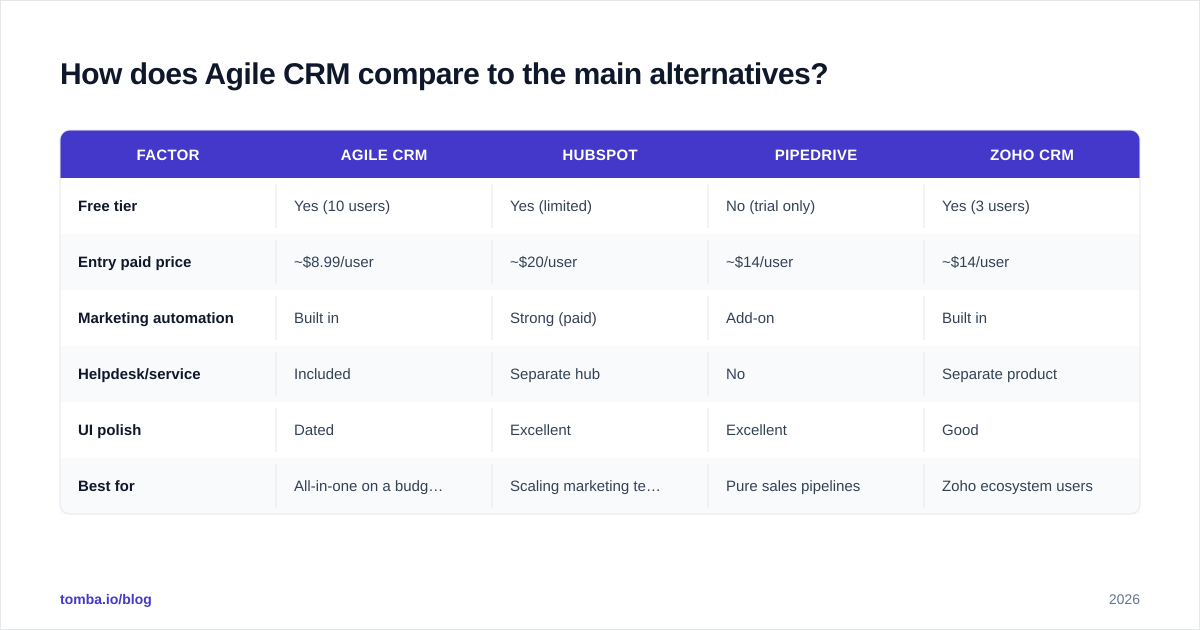
The takeaway: Agile competes on price and breadth. HubSpot wins on polish and ecosystem but costs more as you grow. Pipedrive is the cleaner choice if you only want a sales pipeline. Zoho is the natural pick if you already live in Zoho's other apps.
One thing every option on this list shares: they all assume you arrive with accurate contact data. None of them find or verify the email addresses and phone numbers that fill the pipeline. That's a separate layer — and it's the layer that quietly decides whether your outreach lands or bounces. Whatever CRM you choose, connect it to a clean data source through your integrations so reps aren't hand-typing contacts that may already be stale.
What's the verdict on Agile CRM pricing, reviews, pros and cons?#
Agile CRM in 2026 is a credible, affordable all-in-one for small teams that want more than a basic contact list without paying enterprise prices. The free tier is genuinely useful, the paid plans are fair, and the breadth of features is hard to match at the price. The cost shows up as a dated interface, slower support, and contact caps that push you upmarket on the vendor's schedule, not yours.
If your priority is consolidation on a budget, it earns a spot on your shortlist. If your priority is a fast, modern outbound engine, you'll likely outgrow it and start bolting on specialized tools — at which point the "all-in-one savings" narrow.
Either way, remember the unglamorous truth under every CRM review: the tool is only as good as the data inside it. A pipeline full of unverified, guessed-at email addresses produces bounces and dead deals no matter how slick the dashboard.
That's where Tomba fits regardless of which CRM you pick. Use the Tomba Email Finder to source verified, professional email addresses by name, company, or domain, then push them straight into Agile CRM, HubSpot, Pipedrive, or wherever your team works. Start free with 25 searches a month, scale to the Starter plan at $49/mo when you're ready, and stop letting bad data undercut a CRM you just paid for. Fix the data layer first — the rest of your stack works better for it.
// get started
Find, verify and enrich your first contacts today
Start on the free plan with 25 searches a month, then scale when your team is ready.
Free plan · No credit card required · GDPR & CCPA
// about the author