CapitalConnectorAI vs Cufinder: Which Wins in 2026?
CapitalConnectorAI and Cufinder solve different B2B data problems. Here's an honest 2026 breakdown of features, pricing, accuracy, and the best fit for your team.
TL;DR
- CapitalConnectorAI is built for fundraising and investor matching — it helps founders find and connect with capital sources, not run high-volume sales prospecting.
- Cufinder is a B2B data and enrichment platform: company search, contact data, and email lookup aimed at sales and marketing teams.
- They overlap less than the "vs" framing suggests. Picking between them is really about whether your job is raising money or filling a sales pipeline.
- On raw email accuracy, deliverability, and price-per-verified-contact, neither is a pure email-finder specialist — which is where a focused tool like Tomba Email Finder tends to win.
- If you only remember one thing: match the tool to the job. We break down exactly which job each one does below.
What are CapitalConnectorAI and Cufinder?#
Short version: they aim at different buyers who happen to both want "contact data."
CapitalConnectorAI positions itself around capital formation. The pitch is that founders and fundraisers upload a profile of their company, and the platform surfaces investors, warm-intro paths, and outreach angles tuned to fundraising. The "AI" layer is about matching your stage, sector, and check size to the right funds and angels — then helping you reach them.
Cufinder is a more conventional B2B data engine. It offers company search, contact enrichment, technographic and firmographic data, and email/phone lookup. The buyer is a sales or growth team that needs to turn a list of target accounts into reachable people.
Here's the practical implication: if you're a Series A founder trying to close a round, CapitalConnectorAI speaks your language. If you're an SDR team trying to book 40 meetings a month, Cufinder is closer to your daily reality. Calling them direct competitors is a bit like comparing a matchmaking service to a phone book — both connect you to people, but the intent is completely different.

How do they compare at a glance?#
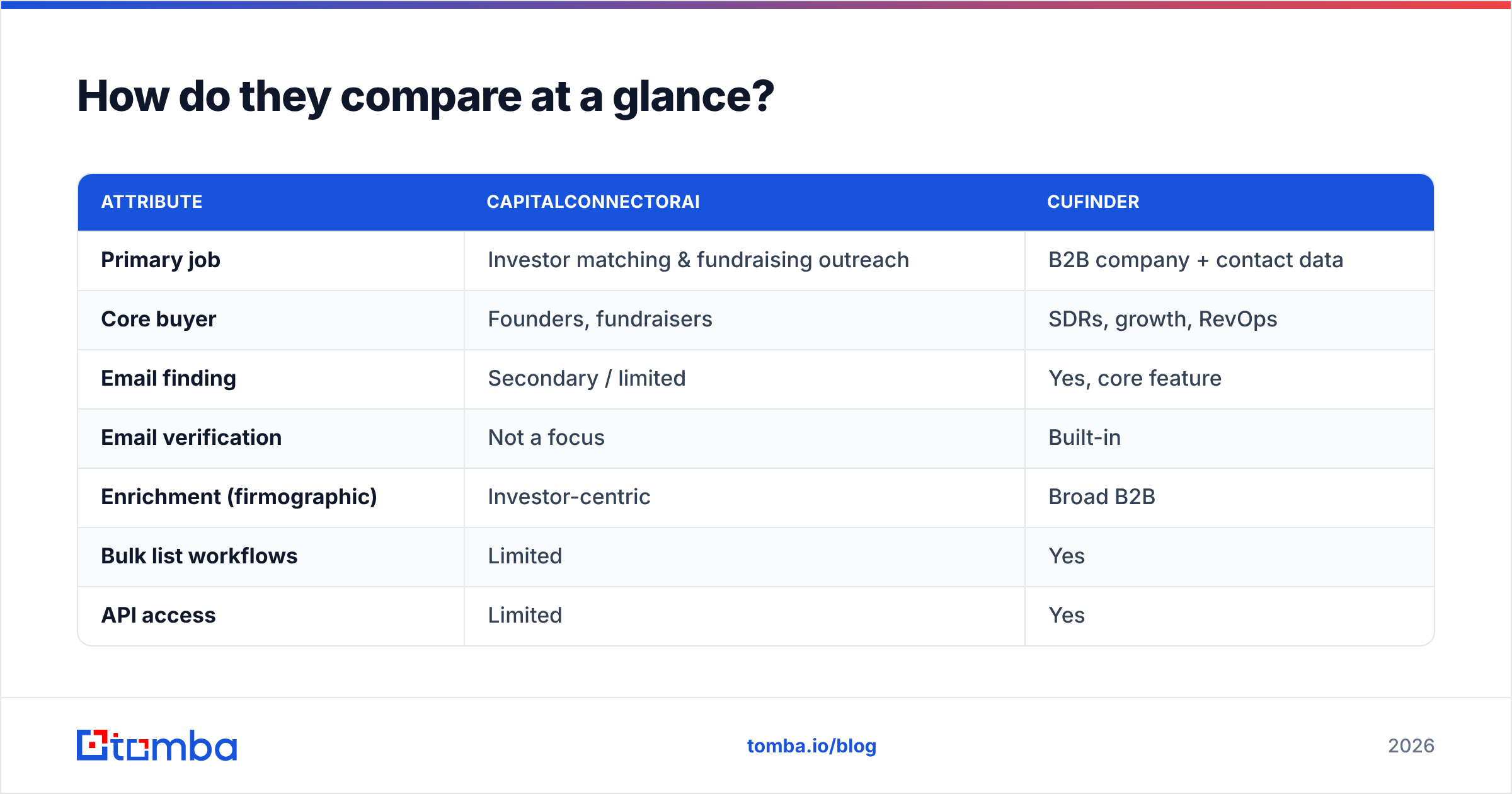
Below is a side-by-side on the attributes that actually drive a buying decision. Treat the pricing as directional — both vendors move tiers and credits around, so confirm on their live pages before you commit.
| Attribute | CapitalConnectorAI | Cufinder |
|---|---|---|
| Primary job | Investor matching & fundraising outreach | B2B company + contact data |
| Core buyer | Founders, fundraisers | SDRs, growth, RevOps |
| Email finding | Secondary / limited | Yes, core feature |
| Email verification | Not a focus | Built-in |
| Enrichment (firmographic) | Investor-centric | Broad B2B |
| Bulk list workflows | Limited | Yes |
| API access | Limited | Yes |
| Free tier | Trial-based | Free credits available |
| Best for | Closing a round | Filling a pipeline |
The table makes the split obvious. One tool optimizes for a handful of high-stakes investor conversations; the other optimizes for volume and repeatability. Neither is "wrong" — they're tuned for different funnels.
Which one finds better B2B emails?#
If email finding is the deciding factor, Cufinder is the more natural fit of the two — but "more natural fit" isn't the same as "best in class."
CapitalConnectorAI's contact data is a means to an end: it wants to get you in front of an investor, so its data depth is concentrated in the venture and angel ecosystem. Ask it to find the VP of Engineering at a 200-person logistics company and you're outside its lane.
Cufinder casts a wider net across general B2B. It can return work emails, company domains, and enriched profiles across industries. That breadth is genuinely useful. The catch with any all-in-one data platform is that email finding and verification are one of many features, so the depth of source data and the rigor of verification often trail dedicated email-finder tools.
This is where a specialist matters. A focused email finder pairs pattern detection with an email verifier and catch-all handling so the addresses you export are actually deliverable — not just plausible. When your sender reputation is on the line, the difference between "looks valid" and "verified valid" is the difference between landing in the inbox and burning a domain.
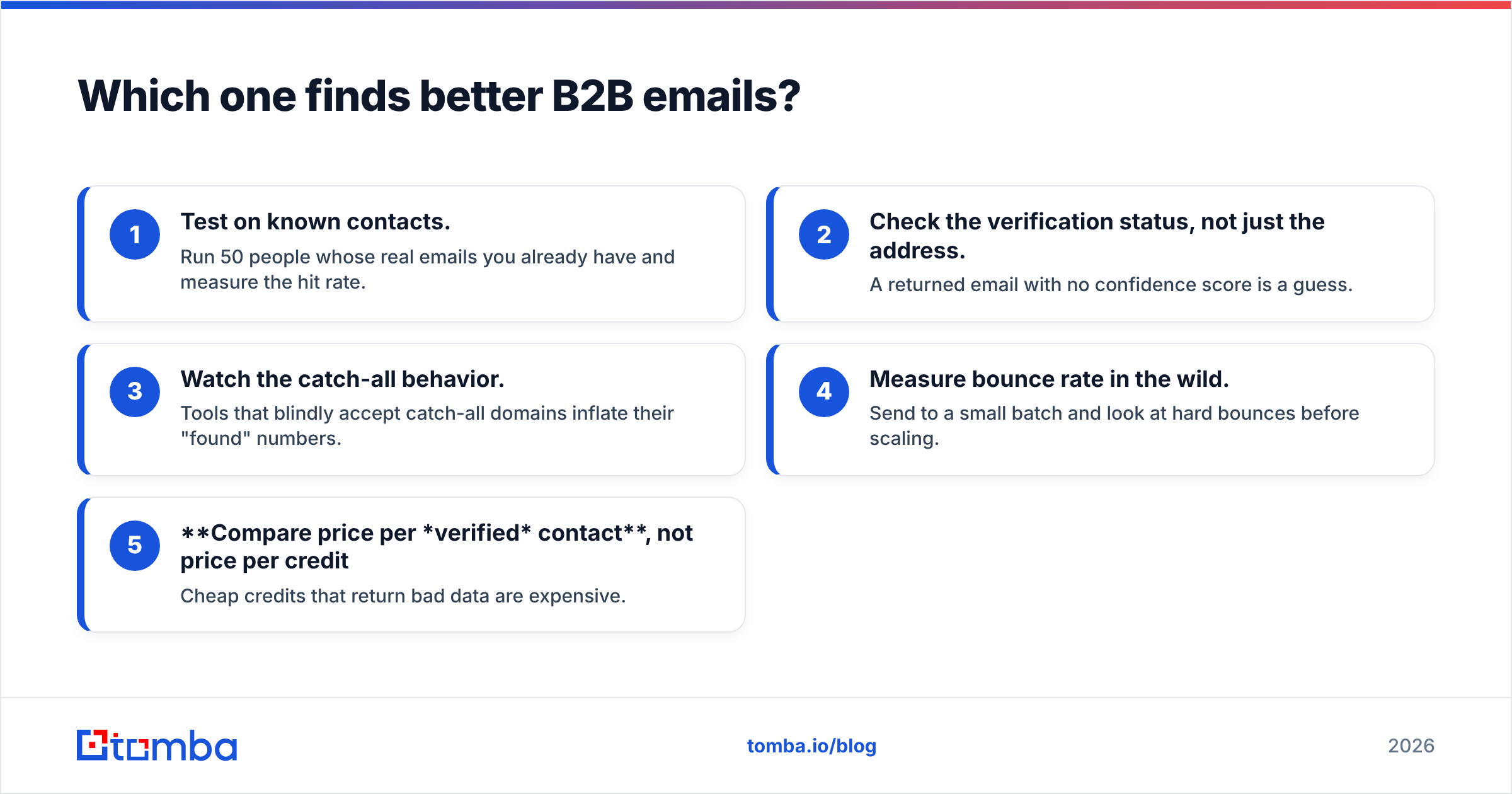
A quick way to evaluate any of these tools on accuracy:
- Test on known contacts. Run 50 people whose real emails you already have and measure the hit rate.
- Check the verification status, not just the address. A returned email with no confidence score is a guess.
- Watch the catch-all behavior. Tools that blindly accept catch-all domains inflate their "found" numbers.
- Measure bounce rate in the wild. Send to a small batch and look at hard bounces before scaling.
- Compare price per verified contact, not price per credit. Cheap credits that return bad data are expensive.
How does pricing compare?#
Pricing is where the "different jobs" theme shows up in your budget.
CapitalConnectorAI tends to price around the value of a successful raise — it's selling outcomes (investor intros) more than units of data, so plans skew toward founder/fundraiser packages rather than per-credit data buckets. Cufinder uses a more familiar credit-and-tier model common to B2B data tools, with a free allotment to start.
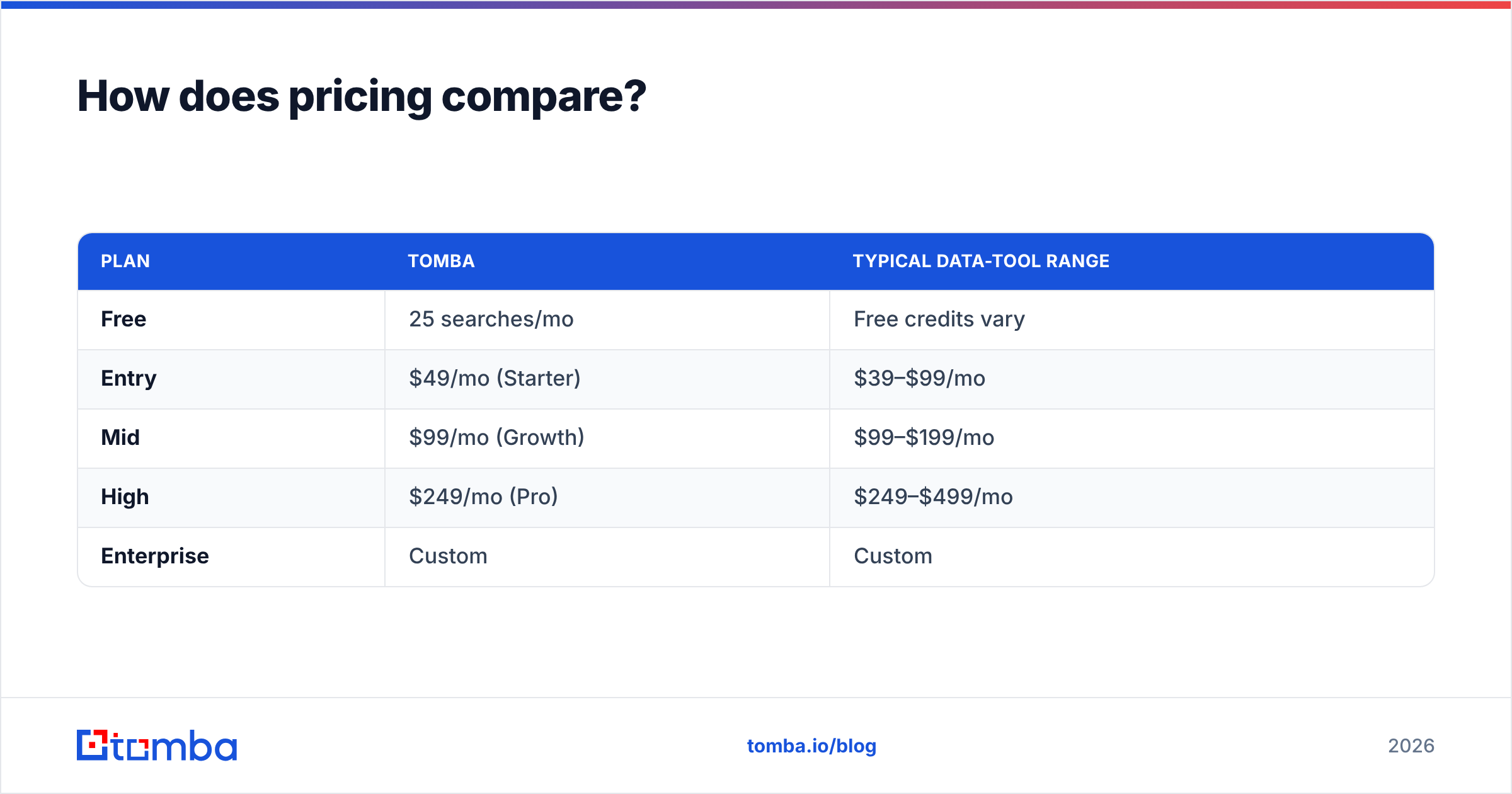
For comparison, here's how a dedicated finder/verifier stacks up on transparent, published tiers:
| Plan | Tomba | Typical data-tool range |
|---|---|---|
| Free | 25 searches/mo | Free credits vary |
| Entry | $49/mo (Starter) | $39–$99/mo |
| Mid | $99/mo (Growth) | $99–$199/mo |
| High | $249/mo (Pro) | $249–$499/mo |
| Enterprise | Custom | Custom |
The lesson isn't "Tomba is cheapest" — it's that you should price the job, not the logo. If you need investor matching, paying a fundraising-outcome price can be rational. If you need 10,000 verified sales emails a month, you want predictable per-credit economics. You can see full Tomba pricing for the data-tool side of that equation.

Is CapitalConnectorAI better than Cufinder?#
It's better for fundraising, and that's the only honest framing.
Use CapitalConnectorAI when:
- You're actively raising and need to identify, prioritize, and reach investors.
- Your "leads" are funds and angels, not buyers of your product.
- Warm-intro pathing and fundraising context matter more than list volume.
Use Cufinder when:
- You're building outbound sales or marketing lists across general B2B.
- You need company search plus contact enrichment in one place.
- You want bulk workflows and an API to feed your CRM.
If your honest answer is "neither — I just need accurate emails and phone numbers to run outbound," then both are slightly off-target, and a dedicated stack (finder + verifier + data enrichment) will usually give you cleaner data per dollar.
What about data accuracy and deliverability?#
Accuracy is the quiet variable that decides whether any of this works.
A platform can advertise hundreds of millions of contacts, but the numbers that matter are: what percentage of returned emails are verified, and what's your real-world bounce rate. High bounce rates damage sender reputation, which then hurts every campaign you send — not just the one with bad data. Major sales-data buyers, the kind who publish reviews on G2, consistently rank deliverability and accuracy above raw database size for exactly this reason.
Two things separate strong data from weak data:
- Verification depth. SMTP checks, catch-all detection, and confidence scoring beat a simple "found/not found" flag.
- Source freshness. B2B contacts decay roughly 2–3% per month as people change jobs. Stale records quietly tank your hit rate.
For the email-and-phone half of the job, Tomba leans on transparent data sources and pairs the finder with verification so the export is campaign-ready. CapitalConnectorAI's strength is contextual relevance to fundraising, not broad-market deliverability; Cufinder is broader but, like most all-in-ones, asks you to trust verification you can't fully inspect.
Can you use them together?#
Yes — and for some teams that's the smartest play.
A founder mid-raise might use CapitalConnectorAI for investor outreach and run a parallel sales motion with a data tool for customer acquisition. There's no rule that says you pick one vendor for the whole company. The mistake is forcing one tool to do a job it wasn't built for: using a fundraising matcher to power cold sales outreach, or using a general data tool to navigate venture relationships.
A clean separation looks like this:
- Fundraising track: investor matching tool → warm intros → tracked conversations.
- Sales track: target account list → domain search → verified emails → CRM → sequenced outreach.
Keep the data and the intent separate, and each tool gets to do what it's actually good at.
CapitalConnectorAI vs Cufinder: the verdict#
There's no single winner because there's no single question.
- Raising capital? CapitalConnectorAI is the on-purpose tool.
- Building broad B2B lists with enrichment? Cufinder is the more sensible all-in-one.
- Optimizing purely for accurate, deliverable contact data at predictable cost? A dedicated finder + verifier beats both at that specific job.
The trap in any "X vs Y" comparison is assuming the two tools are interchangeable. They're not. Diagnose the job first — fundraising, broad enrichment, or high-accuracy outbound — and the right pick becomes obvious instead of agonizing.
Where Tomba fits#
If your bottleneck is reaching the right people with emails that actually deliver, that's the exact problem Tomba Email Finder is built to solve. Find professional addresses by domain, name, or company; verify them before you send; and enrich the rest with phone and firmographic data — all on transparent, published pricing instead of opaque outcome-based plans. Start on the free tier (25 searches a month), test it against your own known contacts, and compare the verified hit rate to whatever you're using today. For most outbound teams, that head-to-head settles the debate faster than any feature chart.
Sources worth checking before you buy: the official Cufinder site, peer reviews on Capterra, and the broader B2B data category on G2.
Ready to find emails that actually work?
Join 150,000+ professionals who stopped guessing and started sending. Free credits on signup — no credit card required.
Get the Tomba newsletter
Practical outbound tactics and product updates — once every two weeks.
About the author