Clay Prospecting Tool in 2026: Honest Review, Pricing & Setup
A no-hype breakdown of the Clay prospecting tool in 2026 — what it does well, where credits get expensive, and how to feed it clean data for better results.
Clay has become the default answer when someone asks how modern teams build prospecting lists at scale. But "Clay" and "easy" rarely belong in the same sentence — it is powerful, credit-hungry, and only as good as the data you pour into it.
This guide is a working review of the Clay prospecting tool for 2026: what it actually does, how the pricing math really works, where it shines, where it bites, and how to wire it up so you do not burn a month of credits in a weekend.
TL;DR#
- Clay is a data orchestration spreadsheet, not a database. It pulls from 100+ enrichment providers, runs "waterfall" lookups, and lets AI agents research each row.
- Credits are the whole story. Pricing is cheap on paper and expensive in practice once you enable multiple enrichment columns per row.
- Garbage in, garbage out. Clay enriches what you give it — pairing it with a high-accuracy email finder and verifier is what separates a clean list from a bounce machine.
- Best fit: RevOps and growth teams who want programmable, multi-source enrichment. Worst fit: a solo rep who just needs 200 verified emails this week.
- A leaner stack — a focused finder plus an enrichment API — often beats full Clay for straightforward use cases at a fraction of the cost.
What is the Clay prospecting tool?#
Clay is a spreadsheet-shaped automation platform for building and enriching lead lists. Think of it as Google Sheets that grew up and got a job in RevOps: each row is a person or company, and each column can call an API, scrape a page, run an AI prompt, or chain to another provider when the first one comes up empty.
The signature feature is the waterfall. Instead of trusting one data vendor, Clay queries them in sequence — provider A, then B, then C — until it finds a result. In theory you get the best coverage of every source you connect. In practice you also pay for every step that runs.
Clay does not own much first-party data. It is a router. That distinction matters: the quality of your output depends entirely on the providers you plug in and the data enrichment logic you configure. Clay is the conductor; the data vendors are the orchestra.
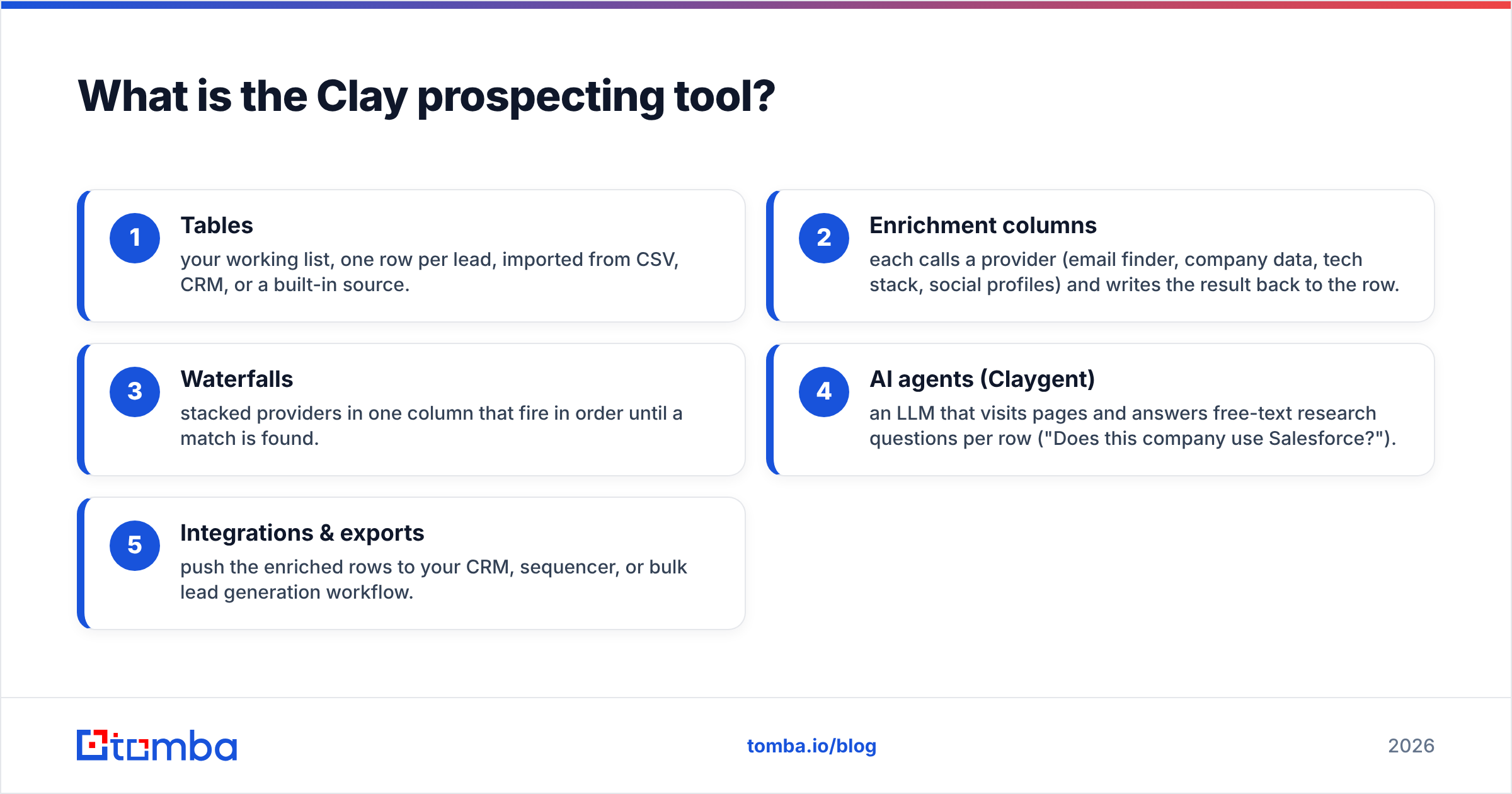
Here is how the core building blocks fit together:
- Tables — your working list, one row per lead, imported from CSV, CRM, or a built-in source.
- Enrichment columns — each calls a provider (email finder, company data, tech stack, social profiles) and writes the result back to the row.
- Waterfalls — stacked providers in one column that fire in order until a match is found.
- AI agents (Claygent) — an LLM that visits pages and answers free-text research questions per row ("Does this company use Salesforce?").
- Integrations & exports — push the enriched rows to your CRM, sequencer, or bulk lead generation workflow.
How does Clay pricing and the credit system work?#
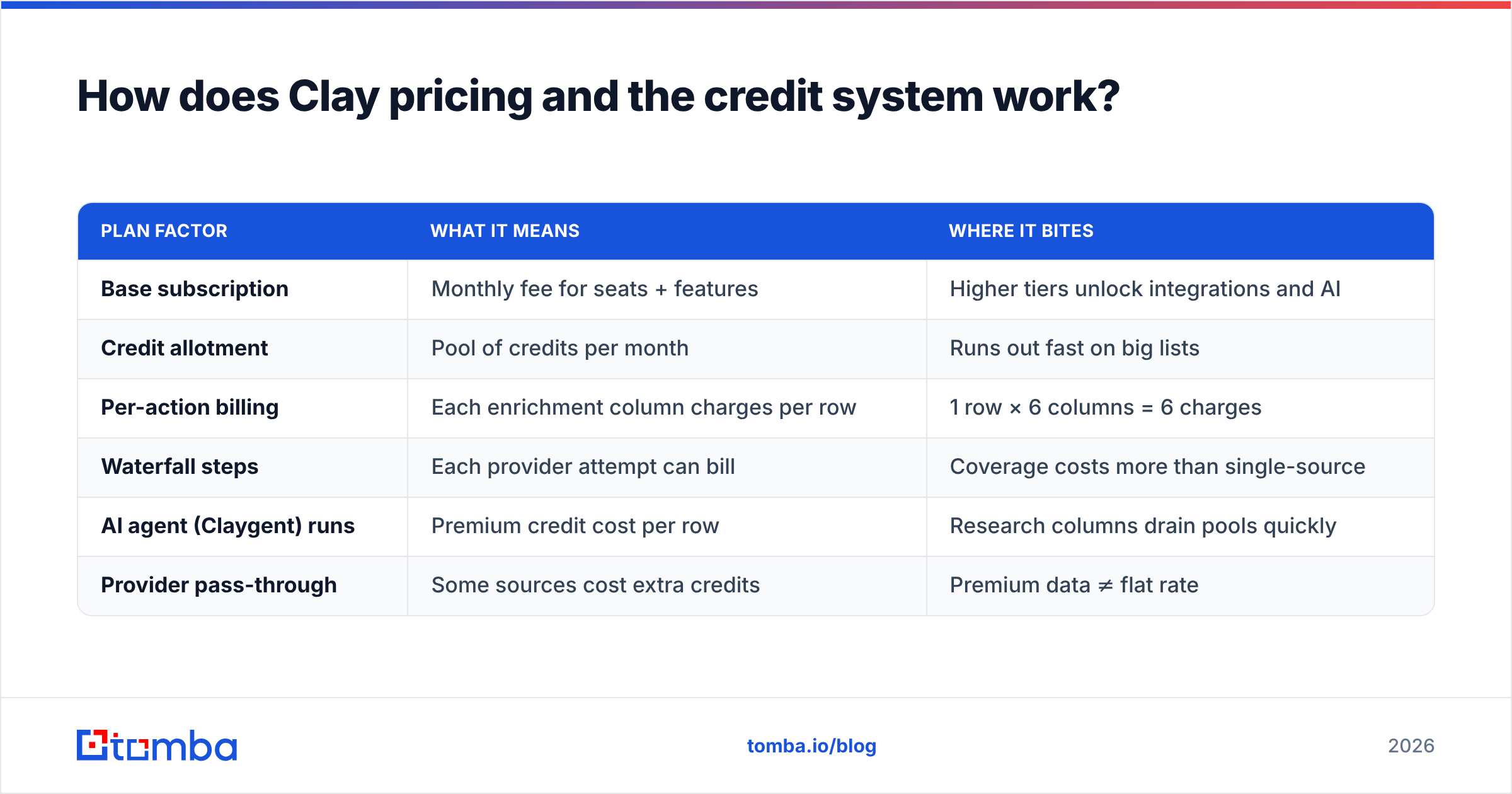
Conclusion first: Clay's sticker price is reasonable, but credits are consumed per enrichment action, so a 1,000-row list with six enrichment columns can cost 6,000+ credits in a single run — and waterfalls multiply that.
Clay sells tiered plans with a monthly credit bucket. Every enrichment call spends credits; AI agent runs and certain premium providers spend more. The trap is that a single table can have a dozen columns, and each one charges per row.
| Plan factor | What it means | Where it bites |
|---|---|---|
| Base subscription | Monthly fee for seats + features | Higher tiers unlock integrations and AI |
| Credit allotment | Pool of credits per month | Runs out fast on big lists |
| Per-action billing | Each enrichment column charges per row | 1 row × 6 columns = 6 charges |
| Waterfall steps | Each provider attempt can bill | Coverage costs more than single-source |
| AI agent (Claygent) runs | Premium credit cost per row | Research columns drain pools quickly |
| Provider pass-through | Some sources cost extra credits | Premium data ≠ flat rate |
Two habits keep the bill sane. First, filter before you enrich — never run AI columns on a 5,000-row table when 800 rows actually fit your ICP. Second, enrich in stages: validate the company fits, then find the contact, then verify the email, killing rows at each gate. Check current numbers on Clay's pricing page before committing, since tiers shift often.
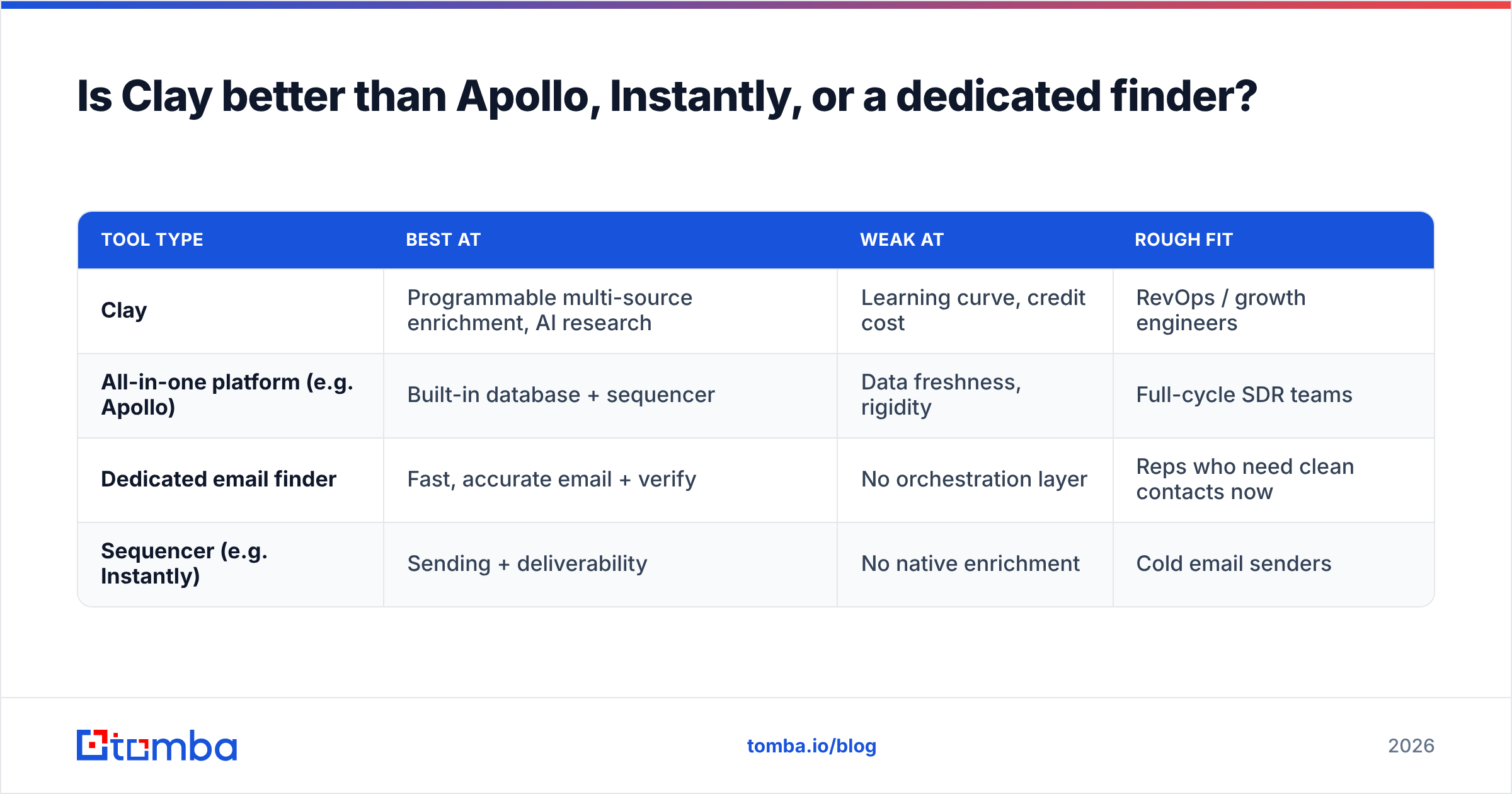
Is Clay better than Apollo, Instantly, or a dedicated finder?#
It depends on the job. Clay wins on flexibility and multi-source coverage; dedicated tools win on speed, simplicity, and cost for a single well-defined task.
| Tool type | Best at | Weak at | Rough fit |
|---|---|---|---|
| Clay | Programmable multi-source enrichment, AI research | Learning curve, credit cost | RevOps / growth engineers |
| All-in-one platform (e.g. Apollo) | Built-in database + sequencer | Data freshness, rigidity | Full-cycle SDR teams |
| Dedicated email finder | Fast, accurate email + verify | No orchestration layer | Reps who need clean contacts now |
| Sequencer (e.g. Instantly) | Sending + deliverability | No native enrichment | Cold email senders |
The honest take: Clay is not competing with a finder — it is competing with you building your own data pipeline. If your prospecting needs are linear ("find verified emails for these 500 companies"), Clay is overkill and a focused tool plus an email finder API does it faster and cheaper. If your needs are conditional and layered ("if they raised funding and use HubSpot, find the VP of Sales and draft a line about their tech stack"), Clay earns its keep.
For a broader market view, G2's sales intelligence category is a useful neutral reference when you compare vendors side by side.
Where does Clay actually shine?#
Clay is at its best when prospecting is a system, not a one-off list pull. A few patterns where it consistently delivers:
- Signal-based outbound. Trigger enrichment when a company hits a signal — new funding, a key hire, a tech-stack change — and build a list automatically.
- Multi-source coverage. When no single provider has good data for your niche, waterfalls genuinely lift match rates.
- Per-row AI research. Claygent can answer questions a static database never could, like summarizing a company's latest blog post for a personalized opener.
- CRM hygiene. Re-enrich stale records in bulk and push fresh fields back to your CRM.
The common thread is conditional logic at scale. Anything you would otherwise do by hand across hundreds of tabs, Clay can encode once and run forever.
Where does Clay fall short?#
Three honest weaknesses. None are dealbreakers, but pretending they do not exist leads to angry month-end invoices.
1. The learning curve is real. Clay is closer to a low-code tool than a spreadsheet. Waterfalls, lookups, conditional run logic, and AI prompts all take time to master. Budget a week before you are productive.
2. Credits evaporate. As covered above, the per-action model punishes wide tables. Teams routinely blow through a month's allotment in days because they enabled enrichment on rows that never qualified.
3. Data is only as good as the source. Clay routes data; it does not guarantee it. If the underlying provider returns a guessed or catch-all email, Clay happily writes it to your row. Without a verification gate, those rows go straight into your sequencer and tank your sender reputation.
That third point is where most teams quietly lose deliverability — and where a dedicated verification layer pays for itself.

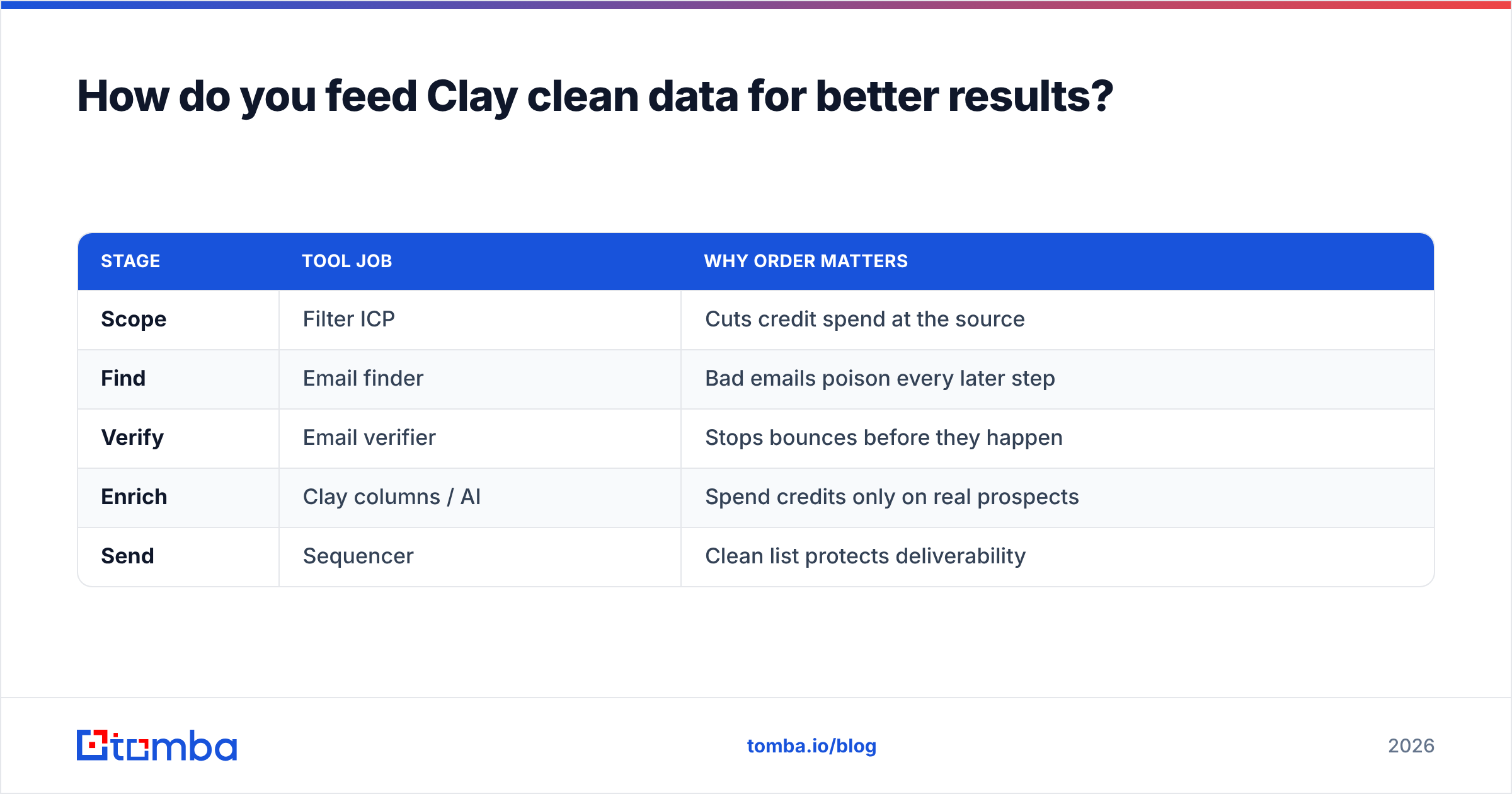
How do you feed Clay clean data for better results?#
Pair Clay's orchestration with a high-accuracy source of truth for emails and contacts. Clay is the pipeline; your finder and verifier are the water filter.
A practical, credit-efficient setup looks like this:
- Scope the list first. Import or build your raw list, then filter hard by ICP before any enrichment runs. Smaller list, fewer wasted credits.
- Find emails with a dedicated finder. Use a domain search to pull verified addresses by company, or a finder to resolve specific people. Accuracy here decides everything downstream.
- Verify before you send. Run every address through an email verifier so catch-all and risky addresses get flagged, not blasted.
- Enrich the survivors. Only run Clay's AI and premium columns on rows that passed the email gate — that is where credits earn their return.
- Export to your sequencer. Push the clean, verified, enriched rows out, and keep the rejects out of your sending domain.
This is also where an API beats clicking around a UI. With the Tomba API you can call find-and-verify directly inside a Clay HTTP column, so verification happens inline before any expensive AI research fires. You verify cheap, then enrich expensive — the correct order.
| Stage | Tool job | Why order matters |
|---|---|---|
| Scope | Filter ICP | Cuts credit spend at the source |
| Find | Email finder | Bad emails poison every later step |
| Verify | Email verifier | Stops bounces before they happen |
| Enrich | Clay columns / AI | Spend credits only on real prospects |
| Send | Sequencer | Clean list protects deliverability |
Who should use Clay in 2026 — and who should not?#
Use Clay if you have someone who will own it. The teams that win with Clay treat it like a product: one person learns the platform deeply, builds reusable tables, and guards the credit budget. RevOps, growth engineers, and data-savvy founders fit this mold.
Skip Clay — or at least delay it — if you are a single rep or a small team whose need is "verified contacts, this week, without a tutorial." For that, a dedicated finder and verifier gets you there in an afternoon with no orchestration overhead, and you can always graduate to Clay when your workflows turn conditional.
A quick self-test:
- Do your lists need if/then logic? Yes → Clay. No → dedicated finder.
- Will someone own and maintain it? No → dedicated finder.
- Is your bottleneck finding emails, or routing data? Finding → finder first. Routing → Clay.
- Is budget predictability critical? Then watch the credit model closely or lead with a flat-rate finder.
Frequently asked questions#
Is Clay a database? No. Clay is an orchestration layer that pulls from external providers. It does not sell you a proprietary contact database the way some platforms do — it routes and enriches data you bring or query.
Does Clay verify emails? It can route to verification providers, but it does not natively guarantee accuracy. Always include a dedicated verification step before sending to protect deliverability.
Is Clay worth it for a solo founder? Often not at first. The credit model and learning curve favor teams. A focused finder plus verifier is usually the better starting point, with Clay added once workflows get conditional.
How do I lower my Clay bill? Filter your list before enriching, run cheap verification before expensive AI columns, and disable waterfalls on rows that do not qualify.
The bottom line#
Clay is one of the most capable prospecting tools on the market in 2026 — and one of the easiest to overspend on. Its power is conditional, multi-source enrichment at scale; its weakness is that it amplifies whatever data quality you feed it, good or bad.
If you want Clay to perform, give it a clean, verified contact layer to build on. Start by finding and verifying your contacts with the Tomba Email Finder — accurate, source-backed emails and built-in verification you can call right inside your Clay tables via the API. Run cheap verification first, spend Clay credits only on prospects who survive, and your enriched list will actually convert instead of bounce. Spin up a free Tomba account, wire it into your workflow, and let Clay do what it does best on top of data you can trust.
// get started
Find, verify and enrich your first contacts today
Start on the free plan with 25 searches a month, then scale when your team is ready.
Free plan · No credit card required · GDPR & CCPA
// about the author