Sales CRM Software in 2026: Features, Pricing & How to Choose
A sales CRM only pays off when it fits your process and runs on clean data. Compare the top platforms by features and price, then learn how to choose.
A sales CRM is supposed to be the system of record for every deal you run. In practice, most teams treat it like a dumping ground: stale contacts, half-filled fields, and pipeline reports nobody trusts. The tool isn't the problem. The fit and the data are.
This guide breaks down what a sales CRM actually does in 2026, how the leading platforms compare on features and price, and the framework you should use to choose one. It also covers the part most buying guides skip: why even the best CRM underperforms when the records inside it are wrong.
TL;DR#
- A sales CRM software platform centralizes contacts, deals, and activity so reps stop selling from spreadsheets and memory.
- The big four — Salesforce, HubSpot, Pipedrive, and Zoho — win on different axes: scale, ease of use, deal-focus, and price.
- Expect to pay anywhere from $0 (limited free tiers) to $165+/user/month for enterprise sales clouds.
- Choose based on team size, process complexity, and integration needs — not the longest feature list.
- A CRM is only as good as the data inside it. Bad emails and missing contacts quietly kill pipeline accuracy, so pair your CRM with verified enrichment.
What is a sales CRM?#
A sales CRM (customer relationship management) platform is the database and workflow layer where your team stores every prospect, tracks every deal, and logs every touchpoint. Think of it as the kitchen pass in a busy restaurant: every order, its status, and who's handling it sits in one place, so nothing gets cooked twice or forgotten on the counter.
Technically, a CRM combines four jobs: contact and account management, pipeline and deal tracking, activity logging (calls, emails, meetings), and reporting. Modern platforms layer on automation, AI scoring, and native sequencing so reps spend less time on data entry and more time selling.
The distinction worth remembering: a CRM is not a marketing automation tool, a sales engagement platform, or a data provider. It's the spine those tools plug into. When buyers conflate these categories, they overpay for overlap or end up with three systems that don't talk to each other.
Why does your sales team need a CRM in 2026?#
Because the alternative is invisible pipeline. Without a shared system, deal status lives in individual reps' heads and inboxes. When someone leaves, their pipeline leaves with them. Forecasting becomes a guess, and managers coach blind.
A CRM fixes four concrete problems:
- Lost context. Every email, call note, and contact sits on the deal record, so anyone can pick up where the last touch left off.
- Inconsistent process. Stages, required fields, and automation enforce how deals actually move, instead of letting each rep improvise.
- No forecast. Weighted pipeline and historical win rate turn gut feel into a number leadership can plan around.
- Wasted admin time. Logging, follow-up reminders, and sales automation hand reps back hours every week.
According to Salesforce's own research, teams using a CRM see measurable lifts in productivity and forecast accuracy — but those gains assume the records are accurate in the first place. That caveat matters more than the headline number.
What features should a sales CRM have?#
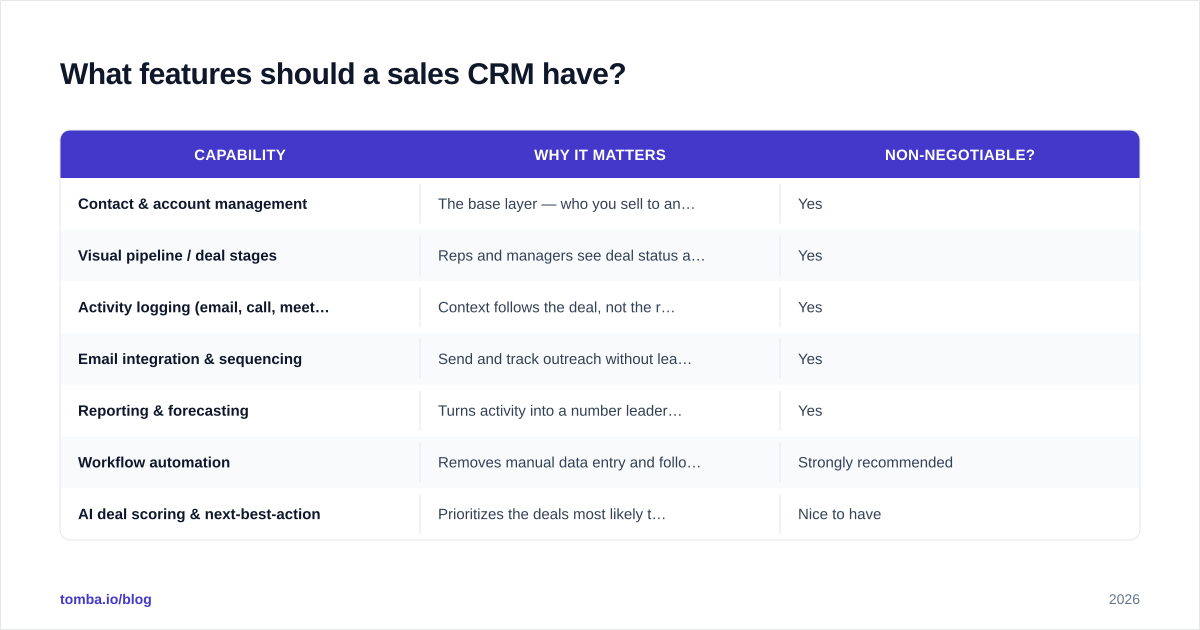
Not every team needs every feature. But a credible sales CRM in 2026 should cover the non-negotiables below, then differentiate on the rest.
| Capability | Why it matters | Non-negotiable? |
|---|---|---|
| Contact & account management | The base layer — who you sell to and how they relate | Yes |
| Visual pipeline / deal stages | Reps and managers see deal status at a glance | Yes |
| Activity logging (email, call, meeting) | Context follows the deal, not the rep | Yes |
| Email integration & sequencing | Send and track outreach without leaving the CRM | Yes |
| Reporting & forecasting | Turns activity into a number leadership trusts | Yes |
| Workflow automation | Removes manual data entry and follow-up reminders | Strongly recommended |
| AI deal scoring & next-best-action | Prioritizes the deals most likely to close | Nice to have |
| Native data enrichment | Auto-fills firmographics and contact details | Nice to have |
| Mobile app | Field reps update deals on the move | Depends on team |
The trap is buying for the "nice to have" column. AI scoring is worthless if your activity data is thin, and native enrichment built into a CRM is often shallower than a dedicated data enrichment source. Buy for the top five rows first.
How do the top sales CRMs compare in 2026?#
The market is crowded, but four platforms anchor most shortlists. Here's how they stack up on the axes that actually drive a decision.
| Platform | Best for | Standout strength | Watch out for |
|---|---|---|---|
| Salesforce Sales Cloud | Enterprise, complex orgs | Endless customization & ecosystem | Cost and admin overhead |
| HubSpot Sales Hub | SMB to mid-market | Ease of use & marketing alignment | Pricing climbs fast at scale |
| Pipedrive | Small, deal-focused teams | Clean, pipeline-first UX | Lighter reporting & extensibility |
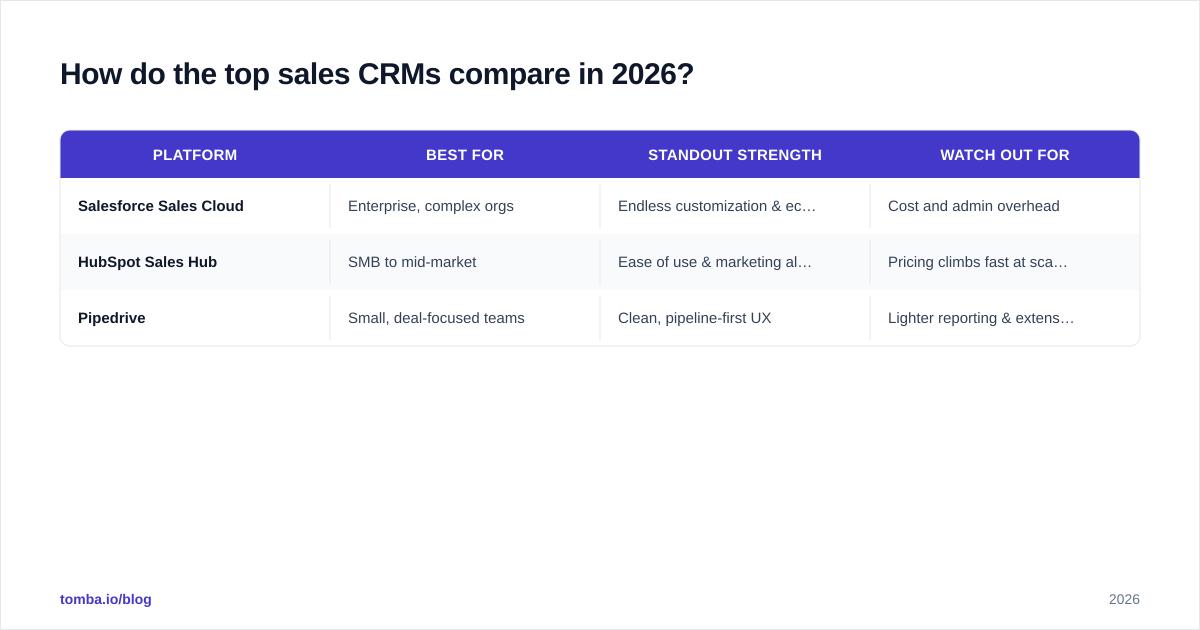
Zoho CRM | Budget-conscious teams | Feature depth per dollar | UI feels dated; support varies |
A few honest notes. Salesforce is the default for a reason — if your process is genuinely complex or you have a RevOps team to run it, nothing else flexes as far. But small teams routinely pay for power they never use. HubSpot wins on time-to-value; reps are productive in days, and the HubSpot integration ecosystem is broad. Pipedrive is the right answer more often than its market share suggests — for a 5-to-20-rep team that just wants a clean pipeline, it removes friction the bigger platforms add. Zoho delivers the most features per dollar, which matters if budget is the binding constraint.
Cross-reference any shortlist against third-party review data on G2's CRM category before you commit. Marketing pages tell you what a tool can do; review volume tells you what teams your size actually experience.
How much does sales CRM software cost?#
Pricing splits into per-user-per-month tiers, and the gap between the entry tier and the tier you'll actually need is where budgets blow up. Approximate 2026 pricing for the most-quoted plans:
| Platform | Free tier | Entry paid | Mid tier | Enterprise |
|---|---|---|---|---|
| HubSpot Sales Hub | Yes (limited) | ~$20/user/mo | ~$100/user/mo | ~$150/user/mo |
| Salesforce Sales Cloud | No | ~$25/user/mo | ~$100/user/mo | ~$165+/user/mo |
| Pipedrive | No (trial) | ~$14/user/mo | ~$49/user/mo | ~$99/user/mo |
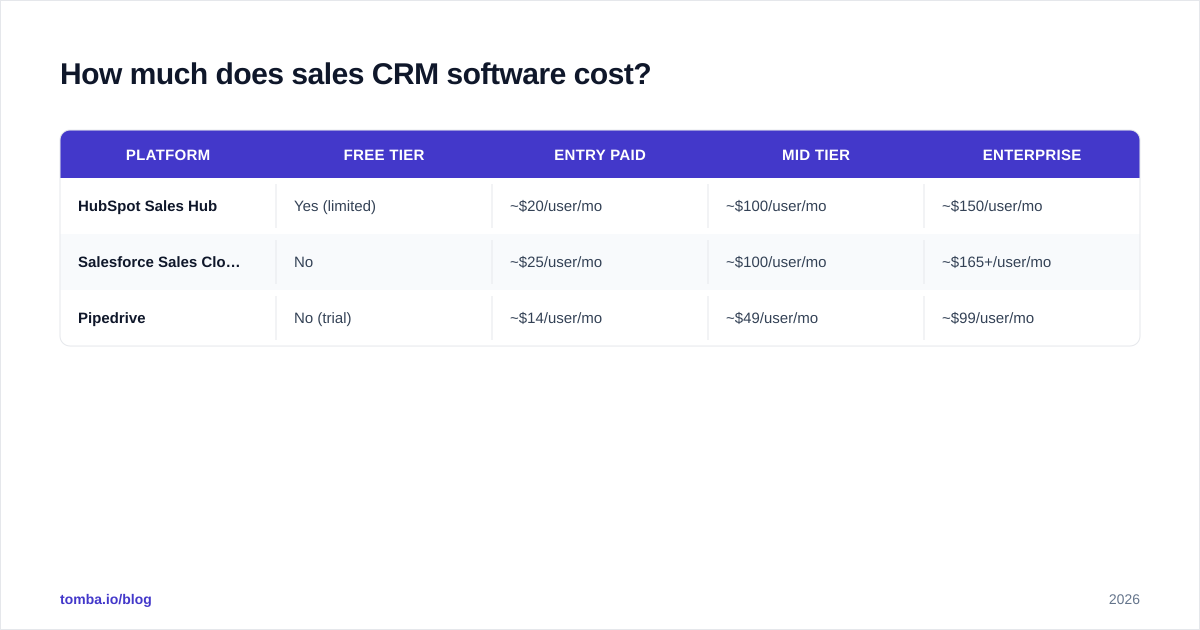
Zoho CRM | Yes (3 users) | ~$14/user/mo | ~$40/user/mo | ~$52/user/mo |
Two budgeting rules save pain. First, the entry tier is almost never the real tier — automation, reporting, and integration limits push most teams up at least one level within a quarter. Price the tier you'll need in month three, not month one. Second, factor in the hidden costs: implementation, admin time, paid add-ons, and the data tooling you'll bolt on. A "cheap" CRM with no clean data feeding it costs more in lost deals than the license ever saved.
How do you choose the right sales CRM?#
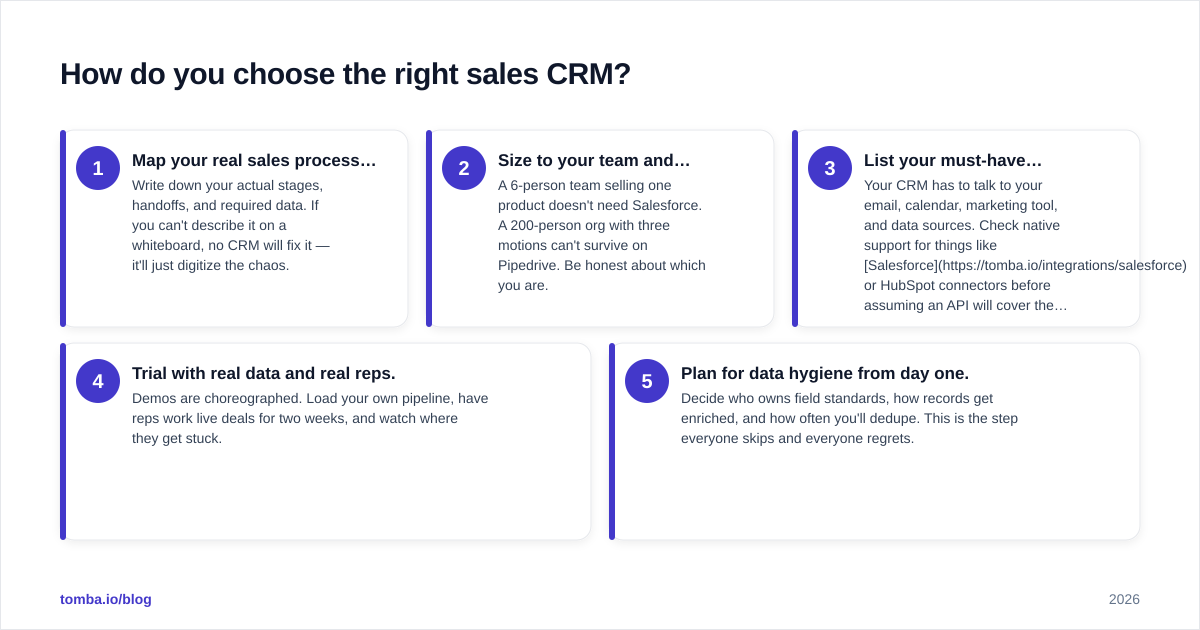
Match the tool to your process, not the other way around. Run every candidate through this five-step framework before you sign anything.
- Map your real sales process first. Write down your actual stages, handoffs, and required data. If you can't describe it on a whiteboard, no CRM will fix it — it'll just digitize the chaos.
- Size to your team and complexity. A 6-person team selling one product doesn't need Salesforce. A 200-person org with three motions can't survive on Pipedrive. Be honest about which you are.
- List your must-have integrations. Your CRM has to talk to your email, calendar, marketing tool, and data sources. Check native support for things like Salesforce or HubSpot connectors before assuming an API will cover the gap.
- Trial with real data and real reps. Demos are choreographed. Load your own pipeline, have reps work live deals for two weeks, and watch where they get stuck.
- Plan for data hygiene from day one. Decide who owns field standards, how records get enriched, and how often you'll dedupe. This is the step everyone skips and everyone regrets.
The teams that get value from a CRM aren't the ones who bought the most powerful platform. They're the ones who matched a tool to a process they'd already defined and committed to keeping the data clean.
Why is CRM data quality the hidden factor?#
Your CRM is a mirror — it reflects the quality of what you put in. The most expensive Sales Cloud in the world produces garbage forecasts if half the contact records have bouncing email addresses, missing decision-makers, or outdated job titles.
Industry estimates put B2B data decay at roughly 30% per year: people change jobs, companies get acquired, and emails go dead. That decay silently corrupts everything downstream — segmentation, routing, scoring, and outreach all degrade as the underlying records rot. A rep working a "qualified" list of dead contacts isn't selling; they're doing data entry with rejection attached.
This is where a dedicated data layer earns its keep. Instead of relying on a CRM's shallow native enrichment, feed your records from a verified source:
- Use an email finder to fill in missing decision-maker contacts before they hit a rep's queue.
- Run new and existing records through an email verifier so bounces never poison your sender reputation or your reports.
- Enrich accounts with firmographic and contact data on import, so reps inherit complete records instead of building them by hand.
Clean data in means trustworthy pipeline out. That's the difference between a CRM your team fights and one your team actually uses.
How does a CRM fit into the wider sales stack?#
A CRM is the hub, but it's not the whole wheel. Around it sit your prospecting tools, your sales engagement platform, your data enrichment source, and your reporting layer. The mistake is expecting the CRM to do all four jobs well — it won't. It's built to be the system of record, and the best results come from connecting specialized tools into it rather than stretching one platform to cover everything.
The practical stack for most B2B teams looks like this: a data provider finds and verifies contacts, those flow into the CRM as enriched records, a sequencing tool runs the outreach, and the CRM logs every result for reporting. Each piece does one job well and hands off cleanly to the next. When you evaluate a CRM, you're really evaluating how well it sits at the center of that flow — not whether it can replace every other tool.
Final take: the CRM is only half the decision#
Pick the platform that fits your process and team size — Salesforce for complex enterprise orgs, HubSpot for fast-moving mid-market teams, Pipedrive for lean deal-focused crews, Zoho when budget rules. Then spend equal energy on the half nobody markets: keeping the data inside it accurate.
A CRM full of verified, enriched contacts forecasts honestly and lets reps sell. A CRM full of dead records is an expensive spreadsheet with extra steps.
Start with the contacts. Use the Tomba Email Finder to find and verify decision-maker emails by domain, name, or company, then push clean, complete records straight into your CRM. Whatever platform you choose, feed it good data — that's the part that actually moves your win rate. Check Tomba pricing to start free with 25 searches a month and scale up as your pipeline grows.
// get started
Find, verify and enrich your first contacts today
Start on the free plan with 25 searches a month, then scale when your team is ready.
Free plan · No credit card required · GDPR & CCPA
// about the author