How to Accelerate Deals in 2026: A B2B Sales Playbook
Deals don't stall because buyers are slow. They stall because sellers lose momentum. Here's the 2026 playbook to accelerate deals without burning trust.
How to Accelerate Deals in 2026: A B2B Sales Playbook
TL;DR
- Deals stall for three reasons: weak qualification, missing champion, and no shared close plan. Fix those and cycle time drops 25-40%.
- A Mutual Action Plan (MAP) is the single highest-leverage tool for deal acceleration. Without one, you're guessing at next steps.
- Multi-threading into 4+ stakeholders increases close rates by 34% (Gartner). Single-threaded deals die when your champion leaves.
- Speed-to-lead under 5 minutes increases qualification rates by 8x. Most teams take 42 hours.
- Tooling matters: enriched contact data, accurate emails, and verified phone numbers cut research time so reps spend cycles selling, not Googling.
Why do most B2B deals stall?#
You've heard it before: "Let me circle back next quarter." That sentence is the sound of a deal dying. Forrester reports that 60% of qualified opportunities end in "no decision" — not lost to a competitor, just lost to inertia.
To accelerate deals, you have to understand the three stall patterns. First, weak qualification means you're chasing prospects who never had budget or authority. Second, no internal champion means nobody inside the account is pushing the deal forward when you're not in the room. Third, no shared close plan means each conversation restarts from zero because there's no agreed-upon path to signature.
Sales velocity is the metric that captures all of this. The formula is simple: (Opportunities × Average Deal Size × Win Rate) / Sales Cycle Length. Pull any of those levers and revenue moves. Shrink the denominator — the cycle length — and you get compounding returns without adding headcount.
What does "accelerate deals" actually mean?#
It does not mean pressuring buyers. Buyers who feel pushed disappear or negotiate harder at the end. To accelerate deals means removing friction the buyer is already feeling — unclear next steps, missing approvals, late legal review, internal politics — so the deal moves at the pace the buyer wants but can't achieve alone.
Think of it like a relay race. The baton (the deal) only moves as fast as the slowest handoff. Your job is to anticipate every handoff before it happens: discovery to demo, demo to proposal, proposal to legal, legal to procurement, procurement to signature. Each transition is where deals die. Accelerating deals means pre-staging the next handoff while you're still in the current one.
What is a Mutual Action Plan (MAP)?#
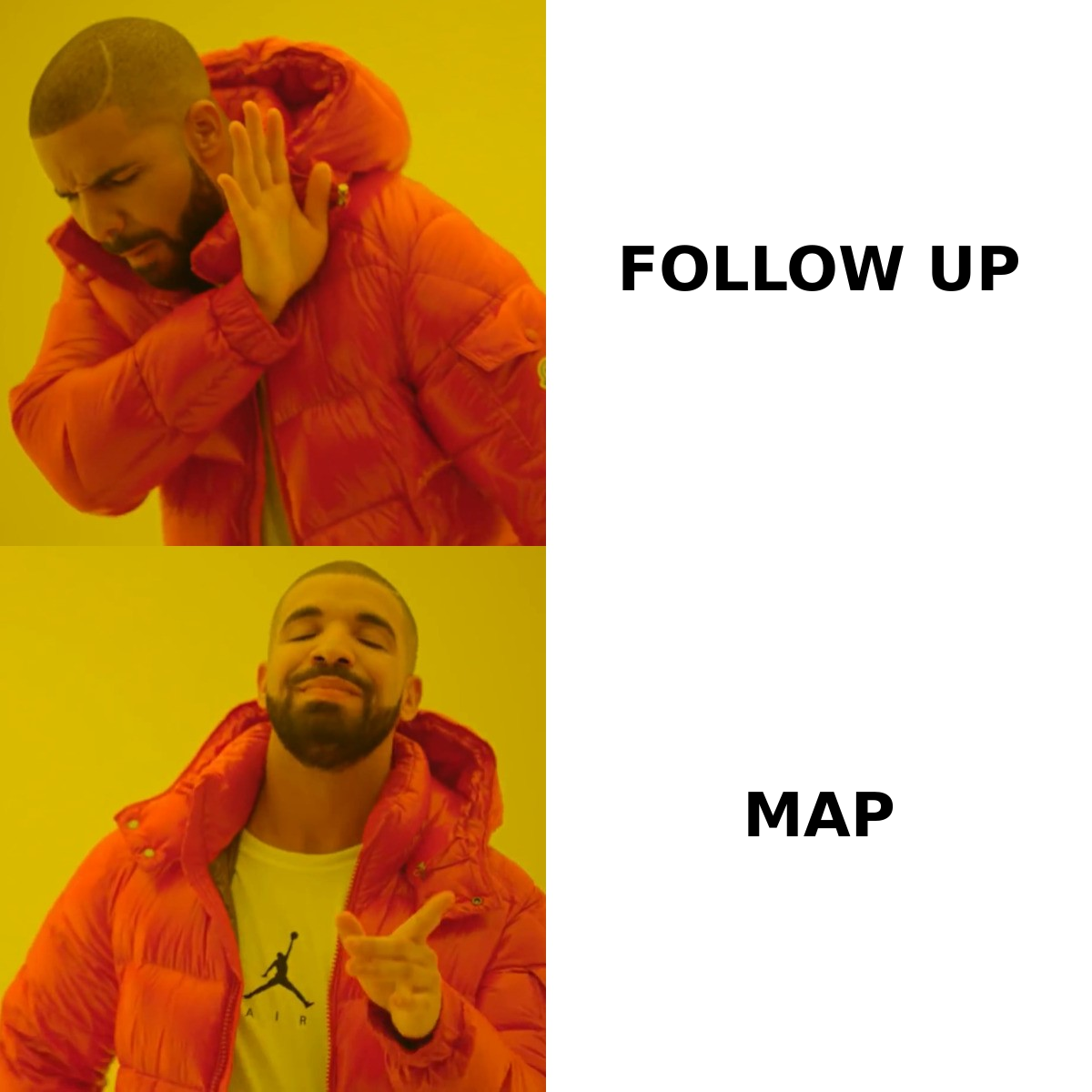
A Mutual Action Plan is a co-authored document between you and the buyer that lists every step required to go from current state to signed contract, with owners and dates. It's the single most under-used acceleration tool in B2B sales.
A good MAP includes:
- The buyer's go-live date, working backwards from there
- Every internal stakeholder who needs to review or approve
- Procurement, legal, security, and IT review windows
- Pilot or POC criteria with success metrics
- Reference call timing
- Contract redline rounds and final signature date
When you ask a buyer to co-author this document, two things happen. They commit publicly to a timeline (loss aversion kicks in if they fall behind), and you surface objections weeks earlier than you would otherwise. According to research from RAIN Group, sellers who use MAPs win 14% more deals and close them 28% faster.
How do you multi-thread without spooking your champion?#
Single-threaded deals are fragile. If your one contact leaves, gets reorganized, or simply gets busy, the deal flatlines. Gartner's research shows that B2B buying decisions involve an average of 6-10 stakeholders, but most reps only know two or three of them.
The trick is to multi-thread with your champion's blessing, not behind their back. Frame it as protecting their time: "Most of our customers loop in their security lead and finance partner around this stage so we don't slow you down later. Who should I send a one-pager to?" Now you have a warm intro instead of a cold pivot.
Tools that help here include LinkedIn Sales Navigator for org-chart mapping, Tomba's email finder for getting verified contact addresses on the new stakeholders, and data enrichment to pull job titles, tenure, and reporting structure so you know who actually has authority to sign.
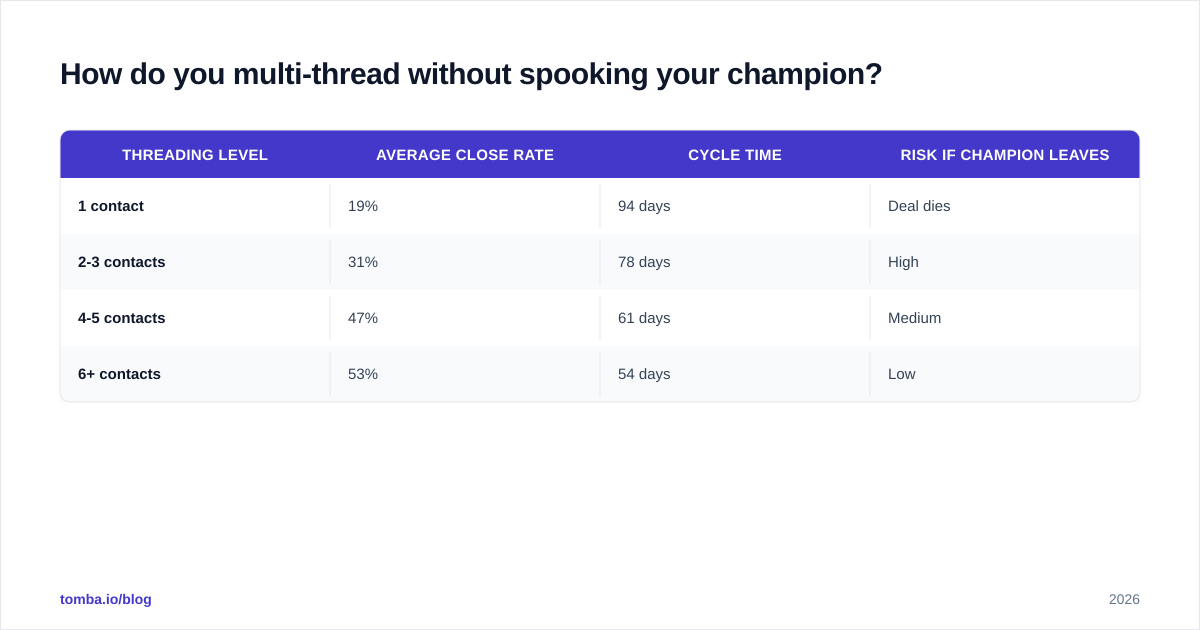
| Threading Level | Average Close Rate | Cycle Time | Risk if Champion Leaves |
|---|---|---|---|
| 1 contact | 19% | 94 days | Deal dies |
| 2-3 contacts | 31% | 78 days | High |
| 4-5 contacts | 47% | 61 days | Medium |
| 6+ contacts | 53% | 54 days | Low |
Source: Aggregated benchmarks from Gartner and HubSpot State of Sales reports.
How fast should you respond to inbound leads?#
Speed-to-lead is the most under-measured acceleration lever in B2B. A study by InsideSales (now XANT) found that responding to a web lead within 5 minutes makes you 8x more likely to qualify them compared to a 30-minute response. After 60 minutes, your odds of qualification drop by 80%.
The math is brutal but the fix is mechanical:
- Route inbound leads automatically — no manual triage
- Enrich the lead with firmographics and contact data the moment it arrives
- Send a templated personal email within 60 seconds
- Trigger an SDR call attempt within 5 minutes
- Book the meeting before the buyer has time to fill out three more forms
To do step 2 fast, you need accurate contact data on demand. Most CRMs ship leads with just an email and a company name. Pulling job title, seniority, department, and direct phone is what lets the SDR open with relevance instead of "Hi, just following up." A bulk email finder workflow plus a phone finder for direct dials makes this enrichment automatic.
How do you handle procurement and legal without losing weeks?#
Procurement and legal are where 30-40% of late-stage deals die. The fix is not to avoid them — they're not the enemy — it's to engage them earlier.
By the time you send a proposal, you should already know:
- Your buyer's preferred contract paper (theirs or yours)
- Whether SOC 2 Type II, GDPR DPA, or BAA documents are required
- The procurement workflow (RFP? MSA? PO?)
- Who the legal reviewer is and their typical turnaround time
- Insurance and indemnification thresholds the company requires
Send security documentation proactively when the technical evaluation starts, not after the verbal yes. Pre-redline your MSA against common Fortune 500 markups so legal has 80% of the work pre-done.

What tools actually move deals faster?#
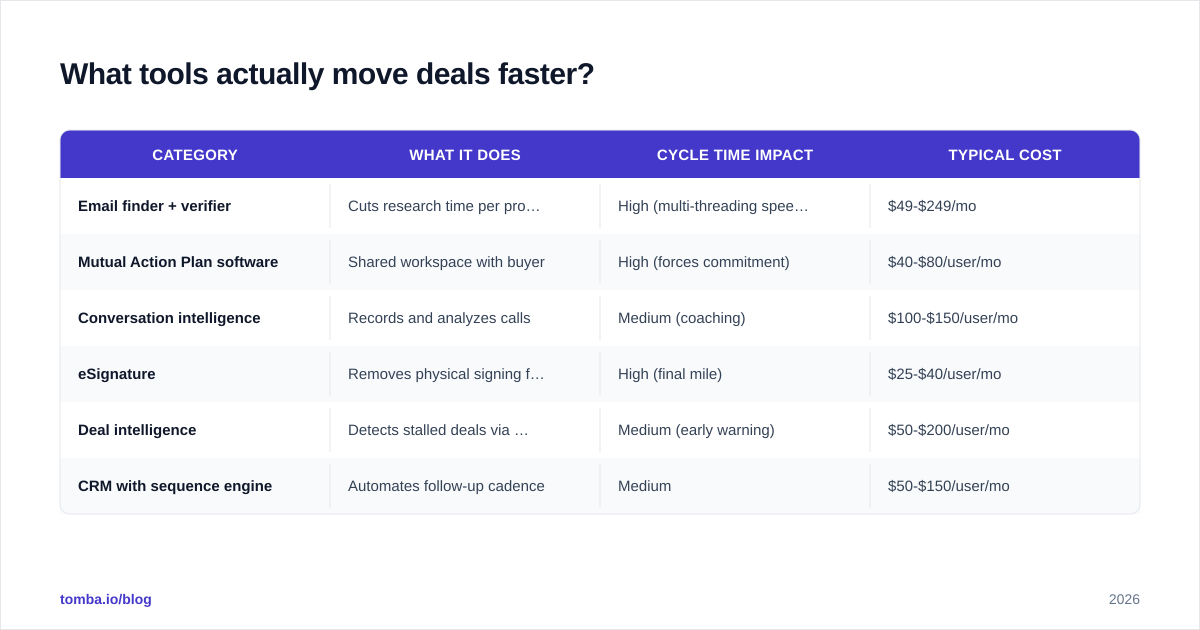
Tool stacks bloat fast. Here's a comparison of the categories that genuinely move the needle on cycle time, with the trade-offs.
| Category | What It Does | Cycle Time Impact | Typical Cost |
|---|---|---|---|
| Email finder + verifier | Cuts research time per prospect from 6 min to 30 sec | High (multi-threading speed) | $49-$249/mo |
| Mutual Action Plan software | Shared workspace with buyer | High (forces commitment) | $40-$80/user/mo |
| Conversation intelligence | Records and analyzes calls | Medium (coaching) | $100-$150/user/mo |
| eSignature | Removes physical signing friction | High (final mile) | $25-$40/user/mo |
| Deal intelligence | Detects stalled deals via engagement signals | Medium (early warning) | $50-$200/user/mo |
| CRM with sequence engine | Automates follow-up cadence | Medium | $50-$150/user/mo |
For the prospecting and enrichment layer, Tomba sits in the email-finder category at the lower price end while offering API and bulk workflows that pricier players charge enterprise rates for. See full Tomba pricing for the breakdown.
How does deal momentum compound?#
Momentum is psychological, not mechanical. Every small commitment a buyer makes — answering a discovery question, attending a follow-up meeting, sharing an internal doc, looping in a colleague — increases their psychological investment in the outcome. This is the consistency principle from Cialdini's Influence.
The acceleration playbook leverages this:
- End every meeting with a confirmed next step on the buyer's calendar (not "I'll send some times")
- Send recap emails within 2 hours, while context is hot
- Reference the buyer's own words back to them in the next conversation
- Ask the buyer to do something small between meetings (review a doc, share with a colleague, pull a metric)
- Track engagement signals: email opens on proposals, doc views, video watch time
A deal where the buyer has done five small things between meeting one and meeting four is dramatically more likely to close than one where the rep has done all the work. If you're carrying the whole relationship, you're not selling — you're presenting.
What metrics tell you a deal is accelerating or stalling?#
Pipeline reviews focused on "What's the close date?" produce sandbagging and false optimism. Better questions to ask in deal reviews:
- When did the buyer last initiate contact (vs. you initiating)?
- How many stakeholders have we engaged in the last 14 days?
- Is there a signed MAP with dates on it?
- Has the buyer pulled an internal artifact into the conversation (a board deck, a budget line, a competing quote)?
- Are response times shrinking or growing across the last 5 emails?
These behavioral signals predict close rate better than stage labels. If a deal hasn't shown buyer-initiated contact in two weeks, it's stalling regardless of what the rep says in forecast.
How does AI fit into deal acceleration?#
AI is genuinely useful in three places: pre-call research summarization, call-recap drafting, and stalled-deal detection. Tools like Gong and Chorus use conversation patterns to flag deals where buyer enthusiasm is dropping before the rep notices.
What AI is not useful for: writing the actual emails that build trust with a CFO, or replacing the judgment call on when to push and when to wait. Treat AI as a research assistant and a pattern-recognizer, not a closer.
For research, pairing an AI assistant with structured contact data — for example, the Tomba MCP server feeding verified contact data into a Claude or GPT workflow — lets you go from "I have a company name" to "I have a 200-word brief on the buying committee" in under a minute.
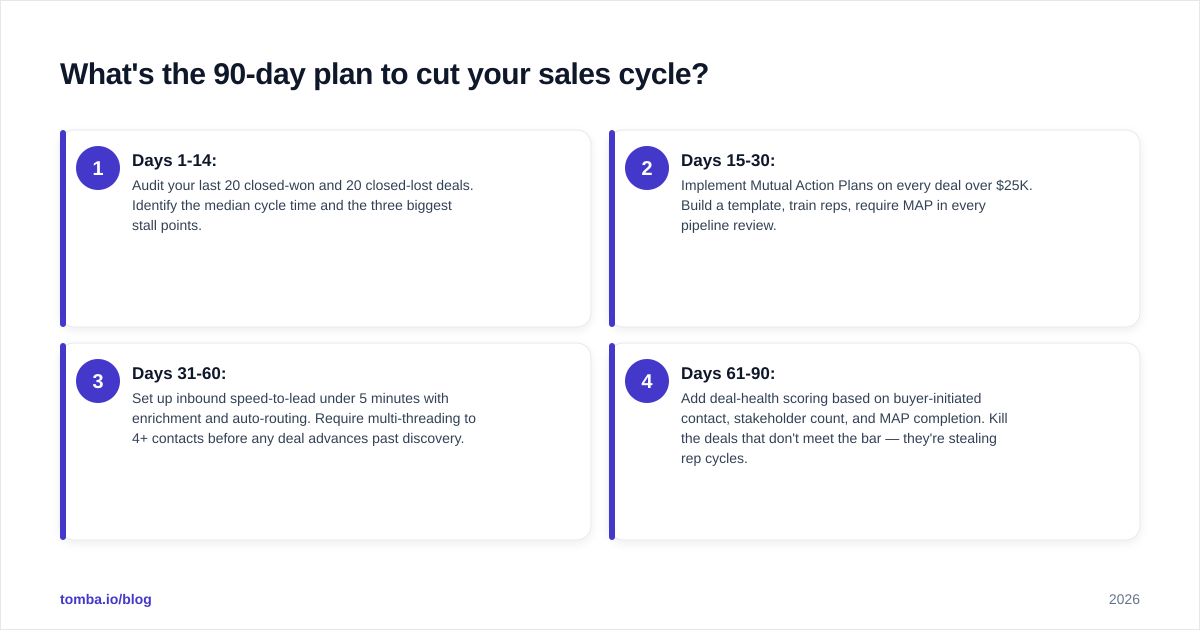
What's the 90-day plan to cut your sales cycle?#
If you implement these in order, most teams see cycle time drop 25-30% inside one quarter:
- Days 1-14: Audit your last 20 closed-won and 20 closed-lost deals. Identify the median cycle time and the three biggest stall points.
- Days 15-30: Implement Mutual Action Plans on every deal over $25K. Build a template, train reps, require MAP in every pipeline review.
- Days 31-60: Set up inbound speed-to-lead under 5 minutes with enrichment and auto-routing. Require multi-threading to 4+ contacts before any deal advances past discovery.
- Days 61-90: Add deal-health scoring based on buyer-initiated contact, stakeholder count, and MAP completion. Kill the deals that don't meet the bar — they're stealing rep cycles.
Where does Tomba fit?#
You can't multi-thread, pre-stage procurement, or run a fast inbound motion without accurate contact data. That's the layer Tomba sits in.
When a new stakeholder appears on a deal, use the Tomba Email Finder to get a verified work email in seconds rather than guessing patterns. For bulk inbound enrichment or expanding into a target account's full org chart, the domain search and bulk workflows do it programmatically. And when you need direct dials for high-priority accounts, the phone finder covers that gap.
Free tier gives you 25 searches per month to test. Paid plans start at $49/mo on Starter and scale to API-level volume on Growth and Pro. Start with the Tomba Email Finder and wire the verified contacts straight into your CRM via the HubSpot or Salesforce integrations. Deals don't accelerate themselves — but the right data stack removes the friction that's been slowing them down.
// get started
Find, verify and enrich your first contacts today
Start on the free plan with 25 searches a month, then scale when your team is ready.
Free plan · No credit card required · GDPR & CCPA
// about the author