Act! CRM Pricing, Reviews, Pros and Cons (2026 Guide)
Act! CRM has been around for decades. Is it still worth it in 2026? We break down the pricing tiers, real user reviews, and the honest pros and cons.
Act! is one of the oldest names in contact management, and that history cuts both ways. For some teams it is a dependable, low-cost database that does exactly what they need. For others it feels like software that peaked a decade ago. This guide gives you the straight version: what Act! actually costs in 2026, what real reviewers say, and where it wins or loses against modern tools.
TL;DR#
- Act! pricing starts around $30/user/month (Premium Cloud, billed annually) and climbs to roughly $60/user/month for the Expert tier; a self-hosted desktop option still exists.
- Best for: small businesses and solo operators who want affordable contact management plus light marketing automation in one box.
- Weakest at: modern UX, native data quality, and deep sales-engagement features that newer platforms ship by default.
- Reviews are polarized: long-time users praise reliability and price; newer users complain about the interface, onboarding, and occasional sync bugs.
- The data gap: Act! manages contacts you already have. It does not find new, verified prospects, so most teams pair it with a dedicated email finder.
What is Act! CRM?#
Act! is a customer relationship management (CRM) and marketing-automation platform aimed primarily at small and mid-sized businesses. Think of it as a digital Rolodex that grew up: it stores contacts, tracks your history with each one, schedules follow-ups, and runs basic email campaigns. If you are new to the category, our CRM glossary entry covers the fundamentals.
Originally launched in the 1980s as "ACT!", the product has passed through Sage and Swiftpage ownership and is now sold simply as Act!. You can run it two ways: Act! Premium Cloud (hosted, subscription) or Act! Premium Desktop (installed on your own machine or server). That desktop option is rare among modern CRMs and is a genuine reason some buyers stay.
The core idea is consolidation: contacts, activities, opportunities, and email marketing in a single tool so a small team does not have to stitch five subscriptions together. Whether that bundle still beats today's specialized apps is the real question, and it depends heavily on what you already pay for elsewhere.
How much does Act! CRM cost in 2026?#
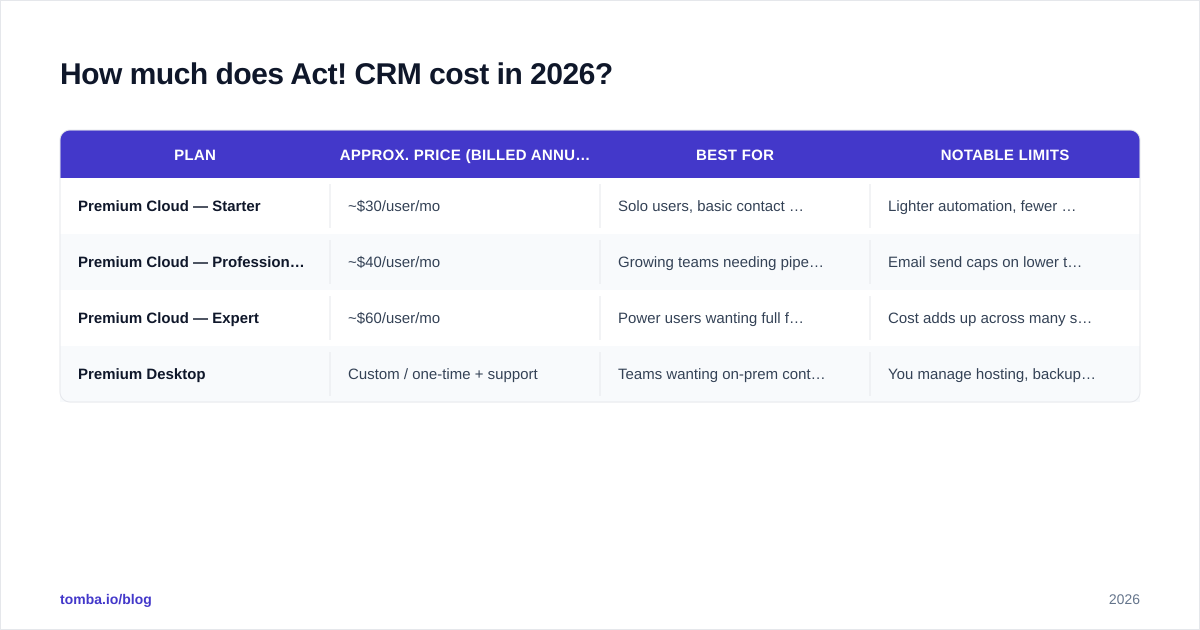
Act! pricing is built around the Premium Cloud subscription, sold per user and billed annually. There are three published cloud tiers, plus a desktop license and optional add-ons. Prices below reflect public 2026 list rates; always confirm the live numbers on act.com because vendors adjust them and run promotions.
| Plan | Approx. price (billed annually) | Best for | Notable limits |
|---|---|---|---|
| Premium Cloud — Starter | ~$30/user/mo | Solo users, basic contact management | Lighter automation, fewer customizations |
| Premium Cloud — Professional | ~$40/user/mo | Growing teams needing pipeline + marketing | Email send caps on lower tiers |
| Premium Cloud — Expert | ~$60/user/mo | Power users wanting full feature set | Cost adds up across many seats |
| Premium Desktop | Custom / one-time + support | Teams wanting on-prem control | You manage hosting, backups, updates |
A few things the price grid does not make obvious:
- Annual commitment is the norm. Month-to-month either is not offered or carries a premium, so budget for a yearly outlay.
- Email marketing tiers separately. Higher send volumes and advanced automation can push you up a plan or into add-ons.
- Desktop is not "free forever." You still pay for updates and support to keep it current and secure.
Compared with entry-level competitors, Act! sits in the affordable-but-not-cheapest band. The value case is the bundled marketing automation; if you would otherwise buy a separate email tool, the math improves.
What do Act! CRM reviews actually say?#
Aggregate scores on G2 and Capterra land Act! in the "solid but dated" range, typically around 3.8–4.0 out of 5. The review split is consistent and worth understanding before you buy.
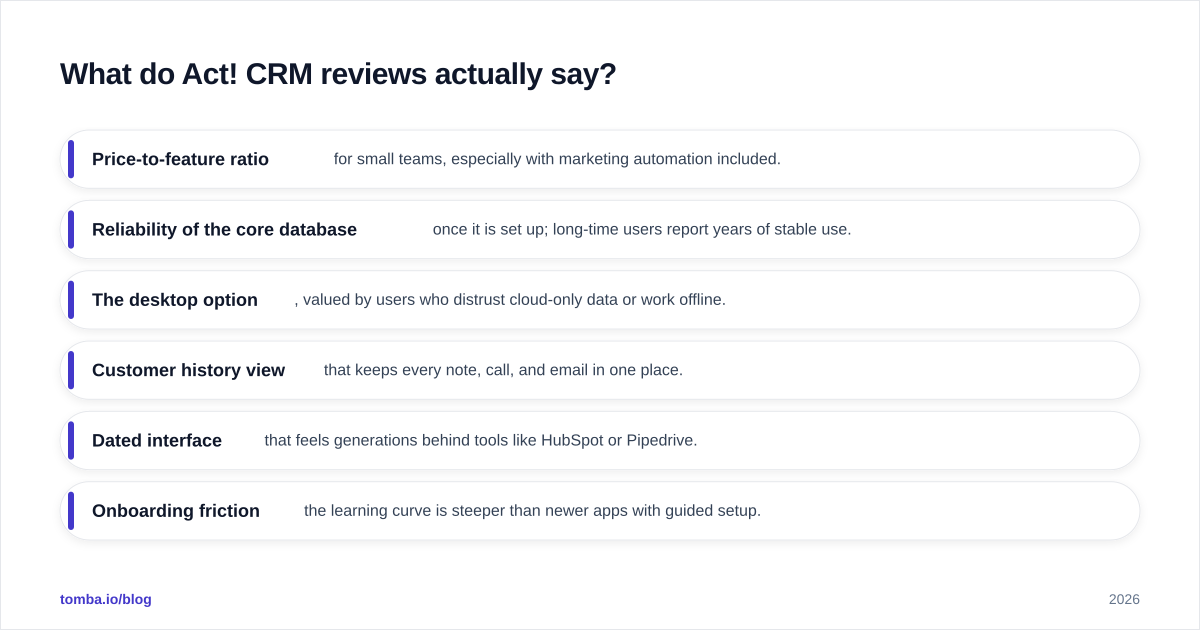
What reviewers consistently praise:
- Price-to-feature ratio for small teams, especially with marketing automation included.
- Reliability of the core database once it is set up; long-time users report years of stable use.
- The desktop option, valued by users who distrust cloud-only data or work offline.
- Customer history view that keeps every note, call, and email in one place.
What reviewers consistently criticize:
- Dated interface that feels generations behind tools like HubSpot or Pipedrive.
- Onboarding friction — the learning curve is steeper than newer apps with guided setup.
- Sync and performance hiccups, particularly when bridging desktop and cloud data.
- Support experiences that vary widely depending on plan and region.
The pattern is clear: people who set Act! up correctly and stay tend to like it; people expecting a sleek, modern SaaS onboarding often bounce. Your satisfaction will track closely with your tolerance for older UX in exchange for a lower bill.
What are the pros and cons of Act! CRM?#
Here is the honest balance sheet, stripped of marketing language.
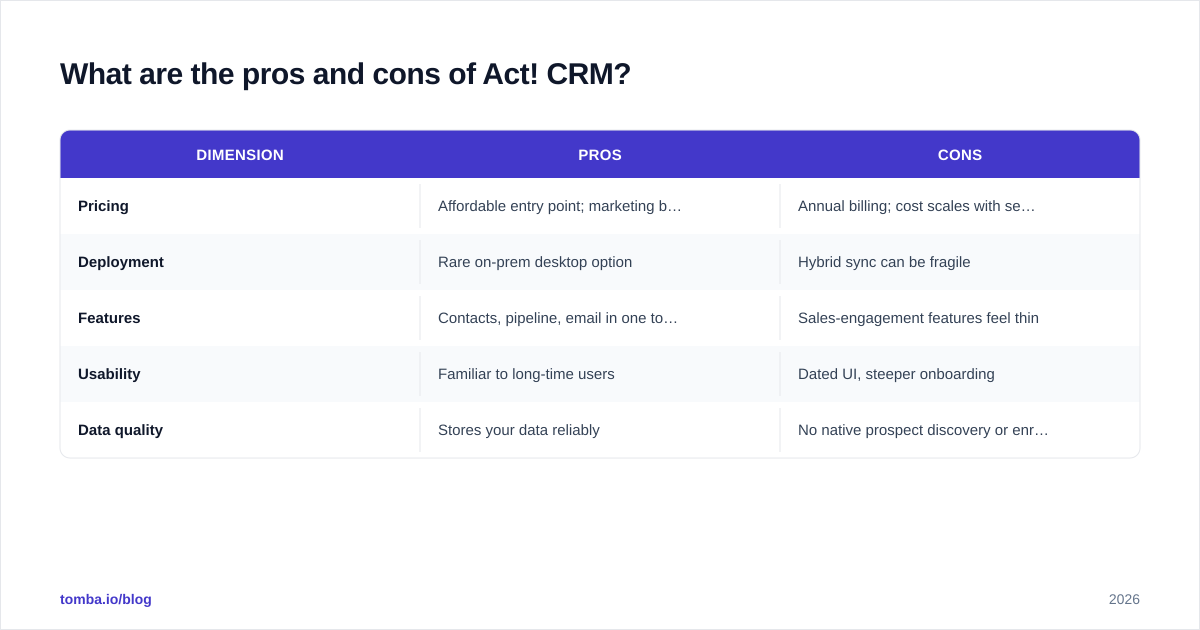
| Dimension | Pros | Cons |
|---|---|---|
| Pricing | Affordable entry point; marketing bundled | Annual billing; cost scales with seats |
| Deployment | Rare on-prem desktop option | Hybrid sync can be fragile |
| Features | Contacts, pipeline, email in one tool | Sales-engagement features feel thin |
| Usability | Familiar to long-time users | Dated UI, steeper onboarding |
| Data quality | Stores your data reliably | No native prospect discovery or enrichment |
The single most important "con" for outbound teams is the last row. Act! is excellent at managing relationships you already have. It does nothing to find new prospects or keep existing records fresh. As contacts change jobs and emails go stale, an Act! database silently decays unless you feed it clean data from somewhere else.
That is why most growth-focused teams treat a CRM like Act! as the destination, not the engine. The engine is your prospecting and data enrichment stack, which fills the CRM with verified, current contact details.
Is Act! CRM better than HubSpot or Pipedrive?#
Short answer: it depends on whether "bundled and cheap" beats "modern and specialized" for your team. Here is how the three compare on the dimensions buyers ask about most.
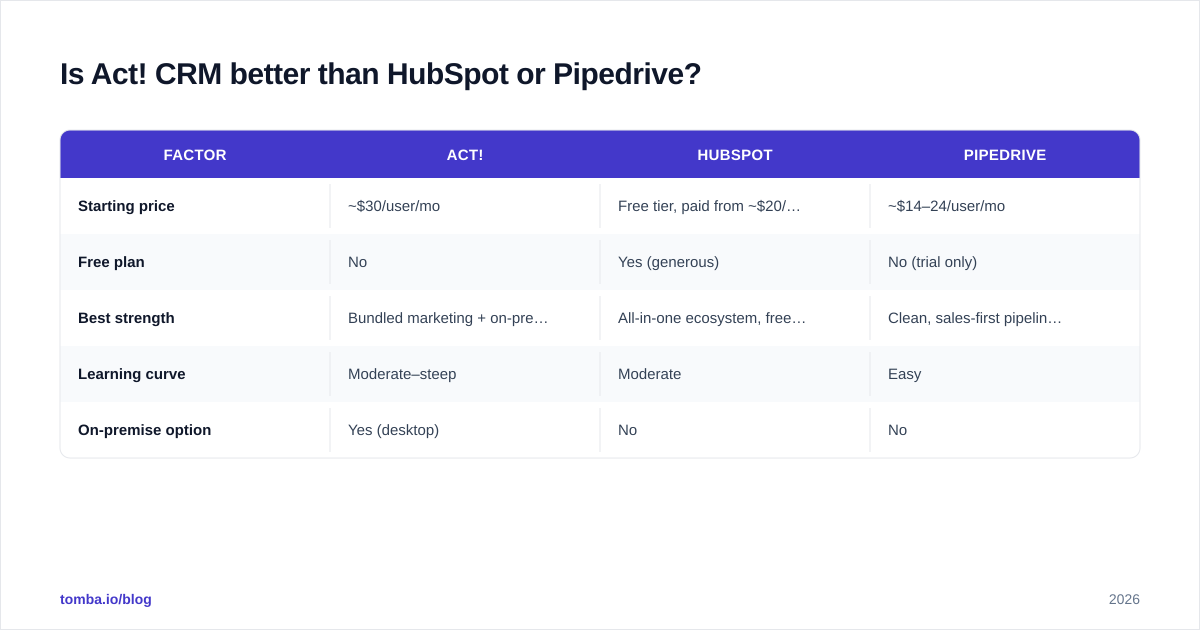
| Factor | Act! | HubSpot | Pipedrive |
|---|---|---|---|
| Starting price | ~$30/user/mo | Free tier, paid from ~$20/seat | ~$14–24/user/mo |
| Free plan | No | Yes (generous) | No (trial only) |
| Best strength | Bundled marketing + on-prem option | All-in-one ecosystem, free CRM | Clean, sales-first pipeline UX |
| Learning curve | Moderate–steep | Moderate | Easy |
| On-premise option | Yes (desktop) | No | No |
If you want a free starting point and a huge app ecosystem, HubSpot is hard to beat; you can see how it connects in our HubSpot integration overview. If you live in your pipeline and want the cleanest day-to-day selling experience, Pipedrive usually wins, and it integrates cleanly with Tomba too. Act! holds its own when you specifically value the desktop deployment, the bundled email marketing, or a lower long-run cost than HubSpot's paid tiers.
There is no universal winner. There is only the best fit for your data ownership preferences, budget, and appetite for change.

Who should actually use Act! in 2026?#
Choose Act! if you recognize yourself here:
- You are a small team or solo operator who wants contacts, follow-ups, and basic email campaigns without juggling subscriptions.
- You value on-premise control and want the option to keep data on your own machine.
- You have used Act! before and the familiarity outweighs the appeal of a redesign.
- Your contact list is relatively stable, so prospect discovery is not your bottleneck.
Look elsewhere if:
- You want a modern, guided onboarding and a polished mobile experience.
- Your growth depends on constant new prospecting and tight sales-engagement sequences.
- You need native data enrichment so records never go stale.
Be honest about which list describes you. Buying Act! for fast outbound growth, or buying HubSpot when you really just wanted a reliable Rolodex, are both expensive mistakes.
How do you fix Act!'s biggest weakness?#
Pair it with a real data layer. Act!'s value is organizing what you have, so the highest-leverage move is making sure what you have is accurate and growing. That means two jobs Act! does not do well:
- Finding new prospects — sourcing verified work emails for the companies and roles you target.
- Keeping records clean — refreshing emails and details as people change jobs.
A dedicated email-finding and verification workflow handles both. You can find emails by name and company, verify them before they ever touch a campaign, and push clean records into Act! or any CRM. If you want to understand why verification matters for email deliverability, bad data is the fastest way to torch your sender reputation, regardless of which CRM stores it.
This is the gap Tomba is built to close. Use the Tomba Email Finder to source accurate, verified B2B email addresses by domain, name, or company, then route them straight into Act!, HubSpot, or Pipedrive. You keep the CRM you prefer and finally feed it data that does not rot. Start free with 25 searches a month, and scale into a paid plan only when your pipeline demands it — see full Tomba pricing for the details.
The bottom line#
Act! in 2026 is a competent, affordable CRM with a unique desktop option and an interface that shows its age. The pricing is fair for what you get, the reviews are reliably mixed, and the pros and cons come down to one trade-off: stability and bundling versus modern polish and specialization. Whatever you choose, remember that no CRM finds prospects for you. Pair your CRM with a strong email finder and verifier, and the tool you pick matters far less than the quality of the data you put inside it.
// get started
Find, verify and enrich your first contacts today
Start on the free plan with 25 searches a month, then scale when your team is ready.
Free plan · No credit card required · GDPR & CCPA
// about the author