Adaptio vs Byteplant: Email Validation Compared (2026)
Adaptio vs Byteplant for email validation in 2026 — accuracy, pricing, API quality, and catch-all handling compared, plus where a finder-first stack beats both.

Choosing between Adaptio and Byteplant comes down to one question: which one keeps your bounce rate under 2% without nuking deliverability or your budget? Both are email validation platforms, both promise high accuracy, and both wrap their engine in an API. But they diverge on catch-all handling, pricing model, compliance posture, and how they fit into a real outbound workflow.
This is a neutral, hands-on comparison — not a sales sheet. By the end you'll know which tool fits your volume and team, and where a finder-first stack quietly outperforms a pure verifier.
TL;DR — Adaptio vs Byteplant in 30 seconds#
- Byteplant (EmailVerify) is the established, infrastructure-grade verifier: SMTP-level checks, on-premise and API options, GDPR-focused, priced per verification with volume tiers.
- Adaptio is the leaner, deliverability-oriented challenger: simpler UX, real-time API, and an emphasis on catch-all and risk scoring rather than raw enterprise tooling.
- Accuracy is close at the syntax/MX/SMTP layer; the real difference is how each handles catch-all and disposable domains.
- Pricing: Byteplant favors high-volume, predictable batch jobs; Adaptio leans toward smaller, recurring real-time checks.
- The gap both leave open: neither finds emails. If you're validating a list you already struggled to build, a combined finder + verifier (like Tomba's email verifier) removes a step.
What is Adaptio?#
Adaptio is an email validation and deliverability tool aimed at sales and marketing teams that want clean lists without standing up heavy infrastructure. Its pitch is speed and simplicity: paste a list or hit the API, get back deliverable/undeliverable/risky verdicts with a confidence score.
The product leans into risk scoring — instead of a binary valid/invalid, it grades addresses so you can decide your own tolerance. That's useful when you'd rather send to a "probably-valid" catch-all than discard a whole domain. The trade-off is that you inherit the decision; the tool hands you a probability, not a guarantee.
What is Byteplant?#
Byteplant is a German data-quality company whose EmailVerify product has been around far longer than most of the current crop. It runs syntax, MX, and SMTP checks, flags disposable and role-based addresses, and is built for compliance-conscious teams — GDPR is a first-class concern, and on-premise / self-hosted deployment is available for organizations that can't send data to a third party.
Byteplant's strength is predictability at scale: batch-verify millions of records, integrate via a stable API, and trust that the verdicts are conservative. Its UI is functional rather than modern, and the experience assumes you know what an SMTP handshake is.
How does email validation actually work?#
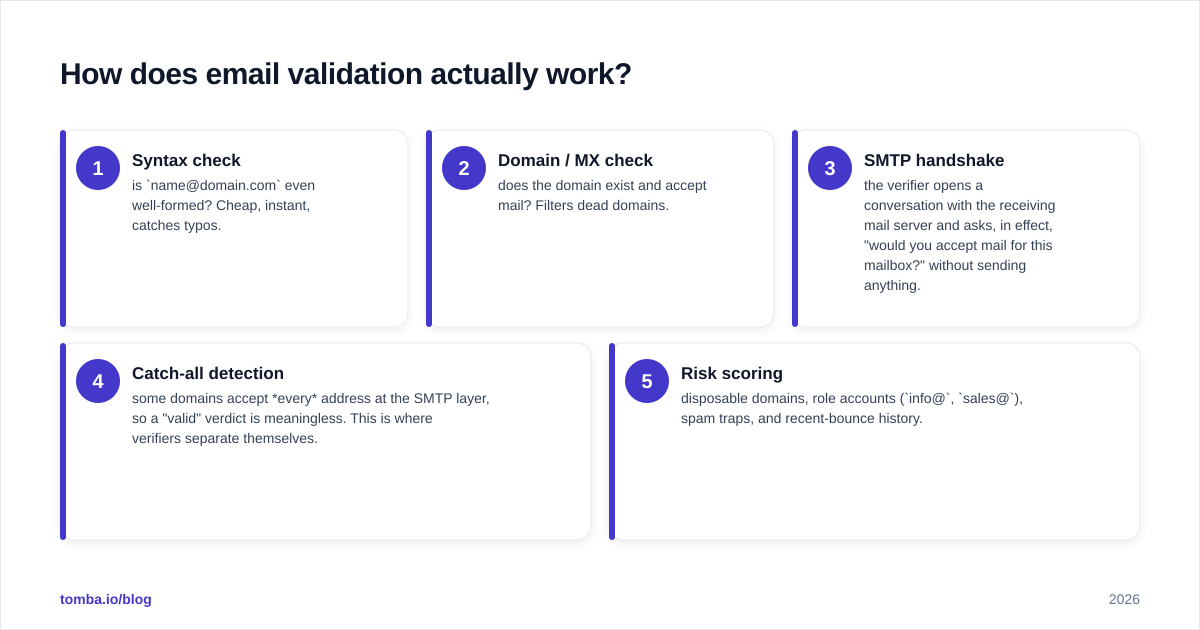
Both tools run the same core pipeline; the differences live in the last two stages.
- Syntax check — is
name@domain.comeven well-formed? Cheap, instant, catches typos. - Domain / MX check — does the domain exist and accept mail? Filters dead domains.
- SMTP handshake — the verifier opens a conversation with the receiving mail server and asks, in effect, "would you accept mail for this mailbox?" without sending anything.
- Catch-all detection — some domains accept every address at the SMTP layer, so a "valid" verdict is meaningless. This is where verifiers separate themselves.
- Risk scoring — disposable domains, role accounts (
info@,sales@), spam traps, and recent-bounce history.
Stages 1–3 are nearly commoditized. If a vendor tells you their edge is "we check MX records," they're describing table stakes. The honest comparison happens at stages 4 and 5 — and that's exactly where you should test both tools on your data before committing.
Adaptio vs Byteplant: side-by-side comparison#
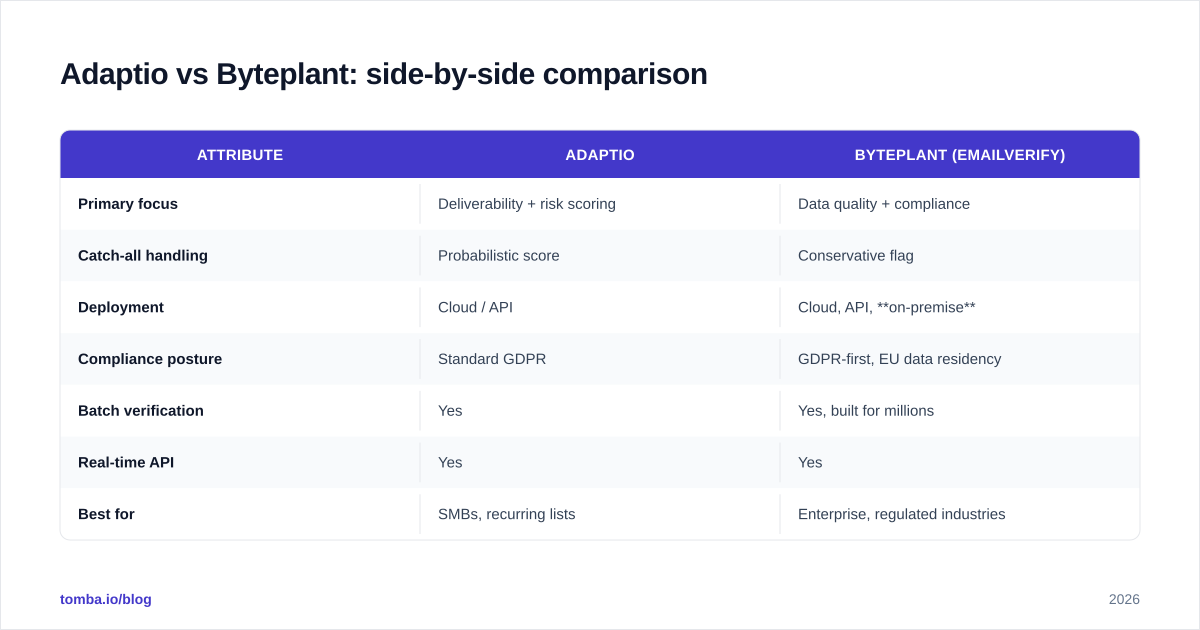
| Attribute | Adaptio | Byteplant (EmailVerify) |
|---|---|---|
| Primary focus | Deliverability + risk scoring | Data quality + compliance |
| Catch-all handling | Probabilistic score | Conservative flag |
| Deployment | Cloud / API | Cloud, API, on-premise |
| Compliance posture | Standard GDPR | GDPR-first, EU data residency |
| Batch verification | Yes | Yes, built for millions |
| Real-time API | Yes | Yes |
| Best for | SMBs, recurring lists | Enterprise, regulated industries |
| Finds new emails? | No | No |
| Typical pricing model | Pay-as-you-go credits | Volume tiers, per-verification |
The pattern: Adaptio optimizes for the day-to-day operator, Byteplant for the compliance and volume buyer. Neither is "better" in the abstract — it depends on whether your bottleneck is workflow speed or audit-proof infrastructure.

Which is more accurate?#
Accuracy claims from any verifier deserve skepticism, because the number depends entirely on the test list. A vendor quoting "99% accuracy" on a hand-picked sample tells you nothing about your real-world bounce rate.
Here's what's true in practice:
- On clean B2B domains (Google Workspace, Microsoft 365), both Adaptio and Byteplant return reliable verdicts. Bounce rates land in the same low single digits.
- On catch-all domains, the tools diverge. Byteplant tends to flag conservatively (mark as risky/unknown), protecting your sender reputation at the cost of discarding some good addresses. Adaptio's probabilistic score lets you keep more, at the cost of accepting more uncertainty.
- On disposable and spam-trap domains, Byteplant's longer-maintained blocklists have a slight edge, though Adaptio closes the gap on freshly registered throwaways.
The right move is a bake-off: take 1,000 addresses you already know the outcome for, run both, and compare false positives. Whichever tool flags fewer good emails as bad — while still catching the bounces — wins for your list. Don't outsource that judgment to a marketing page. If you want a deeper primer on the underlying mechanics, our catch-all verifier explainer breaks down why these domains are so hard.
How do they handle catch-all domains?#
Catch-all (or "accept-all") domains are the single biggest differentiator. A catch-all server says "yes" to every address, so a naive SMTP check returns "valid" for asdfgh@company.com and ceo@company.com alike.
- Byteplant errs toward caution: it labels these
unknownorriskyand lets you decide. Lower risk to your domain reputation, but you'll set aside real contacts. - Adaptio assigns a confidence score using pattern signals (does the format match the company's known scheme? is the name plausible?). You keep more contacts, but you're trusting a probability.
If you send high-volume cold email where one bad batch can torch a sending domain, Byteplant's conservatism is a feature. If you're doing lower-volume, high-value outreach where every contact matters, Adaptio's scoring earns its keep. A third option — pairing verification with a finder that already knows the domain's email pattern — sidesteps a lot of the guesswork, which is where bulk verification inside a finder platform changes the math.
How does pricing compare?#
Neither vendor publishes pricing as cleanly as you'd like, and both move list prices, so treat the shape — not the exact dollars — as the takeaway.
- Byteplant prices per verification with steep volume discounts. It rewards large, predictable batches. If you verify a million records a quarter, the per-check cost drops sharply. Small recurring jobs are comparatively expensive.
- Adaptio leans toward pay-as-you-go credits and subscription tiers tuned for SMB volumes. Cheaper to start, more expensive at enterprise scale.
Cross-shop both against your actual monthly volume. And factor in the hidden cost: if you're also paying a separate tool to find the emails you're verifying, the combined bill often exceeds an all-in-one. For reference, Tomba pricing bundles finding and verification — Free (25 searches/mo), Starter $49/mo, Growth $99/mo, Pro $249/mo — so a single credit covers discovery and validation.

Which integrates better into a real workflow?#
A verifier is only as good as how easily it disappears into your stack.
- Byteplant offers a stable REST API, batch upload, and — its standout — on-premise deployment for teams that legally cannot send PII to a third party. If you're in healthcare, finance, or EU public sector, that alone may decide it.
- Adaptio focuses on a clean real-time API and quick CSV workflows. Less ceremony, faster to wire into a Zapier or Make automation, lighter on documentation overhead.
For most sales teams, the deciding factor isn't the verifier itself — it's whether validation happens automatically at the moment a lead enters the CRM. Both tools can do that via API; Byteplant requires more setup, Adaptio less.
Where do both tools fall short?#
Here's the honest gap neither vendor advertises: a verifier validates a list you already have. It does not build one.
If you're spending hours assembling contact lists — scraping LinkedIn, guessing first.last@ patterns, exporting from a CRM — then running them through Adaptio or Byteplant, you've automated the last step of a mostly manual process. The expensive part is sourcing accurate emails in the first place.
That's the case for a finder-first platform. When the tool that discovers the email also verifies it in the same pass, you skip the export-import-reverify shuffle entirely. You can read more on where contact data actually comes from and why source quality beats post-hoc verification.
This isn't a knock on Adaptio or Byteplant — they're good at the job they do. It's a scope reminder: if your real problem is "I don't have enough good emails," a verifier is the wrong first purchase.
Adaptio vs Byteplant: which should you choose?#
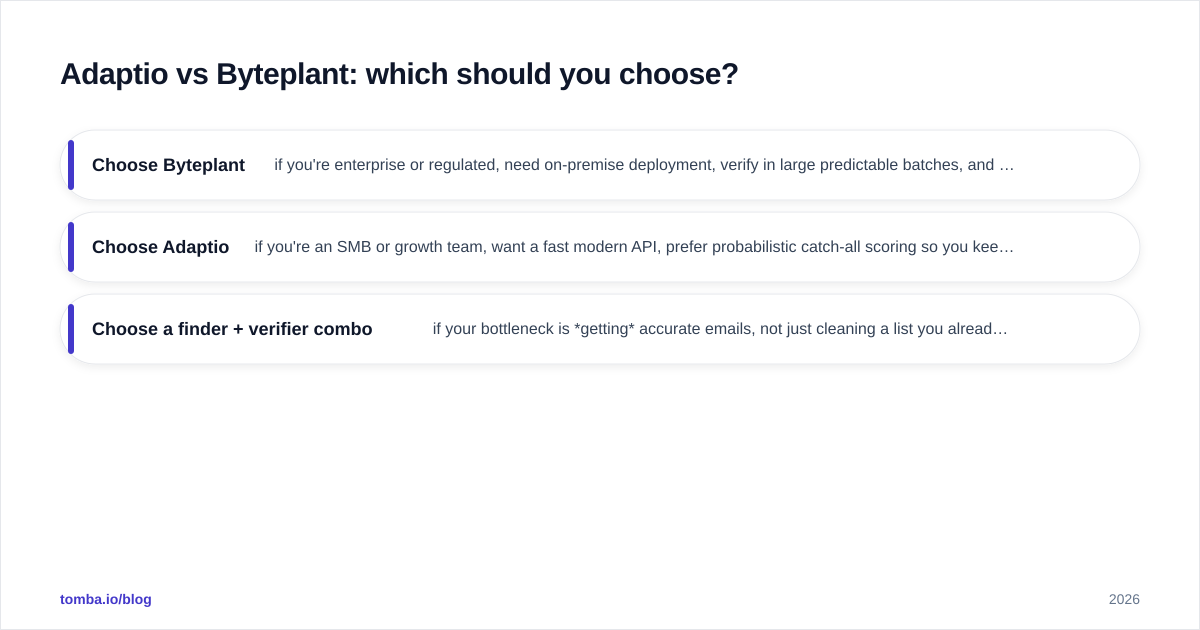
- Choose Byteplant if you're enterprise or regulated, need on-premise deployment, verify in large predictable batches, and value conservative verdicts that protect sender reputation above contact retention.
- Choose Adaptio if you're an SMB or growth team, want a fast modern API, prefer probabilistic catch-all scoring so you keep more contacts, and don't need heavy compliance infrastructure.
- Choose a finder + verifier combo if your bottleneck is getting accurate emails, not just cleaning a list you already have. Validating bad data faster doesn't fix a thin pipeline.
Cross-check both vendors' current reviews on G2 and Capterra before you buy — feature sets and pricing on both move quarter to quarter, and recent reviewer comments on support responsiveness are worth more than any feature list.
The bottom line#
Adaptio and Byteplant solve the same problem from opposite ends: Adaptio for speed and flexibility, Byteplant for scale and compliance. Run a 1,000-address bake-off on your own data, compare false positives on catch-all domains, and let the numbers decide.
But if you find yourself buying a verifier because your hand-built lists are thin and error-prone, you're treating the symptom. Start where the data is born: use the Tomba Email Finder to discover professional emails by name, domain, or company — each result is verified in the same step, so you skip the separate validation tool entirely. Spin up the free tier (25 searches/mo), test it against the addresses you'd otherwise pay Adaptio or Byteplant to clean, and see whether finding-plus-verifying in one pass is the simpler stack. Your bounce rate — and your budget — will tell you.
Ready to find emails that actually work?
Join 150,000+ professionals who stopped guessing and started sending. Free credits on signup — no credit card required.
Get the Tomba newsletter
Practical outbound tactics and product updates — once every two weeks.
About the author