Adaptio vs Global Database: Which B2B Data Tool Wins in 2026?
Adaptio vs Global Database compared head-to-head: data coverage, freshness, verification, pricing models, and which B2B data platform actually fits your go-to-market motion in 2026.
Choosing a B2B data provider is really a bet on two things: how much of your market the database covers, and how confident you can be that the contact you pull today still works tomorrow. Adaptio and Global Database both sell that promise, but they sell it to different buyers in different ways. This guide breaks down where each one earns its keep, where it falls short, and how to decide without signing a year-long contract you regret in month two.
TL;DR#
- Adaptio leans toward dynamic, signal-driven enrichment — built for teams that want data refreshed against real-time activity rather than static exports.
- Global Database is a deep firmographic and company-intelligence platform with strong financial, registry, and company-record coverage, especially across UK and European markets.
- Neither tool is primarily an email finder, so verification quality varies — always re-verify any contact you intend to email at scale.
- Pricing for both skews toward annual commitments and quote-based tiers, which makes them harder to trial than usage-based finders.
- If your core need is finding and verifying professional email addresses fast, a focused tool like Tomba Email Finder usually beats a heavyweight database for cost and speed.
What is Adaptio?#
Adaptio positions itself as a B2B data and enrichment layer for go-to-market teams. The pitch is freshness: instead of handing you a static list, it aims to keep contact and account records updated against ongoing signals — job changes, company movements, and intent-style activity — so your CRM doesn't rot the moment you import it.
That model appeals to revenue teams running sales automation at scale, where a stale title or a moved contact quietly burns sequence slots. The trade-off is that signal-driven platforms tend to price for the whole motion — enrichment, monitoring, and routing bundled together — rather than charging per lookup.
The practical question with any "always fresh" platform is coverage depth versus refresh breadth. A tool can refresh the 40% of your accounts it knows well and silently leave the rest untouched. When you evaluate Adaptio, test it against your target accounts, not the demo list the vendor curates.
What is Global Database?#
Global Database is a company-intelligence platform with roots in firmographic and financial data. Its strength is depth of the company record: registry filings, financial indicators, technology signals, and contact data layered on top of business entities. Coverage is particularly strong across the UK and broader European markets, where it pulls from official company registers.
That makes it less of a "grab 500 emails for a cold campaign" tool and more of an account-research and market-mapping engine. If you're sizing a territory, qualifying companies by revenue or headcount, or feeding a marketing qualified lead model, the firmographic depth matters more than raw contact volume.
The flip side: deep company records don't automatically mean deep, verified contact records. Many account-intelligence platforms are excellent at "here is the company" and merely adequate at "here is the right person's working email." That gap is exactly where a dedicated email verifier earns its place in the stack.
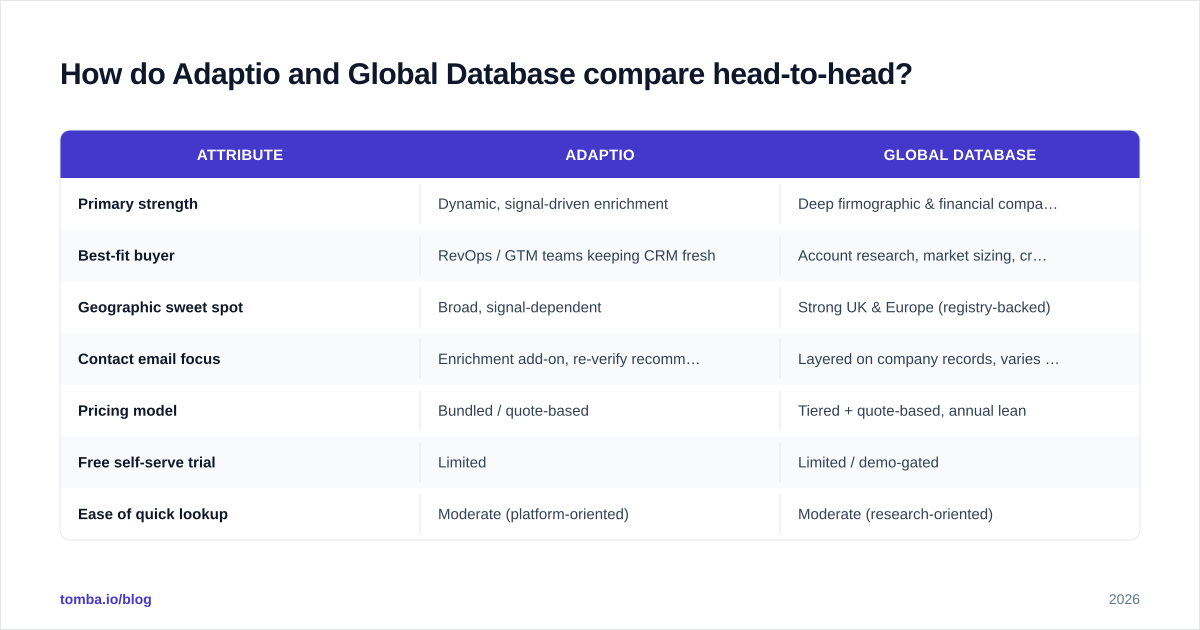
How do Adaptio and Global Database compare head-to-head?#
Use this table as a scan, not a verdict — the right pick depends on whether you're buying company intelligence or contact reach.
| Attribute | Adaptio | Global Database |
|---|---|---|
| Primary strength | Dynamic, signal-driven enrichment | Deep firmographic & financial company records |
| Best-fit buyer | RevOps / GTM teams keeping CRM fresh | Account research, market sizing, credit/risk |
| Geographic sweet spot | Broad, signal-dependent | Strong UK & Europe (registry-backed) |
| Contact email focus | Enrichment add-on, re-verify recommended | Layered on company records, varies by region |
| Pricing model | Bundled / quote-based | Tiered + quote-based, annual lean |
| Free self-serve trial | Limited | Limited / demo-gated |
| Ease of quick lookup | Moderate (platform-oriented) | Moderate (research-oriented) |
The pattern most teams hit: both platforms are built to be adopted, not sampled. You commit, you onboard, you integrate. That's fine when the data is central to your operation, and frustrating when you just needed 2,000 verified emails this quarter.
Which one has better data freshness and accuracy?#
Conclusion first: freshness and accuracy are different problems, and the two tools optimize for different ones.
Adaptio's whole premise is freshness — re-checking records so a contact who changed jobs last month doesn't sit in your sequence pretending to still be the VP of Sales. If your pain is decay (you import good data and it goes bad), that orientation is valuable.
Global Database optimizes for correctness at the source. Registry-backed company data is hard to beat for accuracy on firmographics — legal entity, filings, financials. But contact-level accuracy depends on how recently the person record was touched, and that's harder to guarantee than a company filing.
Here's the part both categories gloss over: no aggregated database verifies an email at send time. A record can be accurate the day it was collected and bounce three weeks later. That's why mature teams treat any list — from any provider — as raw material that still passes through verification before a campaign.
A simple decay test for either vendor:
- Pull 100 contacts in your core segment.
- Run them through an independent email verification pass.
- Bucket the results: valid, risky/catch-all, invalid.
- Note the catch-all rate — that's the share you genuinely can't confirm without a catch-all verifier.
If 25% of a "fresh" list lands in risky/invalid, the freshness claim is mostly marketing.
How does pricing compare for Adaptio vs Global Database?#
Both lean toward annual commitments and quote-based pricing, which is the norm for company-intelligence platforms but a real friction point for smaller teams. You typically can't see the full price without a sales call, and credits or seats are bundled into packages sized for mid-market and enterprise.
That model makes sense if data is your operational core. It makes much less sense if you have a specific, bounded job — find and verify the decision-makers at 3,000 target accounts — where usage-based pricing is far more honest about what you'll actually spend.
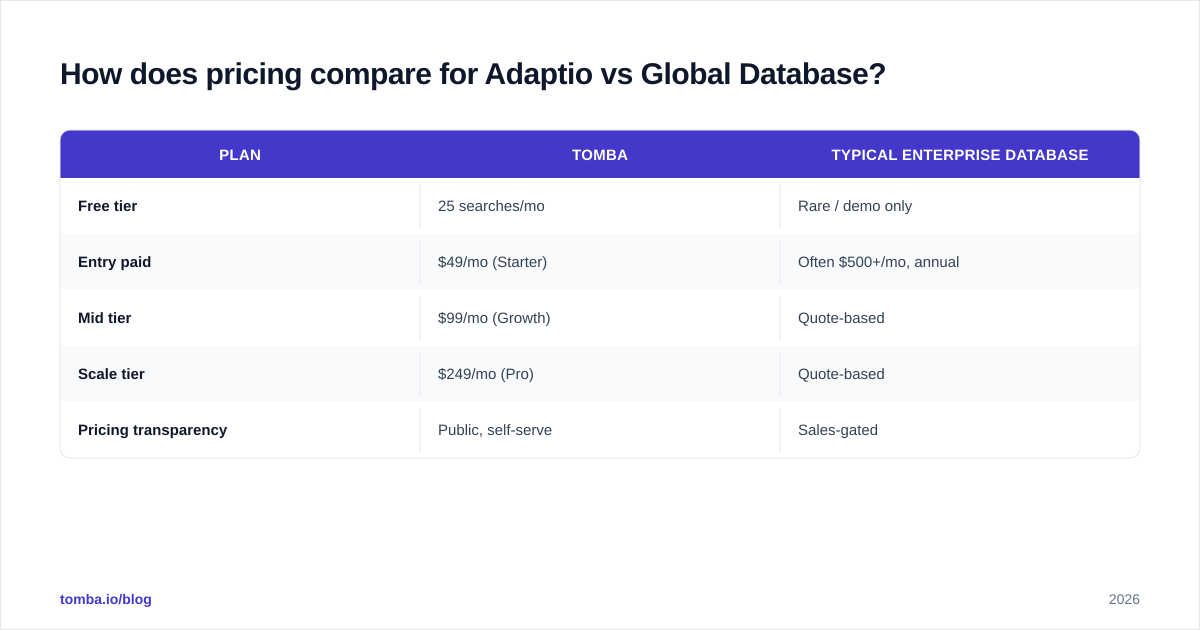
For contrast, here's how a focused, transparent finder prices the contact-discovery job:
| Plan | Tomba | Typical enterprise database |
|---|---|---|
| Free tier | 25 searches/mo | Rare / demo only |
| Entry paid | $49/mo (Starter) | Often $500+/mo, annual |
| Mid tier | $99/mo (Growth) | Quote-based |
| Scale tier | $249/mo (Pro) | Quote-based |
| Pricing transparency | Public, self-serve | Sales-gated |
You can see full Tomba pricing without booking a call — which itself tells you something about how the two categories think about buyers. Heavyweight databases are designed for committed accounts; finders are designed for people who want to start today.
When should you pick a dedicated email finder instead?#
Pick a finder when your bottleneck is reaching people, not understanding companies.
A company-intelligence platform is the right tool when you need to size a market, score accounts by financial health, or build a revenue operations data foundation. It's the wrong tool when you've already chosen your accounts and just need accurate, verified contacts to start outreach this week.
Signs you should reach for a finder over Adaptio or Global Database:
- You know the companies; you need the right person's email by name and domain.
- You're verifying deliverability before a cold campaign and care about bounce rate.
- You want per-lookup or transparent monthly pricing, not an annual platform contract.
- You need to enrich a list inside Sheets, Excel, or your CRM without a heavy implementation.
A tool like the Tomba Email Finder handles exactly that job: give it a name and a domain, get a professional email with a confidence score, then push it through verification. Its domain search covers the "show me everyone at this company" use case, and the bulk email finder handles list-scale jobs without a sales call. For teams already living in spreadsheets, the Google Sheets add-on keeps the workflow in one place.
This isn't an either/or for everyone. Plenty of mature stacks run a company-intelligence platform and a finder — the database for account selection and research, the finder for accurate contact discovery and verification. The mistake is paying enterprise prices for a database and then sending to its unverified emails anyway.
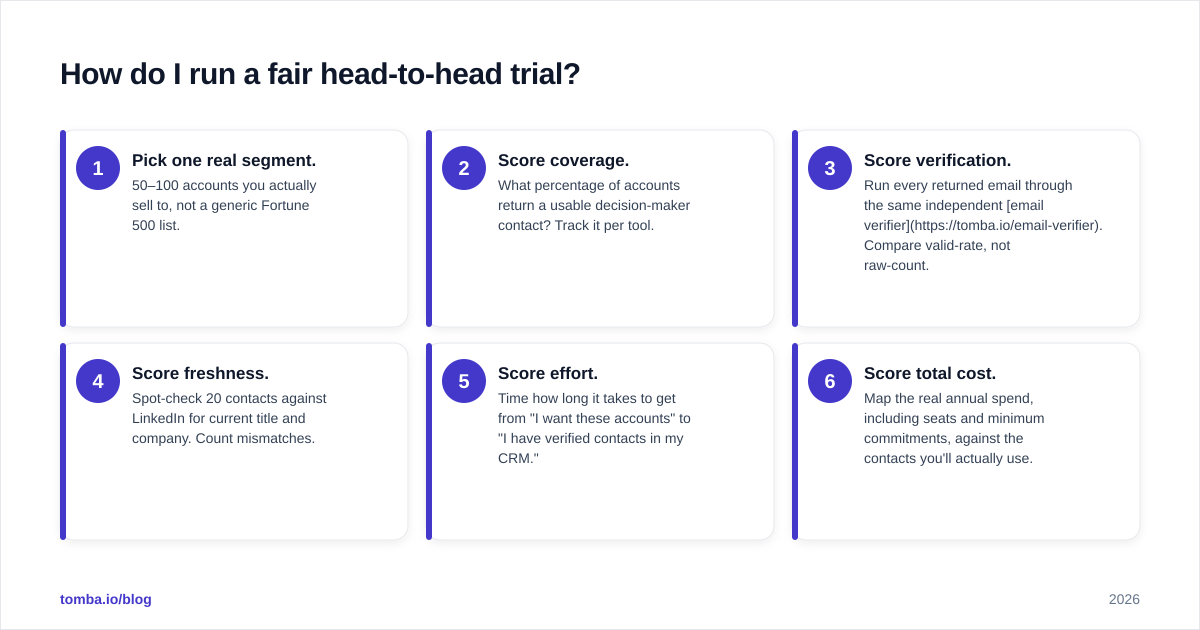
How do I run a fair head-to-head trial?#
Don't trust either vendor's demo data. Run the same controlled test against both, plus a finder as a baseline.
- Pick one real segment. 50–100 accounts you actually sell to, not a generic Fortune 500 list.
- Score coverage. What percentage of accounts return a usable decision-maker contact? Track it per tool.
- Score verification. Run every returned email through the same independent email verifier. Compare valid-rate, not raw-count.
- Score freshness. Spot-check 20 contacts against LinkedIn for current title and company. Count mismatches.
- Score effort. Time how long it takes to get from "I want these accounts" to "I have verified contacts in my CRM."
- Score total cost. Map the real annual spend, including seats and minimum commitments, against the contacts you'll actually use.
Whichever tool wins your valid-rate and effort scores is the one that wins your money — regardless of which has the louder coverage claim. You can read more about where contact data comes from to understand why valid-rate, not list size, is the metric that predicts campaign performance.
For deeper benchmarking, third-party review sites like G2 and Capterra are useful for spotting consistent complaints (billing surprises, support gaps, regional coverage holes) that vendors won't volunteer on a demo call.
Is Adaptio better than Global Database?#
There's no universal winner — there's a winner for your motion.
- Choose Adaptio if your primary pain is CRM decay and you want enrichment that keeps records current against ongoing signals, and you're buying the whole GTM data layer.
- Choose Global Database if you need deep, registry-backed company intelligence — financials, filings, firmographics — especially across UK and European markets.
- Choose a dedicated finder if the actual job is finding and verifying professional emails quickly, with transparent pricing and a free tier to test against your own data.
The honest summary: both platforms are strong at company intelligence and only adequate at verified contact reach. If reach is your real bottleneck, you'll get there faster and cheaper with a focused tool than with a database contract.
The bottom line#
Buy the tool that solves your binding constraint. If you're mapping markets and scoring accounts, a company-intelligence platform like Global Database — or a signal-driven enricher like Adaptio — is worth the commitment. If you already know who you want to reach and need accurate, verified emails without a year-long contract, start with a finder.
Try the Tomba Email Finder on your real target accounts — the free tier gives you 25 searches a month with no sales call, so you can benchmark coverage and valid-rate against any database before you spend a dollar on an annual deal. Find the contacts, verify them with the built-in email verifier, and let your campaign bounce rate decide which data source actually earned its place in your stack.
Ready to find emails that actually work?
Join 150,000+ professionals who stopped guessing and started sending. Free credits on signup — no credit card required.
Get the Tomba newsletter
Practical outbound tactics and product updates — once every two weeks.
About the author