Adaptio vs Leadsforge 2026: Which AI Sales Platform Wins?
A neutral, side-by-side breakdown of Adaptio vs Leadsforge in 2026 — pricing, data accuracy, automation, and which AI sales platform fits your team.
Choosing between Adaptio and Leadsforge usually comes down to one question: do you want a platform that scores and routes the pipeline you already have, or one that builds the pipeline from scratch? This guide breaks both down without the marketing gloss.
TL;DR#
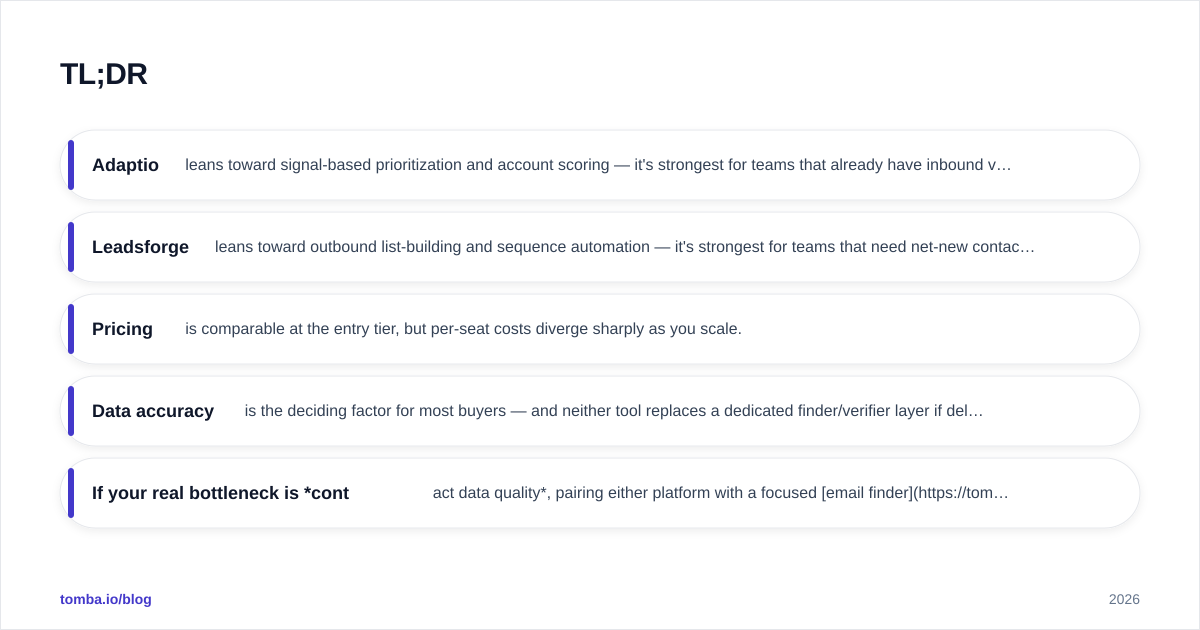
- Adaptio leans toward signal-based prioritization and account scoring — it's strongest for teams that already have inbound volume and need to work it smarter.
- Leadsforge leans toward outbound list-building and sequence automation — it's strongest for teams that need net-new contacts and want them enriched and emailed fast.
- Pricing is comparable at the entry tier, but per-seat costs diverge sharply as you scale.
- Data accuracy is the deciding factor for most buyers — and neither tool replaces a dedicated finder/verifier layer if deliverability matters.
- If your real bottleneck is contact data quality, pairing either platform with a focused email finder beats overpaying for a bundled database.
What are Adaptio and Leadsforge?#
Adaptio is an AI sales-intelligence platform built around intent and engagement signals. It ingests your CRM, web analytics, and product usage data, then scores accounts and contacts so reps spend time on the deals most likely to close. Think of it as a triage nurse for your pipeline — it doesn't generate new patients, it decides who gets seen first.
Leadsforge is an outbound-first prospecting platform. It combines a contact database, enrichment, and multichannel sequencing so SDRs can build a list, fill in missing emails and phone numbers, and launch outreach inside one tool. It's closer to a factory line: raw company names in one end, sequenced contacts out the other.
Both call themselves "AI sales platforms," which makes the category confusing. The honest framing: Adaptio optimizes existing demand, Leadsforge manufactures new demand. That distinction drives almost every other difference below.
How do Adaptio and Leadsforge compare on features?#
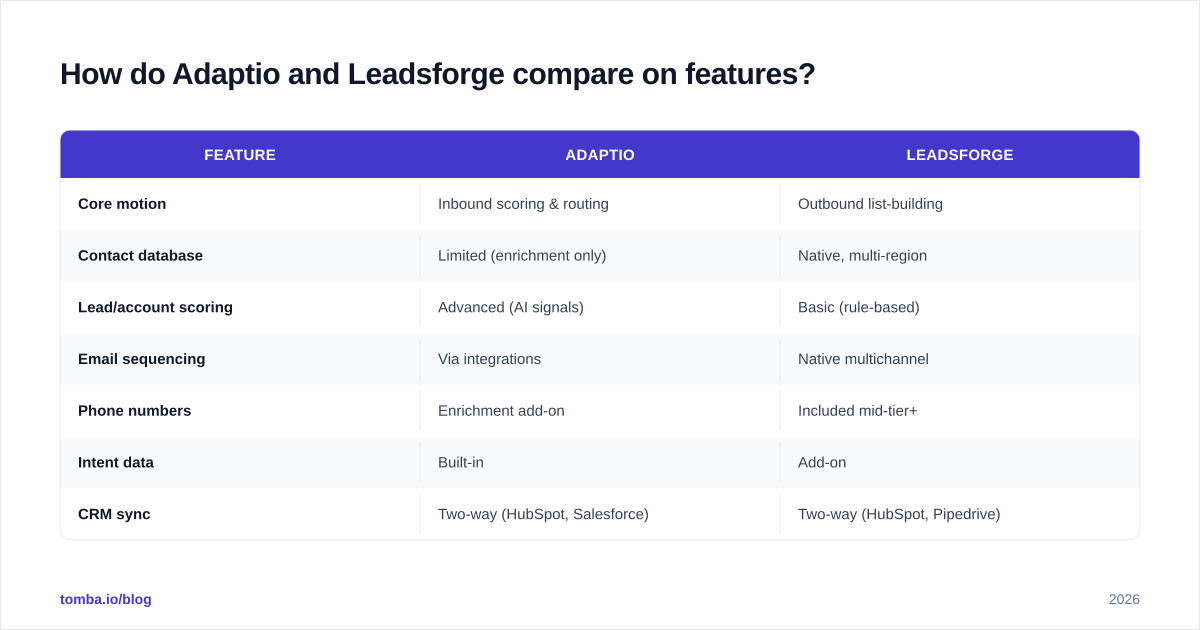
Here's the side-by-side. Treat vendor-published numbers as directional — always validate against a trial with your own data.
| Feature | Adaptio | Leadsforge |
|---|---|---|
| Core motion | Inbound scoring & routing | Outbound list-building |
| Contact database | Limited (enrichment only) | Native, multi-region |
| Lead/account scoring | Advanced (AI signals) | Basic (rule-based) |
| Email sequencing | Via integrations | Native multichannel |
| Phone numbers | Enrichment add-on | Included mid-tier+ |
| Intent data | Built-in | Add-on |
| CRM sync | Two-way (HubSpot, Salesforce) | Two-way (HubSpot, Pipedrive) |
| Best for | RevOps, AE teams | SDR/outbound teams |
| Learning curve | Moderate–steep | Low–moderate |
The pattern is clear: Adaptio is deeper where you already have data, Leadsforge is broader where you don't. A RevOps lead drowning in inbound MQLs will get more from Adaptio's scoring. An SDR staring at an empty CRM will get more from Leadsforge's database and sequences.
Is Adaptio better than Leadsforge for data accuracy?#
Neither tool is a true data company first — and that matters more than either marketing site admits.
Adaptio enriches the records you feed it. Its accuracy is therefore only as good as (a) your existing CRM hygiene and (b) the third-party providers it resamples from. When a contact changes jobs, Adaptio's score can quietly go stale because it trusts the record already in your system.
Leadsforge maintains its own database, so coverage is wider for cold accounts — but self-reported database freshness claims (often "95%+ accurate") rarely survive contact with a verification pass. Bounce rates on bundled databases routinely land higher than the headline number once you actually send.
This is why experienced teams decouple the data layer from the workflow layer. You can run Adaptio or Leadsforge for scoring and sequencing while sourcing and cleaning contacts through a dedicated stack:
- Use a real email verifier before any sequence launches, so bundled-database bounces don't torch your sender reputation.
- Use a catch-all verifier for the domains that neither platform can confidently resolve.
- Backfill missing decision-maker contacts with domain search instead of paying for a second database seat.
The result: you keep the platform you like for workflow, and you stop letting a bundled database dictate your deliverability.
How much do Adaptio and Leadsforge cost in 2026?#
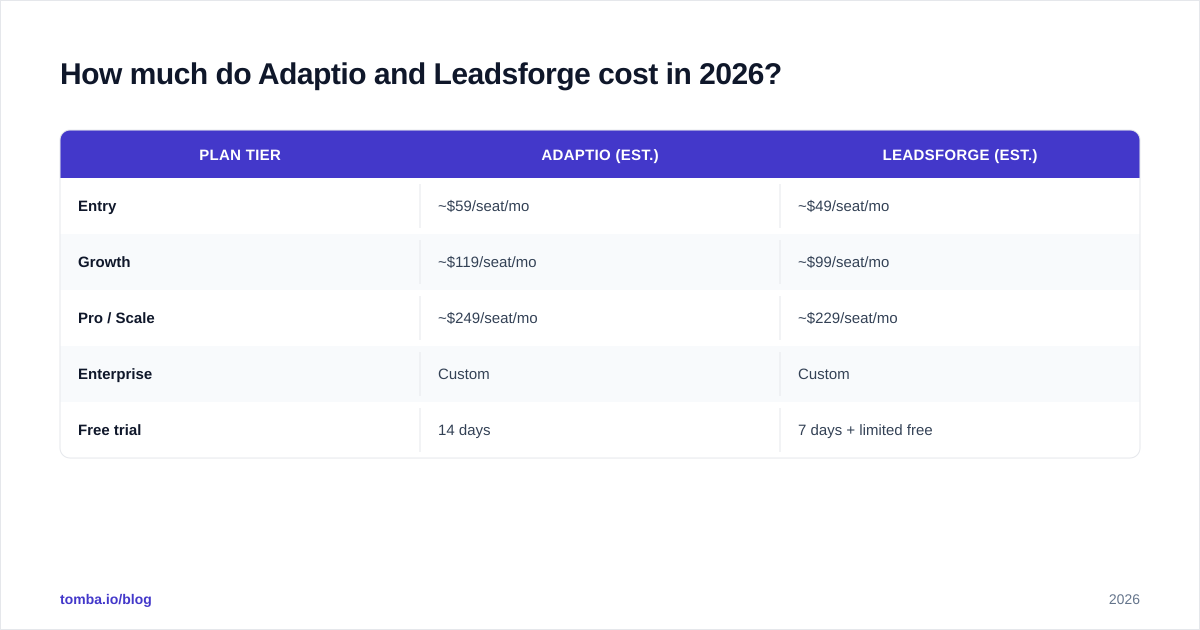
Both publish tiered pricing, and both gate the genuinely useful features (intent, phone, advanced scoring) behind mid-to-upper plans. Use this as a planning baseline, not a quote — seat minimums and annual discounts shift the real number a lot.
| Plan tier | Adaptio (est.) | Leadsforge (est.) |
|---|---|---|
| Entry | ~$59/seat/mo | ~$49/seat/mo |
| Growth | ~$119/seat/mo | ~$99/seat/mo |
| Pro / Scale | ~$249/seat/mo | ~$229/seat/mo |
| Enterprise | Custom | Custom |
| Free trial | 14 days | 7 days + limited free |
Two things stand out. First, Leadsforge is cheaper at entry and includes more out of the box (database + sequencing), which makes it attractive to small outbound teams. Second, Adaptio's cost climbs faster because scoring and intent are its premium surface — you're paying for the brain, not the contact list.
If you're budgeting, compare both against a standalone data tool. A focused finder like Tomba runs a Free tier (25 searches/mo), then Starter at $49/mo, Growth at $99/mo, and Pro at $249/mo — see full Tomba pricing. For many teams, "Leadsforge for sequencing + a dedicated finder for data" costs less and performs better than "Leadsforge Pro for everything."
Which platform fits your go-to-market motion?#
Match the tool to the bottleneck, not the brand.
Pick Adaptio if:
- You have meaningful inbound or PLG signal volume and reps can't triage it.
- Your CRM is reasonably clean and you want AI to prioritize, not populate.
- RevOps owns the buying decision and cares about routing and forecasting.
Pick Leadsforge if:
- Your CRM is thin and you need net-new contacts now.
- You're an outbound-led team that lives in sequences.
- You want list-build, enrich, and send in one window to keep SDRs fast.
Pick neither (or pair them down) if:
- Your actual problem is bounce rates and bad emails. In that case, a workflow tool won't help — fix the email deliverability layer first with proper verification, then layer automation on top.
A useful gut check: if you removed the AI scoring or the sequencing engine tomorrow, would your number change? If the honest answer is "no, my problem is finding and reaching the right people," you're overspending on workflow and underspending on data.
What do Adaptio and Leadsforge get wrong?#
Every comparison should name the weak spots.
Adaptio's blind spot is cold coverage. Because it enriches what you already have, it's nearly useless for true greenfield outbound. If 70% of your TAM isn't in your CRM yet, Adaptio has nothing to score. It also tends to over-trust stale records, so scores drift unless you refresh underlying data on a schedule.
Leadsforge's blind spot is data integrity at scale. Bundled databases look great in a demo and rougher in production. Teams frequently report that the "verified" emails still need a second-pass verification before sending — which means you're paying for data you have to re-clean anyway. Its scoring is also rule-based rather than genuinely predictive, so it underdelivers for inbound-heavy teams.
Both share a structural conflict of interest: they want to be your single source of truth for contact data because that's the stickiest part of the contract. But the moment a record goes stale, that lock-in works against you. Keeping an independent data and verification layer — via a neutral email finder and verifier — is the cheapest insurance you can buy against either platform's database decay.
For deeper feature and pricing checks, read the vendors' own pages alongside third-party reviews on G2 and Capterra rather than trusting any single marketing claim. And if you're standardizing your stack, HubSpot's and Salesforce's integration directories are a fast way to confirm a tool actually syncs the way you need before you commit a seat.
How should you test Adaptio vs Leadsforge before buying?#
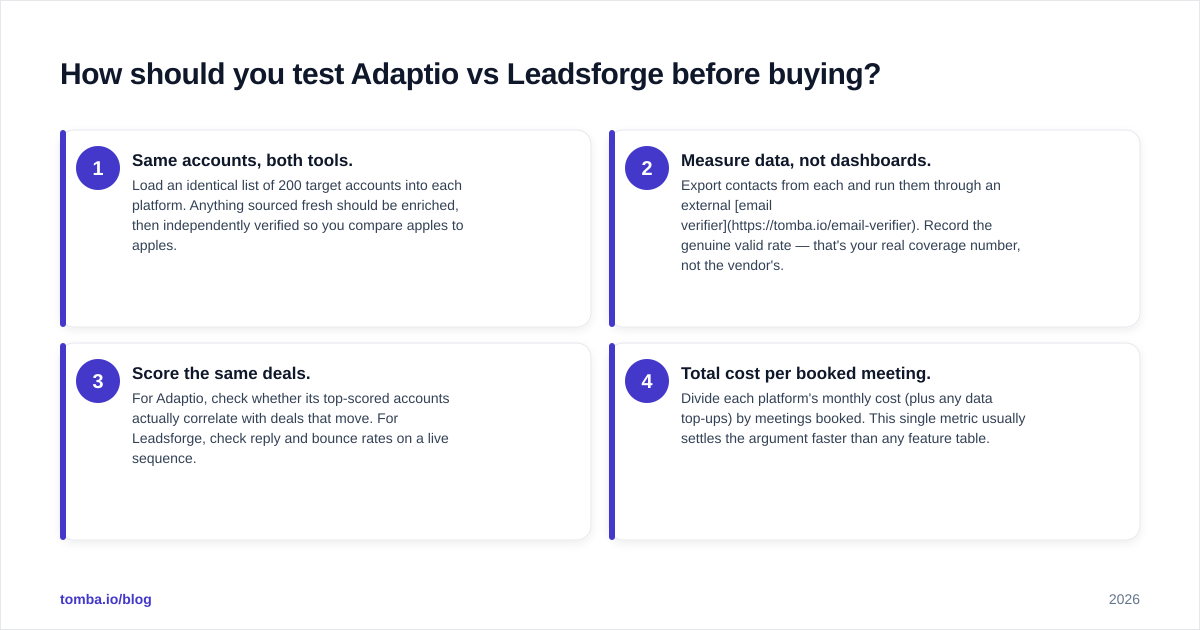
Run a structured 14-day bake-off instead of a vibe-based demo.
- Same accounts, both tools. Load an identical list of 200 target accounts into each platform. Anything sourced fresh should be enriched, then independently verified so you compare apples to apples.
- Measure data, not dashboards. Export contacts from each and run them through an external email verifier. Record the genuine valid rate — that's your real coverage number, not the vendor's.
- Score the same deals. For Adaptio, check whether its top-scored accounts actually correlate with deals that move. For Leadsforge, check reply and bounce rates on a live sequence.
- Total cost per booked meeting. Divide each platform's monthly cost (plus any data top-ups) by meetings booked. This single metric usually settles the argument faster than any feature table.
Teams that run this test often land on a hybrid: one platform for its strongest motion, plus an independent data stack to keep both honest. That's not a cop-out — it's how you avoid paying premium prices for a database you'll have to re-verify regardless.
The bottom line#
Adaptio wins on inbound intelligence; Leadsforge wins on outbound volume. But the variable that actually moves your pipeline — clean, reachable contact data — sits outside both tools' core competency. Decide your motion first, then decide whether you're really buying workflow or buying data.
If your honest bottleneck is finding verified, decision-maker emails — and for most outbound teams it is — start with the layer that fixes it directly. Tomba's Email Finder gives you accurate professional emails by name, domain, or company, with verification built in, on a Free tier you can test today and plans from $49/mo. Pair it with whichever platform you choose, and you stop letting a bundled database decide how many meetings you book.
Ready to find emails that actually work?
Join 150,000+ professionals who stopped guessing and started sending. Free credits on signup — no credit card required.
Get the Tomba newsletter
Practical outbound tactics and product updates — once every two weeks.
About the author