Adaptio vs Market Location: B2B Data Platforms (2026)
Choosing between Adaptio and Market Location for B2B data? Here's a neutral breakdown of coverage, accuracy, pricing models, and the outbound use cases each fits — plus where a verified email finder fills the gaps.
Picking a B2B data provider is less about the brand name on the invoice and more about whether the records actually connect you to a buyer. Adaptio vs Market Location is a comparison a lot of revenue teams run when they need firmographic depth, account intelligence, or contact records to feed outbound — and the honest answer is that the "winner" depends on your region, your motion, and how you plan to action the data.
This guide breaks down both platforms on the criteria that matter, gives you a side-by-side table, and shows where a focused, pay-as-you-grow email tool fits alongside (or instead of) a heavyweight data subscription.
TL;DR#
- Adaptio leans toward adaptive account intelligence and signal-driven targeting — useful when you want to prioritize accounts by intent and fit rather than just download a list.
- Market Location is rooted in structured firmographic and company-record data, with strong coverage in European (especially DACH) markets and classic list-building use cases.
- Neither is a plug-and-play outbound engine: you still need verified contact-level email and phone data to turn a target list into booked meetings.
- For most SMB and mid-market teams, the smartest stack is a lighter data source plus a high-accuracy email finder and email verifier — you pay for what you actually contact.
- Decide on three axes: coverage in your region, data freshness, and how the records get into your workflow.
What is Adaptio?#
Adaptio positions itself in the account-intelligence and adaptive-targeting space: instead of handing you a static spreadsheet, the pitch is that it helps you continuously rank and re-rank accounts based on fit and behavioral signals. That makes it attractive to teams running an account-based motion where the question isn't "who exists?" but "who should we work this week?"
The trade-off with signal-driven platforms is that they're only as good as the signals feeding them and the seats you can afford. They shine when you have a defined ICP and a sales team disciplined enough to act on prioritization. They underperform when you just need raw volume — a thousand verified contacts to load into a sequence tomorrow.
What is Market Location?#
Market Location is closer to the traditional B2B data-provider model: a structured database of companies and firmographic attributes you can segment, filter, and export. Its historical strength is depth in European markets — company registries, industry codes, headcount bands, and address-level firmographics that are harder to source from US-centric tools.
If your motion is "build a clean list of manufacturers in Germany with 50–200 employees and export it," this is the category of tool built for that job. The limitation is the same one every list provider faces: a company record is not a person you can email, and firmographic data decays. You still need to find and verify the individual contact.
Is Adaptio better than Market Location?#
Neither is universally better — they optimize for different jobs. Here's the blunt version:
- Choose Adaptio if your bottleneck is prioritization — too many accounts, not enough focus, and you want intent and fit scoring to tell reps where to spend time.
- Choose Market Location if your bottleneck is structured coverage — you need reliable firmographics and company records, especially in DACH and broader EU markets, to build segments.
- Choose neither (or a lighter stack) if your real bottleneck is contactability — you already know who to target and just need accurate emails and phone numbers to reach them.
That third case is more common than vendors admit. Plenty of teams over-buy a six-figure intelligence platform when the actual gap was a reliable way to find email addresses for the people they already identified.
How do Adaptio and Market Location compare?#
Use this as a decision framework rather than a scoreboard. The right pick is the one whose strength maps to your weakest link.
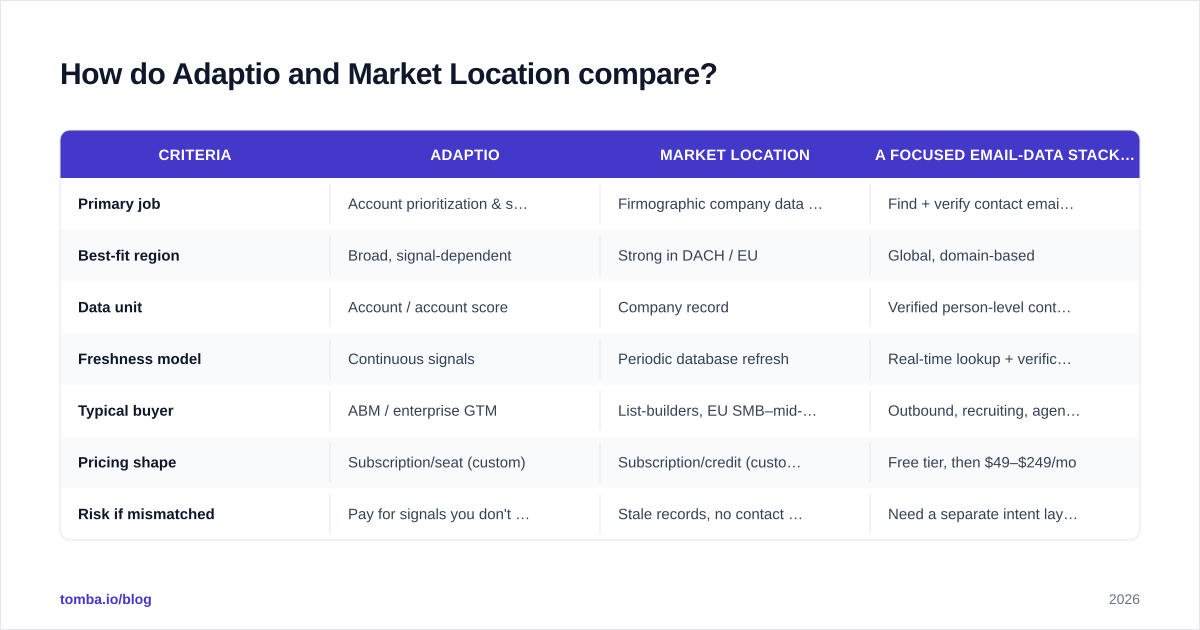
| Criteria | Adaptio | Market Location | A focused email-data stack (e.g. Tomba) |
|---|---|---|---|
| Primary job | Account prioritization & signals | Firmographic company data & lists | Find + verify contact emails/phones |
| Best-fit region | Broad, signal-dependent | Strong in DACH / EU | Global, domain-based |
| Data unit | Account / account score | Company record | Verified person-level contact |
| Freshness model | Continuous signals | Periodic database refresh | Real-time lookup + verification |
| Typical buyer | ABM / enterprise GTM | List-builders, EU SMB–mid-market | Outbound, recruiting, agencies |
| Pricing shape | Subscription/seat (custom) | Subscription/credit (custom) | Free tier, then $49–$249/mo |
| Risk if mismatched | Pay for signals you don't action | Stale records, no contact email | Need a separate intent layer |
| Activation into CRM | Native ABM workflows | Export → import | API, integrations, browser, Sheets |
A few notes on reading this table. Vendor pricing for both platforms is typically quote-based and shifts by region and seat count, so treat "subscription/custom" as a prompt to get a written quote — not a fixed number. By contrast, a tool like Tomba publishes transparent Tomba pricing: a free tier (25 searches/mo), Starter at $49/mo, Growth at $99/mo, and Pro at $249/mo, which makes budgeting predictable.
What should you actually evaluate?#
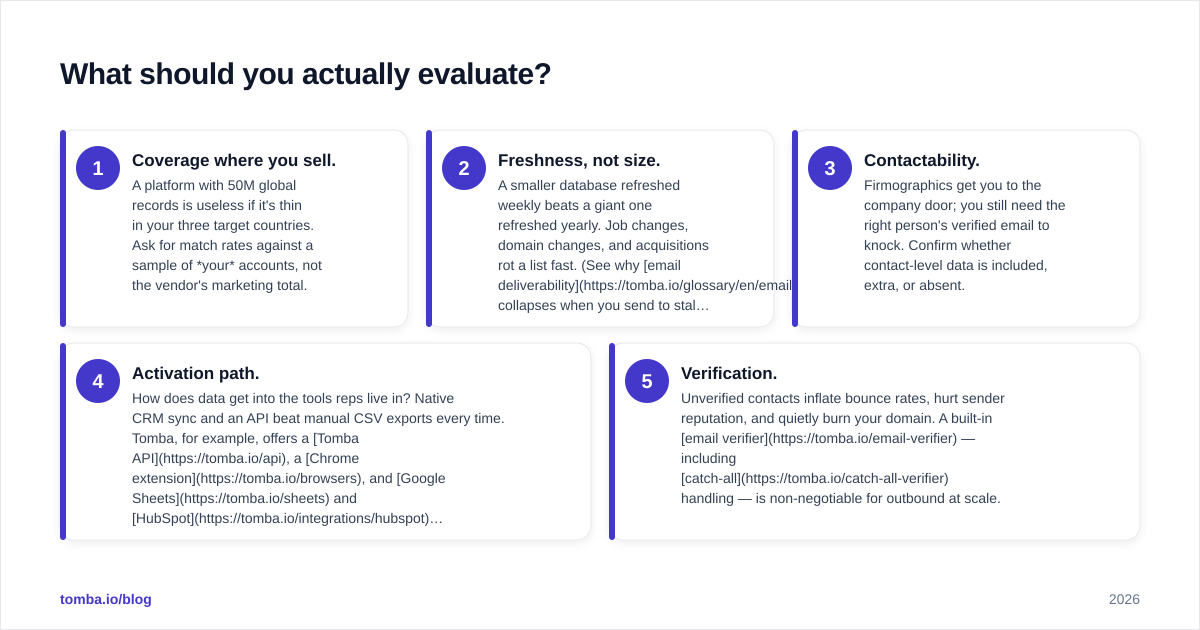
Skip the feature-checklist arms race. Five questions decide whether a B2B data platform earns its cost:
- Coverage where you sell. A platform with 50M global records is useless if it's thin in your three target countries. Ask for match rates against a sample of your accounts, not the vendor's marketing total.
- Freshness, not size. A smaller database refreshed weekly beats a giant one refreshed yearly. Job changes, domain changes, and acquisitions rot a list fast. (See why email deliverability collapses when you send to stale records.)
- Contactability. Firmographics get you to the company door; you still need the right person's verified email to knock. Confirm whether contact-level data is included, extra, or absent.
- Activation path. How does data get into the tools reps live in? Native CRM sync and an API beat manual CSV exports every time. Tomba, for example, offers a Tomba API, a Chrome extension, and Google Sheets and HubSpot integrations.
- Verification. Unverified contacts inflate bounce rates, hurt sender reputation, and quietly burn your domain. A built-in email verifier — including catch-all handling — is non-negotiable for outbound at scale.
If a vendor can't give you straight answers on coverage and freshness for your segment, that silence is your answer.
Where does a dedicated email finder fit?#
A dedicated email tool is the activation layer that turns a target account into a reachable human. Adaptio tells you which account to chase; Market Location tells you the company exists and looks like this; an email finder gets you the actual address and confirms it's safe to send.
This is why many teams run a hybrid stack rather than betting everything on one platform. You source or prioritize accounts with whatever fits your motion, then use a domain search to pull contacts at a target company, an email finder to resolve specific people by name and domain, and a verifier to clean the list before it ever touches your sequencer. For high-volume runs, a bulk email finder processes whole lists at once.
The economics also favor this approach for most teams. A custom enterprise data contract is a fixed annual bet. A usage-based finder with a free tier lets you validate the workflow first and scale spend only as pipeline grows — you pay for contacts you actually pursue, not seats you hope to use.
Adaptio vs Market Location: which should you pick?#
Here's the decision in one paragraph. If you're an enterprise ABM team drowning in accounts and need prioritization, evaluate Adaptio and demand a pilot scored against your real CRM. If you're a list-driven EU SMB or mid-market team that needs clean firmographics — especially in DACH — shortlist Market Location and verify regional coverage with a sample. If your honest bottleneck is reaching people you've already identified, don't buy either yet: start with a focused email-finding and verification stack, prove the motion, and add an intelligence layer only when prioritization — not contactability — becomes the constraint.
Before you sign anything, validate vendor claims against neutral sources. Cross-check reviews on G2 and Capterra, and if you're at enterprise scale, see how analysts like Gartner frame the B2B data and sales-intelligence category. The pattern you'll notice: buyers rarely complain about a tool's headline record count — they complain about accuracy, freshness, and support when the data is wrong.
Frequently asked questions#
Is Market Location only for European markets? It's strongest there, particularly DACH firmographics, but always validate coverage against your specific target geography rather than assuming global parity.
Does Adaptio include contact emails? Account-intelligence platforms vary on whether person-level contact data is bundled, extra, or out of scope. Confirm in writing, because it changes whether you still need a separate email finder.
Can I just use an email finder instead of either platform? For many SMB and agency outbound motions, yes. If you already know your ICP and target accounts, a high-accuracy finder plus verifier covers the gap at a fraction of an enterprise data contract. Check where Tomba gets its data to judge fit.
What about phone numbers? If you run a multichannel motion, look for a phone finder and phone validator alongside email so you're not stitching together three vendors.
The bottom line#
Adaptio and Market Location solve different halves of the same problem — prioritization versus structured coverage — and the right choice depends entirely on which half is actually slowing you down. Run the pilot, demand match rates on your own data, and don't pay for capabilities your motion won't action.
Whichever platform you land on, the contact layer is where outbound lives or dies. Start with the Tomba Email Finder — find professional email addresses by name, company, or domain, verify them before you send, and keep your sender reputation clean. The free tier lets you test it against your real target list today; scale to a paid plan only when the pipeline proves it's worth it.
Ready to find emails that actually work?
Join 150,000+ professionals who stopped guessing and started sending. Free credits on signup — no credit card required.
Get the Tomba newsletter
Practical outbound tactics and product updates — once every two weeks.
About the author