Advanced Email Verifier: How to Cut Bounce Rates in 2026
A basic syntax check won't save your sender reputation. Here's how an advanced email verifier validates SMTP, catch-all, and risky domains before you hit send in 2026.
TL;DR
- A basic email verifier checks syntax and MX records. An advanced email verifier layers SMTP handshakes, catch-all detection, role-account flags, disposable filtering, and risk scoring on top.
- Bounce rates above 2% put your sender reputation at risk. Multi-layer verification keeps hard bounces under 1% on most lists.
- Catch-all domains are the hard part: naive tools mark every address "valid" or "unknown." Advanced verifiers use pattern intelligence and historical data to score them.
- For high-volume teams, bulk verification + an API matter more than a pretty dashboard.
- Tomba's email verifier runs the full validation stack and pairs with its finder, so you verify at the moment you collect.
What is an advanced email verifier?#
An advanced email verifier is a tool that confirms whether an email address can actually receive mail — not just whether it looks correct. Think of it like a bouncer who doesn't just glance at your ID format but calls the issuing office to confirm you exist. A basic checker stops at "this string has an @ and a domain." An advanced one keeps going until it has real evidence the inbox is live.
That difference matters because email service providers (ESPs) like Gmail and Outlook punish senders who hit dead addresses. Every hard bounce is a signal that you don't maintain your list, and that signal drags down your sender reputation. Once your reputation drops, even your good emails land in spam.
So "advanced" isn't marketing fluff here. It's the set of checks that happen after the obvious ones — and those later checks are where most bounces actually get caught.
How does email verification actually work, layer by layer?#
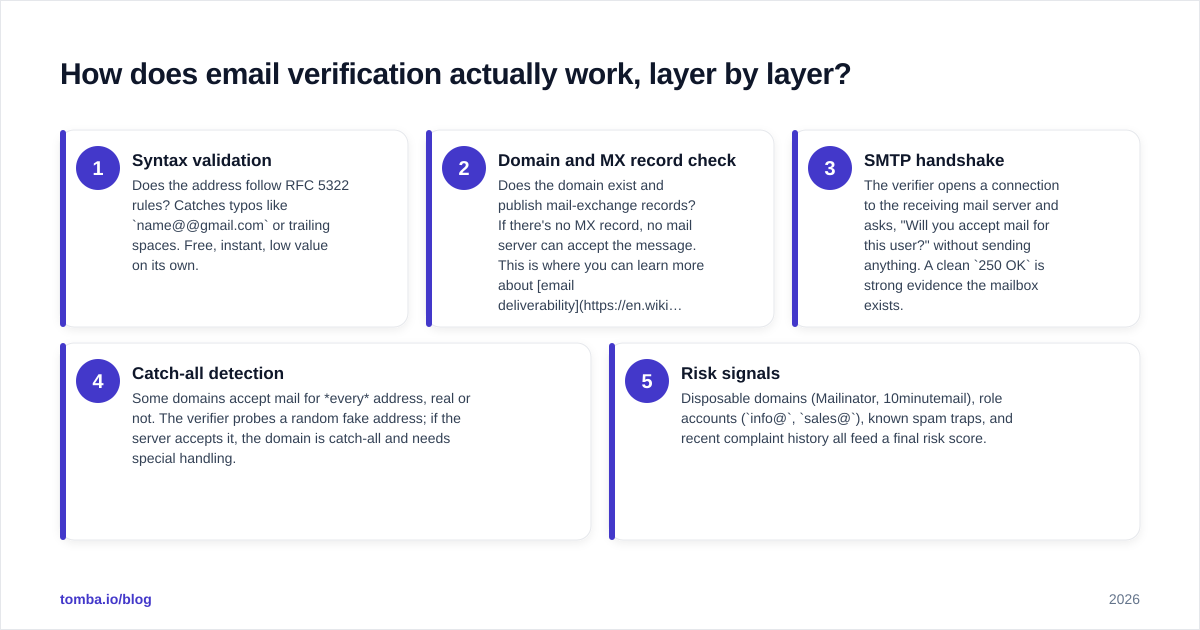
Verification is a pipeline. Each address passes through a sequence of checks, and the order matters because cheap checks filter out junk before expensive ones run.
- Syntax validation — Does the address follow RFC 5322 rules? Catches typos like
name@@gmail.comor trailing spaces. Free, instant, low value on its own. - Domain and MX record check — Does the domain exist and publish mail-exchange records? If there's no MX record, no mail server can accept the message. This is where you can learn more about email deliverability fundamentals.
- SMTP handshake — The verifier opens a connection to the receiving mail server and asks, "Will you accept mail for this user?" without sending anything. A clean
250 OKis strong evidence the mailbox exists. - Catch-all detection — Some domains accept mail for every address, real or not. The verifier probes a random fake address; if the server accepts it, the domain is catch-all and needs special handling.
- Risk signals — Disposable domains (Mailinator, 10minutemail), role accounts (
info@,sales@), known spam traps, and recent complaint history all feed a final risk score.
A basic tool runs steps 1 and 2. An advanced email verifier runs all five and returns a confidence score instead of a naive yes/no.

Why isn't a basic syntax check enough?#
Because syntax tells you nothing about whether anyone is home. jeff.bezos@amazon.com is perfectly valid syntax and may still bounce, while a weird-looking address at a real domain might deliver fine.
Here's the trap: free checkers report "valid" on syntactically correct addresses, you upload them to your ESP, and 8% bounce. Your domain reputation tanks for a week. The cost of skipping deep verification isn't zero — it's your next campaign's inbox placement.
)
The other silent killer is the catch-all domain. Roughly a third of corporate domains are configured to accept all mail. A lazy verifier marks every catch-all address "valid" (false confidence) or "unknown" (useless). Neither helps you decide whether to send. Advanced verifiers cross-reference the address against known-good patterns, historical engagement, and finder data to assign a real probability — which is exactly why pairing a verifier with a catch-all verifier beats a standalone syntax tool.
What separates a basic verifier from an advanced one?#
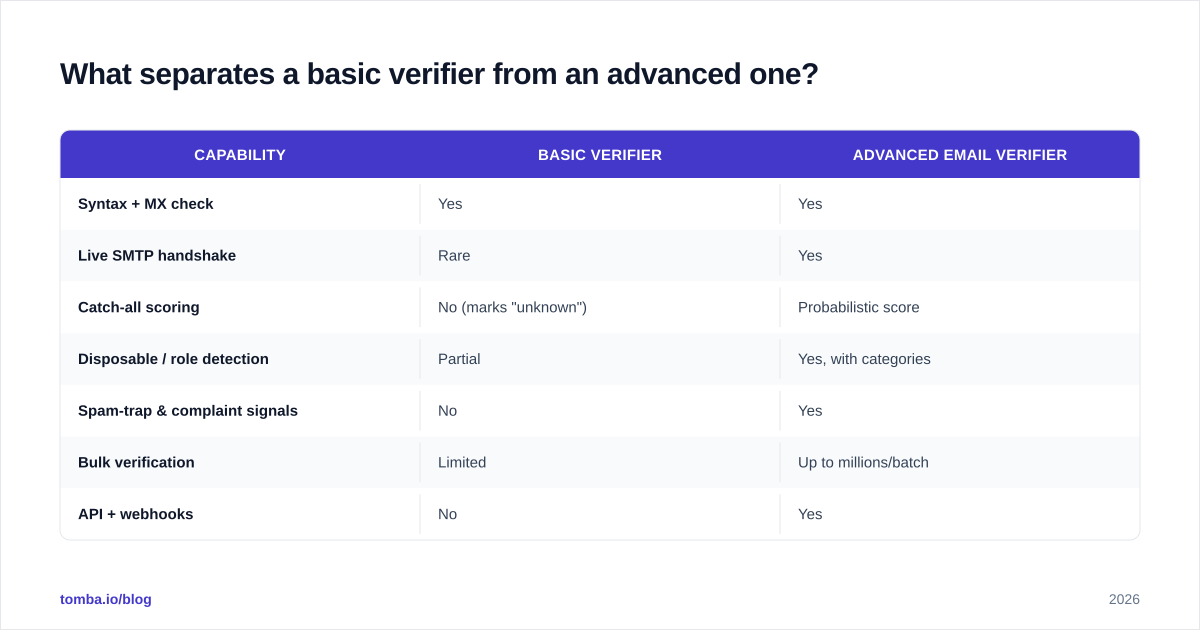
| Capability | Basic verifier | Advanced email verifier |
|---|---|---|
| Syntax + MX check | Yes | Yes |
| Live SMTP handshake | Rare | Yes |
| Catch-all scoring | No (marks "unknown") | Probabilistic score |
| Disposable / role detection | Partial | Yes, with categories |
| Spam-trap & complaint signals | No | Yes |
| Bulk verification | Limited | Up to millions/batch |
| API + webhooks | No | Yes |
| Result | Valid / invalid | Valid / risky / catch-all / score |
The pattern is clear: basic tools give you a binary that's wrong often enough to hurt. Advanced tools give you a graded answer you can route on — send to "valid," hold "risky" for a warm-up sequence, drop "invalid."
How accurate is an advanced email verifier, really?#
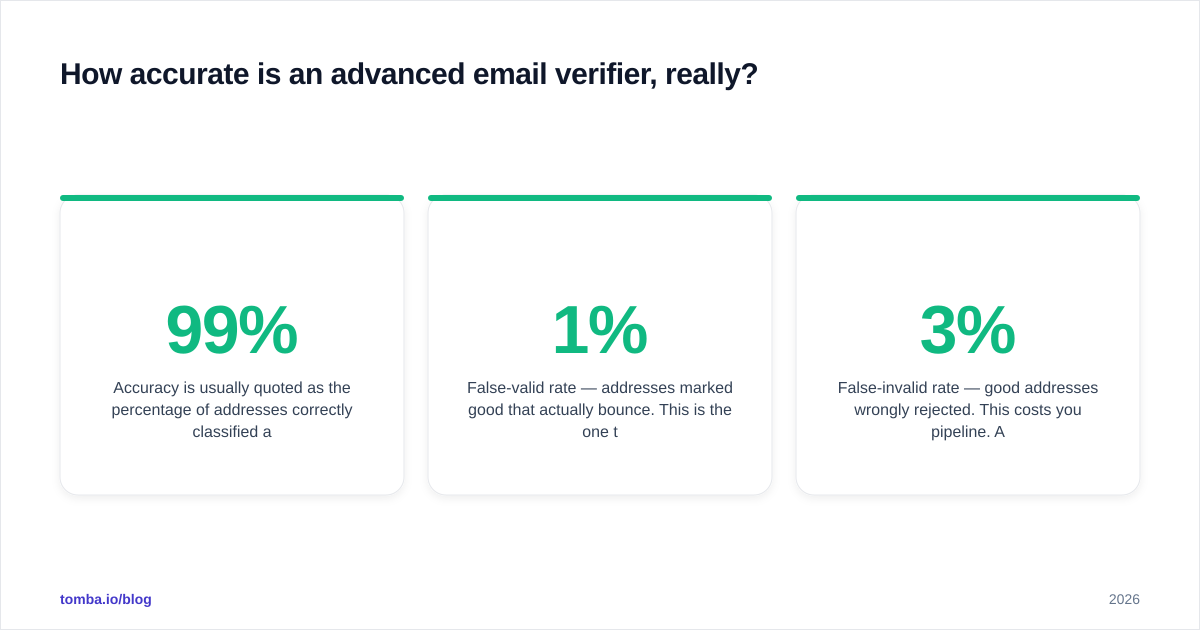
Accuracy is usually quoted as the percentage of addresses correctly classified against a known-good test set. The best tools sit in the 97–99% range on standard mailboxes, dropping into the 85–95% band on catch-all-heavy lists because those are inherently probabilistic.
Two numbers matter more than headline accuracy:
- False-valid rate — addresses marked good that actually bounce. This is the one that costs you reputation. Keep it under 1%.
- False-invalid rate — good addresses wrongly rejected. This costs you pipeline. A 3% false-invalid rate on a 50,000-lead list throws away 1,500 real prospects.
When you evaluate a verifier, don't trust the marketing percentage. Run a test batch of addresses you already know the status of and measure both error directions yourself. Reputable review sites like G2 collect verified user benchmarks if you want a starting shortlist.

Where does verification fit in your outbound workflow?#
The cheapest bounce to fix is the one you never collect. The ideal sequence puts verification at two points: at capture and before send.
- At capture — When you find an address with an email finder or a web form, verify it on the spot. A verified address enters your CRM clean.
- Before each send — Lists decay roughly 2–3% per month as people change jobs. Re-verify any segment older than 90 days before a major campaign.
This two-stage approach is why integrated platforms beat single-purpose verifiers for most teams. If your finder and verifier are the same system, the address is validated the instant it's discovered — no export, no second upload, no gap where bad data sneaks in. HubSpot's own list-hygiene guidance makes the same point: clean at the source, then maintain.
What about bulk verification and APIs?#
For anything past a few hundred addresses a month, two features decide whether a verifier scales with you.
Bulk processing. Upload a CSV, get a scored file back. Advanced tools dedupe, normalize, and process millions of rows per batch with parallel SMTP workers. Tomba's bulk verify handles large lists without you babysitting rate limits.
API access. Real-time verification on signup forms, lead-capture endpoints, and CRM enrichment jobs requires an email verification API. You call it on every new address and reject or flag bad ones before they ever touch your database. This is the difference between cleaning a dirty list forever and never letting it get dirty.
)
If you send transactional or product email, API verification at signup also blocks disposable addresses and typo domains (gmial.com) at the door — cutting support tickets and fraud signups in one move.
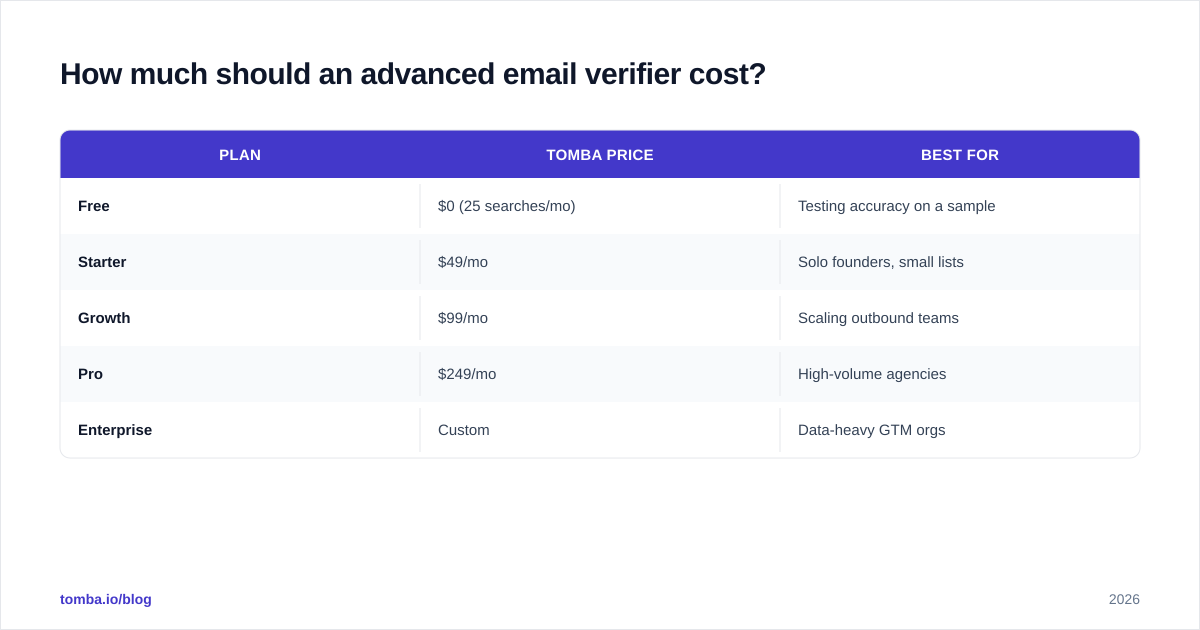
How much should an advanced email verifier cost?#
Pricing models vary, but most credible tools charge per verification with volume discounts. Watch for three traps: charging full price for "unknown" results you can't use, no free tier to test accuracy, and forcing an annual commitment before you've validated their claims.
| Plan | Tomba price | Best for |
|---|---|---|
| Free | $0 (25 searches/mo) | Testing accuracy on a sample |
| Starter | $49/mo | Solo founders, small lists |
| Growth | $99/mo | Scaling outbound teams |
| Pro | $249/mo | High-volume agencies |
| Enterprise | Custom | Data-heavy GTM orgs |
The Free tier is the part that matters during evaluation — it lets you run the accuracy test described above before you commit a dollar. Full Tomba pricing bundles the finder, verifier, domain search, and enrichment under one credit pool, so you're not paying three vendors for one workflow.
What mistakes should you avoid?#
- Treating "catch-all" as "valid." It isn't. Route catch-all addresses into a low-volume warm-up sequence and watch engagement before scaling sends.
- Verifying once and never again. A list verified in January is meaningfully stale by April. Re-verify on a schedule.
- Ignoring role accounts.
info@andsupport@addresses inflate complaint rates and rarely convert. Flag and deprioritize them. - Skipping the free-tier test. Marketing accuracy numbers are self-reported. Your own test batch is the only number you should trust.
- Verifying but not acting on the score. A risk score you ignore is wasted spend. Build routing rules: send, hold, or drop based on the grade.
Is an advanced email verifier worth it for small teams?#
Yes — arguably more than for big ones. A large sender can absorb a bad week of deliverability across millions of messages. A startup sending 2,000 cold emails a month lives or dies on whether those land. One reputation hit from a dirty list can knock you into spam for weeks, and you may not even realize it's happening until replies dry up.
The math is simple. If verification costs you a fraction of a cent per address and a single bounce-driven reputation drop costs you a campaign, the tool pays for itself the first time it catches a bad batch. For most teams the question isn't whether to verify — it's whether to bolt on a standalone tool or use one that verifies inside the same system where you find leads.
The bottom line#
A basic checker tells you an address is spelled right. An advanced email verifier tells you whether sending to it will help or hurt you — and that's the only question that protects your inbox placement. Multi-layer SMTP validation, honest catch-all scoring, risk signals, bulk processing, and an API are the features that separate a real tool from a syntax toy.
If you want verification built into the moment you collect a lead, start with Tomba's Email Finder and its companion email verifier: find the address, validate it through the full stack, and push a clean contact straight into your CRM. The free tier gives you 25 searches a month to test the accuracy yourself before you scale — exactly the way you should evaluate any verifier. Run your own batch, measure both error directions, and let the numbers decide.
Ready to find emails that actually work?
Join 150,000+ professionals who stopped guessing and started sending. Free credits on signup — no credit card required.
Get the Tomba newsletter
Practical outbound tactics and product updates — once every two weeks.
About the author