AE Productivity in 2026: The Account Executive Playbook
Most account executives spend less than a third of their week actually selling. Here's a concrete 2026 playbook to find the lost hours, cut admin, and turn more pipeline into closed revenue.
TL;DR
- The average account executive spends only 28-30% of the week actually selling — the rest leaks into admin, manual research, and internal meetings.
- AE productivity is not "work faster." It is moving hours from low-leverage tasks to revenue-generating ones without burning the rep out.
- The five biggest leaks: data entry, prospect research, bad-fit meetings, context switching, and waiting on enablement assets.
- Tooling helps, but process and clean data matter more — a fast rep with a dirty list still wastes the day.
- This playbook gives you a benchmark, a diagnostic framework, a tooling table, and the metrics that actually predict quota attainment.
What does AE productivity actually mean?#
AE productivity is the ratio of revenue-generating activity to total working hours — and almost every team measures it wrong.
Think of an account executive like a professional chef. The customer only pays for the plated dish (closed deals), but the chef spends most of the shift on prep, cleaning, and inventory. A productive kitchen is not one where the chef chops faster — it is one where prep is handled so the chef cooks. AE productivity works the same way: the goal is to maximize time in front of buyers, not to squeeze more keystrokes out of a tired rep.
Most leaders confuse activity with productivity. A rep who sends 90 emails a day looks busy. But if 40 of those emails bounce because the contact data was stale, that's not productivity — it's expensive motion. According to Salesforce's State of Sales research, reps spend roughly 70% of their time on non-selling tasks. The number has barely moved in a decade, which means the opportunity is still wide open in 2026.
Where do account executives actually lose their hours?#
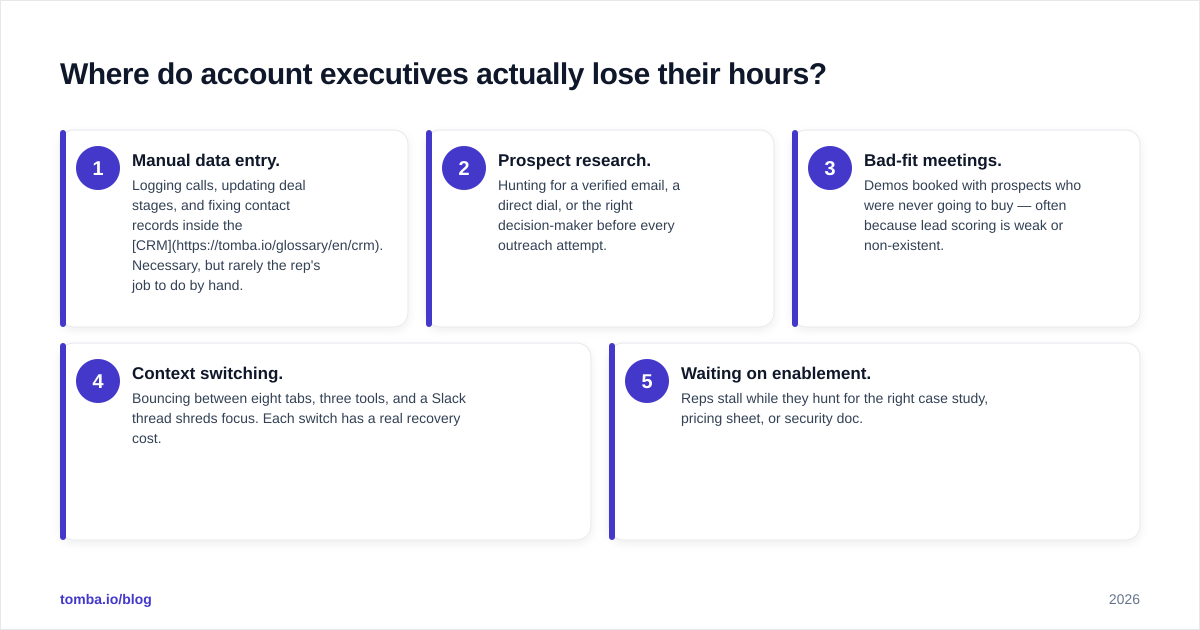
Five recurring leaks account for most of the lost selling time. Name them before you try to fix them.
- Manual data entry. Logging calls, updating deal stages, and fixing contact records inside the CRM. Necessary, but rarely the rep's job to do by hand.
- Prospect research. Hunting for a verified email, a direct dial, or the right decision-maker before every outreach attempt.
- Bad-fit meetings. Demos booked with prospects who were never going to buy — often because lead scoring is weak or non-existent.
- Context switching. Bouncing between eight tabs, three tools, and a Slack thread shreds focus. Each switch has a real recovery cost.
- Waiting on enablement. Reps stall while they hunt for the right case study, pricing sheet, or security doc.
The pattern is obvious once you map it: the leaks cluster before and after the actual selling moment. The conversation itself is fine. The friction is everything wrapped around it.
How do you benchmark AE productivity in 2026?#
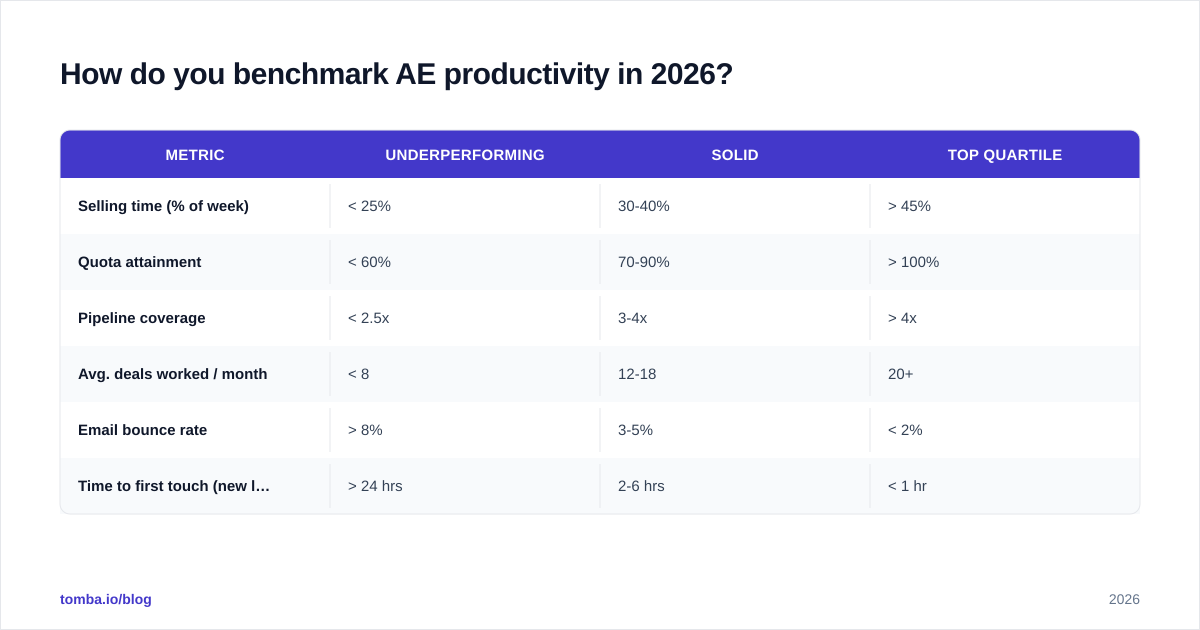
Start by measuring selling time as a percentage of the work week, then layer on outcome metrics. One number alone lies; the combination tells the truth.
Here is a realistic benchmark grid for a B2B mid-market AE. Use it to locate your team, not to shame anyone.
| Metric | Underperforming | Solid | Top quartile |
|---|---|---|---|
| Selling time (% of week) | < 25% | 30-40% | > 45% |
| Quota attainment | < 60% | 70-90% | > 100% |
| Pipeline coverage | < 2.5x | 3-4x | > 4x |
| Avg. deals worked / month | < 8 | 12-18 | 20+ |
| Email bounce rate | > 8% | 3-5% | < 2% |
| Time to first touch (new lead) | > 24 hrs | 2-6 hrs | < 1 hr |
Two of these rows — bounce rate and time to first touch — are pure data-quality and tooling problems. You can fix them this quarter without changing a single rep's selling skill. That is why they're the fastest productivity wins on the board. A high win rate almost always sits on top of clean data and fast follow-up, not heroic individual effort.
Is more tooling the answer, or does it make AE productivity worse?#
More tools usually make it worse — until you consolidate around the few that remove friction instead of adding tabs. The average sales org runs 10+ tools, and every disconnected one is another context switch.
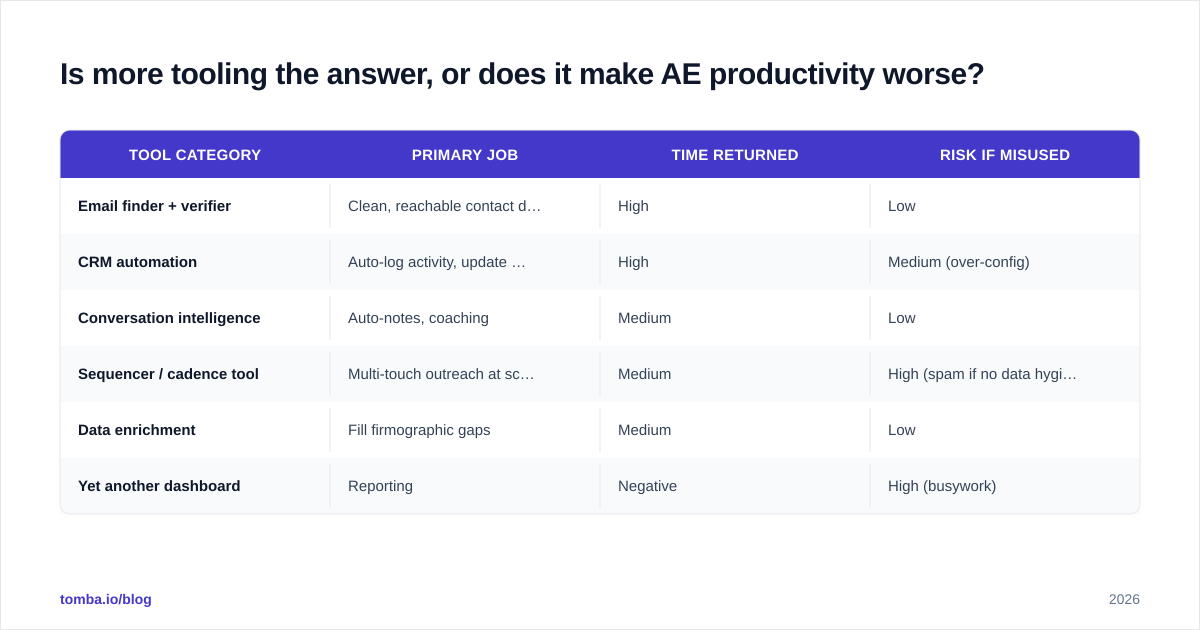
The test for any tool is simple: does it return hours to selling, or does it just generate more dashboards? A call recorder that auto-logs notes returns hours. A fifth analytics tool that nobody opens does not. Below is how the main categories stack up on the only axis that matters — net time given back to the rep.
| Tool category | Primary job | Time returned | Risk if misused |
|---|---|---|---|
| Email finder + verifier | Clean, reachable contact data | High | Low |
| CRM automation | Auto-log activity, update stages | High | Medium (over-config) |
| Conversation intelligence | Auto-notes, coaching | Medium | Low |
| Sequencer / cadence tool | Multi-touch outreach at scale | Medium | High (spam if no data hygiene) |
| Data enrichment | Fill firmographic gaps | Medium | Low |
| Yet another dashboard | Reporting | Negative | High (busywork) |
Notice that the highest-leverage category is the least glamorous: getting accurate, verified contact data in the first place. If a rep has to manually verify an email or dig for a phone number before every send, that is a tax on every single outreach. Removing it compounds across thousands of touches a quarter. Tools like an email finder and data enrichment collapse that research step from minutes per contact to seconds.
What's a repeatable framework for fixing AE productivity?#
Use a four-step loop: Audit, Eliminate, Automate, Coach. Run it quarterly, in that order — never skip to automation.
Step 1 — Audit#
Shadow three reps for a full week and time-stamp their activity into buckets: selling, research, admin, internal, idle. Most teams are shocked to find selling time below 30%. You cannot fix what you have not measured.
Step 2 — Eliminate#
Before automating anything, kill it if you can. Recurring internal meetings, redundant CRM fields, approval steps that add no value — delete them. Eliminated work needs zero tooling budget. This is the cheapest productivity lever and the one teams skip most often.
Step 3 — Automate#
Now automate what survived the cull. Auto-log calls. Auto-enrich new leads. Auto-verify emails before they enter a sequence so bounces never tank your sender reputation. The principle: a human should never do what a verified data pipeline can do for free.
Step 4 — Coach#
The reclaimed hours have to go somewhere productive. Redirect them into deal strategy, discovery skill, and multithreading — not into more low-quality activity. HubSpot's sales research consistently shows coaching is the highest-ROI investment once the operational friction is gone.
Run this loop end to end and the gains stack. Eliminate frees hours, automate protects them, coaching converts them into revenue.
Which metrics predict AE productivity better than activity counts?#
Outcome and efficiency metrics beat raw activity every time. Counting dials and emails measures effort, not results — and it quietly rewards the wrong behavior.
Track these instead:
- Selling time % — the north-star input. If it climbs, everything downstream improves.
- Pipeline velocity — deal value × win rate ÷ sales cycle length. The single best composite of AE efficiency.
- Meeting-to-opportunity rate — measures lead quality and discovery skill at once.
- Data hit rate — share of outreach that reaches a real, verified inbox. Directly tied to your email verifier hygiene.
- Response rate — a clean proxy for targeting and messaging fit. See our note on response rate benchmarks.
A rep who makes 30 well-researched touches to verified contacts will out-earn a rep who blasts 120 unverified ones — every quarter. Productivity is precision, not volume. When you reward verified, targeted activity instead of raw counts, reps naturally stop doing the busywork that was dragging the number down.
How much does data quality move AE productivity?#
More than any other single factor, because bad data taxes every step downstream. A wrong email doesn't just waste one send — it cascades.
Walk the chain. A stale contact record means the rep researches manually (lost time). The guessed email bounces (lost time plus a hit to sender reputation). The bounce drags deliverability down, so the next good email lands in spam (lost opportunity). One bad record poisons the well for the whole sequence.
Now flip it. When reps start from verified, enriched data:
- First-touch time drops from hours to minutes.
- Bounce rates fall below 2%, protecting deliverability for the whole domain.
- Reps trust their list, so they actually work it instead of second-guessing every send.
This is why the fastest AE productivity win in 2026 is rarely a new methodology or a new CRM. It is clean data at the top of the funnel. Independent reviews on G2 consistently rank data accuracy as the top differentiator buyers cite for lead-intelligence tools — ahead of price and features. Get the data right and every other metric on the benchmark grid improves on its own.
What should an AE's ideal week look like?#
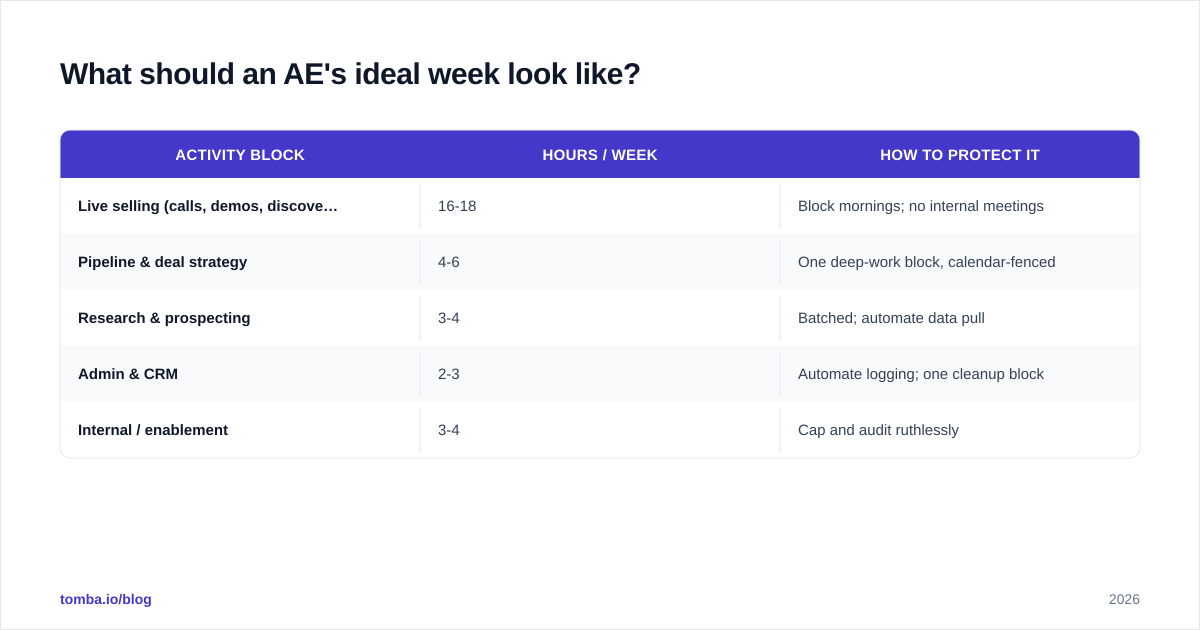
A productive AE week front-loads research and admin into tight blocks, then protects long, uninterrupted selling windows. Fragmentation is the enemy.
A practical target split:
| Activity block | Hours / week | How to protect it |
|---|---|---|
| Live selling (calls, demos, discovery) | 16-18 | Block mornings; no internal meetings |
| Pipeline & deal strategy | 4-6 | One deep-work block, calendar-fenced |
| Research & prospecting | 3-4 | Batched; automate data pull |
| Admin & CRM | 2-3 | Automate logging; one cleanup block |
| Internal / enablement | 3-4 | Cap and audit ruthlessly |
The key move is batching the low-leverage work so it does not fragment the high-leverage work. Thirty minutes of focused research beats six interruptions of five minutes each, because each interruption carries a context-switch tax. Tools that pull verified contact data straight into the workflow — through the Tomba API or a bulk pull at the start of the week — make the research block shorter and keep the selling blocks intact.
Common AE productivity mistakes to avoid#
Most productivity programs fail for predictable reasons. Sidestep these:
- Buying tools before auditing process. A new tool layered on a broken process just automates the waste.
- Measuring activity, not outcomes. Dial counts reward motion and punish thinking.
- Ignoring data hygiene. The cheapest, highest-ROI fix, skipped because it isn't exciting.
- Over-engineering the CRM. Every required field is a tax on every deal. Cut them.
- Coaching effort instead of skill. Telling a rep to "do more" without removing friction just accelerates burnout.
Avoid these five and you are already ahead of most teams — none of them require new headcount or a bigger budget.
The bottom line on AE productivity in 2026#
AE productivity comes down to one equation: maximize verified selling time, minimize everything else. Audit where the hours go, eliminate what you can, automate the rest, and protect the reclaimed time for real selling and coaching. The teams that win in 2026 are not the ones with the most tools — they are the ones whose reps start every outreach from clean, reachable, verified data.
That last piece is where most of the leak lives, and it is the easiest to plug. If your reps are still hand-hunting and guessing email addresses before every send, you are paying a productivity tax on every single touch. Tomba's Email Finder gives account executives verified, ready-to-use professional emails by name, company, or domain — so the research block shrinks and the selling block grows. Start free with 25 searches a month, scale up on the Starter plan at $49/mo, and give your AEs back the hours they are currently losing to busywork.
// get started
Find, verify and enrich your first contacts today
Start on the free plan with 25 searches a month, then scale when your team is ready.
Free plan · No credit card required · GDPR & CCPA
// about the author