Aeroleads Email Finder Review 2026: Pricing, Accuracy & Alternatives
An honest 2026 breakdown of the Aeroleads email finder — how it works, real pricing, accuracy limits, and where lighter, cheaper tools beat it.
TL;DR
- The Aeroleads email finder is a Chrome-extension-first prospecting tool built around LinkedIn scraping, with bulk upload and CRM push-out bolted on.
- It works best if your entire motion lives inside LinkedIn Sales Navigator; it gets weak when you need domain-wide discovery or strict verification.
- Credit-based pricing scales fast — heavy users routinely overrun their monthly allotment and pay for re-finds and dupes.
- Accuracy is "good enough" for warm lists but trails dedicated finders on catch-all domains and bounce control.
- If you want lower cost-per-valid-email and a real verification layer, a finder-plus-verifier stack like Tomba is the more defensible choice.
What is the Aeroleads email finder?#
Aeroleads is a B2B prospecting tool that turns a person's name and company (usually pulled off a LinkedIn or Sales Navigator profile) into a business email address and phone number. Think of it like a metal detector you wave over LinkedIn: you browse profiles, click the extension, and it beeps when it surfaces a contact detail it can attach to that person.
The product has three moving parts. First, a Chrome extension that captures prospects as you browse. Second, a web app where captured leads pile up, get enriched, and get exported. Third, integrations that push those leads into a CRM or outreach tool. The center of gravity is the extension — Aeroleads is fundamentally a "find while you browse" tool rather than a "query a database" tool.
That design choice matters. It shapes who Aeroleads is good for (SDRs living inside LinkedIn all day) and who it frustrates (anyone who wants to find every email on a domain, verify a list in bulk, or run programmatic lookups through an API). If your prospecting starts with a company rather than a person, you'll feel the friction quickly. For that workflow a domain search tool is a better starting point than a profile scraper.
How does the Aeroleads email finder actually work?#
Under the hood, Aeroleads does what most finders do: it takes identity signals (full name, company domain, sometimes role) and runs them against a mix of pattern guessing and cached data. When you trigger the extension on a profile, it resolves the person's likely company domain, generates candidate email permutations (jane.doe@, jdoe@, jane@), and tries to confirm one against whatever signals it has.
Here's the part that trips people up: confirmation and verification are not the same thing. A finder can return jane.doe@acme.com because that's Acme's dominant pattern, without ever proving that mailbox accepts mail. Aeroleads surfaces a result and a rough status, but it is not a hardened verification engine. On catch-all domains — where the server says "yes" to every address — pattern-based finders look confident and are quietly wrong.
That's why serious senders treat finding and verifying as two stages. You find the candidate, then you run it through an email verifier and, for the tricky ones, a catch-all verifier before it ever touches a sequence. Skipping the second stage is the single biggest reason "accurate" finders still produce bounces.

What does Aeroleads cost in 2026?#
Aeroleads uses credit-based tiers, where one credit roughly equals one found contact detail. The published structure has stayed in a familiar shape: a low-cost entry plan, a mid "meta" plan for small teams, and higher tiers for volume. The catch with any credit model is that the sticker price tells you little — what matters is your real cost per valid email after dupes, re-finds, and bounces.
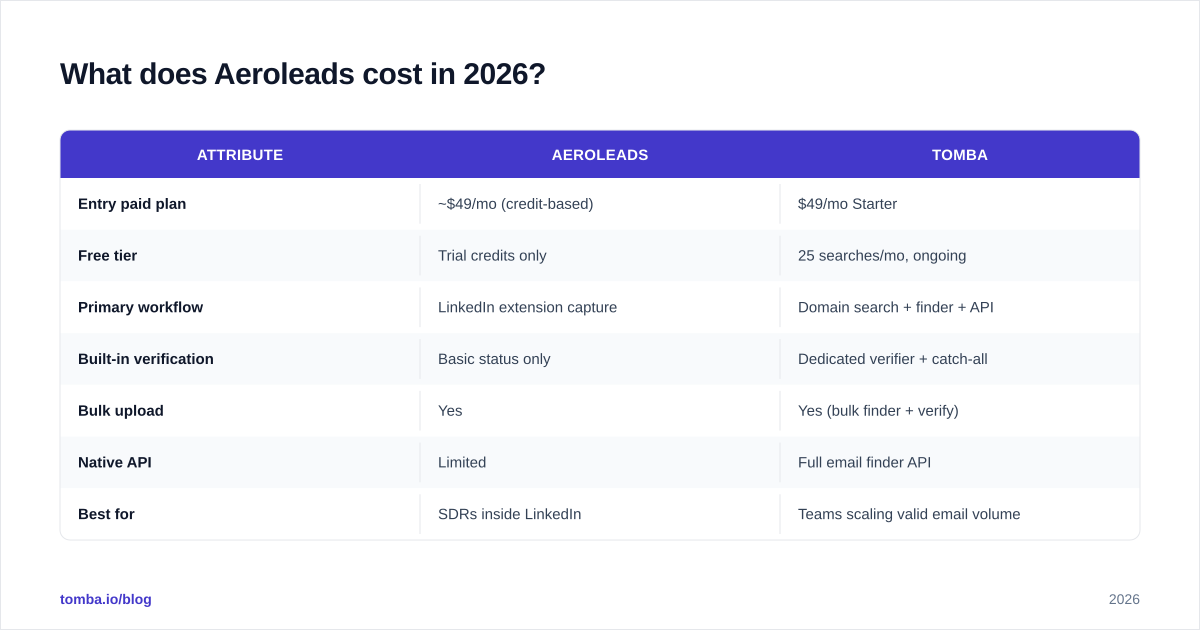
The table below puts Aeroleads next to a finder-plus-verifier stack so you can compare on the dimensions that actually move your budget. Always confirm current numbers on each vendor's own pricing page before you buy; published tiers shift.
| Attribute | Aeroleads | Tomba |
|---|---|---|
| Entry paid plan | ~$49/mo (credit-based) | $49/mo Starter |
| Free tier | Trial credits only | 25 searches/mo, ongoing |
| Primary workflow | LinkedIn extension capture | Domain search + finder + API |
| Built-in verification | Basic status only | Dedicated verifier + catch-all |
| Bulk upload | Yes | Yes (bulk finder + verify) |
| Native API | Limited | Full email finder API |
| Best for | SDRs inside LinkedIn | Teams scaling valid email volume |
Two honest notes. First, Aeroleads and Tomba both start around the same monthly floor — there's no "$39" Aeroleads gotcha that makes one trivially cheaper; the difference shows up in cost-per-valid-email at volume. Second, if you want to see exactly how a finder-plus-verifier plan is priced, the Tomba pricing page lays out Free, Starter ($49), Growth ($99), Pro ($249), and Enterprise tiers without credit-roulette surprises.
/blog/generated/memes/2026-06-04/aeroleads-email-finder-meme-1.png
Is the Aeroleads email finder accurate enough?#
Short answer: accurate enough for warm, LinkedIn-sourced lists; risky for cold, domain-wide campaigns. Aeroleads does well when the person has a complete profile, a clear current employer, and a company that uses a standard email pattern. In those conditions most finders — Aeroleads included — land in the same broad accuracy band.
Where it slips is the long tail: ambiguous names, recent job changes, sub-brands with their own domains, and catch-all servers. Because the extension workflow encourages capturing dozens of profiles fast, it's easy to accumulate a list that looks clean but carries a quiet 10–20% bounce risk you won't see until your sender reputation takes the hit.
This is the deliverability trap. Mailbox providers judge you on bounce rate and spam complaints, so even a modest slug of dead addresses can throttle your inbox placement. If you care about email deliverability, treat any finder's output — Aeroleads or otherwise — as a candidate list, not a send list. Verify first, then send. The data backs this up: independent benchmarks from review sites like G2 consistently show that the gap between finders narrows on easy domains and widens dramatically on catch-all and edge cases.

What are the real pros and cons of Aeroleads?#
No tool is all upside. Here's the balanced read after stripping away the marketing.
Strengths
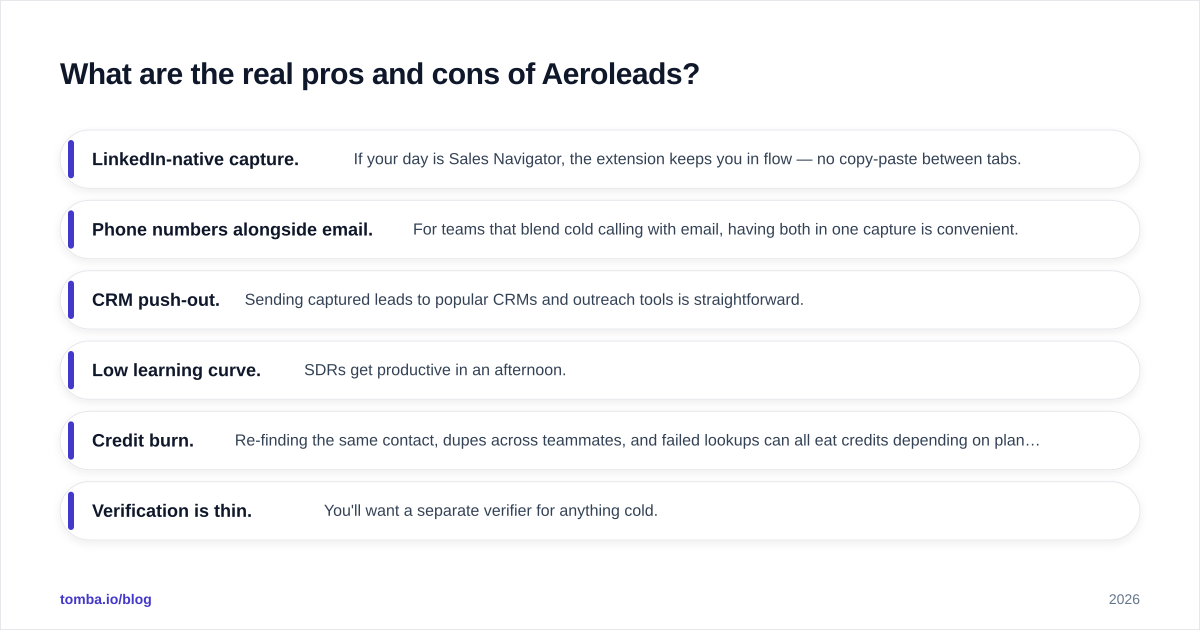
- LinkedIn-native capture. If your day is Sales Navigator, the extension keeps you in flow — no copy-paste between tabs.
- Phone numbers alongside email. For teams that blend cold calling with email, having both in one capture is convenient.
- CRM push-out. Sending captured leads to popular CRMs and outreach tools is straightforward.
- Low learning curve. SDRs get productive in an afternoon.
Weaknesses
- Credit burn. Re-finding the same contact, dupes across teammates, and failed lookups can all eat credits depending on plan rules.
- Verification is thin. You'll want a separate verifier for anything cold.
- Weak for domain-first discovery. No strong "give me everyone at this company" motion compared with a dedicated domain search.
- API depth. Programmatic and automation use cases are limited next to finders built API-first.
If you recognize your team in the weaknesses column — especially credit burn and thin verification — that's the signal to look at the alternatives below rather than upgrading to a bigger Aeroleads tier.
Aeroleads alternatives: who should you actually compare?#
The "best alternative" depends on which weakness hurts most. Use this decision framework instead of picking by brand recognition.
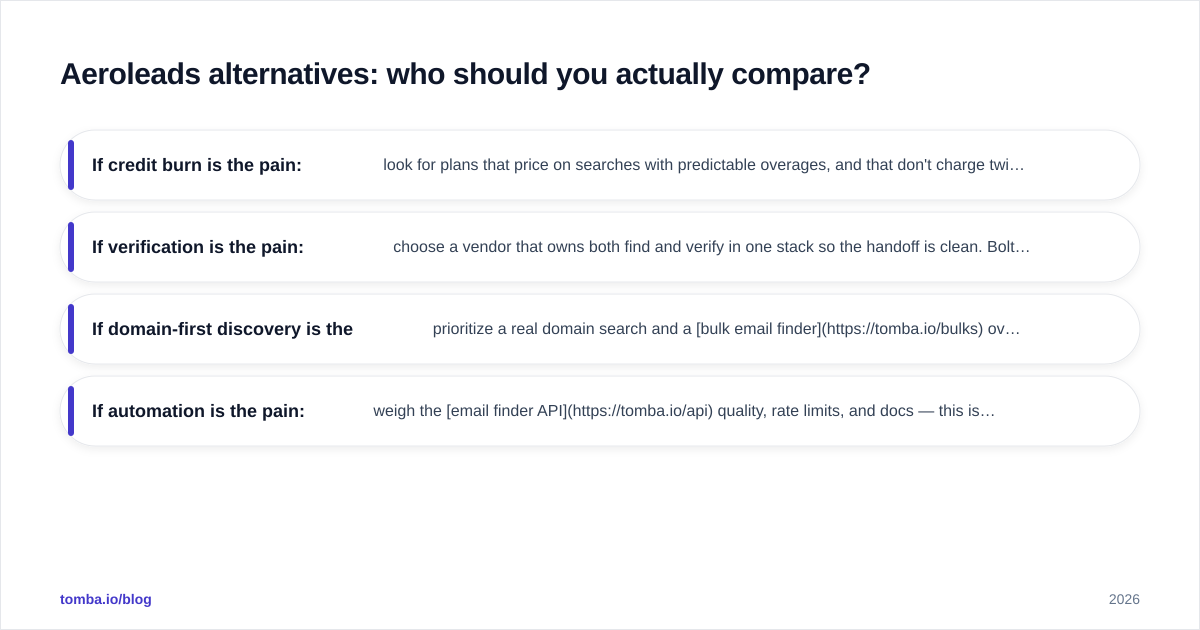
- If credit burn is the pain: look for plans that price on searches with predictable overages, and that don't charge twice for the same contact. A persistent free tier (like Tomba's 25 searches/mo) lets you stress-test accuracy on your own domains before committing.
- If verification is the pain: choose a vendor that owns both find and verify in one stack so the handoff is clean. Bolting a third-party verifier onto Aeroleads works but adds cost and a second dashboard.
- If domain-first discovery is the pain: prioritize a real domain search and a bulk email finder over a profile scraper.
- If automation is the pain: weigh the email finder API quality, rate limits, and docs — this is where lightweight finders often beat heavier all-in-one suites.
For LinkedIn-specific workflows, you don't have to abandon the browser entirely; a LinkedIn finder gives you the capture convenience while still routing results through proper verification. That hybrid — capture in the browser, verify in the pipeline — is usually the strongest setup.
/blog/generated/memes/2026-06-04/aeroleads-email-finder-meme-2.png
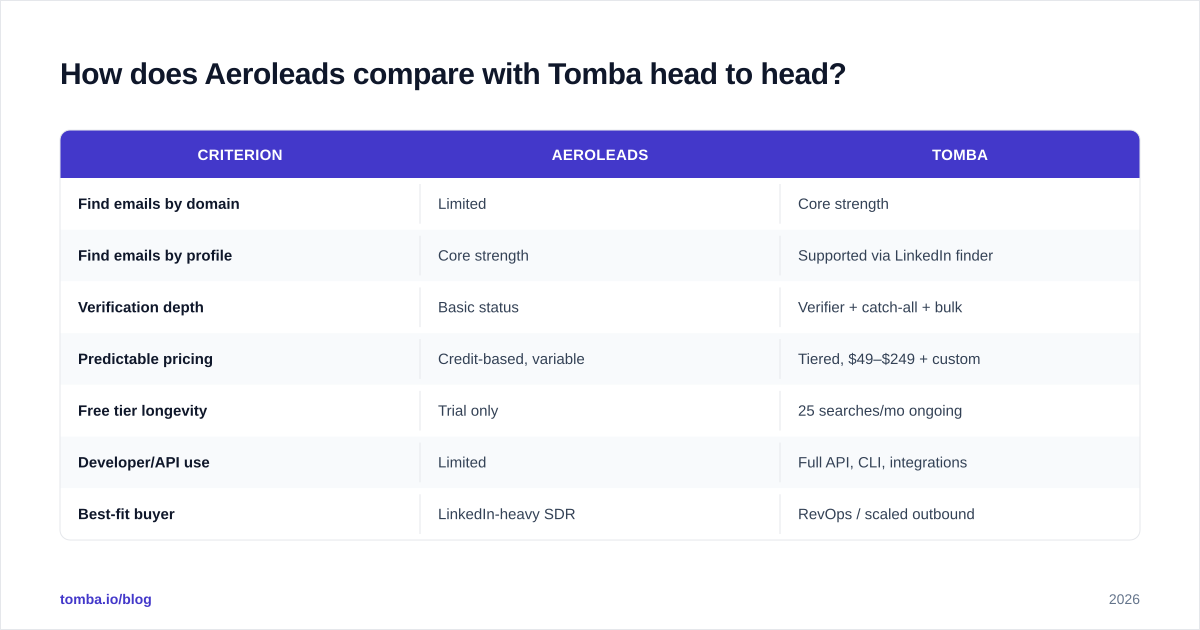
How does Aeroleads compare with Tomba head to head?#
Here's the focused matchup most readers are weighing, scored on the criteria that decide cost-per-valid-email rather than feature-count vanity.
| Criterion | Aeroleads | Tomba |
|---|---|---|
| Find emails by domain | Limited | Core strength |
| Find emails by profile | Core strength | Supported via LinkedIn finder |
| Verification depth | Basic status | Verifier + catch-all + bulk |
| Predictable pricing | Credit-based, variable | Tiered, $49–$249 + custom |
| Free tier longevity | Trial only | 25 searches/mo ongoing |
| Developer/API use | Limited | Full API, CLI, integrations |
| Best-fit buyer | LinkedIn-heavy SDR | RevOps / scaled outbound |
The honest summary: Aeroleads wins if your reps genuinely live inside LinkedIn and you value capture-in-flow above everything else. Tomba wins if you care about domain-wide discovery, owning verification in one place, predictable spend, and programmatic access. Many teams land on a blend — but if you're consolidating to one vendor and your north star is valid emails per dollar, the finder-plus-verifier model is easier to defend to finance.
It's also worth checking how each tool sources its records. Transparency about data sources is a fair question to ask any vendor, because it predicts how the tool will behave on the messy long-tail domains where accuracy actually gets decided.
Frequently asked questions#
Is the Aeroleads email finder free? There's a trial with limited credits, but no durable free tier. If you want to test accuracy on your own domains long-term without paying, a finder with an ongoing free allotment is the better sandbox.
Does Aeroleads verify emails? It returns a basic status, but it is not a dedicated verification engine. For cold campaigns, run results through a real verifier before sending to protect your bounce rate and sender reputation.
Can I find emails by company instead of by person? Aeroleads is built profile-first. For company-wide discovery, a dedicated domain search tool is faster and more complete.
Will Aeroleads hurt my deliverability? Not directly — but any unverified list will. Treat finder output as candidates, verify, then send.
The bottom line#
Aeroleads is a competent LinkedIn-first capture tool, and if that's literally your whole motion, it earns its place. But "find while you browse" is only half the job. The half that protects your domain — verification, catch-all handling, and predictable cost at volume — is where a finder-plus-verifier stack pulls ahead.
If you want to test that difference yourself, start with the Tomba Email Finder: find professional emails by domain, name, or company, then verify them in the same place before they ever hit a sequence. The free tier (25 searches/mo) is enough to benchmark accuracy against your current Aeroleads list — point both at the same 50 prospects, send only the verified ones, and let your bounce rate settle the argument.
// get started
Find, verify and enrich your first contacts today
Start on the free plan with 25 searches a month, then scale when your team is ready.
Free plan · No credit card required · GDPR & CCPA
// about the author