Affistash vs SalesQL 2026: Which Email Finder Wins?
Affistash and SalesQL both promise accurate B2B emails, but they solve different problems. Here's a head-to-head on accuracy, pricing, and workflow fit.
TL;DR
- Affistash leans toward affiliate-and-partner prospecting: it surfaces companies and contacts around a niche, then attaches emails. Good for discovery, weaker on raw verification depth.
- SalesQL is a LinkedIn-first email extractor. It shines inside a browser tab on profiles and search results, but it lives and dies by how much LinkedIn you scrape.
- On accuracy and verification, neither tool publishes the SMTP-level guarantees that dedicated finders do — expect to re-verify exports before you send.
- For pricing, both sit in the budget tier, but credit definitions differ, so "cheaper" depends on whether you find in bulk or one profile at a time.
- If you need API-grade accuracy, catch-all handling, and bulk throughput, a purpose-built finder like Tomba Email Finder covers the gaps both tools leave open.
What are Affistash and SalesQL?#
Affistash and SalesQL are both lead-data tools, but they were built for different jobs, and that origin shows in how they behave day to day.
Affistash is positioned around partnership and affiliate discovery. Think of it like a metal detector for a niche: you tell it the space you care about, and it sweeps for relevant companies, websites, and the people behind them, then tries to attach a contact email. That makes it useful at the top of the funnel, when you don't yet have a named list and you're still figuring out who to talk to.
SalesQL is a LinkedIn email extractor. It works like a highlighter you run over a LinkedIn profile or a search result — you're already looking at a person, and SalesQL pulls their likely email and phone into a sidebar. Its center of gravity is the browser. If your prospecting motion is "live on LinkedIn all day," SalesQL fits the muscle memory you already have.
The practical difference: Affistash helps you find the list, SalesQL helps you enrich the profile you're already on. Both then have to answer the same hard question every email tool faces — is this address real, and will it bounce?
How accurate are Affistash vs SalesQL?#
Accuracy is where most email tools quietly diverge, and it's the metric that actually costs you money — every bounce chips at your sender reputation and pushes more of your real mail into spam.
Both Affistash and SalesQL generate or source an address and present it with some confidence signal. What neither emphasizes is deep SMTP verification — the step where a tool actually negotiates with the receiving mail server to confirm the mailbox exists, and handles the tricky cases like catch-all domains that accept everything at the gateway. That last category is the silent killer: a catch-all domain will happily say "yes, valid" to an address that no human reads.
This is the gap to plan around. Whichever tool you pick, treat its output as a candidate list, not a clean send list. Run exports through a dedicated email verifier before they touch your sequencer, and use a catch-all verifier for the domains that come back ambiguous. Skipping that step is how a "90% accurate" list turns into a 12% bounce rate in practice.

A quick reality check on confidence scores: a "high confidence" label inside a finder is a prediction, not a verification. The two correlate, but they are not the same number. Tools that publish their methodology — where the data comes from, how it's re-checked — give you a more honest read than tools that show a green dot and move on. If you care about this, look at how a provider documents its data sources before you trust the percentage on the screen.
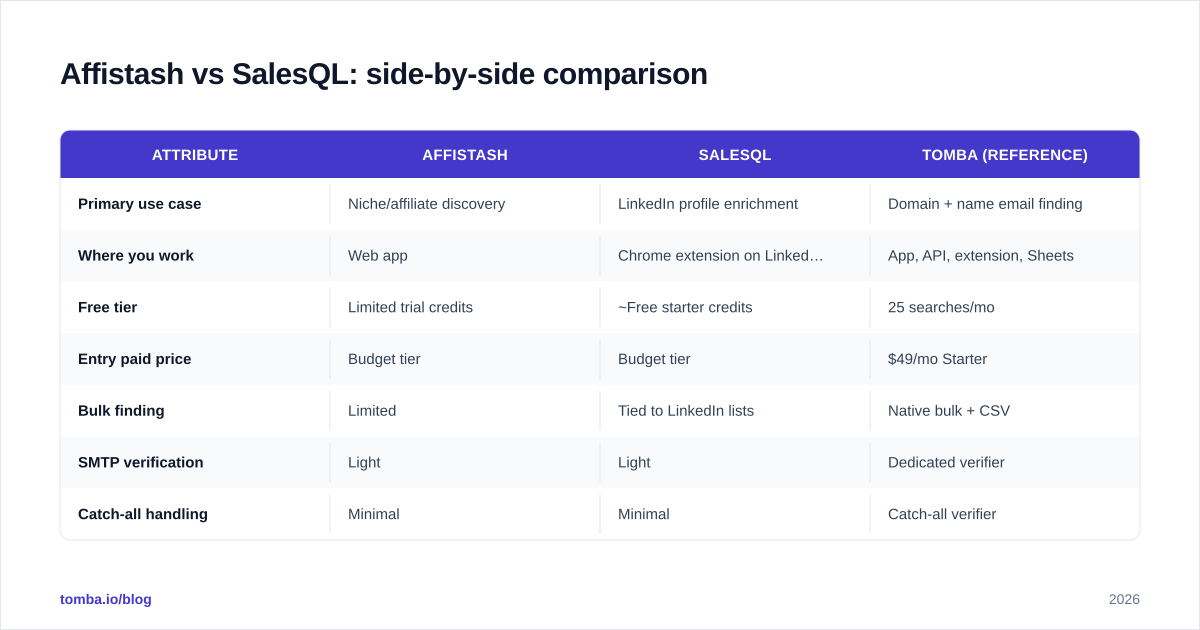
Affistash vs SalesQL: side-by-side comparison#
Here's the head-to-head on the attributes that decide which tool earns a slot in your stack. Treat the pricing as directional — both vendors change tiers, so confirm on their own pages before you buy.
| Attribute | Affistash | SalesQL | Tomba (reference) |
|---|---|---|---|
| Primary use case | Niche/affiliate discovery | LinkedIn profile enrichment | Domain + name email finding |
| Where you work | Web app | Chrome extension on LinkedIn | App, API, extension, Sheets |
| Free tier | Limited trial credits | ~Free starter credits | 25 searches/mo |
| Entry paid price | Budget tier | Budget tier | $49/mo Starter |
| Bulk finding | Limited | Tied to LinkedIn lists | Native bulk + CSV |
| SMTP verification | Light | Light | Dedicated verifier |
| Catch-all handling | Minimal | Minimal | Catch-all verifier |
| Public API | Limited | Limited | Full REST API |
| Best for | Finding who to target | Enriching known profiles | Accuracy + scale |
The pattern is clear when you line them up: Affistash and SalesQL are both discovery-and-grab tools optimized for a specific entry point (a niche, or a LinkedIn tab). They're light on the verification-and-scale machinery that decides whether a list survives contact with a real mail server. That's not a flaw so much as a scope choice — but it's the scope you have to fill yourself.
Which is better for LinkedIn prospecting?#
SalesQL wins on raw LinkedIn convenience — but that strength is also its ceiling.
If your day is profiles and Sales Navigator searches, SalesQL's sidebar is genuinely faster than copy-pasting names into a separate app. You stay in flow. The catch is dependency: your throughput is capped by how much LinkedIn you can browse, and LinkedIn actively rate-limits and discourages heavy extraction. Scale up and you hit walls — view limits, automation flags, account risk.
Affistash is less about a single profile and more about assembling a target universe from a niche, so it's the better starting point when you don't yet have names. But it inherits the same downstream problem: the emails still need verifying.
For a motion that needs to scale beyond what one human can browse, a domain-first approach is more durable. Point a domain search at a company and you get the contacts and the email pattern in one shot, no profile-by-profile grind, and no dependence on a platform that's trying to slow you down. If LinkedIn is specifically where your data must come from, a dedicated LinkedIn finder does the same extraction with verification attached.
How do Affistash and SalesQL price out?#
Both tools target budget-conscious teams, and on paper they look cheap. The number that matters, though, isn't the monthly price — it's cost per usable email, after bounces and re-verification.
Here's the trap. A tool that charges per "found" email but returns a chunk of unverified or catch-all addresses is more expensive than it looks, because you pay twice: once to find, once to verify elsewhere, plus the reputation cost of any bounces that slip through. A slightly pricier tool that returns clean, verified addresses can be cheaper per deliverable contact.
When you compare, normalize on these:
- What counts as a credit? A search? A successful find? A verification? These are not the same, and vendors define them differently.
- Do failed lookups burn credits? Some tools charge whether or not they find anything.
- Is verification included or extra? If it's extra, add it to the sticker price.
- Bulk economics — per-unit cost almost always drops in bulk, so if you find at volume, the bulk tier is the real price.
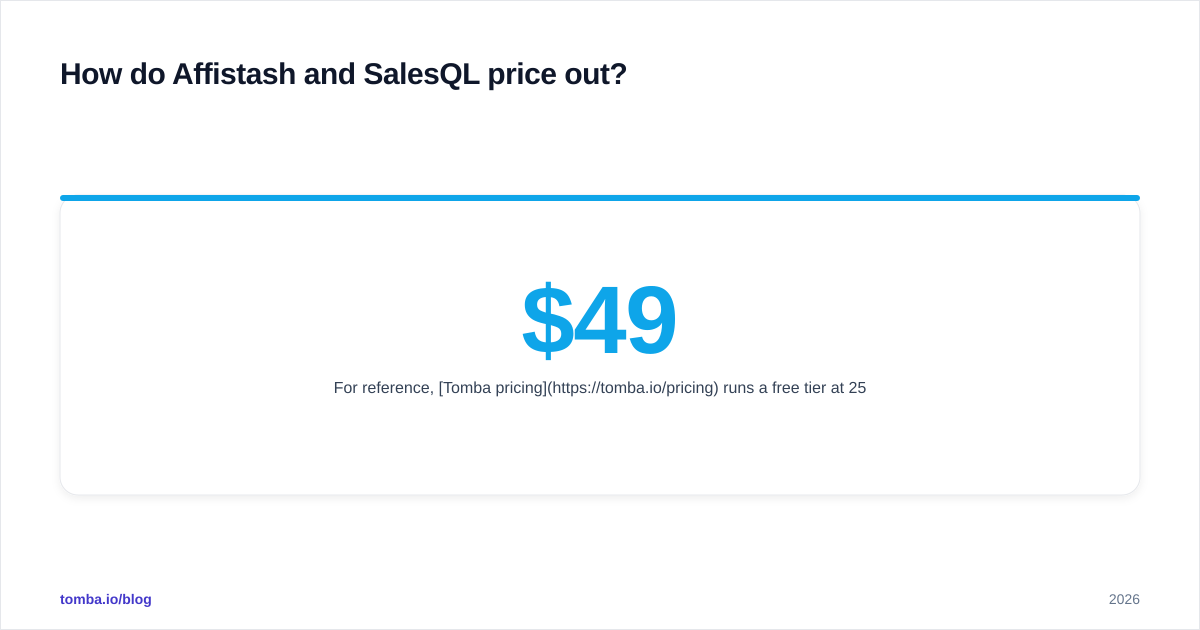
For reference, Tomba pricing runs a free tier at 25 searches/month, then $49/mo Starter, $99/mo Growth, $249/mo Pro, and custom Enterprise — with verification built into the same credit system rather than billed as a separate product. Whichever way you go, do the per-usable-email math, not the per-month math.
What does each tool miss?#
Every tool has a shape, and the shape tells you what falls outside it. Here's what tends to fall outside Affistash and SalesQL.
Bulk throughput. Both are happiest at small, interactive volumes — a niche sweep, a profile here and there. Feed them a 5,000-row list and the workflow strains. A native bulk email finder that ingests a CSV and returns found-and-verified results is a different category of tool.
Deep verification. As covered above, the SMTP-and-catch-all layer is thin. You'll bolt on a verifier either way.
Programmatic access. If you want to enrich records inside your own product, CRM workflow, or data pipeline, you need a real API. A documented email finder API lets you call the same engine from code, which neither tool is primarily built for.
More than email. Modern prospecting often needs the phone number, the social profiles, and firmographic context too. A data enrichment layer or a phone finder closes that gap; single-purpose finders leave it open.
None of these are reasons to dismiss Affistash or SalesQL — they're reasons to be honest about where the tool ends and your own glue work begins. For independent user feedback on any of these tools, G2 and Capterra are the least-biased places to read real reviews before you commit a budget.
When should you choose Affistash, SalesQL, or something else?#
Match the tool to the motion. Here's the decision in plain terms.
Choose Affistash if: you're early in a niche, you don't have a named target list yet, and your first job is discovery — figuring out which companies and partners even belong on the radar. It's a research-and-shortlist tool more than a send-at-scale tool.
Choose SalesQL if: your prospecting genuinely lives on LinkedIn, your volumes are modest, and you value staying inside one browser tab over building a repeatable pipeline. It's the path of least friction for a LinkedIn-native rep.
Choose a dedicated finder if: you need accuracy you can defend, verification baked in, bulk runs that don't choke, and an API to wire it all into your stack. This is the scenario where Affistash and SalesQL ask you to assemble the rest yourself — and where assembling it yourself stops being worth it.
A useful gut check: if your bounce rate matters to someone (it should — it gates your whole email deliverability), you're in the third bucket whether you like it or not. Discovery tools get you names; deliverability comes from verification and clean data, and that's a different engineering problem.

The verdict: Affistash vs SalesQL in 2026#
There's no single winner, because they're not really competing for the same job. SalesQL is the better pick if your world is LinkedIn and your volumes are small. Affistash is the better pick if you're still discovering a niche and need to build a target universe from scratch. Both, though, hand you the same homework: verify the emails before you send, and find a way to scale once one-at-a-time stops working.
That's the honest takeaway. These are capable tools at the front of the funnel, but they're not deliverability tools, and they're not built for volume. If your prospecting is graduating from "a few leads a day" to "a repeatable pipeline," you'll outgrow the convenience faster than you expect.
For that next stage, Tomba Email Finder is built to be the part Affistash and SalesQL leave out: find professional emails by domain, name, or company; verify them with real SMTP and catch-all checks in the same workflow; run it in bulk or call it from the Tomba API; and start free with 25 searches a month before you commit a cent. If clean, deliverable, scalable contact data is the goal, try the Tomba Email Finder and keep the discovery tools for what they do best — discovery.
// get started
Find, verify and enrich your first contacts today
Start on the free plan with 25 searches a month, then scale when your team is ready.
Free plan · No credit card required · GDPR & CCPA
// about the author