Anymail Finder Extension Review 2026: Setup, Limits & Alternatives
A neutral 2026 breakdown of the Anymail Finder extension — what it does well, where it falls short on accuracy and pricing, and the alternatives worth testing.

Anymail Finder Extension Review 2026: Setup, Limits & Alternatives
TL;DR
- The Anymail Finder extension is a Chrome add-on that pulls work email addresses off LinkedIn profiles and company pages without leaving the tab you're on.
- It's genuinely fast for one-off prospecting, but it bills on a "verified emails only" model that can burn credits faster than the dashboard suggests.
- Accuracy is solid on common corporate domains and weaker on catch-all domains, small businesses, and non-English markets.
- Pricing starts higher than several rivals once you need volume, and the extension has no native bulk-from-list workflow.
- If you want a single tool that covers finding, verifying, and enriching, evaluate the extension against alternatives like Tomba before you commit a yearly plan.
Let's get the conclusion out first: the Anymail Finder extension is a competent single-profile lookup tool, but it is not the cheapest or the most complete option in 2026. Whether it's right for you comes down to volume, how much you care about catch-all verification, and whether you also need phone numbers and enrichment in the same workflow.
What is the Anymail Finder extension?#
The Anymail Finder extension is a browser add-on (primarily Chrome, with Edge support) that surfaces a person's professional email address while you browse. You open a LinkedIn profile or a company website, click the extension icon, and it returns the most likely work email along with a confidence label.
Think of it like a caller-ID app for B2B browsing. You're already looking at the person; the extension just whispers their contact details so you don't have to leave the page, guess the format, or run a separate search on the main dashboard.
Under the hood it does three things in sequence:
- Parses the page to extract a name and a company domain.
- Generates candidate email patterns (first.last@, flast@, first@, and so on).
- Verifies the best candidate against the mail server before charging you a credit.
That last step is the selling point. Anymail Finder markets itself on only charging for emails it can verify, which on paper protects your budget. In practice, "verified" and "deliverable" aren't always the same thing once catch-all domains enter the picture — more on that below.
How does the Anymail Finder extension actually work?#
The flow is built for speed on individual prospects. Here's the realistic cycle a rep runs dozens of times a day.
You land on a prospect's LinkedIn profile. The extension reads the name and current employer. It maps the employer to a domain (this is where errors creep in if someone lists a parent company or a recently acquired brand). It then tests email permutations against the domain's mail server and returns one of a few states: a verified email, a "best guess" with lower confidence, or nothing found.
For website prospecting, you visit a company's site and the extension can pull addresses tied to that domain, behaving like a lightweight domain search scoped to whatever tab you're in.
The friction shows up at scale. The extension is a one-profile-at-a-time instrument. If you have a list of 500 prospects in a spreadsheet, the extension is the wrong tool — you'd want a bulk email finder or an API. Anymail Finder does offer bulk processing, but that lives in the dashboard, not the extension, so your workflow splits across two surfaces.

Is the Anymail Finder extension accurate?#
Accuracy is the only metric that matters for an email tool, because a wrong address costs you a bounce, and bounces drag down your sender reputation. The Anymail Finder extension performs well on three conditions and struggles on the rest.
Where it's strong: large companies with predictable, public email formats; English-speaking markets; and roles where the person's full name is clearly listed. On a standard first.last@company.com org, you'll get verified hits consistently.
Where it slips: catch-all domains, where the mail server accepts every address so verification can't distinguish a real inbox from a typo. Small businesses with shared inboxes are also hit-or-miss, and non-Latin or transliterated names trip the pattern generator.
For catch-all domains specifically, no provider can "verify" in the normal sense — they can only estimate. This is why a dedicated catch-all verifier matters if catch-all-heavy industries (agencies, consultancies, many EU firms) make up your list. The extension flags these, but the underlying uncertainty is the same across every vendor.

Independent accuracy varies by dataset, so treat any single vendor's headline percentage with skepticism — including the ones in marketing pages. Run your own 100-contact test against a known list before you trust a number. You can cross-check the official feature claims on the Anymail Finder homepage and user-reported results on G2 rather than relying on one source.
How much does the Anymail Finder extension cost in 2026?#
Anymail Finder uses a verified-results pricing model, which is good for transparency but tends to get expensive once you scale past a few hundred lookups a month. The extension itself is free; you pay for the credits it consumes.
The bigger consideration is total cost of ownership. If you also need a separate email verifier, phone numbers, and enrichment, you end up stacking subscriptions. A platform that bundles those — see full Tomba pricing — can come out cheaper than an email-only tool plus two add-ons.
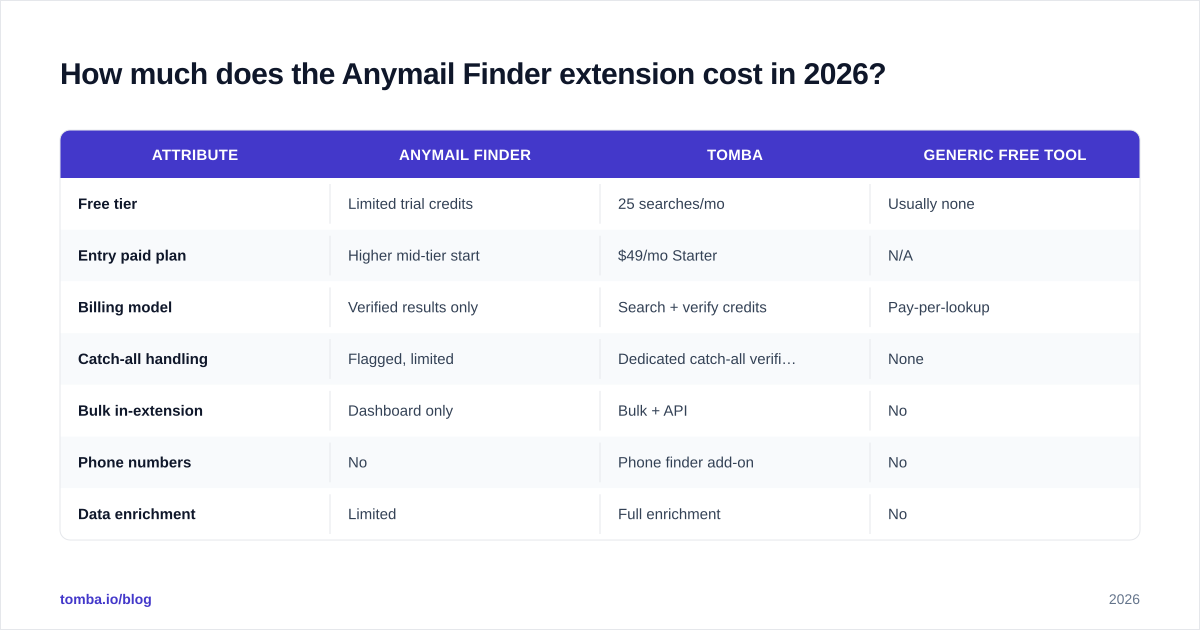
Here's how the Anymail Finder extension compares to two common alternatives on the attributes that actually drive a buying decision.
| Attribute | Anymail Finder | Tomba | Generic free tool |
|---|---|---|---|
| Free tier | Limited trial credits | 25 searches/mo | Usually none |
| Entry paid plan | Higher mid-tier start | $49/mo Starter | N/A |
| Billing model | Verified results only | Search + verify credits | Pay-per-lookup |
| Catch-all handling | Flagged, limited | Dedicated catch-all verifier | None |
| Bulk in-extension | Dashboard only | Bulk + API | No |
| Phone numbers | No | Phone finder add-on | No |
| Data enrichment | Limited | Full enrichment | No |
The table is the short version of a longer truth: email-only tools look cheap until you add the jobs they don't do.

What are the limits of the Anymail Finder extension?#
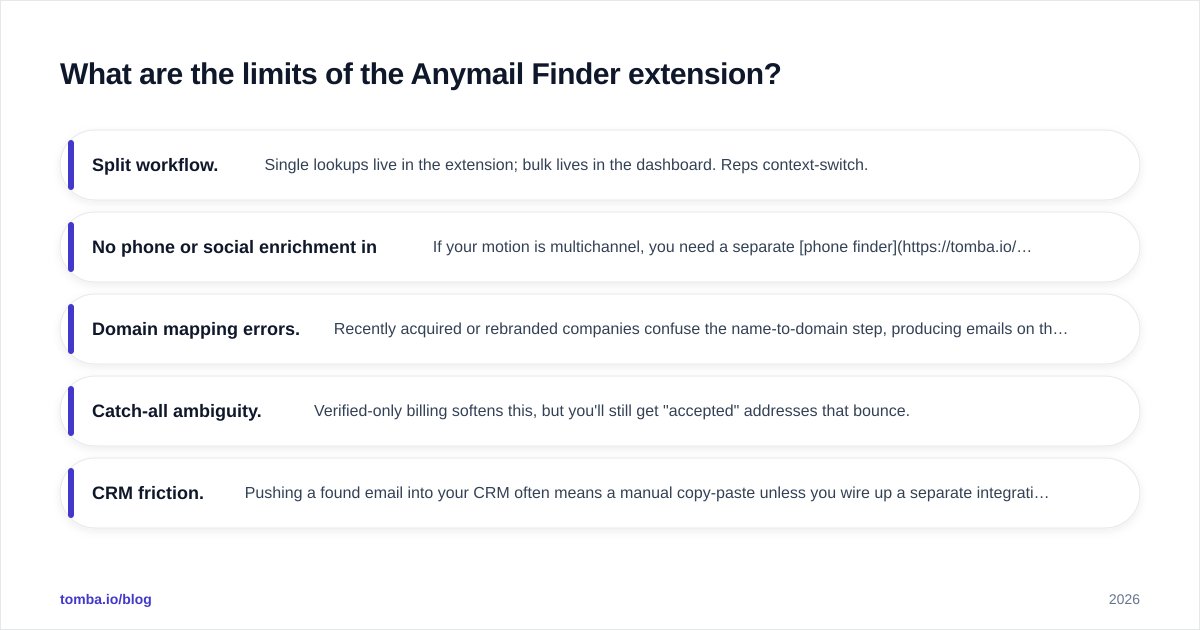
Every extension trades depth for convenience. These are the constraints to plan around before you standardize a team on it.
- Split workflow. Single lookups live in the extension; bulk lives in the dashboard. Reps context-switch.
- No phone or social enrichment in-line. If your motion is multichannel, you need a separate phone finder and a way to grab social profiles.
- Domain mapping errors. Recently acquired or rebranded companies confuse the name-to-domain step, producing emails on the wrong domain.
- Catch-all ambiguity. Verified-only billing softens this, but you'll still get "accepted" addresses that bounce.
- CRM friction. Pushing a found email into your CRM often means a manual copy-paste unless you wire up a separate integration.
None of these are dealbreakers for light, manual prospecting. They become real costs at team scale, where every manual step multiplies across reps and weeks.

How does the Anymail Finder extension compare to alternatives?#
The honest framing: pick the tool that matches your workflow, not the one with the loudest accuracy claim. Here's a decision lens.
If you do occasional, one-at-a-time prospecting on LinkedIn, the Anymail Finder extension is fine, and so are most reputable extensions. Convenience wins; volume doesn't matter.
If you run lists, sequences, and need verification at scale, you want a platform with a real API and bulk pipeline. Browser-only tools force the split workflow described above. Look at how a Tomba Chrome extension pairs with a dashboard and email finder API so single lookups and bulk runs share one credit pool and one data source.
If your list is catch-all heavy or international, prioritize verification quality over raw find rate. A find that bounces is worse than no find at all, because it costs you deliverability. A dedicated catch-all finder plus standard verification beats a single confidence label.
If you need email plus phone plus enrichment, an email-only extension will always leave gaps. Consolidating into one platform with data enrichment reduces tool sprawl and per-seat cost.
For teams specifically shopping around, it's worth reading neutral roundups and reviews on platforms like Capterra alongside any single vendor's own comparison page, since vendor pages grade themselves generously by nature.
Who should use the Anymail Finder extension?#
Use it if you're a solo founder, recruiter, or SDR doing manual, low-volume outreach and you value a clean single-profile experience over a unified pipeline. The verified-only billing genuinely protects a small budget when your monthly volume is modest.
Skip it — or at least benchmark it hard — if any of these are true: you process lists in the hundreds or thousands; you need phone numbers and firmographic enrichment in the same tool; your prospects sit on catch-all or international domains; or you want found contacts to flow into your CRM automatically. In those cases the split workflow and email-only scope will cost you more time and money than the extension saves.
How do I test an email finder extension before committing?#
Run a controlled bake-off. It takes an afternoon and saves you from a year-long contract regret.
- Build a 100-contact ground-truth list where you already know the correct emails.
- Run each candidate tool against the same list.
- Score three numbers: find rate (got an answer), accuracy (answer was correct), and bounce rate (sent and verified).
- Re-test specifically on your catch-all and international subset, since that's where tools diverge most.
- Factor total cost — including the verifier, phone, and enrichment tools you'd otherwise bolt on.
The tool with the best headline find rate often loses on bounce rate, which is the number that actually touches your email deliverability. Measure what matters.
The bottom line#
The Anymail Finder extension does one job — quick, single-profile email lookups — and does it reasonably well. It's a fair pick for manual, low-volume prospecting. It's a poor fit if you need bulk, phones, enrichment, or airtight catch-all handling, and its pricing climbs faster than email-only buyers expect.
If you'd rather not stitch together three tools, start with the Tomba Email Finder. You get verified email lookups, catch-all verification, phone discovery, and enrichment under one credit pool — plus a free tier of 25 searches a month to run the exact bake-off described above before you pay for anything. Test it against your own list, score the bounce rate, and let the numbers, not the marketing, decide.
// get started
Find, verify and enrich your first contacts today
Start on the free plan with 25 searches a month, then scale when your team is ready.
Free plan · No credit card required · GDPR & CCPA
// about the author