Anymail Finder vs Getprospect: 2026 Accuracy & Pricing
A neutral, data-first breakdown of Anymail Finder vs Getprospect in 2026 — accuracy, pricing, verification, and which email finder fits your outbound stack.
Anymail Finder vs Getprospect: 2026 Accuracy & Pricing
Choosing between Anymail Finder and Getprospect comes down to one question most comparison posts dodge: do you want a focused, verification-first email finder, or a broader prospecting database with email lookup bolted on? This post answers that honestly — and tells you where a third option might serve you better.
TL;DR — Anymail Finder vs Getprospect at a glance#
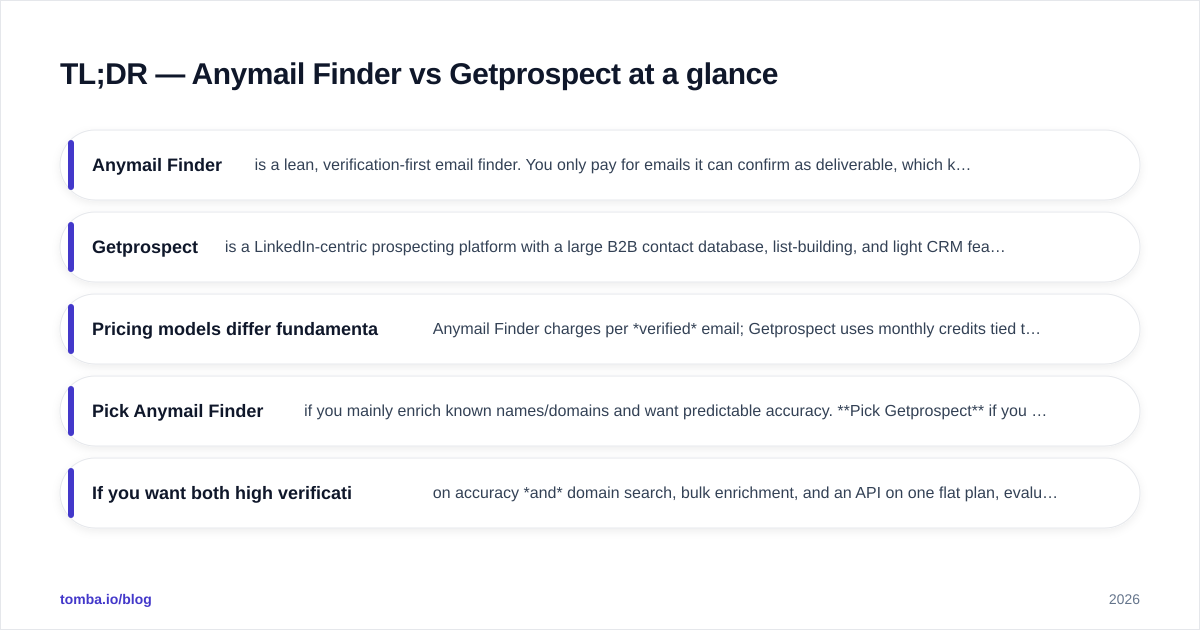
- Anymail Finder is a lean, verification-first email finder. You only pay for emails it can confirm as deliverable, which keeps wasted spend low for pure email lookup.
- Getprospect is a LinkedIn-centric prospecting platform with a large B2B contact database, list-building, and light CRM features — email finding is one feature among several.
- Pricing models differ fundamentally: Anymail Finder charges per verified email; Getprospect uses monthly credits tied to plan tiers.
- Pick Anymail Finder if you mainly enrich known names/domains and want predictable accuracy. Pick Getprospect if you build prospect lists from scratch inside one tool.
- If you want both high verification accuracy and domain search, bulk enrichment, and an API on one flat plan, evaluate a third contender like Tomba before committing.
What is Anymail Finder?#
Anymail Finder is a single-purpose tool: you give it a full name plus a company domain (or a company name), and it returns a business email address. Its defining feature is the pricing promise — you are charged only for emails it returns as verified, not for guesses or "risky" results.
Think of it like a locksmith who only bills you when the key actually turns. That model appeals to teams who hate paying for catch-all guesses that bounce. Anymail Finder supports single lookups, bulk CSV uploads, and an API, and it's commonly wired into outbound sequences where deliverability matters more than volume.
The trade-off is scope. Anymail Finder is not where you discover who to contact — it assumes you already have a name and a company. It's an enrichment engine, not a prospecting database.
What is Getprospect?#
Getprospect is a prospecting platform built around a B2B contact database and a LinkedIn Chrome extension. Instead of starting with a name you already have, you can search the database by job title, industry, location, and company attributes, then pull emails for the people who match.
It layers in list management, basic lead organization, and email verification, positioning itself closer to an all-in-one sales-intelligence tool than a narrow finder. For a rep who lives in LinkedIn Sales Navigator and wants to convert profiles into a contact list without leaving the browser, that workflow is the main draw.
The cost of breadth is focus. A database tool spreads its data investment across millions of records, so accuracy on any single niche email can vary more than a verification-first tool that refuses to return unconfirmed results.
How accurate is each tool in 2026?#
Accuracy is the metric that actually moves reply rates, so treat vendor-published "95%+" claims as marketing, not measurement. The honest framing is about what kind of accuracy each model optimizes for.
Anymail Finder optimizes for precision: by only billing verified results, it has a structural incentive to suppress shaky guesses. You get fewer emails, but a higher share of what you get is deliverable. That's ideal when a bounce costs you sender reputation.
Getprospect optimizes for coverage: a large database means you'll find a contact for more companies, but a portion of those records may be stale or catch-all, so you should run them through a dedicated verifier before sending. Independent reviews on G2 for both tools reflect this split — finders praised for low bounce rates, databases praised for breadth.
The practical takeaway: whatever you choose, validate the output. Pairing any finder with a standalone email verifier and a catch-all verifier is the single highest-leverage step for protecting email deliverability.


Anymail Finder vs Getprospect: feature and pricing comparison#
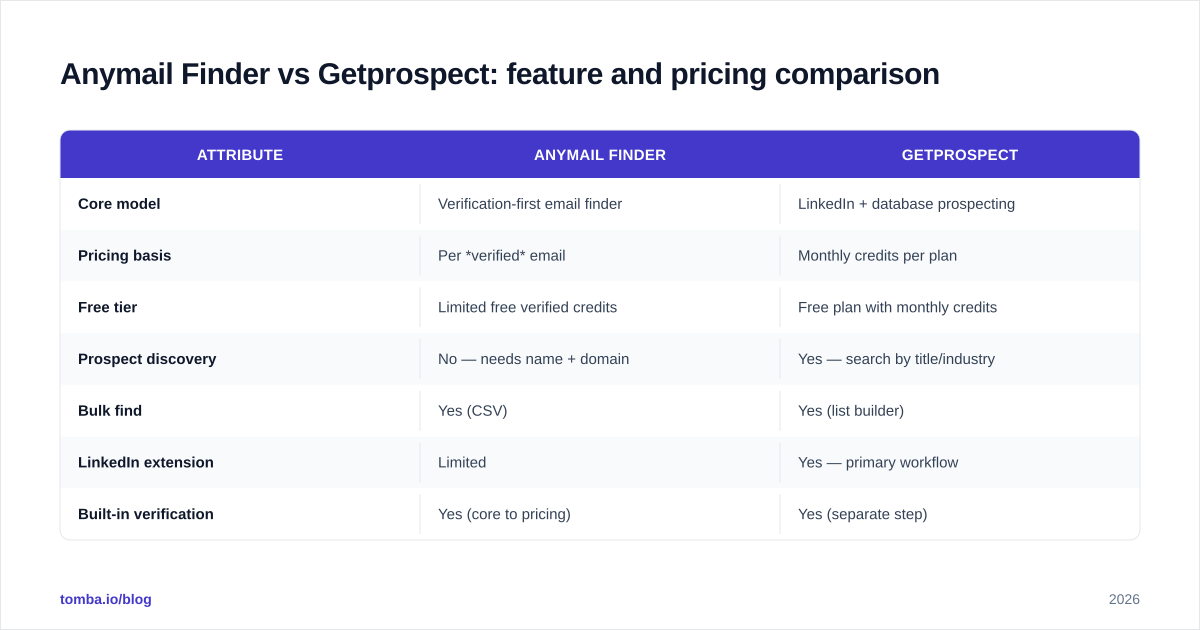
| Attribute | Anymail Finder | Getprospect |
|---|---|---|
| Core model | Verification-first email finder | LinkedIn + database prospecting |
| Pricing basis | Per verified email | Monthly credits per plan |
| Free tier | Limited free verified credits | Free plan with monthly credits |
| Prospect discovery | No — needs name + domain | Yes — search by title/industry |
| Bulk find | Yes (CSV) | Yes (list builder) |
| LinkedIn extension | Limited | Yes — primary workflow |
| Built-in verification | Yes (core to pricing) | Yes (separate step) |
| API access | Yes | Yes (higher tiers) |
| Best for | Enriching known contacts | Building lists from scratch |
| Phone numbers | No | Limited |
The structural difference is the pricing axis. Anymail Finder's "pay for verified only" model is genuinely attractive when your input list is clean and you just need confirmed addresses. Getprospect's credit model rewards heavy database searching but means you can burn credits on records you ultimately discard.
Neither is "cheaper" in the abstract — it depends on whether your bottleneck is finding people (favors Getprospect) or confirming emails for people you already know (favors Anymail Finder).
Which one fits your workflow?#
Conclusion first: match the tool to where your funnel actually leaks.
Choose Anymail Finder if you already export leads from a CRM, Sales Navigator, or an event list and simply need deliverable emails appended. Its verification-gated billing keeps cost-per-usable-email predictable, and the narrow scope means less tool sprawl.
Choose Getprospect if your reps start cold inside LinkedIn and need to assemble target lists by persona without a separate database subscription. The extension-driven workflow saves clicks for a discovery-heavy motion.
Choose neither — look wider — if you need domain-level discovery (every email pattern at a company), bulk enrichment, phone numbers, and an API under one predictable plan. That's the gap a broader platform fills, and it's where many teams consolidate after outgrowing a single-feature finder.
A useful way to decide is to map your weekly task list. If 80% of your time is "I have a name, I need the email," Anymail Finder's model is hard to beat on simplicity. If 80% is "I need to find 200 VPs of Marketing in fintech," a database tool like Getprospect — or a full domain search workflow — earns its keep.

How does Tomba compare to both?#
If you're already comparing two finders, it's worth putting a third on the table for a fair read — especially one that spans both use cases. Tomba combines verification-first finding with database-style domain search, bulk processing, phone lookup, and a developer API on flat monthly pricing instead of per-result billing.
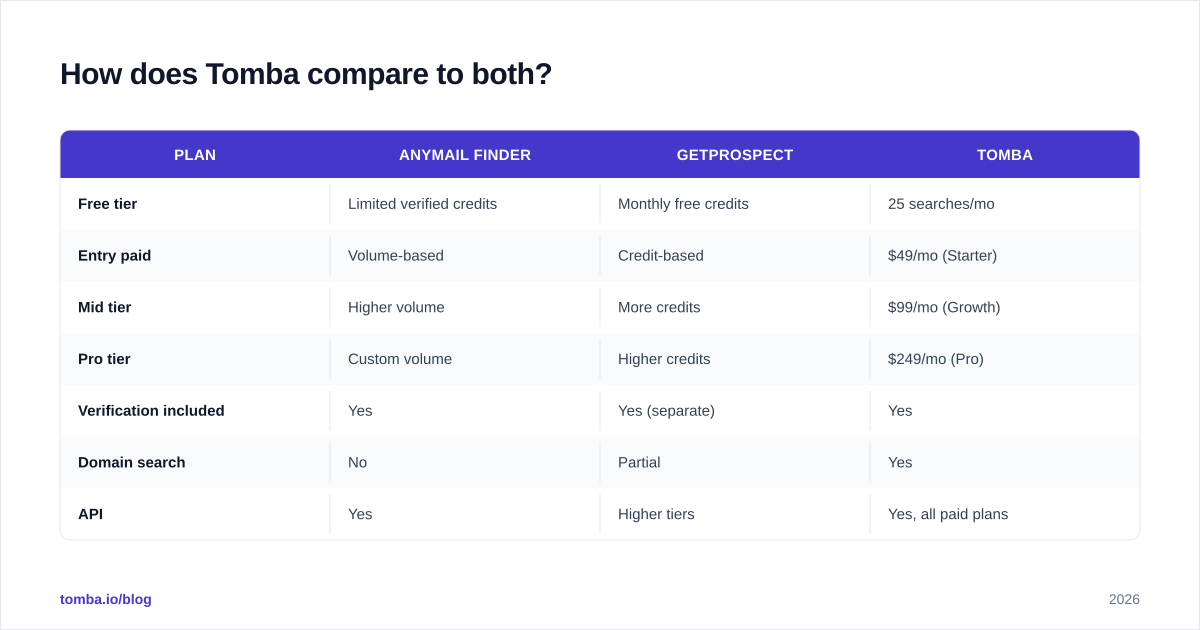
| Plan | Anymail Finder | Getprospect | Tomba |
|---|---|---|---|
| Free tier | Limited verified credits | Monthly free credits | 25 searches/mo |
| Entry paid | Volume-based | Credit-based | $49/mo (Starter) |
| Mid tier | Higher volume | More credits | $99/mo (Growth) |
| Pro tier | Custom volume | Higher credits | $249/mo (Pro) |
| Verification included | Yes | Yes (separate) | Yes |
| Domain search | No | Partial | Yes |
| API | Yes | Higher tiers | Yes, all paid plans |
Where Anymail Finder is precision-narrow and Getprospect is discovery-broad, Tomba's pitch is doing both without forcing you to choose a pricing model that fights your workflow. You can review the full Tomba pricing to compare against your current credit spend, and the data methodology is documented openly on the data sources page — useful when you're auditing accuracy claims rather than taking them on faith.
The point isn't that one tool wins universally. It's that "Anymail Finder vs Getprospect" is sometimes the wrong bracket — like comparing two sedans when your actual job needs a truck.

What do real reviews say about Anymail Finder and Getprospect?#
Cutting through star ratings, a few consistent themes appear across review platforms like Capterra and G2:
Anymail Finder strengths — users repeatedly praise the verified-only billing as fair, and low bounce rates for clean input lists. The most common complaint is the inability to discover new contacts; you must bring your own names.
Anymail Finder limitations — coverage gaps for smaller or non-English-domain companies, since a strict verification gate will simply return nothing rather than a guess. For some teams that's a feature; for others it feels like missing data.
Getprospect strengths — the LinkedIn extension and database search get the most positive mentions for speed of list-building. Reps like staying in one tab.
Getprospect limitations — variable email accuracy on older records and credit consumption that can feel opaque when searches return contacts you don't end up using. Several reviewers recommend running exports through a second verifier — which adds a step Anymail Finder's model avoids.
Neither pattern is disqualifying. They're the predictable trade-offs of a focused finder versus a broad database, and knowing them up front lets you set realistic expectations before you buy.
How should you test these tools before committing?#
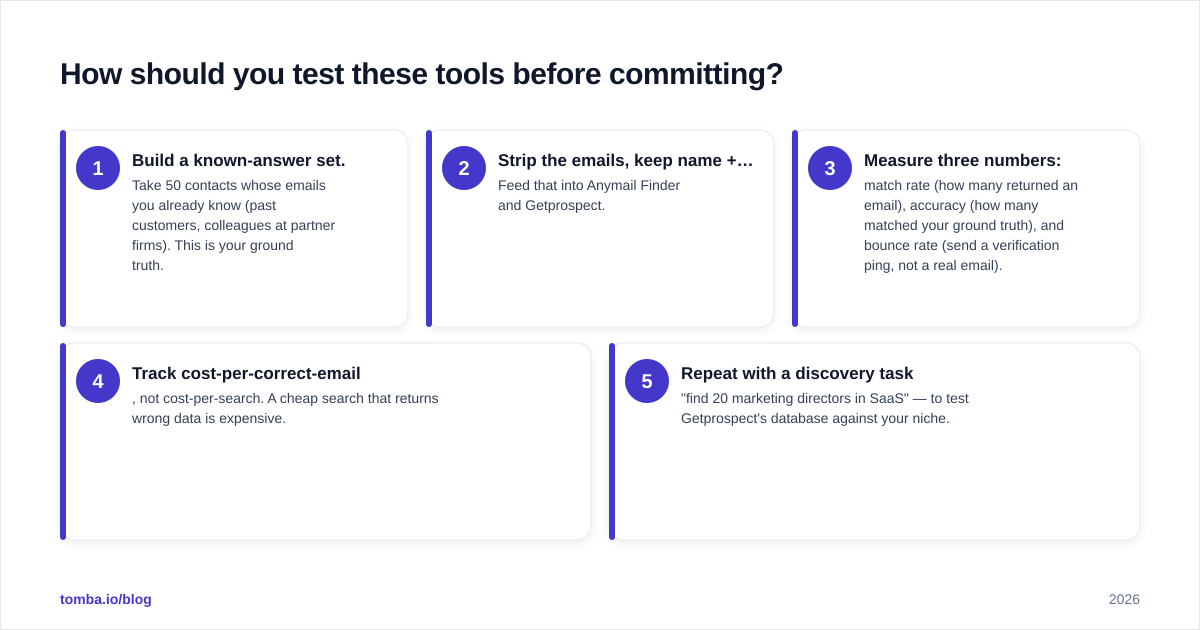
Run the same 50-contact benchmark through every option on the shortlist. Conclusion first: a one-hour test beats a month of reading reviews.
- Build a known-answer set. Take 50 contacts whose emails you already know (past customers, colleagues at partner firms). This is your ground truth.
- Strip the emails, keep name + domain. Feed that into Anymail Finder and Getprospect.
- Measure three numbers: match rate (how many returned an email), accuracy (how many matched your ground truth), and bounce rate (send a verification ping, not a real email).
- Track cost-per-correct-email, not cost-per-search. A cheap search that returns wrong data is expensive.
- Repeat with a discovery task — "find 20 marketing directors in SaaS" — to test Getprospect's database against your niche.
This protocol surfaces the difference between marketing claims and your reality, because accuracy is wildly niche-dependent. A tool that's 95% accurate for US tech companies may be 60% for European manufacturing. Your test list, in your market, is the only benchmark that counts. When you scale the winner, a bulk email finder plus verification keeps the per-record economics honest.
Frequently asked questions#
Is Anymail Finder or Getprospect better for cold outreach? For protecting deliverability on outbound, Anymail Finder's verification-first model gives lower bounce risk per email. For finding who to email in the first place, Getprospect's database is the better starting point. Many teams use a discovery tool for sourcing and a verification-first tool before sending.
Do I still need a separate email verifier? With Getprospect, yes — run exports through a dedicated email verifier before any large send. With Anymail Finder, verification is baked into its pricing, but re-checking aged lists is still wise.
Which is cheaper? It depends on your bottleneck. Per-verified-email billing (Anymail Finder) wins when input lists are clean; credit-based billing (Getprospect) wins for high-volume database searching. Compare against a flat-rate plan to see which model actually matches your monthly volume.
Can I just use one tool for everything? If you need both discovery and verification on one bill, a platform that includes domain search, bulk enrichment, and verification — rather than a single-feature finder — usually consolidates the stack more cleanly.
The bottom line#
Anymail Finder and Getprospect solve adjacent but distinct problems: one confirms emails for people you already know, the other helps you find people you don't. Decide which job dominates your week, run the 50-contact test, and let your own match-and-bounce data — not vendor percentages — make the call.
If your real need spans both discovery and verification on predictable pricing, give the Tomba Email Finder a run on the same benchmark list. Start free with 25 searches a month, test it head-to-head against both tools above, and keep whichever one returns the most correct emails per dollar. That's the only comparison that pays your bills.
Ready to find emails that actually work?
Join 150,000+ professionals who stopped guessing and started sending. Free credits on signup — no credit card required.
Get the Tomba newsletter
Practical outbound tactics and product updates — once every two weeks.
About the author