Atompark Software vs Cufinder: Which Wins in 2026?
Atompark Software and Cufinder solve different halves of outbound. See how their data, pricing, and accuracy stack up in 2026 — and where each one actually fits.
Choosing between Atompark Software and Cufinder feels like comparing a delivery truck to a map. One moves email at volume; the other tells you where your prospects actually live. Most teams pick wrong because they assume "email tool" means the same thing in both cases. It doesn't.
This guide breaks down what each platform really does, where the overlap is thin, and which one belongs in your 2026 stack — plus where a focused email finder beats both for the one job that matters most: getting a correct address in the first place.
TL;DR#
- Atompark Software is a mass-email and marketing suite (Atomic Mail Sender, email verifier, extractor tools). It's built for sending and list hygiene, not for sourcing fresh B2B contacts.
- Cufinder is a B2B data and lead-enrichment platform focused on finding company and contact data, enriching CRMs, and powering prospecting lists.
- They barely compete head-to-head: Atompark wins on bulk sending workflows, Cufinder wins on data sourcing and enrichment.
- Neither is a specialist email finder. If your bottleneck is verified, deliverable email addresses, a dedicated tool like Tomba usually returns higher accuracy at a lower entry price.
- Decision rule: pick Atompark to send, Cufinder to source, and a verifier to make sure what you send doesn't bounce.
What is Atompark Software?#
Atompark Software is a long-running vendor of desktop and cloud email-marketing utilities. Its best-known products are Atomic Mail Sender (bulk email delivery), an email verifier, and a set of email extractor and list-management tools. The pitch is volume: build a list, clean it, and blast campaigns at scale, often from your own SMTP or a connected service.
Where Atompark shines is the outbound mechanics of email — templating, scheduling, personalization tokens, and removing dead addresses before you hit send. It's a sender-and-cleaner, not a prospecting engine. You bring the audience; Atompark helps you reach it without torching your sender reputation.
The trade-off: Atompark assumes you already have contacts. It doesn't crawl the web to tell you the VP of Marketing at a target account or surface a verified work email from a name and domain. That's a different problem, and it's exactly where Cufinder lives.

What is Cufinder?#
Cufinder is a B2B data platform. Its core is a contact and company database plus enrichment APIs that turn a thin lead (a name, a domain, a LinkedIn URL) into a fuller record — job title, company size, industry, and contact details. Sales and RevOps teams use it to build prospect lists, fill CRM gaps, and feed enrichment into automation.
In other words, Cufinder answers who and where, while Atompark answers how to send. Cufinder competes with data and email-finding tools far more than it competes with a mass-mailer. If you've used a platform for data enrichment or domain search, Cufinder sits in that lane.
The catch with broad data platforms is accuracy variance. Aggregated databases age fast; a title from 18 months ago is a bounce or a wrong-person reply today. That's why pairing any data source with a real-time email verifier matters more than the database size on the marketing page.
How do Atompark Software and Cufinder compare?#
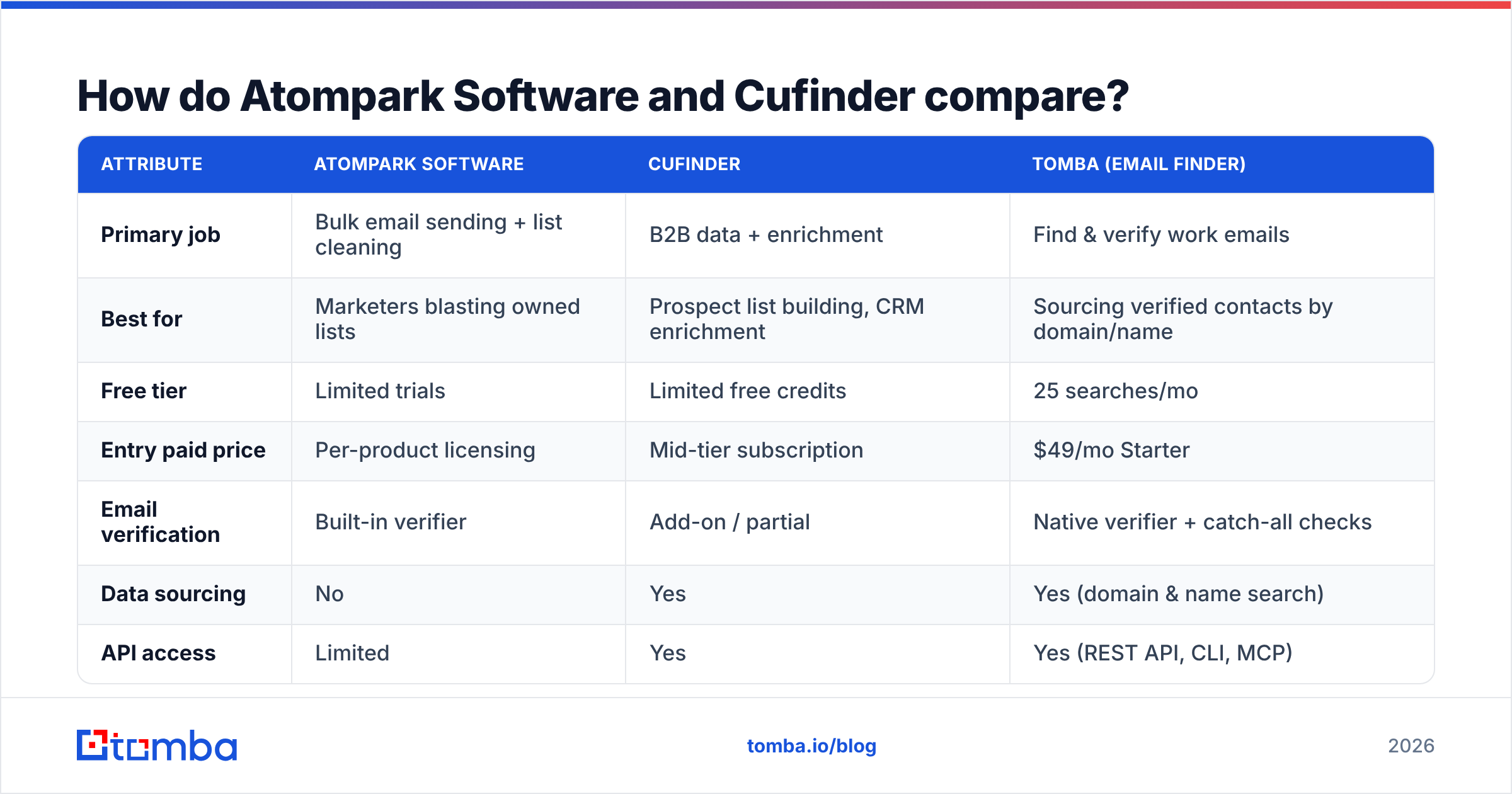
Here's the honest side-by-side. Note that these tools overlap less than their categories suggest — the comparison is really "sender suite vs data platform," with a dedicated email finder shown as the specialist reference point.
| Attribute | Atompark Software | Cufinder | Tomba (email finder) |
|---|---|---|---|
| Primary job | Bulk email sending + list cleaning | B2B data + enrichment | Find & verify work emails |
| Best for | Marketers blasting owned lists | Prospect list building, CRM enrichment | Sourcing verified contacts by domain/name |
| Free tier | Limited trials | Limited free credits | 25 searches/mo |
| Entry paid price | Per-product licensing | Mid-tier subscription | $49/mo Starter |
| Email verification | Built-in verifier | Add-on / partial | Native verifier + catch-all checks |
| Data sourcing | No | Yes | Yes (domain & name search) |
| API access | Limited | Yes | Yes (REST API, CLI, MCP) |
| Deliverability focus | High (sending) | Low | Medium (verification) |
A few things stand out. Atompark has no real data-sourcing engine, so it can't replace Cufinder for prospecting. Cufinder has data but treats verification as a secondary concern, so deliverability suffers if you don't clean its output. And neither is priced or tuned the way a focused finder is — which is why teams often run a finder alongside whichever of these they choose.
Which one is better for finding new B2B emails?#
Cufinder, between the two — but a dedicated finder beats both. Atompark simply isn't a prospecting tool; it cleans and sends lists you already own. Cufinder can source contacts, so it's the obvious pick if "find new people" is the goal.
But "can source" and "sources accurately" are different claims. When your job is turning a company domain into a list of real, verified inboxes, the specialist wins on three axes:
- Accuracy — Pattern detection plus SMTP-level verification catches bad addresses before they bounce. Aggregated databases often serve stale records.
- Catch-all handling — Many corporate domains accept everything. A catch-all verifier distinguishes real mailboxes from black holes; generalist platforms frequently mark these "valid" and leave you guessing.
- Cost per correct email — A finder priced for volume (Tomba pricing starts at $49/mo) usually beats paying enterprise data rates for records you still have to re-verify.
That's the gap. Cufinder gets you a list; a finder + verifier gets you a list you can actually send to without nuking your domain reputation.
Is Atompark Software better for sending campaigns?#
Yes — for sending owned lists, Atompark is the stronger tool of the two. Cufinder isn't a mail server or a campaign manager; it's a data layer. If you have a clean, opted-in list and you want template control, scheduling, and SMTP-level delivery, Atompark's sender products are purpose-built for that.
But two cautions. First, sending volume to poorly verified lists is the fastest way to wreck deliverability. Run every list through verification first; Atompark's verifier helps, but a second independent check is cheap insurance. Second, Atompark's desktop-first heritage means workflows can feel dated next to cloud-native sequencers. If modern automation and CRM sync matter, weigh that.
For the verification layer specifically, you can pressure-test addresses with a free email checker before they ever enter a send queue. Garbage in, bounce out — no sender is immune to a dirty list.
How should you choose between them in 2026?#
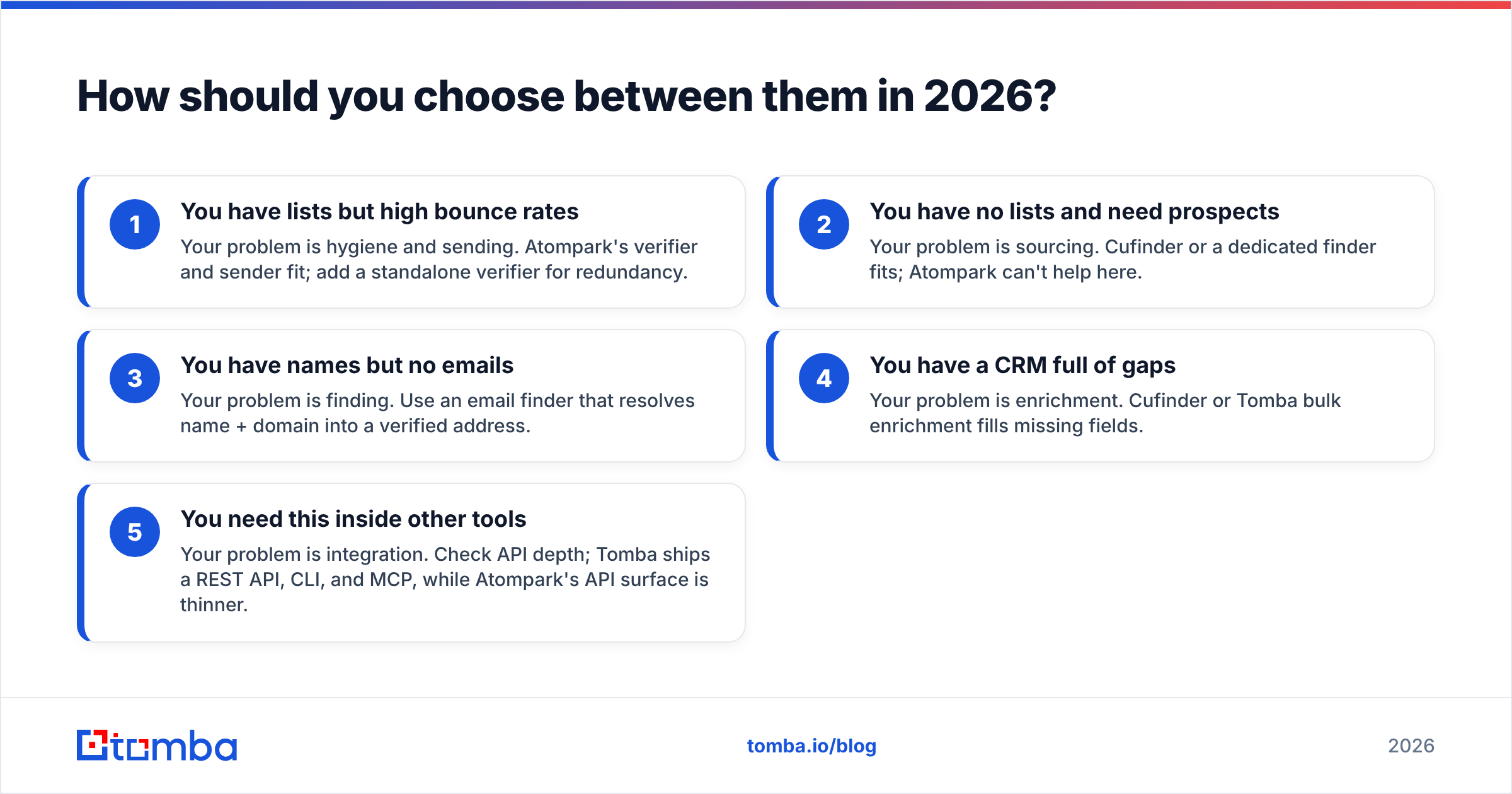
Decide by where your pipeline actually leaks. Use this checklist:
- You have lists but high bounce rates — Your problem is hygiene and sending. Atompark's verifier and sender fit; add a standalone verifier for redundancy.
- You have no lists and need prospects — Your problem is sourcing. Cufinder or a dedicated finder fits; Atompark can't help here.
- You have names but no emails — Your problem is finding. Use an email finder that resolves name + domain into a verified address.
- You have a CRM full of gaps — Your problem is enrichment. Cufinder or Tomba bulk enrichment fills missing fields.
- You need this inside other tools — Your problem is integration. Check API depth; Tomba ships a REST API, CLI, and MCP, while Atompark's API surface is thinner.
The honest takeaway: these two rarely belong in the same shortlist. If a vendor evaluation has both on it, someone has conflated "send email" with "find email." Separate those jobs and the right tool for each becomes obvious.
What about pricing and value?#
Atompark uses a per-product, license-style model — you buy the sender, the verifier, or the extractor, sometimes separately. That can be cost-effective if you only need one piece, but bundling several products adds up. Cufinder runs on tiered subscriptions priced for data volume and enrichment credits, which scales with list size rather than features.
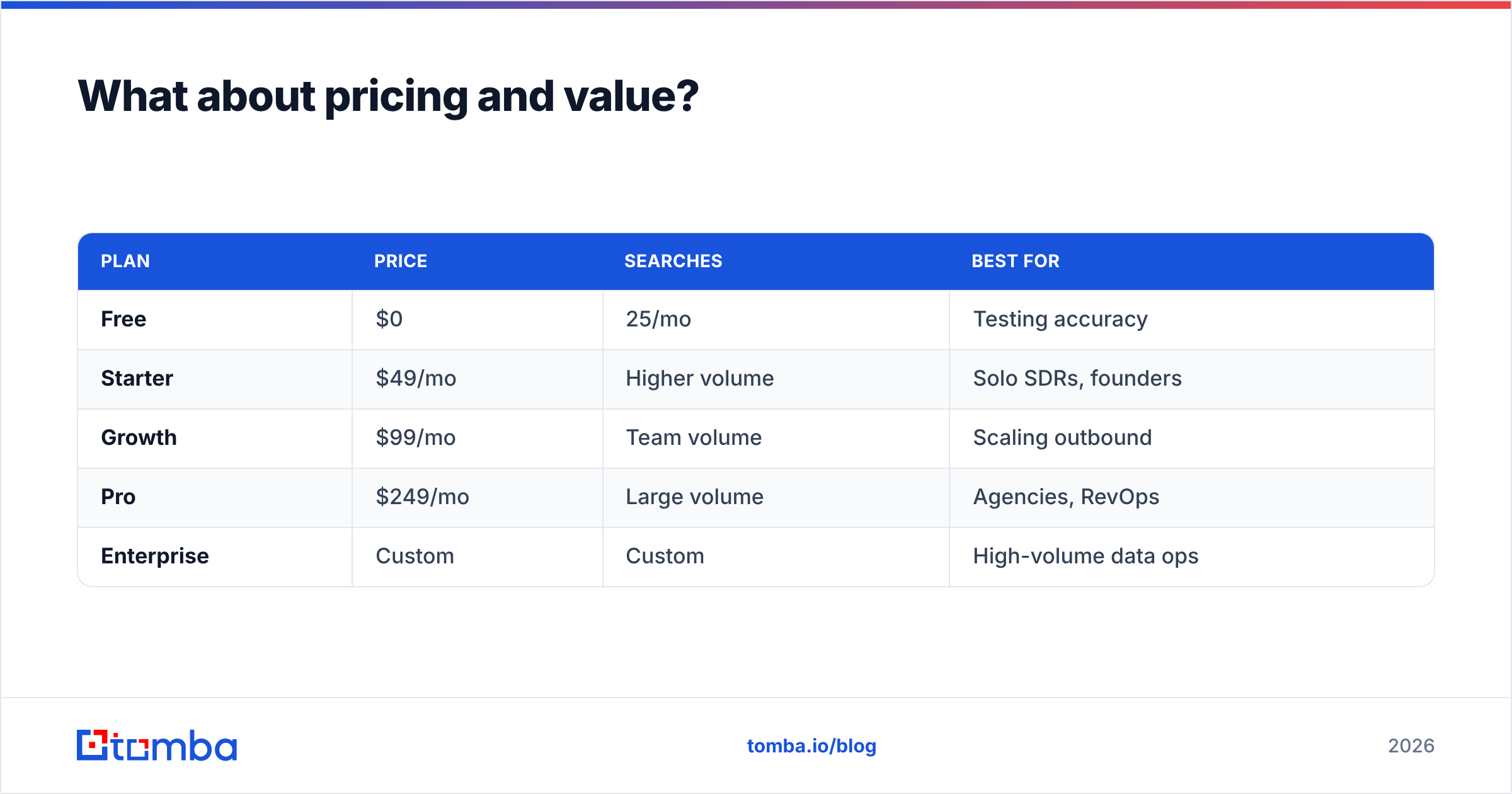
A dedicated finder sits between them on price clarity. For reference, Tomba's tiers are transparent and credit-based:
| Plan | Price | Searches | Best for |
|---|---|---|---|
| Free | $0 | 25/mo | Testing accuracy |
| Starter | $49/mo | Higher volume | Solo SDRs, founders |
| Growth | $99/mo | Team volume | Scaling outbound |
| Pro | $249/mo | Large volume | Agencies, RevOps |
| Enterprise | Custom | Custom | High-volume data ops |
The value question isn't "which is cheapest" — it's "what's my cost per deliverable contact." A cheap database that produces 20% bounces is more expensive than a finder that returns verified addresses, once you factor in burned domain reputation and SDR time chasing wrong emails. Always benchmark on a real sample before committing.
You can validate any vendor's claims independently on review sites like G2 and Capterra, and check each tool's own documentation — Atompark and Cufinder — for current feature lists before you buy.
Frequently asked questions#
Is Atompark Software an email finder? Not really. Atompark focuses on bulk sending, list extraction from sources you provide, and verification. It doesn't source fresh B2B contacts the way a finder or data platform does.
Does Cufinder verify emails? Cufinder offers some verification, but it's secondary to its data and enrichment focus. For high-volume sending, run its output through a dedicated verifier to reduce bounces.
Can I use both together? You can, but it's unusual. A more common stack is a finder/enricher for sourcing, a verifier for hygiene, and a sequencer for sending — three specialists rather than two generalists.
Which has a better free tier? Both offer limited free access. For testing finder accuracy specifically, a tool with a clear monthly free allowance (like Tomba's 25 searches) lets you benchmark deliverability before paying.
What's the single most important metric? Cost per verified, deliverable contact. Database size and send speed are vanity metrics if the addresses bounce.
The bottom line#
Atompark Software and Cufinder aren't true rivals — one sends, the other sources. Pick Atompark when you own a list and need clean delivery. Pick Cufinder when you need to build prospect lists and enrich a CRM. But if your real bottleneck is getting a correct, verified email address in the first place, neither generalist is the sharpest tool for that job.
That's where a focused finder earns its place. The Tomba Email Finder resolves names and domains into verified work emails with native catch-all checks, a real verification layer, and an API that drops into the rest of your stack. Start free with 25 searches, benchmark the accuracy against whatever you're using now, and only scale once the numbers prove out. Source smart, verify always, and send with confidence.
// get started
Find, verify and enrich your first contacts today
Start on the free plan with 25 searches a month, then scale when your team is ready.
Free plan · No credit card required · GDPR & CCPA
// about the author