How to Automate Sales Signals in 2026: Tools & Workflow
Buying signals decay in hours, not days. Here's how to automate sales signals end to end in 2026 — capture, enrich, score, and route them before your competitors even notice.
Buying signals are the most perishable asset in your pipeline. A prospect who fills out a pricing page, hires a VP of Sales, or gets funded is interested now — and roughly 50% less interested by the time a rep notices three days later. The teams winning in 2026 don't read signals; their stack reacts to them automatically.
This guide shows you how to automate sales signals end to end: capturing them, enriching them into reachable contacts, scoring them, and routing them to the right rep before the moment passes.
TL;DR#
- A sales signal is any observable event that suggests an account is more likely to buy — funding, hiring, tech changes, web visits, or product usage. Speed of response matters more than signal volume.
- Automation has four stages: capture → enrich → score → route. Most teams automate one and leave the rest manual, which kills the speed advantage.
- Enrichment is the bottleneck. A signal with no email or phone is a dead end, so a fast, accurate finder API is the connective tissue of the whole system.
- You don't need a $50k intent platform to start. A signal source, an enrichment API, a scoring rule, and a Slack/CRM webhook cover 80% of the value.
- Tomba's email finder API plugs into the enrichment stage so raw signals become contactable leads automatically.
What is a sales signal, and why automate it?#
A sales signal is a real-world event that changes how likely an account is to buy. Think of it like a smoke detector for revenue: instead of walking through every room checking for fire, you wire up sensors that shout the moment something heats up.
Signals fall into a few buckets:
- Firmographic / company events — funding rounds, M&A, expansion into a new region, or office openings.
- Hiring signals — a new VP of Sales, a posting for roles your product supports, or sudden headcount growth on a team.
- Technographic changes — adopting (or dropping) a tool that complements or competes with yours.
- Intent signals — anonymous web visits, content downloads, review-site research, or search behavior.
- Product-led signals — free-trial sign-ups, feature usage thresholds, or seat expansion inside your own product.
The reason to automate is simple math. Signals decay fast, reps are expensive, and manual monitoring doesn't scale past a handful of accounts. When a human checks LinkedIn, exports a list, hunts for an email, and pastes it into a sequence, the signal is hours or days old. Automation collapses that to seconds.
What are the stages of an automated sales-signal workflow?#
Every working system has the same four stages. Skip one and the pipeline leaks.
- Capture — Detect the event. This is your signal source: a funding API, a job-board scraper, a website-visitor reveal tool, or your own product telemetry.
- Enrich — Turn the event into a person you can contact. A funding announcement isn't actionable until you know the CRO's name, verified email, and phone number.
- Score — Decide whether the signal is worth a rep's time. Not every trial sign-up is your ICP; not every funding round is in your segment.
- Route — Deliver the qualified, enriched signal to the right place: a rep's Slack, a CRM task, or an automated sequence — with the context attached.
Most teams nail capture (they buy an intent tool) and route (they pipe it to Slack), then leave enrichment and scoring manual. That's the trap. A Slack alert that says "acme.com is hot" without a name, email, or score just creates work. The automation has to carry the lead all the way to contactable and prioritized, or you've just built a faster way to generate to-do items.
How do you capture sales signals automatically?#
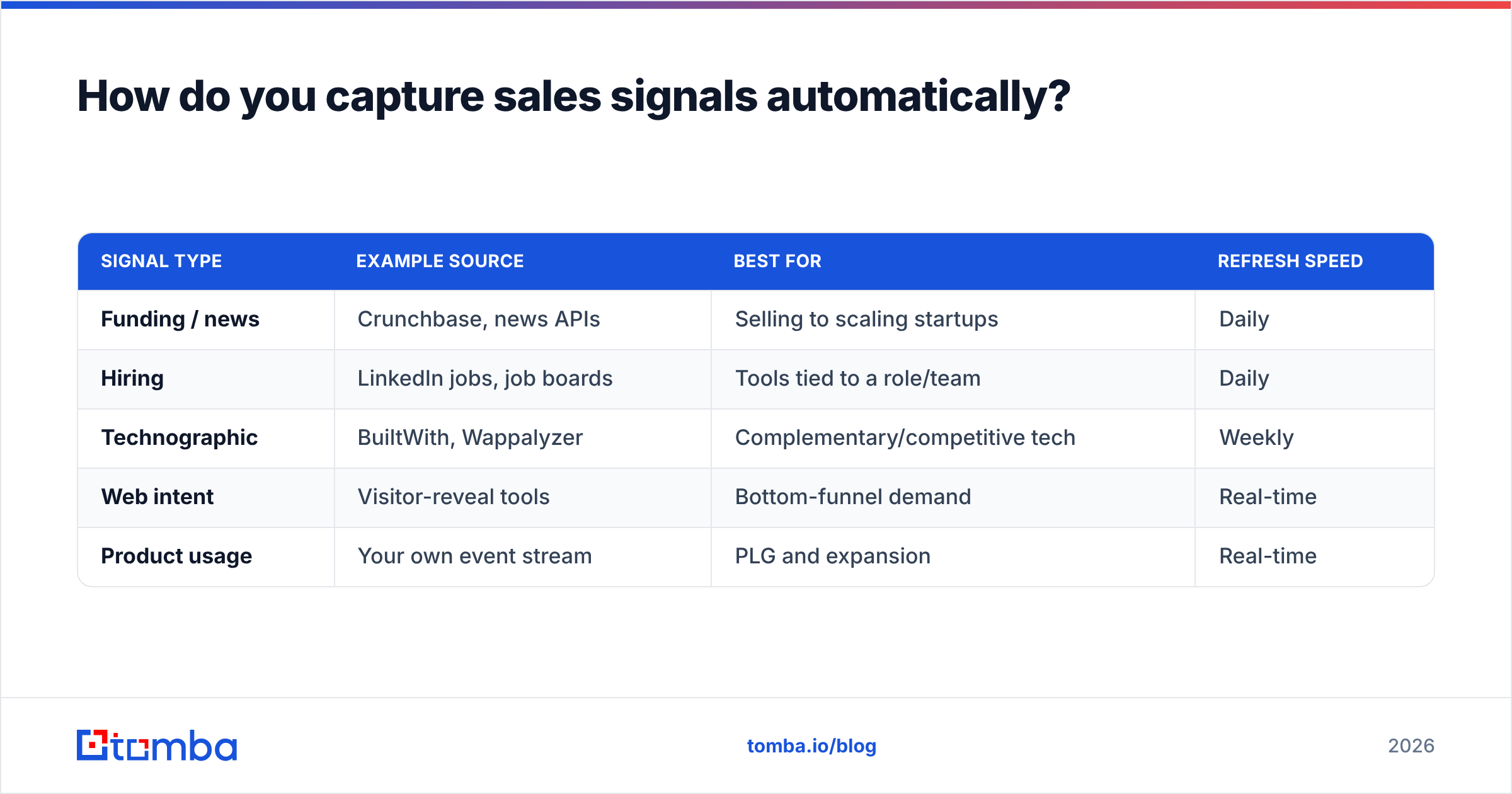
Capture is about choosing sources that match your motion. You don't need all of them — pick two or three that correlate with your best closed-won deals.
| Signal type | Example source | Best for | Refresh speed |
|---|---|---|---|
| Funding / news | Crunchbase, news APIs | Selling to scaling startups | Daily |
| Hiring | LinkedIn jobs, job boards | Tools tied to a role/team | Daily |
| Technographic | BuiltWith, Wappalyzer | Complementary/competitive tech | Weekly |
| Web intent | Visitor-reveal tools | Bottom-funnel demand | Real-time |
| Product usage | Your own event stream | PLG and expansion | Real-time |
If you sell to companies based on the technology they run, a website tech stack checker can confirm a target's stack before a rep ever reaches out. For inbound demand, a website visitor reveal tool de-anonymizes traffic so you can act on accounts that never filled out a form. The point is to wire the source to fire an event — a webhook, a row in a sheet, a CRM update — not to land in a dashboard a human has to remember to open.
Why is enrichment the make-or-break stage?#
Enrichment is where most signal automations quietly fail, because a signal without a verified contact is a dead end.
Picture the smoke detector again: it's useless if it can't tell you which room. A funding alert tells you Acme raised a Series B. So what? You need the VP of Sales's name, a verified work email, and ideally a direct phone number — automatically, in the same second the signal fires. That's the difference between "interesting" and "actionable."
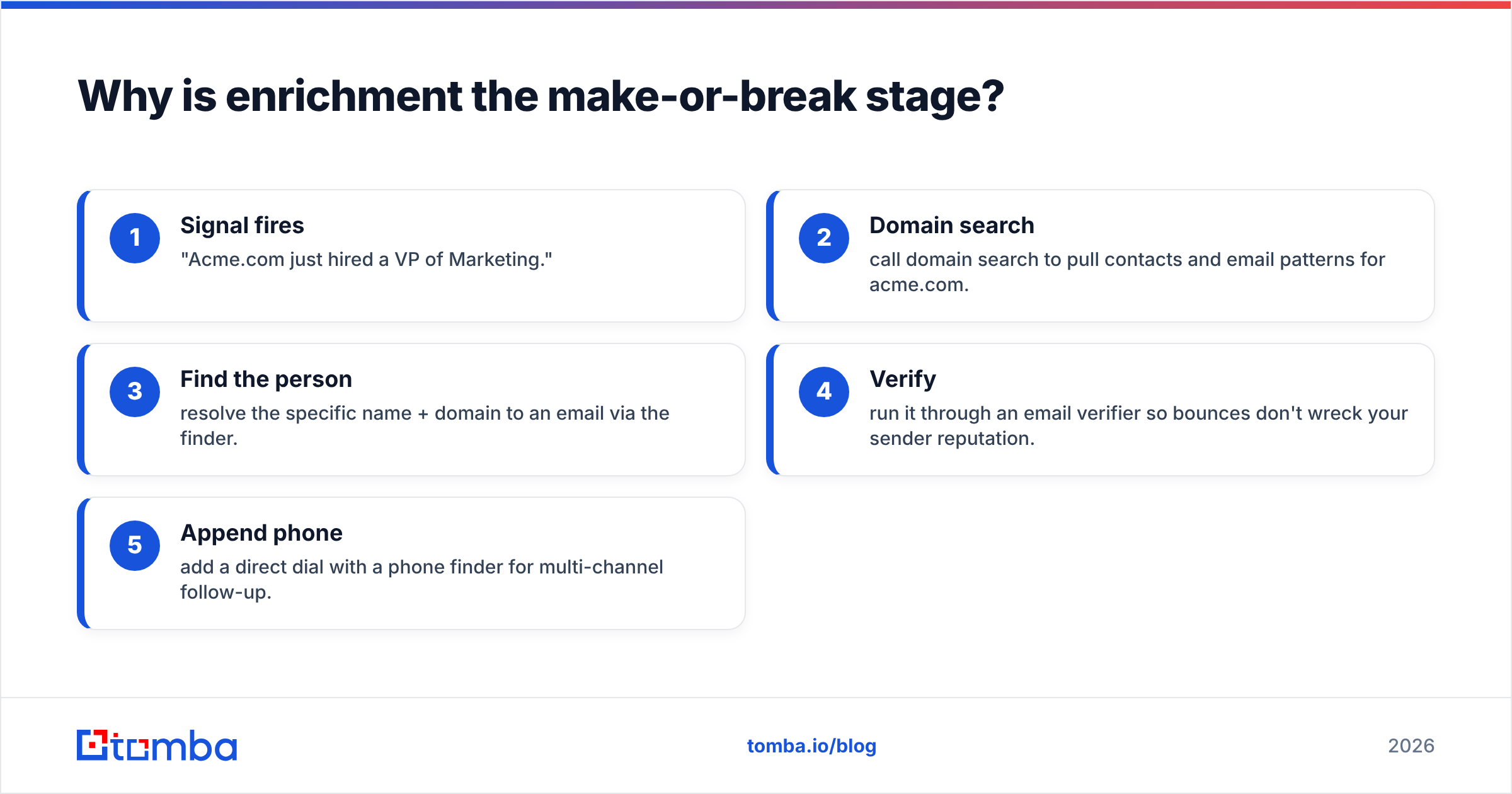
This is exactly where an email finder API earns its place in the stack. When a signal names a company and a role, the API resolves it to a real, deliverable email address. The flow looks like this:
- Signal fires — "Acme.com just hired a VP of Marketing."
- Domain search — call domain search to pull contacts and email patterns for acme.com.
- Find the person — resolve the specific name + domain to an email via the finder.
- Verify — run it through an email verifier so bounces don't wreck your sender reputation.
- Append phone — add a direct dial with a phone finder for multi-channel follow-up.
All of that happens before a rep sees the alert. By the time the notification lands, it carries a name, a verified email, a phone number, and the triggering event. Reps don't research — they reach out.

A note on verification: skipping it is the single most common mistake. Catch-all domains and stale records inflate your bounce rate, and a high bounce rate degrades email deliverability across your whole domain. Running a catch-all verifier on ambiguous results keeps your list — and your sender reputation — clean while still moving at signal speed.
How do you score and prioritize signals?#
Scoring stops automation from drowning your reps. Once enrichment makes every signal actionable, you need rules that decide which ones actually deserve a human.
Score on a few weighted dimensions:
- ICP fit — Does the company match your size, industry, and geography? A perfect signal from a non-ICP account is still noise.
- Signal strength — A pricing-page visit outranks a blog read. A trial sign-up outranks both.
- Recency — Decay the score over time. A signal from this morning is worth more than one from last week.
- Role match — A signal tied to a decision-maker beats one tied to an intern.
- Stacking — Multiple signals on one account (funding and hiring and a web visit) should compound, not just sum.
Keep the first version brutally simple: a points formula in your CRM or a few if rules in your automation platform. A signal scoring 80+ goes straight to a rep as a hot marketing qualified lead; 50–79 enters a nurture sequence; below 50 gets logged but not actioned. You can layer ML later — most teams never need to.
How do you route signals to reps automatically?#
Routing is the last mile: get the enriched, scored signal to the right person in the tool they already live in.
The three routing patterns that matter:
- Rep alert — Push the signal to Slack or email with full context (event, contact, score, suggested next step). Best for high-value, human-led outbound.
- CRM task — Create a task or update a record in your CRM so it shows up in the rep's daily queue. This is where a HubSpot integration or Salesforce integration does the heavy lifting.
- Auto-sequence — Drop qualified, verified contacts straight into a cold-email or LinkedIn cadence for lower-touch segments.
The glue is usually a no-code automation layer. A Zapier integration or Make.com integration lets you chain "signal fires → enrich via API → score → route" without writing a backend. For higher volume, call the Tomba API directly from your own service and skip the per-task automation fees.
What does a complete automated stack look like?#
Here's how the pieces fit together, and roughly what each layer costs to start.
| Stage | Job to be done | Example tooling | Notes |
|---|---|---|---|
| Capture | Detect the event | Intent tool, job scraper, visitor reveal | Pick sources tied to closed-won |
| Enrich | Resolve to verified contact | Tomba Email Finder + verifier | The connective tissue |
| Score | Prioritize ICP + strength | CRM rules, scoring app | Start simple, decay over time |
| Route | Deliver to rep/sequence | Slack, [ |
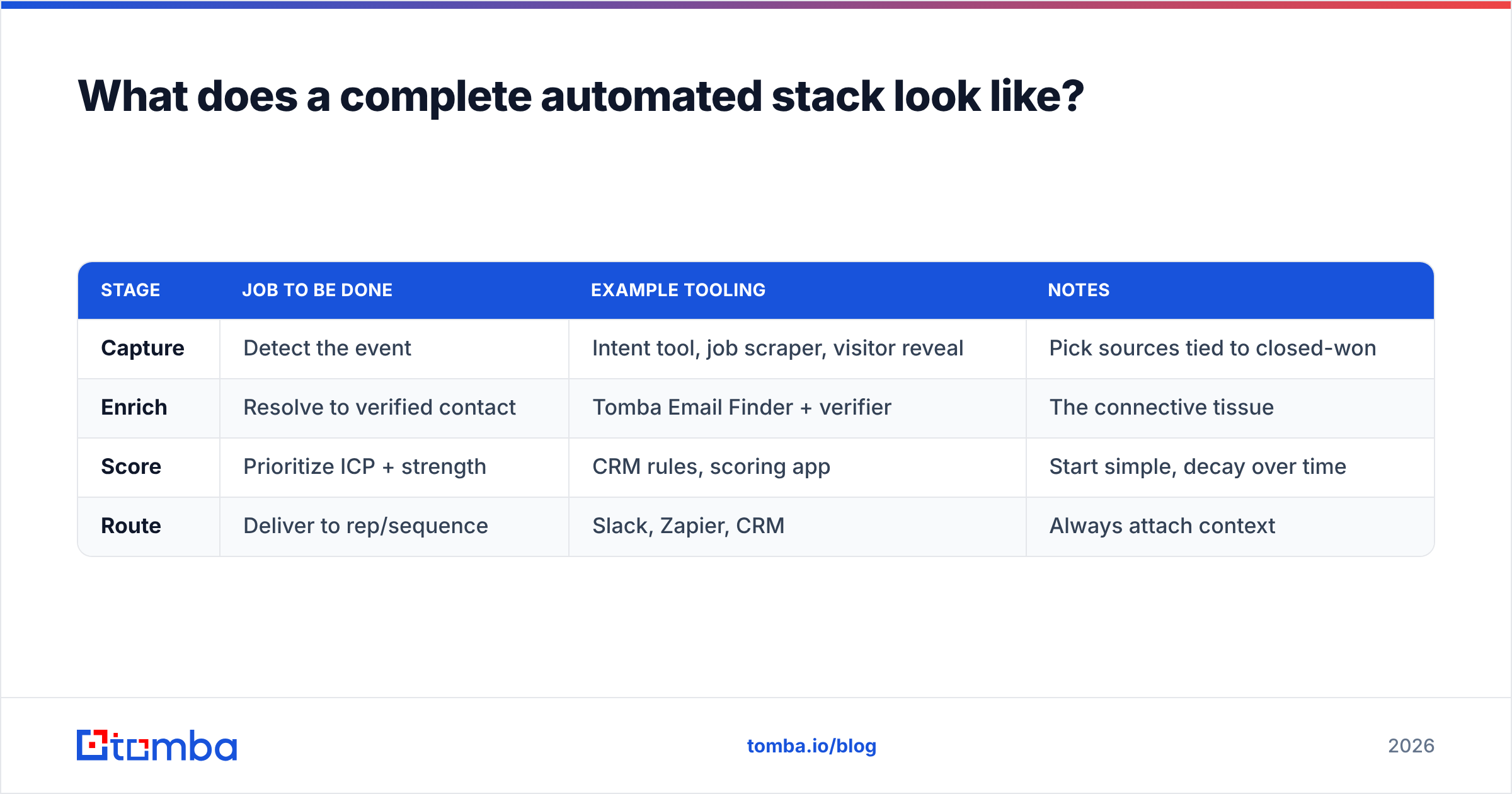
Zapier](https://tomba.io/integrations/zapier), CRM | Always attach context |
On pricing, you can start lean. Many signal sources have free or low-cost tiers, and for the enrichment layer Tomba's pricing starts with a free plan (25 searches/month), then Starter at $49/mo and Growth at $99/mo — enough to enrich thousands of signals before you need an enterprise contract. Compare that to standalone intent platforms that start in the four figures monthly, and the build-it-yourself path is far cheaper to validate.
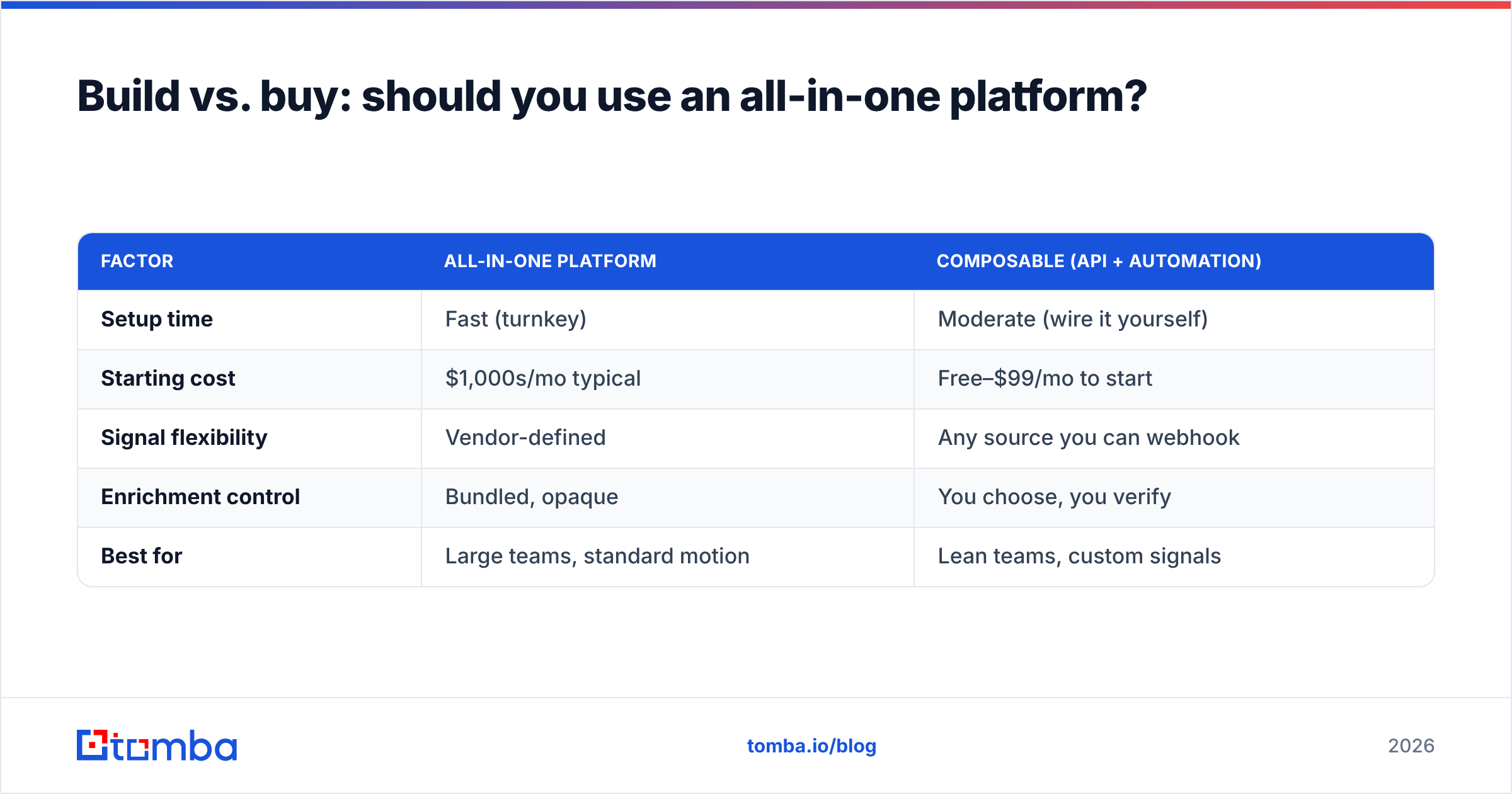
Build vs. buy: should you use an all-in-one platform?#
The honest answer: it depends on volume and how custom your signals are.
| Factor | All-in-one platform | Composable (API + automation) |
|---|---|---|
| Setup time | Fast (turnkey) | Moderate (wire it yourself) |
| Starting cost | $1,000s/mo typical | Free–$99/mo to start |
| Signal flexibility | Vendor-defined | Any source you can webhook |
| Enrichment control | Bundled, opaque | You choose, you verify |
| Best for | Large teams, standard motion | Lean teams, custom signals |
All-in-one suites (the 6sense and Demandbase tier) are excellent if you have the budget and a standard motion — they handle capture, scoring, and routing in one contract. But you trade flexibility and pay for enrichment you can't audit. If you're a lean team or your best signals are non-standard (a niche job board, your own product events), the composable route wins: you control every stage and pay a fraction of the price. For a deeper look at how vendors source contact data, Tomba documents where its data comes from — worth reading before you trust any provider's enrichment.
For broader context on intent data and buying signals as a category, Gartner's sales research and peer reviews on G2 are solid neutral starting points. HubSpot's own guide to buying signals is also a useful primer on the qualitative side.
What's the simplest version you can ship this week?#
You don't need to boil the ocean. Here's a minimum viable signal automation you can stand up in a few hours:
- Pick one signal — say, new VP-level hires at companies in your ICP, pulled from a job-board or LinkedIn feed.
- Webhook it — fire each new hire event into Zapier or Make.
- Enrich — call the email finder API with the name + company domain, then verify the result.
- Score — a one-line filter: is the company in your ICP size/industry? If yes, continue.
- Route — post to a
#signalsSlack channel with the name, verified email, role, and the triggering event.
That's it. One signal, fully automated, carrying a contactable lead to a rep in seconds. Once it's working, add a second source, then scoring nuance, then auto-sequencing. The architecture doesn't change — you're just adding capture sources and routing rules to a pipeline that already runs itself.
The bottom line#
Automating sales signals isn't about buying the most expensive intent platform. It's about closing the gap between "something happened" and "a rep reached out" — and the stage that closes that gap is enrichment. A signal you can't contact is just trivia.
If you want the connective tissue that turns raw signals into verified, contactable leads automatically, start with the Tomba Email Finder and its API. Wire it into the enrich step of your workflow, point your favorite signal source at it, and let every funding round, new hire, and web visit arrive on a rep's desk already researched. Spin up a free plan (25 searches/month), prove the loop on one signal this week, and scale the sources from there.
// get started
Find, verify and enrich your first contacts today
Start on the free plan with 25 searches a month, then scale when your team is ready.
Free plan · No credit card required · GDPR & CCPA
// about the author