Best CRM for Sales Reps in 2026: Top 7 Tools Compared
Most CRMs are built for managers, not the reps who live in them all day. Here are the 7 best CRMs for sales reps in 2026, ranked by what actually saves selling time.
Best CRM for Sales Reps in 2026: Top 7 Tools Compared
Most CRMs are bought by managers and resented by reps. The dashboards look great in a board deck, but the person who has to log 40 calls a day just sees another form to fill out. The best CRM for sales reps is the one they actually open without being nagged — fast to update, automated where it counts, and useful on a phone between meetings.
This guide ranks seven CRMs from the seller's seat, not the VP's. We weigh data entry friction, automation, mobile usability, and price, then show where each one fits.
TL;DR#
- Best overall for reps: HubSpot Sales Hub — clean UI, generous free tier, low logging friction.
- Best for pure pipeline focus: Pipedrive — built around the deal board, nothing extra to distract you.
- Best for enterprise teams: Salesforce — the most powerful, but only with admin support behind it.
- Best lightweight option: Folk or Close — fast, modern, and built for small outbound teams.
- A CRM is only as good as its data. Pair any of these with an email finder and data enrichment so reps aren't manually hunting contact details.
What makes a CRM good for sales reps specifically?#
A CRM good for reps optimizes for one thing: time spent selling versus time spent feeding the system. Manager-first CRMs invert that — they demand rich data for reporting and push the cost onto the rep.
Think of it like a car. Executives want the dashboard with every gauge; the driver just wants the steering and pedals to respond. A rep-first CRM hides the gauges until you need them and keeps the controls within reach.
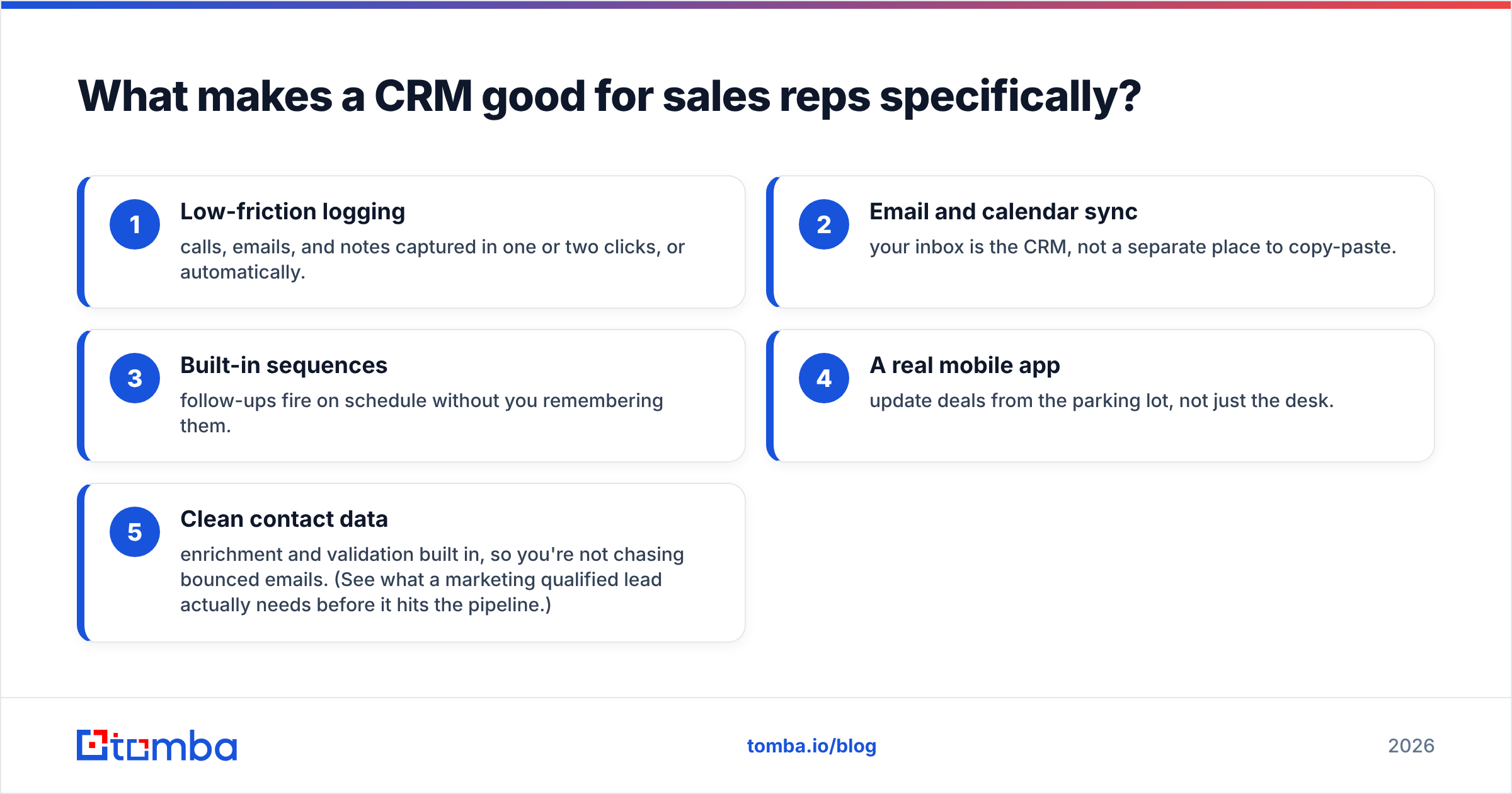
Five things separate a rep-friendly CRM from an admin tax:
- Low-friction logging — calls, emails, and notes captured in one or two clicks, or automatically.
- Email and calendar sync — your inbox is the CRM, not a separate place to copy-paste.
- Built-in sequences — follow-ups fire on schedule without you remembering them.
- A real mobile app — update deals from the parking lot, not just the desk.
- Clean contact data — enrichment and validation built in, so you're not chasing bounced emails. (See what a marketing qualified lead actually needs before it hits the pipeline.)
If a CRM nails those five, reps update it willingly. If it misses them, you get the classic graveyard of half-filled deals and a forecast nobody trusts.
)
Which CRMs are the best for sales reps in 2026?#
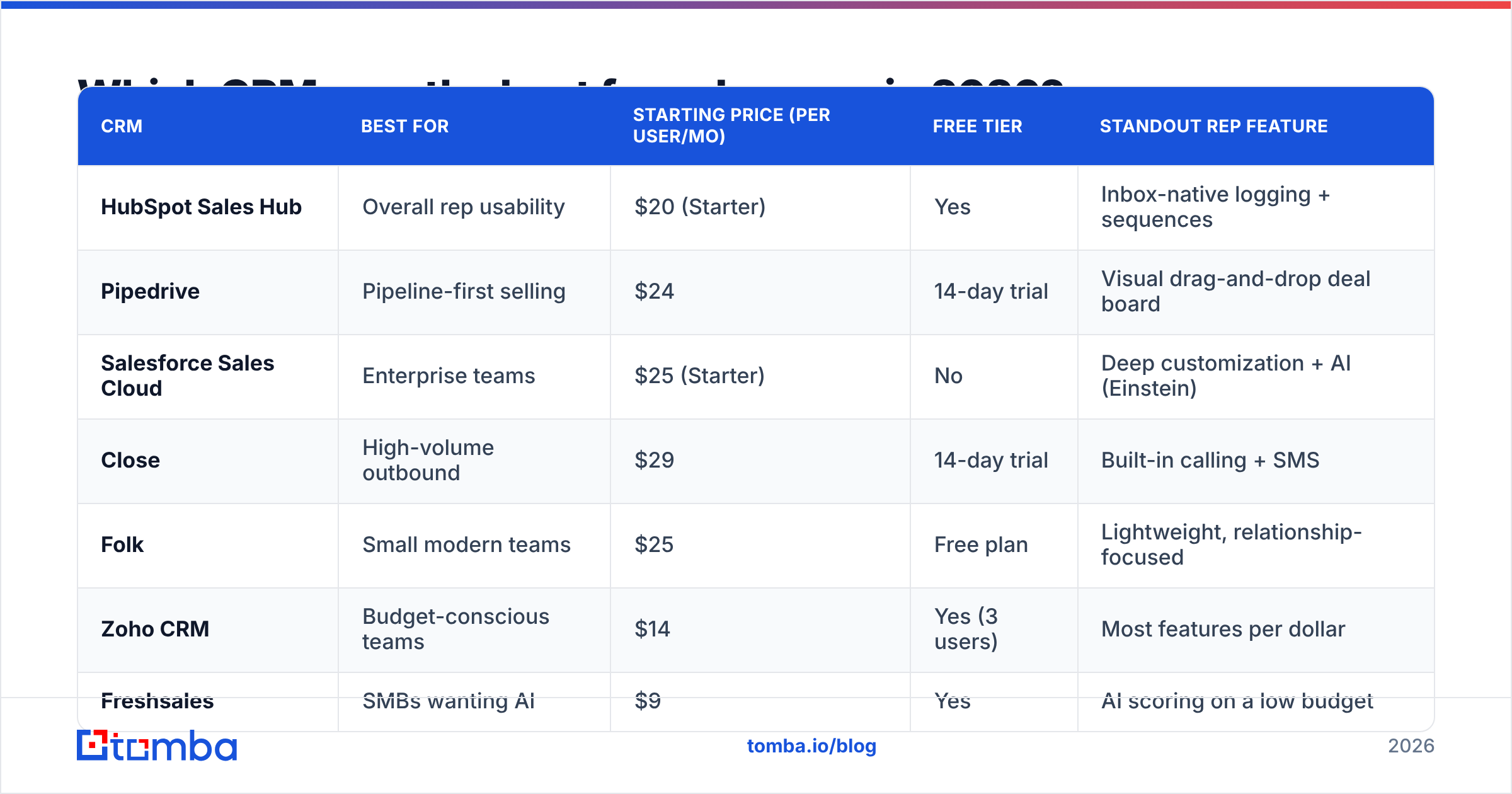
Here's the short ranking before we go tool by tool. Prices are the entry-level paid seat as of 2026; always confirm current rates on each vendor's page.
| CRM | Best for | Starting price (per user/mo) | Free tier | Standout rep feature |
|---|---|---|---|---|
| HubSpot Sales Hub | Overall rep usability | $20 (Starter) | Yes | Inbox-native logging + sequences |
| Pipedrive | Pipeline-first selling | $24 | 14-day trial | Visual drag-and-drop deal board |
| Salesforce Sales Cloud | Enterprise teams | $25 (Starter) | No | Deep customization + AI (Einstein) |
| Close | High-volume outbound | $29 | 14-day trial | Built-in calling + SMS |
| Folk | Small modern teams | $25 | Free plan | Lightweight, relationship-focused |
| Zoho CRM | Budget-conscious teams | $14 | Yes (3 users) | Most features per dollar |
| Freshsales | SMBs wanting AI | $9 | Yes | AI scoring on a low budget |
No single winner fits everyone. A 200-person org and a 4-person founder-led sales team should not buy the same CRM.
Is HubSpot the best CRM for sales reps?#
For most reps, yes — HubSpot Sales Hub is the strongest all-around pick. It's the one reps complain about least, which is the highest praise a CRM gets.
The reason is friction. HubSpot logs emails and meetings automatically through its HubSpot integration-friendly architecture and Gmail/Outlook plugins, so the contact timeline fills itself. Sequences let a rep enroll a prospect once and let automated follow-ups run. The free tier is genuinely usable, not a crippled demo, which makes it easy to roll out to a team before committing budget.
The catch: HubSpot gets expensive fast as you climb tiers and add seats. Starter is fair, but Professional and Enterprise pricing can surprise small teams. Read the fine print on HubSpot's pricing page before assuming Starter covers you.
Best for: SMBs and mid-market teams that want adoption without a six-month rollout.
Is Pipedrive better than Salesforce for reps?#
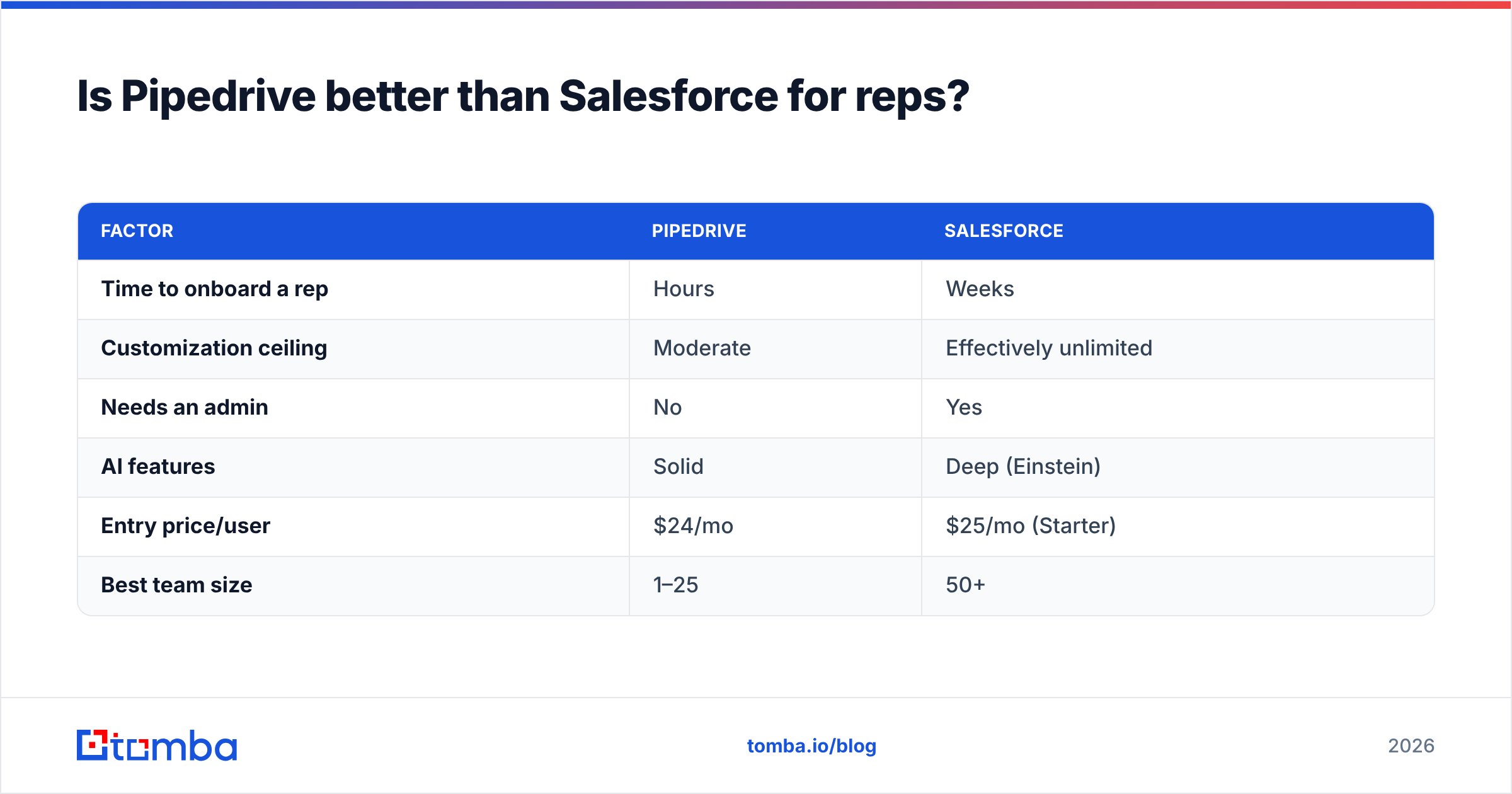
For the individual rep, often yes — Pipedrive is better; for the organization, Salesforce usually wins. They optimize for different buyers.
Pipedrive is built around one screen: the pipeline. Deals are cards you drag between stages, and the entire product is organized around moving them forward. There's almost nothing to learn. Reps who hate CRMs tend to tolerate Pipedrive because it feels like a to-do list, not a database. It connects cleanly through its Pipedrive integration ecosystem for enrichment and outreach.
Salesforce is the opposite — near-infinite power, near-infinite configuration. It can model any sales process on earth, but it needs an admin to do it. Drop a rep into an unconfigured Salesforce org and they'll drown. Configure it well, and it's the strongest enterprise CRM available. Its Salesforce integration options and AppExchange are unmatched. Compare the editions on Salesforce's official pricing.
Rule of thumb: under 25 reps with a simple process, Pipedrive. Complex territories, custom objects, and a dedicated ops team, Salesforce.
| Factor | Pipedrive | Salesforce |
|---|---|---|
| Time to onboard a rep | Hours | Weeks |
| Customization ceiling | Moderate | Effectively unlimited |
| Needs an admin | No | Yes |
| AI features | Solid | Deep (Einstein) |
| Entry price/user | $24/mo | $25/mo (Starter) |
| Best team size | 1–25 | 50+ |
What about Close, Folk, Zoho, and Freshsales?#
These four cover the edges that the big three miss.
- Close is built for outbound teams that live on the phone. Calling, SMS, and email are native, so a rep can dial, log, and follow up without leaving one window. If your team runs high-volume cold outreach, it's hard to beat. Pair it with reliable B2B phone numbers and the calling workflow gets even tighter.
- Folk is the modern, lightweight choice — relationship-first, fast, and pleasant to use. Great for founder-led sales, agencies, and small teams that find HubSpot too heavy.
- Zoho CRM delivers the most features per dollar. At $14/user it's the value pick, and it scales surprisingly well, though the UI feels busier than the premium options.
- Freshsales brings AI lead scoring and a clean interface at the lowest entry price, making it a strong SMB option for teams that want intelligence without enterprise cost.
)
How much should sales reps' CRM cost?#
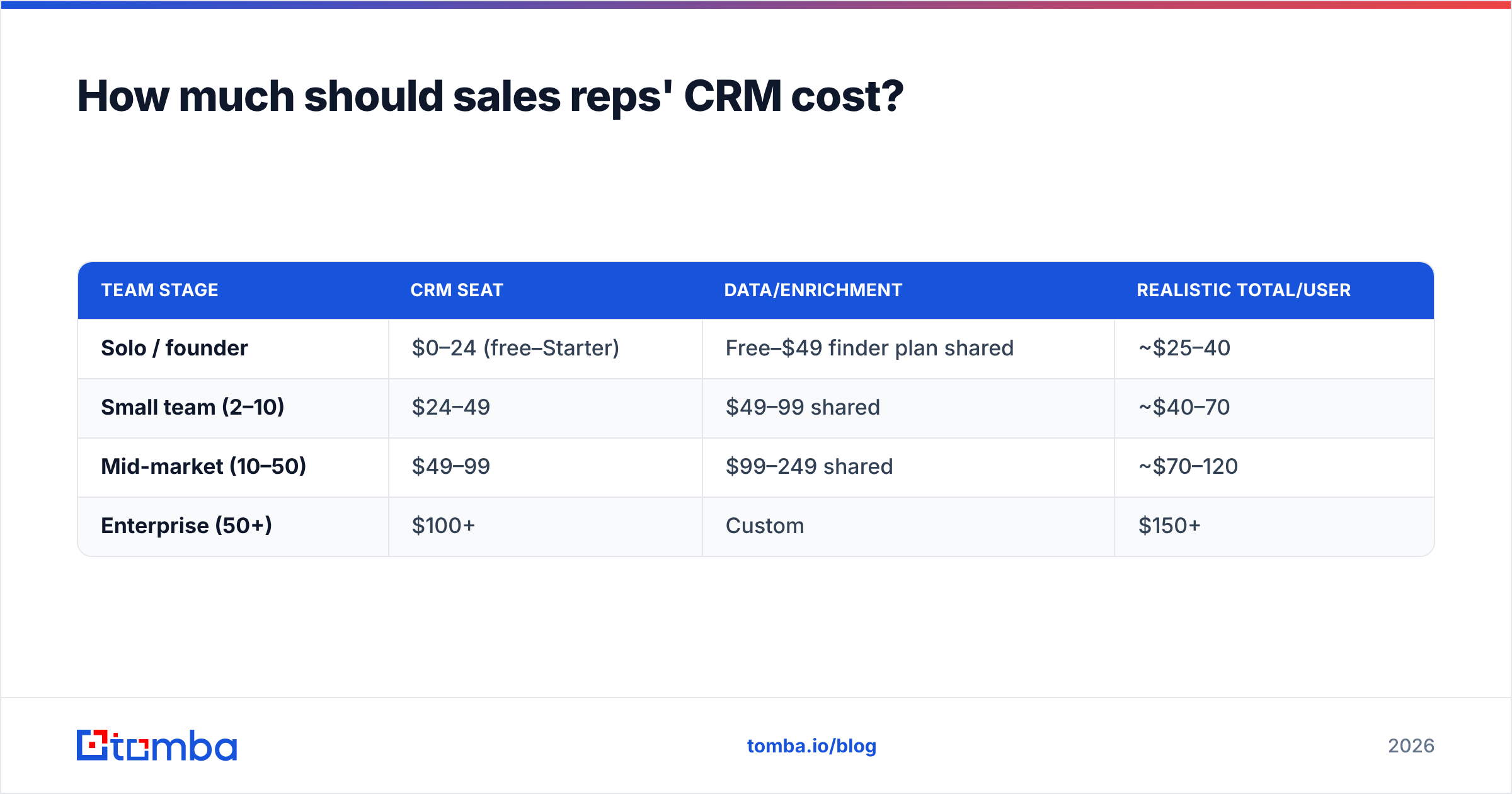
Budget per rep for the seat plus the data layer — most teams forget the second half. A $25/user CRM with garbage contact data costs you more in bounced emails and dead dials than a slightly pricier setup with clean records.
Here's a realistic monthly cost framework per rep:
| Team stage | CRM seat | Data/enrichment | Realistic total/user |
|---|---|---|---|
| Solo / founder | $0–24 (free–Starter) | Free–$49 finder plan shared | ~$25–40 |
| Small team (2–10) | $24–49 | $49–99 shared | ~$40–70 |
| Mid-market (10–50) | $49–99 | $99–249 shared | ~$70–120 |
| Enterprise (50+) | $100+ | Custom | $150+ |
The pattern that works: pick a CRM your reps will actually use, then layer a dedicated data tool underneath it. Tomba's pricing starts free (25 searches/mo) and scales to Starter at $49/mo and Growth at $99/mo — cheap insurance against a pipeline full of wrong addresses. You can verify records with the email verifier before they ever reach a sequence.
Why does CRM data quality matter more than the CRM itself?#
Because a CRM is just a container — what's inside it decides whether reps win. The slickest interface in the world is useless if half the email addresses bounce and the phone numbers are three jobs out of date.
This is the part teams underinvest in. They argue for weeks about HubSpot versus Salesforce, then populate either one with scraped, unverified data and wonder why connect rates crater. Garbage in, forecast out.
Three habits keep CRM data sales-ready:
- Find contacts at the source. Use an email finder or domain search to pull verified work emails by name or company instead of guessing patterns.
- Verify before you send. Run new contacts through verification so bounces never touch your sending domain — protecting your sender reputation and deliverability.
- Enrich on entry. Auto-append title, company size, and social profiles so reps prioritize the right accounts without manual research.
When data flows in clean and enriched, the CRM stops being a chore and starts being a weapon. Reps trust it, update it, and the forecast finally reflects reality.
How do you roll out a new CRM without reps revolting?#
Start with the workflow, not the software. The most common failure is buying a CRM, replicating every old field, and forcing reps to fill all of them. Adoption dies in week two.
A rollout that sticks:
- Map the real selling motion first. Define the five to seven stages a deal actually moves through. Build the CRM around those, nothing more.
- Make the first week feel like a win. Pre-load enriched contacts so reps open the CRM to a populated, useful pipeline instead of empty forms.
- Automate the logging. Turn on email/calendar sync from day one so reps see the timeline fill without typing.
- Tie it to commission visibility. Reps update what they can see paying off. Surface deal value and quota progress front and center.
- Cut required fields ruthlessly. Every mandatory field is a tax. Require only what you genuinely report on.
Do this and you sidestep the death spiral where reps keep their real pipeline in a spreadsheet and treat the CRM as theater for management.
The bottom line: which CRM should you pick?#
Match the tool to your team size and motion. HubSpot for balanced all-around use, Pipedrive for pipeline-focused small teams, Salesforce for enterprise complexity, Close for phone-heavy outbound, and Zoho or Freshsales when budget leads. There is no universal best — only the best fit for how your reps actually sell.
But whichever CRM you choose, its value is capped by the quality of the data inside it. A rep-friendly interface on top of stale, unverified contacts still produces bounced emails, wasted dials, and a forecast nobody believes.
That's where Tomba's Email Finder earns its place in the stack. Find verified professional emails by name, domain, or company, run them through verification, and push clean records straight into HubSpot, Salesforce, or Pipedrive through Tomba's native integrations. Start free with 25 searches a month, then scale to a $49/mo Starter plan as your team grows. Pick the CRM your reps will love — then feed it data they can trust.
// get started
Find, verify and enrich your first contacts today
Start on the free plan with 25 searches a month, then scale when your team is ready.
Free plan · No credit card required · GDPR & CCPA
// about the author