Bounceremove vs Limeleads: B2B Data Tool Comparison 2026
Bounceremove cleans bounced emails; Limeleads sells B2B contact lists. They solve different problems. Here's which one your pipeline actually needs in 2026.
You typed "Bounceremove vs Limeleads" into a search bar expecting a clean head-to-head. The honest answer is that these two tools barely compete — they sit at opposite ends of the same workflow. One scrubs the emails you already have. The other sells you emails you don't. Pick the wrong one and you'll either pay to verify a list you never built, or build a list you can't trust.
This breakdown sorts out exactly what each does, where they overlap, where they don't, and which tool — including a third option that does both jobs — belongs in your 2026 outbound stack.
TL;DR#
- Bounceremove is an email verification / list-cleaning tool. You feed it a list, it flags invalids, catch-alls, and risky addresses so your bounce rate drops.
- Limeleads is a B2B contact database. You search by industry, title, and geography, then export verified-ish leads. It sources data; it doesn't deeply clean yours.
- They are not direct competitors. Verification ≠ lead sourcing. Many teams need both, in sequence.
- The real decision is whether you want two single-purpose tools or one platform that finds, verifies, and enriches in the same place.
- Tomba covers finding, verifying, catch-all checks, and enrichment under one roof, starting at $49/mo — which is why it shows up in both columns below.
What does Bounceremove actually do?#
Bounceremove is a single-job tool: email list verification. Think of it as a bouncer at the door of your sending domain. Before a name gets onto your send list, Bounceremove checks the address against MX records, runs SMTP handshakes, and flags anything that looks like it'll bounce — typos, dead mailboxes, role accounts (info@, sales@), and disposable domains.
The output is a cleaned file, usually split into categories like valid, invalid, catch-all/accept-all, and unknown. You upload a CSV, wait, and download a safer version. That's the whole loop.
Where it helps:
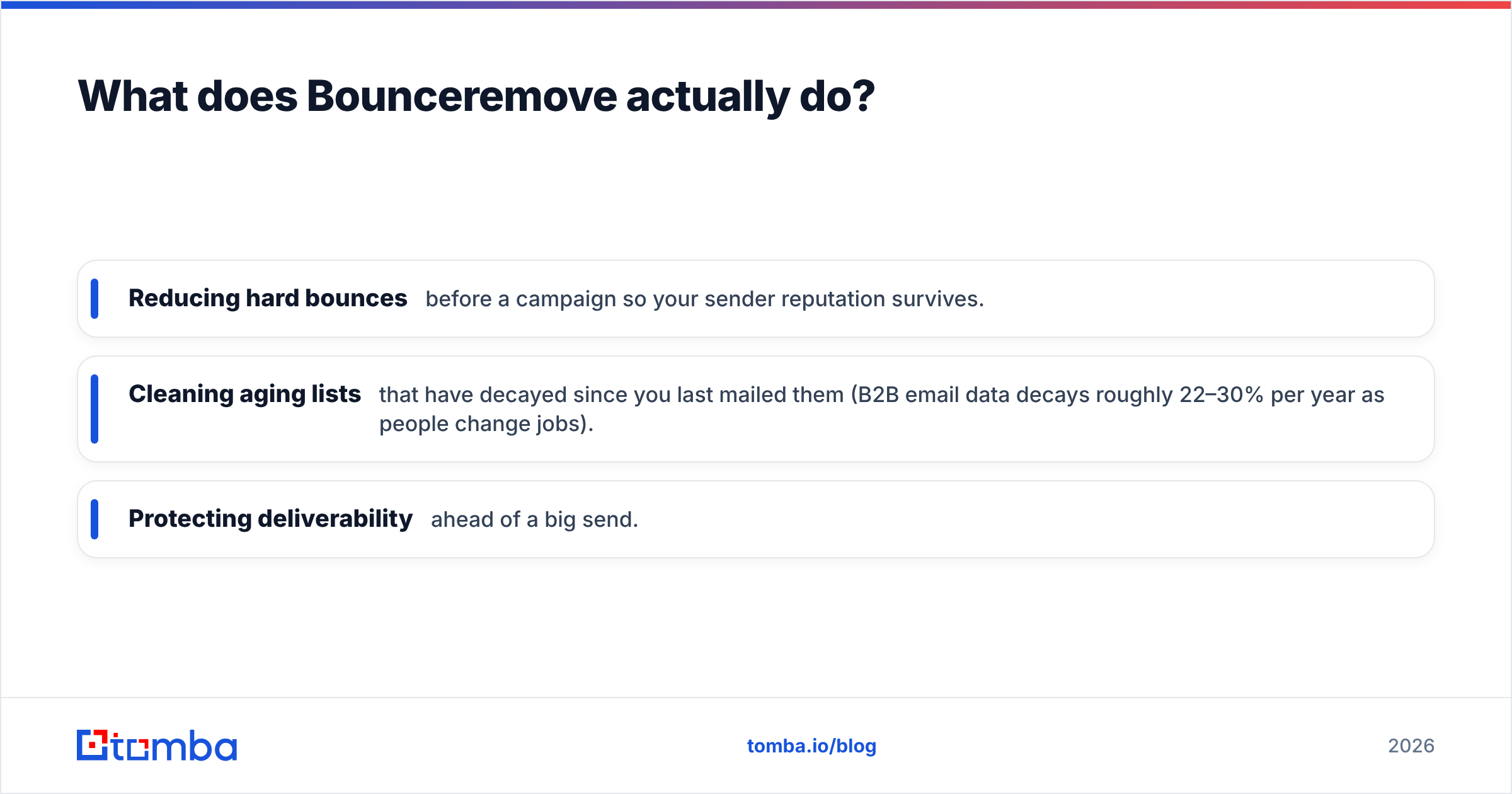
- Reducing hard bounces before a campaign so your sender reputation survives.
- Cleaning aging lists that have decayed since you last mailed them (B2B email data decays roughly 22–30% per year as people change jobs).
- Protecting deliverability ahead of a big send.
What it does not do: it won't find you a single new contact. If your CRM is empty, Bounceremove has nothing to clean. It's a maintenance tool, not a growth tool.

What does Limeleads actually do?#
Limeleads is a lead generation database. You don't bring a list — you build one. Using filters like industry, company size, job title, location, and revenue, you search a pool of business contacts and export the ones that match your ideal customer profile. According to Limeleads' own positioning, the pitch is "targeted B2B leads on demand," with credits consumed as you reveal and export contacts.
Where it helps:
- Cold-starting outbound when you have no existing pipeline.
- Building lists by persona — e.g., "VP Marketing at SaaS companies, 50–200 employees, US."
- Filling territory gaps for SDRs who've exhausted their warm network.
Limeleads does run some validation on its data, but its core value is sourcing, not cleaning. The freshness of any database depends entirely on when each record was last refreshed, and contact databases are notorious for stale rows. You'll still want a verification pass before you mail an exported list at scale — which is exactly the job Bounceremove (or a built-in verifier) does.
So the two tools are sequential, not interchangeable: Limeleads to source → verify → send. Bounceremove only handles that middle step.
Bounceremove vs Limeleads: the core difference#
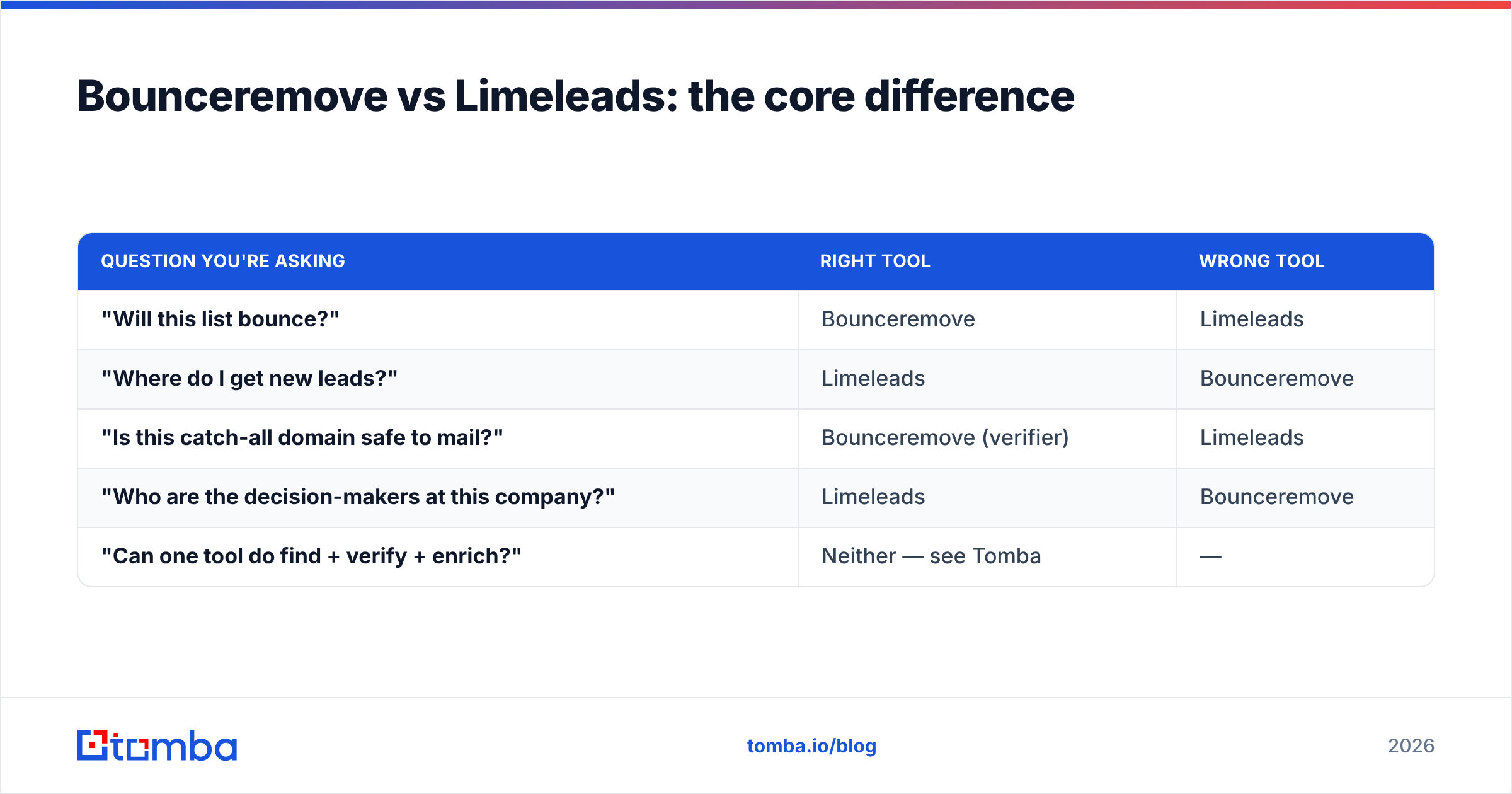
Here's the cleanest way to see it. These tools answer different questions.
| Question you're asking | Right tool | Wrong tool |
|---|---|---|
| "Will this list bounce?" | Bounceremove | Limeleads |
| "Where do I get new leads?" | Limeleads | Bounceremove |
| "Is this catch-all domain safe to mail?" | Bounceremove (verifier) | Limeleads |
| "Who are the decision-makers at this company?" | Limeleads | Bounceremove |
| "Can one tool do find + verify + enrich?" | Neither — see Tomba | — |
If you only remember one line: Limeleads gets you the names; verification keeps them from wrecking your domain. They're two stops on the same assembly line.
How do they compare on features and pricing?#
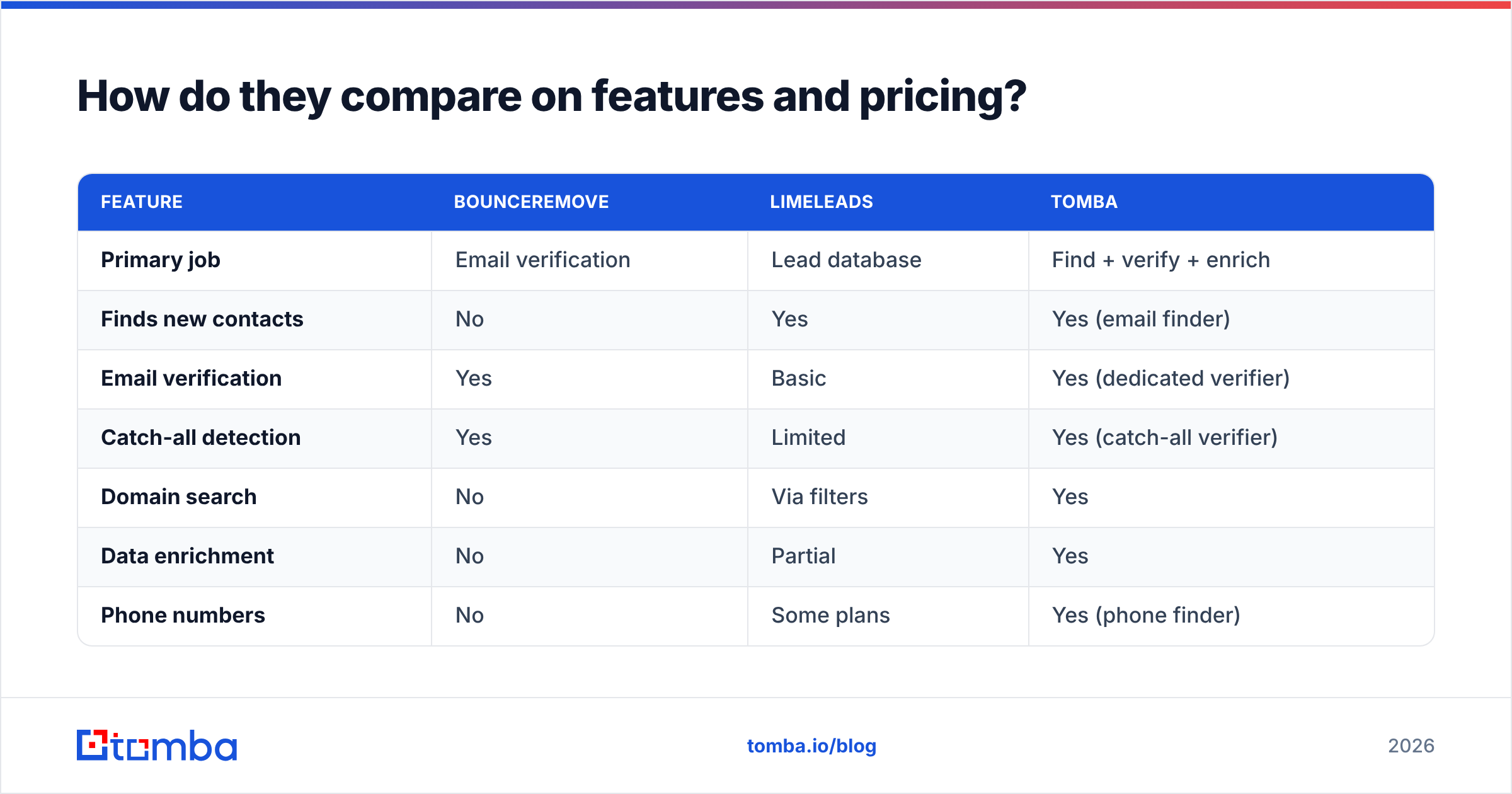
Because the tools target different jobs, a fair comparison lines them up across the full sourcing-to-send workflow — and includes a platform that spans both, so you can see what consolidation looks like.
| Feature | Bounceremove | Limeleads | Tomba |
|---|---|---|---|
| Primary job | Email verification | Lead database | Find + verify + enrich |
| Finds new contacts | No | Yes | Yes (email finder) |
| Email verification | Yes | Basic | Yes (dedicated verifier) |
| Catch-all detection | Yes | Limited | Yes (catch-all verifier) |
| Domain search | No | Via filters | Yes |
| Data enrichment | No | Partial | Yes |
| Phone numbers | No | Some plans | Yes (phone finder) |
| Bulk processing | Yes | Yes (export) | Yes (bulk tools) |
| API access | Limited | Limited | Full REST API |
| Free tier | Trial credits | Limited free leads | 25 searches/mo |
| Entry paid price | Pay-as-you-go | Subscription tiers | $49/mo Starter |
Pricing models differ enough that "cheaper" depends on volume. Bounceremove leans pay-as-you-go per verification — fine for occasional cleanups, pricey if you verify constantly. Limeleads runs on credit-based subscriptions where each revealed contact burns credits. Platforms like Tomba bundle searches and verifications into monthly plans; you can compare the Tomba pricing tiers directly rather than estimating per-credit math.
A practical note on cost: paying twice — once to source (Limeleads) and once to verify (Bounceremove) — is common and totally valid. But it's also why teams running steady outbound often consolidate. Two subscriptions, two logins, two billing cycles, and a manual CSV handoff between them adds friction that a single platform removes.
When should you choose Bounceremove?#
Choose a dedicated verifier like Bounceremove when:
- You already have lists from events, signups, partnerships, or an old CRM, and just need them clean.
- Verification is occasional — a quarterly scrub rather than a daily pipeline.
- You don't need new leads and won't pay for sourcing features you'd never touch.
If that's you, a focused verification tool does the job. Just confirm it handles catch-all verification properly — accept-all domains are where weak verifiers quietly pass bad addresses and your bounce rate creeps back up. The difference between a tool that marks every catch-all "unknown" and one that actually probes them is the difference between a 1% and a 6% bounce rate.
When should you choose Limeleads?#
Choose a lead database like Limeleads when:
- Your pipeline is empty and you need raw volume to start prospecting.
- You sell by clear persona and can filter precisely by title, industry, and geography.
- You'd rather buy lists than build them through manual research.
The caveat: treat any exported list as raw material, not finished product. Always run email verification on database exports before a real send. Even well-maintained databases carry stale rows, and "I exported it from a paid tool" is not a deliverability guarantee. The cost of skipping that step is a spike in hard bounces that follows you for weeks.
For a sanity check on any vendor's data quality before committing, read independent reviews on G2 — buyer feedback tends to reveal freshness problems that marketing pages don't.
Is there a tool that does both?#
Yes — and this is the part most "X vs Y" posts skip. If you're weighing Bounceremove against Limeleads, you're really describing two halves of one workflow: source, then verify. A platform that does both removes the CSV handoff entirely.
Tomba is built for exactly that span:
- Find — use the email finder or domain search to source contacts by name, company, or domain, the way you'd use Limeleads.
- Verify — run results through the email verifier and catch-all checks in the same workspace, the way you'd use Bounceremove.
- Enrich — layer on data enrichment, phone numbers, and social profiles so a name becomes a full record.
- Scale — push it all through the API or bulk tools instead of uploading files by hand.
This isn't to say Tomba beats every single-purpose tool at its one trick — a dedicated verifier may offer more granular bounce categories, and a niche database may go deeper in one vertical. The argument is about consolidation: one login, one bill, one data pipeline, and no manual export-import step where leads get lost or duplicated.
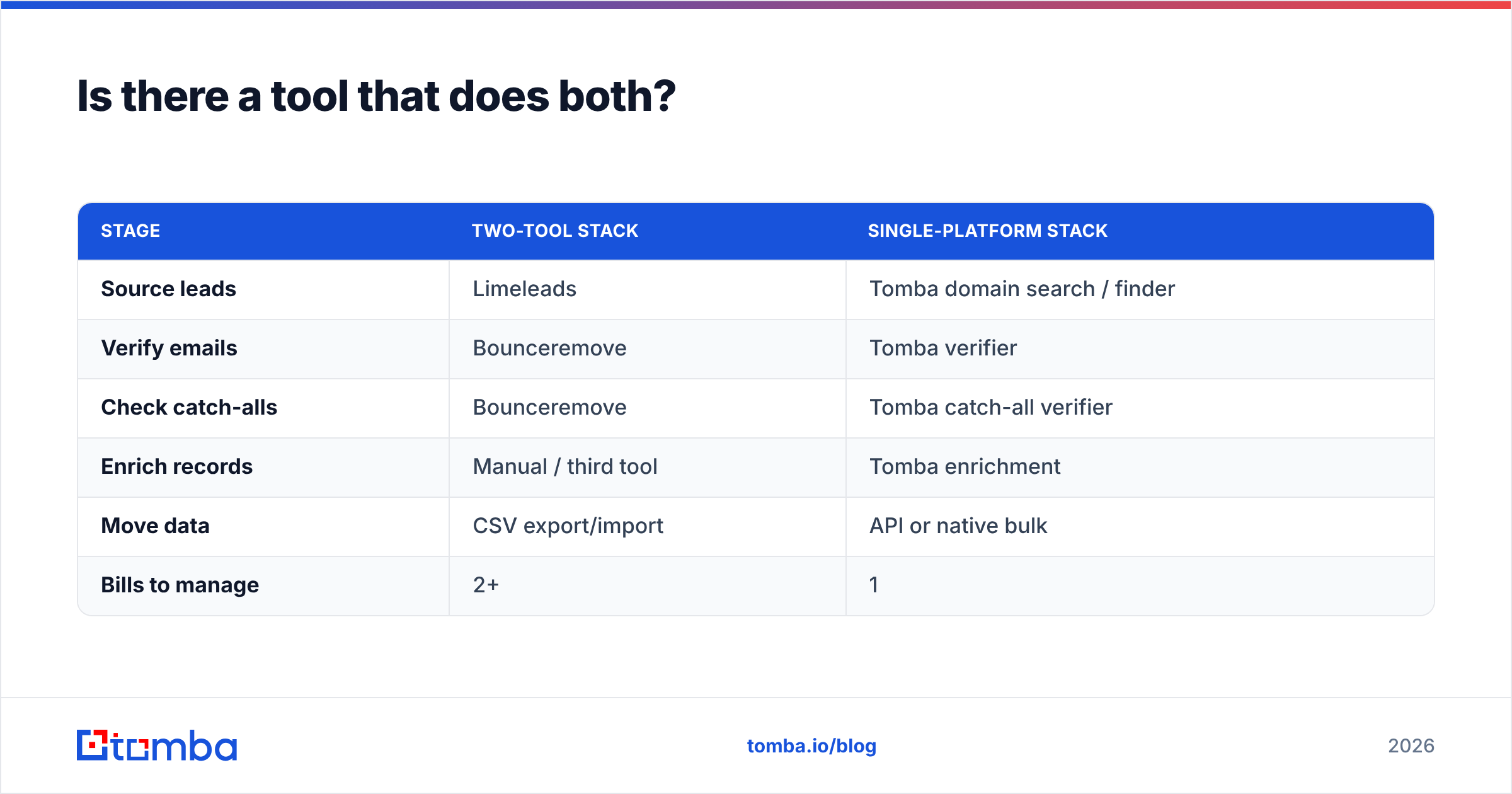
Here's the same workflow mapped to tools, so the trade-off is concrete:
| Stage | Two-tool stack | Single-platform stack |
|---|---|---|
| Source leads | Limeleads | Tomba domain search / finder |
| Verify emails | Bounceremove | Tomba verifier |
| Check catch-alls | Bounceremove | Tomba catch-all verifier |
| Enrich records | Manual / third tool | Tomba enrichment |
| Move data | CSV export/import | API or native bulk |
| Bills to manage | 2+ | 1 |
For where the underlying records come from and how accuracy is maintained, Tomba documents its data sources — worth reading whichever vendor you pick, since data provenance is the single biggest driver of real-world accuracy.
What about deliverability — does the tool even matter?#
Partly. The best verifier in the world can't save a domain with no SPF/DKIM, no warmup, and a spammy template. Tooling reduces bounces; it doesn't fix sending hygiene. Before you blame a list, confirm the fundamentals: authenticated domain, gradual volume ramp, and a clean reply-to. HubSpot's guidance on email deliverability is a solid, vendor-neutral starting point.
That said, verification is the highest-leverage single step you can take. Mailbox providers weigh bounce rate heavily when deciding inbox vs. spam. Cutting hard bounces from 8% to under 2% — which a good verification pass does routinely — often moves more campaigns to the inbox than any subject-line tweak. So whether you go Bounceremove, a built-in verifier, or something else, don't skip the verify step. It's the cheapest deliverability insurance you'll buy.
So which should you pick?#
Conclusion first: if you only need to clean lists, a verifier like Bounceremove is enough. If you only need new leads, a database like Limeleads is enough. If you do outbound continuously, stop maintaining two tools and use one platform that finds, verifies, and enriches in the same place.
- Tiny, occasional cleanup? A standalone verifier.
- One-time list build, no existing pipeline? A standalone database.
- Repeatable outbound motion? Consolidate. The CSV shuffling between a sourcing tool and a cleaning tool is exactly the kind of busywork a single platform eliminates.
The "vs" framing assumes these tools fight for the same slot. They don't. The smarter question is how many tools you want to maintain to run one workflow — and for most teams in 2026, the answer is fewer.
Get started with Tomba#
If you want to skip the two-subscription juggle, start with the Tomba Email Finder. Find professional emails by domain, name, or company; verify them and screen catch-alls in the same dashboard; then enrich with phone numbers and social data before they ever hit your sequence. The free tier gives you 25 searches a month to test accuracy on your own target accounts, and paid plans start at $49/mo with full API access for when you're ready to automate the whole find-verify-enrich loop. Build the list and trust the list — in one place.
// get started
Find, verify and enrich your first contacts today
Start on the free plan with 25 searches a month, then scale when your team is ready.
Free plan · No credit card required · GDPR & CCPA
// about the author