Bounceshield vs RocketReach: Best Email Tool in 2026?
Bounceshield guards deliverability; RocketReach finds contacts. Here's how they really compare on accuracy, pricing, and coverage in 2026 — plus a faster, cheaper alternative that does both.
You found a prospect, pulled their email, hit send — and it bounced. Now your domain reputation takes a hit and the deal stalls. That single failure is why teams keep asking whether they need a finder like RocketReach, a bounce guard like Bounceshield, or something that handles both.
This guide breaks down Bounceshield vs RocketReach on the things that actually move pipeline: data accuracy, verification depth, pricing, coverage, and workflow fit. By the end you'll know which one belongs in your stack — and where a combined tool quietly beats both.
TL;DR#
- RocketReach is a contact-data platform: it finds emails, phone numbers, and social profiles from a large person/company database. It's a finder first, verifier second.
- Bounceshield is a deliverability-focused verifier: its job is catching invalid, risky, and catch-all addresses before they bounce. It doesn't find new contacts for you.
- They solve different halves of the same problem. Using one without the other leaves a gap — you either find emails you can't trust, or protect a list you still have to build elsewhere.
- On price, RocketReach scales by credits and seats; standalone verification tools like Bounceshield charge per email checked. Stacking both gets expensive fast.
- If you want finding and real verification in one place, an all-in-one like the Tomba Email Finder covers both jobs at a lower combined cost.
What is Bounceshield?#
Bounceshield is an email verification and bounce-prevention tool. Think of it like a bouncer at the door of your email list: before a message goes out, it checks each address against MX records, SMTP responses, syntax rules, and known spam-trap and disposable-domain lists, then waves through only the addresses likely to deliver.
Its core value is protecting sender reputation. Every hard bounce signals to inbox providers that you're emailing bad data, which drags down placement for your good contacts too. A verifier sits between your raw list and your sending tool to keep bounce rates low — usually the target is under 2-3%.
What Bounceshield does not do is generate contacts. Feed it a list and it cleans the list. It won't tell you the email of a VP of Marketing you just found on LinkedIn. For that you need a finder — which is exactly where RocketReach comes in. If you want to understand the category in general, our breakdown of email verification covers what a verifier checks and why it matters.

What is RocketReach?#
RocketReach is a contact-finding and B2B data platform. You search by name, company, role, or domain, and it returns professional emails, phone numbers, and social links pulled from a database it reports as covering hundreds of millions of professionals. It's widely used by sales, recruiting, and marketing teams for prospecting at scale, and you can read user reviews on G2 to gauge real-world sentiment.
RocketReach's strength is discovery: starting from nothing and ending with a contact. It includes a Chrome extension, bulk lookups, and an API, and it does run a verification pass on the emails it returns. But that built-in check is a confidence score, not a deep, configurable verification engine — it's there to grade the data it found, not to clean a 50,000-row list you imported from another source.
So the honest framing is: RocketReach finds, with light verification baked in. Bounceshield verifies, with no finding at all. For a deeper look at how finders work, see our guide to using an email finder effectively.
Bounceshield vs RocketReach: how do they compare?#
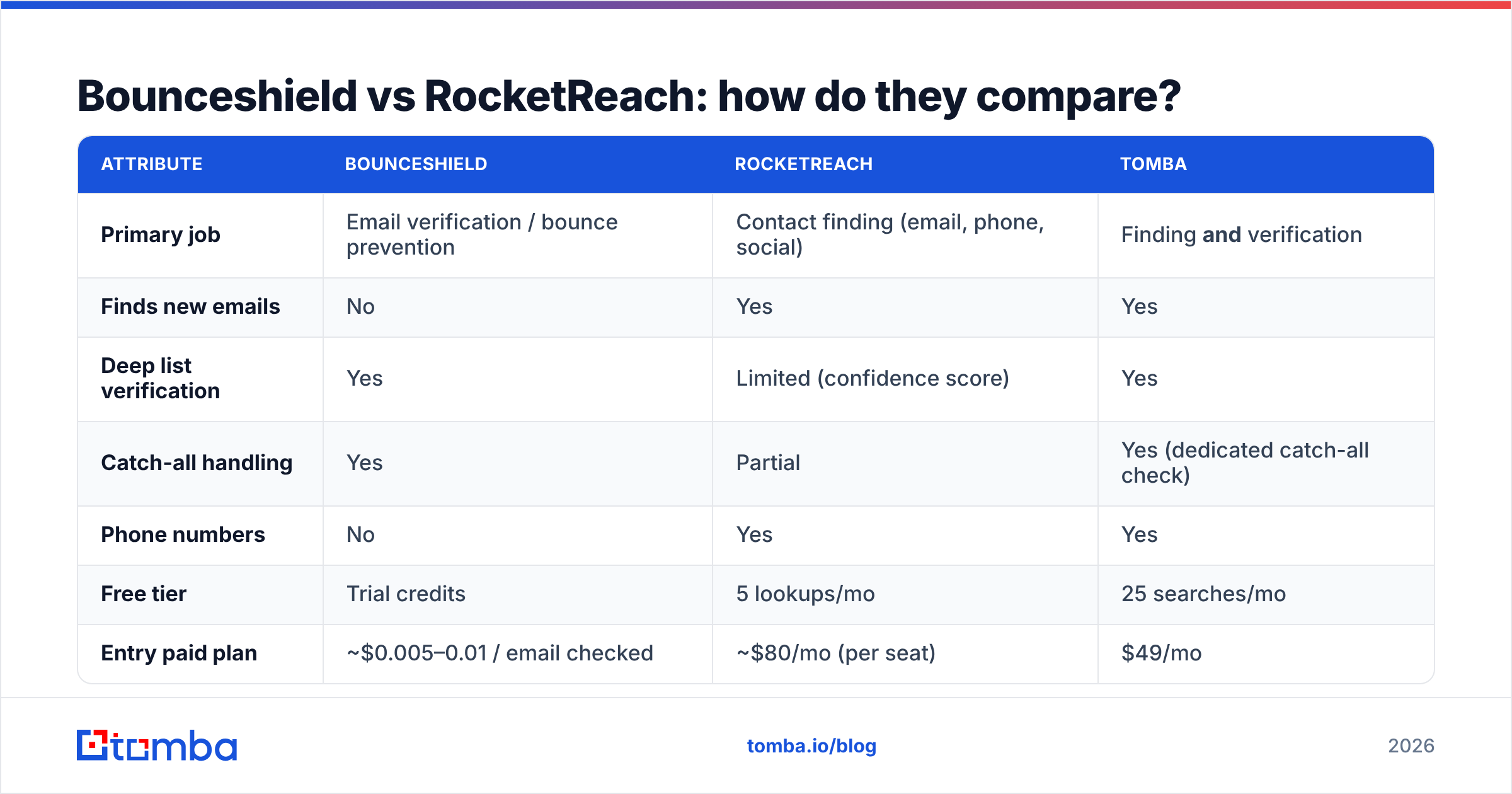
Here's the side-by-side. Treat exact prices as representative of published 2026 plans — always confirm on each vendor's site, since credit bundles and seat rules change.
| Attribute | Bounceshield | RocketReach | Tomba |
|---|---|---|---|
| Primary job | Email verification / bounce prevention | Contact finding (email, phone, social) | Finding and verification |
| Finds new emails | No | Yes | Yes |
| Deep list verification | Yes | Limited (confidence score) | Yes |
| Catch-all handling | Yes | Partial | Yes (dedicated catch-all check) |
| Phone numbers | No | Yes | Yes |
| Free tier | Trial credits | 5 lookups/mo | 25 searches/mo |
| Entry paid plan | ~$0.005–0.01 / email checked | ~$80/mo (per seat) | $49/mo |
| API access | Yes | Yes (higher tiers) | Yes, all plans |
| Best for | Cleaning lists you already have | Building lists from scratch | Teams that need both |
The pattern is clear: each specialist tool covers one column well and leaves the other empty. To run a complete outbound motion with just these two, you'd subscribe to both — paying RocketReach per seat to find, then Bounceshield per email to verify.
The accuracy question#
Accuracy is where the two tools are hardest to compare directly, because they measure different things. RocketReach's accuracy is about find rate and correctness — did it return the right email for the right person? Bounceshield's accuracy is about catch rate — did it correctly flag the addresses that would bounce?
Both matter, and a weakness in either one costs you. A finder with a high find rate but weak verification hands you addresses that bounce. A verifier with poor catch-all detection passes risky addresses you shouldn't send to. The chart below shows how email-data tools stack up on accuracy when you benchmark them head to head.

The takeaway: a single high accuracy number is marketing. What you want is high find rate and strong verification on the same record, so the email you pull is the email that lands.
Which one should you choose?#
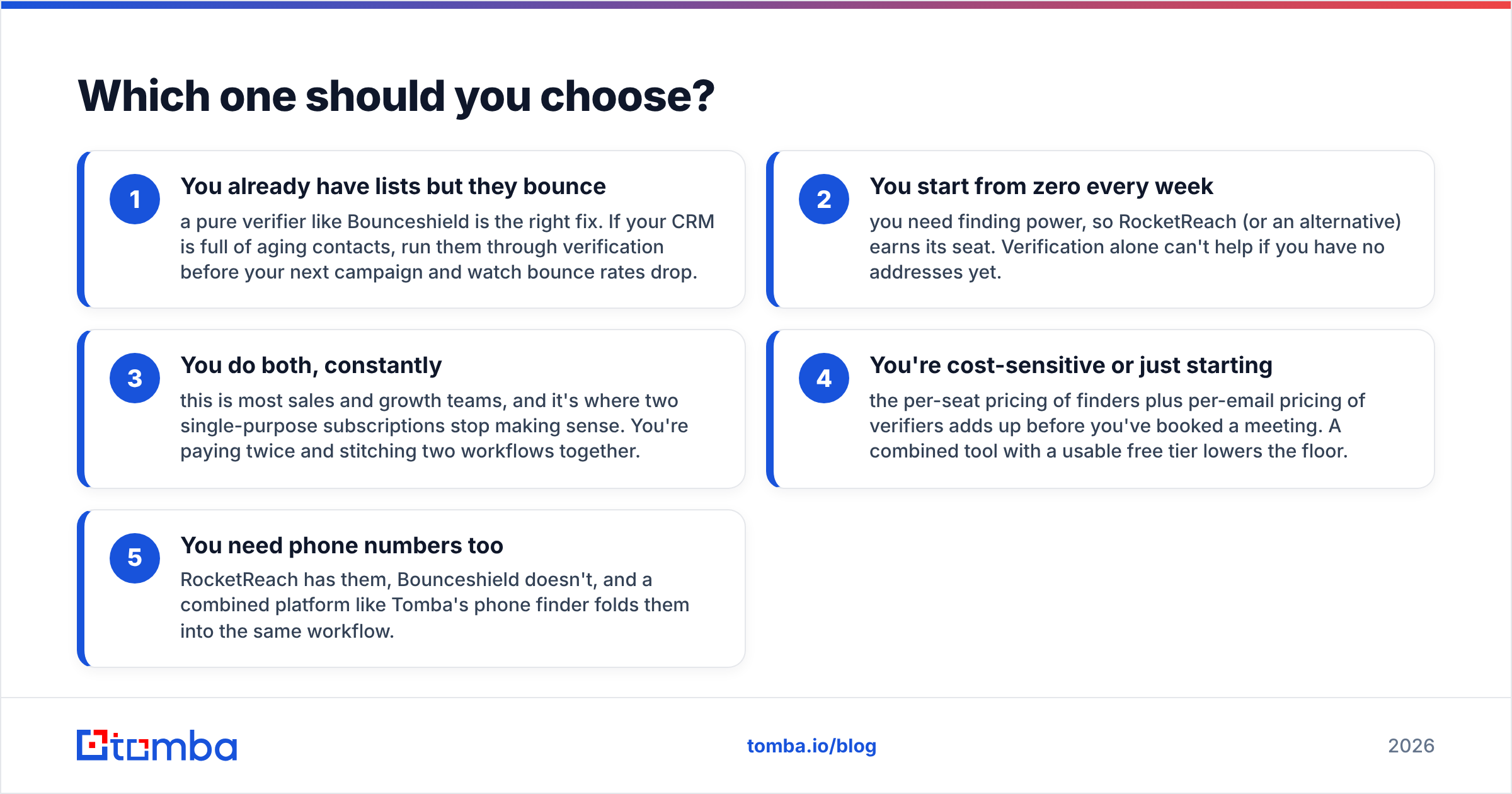
Pick based on the gap in your current stack, not the louder brand.
- You already have lists but they bounce — a pure verifier like Bounceshield is the right fix. If your CRM is full of aging contacts, run them through verification before your next campaign and watch bounce rates drop.
- You start from zero every week — you need finding power, so RocketReach (or an alternative) earns its seat. Verification alone can't help if you have no addresses yet.
- You do both, constantly — this is most sales and growth teams, and it's where two single-purpose subscriptions stop making sense. You're paying twice and stitching two workflows together.
- You're cost-sensitive or just starting — the per-seat pricing of finders plus per-email pricing of verifiers adds up before you've booked a meeting. A combined tool with a usable free tier lowers the floor.
- You need phone numbers too — RocketReach has them, Bounceshield doesn't, and a combined platform like Tomba's phone finder folds them into the same workflow.
Is there a better alternative to both?#
Yes — and it's the obvious move once you notice the two tools above are two halves of one job. Instead of paying RocketReach to find and Bounceshield to verify, a platform that does both removes the seam (and the second invoice).
Tomba is built around exactly that. You find an email by name, company, or domain, and every result runs through verification in the same step — no export, no second tool, no separate per-email bill. It also handles the part that trips up most verifiers: catch-all domains. A dedicated catch-all verifier tells you whether an address on an accept-all domain is genuinely deliverable, instead of marking the whole domain "unknown" and leaving you to guess.
For team workflows, domain search pulls every public email pattern for a company at once, so you're not looking up contacts one at a time. And because verification is native, your bounce rate stays low without bolting on a separate guard.
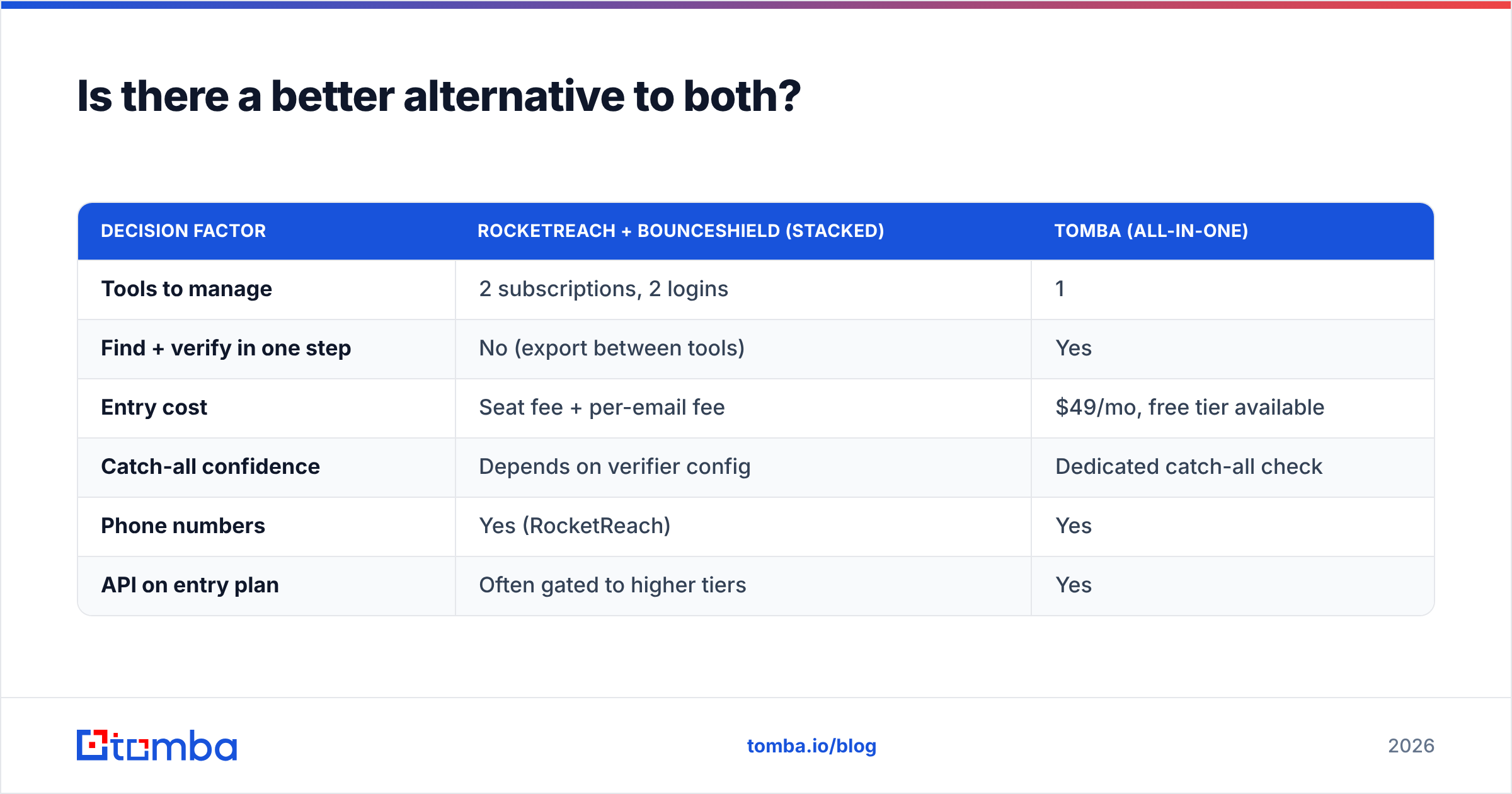
Here's how the combined approach compares on the dimensions that decide a stack:
| Decision factor | RocketReach + Bounceshield (stacked) | Tomba (all-in-one) |
|---|---|---|
| Tools to manage | 2 subscriptions, 2 logins | 1 |
| Find + verify in one step | No (export between tools) | Yes |
| Entry cost | Seat fee + per-email fee | $49/mo, free tier available |
| Catch-all confidence | Depends on verifier config | Dedicated catch-all check |
| Phone numbers | Yes (RocketReach) | Yes |
| API on entry plan | Often gated to higher tiers | Yes |
This isn't a knock on either specialist — Bounceshield is good at verification and RocketReach is good at finding. It's that most teams need both jobs done, and doing them in one tool is cheaper and faster than running two.

How much does each option actually cost?#
Cost is where stacking specialists hurts most, because the two pricing models don't overlap — they compound.
- RocketReach charges per seat, with monthly lookup limits that scale by plan. Add users or raise volume and the bill climbs. Its free tier is small (a handful of lookups per month).
- Bounceshield (like most verifiers) charges by volume of emails checked. Clean a big list and you burn through credits regardless of how many of those addresses you actually email.
- Stacked, you pay a seat fee to find and a per-email fee to verify the same contacts — effectively paying twice along the path from "lead" to "verified contact."
Compare that to Tomba pricing: a free tier with 25 searches/mo, then Starter at $49/mo, Growth at $99/mo, and Pro at $249/mo — with finding and verification both included, no separate verification meter. For most small-to-mid teams, one combined plan lands below the cost of two specialist subscriptions doing the same end-to-end work.
A quick gut check: tally your current spend on finding plus what you'd pay a standalone verifier for your monthly list volume. If that number tops a single combined plan, the stack is costing you margin for no extra capability.
What about deliverability beyond verification?#
Verification is necessary but not sufficient. Even a perfectly clean list bounces if your sending domain isn't set up right. Verifiers like Bounceshield reduce bounces from bad addresses; they can't fix bounces caused by missing authentication or a cold domain.
So whichever tool you choose for data, pair it with the basics: publish correct SPF, DKIM, and DMARC records, warm up new sending domains gradually, and monitor your sender reputation over time. You can dig into the fundamentals of authentication on Wikipedia's SPF overview. Clean data plus proper authentication is what actually keeps you in the inbox — neither alone is enough.
The point: don't expect a verifier to rescue a misconfigured domain, and don't expect a finder's confidence score to replace real verification. Get the data right and the infrastructure right.
Bounceshield vs RocketReach: the verdict#
If you only need to clean lists, Bounceshield does that job. If you only need to find contacts, RocketReach does that job. But most teams that ask "Bounceshield vs RocketReach" actually need both — and that's the real answer: you're comparing two halves of a workflow that's cheaper and simpler to run as one.
That's the case for an all-in-one. With Tomba you find professional emails by name, company, or domain, verify them in the same step, check catch-all domains with confidence, and pull phone numbers — without juggling two subscriptions or exporting data between tools. Start free with 25 searches a month, then scale on a single plan from $49/mo. Try the Tomba Email Finder and replace the two-tool stack with one.
// get started
Find, verify and enrich your first contacts today
Start on the free plan with 25 searches a month, then scale when your team is ready.
Free plan · No credit card required · GDPR & CCPA
// about the author