Client Outreach in 2026: The Complete Playbook for Replies
A practical 2026 client outreach playbook: how to build a clean list, personalize at scale, sequence channels, and book more meetings without burning your domain.
Client outreach is no longer about volume. In 2026, the teams that win are the ones who reach the right person, on the right channel, with a message that proves they did their homework. Everyone else is feeding spam filters.
This playbook walks through the full motion: building a clean contact list, personalizing without spending an hour per prospect, sequencing across email and phone, and following up enough to actually get a reply. No fluff, no "synergy" — just the parts that move pipeline.
TL;DR#
- Client outreach is the structured process of contacting potential customers across email, phone, and social to start a sales conversation — done well, it's research-led, not blast-and-pray.
- Data quality decides everything. Bounce rates above 3-4% wreck your sender reputation, so verify before you send.
- Personalization beats volume. A relevant first line tied to a real trigger outperforms 10x the generic sends.
- Multichannel sequences win. Email + phone + LinkedIn together book roughly 2-3x the meetings of email alone.
- Follow-up is where deals live. Most replies come on messages 2-5, not the first touch.
What is client outreach?#
Client outreach is the deliberate, repeatable process of contacting people who fit your ideal customer profile to open a sales or partnership conversation. Think of it like fishing: spray-and-pray is dumping a net in a random lake and hoping; modern outreach is knowing which lake holds the fish, what they're biting on today, and casting one good line where they actually are.
The mechanics break into five repeatable stages. Get each one right and the next becomes easier:
- Targeting — Define the ideal customer profile (ICP) and the specific buyer persona inside it. Job title, company size, industry, and a trigger event (funding, new hire, tech change).
- Sourcing — Find verified contact details for those people. This is where an email finder and data enrichment replace hours of manual LinkedIn digging.
- Personalization — Tie each message to something real about the prospect or their company so it doesn't read like a template.
- Sequencing — Decide the channels, timing, and number of touches before you move on.
- Measurement — Track open, reply, and meeting-booked rates so you can cut what fails and double down on what works.
Skip stage two and the rest collapses. You can write the best copy in the world, but if it lands on a dead inbox it bounces, and bounces poison your sender reputation for every future send.
Why does most client outreach fail?#
Most outreach fails for three boring, fixable reasons: bad data, no relevance, and giving up too early.
Bad data is the silent killer. If 15% of your list bounces, mailbox providers start treating your domain as a spammer, and even your good emails land in the junk folder. The fix is non-negotiable: run every address through an email verifier before the campaign goes out, and handle catch-all domains with a dedicated catch-all verifier instead of guessing.
No relevance is the second killer. A 2024 study from the sales-research community at G2 consistently shows personalized subject lines and opening lines lift reply rates materially. Buyers can smell a mail merge in half a second. If your first sentence could be sent to 10,000 people unchanged, it's noise.
Giving up too early is the quiet one. The single most common mistake is sending one email and assuming silence means "no." It usually means "not right now" or "I missed it." The reply often lives on touch three or four.
What does a strong client outreach sequence look like?#
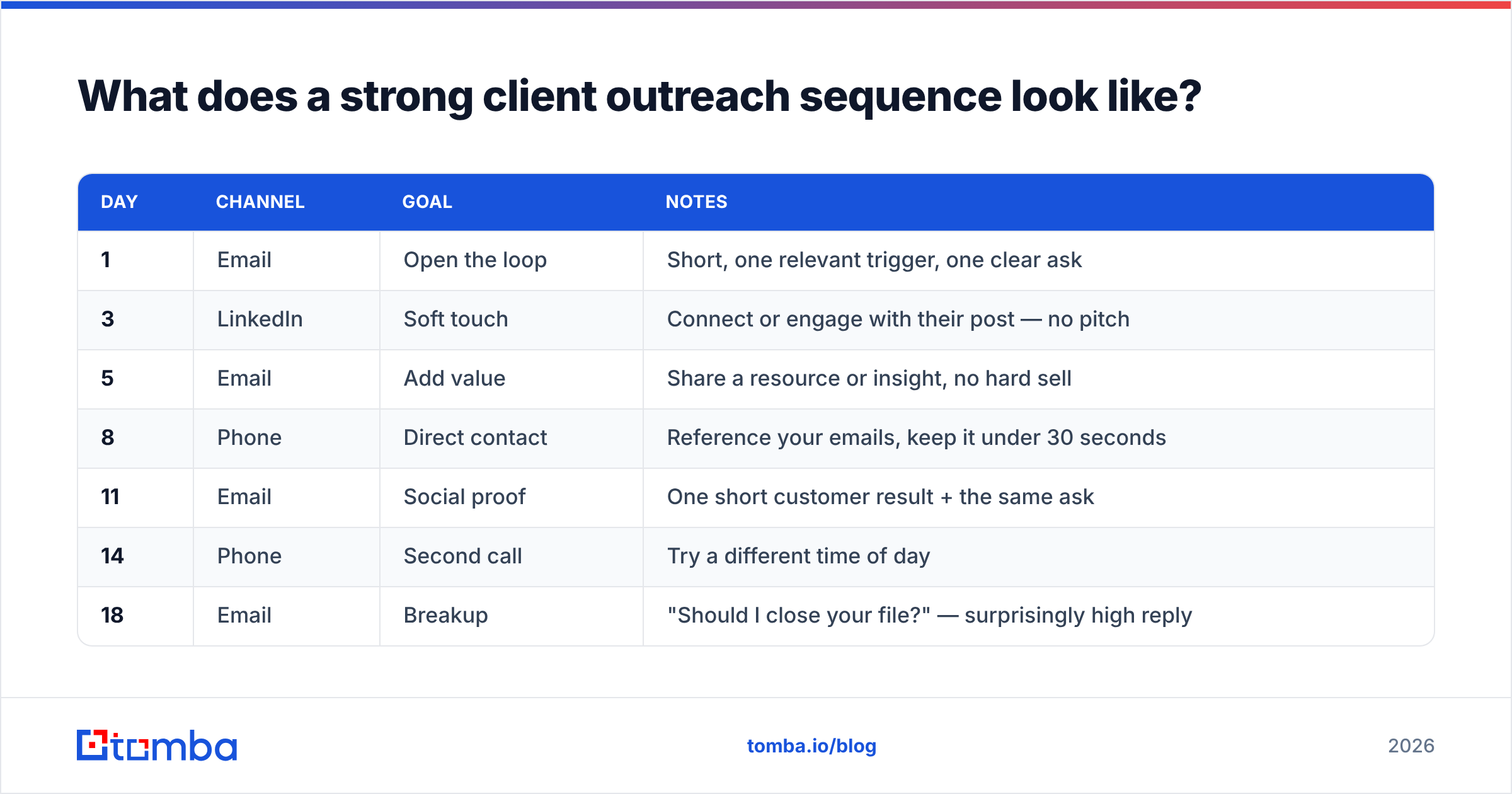
A strong sequence spreads 6-9 touches across 2-3 weeks, mixing channels so you're not relying on a single inbox. Here's a proven shape for a B2B sales motion:
| Day | Channel | Goal | Notes |
|---|---|---|---|
| 1 | Open the loop | Short, one relevant trigger, one clear ask | |
| 3 | Soft touch | Connect or engage with their post — no pitch | |
| 5 | Add value | Share a resource or insight, no hard sell | |
| 8 | Phone | Direct contact | Reference your emails, keep it under 30 seconds |
| 11 | Social proof | One short customer result + the same ask | |
| 14 | Phone | Second call | Try a different time of day |
| 18 | Breakup | "Should I close your file?" — surprisingly high reply |
Notice the rhythm: you never hit the same channel twice in a row, and the asks escalate gently rather than repeating "just checking in." For the phone touches, pulling a verified mobile from a phone finder means you're dialing a real number, not a dead switchboard.
The breakup email deserves special mention. Loss aversion is real — telling someone you're about to close their file frequently revives a thread that ignored every value-add before it.
How do you personalize client outreach at scale?#
Personalization at scale means building reusable templates with a few high-impact variable slots, then filling those slots with enriched data instead of writing every email from zero. The trap is thinking personalization equals hand-writing 200 unique emails. It doesn't. It means one strong framework plus three or four true, specific details per prospect.
The highest-leverage variables are:
- The trigger — Why now? A funding round, a new VP, a product launch, a hiring spree. Data enrichment surfaces these automatically.
- The role-specific pain — A CFO and a Head of Demand Gen care about completely different outcomes. Speak to theirs.
- A proof point that matches them — A result from a similar company in their industry, not your flagship logo if it's irrelevant to them.
- A frictionless ask — "Worth a 15-minute call Thursday?" beats "Let me know if you'd like to learn more about our solution."
Layer those four onto a clean template and you get mail that reads bespoke while still going out at volume. Want to go deeper on the writing side without starting from a blank page? Tools like a cold email AI writer and tested cold email templates give you a frame to adapt rather than reinventing structure every send.
Which channels should you use for client outreach?#
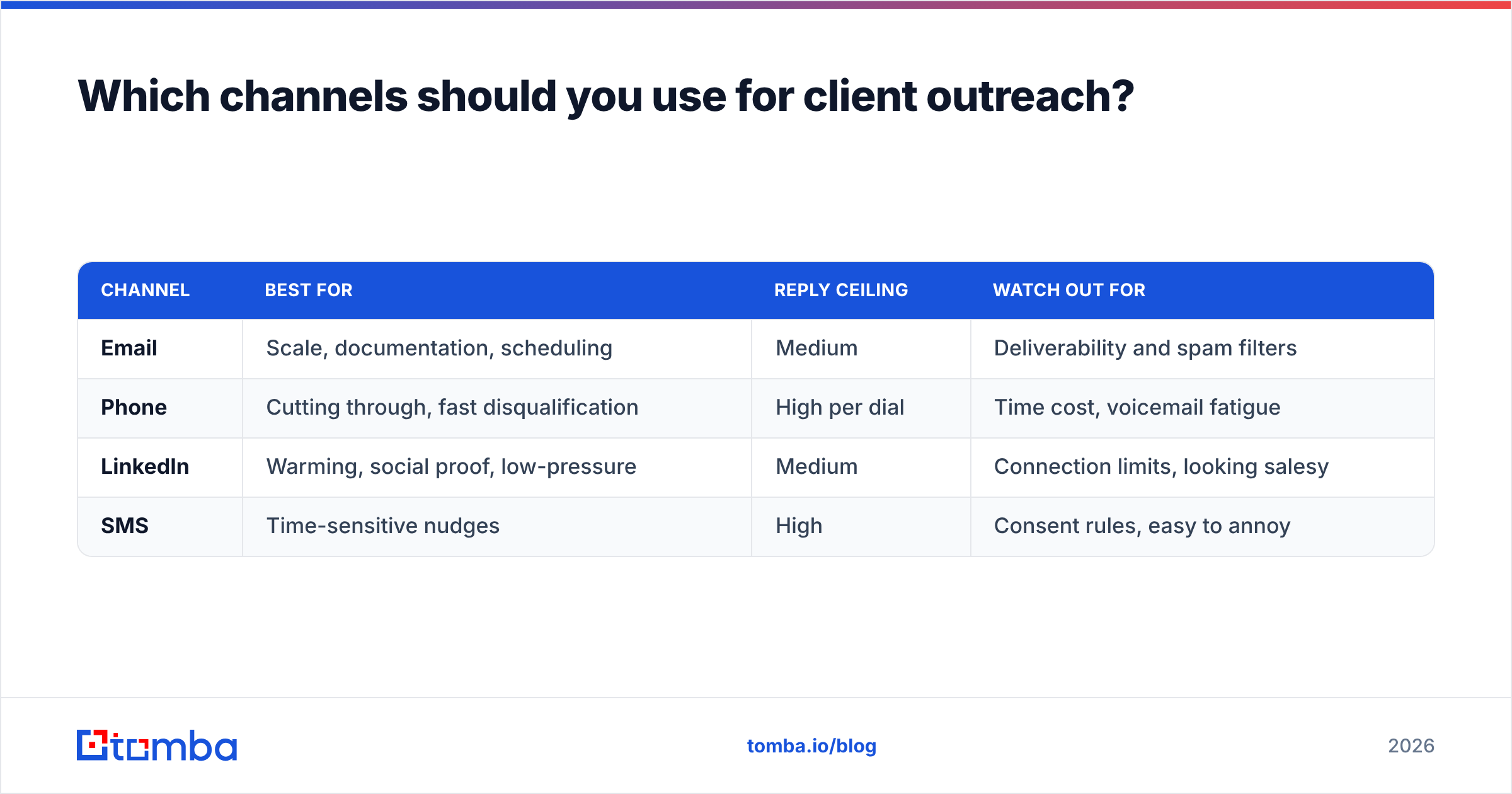
Use email as the backbone, phone for breakthrough, and LinkedIn for warming — together, not in isolation. Each channel has a different strength, and stacking them is what separates a 2% reply rate from an 8% one.
| Channel | Best for | Reply ceiling | Watch out for |
|---|---|---|---|
| Scale, documentation, scheduling | Medium | Deliverability and spam filters | |
| Phone | Cutting through, fast disqualification | High per dial | Time cost, voicemail fatigue |
| Warming, social proof, low-pressure | Medium | Connection limits, looking salesy | |
| SMS | Time-sensitive nudges | High | Consent rules, easy to annoy |
Email scales the widest and creates a paper trail, but it lives or dies on email deliverability. Phone breaks through when inboxes are saturated — a 20-second call referencing your earlier email often lands the meeting an email couldn't. LinkedIn is your warming layer: engage with a prospect's post before you pitch and your cold email suddenly isn't cold.
The mistake is treating these as either/or. The teams hitting quota run them as one orchestrated sequence, which is exactly what the day-by-day table above lays out.
What tools power modern client outreach?#
The 2026 outreach stack splits into three jobs: find verified contacts, send and sequence, and measure. You don't need a 12-tool monster — you need one reliable source of contact data and a sender you trust.
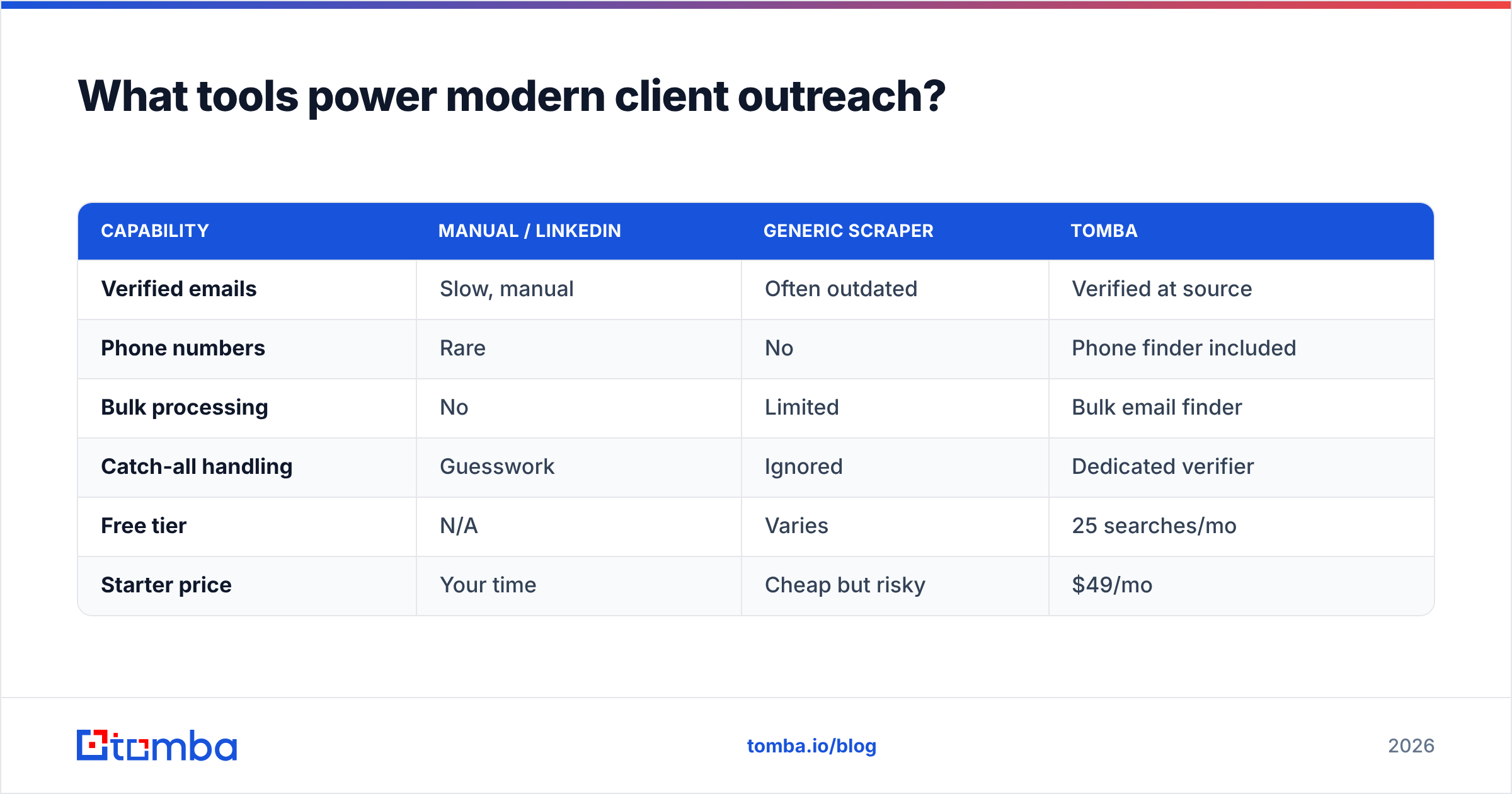
Here's how the data layer compares across common approaches:
| Capability | Manual / LinkedIn | Generic scraper | Tomba |
|---|---|---|---|
| Verified emails | Slow, manual | Often outdated | Verified at source |
| Phone numbers | Rare | No | Phone finder included |
| Bulk processing | No | Limited | Bulk email finder |
| Catch-all handling | Guesswork | Ignored | Dedicated verifier |
| Free tier | N/A | Varies | 25 searches/mo |
| Starter price | Your time | Cheap but risky | $49/mo |
The data layer is where outreach quietly succeeds or fails. A verified list keeps your bounce rate low, which protects deliverability, which means your carefully written sequence actually reaches inboxes. You can compare full Tomba pricing against your volume, but the Free tier (25 searches/month) is enough to test the workflow before committing.
For the sending side, mature platforms documented by vendors like HubSpot handle sequencing, A/B testing, and reporting. Whatever you choose, make sure it reports reply and meeting-booked rates, not just opens — opens have been unreliable since Apple's mail privacy changes muddied tracking pixels.
How do you measure client outreach success?#
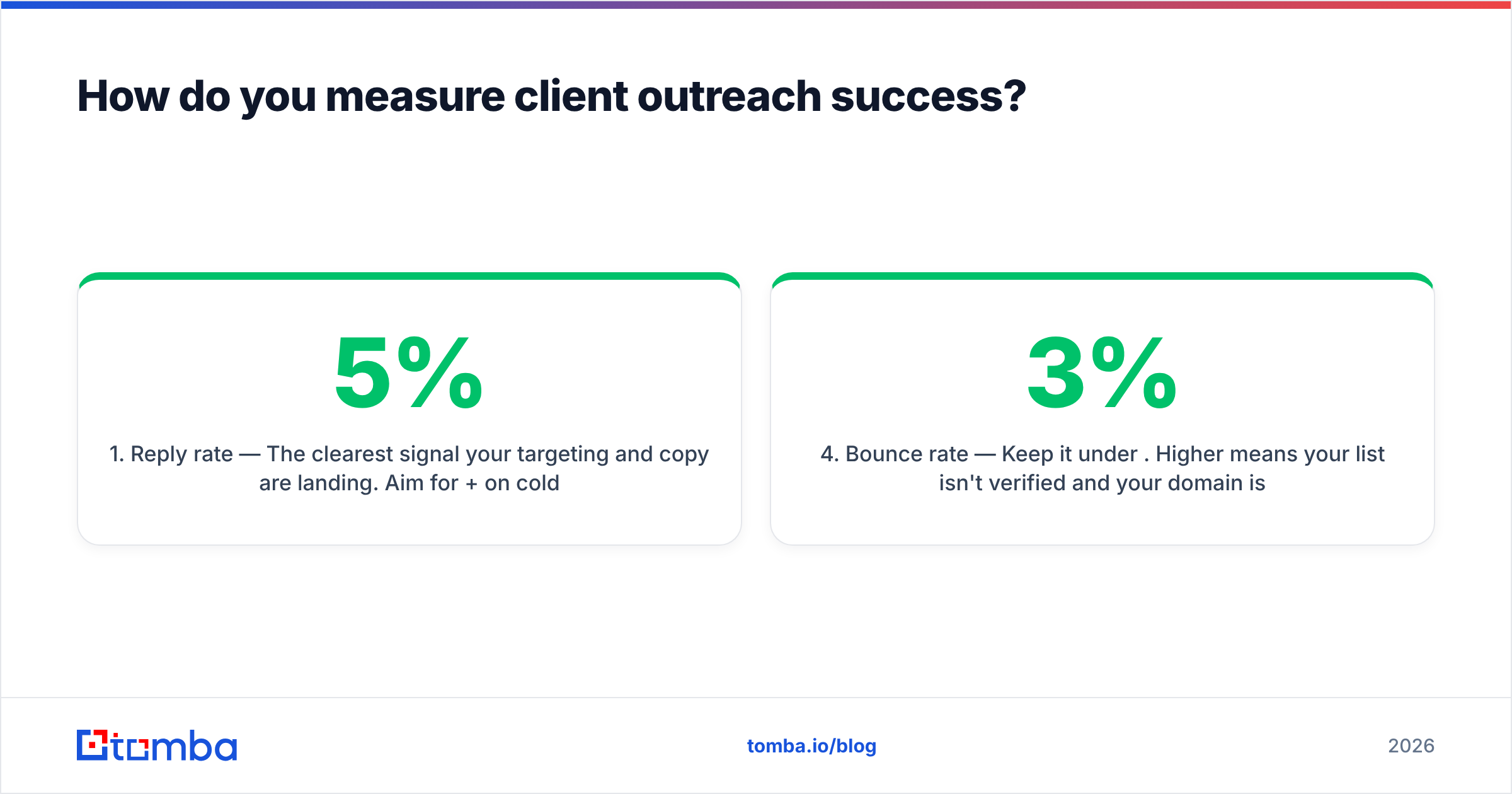
Measure outreach by reply rate and meetings booked, not open rate — opens are vanity, replies are pipeline. The metrics that actually matter, in priority order:
- Reply rate — The clearest signal your targeting and copy are landing. Aim for 5%+ on cold email; below 2% means something upstream is broken.
- Positive reply rate — Replies that aren't "unsubscribe." This filters out angry bounces and tells you about message-market fit.
- Meetings booked — The only metric your revenue team truly cares about. Track it per sequence and per channel.
- Bounce rate — Keep it under 3%. Higher means your list isn't verified and your domain is at risk.
- Win rate — Downstream, but it tells you whether you're booking the right meetings or just any meeting.
Set up your tracking before you launch, not after. If you can't tie a booked meeting back to the sequence and channel that produced it, you're flying blind and can't improve.
What's a realistic client outreach workflow for a small team?#
A small team can run effective outreach in about an hour a day with the right setup. Here's a lean weekly motion:
- Monday — Build the list. Use domain search to pull every relevant contact at your target accounts, then verify the batch.
- Tuesday — Enrich and segment. Add triggers and roles so you can write to pain, not to a generic "decision maker."
- Wednesday — Load sequences. Drop contacts into your multichannel sequence with personalized variables filled.
- Thursday — Call the warm ones. Anyone who opened twice or clicked gets a dial.
- Friday — Review the numbers. Cut the worst-performing subject line, keep the best, repeat.
That cadence keeps your list fresh, your domain healthy, and your follow-ups consistent without a 10-person SDR team. The leverage comes from automating the tedious parts — sourcing and verification — so your humans spend their time on the two things software can't fake: relevance and conversation.
Start your client outreach the right way#
Great outreach starts with great data — everything downstream depends on reaching a real person at a real address. Before you write a single subject line, build a verified, enriched list so your sequence lands in inboxes instead of spam folders.
The Tomba Email Finder finds professional email addresses by name, domain, or company, with verification built in so your bounce rate stays low and your sender reputation stays clean. Start free with 25 searches a month, then scale to the $49/mo Starter plan when your outreach is booking meetings. Find the right people, reach them where they are, and let your follow-ups do the rest.
// get started
Find, verify and enrich your first contacts today
Start on the free plan with 25 searches a month, then scale when your team is ready.
Free plan · No credit card required · GDPR & CCPA
// about the author