550 Recipient Rejected: Causes & Fixes for 2026
Your cold email just bounced with '550 recipient rejected.' Here's exactly what triggered it, how to diagnose the root cause, and the fixes that stop it from killing your sender reputation in 2026.
550 Recipient Rejected: Causes & Fixes for 2026
You hit send on a clean-looking sequence, and within seconds your ESP logs light up with 550 5.1.1 recipient rejected. The message never reached the inbox, never reached the spam folder, never even crossed the recipient's gateway. The receiving server slammed the door at the SMTP handshake.
This guide breaks down every reason that bounce code fires, how to tell which root cause you're hit by, and the concrete deliverability fixes that get your sequences flowing again.
TL;DR#
- A
550 recipient rejectedbounce means the receiving mail server permanently refused to accept the message during the SMTP transaction — usually because the recipient address does not exist, is disabled, or your sending domain is blocked. - The most common trigger in 2026 is sending to addresses that were never verified against a real-time SMTP check, especially after buying or scraping lists.
- A spike in 550 bounces past 2% will tank your sender reputation at Gmail and Microsoft within 72 hours.
- Fix the immediate hit by pausing the sequence, scrubbing the list with an email verifier, and resuming only after warmup signals recover.
- Long-term protection comes from verifying every address before send, authenticating with SPF/DKIM/DMARC, and segmenting risky lists.
What does "550 recipient rejected" actually mean?#
550 is an SMTP permanent failure response. Permanent means the sending server should not retry — the receiver is telling you "this delivery will never succeed under current conditions." The recipient rejected text narrows the reason to the RCPT TO step of the SMTP conversation, which is where your server names the inbox it wants to deliver to.
Think of SMTP like a doorman checking a guest list. The connection (EHLO) is your server walking up to the building. MAIL FROM is you announcing who sent you. RCPT TO is you naming the person you came to visit. A 550 at this step is the doorman saying "no one by that name lives here, or they've told us not to let you in."
The full bounce string typically looks like one of these:
550 5.1.1 The email account that you tried to reach does not exist550 5.1.1 <user@example.com>: Recipient address rejected: User unknown550 5.7.1 Recipient rejected: Access denied550 Requested action not taken: mailbox unavailable
The enhanced status code after 550 (the 5.x.x) is where the real diagnosis lives. We'll decode each variant below.
What are the most common causes of a 550 recipient rejected bounce?#
There are five root causes that account for nearly every 550 you'll see. Diagnose by the enhanced status code, then match to the fix.
| Status code | Real meaning | Typical cause | Fix priority |
|---|---|---|---|
| 5.1.1 | Bad mailbox | Address doesn't exist or was deactivated | Verify list immediately |
| 5.1.10 | Recipient does not exist | Microsoft 365 user not provisioned | Re-verify, remove from list |
| 5.4.1 | Recipient address rejected | Domain has no inbox at that local-part | Check email pattern |
| 5.7.1 | Access denied | You are blocked by recipient policy or filter | Audit sender reputation |
| 5.7.606 | Access denied, banned IP | Your sending IP is on an internal blocklist | Switch IP, fix authentication |
A 5.1.1 is benign in isolation — one bad address. A wave of 5.7.1 across multiple unrelated domains is a five-alarm fire: it means your sending infrastructure has been flagged.
Is "550 recipient rejected" the same as a hard bounce?#
Yes. Any 5.x.x response in SMTP is a hard bounce by definition — the message will not be retried. This is different from a 4.x.x soft bounce, where the receiver is saying "try again later" (mailbox full, server busy, greylisting).
The distinction matters because mailbox providers weight hard bounces much more heavily in reputation scoring. Gmail's Postmaster Tools will start flagging your domain after roughly 2% hard bounce rate over a rolling seven-day window. Microsoft will throttle you faster — closer to 1% on a new domain.
That's why a single bad list import can wreck a sender that took six months to warm up.
How do you diagnose which type of 550 you're hit by?#
Open your ESP's bounce log and pull the full Diagnostic-Code header for ten or more rejected messages. Look for three patterns:
- All from one domain — your sending IP or domain is likely blocked by that specific recipient. Check if you're on Spamhaus, Barracuda, or SpamCop. Run a quick scan with a blacklist checker.
- Random domains, mostly 5.1.1 — your list is dirty. The addresses don't exist. This is the most common scenario and the easiest to fix.
- Random domains, mostly 5.7.x — your authentication is broken or your reputation has cratered. SPF, DKIM, or DMARC is misaligned, or you've been reported as spam enough times that filters now reject you at the gateway.
Microsoft 365 and Google Workspace return verbose error strings that name the cause explicitly. Yahoo and AOL are terser — you'll often need to cross-reference with their postmaster documentation.
What does a 550 bounce do to your sender reputation?#
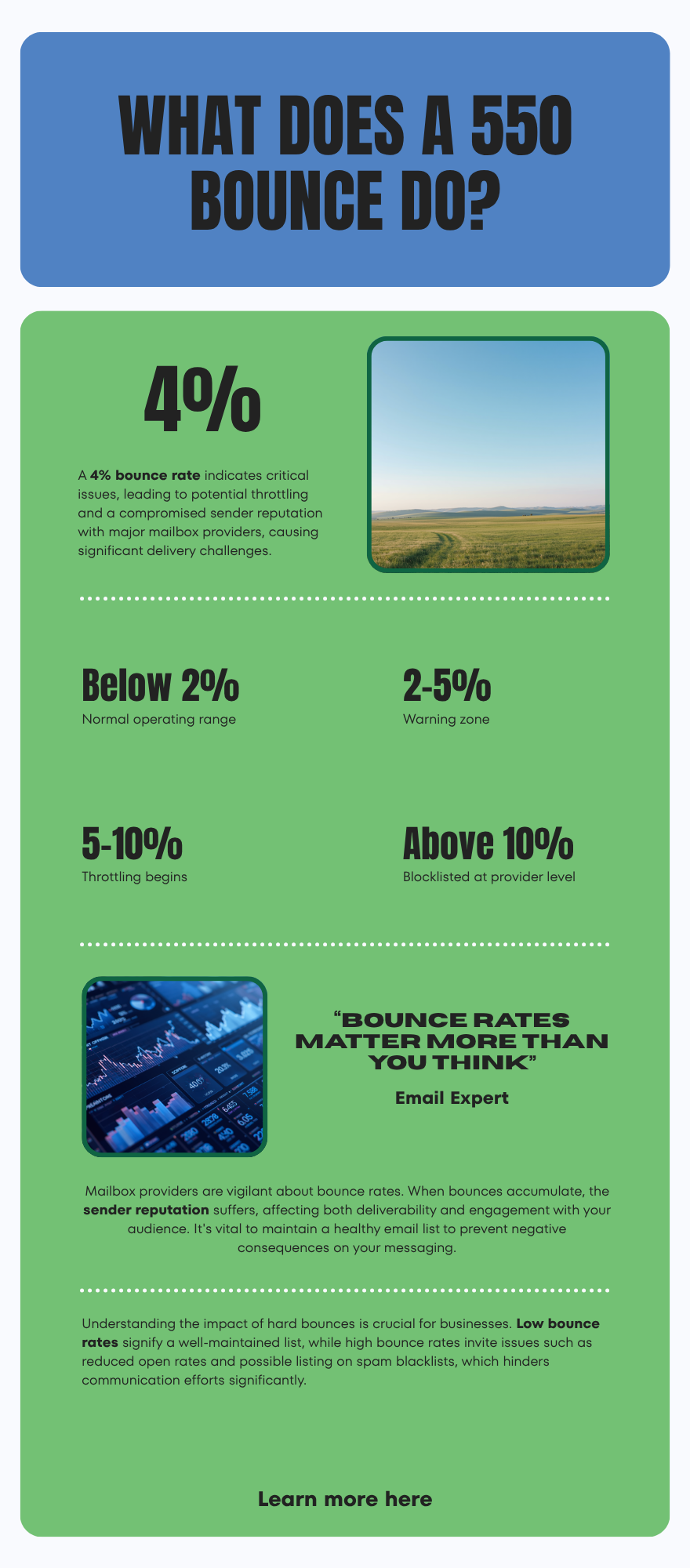
Each hard bounce is a negative signal. Mailbox providers track your bounce rate as a percentage of total volume sent, and once you cross provider-specific thresholds, the consequences cascade:
- Below 2%: normal operating range, no impact.
- 2–5%: warning zone. Open rates start to dip 10–15% as some messages route to spam.
- 5–10%: throttling. Gmail begins deferring your messages with 4.x.x temp errors. Microsoft tightens content filtering.
- Above 10%: blocklisted at the provider level. Even verified addresses will start bouncing or going to spam. Recovery takes weeks.
The math is unforgiving. A 5,000-address sequence with 8% bad data produces 400 hard bounces. If that lands in a single day on a domain sending 10,000 emails, you've just hit a 4% daily bounce rate — enough to flag you at every major provider.
This is why prevention beats remediation. Read more on sender reputation and how it compounds across providers.
How do you fix a 550 recipient rejected error?#
The fix depends on the root cause. Here's the playbook for each.
If the cause is bad addresses (5.1.1, 5.1.10)#
- Pause the offending sequence immediately. Continuing to send into a dirty list adds bounces every minute.
- Export the full recipient list to CSV. Include the bounce status column.
- Run the list through a real-time email verifier. A proper verifier performs MX lookup, SMTP handshake, RCPT TO check, and catch-all detection in under two seconds per address. Tomba's email verifier returns a status (deliverable, risky, undeliverable, unknown) plus the reason.
- Remove every "undeliverable" and most "risky" addresses before re-importing.
- Re-warm the domain if the bounce spike was severe — keep daily volume to 50–100 for the first week, climb 30% per week from there.
If the cause is sender blocking (5.7.1, 5.7.606)#
- Run an authentication check. Use an SPF lookup tool and a DKIM signature validator. Misalignment between MAIL FROM domain and DKIM d= is the #1 cause of 5.7.1 in 2026, especially after Gmail's bulk sender requirements went into effect.
- Check blocklists. Spamhaus ZEN, SURBL, and Barracuda are the ones that move the deliverability needle.
- Audit your DMARC policy. A misconfigured
p=rejecton a domain with broken DKIM will hard-bounce every message you send. - Request delisting if you're on a blocklist. Spamhaus has a self-service form; most others require an email request.
If the cause is unclear#
Send a single test message from a clean address on a clean domain to one of the bouncing recipients. If that lands, your infrastructure is the problem. If it bounces with the same code, the recipient address itself is dead.
How do you prevent 550 bounces in the first place?#
Prevention has three layers: data hygiene, authentication, and sending discipline.
Layer 1: data hygiene#
Every address should be verified at two points:
- Acquisition — when you find the email via an email finder or scrape, verify it immediately. Don't store unverified data in your CRM.
- Send time — re-verify any address older than 90 days. B2B email decay runs roughly 22% per year, and that decay accelerates during layoff cycles.
Bulk verification through Tomba's bulk email finder processes 10,000+ addresses per run with status codes that map directly to deliverability outcomes.
Layer 2: authentication#
You need all three, configured correctly:
| Record | Purpose | Failure symptom |
|---|---|---|
| SPF | Authorizes which IPs can send for your domain | 5.7.1 on Gmail/Microsoft |
| DKIM | Cryptographic signature proving message wasn't altered | 5.7.26 dmarc=fail |
| DMARC | Policy telling receivers what to do if SPF/DKIM fail | 550 reject on aligned policy |
Gmail's 2024 bulk sender requirements (still in force in 2026) make all three mandatory for anyone sending 5,000+ emails per day to gmail.com addresses. Microsoft adopted the same standards in mid-2025. There is no longer a grace period.
Layer 3: sending discipline#
- Cap daily volume per inbox at 50 for new domains, 200 for warmed-up domains.
- Maintain a bounce rate target of 1.5% or lower.
- Segment by engagement — re-engage cold contacts on a separate domain so a high bounce rate doesn't contaminate your primary sending.
- Use a separate subdomain for cold outreach (
outreach.yourdomain.com) so transactional and marketing reputations stay isolated.


What tools help diagnose and prevent 550 bounces?#
The market splits into three categories: verifiers (prevent bounces before send), monitors (watch your reputation), and authentication checkers (validate setup).
| Category | Tool examples | What it does | Pricing tier |
|---|---|---|---|
| Verifier | Tomba,ZeroBounce, NeverBounce | SMTP-level address validation | $0.001–0.01 per email |
| Reputation monitor | Google Postmaster, Microsoft SNDS | Domain reputation, complaint rate | Free |
| Authentication | MXToolbox, DMARC Analyzer | SPF/DKIM/DMARC validation | Free–$50/mo |
| Blocklist scanner | Spamhaus, MultiRBL | Cross-check 100+ blocklists | Free–$30/mo |
| List hygiene | Tomba Verifier, Kickbox | Bulk cleanup post-bounce | $49–$99/mo |
For Tomba pricing specifically, the free tier covers 25 verifications per month, and the Tomba Starter plan at $49/mo includes verification credits suitable for SDR teams running weekly cleanup cycles. For more on accuracy tradeoffs, the official Spamhaus blocklist documentation is the canonical reference.
How does Tomba help avoid 550 recipient rejected errors?#
Tomba's verification stack runs every found address through a multi-stage check before returning it as deliverable:
- Syntax check — eliminates malformed addresses.
- Domain MX lookup — confirms the domain accepts mail.
- SMTP handshake — connects to the recipient's mail server.
- RCPT TO probe — tests whether the specific local-part exists.
- Catch-all detection — flags domains that accept all mail, marking those addresses as "risky" rather than "deliverable."
The result: every "deliverable" status from Tomba has been confirmed by the recipient's own SMTP server. You can read more about where Tomba sources its data and how the verification pipeline maps to bounce prevention.
Integration matters as much as accuracy. Tomba ships native integrations with HubSpot, Salesforce, and Pipedrive, so verified addresses flow into your CRM without manual exports. The Tomba API supports real-time verification at the moment a lead is added — the cleanest way to prevent bad data from ever entering your stack.
What if Tomba returns "risky" instead of "deliverable"?#
Risky usually means the domain is catch-all — it accepts mail at every address, so you can't confirm the specific inbox exists without sending. For these, you have three options:
- Skip them — safest, costs you contacts.
- Send carefully — segment into a separate sequence with conservative volume, monitor bounce rate, remove anyone who bounces.
- Re-verify with the catch-all verifier — Tomba's catch-all module uses signal stacking (LinkedIn match, name pattern confidence, social presence) to upgrade some risky addresses to deliverable.
The right call depends on your volume tolerance and reputation cushion. If your bounce rate is already at 2%, skip risky. If you're at 0.5% with months of warmup, you can afford to test.
Final checklist before you resume sending#
Run through this before unpausing any sequence after a 550 spike:
- List re-verified within the last 7 days
- Bounce rate from last 24h below 2%
- SPF, DKIM, DMARC all passing on a test send
- Not listed on Spamhaus ZEN, SURBL, or Barracuda
- Daily send volume capped at 70% of pre-incident peak
- Engagement-based segmentation in place (don't email cold contacts from your main domain)
- Warmup tool still running on the affected mailbox
Skip any of these and you'll be back in the bounce pit within a week.
Stop bouncing. Start verifying.#
A 550 recipient rejected is the symptom. Bad data is almost always the disease. Every dollar spent on real-time verification saves ten dollars of reputation repair.
Start with a free Tomba account — 25 verifications and 25 finder searches per month, no card required. Upgrade when your volume crosses 200 leads per week. The Tomba Email Finder pairs every found address with a verification status, so the data entering your CRM is deliverable from day one. That's the single highest-leverage change you can make to drop your 550 rate to near zero in 2026.
// get started
Find, verify and enrich your first contacts today
Start on the free plan with 25 searches a month, then scale when your team is ready.
Free plan · No credit card required · GDPR & CCPA
// about the author