Account Enrichment in 2026: The Complete B2B Data Playbook
Account enrichment turns thin company records into sales-ready intelligence. Here is how it works, what data to add, and how to pick a vendor in 2026.
TL;DR
- Account enrichment is the process of attaching firmographic, technographic, intent, and contact data to the company records already sitting in your CRM — so reps stop guessing and start prioritizing.
- The biggest payoff is not "more data," it is accurate, current data: stale firmographics quietly tank routing, scoring, and territory planning.
- A workable stack has three layers — identity resolution, attribute enrichment, and refresh cadence. Skip the third and your database decays 25–30% a year.
- Evaluate vendors on match rate, field coverage, freshness, and price-per-record, not logo count. Run a sample file before you sign.
- Pair account enrichment with contact-level discovery (email, phone, LinkedIn) so an enriched account actually becomes a reachable buyer.
What is account enrichment?#
Account enrichment is the practice of taking a sparse company record — often just a domain or a company name — and filling it out with structured, decision-useful attributes: employee count, revenue band, industry, location, tech stack, funding stage, and buying signals.
Think of it like a real-estate listing. A raw CRM row is an address scrawled on a napkin. Enrichment is the full listing: square footage, year built, recent renovations, neighborhood comps. Same property, but now you can actually decide whether to make an offer. For sales and marketing teams, the "offer" is where to spend limited prospecting time.
The distinction worth holding onto: account enrichment operates at the company level, while contact (or lead) enrichment operates at the person level. You usually need both. An enriched account tells you this company is worth pursuing; contact enrichment tells you here is the VP of Engineering and her work email. Most modern data enrichment workflows chain the two together.
Why does account enrichment matter in 2026?#
Because your CRM is lying to you, and the lie compounds.
B2B data decays fast. People change jobs, companies get acquired, headcounts swing, and tech stacks get ripped out. Gartner and most data-quality practitioners peg annual contact-data decay at roughly 25–30%. That means a "clean" database you bought 18 months ago is now closer to half-rotten. Routing rules fire on the wrong segment. Lead scoring rewards the wrong accounts. SDRs burn a morning on a company that downsized out of your ICP last quarter.
Account enrichment is the maintenance layer that fights that decay. When it is working, three things improve at once:
- Targeting. You can build and defend an ICP using real firmographics instead of vibes.
- Routing and scoring. Territory assignment and lead scoring run on attributes that are actually true.
- Personalization. Reps open with "I saw you just moved off Segment to a first-party stack" instead of "Hope this email finds you well."
)
There is also a hard cost angle. Every enriched, correctly-routed account is one your team does not waste a touch on. At scale, that is the difference between an SDR working 40 real accounts a week and 40 ghosts.
What data goes into an enriched account?#
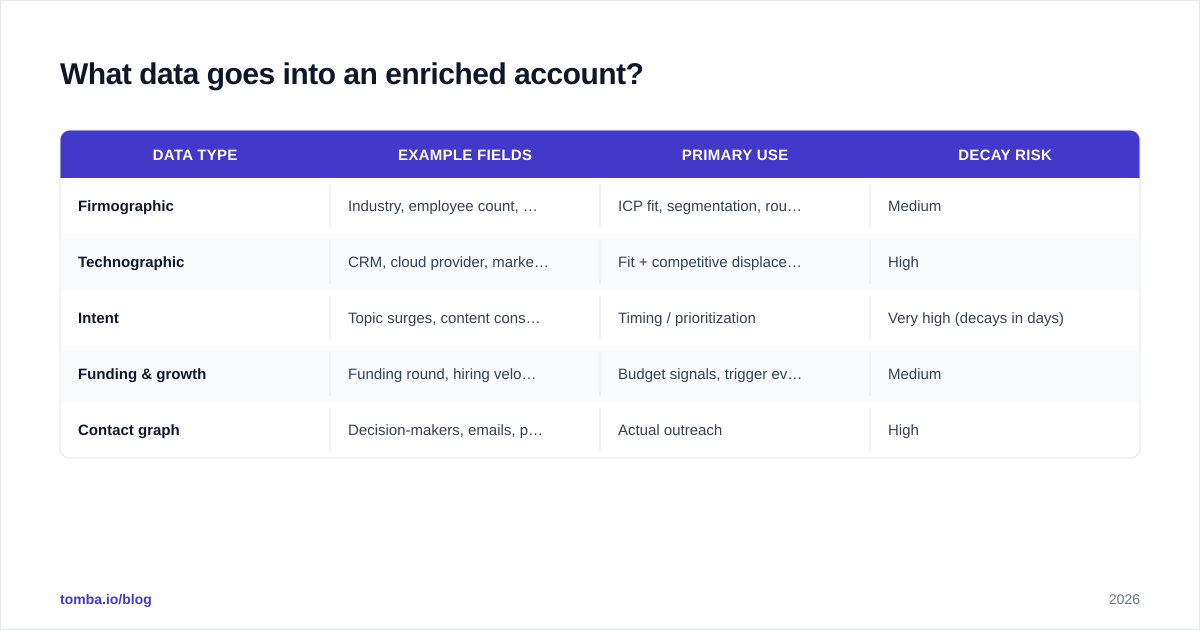
Not all attributes carry equal weight. Here is how the common categories break down and what each is actually good for.
| Data type | Example fields | Primary use | Decay risk |
|---|---|---|---|
| Firmographic | Industry, employee count, revenue, HQ location | ICP fit, segmentation, routing | Medium |
| Technographic | CRM, cloud provider, marketing stack, languages | Fit + competitive displacement | High |
| Intent | Topic surges, content consumption, web visits | Timing / prioritization | Very high (decays in days) |
| Funding & growth | Funding round, hiring velocity, M&A | Budget signals, trigger events | Medium |
| Contact graph | Decision-makers, emails, phone, LinkedIn | Actual outreach | High |
A practical rule: firmographics decide if you pursue an account, intent decides when, and the contact graph decides how. A program that enriches firmographics but never adds the contact graph produces a beautiful, completely unactionable database. That last mile — turning an enriched account into reachable humans — is why teams pair enrichment with an email finder and a phone finder.
How does the account enrichment process work?#
There is a repeatable pipeline under almost every good enrichment setup. Four stages.
1. Ingest and normalize. You start with whatever you have — a domain, a messy company name, a partial record. Normalization standardizes it: Acme, Inc., acme.com, and ACME Corporation all need to resolve to one canonical entity. Garbage normalization is the silent killer of match rates.
2. Identity resolution. This is the matching step: connecting your normalized input to a record in the provider's graph. The cleanest key is the domain. Name-only matching is error-prone, which is why a domain search approach is usually more reliable than fuzzy company-name lookups.
3. Attribute append. Once matched, the provider returns the fields you asked for. Good APIs let you request only what you need (cheaper, faster) rather than dumping 90 columns you will never map.
4. Refresh and decay management. The step everyone forgets. Enrichment is not a one-time event; it is a subscription to truth. Set a cadence — quarterly for firmographics, weekly or event-driven for intent — and re-run it. A static enriched database is just a more expensive stale database.
You can run this manually with a bulk email finder and a spreadsheet, or wire it directly into your systems with an email finder API so records enrich the moment they are created.
Real-time vs. batch enrichment: which should you use?#
Both, for different jobs.
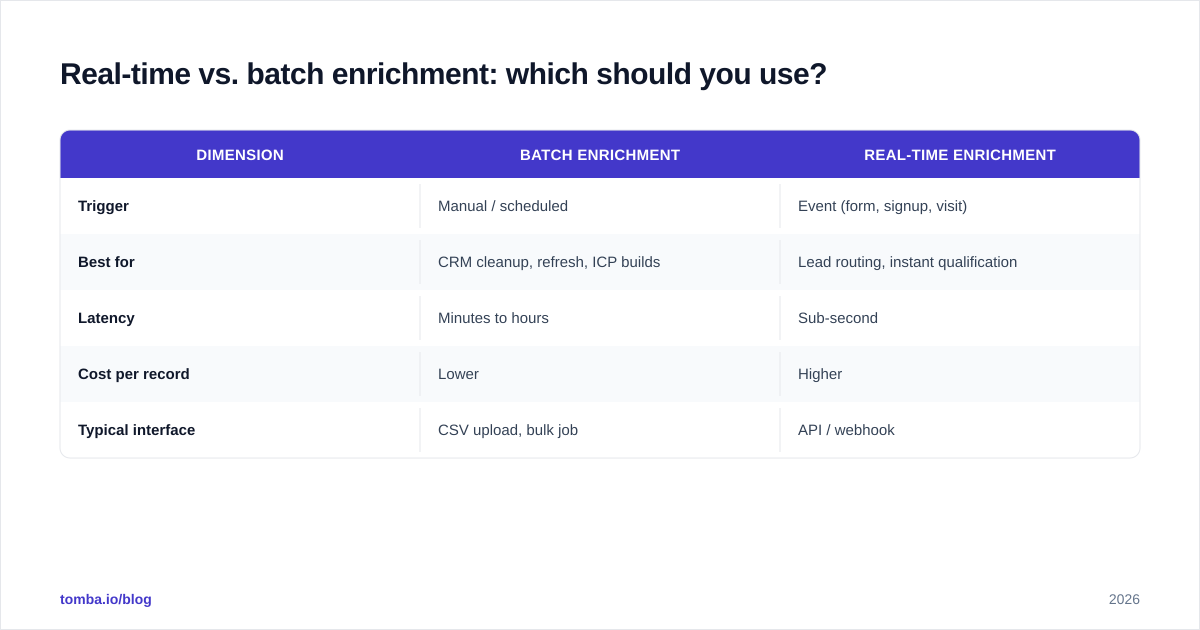
Batch enrichment processes a list — your whole CRM, an event attendee export, a webinar registration dump — in one pass. It is the right tool for cleanups, ICP rebuilds, and periodic refresh cycles. You trade immediacy for throughput and lower per-record cost.
Real-time enrichment fires on a trigger: a form submission, a new CRM record, a website visit. The user fills in their email; before the record even saves, you have appended company size and industry and routed the lead. The cost is higher per call but the payoff is instant — no lead sits unqualified.
| Dimension | Batch enrichment | Real-time enrichment |
|---|---|---|
| Trigger | Manual / scheduled | Event (form, signup, visit) |
| Best for | CRM cleanup, refresh, ICP builds | Lead routing, instant qualification |
| Latency | Minutes to hours | Sub-second |
| Cost per record | Lower | Higher |
| Typical interface | CSV upload, bulk job | API / webhook |
Most mature teams run batch for hygiene and real-time for the moment of capture. If you are starting out, batch-clean what you have first — there is no point routing new leads into a database that is already 30% wrong.
How do you choose an account enrichment vendor?#
Stop counting logos on the homepage. Evaluate on numbers you can verify with a sample file.
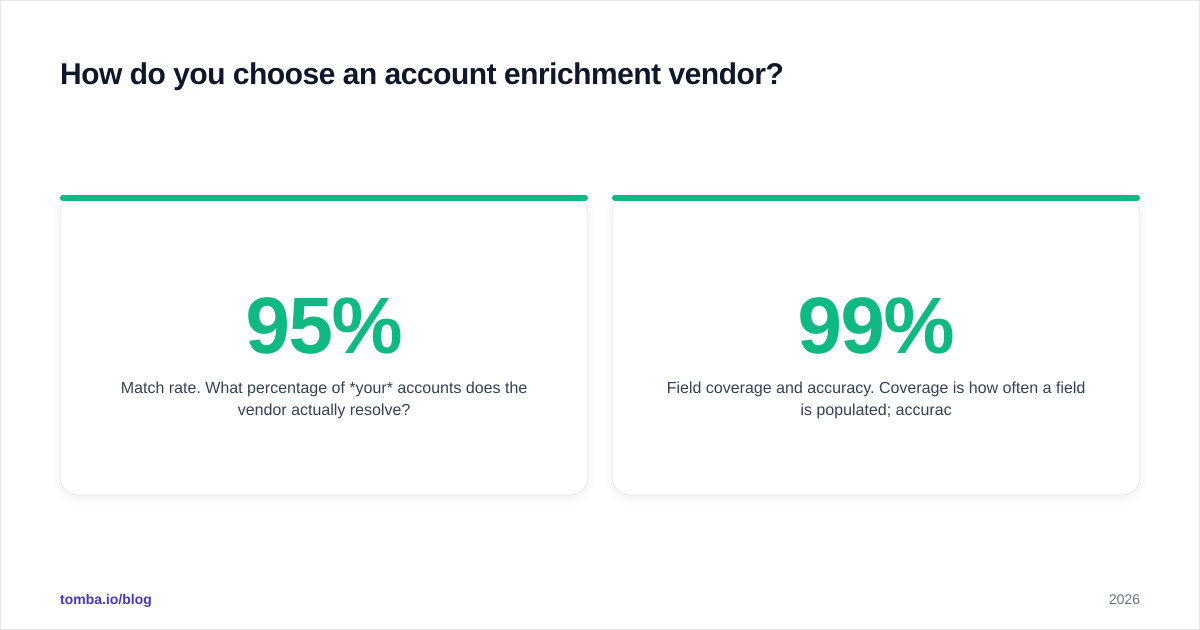
- Match rate. What percentage of your accounts does the vendor actually resolve? A 95% match rate on US tech firms can collapse to 50% on European SMBs. Test on your real data, not their demo set.
- Field coverage and accuracy. Coverage is how often a field is populated; accuracy is how often it is right. Ask for both. A vendor that fills "employee count" 99% of the time but is wrong half the time is worse than one that fills it 70% of the time accurately.
- Freshness. When was the record last verified? Ask for the recency distribution, not a marketing adjective. This is where many cheap providers quietly fail.
- Price model. Per-record, per-credit, or seat-based? Per-credit models reward you for enriching only what you need; seat models punish low-volume teams. Compare against published Tomba pricing and others on a cost-per-successful-match basis, not list price.
- Compliance. Where does the data come from, and is sourcing documented? Reputable vendors publish their data sources. If a vendor is cagey about provenance, treat that as a red flag.
Cross-check vendor claims against third-party review data on G2 or Capterra before you trust a self-reported accuracy number. And always — always — run a 500-row sample through a free trial before committing to an annual contract.
)
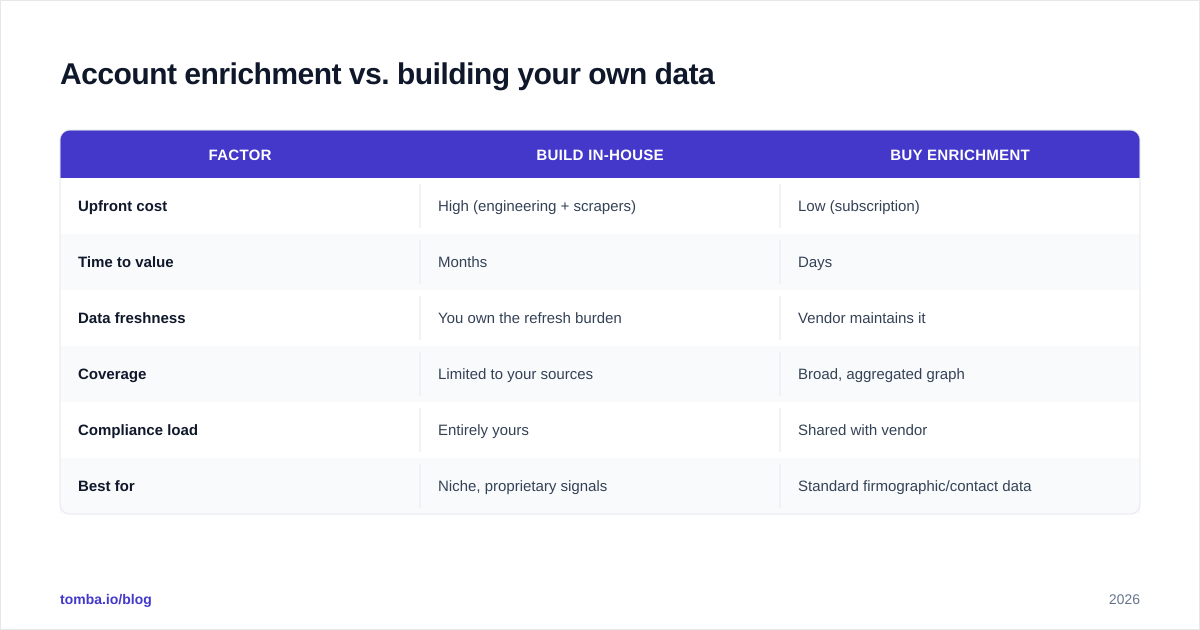
Account enrichment vs. building your own data#
The classic build-vs-buy question. Here is the honest breakdown.
| Factor | Build in-house | Buy enrichment |
|---|---|---|
| Upfront cost | High (engineering + scrapers) | Low (subscription) |
| Time to value | Months | Days |
| Data freshness | You own the refresh burden | Vendor maintains it |
| Coverage | Limited to your sources | Broad, aggregated graph |
| Compliance load | Entirely yours | Shared with vendor |
| Best for | Niche, proprietary signals | Standard firmographic/contact data |
For 95% of teams, buying wins for standard attributes. The math on maintaining your own scrapers, proxies, and verification pipeline rarely pencils out against a per-credit subscription. Build only where you have a proprietary signal no vendor can sell you — usage data from your own product, for instance. Buy the commodity firmographics and contact graph; you are not going to out-crawl a dedicated data company.
If you go the buy route, integration matters as much as the data. Look for native connectors to your CRM — HubSpot, Salesforce, Pipedrive — plus [
Zapier](https://tomba.io/integrations/zapier) or Google Sheets for the long tail of workflows. Enrichment that requires a manual CSV round-trip every week will quietly die from neglect.
What does good account enrichment look like in practice?#
A quick end-to-end example. Say a prospect downloads your whitepaper and gives you only a work email.
- The form submission triggers real-time enrichment off the email domain.
- Identity resolution maps
jane@acme.comto Acme Corp; attribute append returns 1,200 employees, SaaS industry, $200M revenue, runs Salesforce and AWS. - Your scoring model recognizes a strong ICP fit and routes Jane to an enterprise AE instead of the self-serve nurture.
- The AE pulls the contact graph for Acme — VP Eng, CTO, Director of Platform — and uses an email verifier to confirm deliverability before outreach.
- A quarterly batch job re-checks Acme's firmographics; when headcount jumps to 1,500 after a funding round, the account auto-promotes to a higher tier.
That is the whole point of account enrichment: every step downstream — routing, scoring, personalization, refresh — runs on data that is current and verified, not on a domain someone typed into a form once.
Common account enrichment mistakes to avoid#
- Enriching once and calling it done. Without a refresh cadence you are buying a depreciating asset. Schedule it.
- Optimizing coverage over accuracy. A fully-populated wrong field routes leads into the void. Verify before you trust.
- Ignoring the contact layer. Enriched accounts you cannot reach are trivia. Append emails and phones.
- Skipping the sample test. Vendor accuracy claims are marketing until proven on your data.
- No dedup before enrichment. Enriching duplicate accounts wastes credits and pollutes scoring. Clean first with a remove-duplicates pass.
Bring it all together with Tomba#
Account enrichment is only as valuable as the outreach it enables. Once you have identified and enriched the right companies, you still need to reach the actual decision-makers inside them — accurately, and without burning your sender reputation on bad addresses.
That is exactly where Tomba's Email Finder fits. Use domain search to surface verified contacts at every enriched account, confirm them with the email verifier, and push the results straight into your CRM via the Tomba API or native integrations. The Free tier gives you 25 searches a month to test it on your own list; paid plans start at $49/mo (Starter) and scale to Growth at $99/mo and Pro at $249/mo as your enrichment volume grows. Start with your messiest 100 accounts, enrich them, and watch how much faster your reps move when the data is finally true.
// get started
Find, verify and enrich your first contacts today
Start on the free plan with 25 searches a month, then scale when your team is ready.
Free plan · No credit card required · GDPR & CCPA
// about the author