AI Bulk Email Sender: Best Tools and Tactics for 2026
AI bulk email senders promise personalization at scale, but most teams misuse them and tank deliverability. Here's how to pick the right tool and send cold email that actually lands in 2026.
TL;DR
- An AI bulk email sender combines mass sending with AI personalization, send-time optimization, and inbox-rotation so each recipient gets a message that reads one-to-one.
- The bottleneck is never sending volume — it's deliverability. Clean lists, warmed domains, and verified addresses matter more than how many emails you can fire per hour.
- Cold outreach and marketing newsletters need different tools. Don't blast cold prospects from your main marketing ESP.
- The best 2026 stack pairs a sending platform (Instantly, Smartlead, HubSpot) with a data layer that supplies accurate, verified contacts.
- Personalization that scales starts with good data. A bad address ruins a perfect email — verify before you send.
What is an AI bulk email sender?#
An AI bulk email sender is software that sends large volumes of email while using AI to tailor each message, schedule sends, and protect your sender reputation. Think of it as the difference between a megaphone and a switchboard: the old megaphone shouts the same line at everyone, while the switchboard routes a personal-sounding message to each contact through the right line at the right moment.
Three capabilities separate a modern AI sender from a plain mail-merge tool:
- AI personalization at scale — generating opening lines, value props, or full variants from a contact's role, company, or recent activity.
- Deliverability automation — inbox rotation, warmup, spam-word detection, and send throttling so you don't trip spam filters.
- Send-time and volume optimization — AI decides when and how fast to send based on engagement signals.
The category splits into two camps that people constantly confuse: cold outreach platforms (built to contact people who don't know you yet) and email marketing/ESP platforms (built for opted-in subscribers). Using the wrong one is the single most common reason campaigns fail.
Why does deliverability matter more than volume?#
Because an email that lands in spam is worth exactly zero, no matter how many you send. You can send 50,000 messages a day, but if 40,000 hit the spam folder you've accomplished nothing except damaging your domain.
Most beginners obsess over send capacity. Experienced senders obsess over inbox placement. The math is simple: 1,000 emails at 90% inbox placement beats 10,000 emails at 5%. Volume without email deliverability is just a faster way to get blacklisted.
Mailbox providers like Google and Microsoft score your sender reputation based on bounce rates, spam complaints, and engagement. Google's own Postmaster Tools documentation is explicit that a high spam-complaint rate will sink you. AI senders help by spreading volume across multiple inboxes and warming them gradually — but no software can rescue a dirty list.
The four pillars of deliverability, in order of impact:
- Authentication — SPF, DKIM, and DMARC records correctly configured. Run an SPF checker before you send anything.
- List quality — verified, non-bouncing addresses with no spam traps.
- Warmup — gradually ramping new domains and inboxes so providers trust them.
- Engagement — relevant messages that get opens and replies, not deletes and complaints.
How do I choose the right AI bulk email sender?#
Start with your use case, not the feature list. Ask three questions: Are these cold contacts or opted-in subscribers? How many inboxes do you need to rotate? And what's your monthly volume? Your answers eliminate two-thirds of the market instantly.
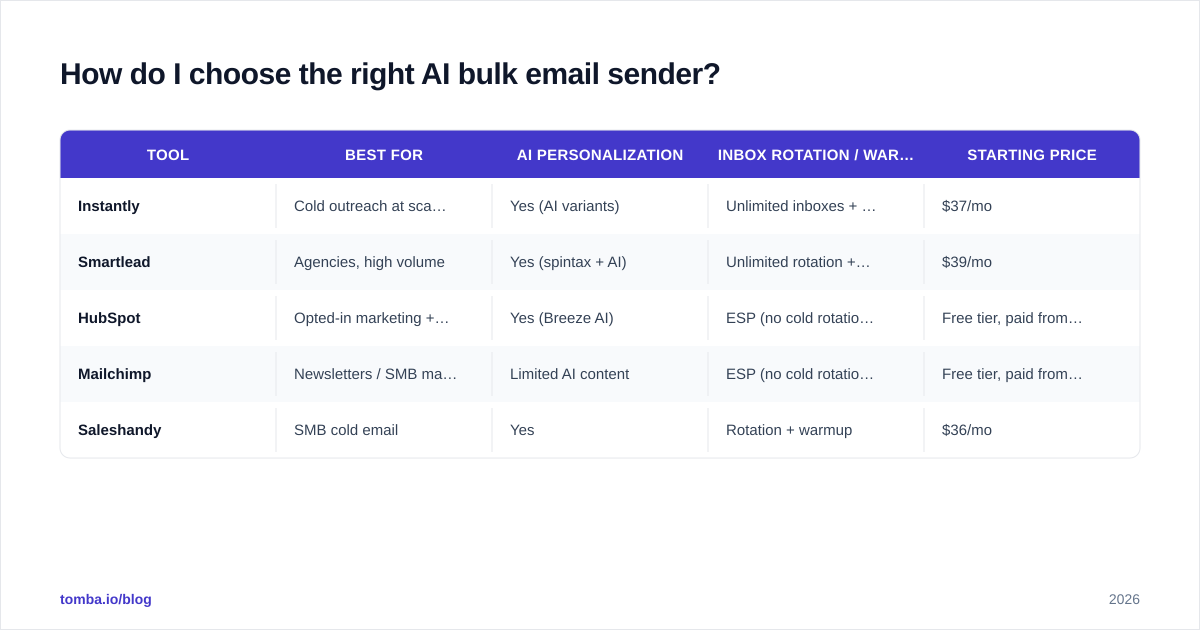
Here's how the leading 2026 options compare across the attributes that actually decide outcomes:
| Tool | Best for | AI personalization | Inbox rotation / warmup | Starting price |
|---|---|---|---|---|
| Instantly | Cold outreach at scale | Yes (AI variants) | Unlimited inboxes + free warmup | $37/mo |
| Smartlead | Agencies, high volume | Yes (spintax + AI) | Unlimited rotation + warmup | $39/mo |
| HubSpot | Opted-in marketing + CRM | Yes (Breeze AI) | ESP (no cold rotation) | Free tier, paid from $20/mo |
| Mailchimp | Newsletters / SMB marketing | Limited AI content | ESP (no cold rotation) | Free tier, paid from $13/mo |
| Saleshandy | SMB cold email | Yes | Rotation + warmup | $36/mo |
A few honest caveats. Marketing ESPs like HubSpot and Mailchimp explicitly prohibit cold/purchased lists in their terms — using them for cold outreach gets your account suspended. Cold platforms like Instantly and Smartlead, on the other hand, are purpose-built for it but are not meant for newsletters to your existing customers. Match the tool to the job.
If you want third-party validation beyond vendor claims, cross-check current ratings on G2 — the category leaders shift every quarter.
What's the AI personalization trap?#
The trap is thinking AI personalization fixes bad targeting. It doesn't — it just makes generic outreach generic faster.
AI is excellent at phrasing and terrible at judgment. It can write a smooth opening line referencing a prospect's job title, but it can't tell you whether that prospect is even the right buyer. When teams plug AI into a bulk sender and let it auto-generate openers across a poorly-researched list, they get thousands of plausible-sounding, contextually wrong emails. Recipients smell it immediately.
Use AI personalization where it has real signal to work with:
- First-line generators fed real data points (recent funding, a published article, a hiring spree).
- Variant testing — let AI produce three subject lines, then A/B test with a subject line tester.
- Dynamic value props matched to industry or role, not invented from nothing.
The rule: AI scales the writing, not the thinking. The thinking is your ICP definition and your data. Garbage in, fluent garbage out.
How do I keep emails out of spam at scale?#
Verify first, warm always, and throttle your ramp. Those three habits prevent the vast majority of spam-folder disasters.
1. Verify every address before sending. Invalid addresses cause hard bounces, and a bounce rate above roughly 2-3% signals mailbox providers that you're sending to a stale or purchased list. Run your list through an email verifier and remove unknowns and catch-alls you can't confirm. This one step routinely cuts bounce rates from 12% to under 2%.
2. Warm up new domains and inboxes. A brand-new domain that suddenly sends 1,000 emails looks exactly like a spammer. Ramp gradually — start at 20-40 per inbox per day and increase over 2-4 weeks. Use an email warmup calculator to plan the curve, and let your sender's automated warmup network build positive engagement signals.
3. Rotate inboxes and throttle volume. Spreading 1,000 daily sends across 20 inboxes (50 each) looks human; blasting 1,000 from one inbox looks robotic. This is the core reason cold platforms exist.
4. Watch the content signals. Spammy words, too many links, image-heavy bodies, and missing unsubscribe options all hurt. Run drafts through a spam checker before launch.
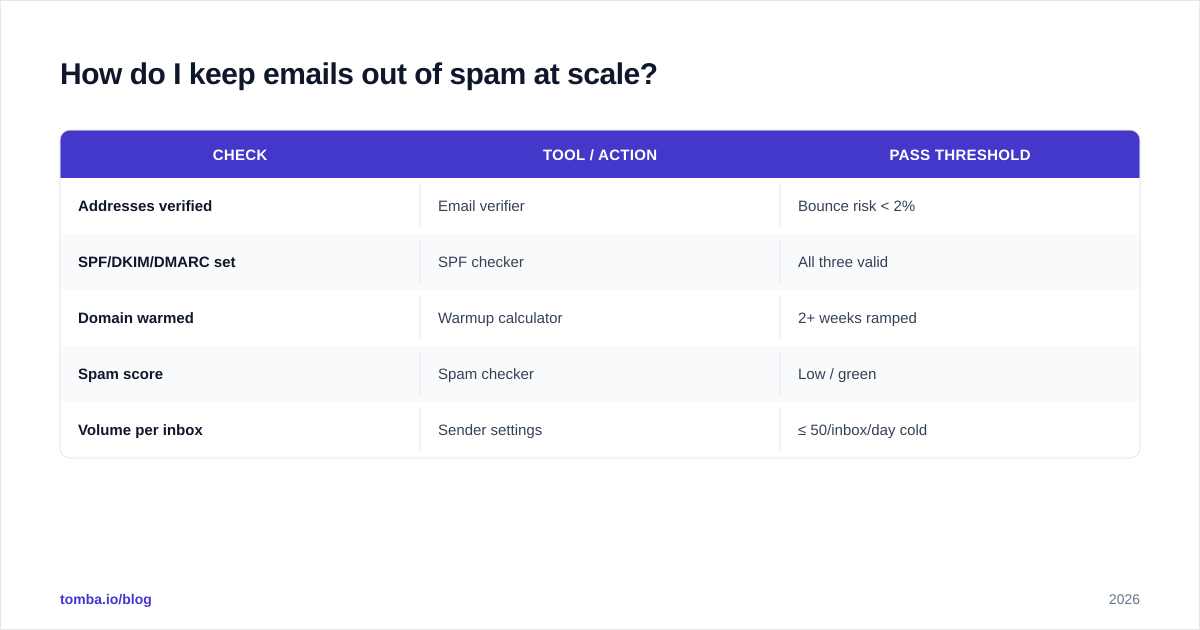
A quick pre-send checklist:
| Check | Tool / action | Pass threshold |
|---|---|---|
| Addresses verified | Email verifier | Bounce risk < 2% |
| SPF/DKIM/DMARC set | SPF checker | All three valid |
| Domain warmed | Warmup calculator | 2+ weeks ramped |
| Spam score | Spam checker | Low / green |
| Volume per inbox | Sender settings | ≤ 50/inbox/day cold |
Where does the data come from?#
From accurate, verified, and recent contact data — and this is where most AI sending stacks quietly fail. You can own the best AI bulk email sender on the market and still flop if your addresses are guessed, outdated, or scraped from a list everyone else also bought.
A sending platform moves messages; it does not find or validate contacts. You need a data layer feeding it. That's the role of an email finder: you supply a name and company (or a whole domain) and get back verified, deliverable professional addresses with confidence scores. Tomba's domain search pulls every public email pattern for a company, and its built-in verification flags risky addresses before they ever enter your sender.
The clean pipeline looks like this:
- Define ICP → who you're targeting.
- Find contacts → email finder + domain search for verified addresses.
- Verify → confirm deliverability, drop catch-alls and unknowns.
- Personalize → AI variants built on real data points.
- Send + rotate → bulk sender with warmup and throttling.
- Measure → reply rate, not just open rate.
Skip step 2 or 3 and the rest collapses. Tools like Tomba exist precisely because the bulk email finder and verification layer is the unglamorous part that determines whether the glamorous AI sending actually works.
What does an AI bulk email sender cost?#
Less than you'd think for sending, more than you'd think once you add data. Sending platforms are cheap because the value is in the contacts. Budget for both layers.
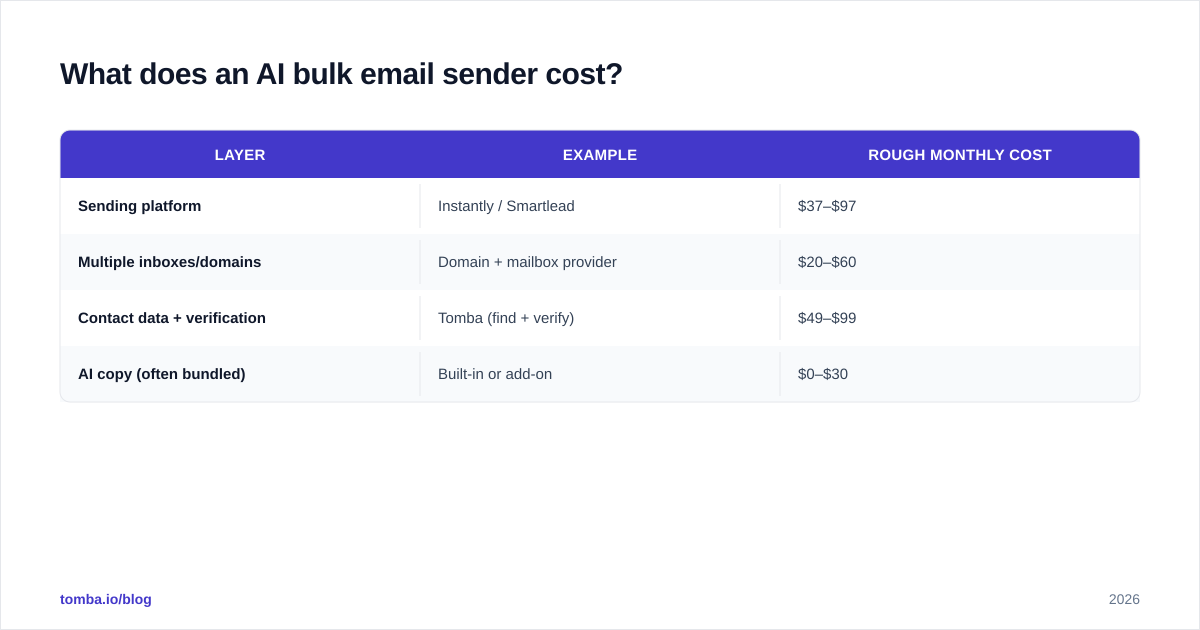
Typical 2026 monthly cost for a small outbound team:
| Layer | Example | Rough monthly cost |
|---|---|---|
| Sending platform | Instantly / Smartlead | $37–$97 |
| Multiple inboxes/domains | Domain + mailbox provider | $20–$60 |
| Contact data + verification | Tomba (find + verify) | $49–$99 |
| AI copy (often bundled) | Built-in or add-on | $0–$30 |
For the data layer specifically, Tomba's pricing scales with volume: a Free tier (25 searches/mo), Starter at $49/mo, Growth at $99/mo, and Pro at $249/mo. You can see full Tomba pricing for credit allocations. The point is to treat data and sending as two line items — under-investing in data is the false economy that sinks most campaigns.
Cold outreach vs. email marketing: which do you actually need?#
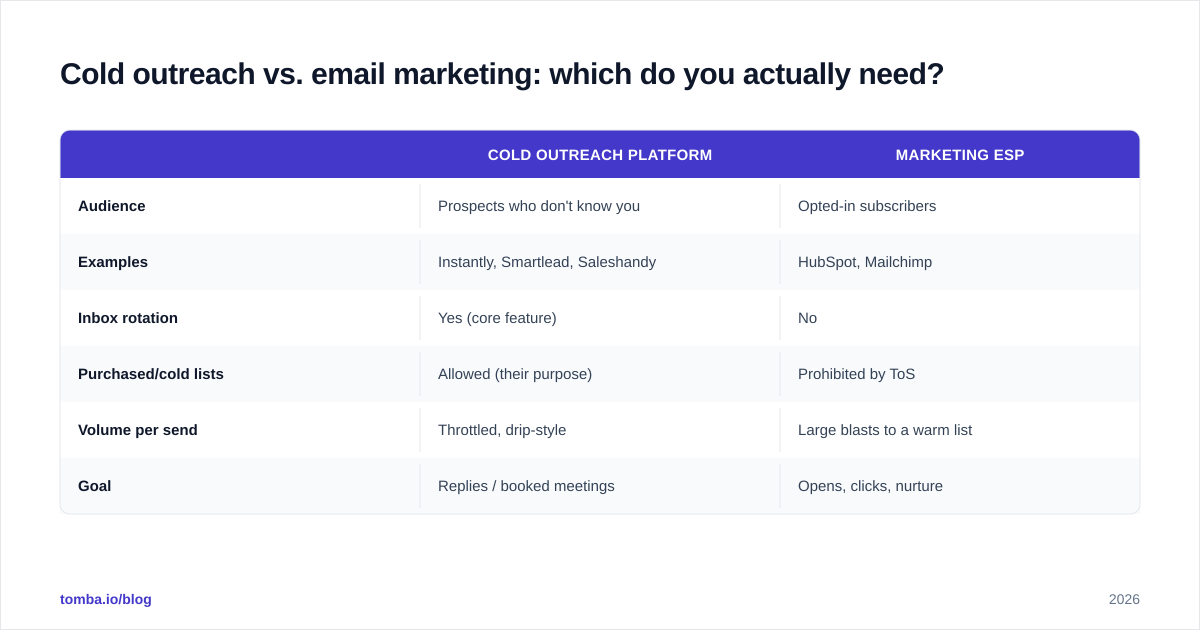
If your recipients opted in, you need a marketing ESP. If they haven't heard of you, you need a cold platform. Mixing them up is how good domains die.
| Cold outreach platform | Marketing ESP | |
|---|---|---|
| Audience | Prospects who don't know you | Opted-in subscribers |
| Examples | Instantly, Smartlead, Saleshandy | HubSpot, Mailchimp |
| Inbox rotation | Yes (core feature) | No |
| Purchased/cold lists | Allowed (their purpose) | Prohibited by ToS |
| Volume per send | Throttled, drip-style | Large blasts to a warm list |
| Goal | Replies / booked meetings | Opens, clicks, nurture |
Run them on separate domains, too. Never send cold campaigns from the domain that hosts your transactional and marketing email — if the cold domain gets burned, your real business email survives.
The bottom line#
An AI bulk email sender is a force multiplier, not a magic wand. It multiplies whatever you feed it — so feed it verified contacts, a warmed domain, and personalization grounded in real signal. The teams that win in 2026 aren't the ones sending the most email; they're the ones whose email lands, gets read, and gets a reply.
Get the foundation right before you scale the volume. Start by building a clean, verified contact list with the Tomba Email Finder — find professional addresses by name, company, or domain, verify them in the same flow, and hand your AI sender data that's actually worth personalizing. Try it free with 25 searches a month, then scale up as your outbound engine proves itself.
// get started
Find, verify and enrich your first contacts today
Start on the free plan with 25 searches a month, then scale when your team is ready.
Free plan · No credit card required · GDPR & CCPA
// about the author