AI Email Send Time Optimization: The 2026 Playbook
Sending at 9 a.m. is a coin flip. Here is how AI email send time optimization actually lifts opens and replies in 2026 — what it does, where it fails, and how to deploy it.
TL;DR
- AI email send time optimization predicts the moment each individual contact is most likely to open and reply, instead of blasting your whole list at one "best practice" hour.
- It reliably moves open rates by 5–25% and reply rates by a smaller margin — real, but not magic. Deliverability and list quality matter more.
- The lift comes from per-recipient timezone, historical engagement, and behavioral signals — not from a single global "Tuesday at 10 a.m." rule.
- It only works on top of clean data and a warmed sending domain. Optimizing the send time of an email that lands in spam changes nothing.
- Most ESPs and sales engagement tools now ship some version of this. The differences are in granularity, transparency, and whether you can trust the model.
What is AI email send time optimization?#
AI email send time optimization is software deciding when to deliver each email so it lands near the top of the inbox at the moment a specific person is most likely to act on it.
Think of it like a TV network scheduling shows. You do not air a kids' cartoon at 2 a.m. and a late-night talk show at breakfast — you put each program where its audience is awake and watching. Send time optimization does the same thing per recipient: it learns that one prospect clears their inbox at 7 a.m. before standup, another at 9 p.m. after the kids are asleep, and it queues your message to surface at each person's window.
Technically, the model ingests historical engagement events (opens, clicks, replies), recipient timezone, day-of-week patterns, and sometimes device and inbox-provider behavior. It produces a per-contact probability curve across the week and schedules the send at the peak. The naive alternative — pick one hour and fire the whole batch — treats a 50,000-person list as if everyone lives in one city and works one schedule. They do not.
The distinction that matters: batch send time ("send everyone at 10 a.m. EST") versus individual send time ("send each person at their predicted peak"). The first is a calendar rule. The second is a prediction. Only the second is meaningfully "AI."
Why does send time matter at all?#
Because inbox attention is a stack, and recency wins position.
Most inboxes sort newest-first. An email that arrives at 3 a.m. sits buried under 40 newer messages by the time your prospect opens their laptop. An email that arrives 10 minutes before they check is near the top. Same copy, same sender, wildly different odds of being seen.
There is a ceiling, though, and it is important to be honest about it. Send time optimization changes whether your email is seen, not whether it deserves a reply. If your subject line is weak or your offer is irrelevant, perfect timing just gets your bad email seen faster. The lever is real but it is one lever among several:
- Deliverability decides if you reach the inbox at all.
- Subject line decides if a seen email gets opened.
- Timing decides if a delivered email gets seen before it sinks.
- Body and offer decide if an opened email gets a reply.
Get timing right and you typically recover the opens you were losing to inbox burial — often a 5–25% relative lift depending on how scattered your audience's timezones and habits are. A regionally concentrated list sees less; a global list sees more.
How does the AI actually pick a time?#
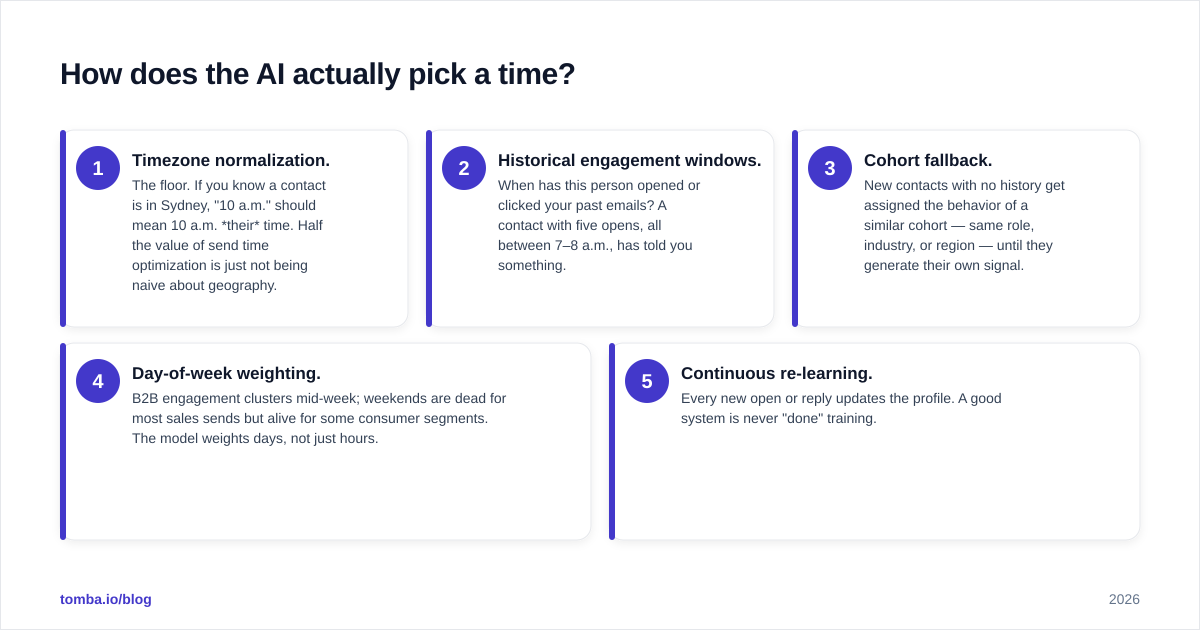
It builds a per-recipient engagement profile and schedules against it. Here is the layered logic most systems use, from crudest to most sophisticated:
- Timezone normalization. The floor. If you know a contact is in Sydney, "10 a.m." should mean 10 a.m. their time. Half the value of send time optimization is just not being naive about geography.
- Historical engagement windows. When has this person opened or clicked your past emails? A contact with five opens, all between 7–8 a.m., has told you something.
- Cohort fallback. New contacts with no history get assigned the behavior of a similar cohort — same role, industry, or region — until they generate their own signal.
- Day-of-week weighting. B2B engagement clusters mid-week; weekends are dead for most sales sends but alive for some consumer segments. The model weights days, not just hours.
- Continuous re-learning. Every new open or reply updates the profile. A good system is never "done" training.
The quality gap between vendors lives in steps 2–5. A tool that only does step 1 (timezone) is selling you a calendar feature with an "AI" label. Ask any vendor: what does it do for a contact with zero engagement history? The answer separates real modeling from marketing.
This is also why your data foundation matters. The model is only as good as the contact records feeding it. If your timezone, company, and role fields are empty or wrong, send time optimization is guessing. Enriching contacts with accurate firmographic and location data — through data enrichment before the campaign — gives the model the cohort signals it needs on day one, before any opens have accumulated.
Does it work for cold email or only warm lists?#
It works best on warm lists and is weakest exactly where cold senders want it most.
The reason is mechanical: individual send time optimization needs history. A cold prospect who has never received an email from you has no engagement profile, so the model falls back to cohort or timezone defaults. That is still better than a blind 9 a.m. blast — timezone alone is worth having — but you are not getting the per-person precision that lifts warm-list opens.
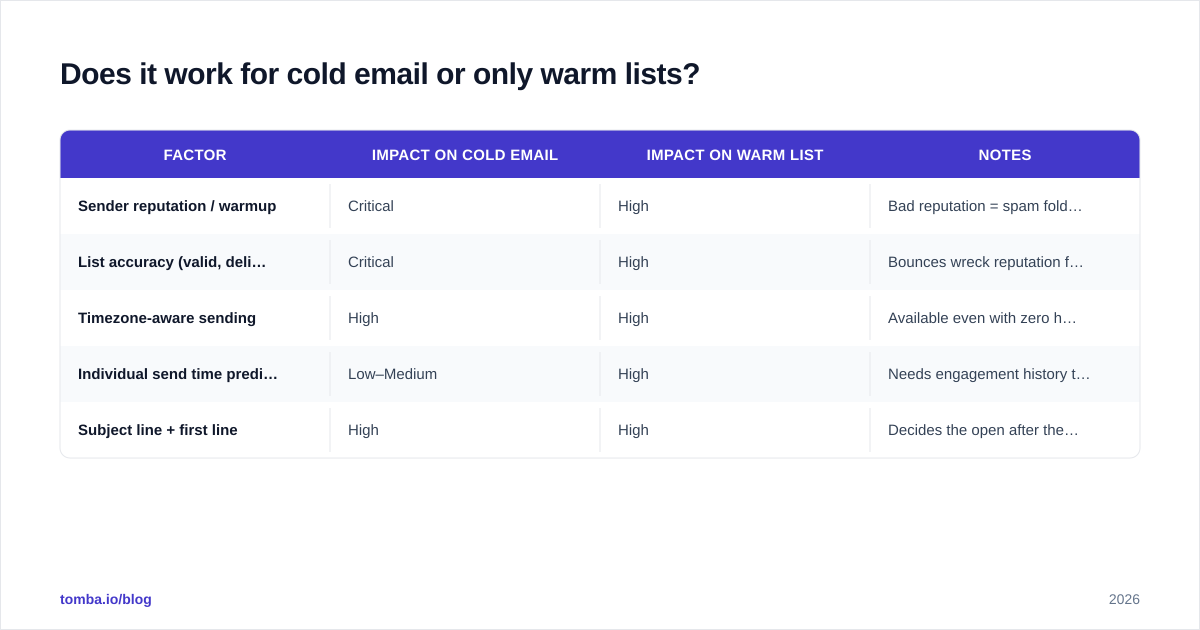
For cold outreach, the priorities sit upstream of timing:
| Factor | Impact on cold email | Impact on warm list | Notes |
|---|---|---|---|
| Sender reputation / warmup | Critical | High | Bad reputation = spam folder, timing irrelevant |
| List accuracy (valid, deliverable) | Critical | High | Bounces wreck reputation fast |
| Timezone-aware sending | High | High | Available even with zero history |
| Individual send time prediction | Low–Medium | High | Needs engagement history to work |
| Subject line + first line | High | High | Decides the open after the email is seen |
The takeaway: if you run cold campaigns, fix deliverability and list quality first. A verified list keeps bounce rates low, which protects the sender reputation that decides whether your perfectly timed email reaches the inbox at all. Run your list through an email verifier before you ever worry about send time. Optimizing the timing of a message that hard-bounces is optimizing nothing.
What are the best AI send time optimization tools in 2026?#
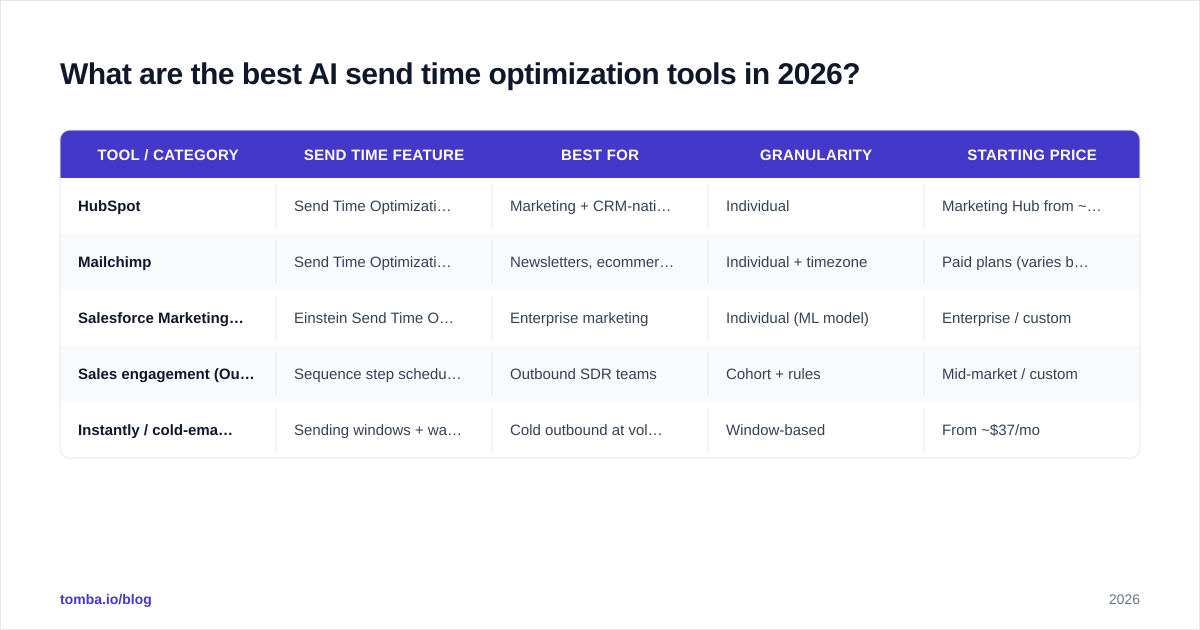
There is no single "best" — it depends on whether you are doing marketing broadcasts, sales sequences, or transactional sends. Here is how the main categories compare.
| Tool / Category | Send time feature | Best for | Granularity | Starting price |
|---|---|---|---|---|
| HubSpot | Send Time Optimization (per-contact) | Marketing + CRM-native teams | Individual | Marketing Hub from ~$15/seat/mo (Starter) |
| Mailchimp | Send Time Optimization + Timewarp | Newsletters, ecommerce | Individual + timezone | Paid plans (varies by list size) |
| Salesforce Marketing Cloud | Einstein Send Time Optimization | Enterprise marketing | Individual (ML model) | Enterprise / custom |
| Sales engagement (Outreach, Salesloft) | Sequence step scheduling + suggestions | Outbound SDR teams | Cohort + rules | Mid-market / custom |
| Instantly / cold-email tools | Sending windows + warmup | Cold outbound at volume | Window-based | From ~$37/mo |
A few honest caveats on this table:
- HubSpot and Salesforce Einstein do genuine per-contact ML and expose how confident the model is. If you live in a CRM, the native option is usually the right call because it sees all your engagement data. See HubSpot's own documentation for how Send Time Optimization is wired into the email tool.
- Mailchimp's Timewarp is timezone-based delivery — solid, simple, and honest about what it is. Their send time guidance is worth reading even if you use a different tool.
- Cold-email tools mostly offer sending windows (e.g., "only send 9 a.m.–5 p.m. recipient local") plus throttling and warmup, not true per-contact prediction. That is appropriate for cold volume, where deliverability beats precision.
Cross-reference vendor claims with third-party reviews on G2 before you commit. "AI-powered" is the most over-claimed phrase in this category, and the review corpus will tell you whether the feature actually moves numbers for teams like yours.
How do I deploy send time optimization without breaking deliverability?#
Run it as a layer on a healthy sending setup — never as a fix for a broken one. The sequence matters.
Step 1 — Authenticate and warm your domain. SPF, DKIM, and DMARC must pass. A cold domain sending optimized-but-sudden volume looks exactly like a spammer to inbox filters. Check your SPF record and warm gradually.
Step 2 — Clean the list. Remove invalids, role accounts you do not want, and catch-all addresses you cannot confirm. High bounce rates destroy reputation faster than good timing can rebuild it. A catch-all verifier helps you decide which risky addresses are worth keeping.
Step 3 — Enrich for cohort signals. Fill in timezone, role, and company fields so the model has something to reason about on day one. This is where contacts with no engagement history still get a smart default instead of a blind guess.
Step 4 — Turn on send time optimization, but keep guardrails. Cap daily volume per inbox. Keep sends inside business hours in the recipient's local time. Do not let the model schedule 200 emails into a single 8 a.m. spike — that spike itself can trip rate limits.
Step 5 — Measure against a control. Hold out 10–20% of each segment as a fixed-time control group. If the AI cohort does not beat the control on opens and replies over a few weeks, the feature is not earning its place. Tie it back to your response rate, not just opens — opens have gotten noisier since Apple Mail Privacy Protection inflated them.
That last point deserves emphasis. Open rates are a corrupted metric for a meaningful slice of your audience because privacy proxies pre-fetch images and fire false opens. Send time models that train only on opens are partly training on noise. The better systems weight clicks and replies more heavily. When you evaluate a vendor, ask what signal their model optimizes for — if the answer is "opens," discount the claimed lift accordingly.
What results should I realistically expect?#
Expect a modest, compounding lift on engagement — not a transformation of a weak campaign.
Honest ranges from teams running proper holdout tests:
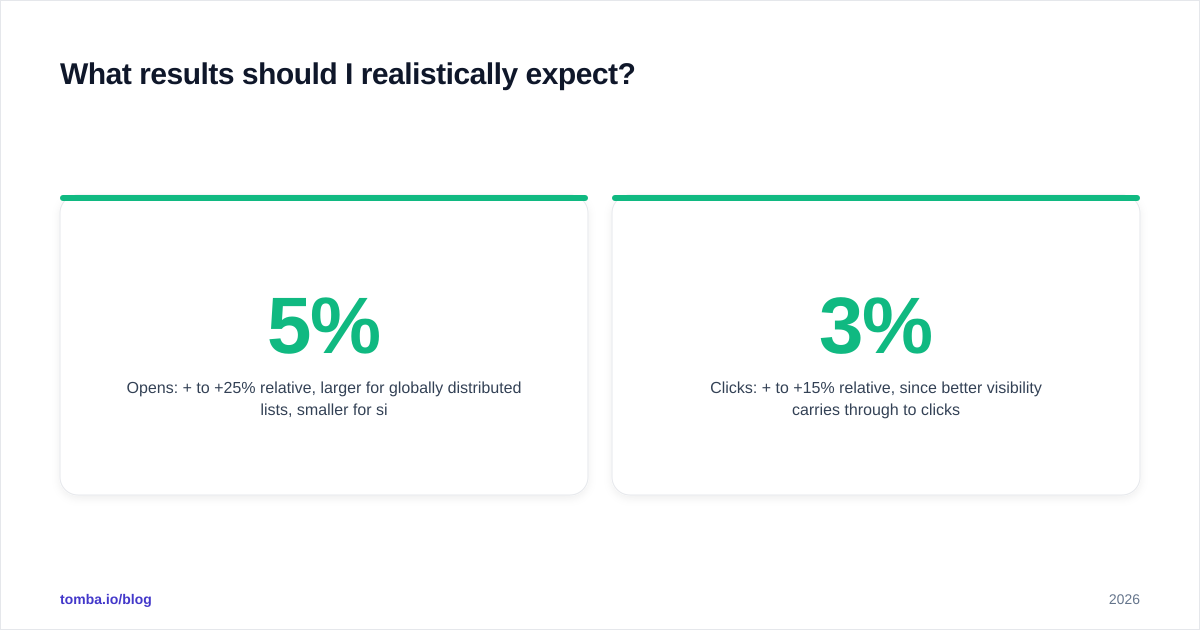
- Opens: +5% to +25% relative, larger for globally distributed lists, smaller for single-region lists.
- Clicks: +3% to +15% relative, since better visibility carries through to clicks.
- Replies: smaller and noisier. Timing gets you seen; copy and offer get you answered.
What erodes those numbers in practice: a single-timezone audience (less to optimize), thin engagement history (model is guessing), and corrupted open data (model trains on noise). What amplifies them: a global list, a long engagement history, and a clean, enriched contact database.
The strategic point is that send time optimization is a multiplier on an already-functional system. If your fundamentals — deliverability, list quality, targeting, and copy — are in place, it adds a real few points. If they are not, it adds rounding error. Fix the foundation first; the timing layer pays off after.
A practical sequencing rule for a sales team: get your contact data right, verify it, warm your domain, write a tight sequence, then switch on send time optimization and measure it against a control. In that order, every layer compounds. Out of order, you are tuning the radio in a car with no engine.
The bottom line#
AI email send time optimization is a legitimate, well-understood lever that earns a real but bounded lift — provided it sits on top of clean data and a healthy domain. It is not a substitute for deliverability work, list hygiene, or a message worth reading. Treat it as the final 5% polish on a campaign that already works, and it pays for itself. Treat it as a rescue for a broken funnel, and it does nothing.
Before you optimize when you send, make sure you are sending to real, reachable people. Start with the Tomba Email Finder to build accurate, verified contact lists by domain, name, or company — then enrich those records with the timezone and firmographic signals every send time model needs to make a smart first guess. Clean data in, real lift out. Check current Tomba pricing to find the plan that fits your outbound volume, starting with a free tier of 25 searches a month.
// get started
Find, verify and enrich your first contacts today
Start on the free plan with 25 searches a month, then scale when your team is ready.
Free plan · No credit card required · GDPR & CCPA
// about the author