B2B Lists vs LeadsForge: Which Wins for Pipeline in 2026?
Static B2B lists are cheap but decay fast. LeadsForge promises AI-sourced leads. Here's an honest 2026 breakdown of cost, accuracy, and which one actually fills pipeline.
You have budget for one lead source this quarter. Do you buy a pre-built B2B list, subscribe to LeadsForge's AI sourcing, or build your own pipeline with live enrichment? This guide compares the first two head-to-head, then shows where a verify-on-demand approach quietly beats both.
TL;DR#
- B2B lists are cheap and instant but decay 25-30% per year, so a "10,000-contact" file is often 7,000 reachable contacts within months.
- LeadsForge sells AI-assisted lead sourcing — fresher than a static CSV, but you pay per seat and inherit whatever its underlying data partners provide.
- Accuracy is the real cost. A bounced email burns sender reputation; a stale list silently throttles every campaign that follows.
- The honest winner depends on volume. One-off list for a niche event? Buy the list. Ongoing outbound? Source names, then verify and enrich each contact live.
- A find-and-verify workflow (the model behind the Tomba Email Finder) costs less than most list subscriptions and never serves you a 14-month-old record.
What are B2B lists?#
A B2B list is a static export of business contacts — names, titles, companies, emails, sometimes phone numbers — sold as a file or a database seat. Think of it like buying a printed phone book: accurate the day it's printed, slowly wrong every day after.
Vendors range from marketplace resellers (you pick filters, download a CSV) to database platforms where you "build a list" inside their UI and export credits. The appeal is obvious: you get thousands of rows in minutes, no scraping, no manual research.
The catch is decay. People change jobs, companies rebrand, domains migrate, and inboxes get deactivated. Industry studies on B2B data consistently put annual decay between 22% and 30%. That means a list you bought in January is measurably worse by spring, and you usually can't tell which rows went bad until your emails start bouncing.
There's also a compliance dimension. Purchased lists often lack a clear consent trail, which matters under GDPR and CAN-SPAM. You're responsible for how you contact people regardless of where the data came from.
What is LeadsForge?#
LeadsForge positions itself as an AI-driven lead generation tool: you describe your ideal customer in plain language, and it returns a list of matching prospects with contact details. Instead of manually setting 20 filters, you tell it "VP of Marketing at Series B SaaS companies in the US" and it assembles candidates.
That conversational layer is genuinely useful for non-technical reps. Under the hood, though, an AI sourcing tool is still bound by its data sources. The natural-language interface speeds up querying; it doesn't change the freshness or accuracy of the records being queried. If the underlying provider has a stale email for a contact, the AI will hand you that stale email confidently.
So the real comparison isn't "old-fashioned list vs smart AI." It's "static export vs subscription query layer" — and the deciding factors are freshness, verification, cost model, and how the data enters your workflow.
B2B lists vs LeadsForge: the core comparison#
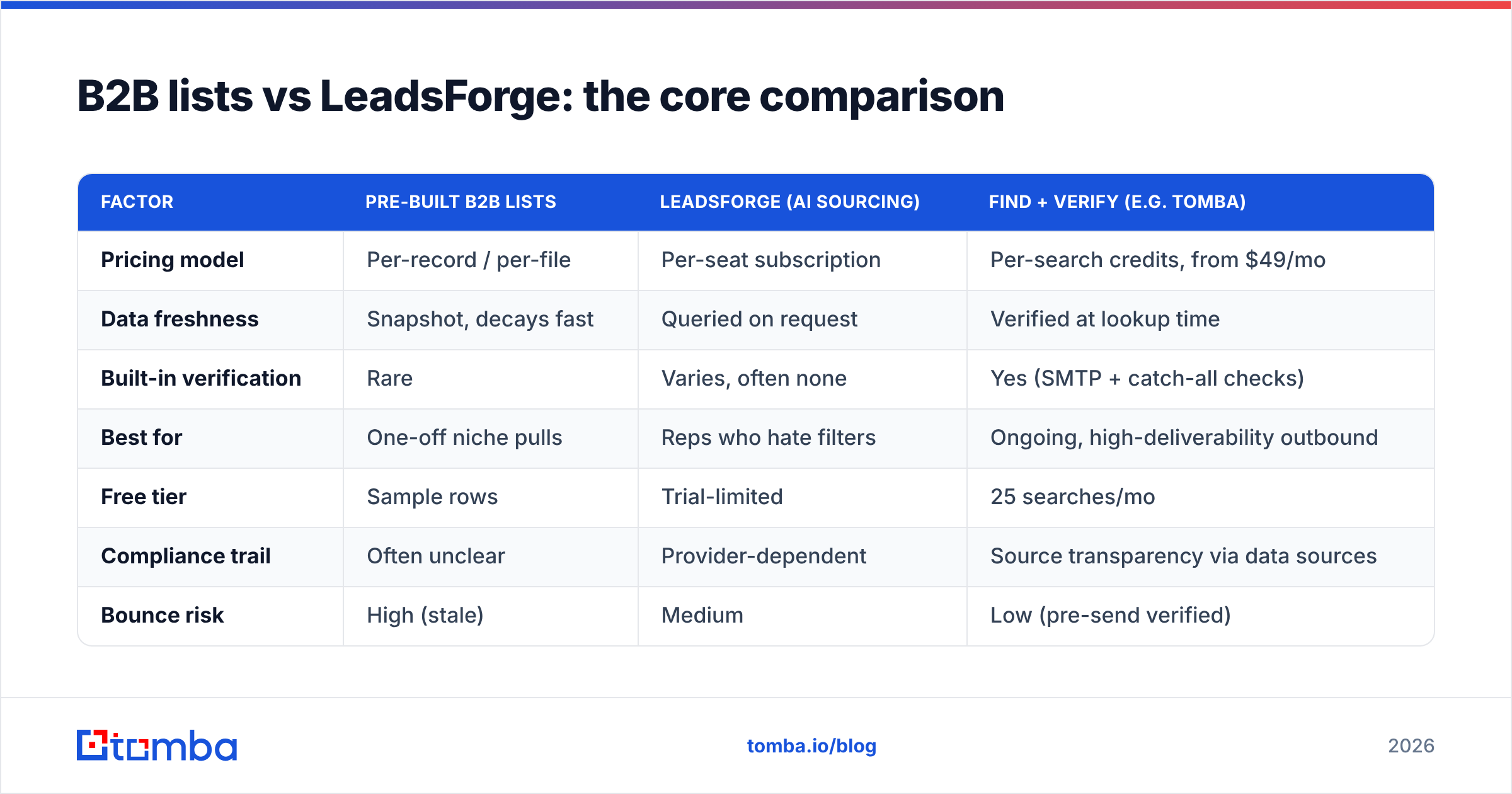
Here's the honest side-by-side. Treat specific prices as directional — vendors change tiers — but the structure of each cost model is what matters.
| Factor | Pre-built B2B lists | LeadsForge (AI sourcing) | Find + verify (e.g. Tomba) |
|---|---|---|---|
| Pricing model | Per-record / per-file | Per-seat subscription | Per-search credits, from $49/mo |
| Data freshness | Snapshot, decays fast | Queried on request | Verified at lookup time |
| Built-in verification | Rare | Varies, often none | Yes (SMTP + catch-all checks) |
| Best for | One-off niche pulls | Reps who hate filters | Ongoing, high-deliverability outbound |
| Free tier | Sample rows | Trial-limited | 25 searches/mo |
| Compliance trail | Often unclear | Provider-dependent | Source transparency via data sources |
| Bounce risk | High (stale) | Medium | Low (pre-send verified) |
A few things stand out. First, both lists and AI tools sell you access to records, while a find-and-verify tool sells you confirmed reachability. Second, the per-record list model looks cheapest until you divide by the share that actually lands — a $0.10 record that bounces cost you infinitely more once you count reputation damage.
Which is more accurate?#
Accuracy is where this decision is actually won or lost, and it's worth being precise about what "accurate" means.
A list can be correct (the person really is the CMO of that company) and still undeliverable (they left three months ago, or the email is a catch-all that silently drops mail). For outbound, deliverability is the metric that pays. A 95%-correct list that's only 70% deliverable will tank your sender reputation faster than a smaller, fully verified one.
This is the core argument for verification over acquisition:
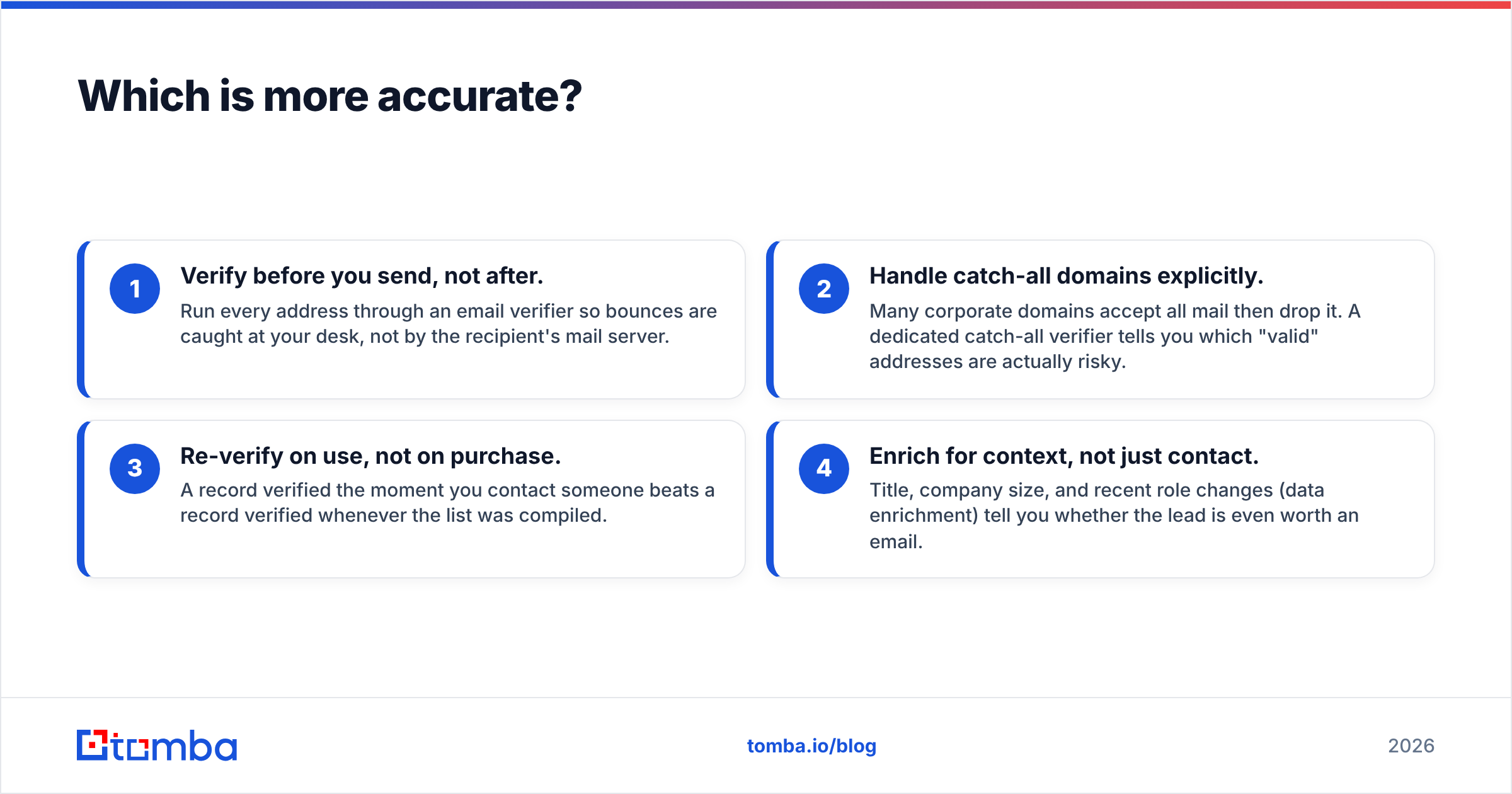
- Verify before you send, not after. Run every address through an email verifier so bounces are caught at your desk, not by the recipient's mail server.
- Handle catch-all domains explicitly. Many corporate domains accept all mail then drop it. A dedicated catch-all verifier tells you which "valid" addresses are actually risky.
- Re-verify on use, not on purchase. A record verified the moment you contact someone beats a record verified whenever the list was compiled.
- Enrich for context, not just contact. Title, company size, and recent role changes (data enrichment) tell you whether the lead is even worth an email.
Neither a static list nor a query layer guarantees step 1 for free. That's the gap. According to G2 category reviews, the tools users rate highest for accuracy are consistently the ones that verify at lookup time rather than ship a periodic snapshot.
Which is cheaper in practice?#
Cheaper depends entirely on whether your need is a spike or a stream.
For a one-time spike — say you're targeting 500 attendees of a single conference — a purchased list often wins on raw price. You pay once, you're done, and decay doesn't matter much because you'll use it within days.
For ongoing outbound, the math flips. A per-seat AI subscription charges you whether or not you sourced anything that month, and a list you bought in Q1 needs re-buying by Q3. A credit-based find-and-verify model only charges when you actually pull a contact, and the contact is fresh each time.
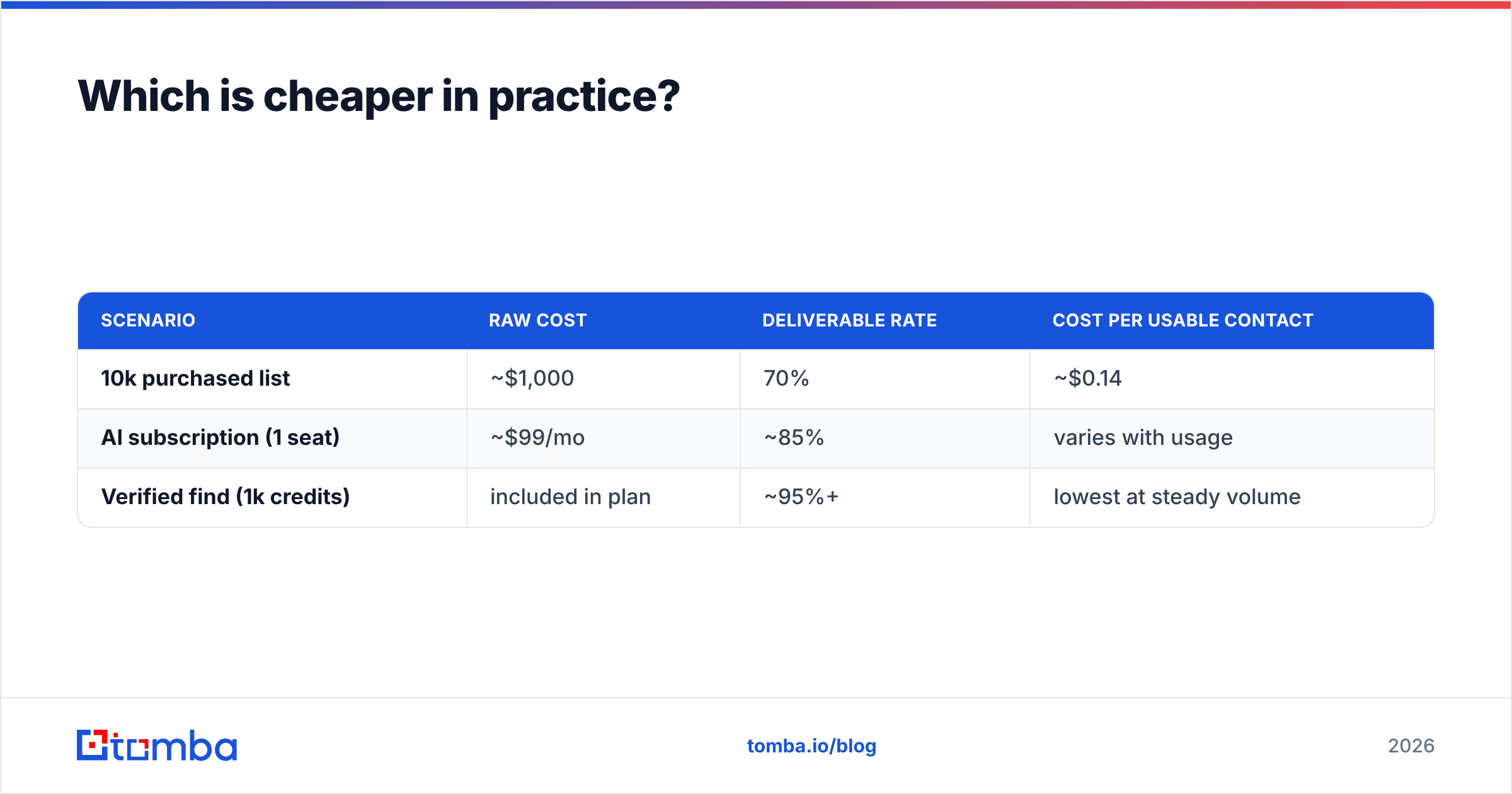
Run the unit economics on deliverable contacts, not raw rows:
| Scenario | Raw cost | Deliverable rate | Cost per usable contact |
|---|---|---|---|
| 10k purchased list | ~$1,000 | 70% | ~$0.14 |
| AI subscription (1 seat) | ~$99/mo | ~85% | varies with usage |
| Verified find (1k credits) | included in plan | ~95%+ | lowest at steady volume |
The list looks cheapest per raw row and worst per usable row once decay is priced in. For teams running consistent campaigns, see the full Tomba pricing breakdown — the credit model is built for exactly this steady-state case.
When should you actually buy a B2B list?#
Buying a list isn't wrong — it's wrong by default. There are legitimate cases:
- Hyper-niche segments a database can't query well (e.g., "independent marine surveyors in the Pacific Northwest"), where a specialist broker has hand-built data.
- One-shot campaigns with a short shelf life, where decay never gets a chance to bite.
- Account research seeding, where you want a rough universe to prioritize, not a send-ready file.
Even then, treat a purchased list as raw input, not a finished asset. Run it through verification, dedupe it, and enrich the survivors. A list becomes safe to mail only after you've confirmed the addresses still resolve.
When does LeadsForge make sense?#
LeadsForge and similar AI sourcing tools shine for a specific user: a rep who needs results fast and doesn't want to learn a filter-heavy database UI. The natural-language interface lowers the skill floor, which is real value for small teams without a RevOps function.
It's a weaker fit when:
- You need API-level integration to enrich records inside your own CRM or product. A workflow-first team usually wants an email finder API rather than a chat box.
- You care about knowing your data provenance — where each record came from and when it was last confirmed.
- Your volume is bursty, making a flat monthly seat inefficient versus pay-per-search credits.
If the chat-style sourcing genuinely saves your reps hours, it can earn its seat price. Just verify what it returns before you trust it — the AI layer makes querying friendlier, not the data fresher.
How does a find-and-verify workflow compare to both?#
The third path is to stop buying static contact sets entirely and instead source names from your own research, then resolve and verify each contact on demand.
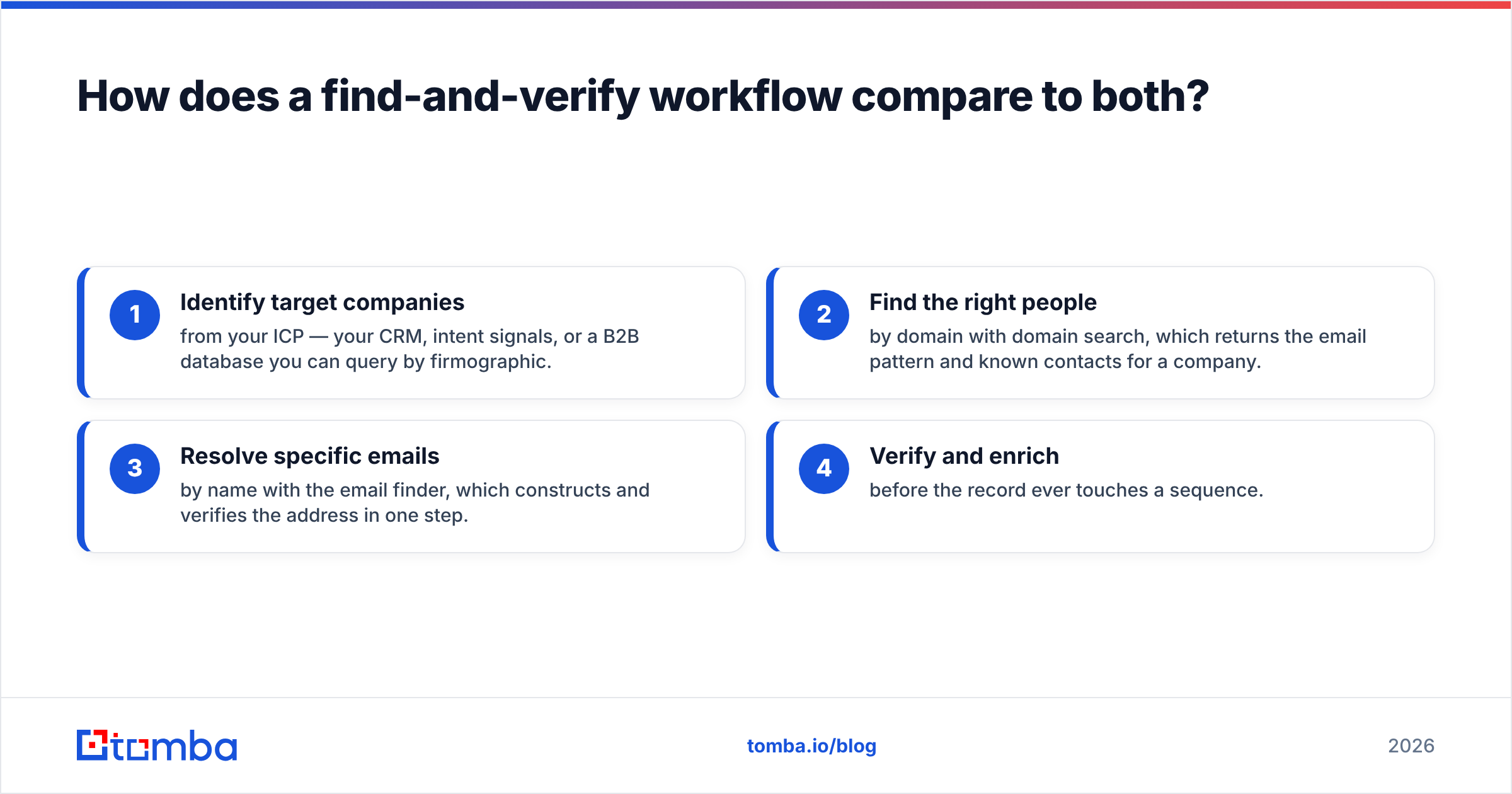
The pattern looks like this:
- Identify target companies from your ICP — your CRM, intent signals, or a B2B database you can query by firmographic.
- Find the right people by domain with domain search, which returns the email pattern and known contacts for a company.
- Resolve specific emails by name with the email finder, which constructs and verifies the address in one step.
- Verify and enrich before the record ever touches a sequence.
The advantage is structural: nothing in this pipeline is older than the moment you ran it. There's no file to decay, no subscription you're paying for during a slow month, and a transparent trail of where each address came from. For workflow-heavy teams, this plugs directly into tools you already use — see the integrations list, including Salesforce and HubSpot — so enriched, verified contacts land in the CRM automatically.
This is also the most compliance-friendly model. Because you're resolving public professional emails for specific, identified contacts rather than absorbing an opaque purchased file, your documentation of why you have each record is far cleaner. (Always pair it with proper opt-out handling and the consent rules in your region — see HubSpot's GDPR resources for a practical primer.)
What about deliverability after you get the data?#
Whichever source you pick, the data is only half the job. The other half is protecting the inbox you send from. Even perfect contacts fail if your domain isn't warmed and authenticated.
Before any campaign:
- Confirm your SPF, DKIM, and DMARC are set — a quick SPF checker catches the most common misconfiguration.
- Watch your bounce rate obsessively. This is exactly why verified-on-send beats decayed lists: every avoided bounce protects your email deliverability.
- Keep lists deduplicated so you never hit the same contact twice from two sources.
A clean, verified, freshly-sourced contact set is the single biggest lever on deliverability — bigger than copy, bigger than send time. That's the quiet reason the find-and-verify model outperforms both static lists and AI sourcing for sustained outbound: it optimizes the one input everything else depends on.
The verdict#
For a single niche pull, buy a targeted list and verify it before sending. For reps who want fast, conversational sourcing and have steady budget, LeadsForge can earn its seat — as long as you verify its output. But for ongoing, deliverability-sensitive outbound, neither static lists nor AI query layers beat a workflow that finds and verifies each contact at the moment you need it.
The deciding question is simple: are you buying records, or are you buying reachability? Lists and AI tools mostly sell the first. Pipeline is built on the second.
If you're tired of paying for contacts that bounce, start with the Tomba Email Finder. Find professional emails by name, domain, or company, verify them in the same step, and keep your 25 free searches a month while you test it against whatever list or AI tool you're using today. Source fresh, verify before you send, and let your sender reputation do the compounding.
// get started
Find, verify and enrich your first contacts today
Start on the free plan with 25 searches a month, then scale when your team is ready.
Free plan · No credit card required · GDPR & CCPA
// about the author