Bulk Email Address List Cleaner: The 2026 Cleanup Guide
A dirty list tanks deliverability and burns your domain. Here's how a bulk email address list cleaner works, what to check, and how to pick one in 2026.
Bulk Email Address List Cleaner: The 2026 Cleanup Guide
You bought, scraped, or exported a list of 40,000 contacts. Half of it is going to hurt you. A bulk email address list cleaner is the tool that tells you which half — before a mailbox provider does it for you by routing your campaign to spam.
This guide explains what list cleaning actually checks, how to read the results, and how to choose a tool in 2026 without wasting credits on guesswork.
TL;DR#
- A bulk email address list cleaner validates large contact lists in one pass: syntax, domain/MX records, mailbox existence, and risk flags (role, disposable, catch-all, spam-trap likelihood).
- Cleaning before you send protects your sender reputation and keeps bounce rates under the ~2% line that providers like Gmail and Outlook punish.
- The four numbers that matter on every report: valid, invalid, risky/catch-all, and unknown — never delete "catch-all" blindly.
- Accuracy and catch-all handling separate good cleaners from cheap ones. Test on a known sample before bulk-processing.
- Tomba's email verifier and bulk verify tools handle list cleaning plus enrichment, starting on a free tier.
What is a bulk email address list cleaner?#
A bulk email address list cleaner is software that takes an entire list — CSV, Excel, or an API stream — and checks every address for deliverability without sending a real email. Think of it like airport security for your contacts: every address walks through the same scanner, and only the ones that clear get on the plane.
Under the hood, a cleaner runs each address through a sequence of checks and returns a status. The good ones do this for tens of thousands of rows in minutes and hand you back the same file with verdict columns attached.
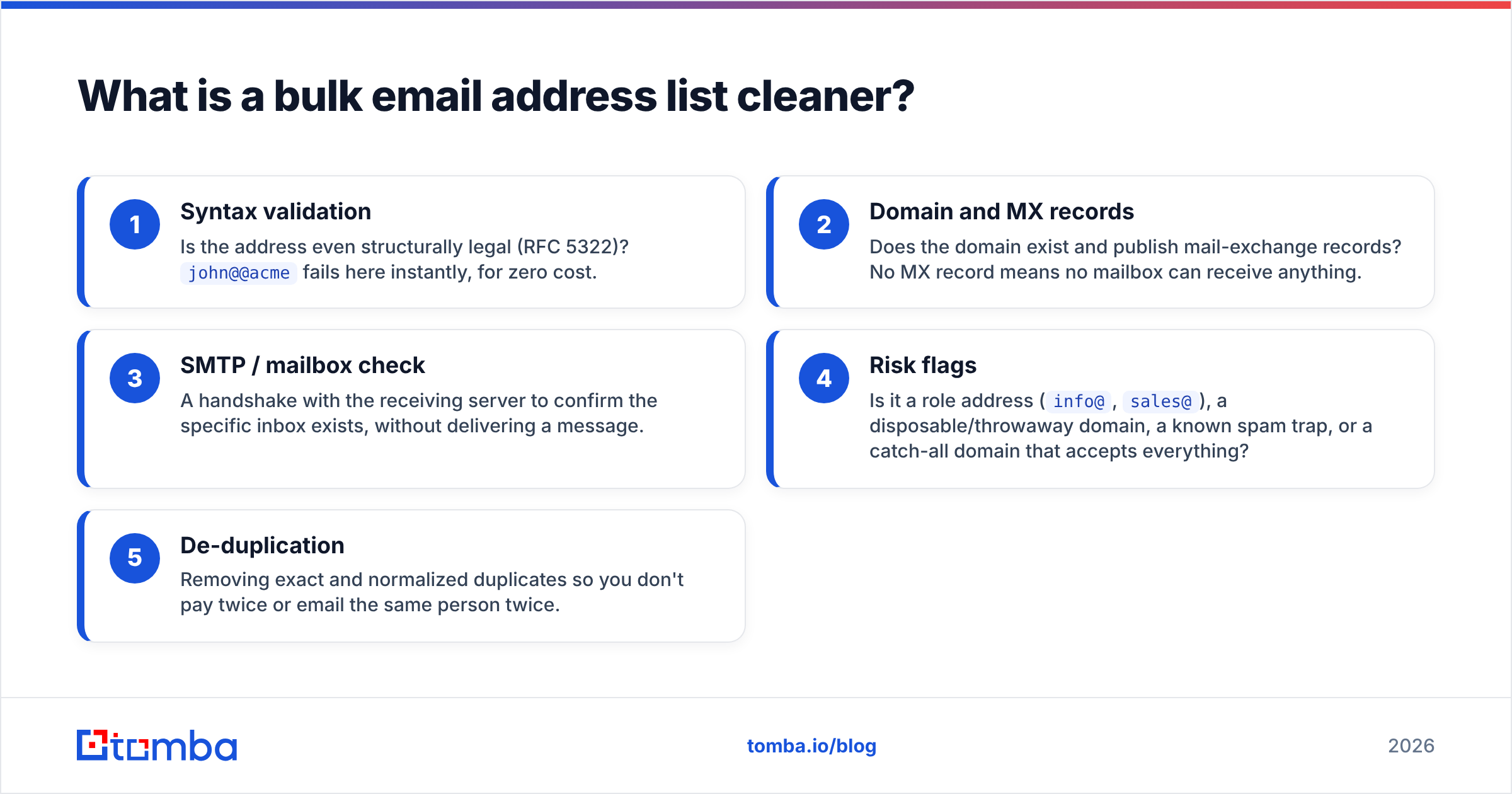
Here are the checks a serious cleaner performs, in the order they run:
- Syntax validation — Is the address even structurally legal (RFC 5322)?
john@@acmefails here instantly, for zero cost. - Domain and MX records — Does the domain exist and publish mail-exchange records? No MX record means no mailbox can receive anything.
- SMTP / mailbox check — A handshake with the receiving server to confirm the specific inbox exists, without delivering a message.
- Risk flags — Is it a role address (
info@,sales@), a disposable/throwaway domain, a known spam trap, or a catch-all domain that accepts everything? - De-duplication — Removing exact and normalized duplicates so you don't pay twice or email the same person twice.
The output is a labeled list, not a yes/no. Your job is to decide what to do with each label — which is where most people get it wrong.
Why do you need to clean a list before sending?#
Because bounces are the fastest way to wreck your domain. One conclusion, then the reasoning: mailbox providers treat a high bounce rate as a signal that you don't know your audience — and that's the profile of a spammer.
When you send to dead addresses, three things happen at once:
- Hard bounces spike. Above roughly 2% bounce rate, Gmail, Yahoo, and Outlook start throttling or junking your mail. Some providers begin reacting closer to 1%.
- Spam traps fire. Recycled or pristine traps sit on purchased and stale lists. Hitting one can land your domain or IP on a blacklist.
- Engagement metrics crater. Dead addresses never open or click, dragging down the open-rate signal that providers now weight heavily.
The cost is asymmetric. A cleaner charges you a fraction of a cent per address; a damaged sender reputation can cost you weeks of warmup and a chunk of your pipeline. Google's own sender guidelines are explicit that bulk senders must keep spam complaints and invalid sends low — cleaning is how you stay inside that line.
If you're not sure how bad your list is, run a free spot check first with a free email checker before committing the whole file.
How does bulk verification actually work?#
The mechanics are simpler than vendors make them sound. A bulk verifier parallelizes the single-address checks above across your whole file, manages rate limits per receiving domain, and aggregates the verdicts.
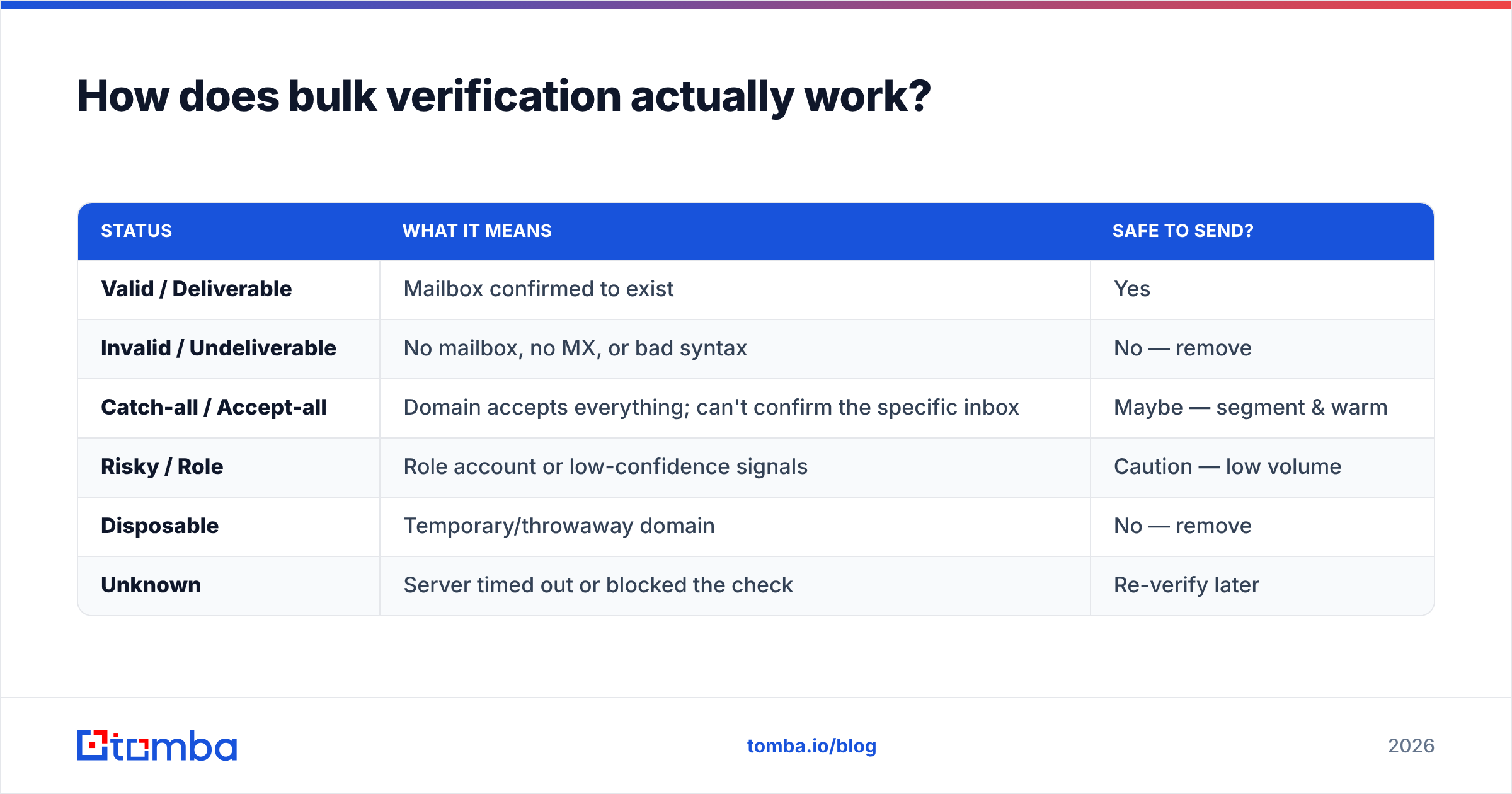
The part that trips people up is the status taxonomy. Every cleaner returns roughly these buckets, even if the labels differ:
| Status | What it means | Safe to send? |
|---|---|---|
| Valid / Deliverable | Mailbox confirmed to exist | Yes |
| Invalid / Undeliverable | No mailbox, no MX, or bad syntax | No — remove |
| Catch-all / Accept-all | Domain accepts everything; can't confirm the specific inbox | Maybe — segment & warm |
| Risky / Role | Role account or low-confidence signals | Caution — low volume |
| Disposable | Temporary/throwaway domain | No — remove |
| Unknown | Server timed out or blocked the check | Re-verify later |
The catch-all row is where money is won and lost. A catch-all domain (common on Google Workspace and Microsoft 365 setups) replies "yes" to every address, so a naive cleaner either drops them all (you lose real buyers) or passes them all (you send blind). A good catch-all strategy uses pattern confidence and historical data — Tomba exposes this through a dedicated catch-all finder rather than forcing a binary delete.
What should you look for in a list cleaner in 2026?#
Conclusion first: prioritize accuracy on catch-all domains, transparent pricing, and an API — in that order. Speed and a pretty dashboard are table stakes now.
Here's the checklist I use when evaluating any tool:
- Real accuracy, not marketing accuracy. Every vendor claims "99%." Test it: take 100 addresses you've already emailed (you know which bounced) and run them through. Compare verdicts to reality.
- Catch-all handling. Does it guess, segment, or just label and shrug? This single feature explains most accuracy gaps between tools.
- Duplicate and normalization logic. Does it catch
John.Doe@acme.comvsjohndoe@acme.com? Use a remove-duplicates pass even before uploading. - Pricing model. Per-credit, monthly, or both? Do unknown results refund credits? Cheap cleaners that bill for "unknown" verdicts quietly cost the most.
- Integrations and API. If cleaning is a step in a pipeline (it should be), you need an email verification API, not just a file upload.
- Data residency and compliance. GDPR/CCPA posture matters when you're uploading personal data in bulk.
Tomba vs a generic verifier vs manual cleanup#
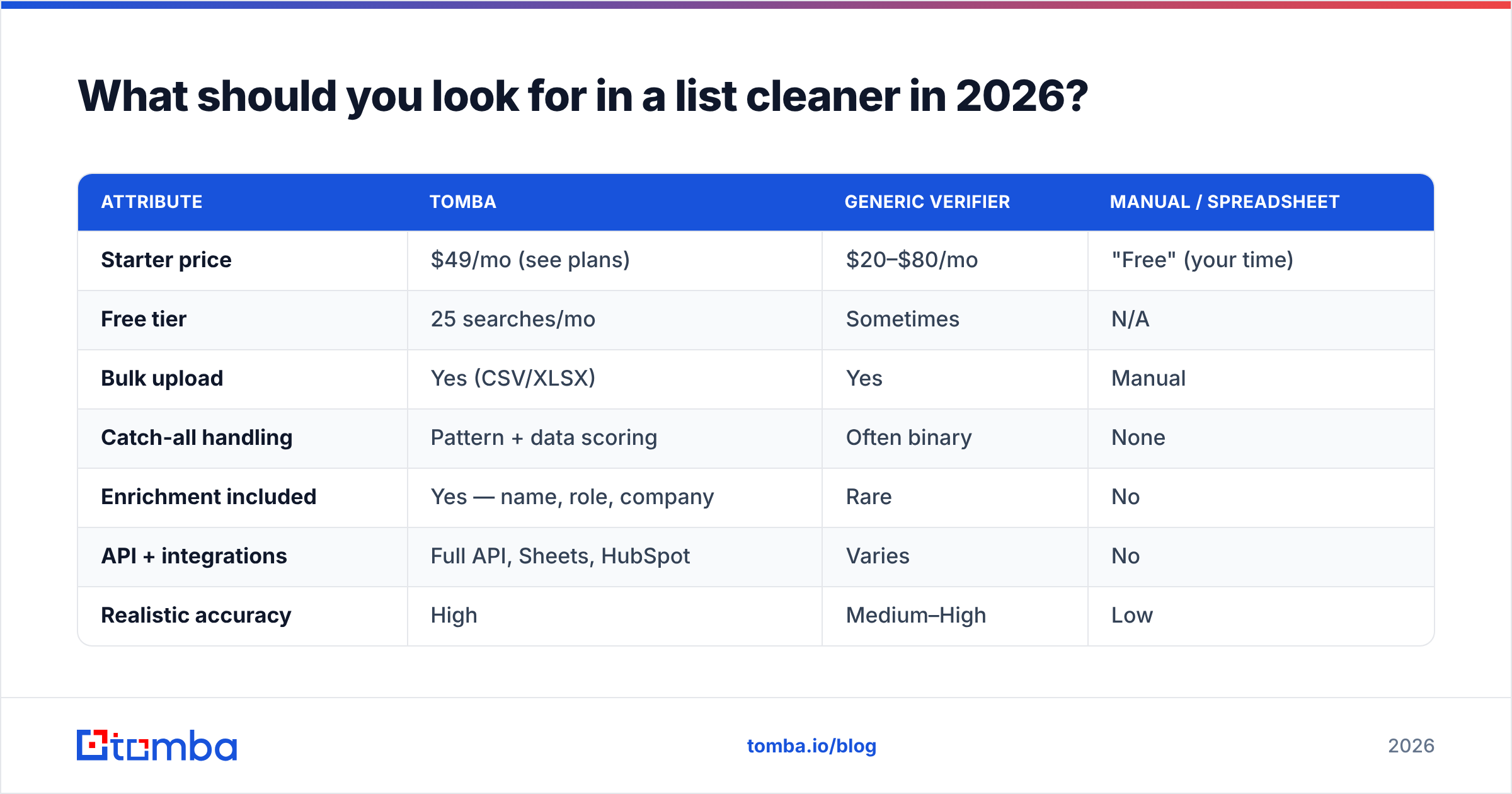
| Attribute | Tomba | Generic verifier | Manual / spreadsheet |
|---|---|---|---|
| Starter price | $49/mo (see plans) | $20–$80/mo | "Free" (your time) |
| Free tier | 25 searches/mo | Sometimes | N/A |
| Bulk upload | Yes (CSV/XLSX) | Yes | Manual |
| Catch-all handling | Pattern + data scoring | Often binary | None |
| Enrichment included | Yes — name, role, company | Rare | No |
| API + integrations | Full API, Sheets, HubSpot | Varies | No |
| Realistic accuracy | High | Medium–High | Low |
Manual cleanup is a trap. You can dedupe in Excel and eyeball obvious junk, but you cannot SMTP-verify a mailbox from a spreadsheet, and you'll never catch a recycled spam trap by reading. Pair an Excel email finder or Google Sheets add-on with a real verification engine instead of grinding rows by hand.
How often should you clean your lists?#
Set a cadence, don't wait for damage. Email data decays at roughly 22–30% per year as people change jobs — a list that was clean in January is measurably worse by summer.
Practical rules:
- Before every cold campaign to a list older than 30 days.
- Before importing any purchased, scraped, or event list — no exceptions.
- Quarterly for your active CRM/newsletter base, even engaged ones.
- After re-engagement gaps — if a segment hasn't opened in 90+ days, re-verify before the win-back send.
A standing cleaning step also feeds better email deliverability overall, because you stop training providers to associate your domain with dead sends.
How do you clean a list step by step?#
A repeatable workflow beats ad-hoc scrubbing. Here's the one I run:
- Normalize the file. One address per row, trim whitespace, lowercase domains, remove obvious test rows.
- De-duplicate. Strip exact and normalized duplicates before you spend a single credit.
- Bulk verify. Upload to your cleaner or hit the API. Let it run syntax → MX → SMTP → risk flags.
- Segment by status. Keep valid, drop invalid and disposable, and put catch-all/risky in a separate low-volume warm-up segment.
- Enrich the survivors. Add role, company, and LinkedIn data with data enrichment so your messaging is targeted, not generic.
- Re-verify before the next send if more than a month has passed.
If you're building lists as well as cleaning them, the same platform that runs your domain search and email finder should hand verified addresses straight into this pipeline — fewer tools, fewer handoffs, fewer leaks.
What does cleaning do to your numbers?#
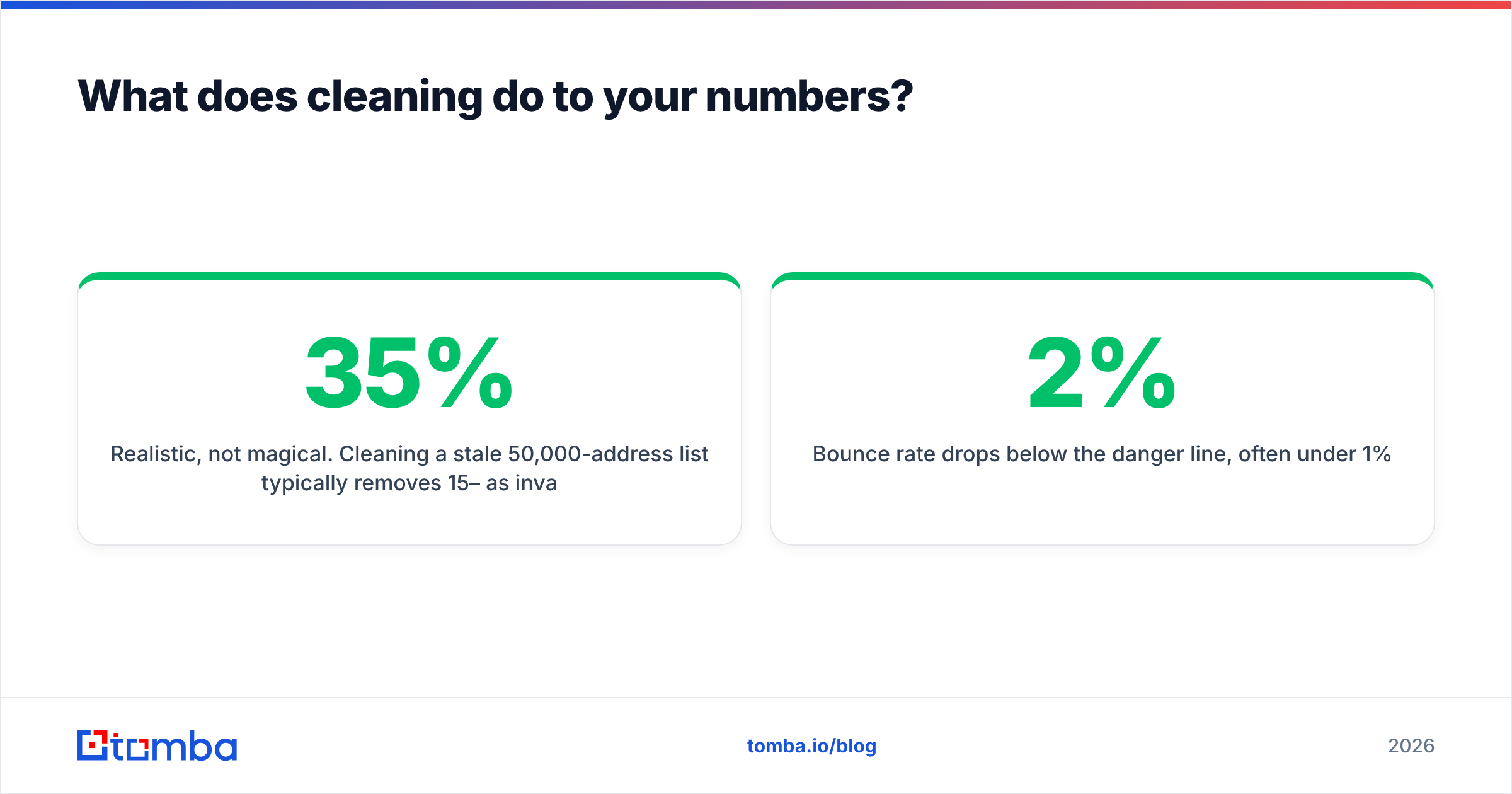
Realistic, not magical. Cleaning a stale 50,000-address list typically removes 15–35% as invalid/disposable and flags another 10–20% as catch-all or risky. The payoff shows up in three metrics:
- Bounce rate drops below the 2% danger line, often under 1%.
- Inbox placement improves because providers stop seeing dead-send patterns.
- Apparent open rate rises — not because more people read you, but because you stopped diluting the denominator with addresses that never could.
That last point matters: a cleaner doesn't invent engagement, it stops you from lying to yourself about list size. G2 and Capterra reviews of verification tools consistently echo the same result — see the email verification category on G2 for unfiltered user data before you commit budget.
The bottom line#
A dirty list is a liability that compounds every time you hit send. A bulk email address list cleaner turns that liability into a known, segmented asset: valid contacts you can mail confidently, risky ones you warm carefully, and dead weight you delete before it costs you a blacklist entry.
If you want one platform that finds, verifies, and enriches in the same workflow, start with Tomba's email verifier and bulk verification tools. The free tier lets you test accuracy on your own sample before you pay, and the email finder sits right next to it so the addresses you add are clean from the moment they enter your list. Clean inputs, fewer bounces, more replies — that's the whole game.
// get started
Find, verify and enrich your first contacts today
Start on the free plan with 25 searches a month, then scale when your team is ready.
Free plan · No credit card required · GDPR & CCPA
// about the author