Business Mailing Lists in 2026: Build, Buy, or Find?
Bought business mailing lists decay fast and wreck deliverability. Here is how to build verified B2B lists in 2026 that actually convert.
TL;DR
- Most purchased business mailing lists are stale on arrival — B2B data decays around 22-30% per year as people change jobs, so a list sold to 50 buyers is already burning your domain.
- Building a targeted, verified list beats buying a generic one on every metric that matters: deliverability, response rate, and cost per booked meeting.
- The winning workflow in 2026 is "find then verify": pull contacts by domain or role, confirm each address before it touches your sequence, and enrich with phone and firmographic data.
- A verified list of 500 right-fit contacts outperforms a bought list of 50,000 cold records — fewer bounces, higher reply rates, no spam-trap landmines.
- Skip the CSV bundles. Use a tool that finds emails on demand and verifies them in the same pass.
What is a business mailing list?#
A business mailing list is a collection of professional contact records — name, company, role, and email address, often with phone numbers and firmographic data — that you use for outbound sales, marketing, or partnership outreach. Think of it as the guest list for your campaign: get the names right and the event fills up; pad it with strangers and you spend the night apologizing.
There are two fundamentally different things people call a "business mailing list," and conflating them is where most outbound programs go wrong:
- A bought list — a pre-packaged CSV or database export you purchase in bulk from a data broker. You pay per thousand records, download it, and import it. The vendor sold the same records to dozens of other buyers.
- A built list — a targeted set of contacts you assemble yourself for a specific campaign, sourced from company domains, job titles, and your ideal customer profile, then verified before use.
The distinction matters because it determines your bounce rate, your sender reputation, and ultimately whether your emails land in the inbox or the spam folder. The rest of this guide breaks down which approach wins in 2026 and how to execute it without torching your domain.

Why do bought business mailing lists fail so often?#
Bought lists fail because B2B contact data rots faster than almost any other dataset you will ever work with. The core problem is decay: people get promoted, switch companies, and change email formats constantly. Industry analysts and data vendors consistently peg annual B2B data decay at roughly 22-30%. That means a list sold as "fresh" in January is meaningfully wrong by summer.
Three specific failure modes show up again and again:
- Spam traps. Old, harvested lists are riddled with recycled or pristine spam-trap addresses planted by blocklist operators. Hit one and you can land on a blocklist that affects every email you send, not just the campaign.
- Shared exclusivity. When a broker sells the same record to 50 buyers, those contacts have already been hammered. By the time you email them, they have unsubscribed mentally if not formally.
- No consent trail. Under GDPR and CAN-SPAM, you need a defensible basis for contacting someone. A purchased list rarely comes with one, and mailbox providers increasingly treat "no engagement history" as a spam signal.
The result is predictable: high bounce rates, low engagement, and a sender reputation that tanks. Once your sender reputation drops, even your good emails to good prospects stop reaching the inbox. You are not just wasting the bad list — you are poisoning the well for every future campaign.
Google and Yahoo's 2024 bulk-sender requirements made this worse for list-buyers: they now enforce a hard spam-complaint threshold (keep it under 0.3%), and bought lists blow past it routinely. You can read the specifics in Google's sender guidelines.
Should you build or buy your business mailing list?#
Build it. For nearly every B2B use case in 2026, a smaller verified list you assemble yourself outperforms a large list you purchase — on deliverability, on reply rate, and on cost per meeting booked. The only scenario where buying makes marginal sense is broad, top-of-funnel brand awareness where bounce tolerance is high and you have a separate domain to burn. For revenue outreach, building wins.
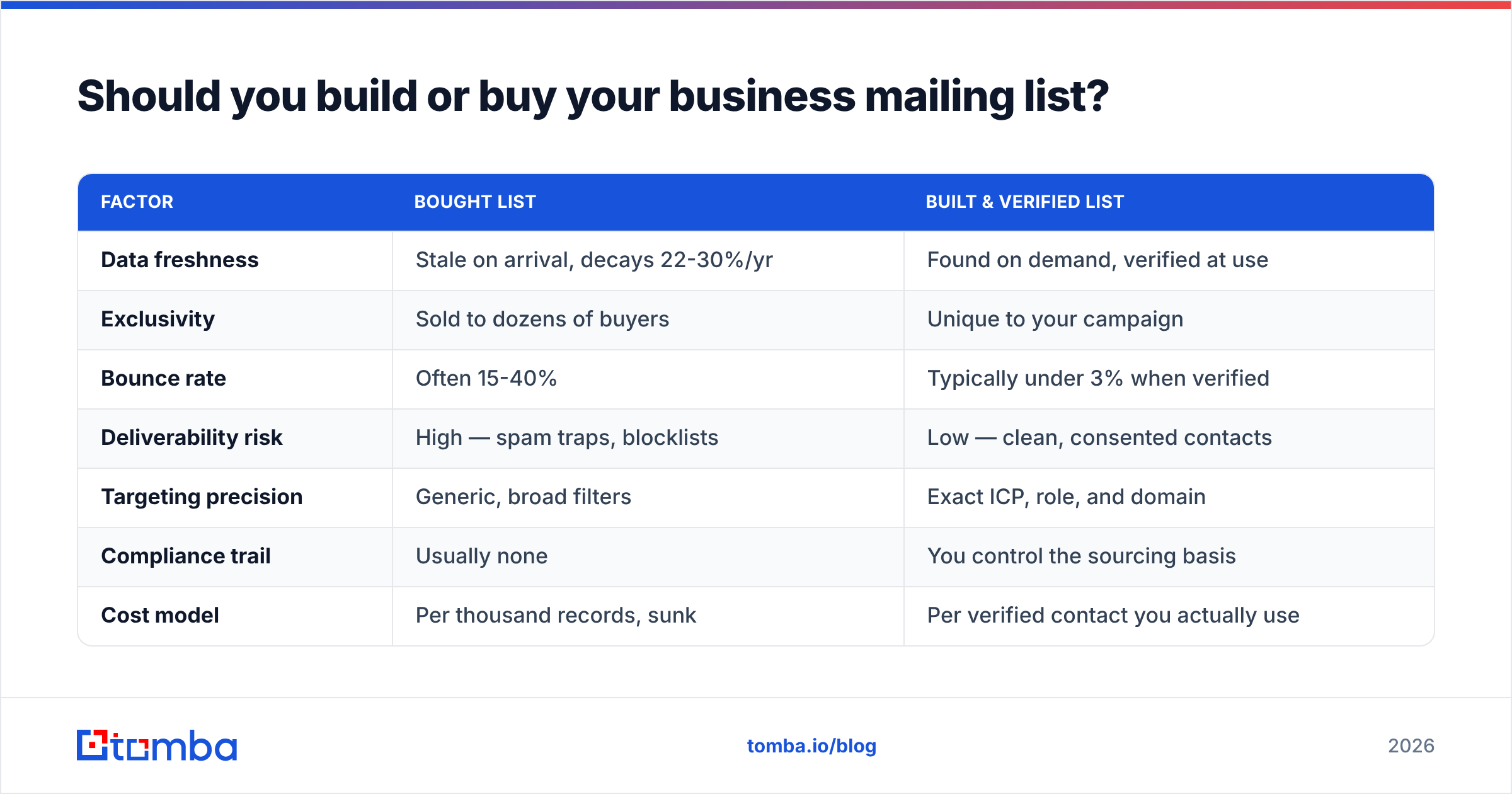
Here is the head-to-head:
| Factor | Bought List | Built & Verified List |
|---|---|---|
| Data freshness | Stale on arrival, decays 22-30%/yr | Found on demand, verified at use |
| Exclusivity | Sold to dozens of buyers | Unique to your campaign |
| Bounce rate | Often 15-40% | Typically under 3% when verified |
| Deliverability risk | High — spam traps, blocklists | Low — clean, consented contacts |
| Targeting precision | Generic, broad filters | Exact ICP, role, and domain |
| Compliance trail | Usually none | You control the sourcing basis |
| Cost model | Per thousand records, sunk | Per verified contact you actually use |
| Reply rate | Low (often <1%) | 3-8x higher when targeted |
The economics flip once you account for what you actually pay per usable contact. A $0.10-per-record bought list looks cheap until you find that 30% bounce and 60% are wrong-fit — your effective cost per real conversation skyrockets. A built list costs more per record but nearly every record is reachable and relevant.
How do you build a verified business mailing list?#
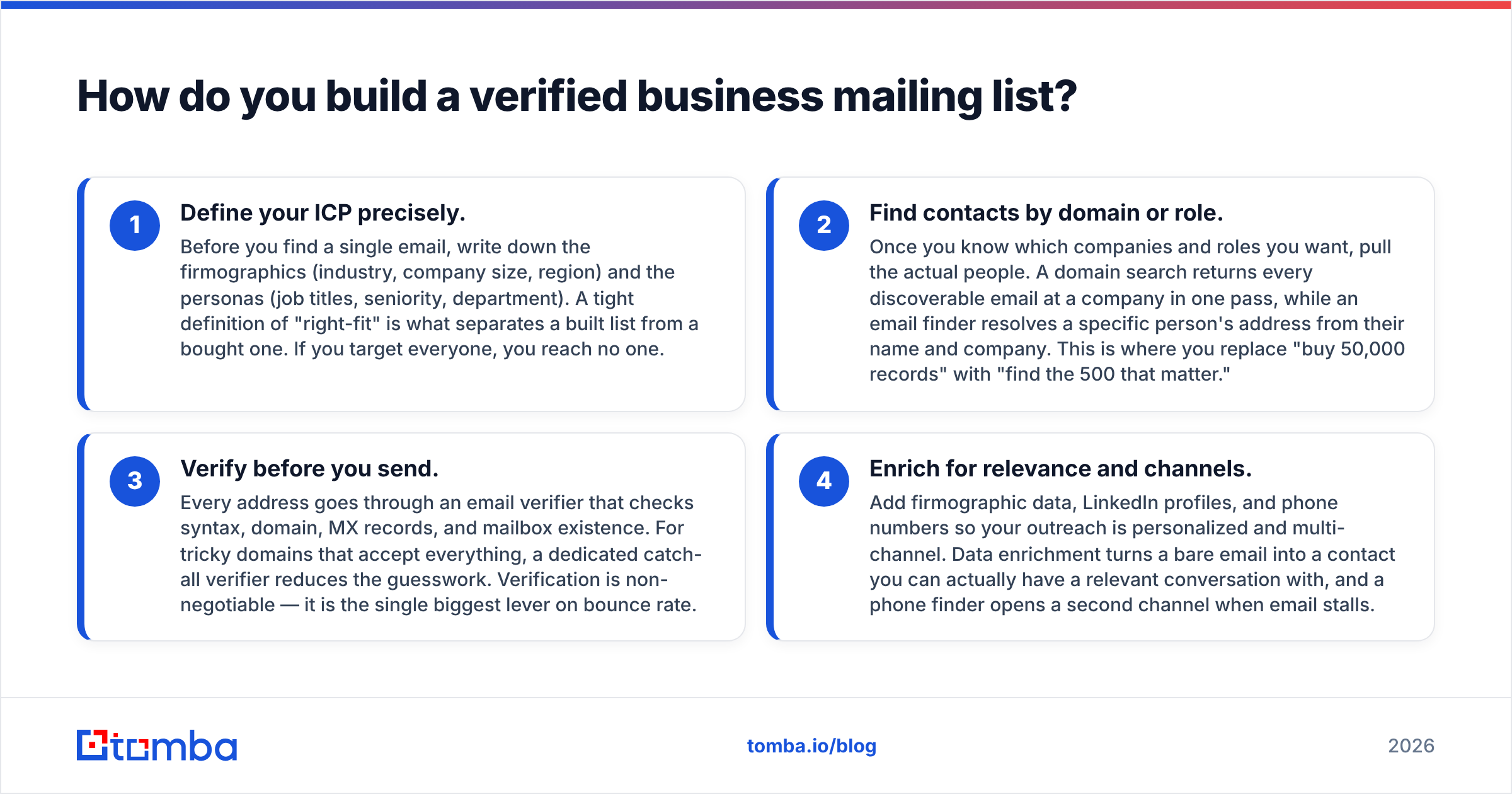
You build a verified business mailing list in four steps: define the profile, find the contacts, verify every address, and enrich for context. Done in order, this turns a vague "we need leads" into a clean, sequence-ready CSV with bounce rates under 3%.
- Define your ICP precisely. Before you find a single email, write down the firmographics (industry, company size, region) and the personas (job titles, seniority, department). A tight definition of "right-fit" is what separates a built list from a bought one. If you target everyone, you reach no one.
- Find contacts by domain or role. Once you know which companies and roles you want, pull the actual people. A domain search returns every discoverable email at a company in one pass, while an email finder resolves a specific person's address from their name and company. This is where you replace "buy 50,000 records" with "find the 500 that matter."
- Verify before you send. Every address goes through an email verifier that checks syntax, domain, MX records, and mailbox existence. For tricky domains that accept everything, a dedicated catch-all verifier reduces the guesswork. Verification is non-negotiable — it is the single biggest lever on bounce rate.
- Enrich for relevance and channels. Add firmographic data, LinkedIn profiles, and phone numbers so your outreach is personalized and multi-channel. Data enrichment turns a bare email into a contact you can actually have a relevant conversation with, and a phone finder opens a second channel when email stalls.
For volume, do all of this in bulk. A bulk email finder lets you upload a list of companies or names and get back found-and-verified contacts in one job, so building scale does not mean building by hand.

What makes a business mailing list high quality?#
A high-quality business mailing list is accurate, exclusive, relevant, and consented. Those four attributes predict whether your campaign performs, and they are exactly what bought lists lack. Here is what to audit before any list goes into a sequence:
- Accuracy — Every email is verified and deliverable, with a bounce rate under 3%. This is the floor, not the goal.
- Exclusivity — The list is built for your campaign, not resold. Nobody else hammered these contacts last week.
- Relevance — Each contact matches your ICP on firmographics and persona. A reachable wrong-fit contact is still a wasted send.
- Recency — Contacts were found or re-verified recently, not pulled from a 2023 database dump.
- Consent basis — You can defend why you are contacting each person under GDPR and CAN-SPAM.
- Enrichment depth — Names, roles, companies, and ideally phone and social profiles, so personalization is possible.
Quality also depends on where the data comes from. Tools that build records from live public sources and verify them at request time beat static databases that were scraped once and resold for years. If you want to understand the sourcing behind a tool, look at its data sources documentation before you trust its records.
How does Tomba compare to buying a list?#
Tomba replaces the "buy a static CSV" model with "find and verify on demand," which is the workflow that actually protects your deliverability. Instead of purchasing thousands of shared, decaying records, you pull the specific contacts you need and confirm each one is live before it enters a campaign. You can use it through the web app, a Chrome extension, a Google Sheets add-on, or the email finder API if you are wiring it into your own stack.
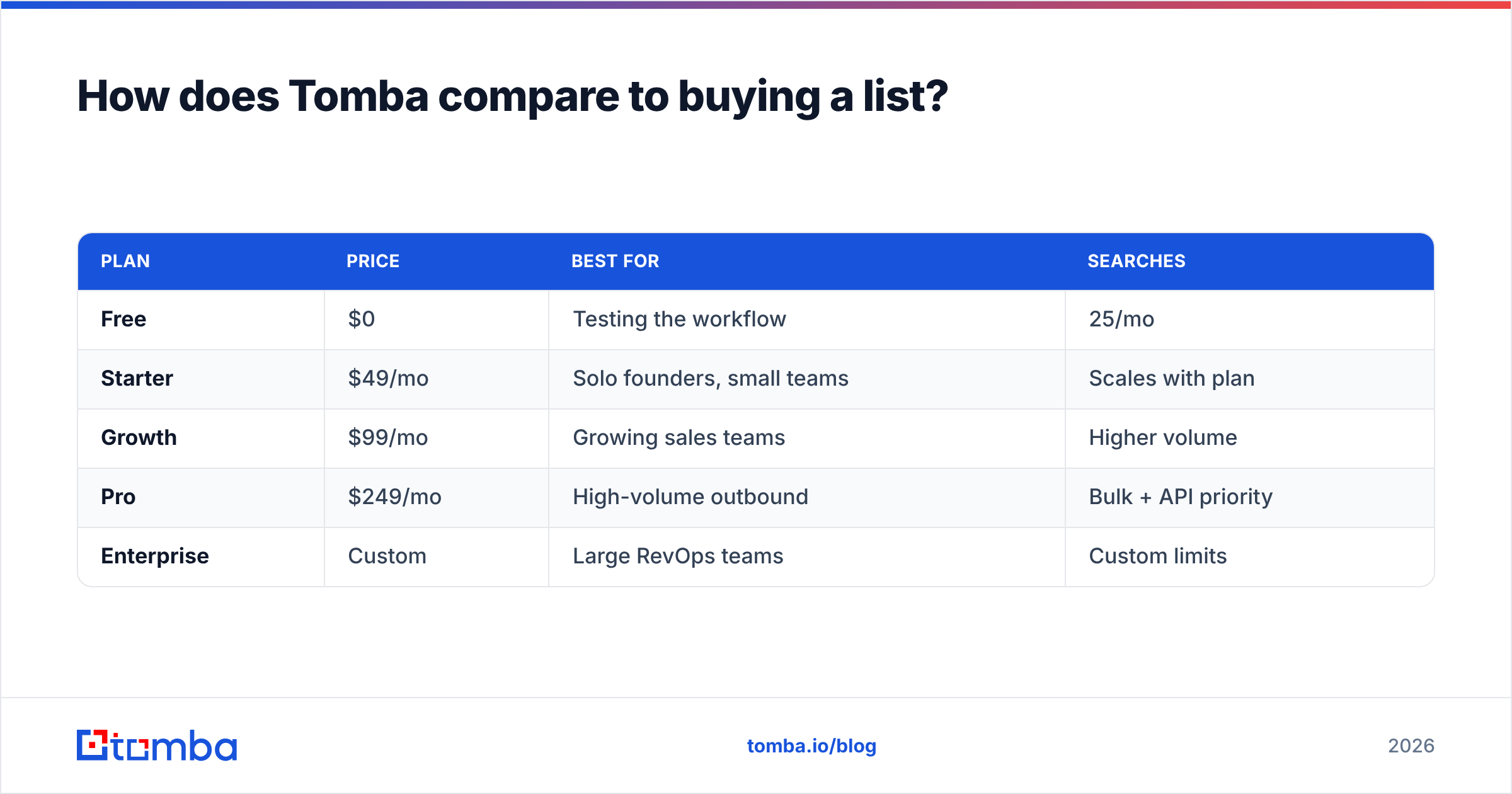
Here is how the cost and capability picture looks across plans:
| Plan | Price | Best for | Searches |
|---|---|---|---|
| Free | $0 | Testing the workflow | 25/mo |
| Starter | $49/mo | Solo founders, small teams | Scales with plan |
| Growth | $99/mo | Growing sales teams | Higher volume |
| Pro | $249/mo | High-volume outbound | Bulk + API priority |
| Enterprise | Custom | Large RevOps teams | Custom limits |
Full breakdowns are on the Tomba pricing page. Compared against the per-thousand pricing of a data broker, the difference is not just cost — it is that every dollar goes toward a contact you can actually reach, with a verification step baked in. Independent reviews on platforms like G2 are a useful sanity check on accuracy claims before you commit.
The practical upshot: you stop paying for the 30% of a bought list that bounces and the 60% that is wrong-fit, and you redirect that budget into verified, on-target contacts.
What about deliverability and compliance?#
Building a verified list is necessary but not sufficient — you also have to protect the domain you send from. Even a perfect list will underperform if your sending infrastructure looks suspicious to mailbox providers. Cover these basics:
- Authenticate your domain. Set up SPF, DKIM, and DMARC before you send a single cold email. These tell receiving servers your mail is legitimate. A quick SPF checker confirms your record is valid.
- Warm up gradually. Do not blast 5,000 emails from a cold domain on day one. Ramp volume over weeks so providers build trust in your sender reputation.
- Verify continuously, not once. Re-verify lists before each major send. Data decays even on lists you built yourself.
- Honor opt-outs instantly. Every email needs a clear unsubscribe path, and you must process opt-outs fast to stay under complaint thresholds.
Compliance is not a legal footnote — it is a deliverability feature. Mailbox providers reward senders who behave like legitimate businesses and punish those who behave like list-buyers. Treat email deliverability as a core metric you monitor, not a one-time setup task.
Frequently asked questions#
Is buying a business mailing list illegal? Not inherently, but it is risky. CAN-SPAM permits cold B2B email with proper identification and opt-out, while GDPR requires a lawful basis for contacting EU individuals. Bought lists rarely come with a defensible consent trail, which is where legal and deliverability risk converge.
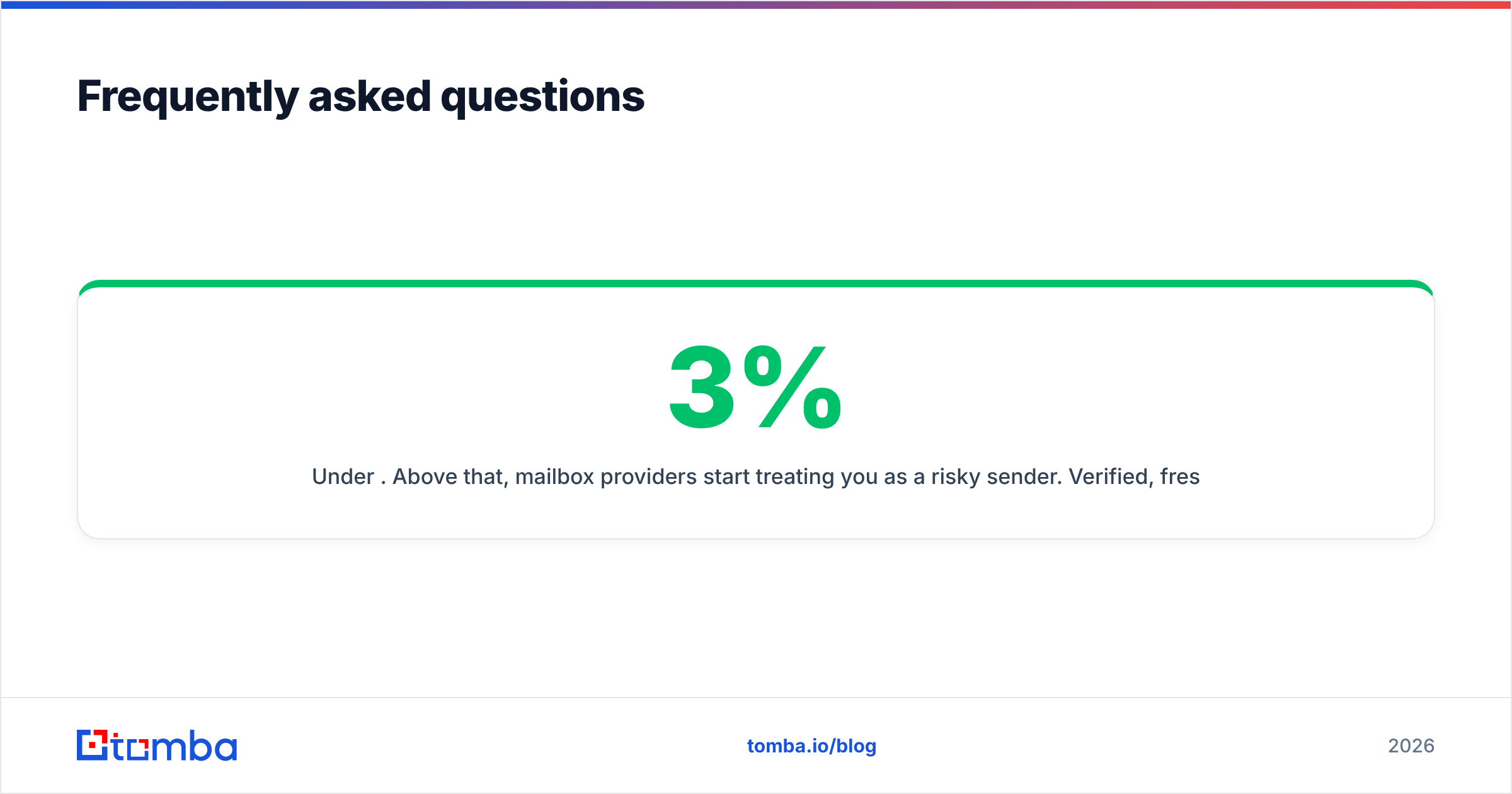
What bounce rate should I aim for? Under 3%. Above that, mailbox providers start treating you as a risky sender. Verified, freshly built lists routinely hit 1-2%, while bought lists commonly bounce 15-40%.
Can I just clean a bought list with a verifier? Verification removes dead addresses, which helps, but it cannot fix the deeper problems — shared exclusivity, spam traps that pass syntax checks, and wrong-fit targeting. Cleaning a bought list is damage control; building a verified one is prevention.
How many contacts do I need? Fewer than you think. A focused list of 300-500 right-fit, verified contacts with strong personalization outperforms tens of thousands of generic records. Quality of targeting beats raw volume every time.
Build the list that actually books meetings#
Stop renting decayed data and start building lists you control. The Tomba Email Finder lets you find professional email addresses by domain, name, or company and verify them in the same workflow — so the contacts that land in your sequence are real, relevant, and exclusive to you. Pair it with the built-in verifier and bulk tools, start free with 25 searches a month, and replace your next bought CSV with a list that respects your domain and your reply rate. Your inbox placement — and your pipeline — will show the difference.
// get started
Find, verify and enrich your first contacts today
Start on the free plan with 25 searches a month, then scale when your team is ready.
Free plan · No credit card required · GDPR & CCPA
// about the author