550 High Probability of Spam: Fix the Bounce in 2026
Getting hit with '550 high probability of spam' bounces? Here's what triggers the error, which providers send it, and the exact fixes that get your mail flowing again.
You hit send. A few seconds later, your inbox fills with bounce reports: 550 5.7.1 high probability of spam. Your campaign is dead in the water, your domain reputation is taking damage, and you have no idea which of the dozen things you changed last week is responsible.
This guide breaks down what that bounce actually means, which receivers are sending it, and the exact fixes that work in 2026.
TL;DR#
- 550 high probability of spam is a hard bounce from the receiving mail server's content/reputation filter — your mail was rejected before it ever reached the inbox or spam folder.
- The top causes in 2026 are missing or misaligned SPF/DKIM/DMARC, sending from a cold domain, link-heavy or image-only HTML, and IP/domain reputation drops.
- Fixes follow a strict order: authenticate first, warm up second, fix content third, then resend — never re-blast the same list.
- Receivers most likely to send this code: Microsoft 365 / Outlook, Proofpoint, Mimecast, and self-hosted Exchange.
- Verify every recipient with a real-time email verifier before sending to keep bounce rates under 2%.
What does "550 high probability of spam" actually mean?#
The 550 status code is an SMTP "permanent failure" — the receiving server is telling your server not to retry, because retrying won't help. The text after the code (high probability of spam, sometimes phrased as message identified as spam or content rejected) is the receiver's reason.
Think of it like a bouncer at a club. A 4xx code is "come back in ten minutes, the line's too long." A 550 is "you are not getting in tonight, and don't argue." When the bouncer adds "spam" to the explanation, the rejection is about who you are or what you brought, not about timing or capacity.
Three signals usually combine to trigger it:
- Authentication failures — your message didn't pass SPF, DKIM, or DMARC checks.
- Reputation signals — the sending IP or domain has a poor track record with this receiver.
- Content signals — the body, subject, or links matched patterns the receiver associates with spam.
You rarely fail on just one. A clean message from a poorly authenticated domain often slides through. A perfectly authenticated message with three suspicious URLs and a "Re: " subject line on a cold outbound thread will not.
Which mail providers send this exact error?#
Not every receiver phrases the rejection identically, but the 550 high probability of spam wording is most strongly associated with these systems:
| Receiver | Typical wording | Primary trigger |
|---|---|---|
| Microsoft 365 / Outlook.com | 550 5.7.1 Message identified as spam |
SmartScreen + sender reputation |
| Proofpoint | 550 5.7.1 high probability of spam |
Content + URL classification |
| Mimecast | 550 Spam detected |
Reputation + attachment scan |
| Google Workspace | 550-5.7.1 ... unsolicited mail |
Gmail postmaster signals |
| Self-hosted Exchange + spam filter | 550 5.7.1 The message was rejected as spam |
IP RBL hit |
| Barracuda Networks | 550 Message rejected as spam by Content Filtering |
Bayesian content score |
If you don't recognize the receiving system, check the bounce DSN for clues: Proofpoint adds pphosted.com references, Mimecast adds mimecast.com, and Microsoft adds protection.outlook.com to the headers.
What are the most common causes in 2026?#
The mix shifted in 2024 when Google and Yahoo enforced bulk-sender authentication, and again in 2025 when Microsoft tightened SmartScreen on cold outbound. Here's what we see now.
Missing or misaligned authentication#
A working SPF record isn't enough. The "From:" domain must align with either the SPF-authenticated domain or the DKIM-signing domain for DMARC to pass. Senders using third-party platforms (Mailchimp, Instantly, Salesloft) frequently misconfigure this and get silently downgraded.
Run an SPF checker on your sending domain. If it returns "no record" or shows more than 10 DNS lookups, you have an authentication problem before you've debugged anything else. Read more on email deliverability basics.
Cold or rotating IPs#
A brand-new sending IP has no reputation. A reused IP from a shared pool may carry the reputation of whoever sent on it last. Microsoft is particularly aggressive about treating unfamiliar IPs as suspicious — your first 100 messages from a new IP will get more scrutiny than your next 10,000.
Volume spikes#
Sending 50 emails per day for three weeks, then 5,000 in one afternoon, triggers volume-anomaly heuristics. Receivers compare today's volume to your rolling average. A 100x jump looks like a compromised account, not a legitimate campaign.
Suspicious content patterns#
The content classifier looks at the whole envelope: subject line urgency markers ("URGENT", "RE:" on a first-touch), spam phrases ("act now"), short URLs (bit.ly, t.co), HTML with one image and no text, attachment types (.zip, .html, .exe), and unbalanced text-to-link ratios.
Bad list hygiene#
Sending to invalid addresses, role accounts (info@, sales@), and known spamtraps tanks your sender reputation across every receiver. One spamtrap hit can cost you a 90-day reputation rebuild.
How do you fix a 550 high probability of spam bounce?#
Work in this order. Skipping ahead wastes effort.
Step 1: Confirm authentication#
Pull up your DNS and check:
dig +short TXT yourdomain.com         # SPF
dig +short TXT default._domainkey.yourdomain.com   # DKIM (selector varies)
dig +short TXT _dmarc.yourdomain.com  # DMARC
You want:
- SPF: ends in
~allor-all, includes every service you send through, fewer than 10 DNS lookups. - DKIM: a 2048-bit key, selector matching your sending platform's documentation.
- DMARC: at least
p=nonewithrua=reporting enabled; ideallyp=quarantineorp=rejectonce you've reviewed reports.
If you're sending through a platform like Instantly, Apollo, or Salesloft, every sending subdomain needs its own SPF/DKIM setup. See our Instantly alternative guide for the platform-specific setup notes.
Step 2: Warm the sending identity#
A new domain or IP needs ramped volume — start at 20-30 messages/day, double weekly, and aim to plateau around 200-500/day per mailbox after 4-6 weeks. Sending more than that from a single mailbox in 2026 is a red flag regardless of authentication.
Use an email warmup calculator to plan the ramp before you commit.
Step 3: Audit your content#
Before resending, run the message through a spam checker. Things that fire the filter:
- Subject lines over 70 characters or in ALL CAPS
- Body with fewer than 50 words
- More than 3 links in a short message
- Tracking pixels from unfamiliar domains
- Unsubscribe link missing or buried
- HTML weight over 100 KB with images-only fallback
Try a free spam checker to score your draft, and a subject line analyzer on the headline. Read the official Microsoft anti-spam guidance and the Google sender guidelines before tuning further.
Step 4: Clean the recipient list#
Bouncing to invalid addresses is the fastest way to compound the problem. Verify every address before the next send. A real-time email verifier catches:
- Invalid syntax
- Disposable domains
- Role-based addresses
- Catch-all domains (these need a catch-all verifier)
- MX record failures
- Known spamtraps
Aim for a bounce rate under 2%. Above 5% and receivers will start auto-rejecting future mail from your domain.
Step 5: Resend strategically#
Do not re-send the same message to the same list from the same identity. That looks like spam re-attempt and locks you out faster. Instead:
- Wait 24-48 hours
- Send a different message (different subject, different body) to a subset of the bounced list
- Monitor delivery in a tool like Google Postmaster Tools or Microsoft SNDS
- If the second send delivers cleanly, ramp back up over a week

Is "550 high probability of spam" the same as "550 5.7.1"?#
Mostly yes. The 5.7.1 enhanced status code means "delivery not authorized, message refused" — and almost every receiver pairs it with a spam classification message. You'll also see:
| Code | Meaning | Action |
|---|---|---|
| 550 5.7.1 high probability of spam | Content/reputation rejected | Fix auth + content + warm up |
| 550 5.7.1 unsolicited mail | Reputation rejected (Gmail) | Postmaster Tools review |
| 550 5.7.26 SPF/DKIM failure | Authentication failed | Fix SPF/DKIM/DMARC |
| 550 5.4.1 recipient not authorized | Receiver blocks your domain | Manual whitelist request |
| 554 5.7.1 blocked by RBL | IP on blocklist | Blocklist removal request |
| 421 4.7.0 try again later | Rate-limited soft bounce | Slow down, retry later |
A 554 is essentially a 550 with the door slammed harder — same fix sequence applies.
How do you stop the bounce from coming back?#
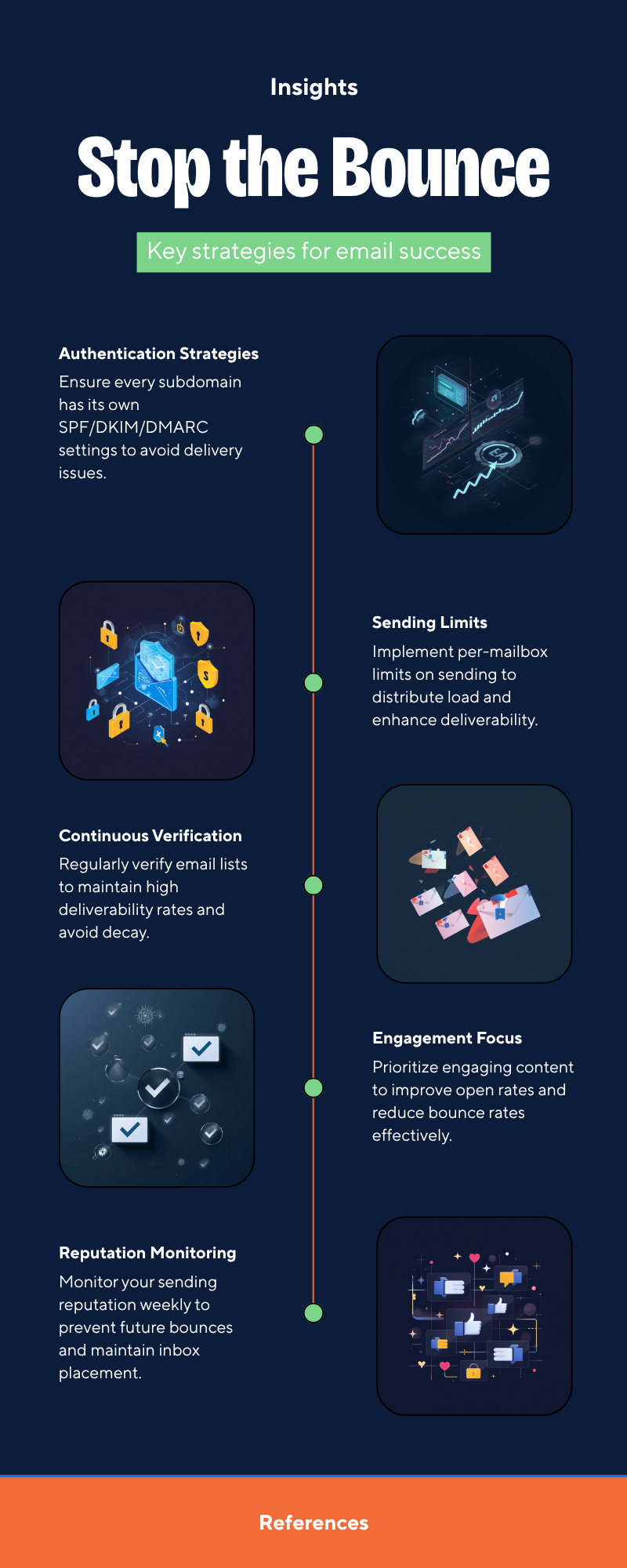
Fixing one campaign is one thing. Staying fixed is the harder problem. The senders who don't get rejected in 2026 share four habits:
- Authentication on every subdomain. Each sending subdomain (
mail.,outbound.,news.) gets its own SPF/DKIM/DMARC. Sloppy setup at the subdomain level is the most common reason a previously-working campaign suddenly bounces. - Continuous list verification. Don't verify a list once at import. Re-verify before each campaign — emails decay at 22-30% per year. Bulk options in bulk verify handle this at scale.
- Reputation monitoring. Watch Google Postmaster, Microsoft SNDS, and a blacklist checker weekly. A 3-point reputation drop today is a 550 bounce next week.
- Per-mailbox sending limits. Cap each mailbox at 50-200 sends per day depending on age and history. Don't try to push 1,000 through one inbox — distribute across mailboxes and domains.
Worth bookmarking: G2's email deliverability software category for vendor comparisons and the Wikipedia SMTP reference for the full status code list.
Quick decision matrix#
| Symptom | Most likely cause | First action |
|---|---|---|
| All recipients bounce | Authentication broken | Check SPF/DKIM/DMARC |
| Only Microsoft 365 bounces | SmartScreen reputation drop | Check SNDS, slow ramp |
| Bounces spike after volume increase | Velocity anomaly | Reduce daily send rate by 50% |
| Bounces on specific message only | Content classifier | Rewrite subject + body, remove links |
| New domain bouncing from day 1 | No warmup | Run 4-6 week warmup cycle |
| Bounces after years of clean sending | New blocklist entry or hijacked relay | Audit logs, check blocklists |
Find clean recipients before you ever see a 550#
The cheapest 550 bounce is the one you never trigger. Most of the spam-score damage comes from sending to invalid, role-based, or trap addresses you should have filtered out at the import stage.
Tomba's Email Finder returns only verified professional addresses, with confidence scores and source attribution — so your list starts clean instead of needing rescue verification on the back end. Pair it with the email verifier for real-time pre-send checks and you'll keep your bounce rate where receivers stop caring: under 2%. Start with the free tier (25 searches/month) before scaling to Starter at $49/mo.
Stop debugging bounces. Send to addresses that don't bounce in the first place.
// get started
Find, verify and enrich your first contacts today
Start on the free plan with 25 searches a month, then scale when your team is ready.
Free plan · No credit card required · GDPR & CCPA
// about the author