Adaptio vs Clearout (2026): Email Finder & Verifier Compared
Adaptio vs Clearout, broken down for 2026: data coverage, email accuracy, verification quality, pricing models, and the workflows each tool actually fits.

Choosing between Adaptio (Adapt.io) and Clearout usually comes down to one question: do you need a place to source B2B contacts, or a tool to clean the contacts you already have? They overlap on the word "email," but they solve different ends of the same pipeline.
This is a neutral, workflow-first comparison. No tool wins every category, and the right pick depends on whether your bottleneck is data volume or data quality.
TL;DR#
- Adapt.io is a B2B contact database and lead-intelligence platform. Its strength is discovery — searching a database of companies and people, then pulling emails and direct dials via a Chrome extension.
- Clearout is primarily an email verification engine with a lighter email-finder bolted on. Its strength is accuracy — confirming whether an address will actually deliver before you send.
- If you need raw prospecting volume and firmographic filters, lean Adapt.io. If you need to scrub a list and kill bounces, lean Clearout.
- Pricing models differ sharply: Adapt.io is seat-and-credit based with quote-driven plans; Clearout is transparent pay-as-you-go credits with a free tier.
- Many teams run both — or replace the pair with a single tool that finds and verifies in one step.
What are Adaptio and Clearout?#
The fastest way to understand the difference: Adapt.io is the grocery store, Clearout is the freshness inspector. One stocks the shelves with contacts; the other checks the expiry date before you put anything in the cart.
Adapt.io (often typed "Adaptio") is a sales-intelligence platform built around a contact database of roughly 100M+ business profiles. You filter by industry, title, company size, geography, and technology stack, then export emails and phone numbers. Its Prospector Chrome extension surfaces contact data while you browse LinkedIn or company sites. It competes most directly with tools like ZoomInfo, Apollo, and Lusha — a data intelligence play, not a verification specialist.
Clearout is an email verification and finding service. Its core engine runs 20+ validation checks — syntax, MX records, SMTP handshake, catch-all detection, role-account and disposable flagging — and returns a deliverability confidence score. The email finder exists, but verification is the headline product. Clearout's selling point is bounce reduction, not database breadth.
That framing matters because comparing them feature-for-feature is slightly unfair to both. Adapt.io will always have more contacts; Clearout will almost always have cleaner verification. The real question is which gap hurts your pipeline more.
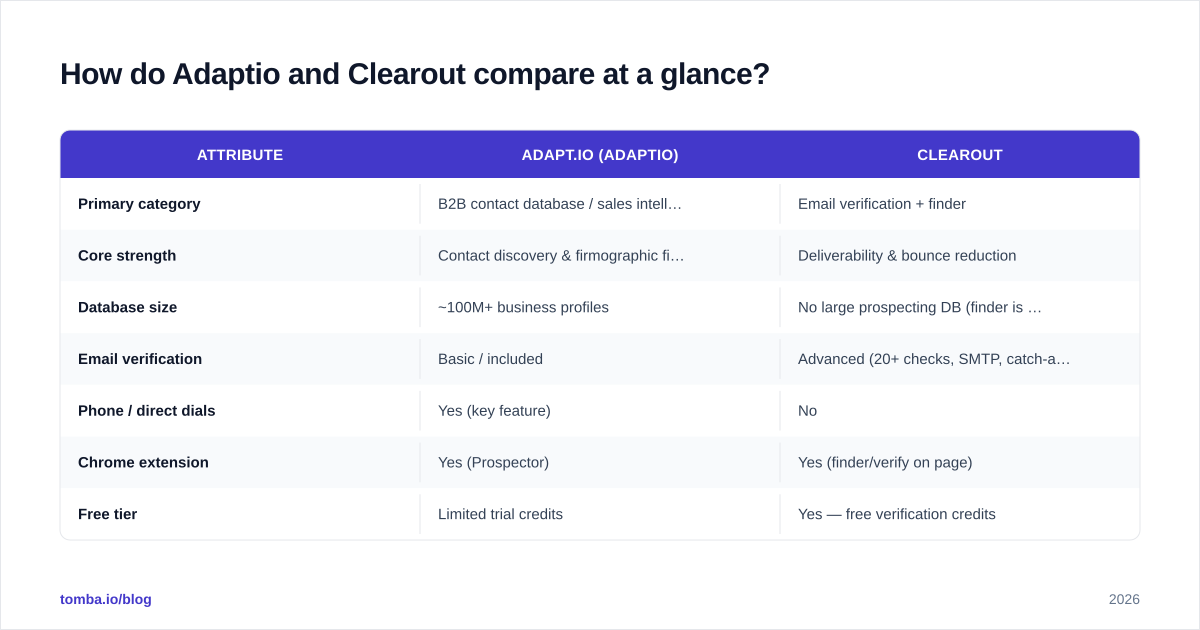
How do Adaptio and Clearout compare at a glance?#
| Attribute | Adapt.io (Adaptio) | Clearout |
|---|---|---|
| Primary category | B2B contact database / sales intelligence | Email verification + finder |
| Core strength | Contact discovery & firmographic filters | Deliverability & bounce reduction |
| Database size | ~100M+ business profiles | No large prospecting DB (finder is on-demand) |
| Email verification | Basic / included | Advanced (20+ checks, SMTP, catch-all) |
| Phone / direct dials | Yes (key feature) | No |
| Chrome extension | Yes (Prospector) | Yes (finder/verify on page) |
| Free tier | Limited trial credits | Yes — free verification credits |
| Pricing model | Seat + credit, quote-driven | Transparent pay-as-you-go + subscriptions |
| Best for | Building net-new prospect lists at scale | Cleaning lists before cold campaigns |
| Bulk processing | Yes (export-based) | Yes (bulk verify is a core feature) |
A quick read: the two products barely overlap on their primary job. Adapt.io is where lists are born; Clearout is where lists are saved.

Is Adaptio better than Clearout for finding emails?#
For net-new prospecting at volume, yes — Adapt.io is built for it. You can run a search like "VP of Marketing, SaaS companies, 50–200 employees, US, using HubSpot" and export a list of matching contacts with emails and direct dials attached. Clearout's finder can't do that; it finds an email when you already know the person and their company domain.
But "better at finding" doesn't mean "better email." Database tools age. A profile pulled from a static database may reflect a job the person left eight months ago. That's exactly the failure mode verification catches — which is why pairing a finder with a email verifier is standard practice, not optional polish.
If your motion is account-based and you need direct dials alongside email, Adapt.io's find phone numbers capability is a genuine differentiator Clearout simply doesn't offer.
How accurate is each tool?#
Accuracy means two different things here, and conflating them is the most common mistake buyers make.
- Discovery accuracy (Adapt.io's domain): is the contact record current and correct? Right person, right title, right company?
- Deliverability accuracy (Clearout's domain): will this specific address accept mail right now without bouncing?
Clearout wins decisively on the second. Its SMTP-level checks and catch-all verifier logic are designed to push bounce rates under 2–3%, which protects your sender reputation and keeps you out of spam folders. Adapt.io includes verification, but it's a feature, not the whole product — fine for a first pass, not a substitute for a dedicated engine.

The honest takeaway: a large database with mediocre verification still produces bounces, and a great verifier with no database still leaves you hunting for contacts. Neither tool fully closes the loop on its own, which is the structural reason teams end up stacking them.
What about email verification specifically?#
This is Clearout's home turf. Its verification stack typically includes:
- Syntax and formatting validation
- Domain and MX record checks
- SMTP handshake (mailbox existence)
- Catch-all / accept-all domain detection
- Role-based address flags (info@, sales@, support@)
- Disposable and temporary email detection
- Greylisting handling and confidence scoring
Bulk verification is a first-class workflow — upload a CSV, get a scored, segmented list back. That's the use case Adapt.io users often outsource to a tool like Clearout, because exporting from a database and then verifying elsewhere is a normal two-step pattern.
Adapt.io's verification exists to make its own exports usable, not to serve as a standalone scrubbing service for lists sourced elsewhere. If verification is your primary need, Clearout (or a dedicated alternative) is the better-fit category. See our Clearout alternative breakdown for how the verification-first category stacks up more broadly.
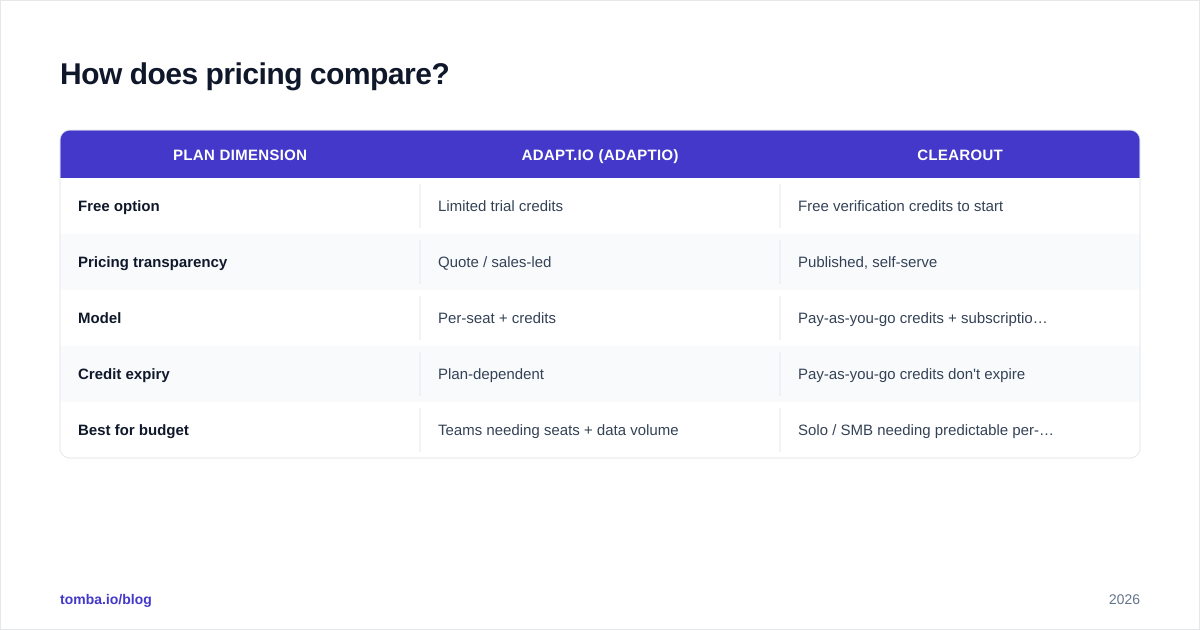
How does pricing compare?#
The pricing philosophies are almost opposites, and that often decides the call before features do.
| Plan dimension | Adapt.io (Adaptio) | Clearout |
|---|---|---|
| Free option | Limited trial credits | Free verification credits to start |
| Pricing transparency | Quote / sales-led | Published, self-serve |
| Model | Per-seat + credits | Pay-as-you-go credits + subscriptions |
| Credit expiry | Plan-dependent | Pay-as-you-go credits don't expire |
| Best for budget | Teams needing seats + data volume | Solo / SMB needing predictable per-email cost |
Clearout's pay-as-you-go credits are friendly to small teams and one-off cleanups — you buy what you need, and unused credits generally stick around. Adapt.io's sales-led pricing fits organizations that want seats, bulk data, and integrations bundled, but it removes the ability to estimate cost from a public page. Always confirm current pricing directly with each vendor; published tiers change.

Which should you choose for your workflow?#
Match the tool to your bottleneck, not to a feature checklist.
Choose Adapt.io if:
- Your main pain is finding enough qualified contacts.
- You need direct dials and phone numbers, not just email.
- You run account-based outbound and rely on firmographic/technographic filters.
- You have budget for seat-based, sales-led pricing.
Choose Clearout if:
- You already have lists and your pain is bounces.
- Deliverability and inbox placement are top priority.
- You want transparent, low-commitment, pay-as-you-go pricing.
- You need high-volume bulk verification as a recurring task.
You probably want both if you're sourcing cold and your sender reputation matters — which describes most outbound teams. In that stack, Adapt.io fills the top of the funnel and Clearout guards the send. The downside is two subscriptions, two credit pools, and an export-import step between them.
You can compare both on independent review sites like G2 before committing, since category fit varies by team size and region coverage.
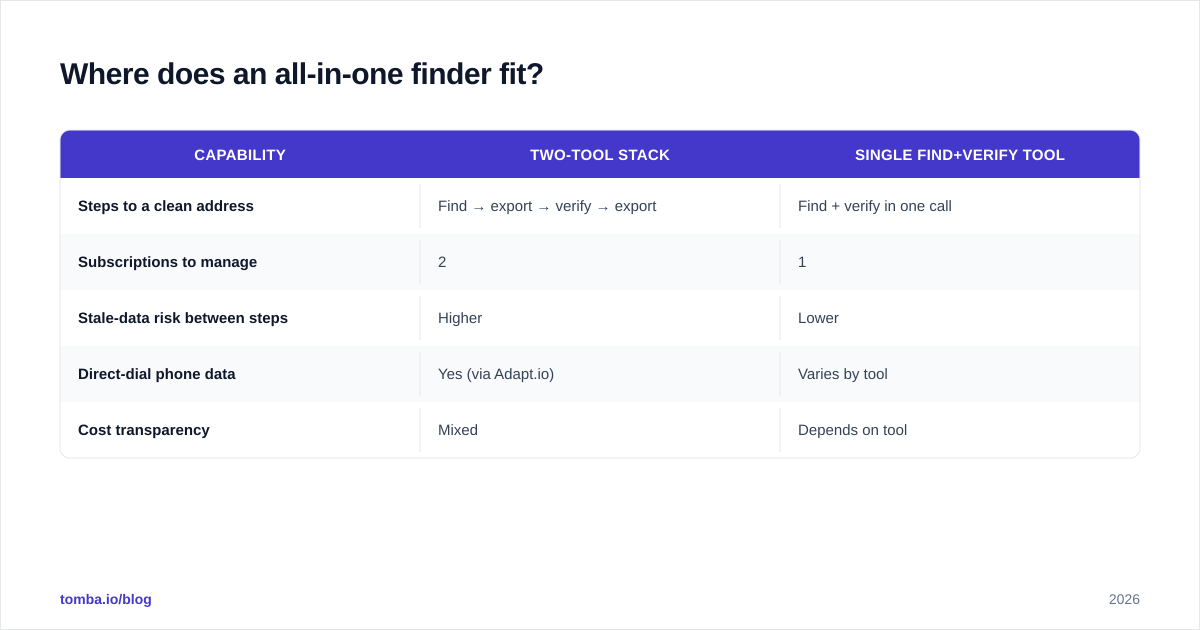
Where does an all-in-one finder fit?#
The two-tool stack works, but it has friction: you discover in one place, export, re-import, verify elsewhere, then export again. Every hop adds time and a chance for stale data to slip through.
This is where a combined finder-and-verifier earns its keep. Tomba's email finder locates professional addresses by name, company, or domain, then verifies them in the same flow — so the address you export is the address that delivers. For list building beyond a single contact, domain search pulls every discoverable email on a company domain, and bulk email finder handles volume without a separate verification round trip.
| Capability | Two-tool stack | Single find+verify tool |
|---|---|---|
| Steps to a clean address | Find → export → verify → export | Find + verify in one call |
| Subscriptions to manage | 2 | 1 |
| Stale-data risk between steps | Higher | Lower |
| Direct-dial phone data | Yes (via Adapt.io) | Varies by tool |
| Cost transparency | Mixed | Depends on tool |
It's not that Adapt.io and Clearout are wrong — they're specialists, and specialists are excellent at their lane. It's that for a lot of teams, the handoff between lanes is where leads quietly die.
Final verdict: Adaptio vs Clearout#
There's no single winner, because they're answering different questions. Adapt.io is the stronger choice when your funnel is starved for contacts and you need phone numbers and deep filters. Clearout is the stronger choice when your contacts are plentiful but your bounce rate is hurting deliverability. Buy the one that fixes your actual bottleneck — and resist paying for breadth you won't use.
If your bottleneck is both — you need fresh emails and you can't afford bounces — collapsing the two jobs into one workflow is the cleaner answer. Start free with the Tomba Email Finder: find verified, send-ready B2B emails in a single step, with transparent pricing that starts at a $49/mo Starter plan and a free tier of 25 searches so you can test accuracy before you commit. Find it, verify it, send it — without the export-import shuffle.
// get started
Find, verify and enrich your first contacts today
Start on the free plan with 25 searches a month, then scale when your team is ready.
Free plan · No credit card required · GDPR & CCPA
// about the author