Adaptio vs ContactOut: Which B2B Data Tool Wins in 2026?
Adaptio vs ContactOut compared on data accuracy, pricing, LinkedIn workflows, and outreach automation — plus where a dedicated email finder beats both.
Choosing between Adaptio and ContactOut feels harder than it should, because the two tools are not really solving the same problem. One is an AI-driven outreach engine; the other is a contact-data and email-finding platform built on a massive LinkedIn-sourced database. This guide cuts through the positioning and tells you which one belongs in your stack — and where a focused email finder beats both.
TL;DR#
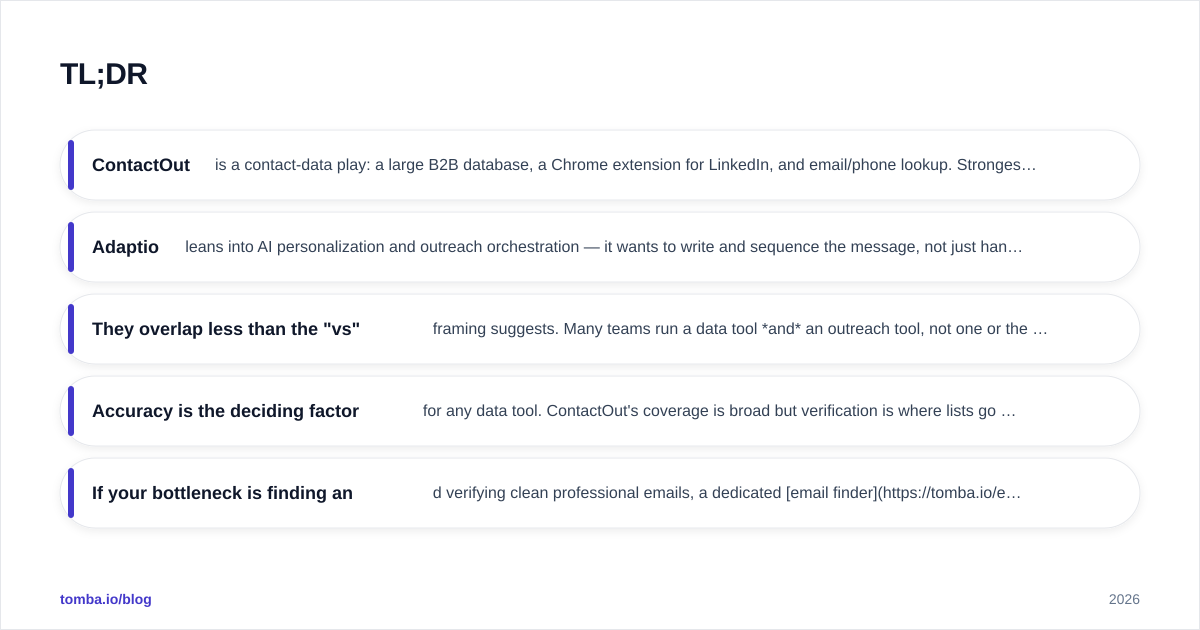
- ContactOut is a contact-data play: a large B2B database, a Chrome extension for LinkedIn, and email/phone lookup. Strongest when you need raw contact records at volume.
- Adaptio leans into AI personalization and outreach orchestration — it wants to write and sequence the message, not just hand you the address.
- They overlap less than the "vs" framing suggests. Many teams run a data tool and an outreach tool, not one or the other.
- Accuracy is the deciding factor for any data tool. ContactOut's coverage is broad but verification is where lists go to die.
- If your bottleneck is finding and verifying clean professional emails, a dedicated email finder like Tomba is cheaper per valid contact than either platform.
What is Adaptio?#
Adaptio positions itself as an AI sales-outreach platform. The pitch is automation of the messaging layer: researching a prospect, generating personalized copy, and pushing multi-step sequences across email and LinkedIn. The promise is fewer hours spent staring at a blank first line and more replies from messages that feel hand-written.
Think of Adaptio less as a phone book and more as a sales development rep who never sleeps. It assumes you either already have contacts or will enrich them, then focuses on turning those contacts into booked meetings. That makes it a complement to a data source, not a replacement for one.
What is ContactOut?#
ContactOut is a contact-intelligence platform best known for its Chrome extension that surfaces emails and phone numbers directly on LinkedIn profiles. It markets a very large database — hundreds of millions of professionals — and sells access through credits, search, and bulk export. You can read more on their official site.
If Adaptio is the rep writing the email, ContactOut is the rolodex. Its core value is breadth: when you need to go from "I found this person on LinkedIn" to "here is their work email and mobile," ContactOut is built for that single jump. The trade-off, as with every database product, is that breadth and verified accuracy are not the same thing.
Adaptio vs ContactOut: how do they actually compare?#
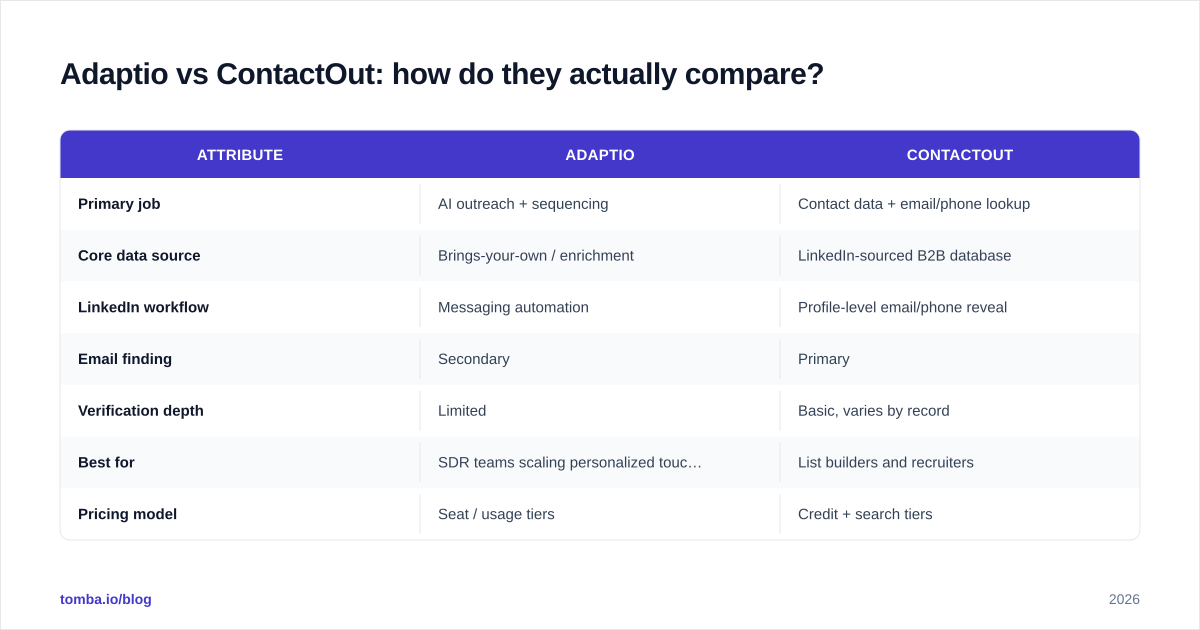
Here is the honest side-by-side. Notice that most rows favor one tool because the tools are aimed at different jobs — that is the real takeaway.
| Attribute | Adaptio | ContactOut |
|---|---|---|
| Primary job | AI outreach + sequencing | Contact data + email/phone lookup |
| Core data source | Brings-your-own / enrichment | LinkedIn-sourced B2B database |
| LinkedIn workflow | Messaging automation | Profile-level email/phone reveal |
| Email finding | Secondary | Primary |
| Verification depth | Limited | Basic, varies by record |
| Best for | SDR teams scaling personalized touches | List builders and recruiters |
| Pricing model | Seat / usage tiers | Credit + search tiers |
| Learning curve | Moderate (sequence setup) | Low (extension-first) |
The pattern is clear: if your problem is "I have a list and need replies," Adaptio is the closer fit. If your problem is "I need the list in the first place," ContactOut is the closer fit. Buying one expecting it to do the other job is the most common mistake teams make.

How accurate is the contact data?#
Accuracy is where data tools win or lose, and it is the question that matters most before you pay for either. A database can advertise 300 million contacts and still hand you a 30% bounce rate, because LinkedIn-scraped emails skew toward stale personal addresses and guessed work patterns that were never confirmed against a mail server.
ContactOut's reveal is convenient, but convenience is not verification. The number that actually affects your sender reputation is the share of addresses that pass an SMTP check — not the size of the database. Adaptio, meanwhile, generally relies on whatever data you feed it, so its output is only as clean as your source.

This is the gap that catches teams off guard. You run a campaign, deliverability tanks, and you discover half the "found" emails were catch-all or never-verified. The fix is to treat finding and verifying as one step, not two. A dedicated email verifier plus a catch-all verifier will tell you what is actually safe to send before you hit a single inbox — something neither Adaptio nor ContactOut makes a first-class workflow.
How does pricing compare?#
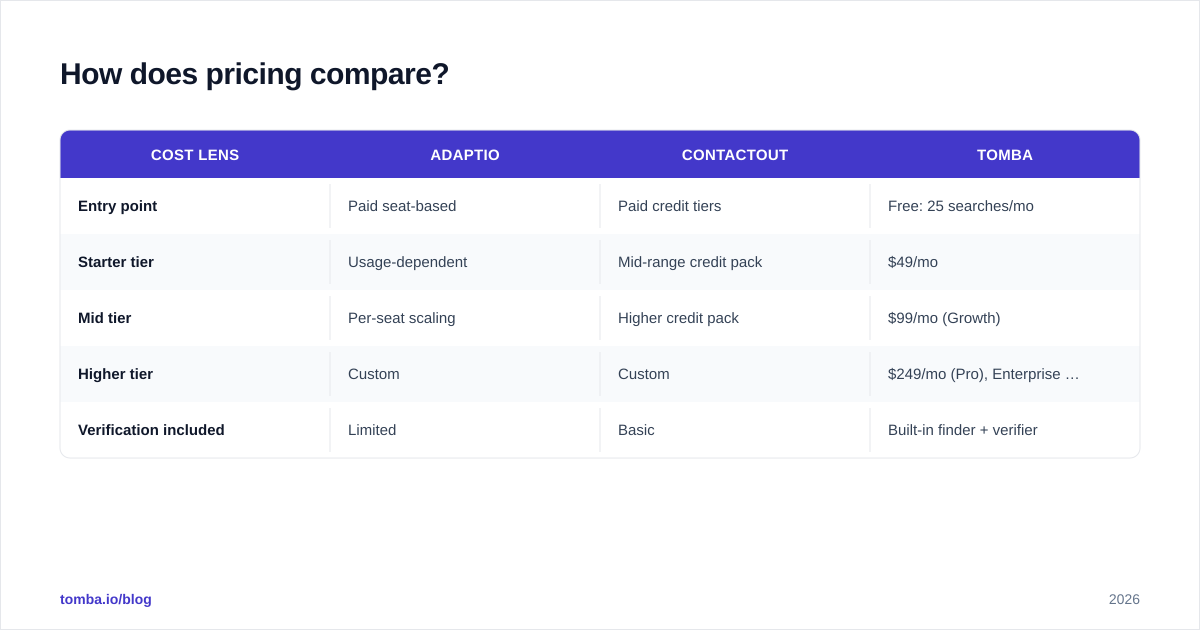
Neither tool is cheap once you scale, and the pricing models make apples-to-apples comparison hard. ContactOut charges around credit consumption and search seats; Adaptio prices closer to seats plus usage for its AI features. The honest answer is that cost per verified contact — not headline monthly price — is the metric to track.
| Cost lens | Adaptio | ContactOut | Tomba |
|---|---|---|---|
| Entry point | Paid seat-based | Paid credit tiers | Free: 25 searches/mo |
| Starter tier | Usage-dependent | Mid-range credit pack | $49/mo |
| Mid tier | Per-seat scaling | Higher credit pack | $99/mo (Growth) |
| Higher tier | Custom | Custom | $249/mo (Pro), Enterprise custom |
| Verification included | Limited | Basic | Built-in finder + verifier |
For exact, current numbers always check the vendor — pricing pages move. You can compare full Tomba pricing directly, and validate competitor reviews on G2 rather than trusting any single vendor's claims.
The strategic point: if your spend is dominated by finding and verifying emails, paying outreach-platform or premium-database prices for that one job is overkill. A focused finder with a free tier lets you test accuracy on your own ICP before committing budget.
Which one fits your workflow?#
Match the tool to the bottleneck instead of the brand.
Choose ContactOut if:
- Your team lives inside LinkedIn and wants emails/phones revealed on-profile.
- You are a recruiter or list-builder who values database breadth over message automation.
- You can tolerate adding a verification step before sending.
Choose Adaptio if:
- Your contacts are already sourced and your bottleneck is writing and sequencing.
- You want AI-assisted personalization at the top of the funnel.
- You have a separate, trusted data source feeding it.
Choose a dedicated email finder if:
- Your real problem is clean, verified emails at a predictable cost.
- You want one workflow that finds and verifies, with bulk and API access.
- You need to keep bounce rates low to protect sender reputation.
Most mature outbound teams end up with a layered stack: a data/finder layer, a verification layer, and an outreach layer. Trying to force one product to own all three is how you end up overpaying for mediocrity in two of them.
Where does Tomba fit between them?#
Tomba sits squarely on the part both tools treat as secondary: finding and verifying professional emails accurately, at scale, for a transparent price. It is not trying to be your AI copywriter or your LinkedIn auto-messenger — it is trying to make sure the addresses you act on are real.
The toolkit maps cleanly onto the gaps above:
- Email Finder — find professional emails by name, domain, or company.
- Domain Search — pull every public email pattern for a company in one query.
- LinkedIn finder — get work emails from LinkedIn profiles, the exact job people buy ContactOut for.
- Bulk email finder — process lists instead of one profile at a time.
- Tomba API — wire finding and verification into Adaptio, your CRM, or any sequencer.
Because verification is built in rather than bolted on, you ship lists that bounce less — which protects deliverability and keeps your domain out of spam folders. If you are evaluating ContactOut specifically, the side-by-side on the ContactOut alternative page breaks down the data-quality and pricing differences in more detail.
How do you decide quickly?#
Run a 30-minute test instead of reading more reviews. Take 50 real prospects from your ideal customer profile. Pull their emails through each tool you are considering, then run every result through a verifier and measure the valid rate and the cost per valid contact. The winner is rarely the one with the biggest database or the flashiest AI — it is the one that produces the most safe-to-send addresses per dollar.
That single experiment will tell you more than any feature matrix, because it is measured on your market, not a vendor's marketing deck. Pair it with a quick check of independent reviews on G2 or Capterra and you have a defensible decision in an afternoon.
The bottom line#
Adaptio and ContactOut are not true rivals — one automates outreach, the other supplies contacts. The "vs" only makes sense once you name your bottleneck. If you need messages sent, lean Adaptio. If you need contacts revealed at volume, lean ContactOut. But if the thing actually slowing you down is getting accurate, verified emails without torching your sender reputation, neither owns that job well, and that is exactly the gap a focused finder fills.
Start free and benchmark on your own list before you commit a budget. Spin up the Tomba Email Finder, run 25 searches on your real ICP at no cost, verify the results, and compare the valid rate against whatever Adaptio or ContactOut returns. Let the bounce rate — not the brochure — pick your winner.
// get started
Find, verify and enrich your first contacts today
Start on the free plan with 25 searches a month, then scale when your team is ready.
Free plan · No credit card required · GDPR & CCPA
// about the author