Adaptio vs Leadrocks (2026): Features, Pricing & Verdict
Adaptio vs Leadrocks compared head-to-head for 2026: data coverage, LinkedIn workflows, pricing models, and which lead tool actually fits your outbound motion.
Choosing between Adaptio and Leadrocks comes down to one question: do you want an AI-led outreach engine that decides who to contact and when, or a low-cost contact database you mine on your own schedule? This guide breaks down both so you can pick without buyer's remorse.
TL;DR — Adaptio vs Leadrocks at a glance#
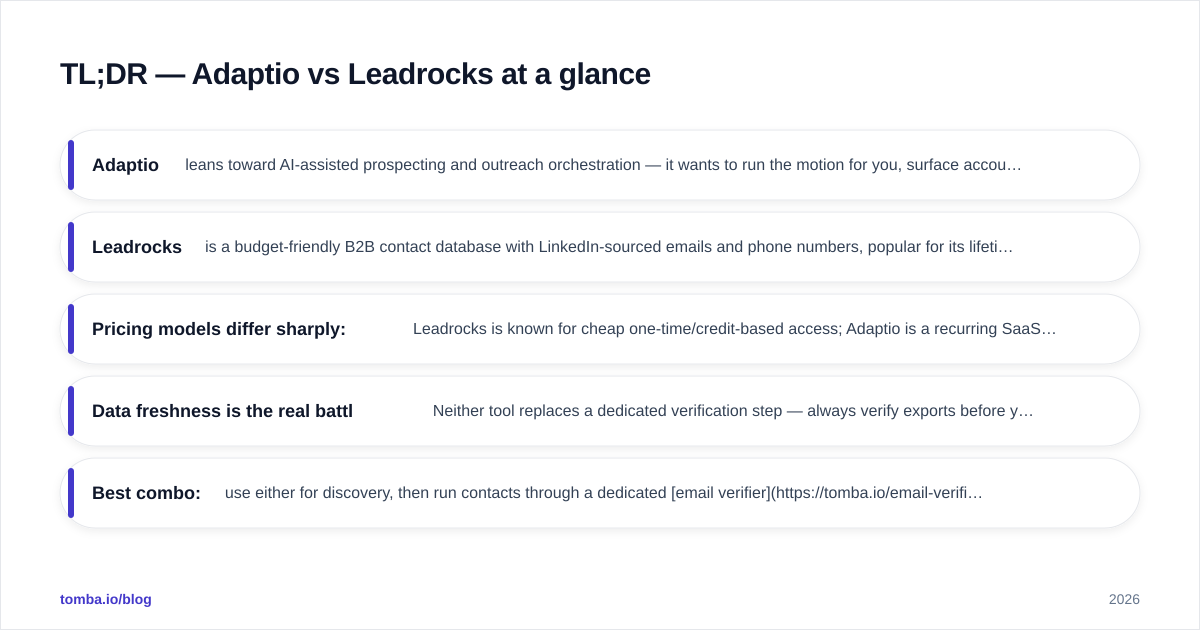
- Adaptio leans toward AI-assisted prospecting and outreach orchestration — it wants to run the motion for you, surface accounts, and automate sequencing.
- Leadrocks is a budget-friendly B2B contact database with LinkedIn-sourced emails and phone numbers, popular for its lifetime-deal pricing and simple list-building.
- Pricing models differ sharply: Leadrocks is known for cheap one-time/credit-based access; Adaptio is a recurring SaaS subscription priced for teams running active outbound.
- Data freshness is the real battleground. Neither tool replaces a dedicated verification step — always verify exports before you send.
- Best combo: use either for discovery, then run contacts through a dedicated email verifier so bounce rates stay low and your domain reputation survives.
What is Adaptio?#
Adaptio positions itself as an AI-driven prospecting and outreach layer. Instead of handing you a raw spreadsheet, the pitch is that it identifies likely-fit accounts, builds contact lists around them, and helps orchestrate the follow-up — closer to a sales-automation copilot than a static directory.
That matters for how you work. If your team's bottleneck is deciding who to contact and keeping sequences moving, an AI-led tool reduces the manual overhead of list curation and timing. The trade-off is that you're trusting the tool's targeting logic, and you pay a recurring subscription for that intelligence.
Treat Adaptio as a workflow tool first and a data tool second. Its value compounds when you fully adopt its sequencing and account-scoring features rather than using it as a one-off export source.
What is Leadrocks?#
Leadrocks is a B2B contact database. You search by job title, company, location, and industry, then pull emails and phone numbers sourced largely from LinkedIn-style profile data. It built its reputation on AppSumo-style lifetime deals and credit packs, which made it a go-to for founders and small teams who wanted leads without a per-seat SaaS bill.
The model is straightforward: search, filter, export, send. There's far less "automation" than Adaptio — you are the operator deciding who to contact and how. For many lean teams, that control plus the low price is exactly the appeal.
The catch with any database product is decay. B2B contact data goes stale fast — people change jobs roughly every 2–3 years, and email patterns shift. A cheap database is only cheap if you don't burn your sender reputation on dead addresses.
)
Adaptio vs Leadrocks: feature comparison#
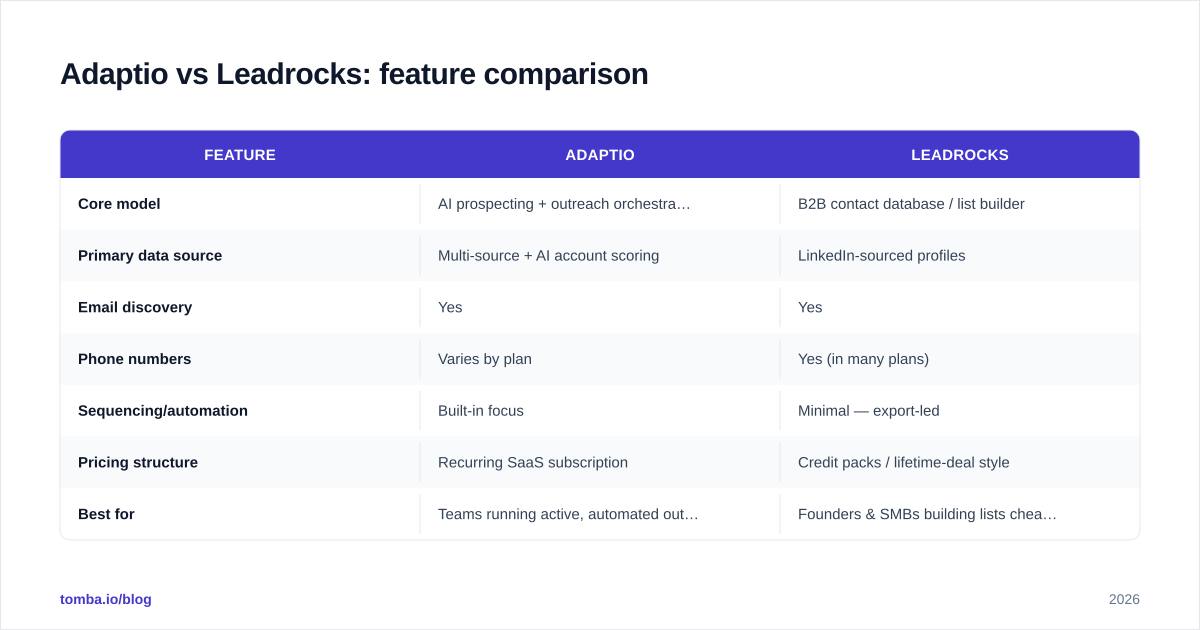
Here is the head-to-head on the attributes that actually change your day-to-day workflow.
| Feature | Adaptio | Leadrocks |
|---|---|---|
| Core model | AI prospecting + outreach orchestration | B2B contact database / list builder |
| Primary data source | Multi-source + AI account scoring | LinkedIn-sourced profiles |
| Email discovery | Yes | Yes |
| Phone numbers | Varies by plan | Yes (in many plans) |
| Sequencing/automation | Built-in focus | Minimal — export-led |
| Pricing structure | Recurring SaaS subscription | Credit packs / lifetime-deal style |
| Best for | Teams running active, automated outbound | Founders & SMBs building lists cheaply |
| Verification built in | Not a substitute for dedicated tools | Not a substitute for dedicated tools |
| Learning curve | Higher (adopt the full workflow) | Low (search → export) |
The pattern is clear: Adaptio sells doing the work, Leadrocks sells raw access. Your choice depends on whether you have the headcount to run outbound manually or want the tool to drive it.
Which one has better data accuracy?#
Neither tool publishes independently audited accuracy numbers you should take at face value, so judge them by methodology, not marketing. Databases like Leadrocks are excellent for breadth and price but lean on profile scraping that ages quickly. AI-led tools like Adaptio can cross-reference more signals, but "AI-enriched" does not automatically mean "verified."
The honest answer: assume every list from either tool contains some dead or risky addresses, and verify before sending. A 10–15% bounce rate will get a young domain throttled or blacklisted regardless of which vendor you bought from. Protecting email deliverability is your job, not theirs.
This is where a verification layer pays for itself. Running exports through a catch-all verifier and a standard verifier catches the addresses that would otherwise tank your reputation. The cost of verification is trivial next to the cost of a burned sending domain.
Adaptio vs Leadrocks: pricing compared#
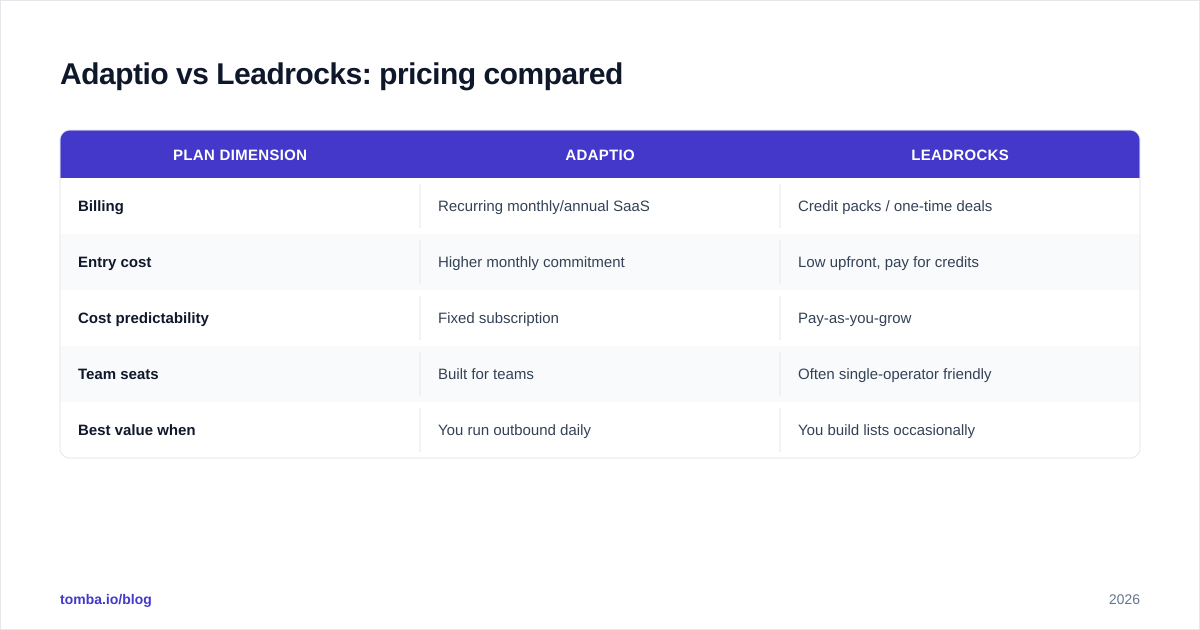
Pricing is the cleanest dividing line between these two.
| Plan dimension | Adaptio | Leadrocks |
|---|---|---|
| Billing | Recurring monthly/annual SaaS | Credit packs / one-time deals |
| Entry cost | Higher monthly commitment | Low upfront, pay for credits |
| Cost predictability | Fixed subscription | Pay-as-you-grow |
| Team seats | Built for teams | Often single-operator friendly |
| Best value when | You run outbound daily | You build lists occasionally |
If you send outbound every day and want automation, Adaptio's subscription can be worth it because the workflow savings offset the price. If you build lists in bursts — a campaign here, a launch there — Leadrocks' credit model wastes less money sitting idle.
For pricing sanity-checks, always confirm current numbers on each vendor's own site and cross-reference reviews on G2 and Capterra before committing, since lifetime-deal availability and SaaS tiers change frequently.
)
When should you choose Adaptio?#
Pick Adaptio if most of these are true:
- You have a defined ICP and want the tool to surface matching accounts automatically.
- Your reps lose time on manual list-building and sequence management.
- You're running continuous outbound and can justify a recurring subscription.
- You value automation and AI account scoring over raw cost savings.
Adaptio rewards teams that commit to its workflow. Half-using it as an occasional export tool wastes what you're paying for.
When should you choose Leadrocks?#
Pick Leadrocks if most of these are true:
- You're a founder or small team watching every dollar.
- You build lists in campaigns rather than continuously.
- You want phone numbers and emails without a per-seat SaaS bill.
- You're comfortable being the operator — searching, filtering, and exporting yourself.
Leadrocks is a strong "good enough, cheap, and mine" option. Just budget time and a small verification spend to clean what you pull.
How do they compare to a dedicated email finder?#
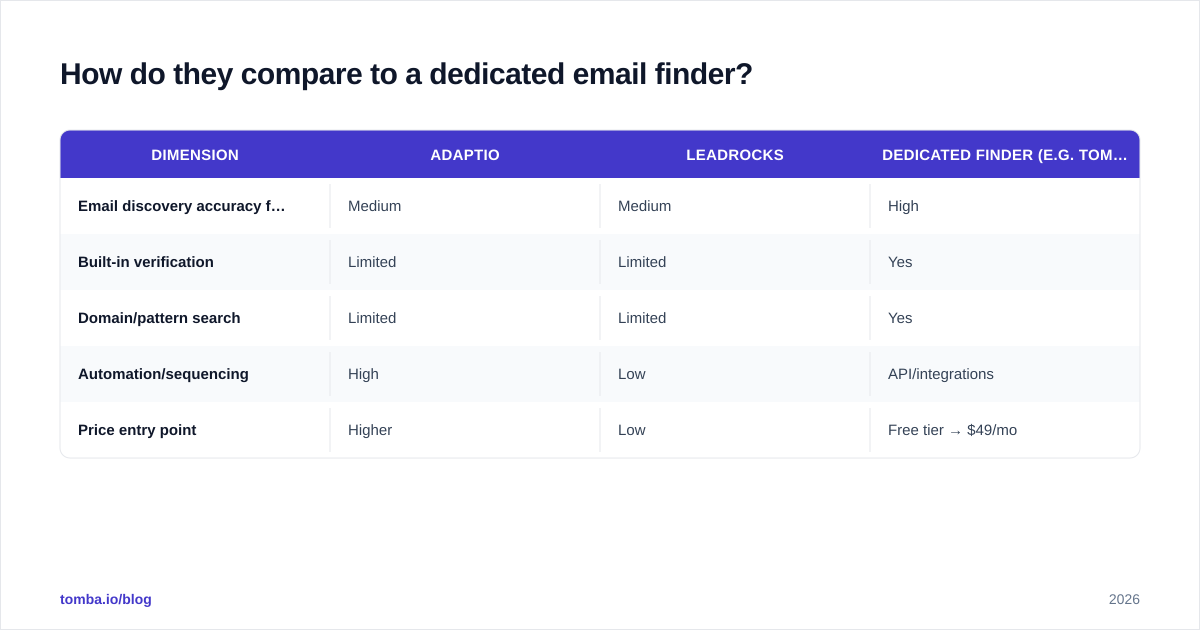
Both tools blur the line between database and workflow, but neither is purpose-built around email discovery accuracy the way a dedicated finder is. If your core need is finding and verifying professional emails at scale — by name, company, or domain — a specialist tool fills the gaps either of these leaves.
That's the role of a tool like Tomba. You can run domain search to pull every public email pattern at a target company, use the LinkedIn finder to convert profiles into verified addresses, and push everything through data enrichment to fill missing fields. Many teams run Adaptio or Leadrocks for discovery and a finder/verifier for accuracy — they aren't mutually exclusive.
Here's how the three approaches stack up:
| Dimension | Adaptio | Leadrocks | Dedicated finder (e.g. Tomba) |
|---|---|---|---|
| Email discovery accuracy focus | Medium | Medium | High |
| Built-in verification | Limited | Limited | Yes |
| Domain/pattern search | Limited | Limited | Yes |
| Automation/sequencing | High | Low | API/integrations |
| Price entry point | Higher | Low | Free tier → $49/mo |
For reference, Tomba's plans run from a free tier (25 searches/mo) through Starter at $49/mo and Growth at $99/mo — see full Tomba pricing for the current breakdown.
What about deliverability and sender reputation?#
This is the part most comparison posts skip, and it's the one that actually decides your reply rate. No matter which tool you buy, your results depend on whether the emails you send actually land in the inbox.
Three non-negotiables before any campaign:
- Verify the list. Strip invalid and risky addresses with an email verifier so bounces stay under 2–3%.
- Warm the domain. New sending domains need gradual volume ramp-up; sending 500 cold emails on day one is a reputation death sentence.
- Authenticate. Set up SPF, DKIM, and DMARC so mailbox providers trust you.
Database breadth means nothing if your messages route to spam. A clean, verified list of 200 contacts beats a raw export of 2,000 every time. Protecting your sender reputation is the highest-leverage thing you can do, and it's tool-agnostic.
The verdict: Adaptio vs Leadrocks in 2026#
There's no universal winner — there's a winner for your situation.
- Choose Adaptio if you're a team that wants AI to drive the outbound motion and you'll commit to its workflow and subscription.
- Choose Leadrocks if you're cost-sensitive, build lists in bursts, and want a cheap, no-frills database you control.
- Choose neither as your only tool if email accuracy is mission-critical — pair your pick with a dedicated finder and verifier.
The smartest setup most teams land on: a discovery tool for breadth, plus a verification and finding layer for accuracy. That combination keeps your pipeline full and your domain healthy — which is the whole point.
Get verified, send-ready leads with Tomba#
Whichever side of the Adaptio vs Leadrocks debate you land on, your campaigns are only as good as the addresses behind them. Tomba's Email Finder finds professional emails by name, company, or domain and verifies them in the same flow — so you spend on sends that land, not bounces that burn your reputation. Start free with 25 searches a month, scale to Starter at $49/mo when you're ready, and plug it into your existing stack via the Tomba API. Build the list anywhere; verify it with Tomba before you hit send.
// get started
Find, verify and enrich your first contacts today
Start on the free plan with 25 searches a month, then scale when your team is ready.
Free plan · No credit card required · GDPR & CCPA
// about the author